导入模块
在调用接口页面的<script>部分增加如下配置。
import prompt from '@system.prompt'
或
var prompt = require("@system.prompt")
[h2]prompt.showToast(OBJECT)
描述
显示Toast。
OBJECT参数
参数 |
类型 |
是否必填 |
说明 |
|---|---|---|---|
message |
string |
是 |
要显示的文本。 |
duration |
number |
否 |
toast显示的持续时间,0为短时,1为长时,默认0。 短时大约为2000毫秒,长时大约为3500毫秒。 如果大于1,则表示自定义的toast显示时间,单位为ms。最大不允许超过10000ms,如果设置的时长超过10000ms,则仍以10000ms为准。 |
image(1020+) |
uri |
否 |
要显示的本应用内本地图片路径。 |
gravity(1020+) |
string |
否 |
bottom,right,left,center,top,缺省为跟随系统。 该参数在HarmonyOS 2.0及以上或Android Q及以上版本不支持。 |
示例代码
prompt.showToast({
    message:'message',
    duration:"100000",
    image:"/Common/logo.png",
    gravity: 'center'
})
[h2]prompt.showDialog(OBJECT)
描述
显示对话框。
OBJECT参数
参数 |
类型 |
是否必填 |
说明 |
|---|---|---|---|
title |
string |
否 |
标题。 |
message |
string |
否 |
内容。 |
buttons |
array |
否 |
按钮的数组,按钮结构:{text:'text',color:'#333333'},color可选:buttons的第1项为positive button;buttons的第2项(如果有)为negative button;buttons的第3项(如果有)为neutral button。最多支持3个button。 |
success |
function |
否 |
成功回调。 |
cancel |
function |
否 |
取消回调。 |
complete |
function |
否 |
执行结束后的回调。 |
success返回值:
参数名 |
类型 |
说明 |
|---|---|---|
index |
number |
选中按钮在buttons数组中的序号。 |
示例代码
prompt.showDialog({
    title: 'title',
    message: 'message',
    buttons: [
    {
        text: '确定',
        color: '#33dd44'
    },
    {
        text: '取消',
        color: '#33dd44'
    }
    ],
    success: function (data) {
        console.log("handling callback",data);
    },
    cancel: function(){
        console.log("cancel");
    }
})
[h2]prompt.showContextMenu(OBJECT)
描述
显示上下文菜单。
OBJECT参数
参数 |
类型 |
是否必填 |
说明 |
|---|---|---|---|
itemList |
array |
是 |
菜单项的文字数组。 |
itemColor |
hexcolor |
否 |
菜单项颜色。 |
success |
function |
否 |
成功回调。 |
cancel |
function |
否 |
取消回调。 |
complete |
function |
否 |
执行结束后的回调。 |
success返回值:
参数 |
类型 |
说明 |
|---|---|---|
index |
number |
选中按钮在itemList数组中的序号 |
示例代码
prompt.showContextMenu({
  itemList: ['item1', 'item2'],
  itemColor: '#ff33ff',
  success: function(data) {
    console.log("handling callback");
  },
   cancel: function() {
    console.log("user cancel=");
  }
})
[h2]prompt.showLoading(OBJECT)(1075+)
描述
显示 loading 提示框。

OBJECT参数
参数 |
类型 |
默认值 |
是否必填 |
说明 |
|---|---|---|---|---|
message |
string |
正在载入... |
否 |
loading提示框文字信息。 |
loadingColor |
string |
#CACACA |
否 |
loading动画颜色。 |
mask |
boolean |
true |
否 |
是否显示透明蒙层,防止触摸穿透。 |
示例代码
prompt.showLoading({
    message: 'message'
    loadingColor: 'blue',
    mask: false
})
Demo
<template>
  <div class="container">
    <div class="item-container">
      <input type="button" class="btn" onclick="showToast" value="Show a toast" />
      <input type="button" class="btn" onclick="showDialog" value="Show a dialog" />
      <input type="button" class="btn" onclick="showContextMenu" value="Show the context menu" />
      <input type="button" class="btn" onclick="showLoading" value="Show a loading " />
      <input type="button" class="btn" onclick="hideLoading" value="Close a loading " />
    </div>
  </div>
</template>

<style>
    .container {
    flex-direction: column;
    justify-content: center;
    align-items: center;
  }
  .item-container {
    margin-bottom: 50px;
    margin-right: 60px;
    margin-left: 60px;
    flex-direction: column;
  }
   .btn {
    height: 80px;
    width: 400px;
    text-align: center;
    border-radius: 5px;
    margin-right: 60px;
    margin-left: 60px;
    margin-bottom: 50px;
    color: #ffffff;
    font-size: 30px;
    background-color: #0faeff;
  }
</style>

<script>
  import prompt from '@system.prompt'
  export default {
    data: {
      componentName: 'Pop-up',
      componentData: {},
    },
    onInit: function () {
      this.$page.setTitleBar({ text: 'Pop-up' })
      this.componentData = this.$t('message.interface.interaction.prompt')
    },
    showToast: function () {
      prompt.showToast({
        message: 'logo',
        duration:"100000",
        image:"/Common/logo.png",
        gravity: 'center'
      })
    },
    showDialog: function () {
      let that = this
      prompt.showDialog({
        title: '弹框标题',
        message: '弹框内容、告知当前状态、信息和解决方法,描述文字尽量控制在三行内',
        buttons:  [
          {
            text: '确定',
            color: '#0faeff'
          },{
            text: '取消'
          },{
            text: '忽略'
          }
        ],
        success: function (ret) {
          prompt.showToast({
            message: '成功回调:选中按钮序号---' + ret.index
          })
        },
        cancel: function () {
          prompt.showToast({
            message: '取消回调'
          })
        },
        complete: function () {
         prompt.showToast({
           message: '执行结束',
           duration: 2000,
           gravity: 'center'
         })
        }
      })
    },
    showContextMenu: function () {
      let that = this
      prompt.showContextMenu({
        itemList: ['item0', 'item1', 'item2', 'item3', 'item4', 'item5'],
        itemColor: '#ff33ff',
        success: function (ret) {
          prompt.showToast({
            message: '成功回调:选中按钮序号---' + ret.index
          })
        },
        cancel: function (ret) {
          prompt.showToast({
            message: '取消回调'
          })
        },
        complete: function () {
            console.log("执行结束后的回调");
        }
      })
    },
    showLoading: function () {
      prompt.showLoading({
          message: 'loading',
          loadingColor: 'blue',
          mask: false
      })
    },
    hideLoading: function () {
      prompt.hideLoading();
      console.log("关闭loading 提示框");
    }
  }
</script>
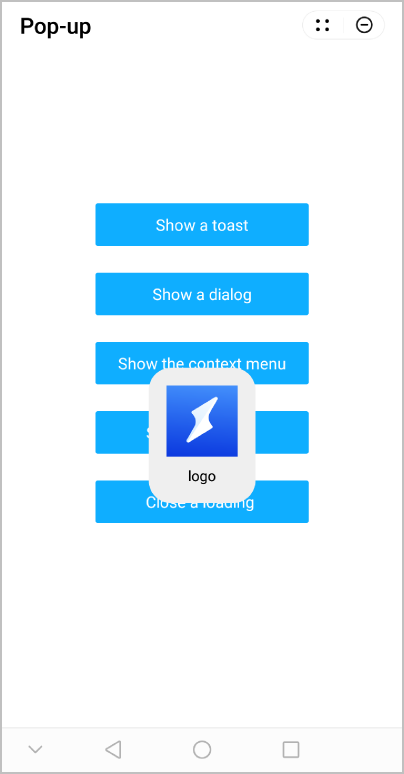
效果图如下: