导入模块
在调用接口页面的<script>部分增加如下配置。
import record from '@system.record'
或
var record = require("@system.record") [h2]record.start(OBJECT)
描述
开始录音。
OBJECT参数
参数 | 类型 | 默认值 | 是否必填 | 说明 |
|---|---|---|---|---|
duration (1010+) | number | -1 | 否 | 指定录音的时长,单位ms,如果传入了合法的duration,在到达指定的 duration 后会自动停止录音。 |
sampleRate (1010+) | number | - | 否 | 采样率,建议值: 8000/16000/44100。 |
numberOfChannels (1010+) | number | - | 否 | 录音通道数,有效值 1/2。 |
encodeBitRate (1010+) | number | - | 否 | 编码码率,当format=aac时,采样率与码率的对应关系参见下面对应表。 |
format (1010+) | string | 3gpp | 否 | 音频格式,有效值 3gpp/amr/aac/pcm(1110+)。 使用pcm格式时,如果不指定frameSize参数,则不会回调onframerecorded。 |
frameSize(1110+) | number | 0 | 否 | 指定帧的大小,单位为Byte。 传入frameSize后,每次录制指定帧大小的内容时都会回调录制的文件内容,否则不回调。 注意:
|
success | function | - | 否 | 成功回调。 |
fail | function | - | 否 | 失败回调。 |
complete | function | - | 否 | 执行结束后的回调。 |
采样率及码率对应表(1010+):
采样率 | 编码码率 |
|---|---|
8000 | 16000 ~ 48000 |
11025 | 16000 ~ 48000 |
12000 | 24000 ~ 64000 |
16000 | 24000 ~ 64000 |
22050 | 32000 ~ 128000 |
24000 | 32000 ~ 128000 |
32000 | 48000 ~ 192000 |
44100 | 64000 ~ 320000 |
48000 | 64000 ~ 320000 |
success返回值:
参数名 | 类型 | 说明 |
|---|---|---|
uri | string | 录音文件的存储路径,会记录在应用的缓存目录中,录音文件格式为3gpp。 |
fail返回错误码:
错误码 | 说明 |
|---|---|
201 | 用户拒绝,获取录音权限失败。 |
202(1110+) | 参数错误。当设置frameSize参数>0时,录音文件格式必须为pcm。 |
示例代码
record.start({
        duration: 20000,
        sampleRate:8000,
        numberOfChannels:1,
        encodeBitRate:16000,
        format:'aac',
        format:'pcm',
        frameSize:'1024',
        success: function (ret) {
          that.pathRecordSave = ret.uri;
        },
        fail: function (erromsg, errocode) {
          console.log('record.startRecord----------' + errocode + ': ' + erromsg)
        },
         complete: function () {
           console.log('record.startRecord----------complete')
         }
}) [h2]record.onframerecorded = function(OBJECT)(1110+)
描述
添加了onframerecorded(res)回调,用于监听指定帧大小文件的录制情况。
如果设置了frameSize,该事件将被回调。
OBJECT参数
参数 | 类型 | 默认值 | 是否必填 | 说明 |
|---|---|---|---|---|
callback | function | - | 否 | 指定了帧大小时触发,频率为s。 |
success返回值:
参数名 | 类型 | 说明 |
|---|---|---|
frameBuffer | ArrayBuffer | 录制的音频分片数据。通常帧大小为指定的frameSize,但如果指定的frameSize太小,会自动调整到合适的大小。 |
isLastFrame | boolean | 当前是否为最后一帧数据。 |
示例代码
record.onframerecorded = function (res){
    //Get audio data: res.frameBuffer
    //Whether it is the last frame: res.isLastFrame
}
Demo
<template>
  <!-- Only one root node is allowed in template. -->
  <div class="container">
    <div class="mlr-container">
      <text class="txt">RecordPath:{{audioUri}}</text>
    </div>
    <div class="mlr-container">
      <input onclick="updateRecord" type="button" value="{{isRecording ? 'Stop Record' : 'Start Record'}}" class="btn-blue"/>
    </div>
  </div>
</template>

<style lang="sass">
.container {
  flex-direction: column;
  justify-content: center;
  padding-bottom: 50px;
}
.mlr-container {
  margin-right:32px;
  margin-left:32px;
}
.btn-blue {
    background-color: #0faeff;
    width: 100%;
    height: 80px;
    border-radius: 40px;
    color: #fff;
    font-size: 32px;
    font-weight: 500;
  }
</style>

<script>
  import record from '@system.record';
  import audio from '@system.audio';
  module.exports = {
    public: {
        isRecording:false,
        audioUri:''
    },
    onInit: function () {
      this.$page.setTitleBar({ text: 'record' });
    },
    updateRecord(){
      let that = this;
      if(!this.isRecording)
      {
        this.isRecording = true;
        record.start({
          duration:20000,
          sampleRate: 44100,
          numberOfChannels: 1,
          encodeBitRate: 192000,
          format: '3gpp',//3gpp/amr/aac
          success: function (data) {
            that.audioUri = data.uri;
          }
        })
      }else{
        record.stop();
        this.isRecording = false;
      }
    }
  }
</script>
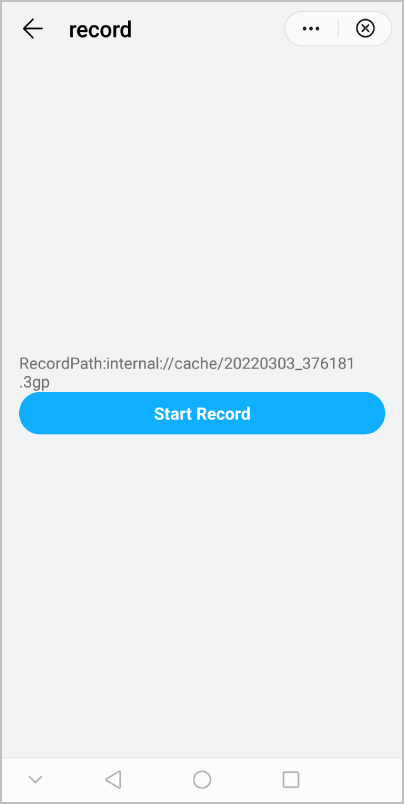
效果图如下: