


智能客服
你问我答,随时在线为你解决问题















在manifest.json文件的 features属性中增加如下配置。
- {"name": "system.resident"}
在调用接口页面的<script>部分增加如下配置。
- import resident from '@system.resident'
或
- const resident= require('system.resident')
限制条件 | 说明 |
|---|---|
适用终端 | 手机、平板 |
适用区域 | 全球 |
接口 | 描述 |
|---|---|
启动后台运行。 | |
停止后台运行。 |
描述
启动后台运行。目前为空实现。
OBJECT参数
参数 | 类型 | 是否必填 | 说明 |
|---|---|---|---|
desc | string | 否 | 目前设置的值不会体现在通知栏。 |
示例代码
- resident.start({
- desc: ' '
- })
描述
停止后台运行。目前为空实现。
示例代码
- resident.stop()
- <template>
- <!-- Only one root node is allowed in template. -->
- <div class="container">
- <div class="item-container">
- <input type="button" class="btn" onclick="test_residentstart" value="resident start" />
- </div>
- <div class="item-container">
- <input type="button" class="btn" onclick="test_residentstop" value="resident stop" />
- </div>
- </div>
- </template>
- <style>
- .container {
- flex-direction: column;
- justify-content: center;
- align-items: center;
- }
- .item-container {
- margin-top: 50px;
- margin-right: 30px;
- margin-left: 30px;
- flex-direction: column;
- }
- .btn {
- background-color: #0faeff;
- color: #ffffff;
- width:400px;
- height: 100px;
- font-size: 50px;
- border-radius:15px;
- }
- .content {
- border: 2px ;
- border-radius: 10px;
- text-align: center;
- }
- </style>
- <script>
- import resident from '@system.resident'
- import prompt from '@system.prompt';
- module.exports = {
- data: {
- info:''
- },
- onInit() {
- this.$page.setTitleBar({
- text: 'resident',
- textColor: '#ffffff',
- backgroundColor: '#007DFF',
- backgroundOpacity: 0.5,
- menu: true
- });
- },
- test_residentstart() {
- console.log("start running in the background");
- resident.start({
- desc: ' 备份进度 30%'
- })
- prompt.showToast({
- message: 'start running in the background',
- duration: 2000,
- gravity: 'bottom'
- });
- },
- test_residentstop() {
- resident.stop()
- console.log("stop running in the background");
- prompt.showToast({
- message: 'stop running in the background',
- duration: 2000,
- gravity: 'bottom'
- });
- }
- }
- </script>
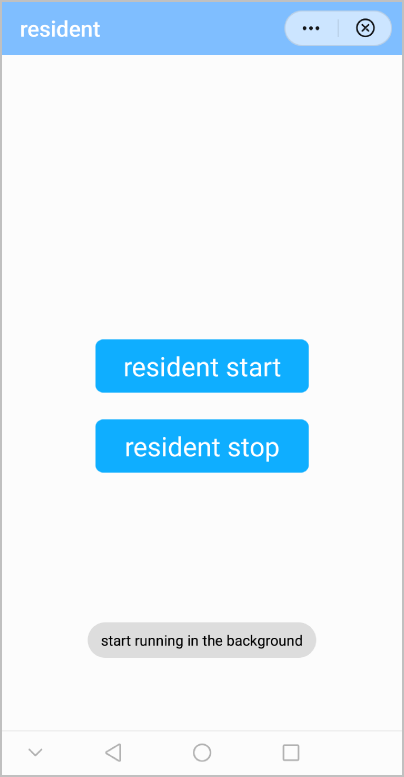
效果图如下:
版本 | 发布日期 | 描述 |
|---|---|---|
1070 | 2020-05-19 | 新增接口,用于控制快应用在后台运行。 |