















合作咨询
我们的专家服务团队将竭诚为您提供专业的合作咨询服务
在manifest.json文件的 features属性中增加如下配置。
- {"name": "system.sms"}
在调用接口页面的<script>部分增加如下配置。
- import sms from '@system.sms'
或
- var sms = require("@system.sms")
限制条件 | 说明 |
|---|---|
适用终端 | 手机、平板 |
适用区域 | 全球 |
接口 | 描述 |
|---|---|
发送短信接口,每次调用会给用户弹框提示确认,短信内容不能超过70个字符。 |
描述
发送短信接口,每次调用会给用户弹框提示确认,短信内容不能超过70个字符。
OBJECT参数
参数 | 类型 | 是否必填 | 说明 |
|---|---|---|---|
address | string | 是 | 短信要发送的目标号码(只支持数字、空格、首字符为“+”)。 |
content | string | 是 | 短信内容(不能超过70个字符)。 |
success | function | 否 | 成功回调。 |
fail | function | 否 | 失败回调。 |
complete | function | 否 | 执行结束后的回调。 |
fail返回错误码:
参数名 | 说明 |
|---|---|
200 | 发送失败。 |
201 | 用户拒绝,获取发送短信权限失败。 |
202 | 参数为空或者参数错误。 |
示例代码
- message.send({
- address:'10086',
- content:'这是短信内容',
- success: function () {
- console.log('handling success')
- },
- fail: function (data, code) {
- console.log('handling fail, code = ${code}')
- }
- })
- <template>
- <!-- Only one root node is allowed in template. -->
- <div class="container">
- <div class="case-title">
- <text class="title">Recipient</text>
- </div>
- <div class="mlr-container">
- <input onchange="phoneChange" class="input-big" placeholder="please input address" />
- </div>
- <div class="case-title">
- <text class="title">Message</text>
- </div>
- <div class="mlr-container">
- <textarea onchange="contentChange" class="textarea" placeholder="please input content"></textarea>
- </div>
- <div class="mlr-container mt-btn">
- <input onclick="send" type="button" value="Send message" class="btn-blue" />
- </div>
- </div>
- </template>
- <style lang="sass">
- .container {
- flex-direction: column;
- padding-bottom: 50px;
- }
- .case-title {
- margin-left: 32px;
- margin-right: 32px;
- margin-bottom: 20px;
- margin-top: 40px;
- flex-direction: column;
- }
- .title {
- color: rgba(0, 0, 0, 0.6);
- font-size: 28px;
- font-weight: 500;
- }
- .mlr-container {
- margin-right: 32px;
- margin-left: 32px;
- }
- .input-big {
- width: 100%;
- background-color: #fff;
- height: 100px;
- border-radius: 50px;
- padding-left: 30px;
- font-size: 32px;
- }
- .textarea {
- width: 100%;
- height: 300px;
- background-color: #fff;
- padding: 20px 30px;
- font-size: 32px;
- border-radius: 16px;
- }
- .btn-blue {
- background-color: #0faeff;
- width: 100%;
- height: 80px;
- border-radius: 40px;
- color: #fff;
- font-size: 32px;
- font-weight: 500;
- }
- </style>
- <script>
- import prompt from '@system.prompt';
- import message from '@system.sms';
- module.exports = {
- public: {
- phone: "",
- content: "",
- },
- onInit: function () {
- this.$page.setTitleBar({ text: 'message'});
- },
- phoneChange({ value }) {
- this.phone = value;
- },
- contentChange({ value }) {
- this.content = value;
- },
- send() {
- if (!this.phone || !this.content) {
- prompt.showToast({
- message: 'please input address or content',
- duration: 2000,
- gravity: 'bottom'
- });
- return;
- }
- message.send({
- address: this.phone,
- content: this.content,
- success: function () {
- prompt.showToast({
- message: 'success',
- duration: 2000,
- gravity: 'bottom'
- });
- },
- fail: function (data, code) {
- prompt.showToast({
- message: 'fail',
- duration: 2000,
- gravity: 'bottom'
- });
- }
- })
- }
- }
- </script>
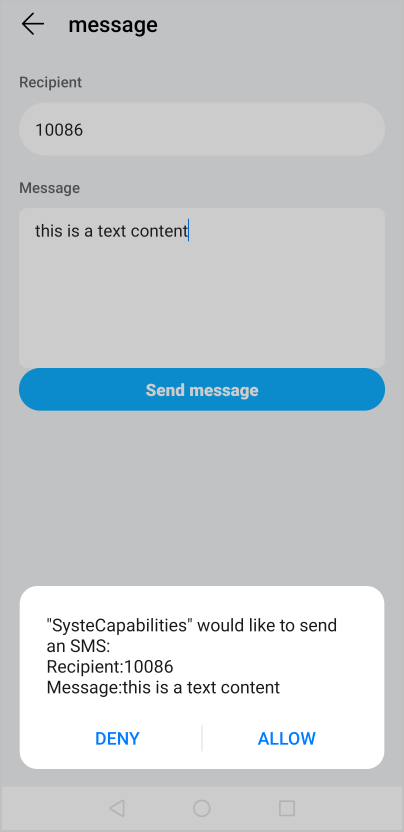
效果图如下:
版本 | 发布日期 | 描述 |
|---|---|---|
1010 | 2018-04-20 | 第一次正式发布。 |