此接口处理的数据在PC终端使用时,可能会被其它应用读取,所以建议请勿使用此接口存储敏感数据。
导入模块
在调用接口页面的<script>部分增加如下配置。
import storage from '@system.storage'
或
var storage = require("@system.storage")
[h2]storage.get(OBJECT)
描述
读取应用数据库存储的内容。
OBJECT参数说明
参数 |
类型 |
是否必填 |
说明 |
|---|---|---|---|
key |
string |
是 |
索引。 |
default |
string |
否 |
如果key不存在,返回default。如果default未指定,返回长度为0的空字符串。 |
success |
function |
否 |
成功回调,其返回值为key对应的存储内容。 |
fail |
function |
否 |
失败回调。 |
complete |
function |
否 |
执行结束后的回调。 |
示例代码
storage.get({
  key: 'A1',
  success:function(data){console.log("handling success");},
  fail: function(data, code) {
    console.log("handling fail, code=" + code);
  }
})
[h2]storage.set(OBJECT)
描述
修改应用数据库存储的内容。
OBJECT参数
参数 |
类型 |
是否必填 |
说明 |
|---|---|---|---|
key |
string |
是 |
索引。 |
value |
string |
否 |
新值。值的总大小不能超过2MB。如果新值是长度为0的空字符串,会删除以key为索引的数据项。 |
success |
function |
否 |
成功回调。 说明:
当minPlatformVersion>=1035时,返回值data的内容为"success";当minPlatformVersion<1035时,返回值data为空。 |
fail |
function |
否 |
失败回调。 |
complete |
function |
否 |
执行结束后的回调。 |
示例代码
storage.set({
  key: 'A1',
  value: 'V1',
  success:function(data){console.log("handling success");},
  fail: function(data, code) {
    console.log("handling fail, code=" + code);
  }
})
[h2]storage.clear(OBJECT)
描述
清空应用数据库存储的内容。
OBJECT参数
参数 |
类型 |
是否必填 |
说明 |
|---|---|---|---|
success |
function |
否 |
成功回调。 说明:
当minPlatformVersion>=1035时,返回值data的内容为"success";当minPlatformVersion<1035时,返回值data为空。 |
fail |
function |
否 |
失败回调。 |
complete |
function |
否 |
执行结束后的回调。 |
示例代码
storage.clear({
  success:function(data){console.log("handling success");},
  fail: function(data, code) {
    console.log("handling fail, code=" + code);
  }
})
[h2]storage.delete(OBJECT)
描述
删除应用数据库存储的内容。
OBJECT参数
参数 |
类型 |
是否必填 |
说明 |
|---|---|---|---|
key |
string |
是 |
索引。 |
success |
function |
否 |
成功回调。 说明:
当minPlatformVersion>=1035时,返回值data的内容为"success";当minPlatformVersion<1035时,返回值data为空。 |
fail |
function |
否 |
失败回调。 |
complete |
function |
否 |
执行结束后的回调。 |
示例代码
storage.delete({
  key: 'A1',
  success:function(data){console.log("handling success");},
  fail: function(data, code) {
    console.log("handling fail, code=" + code);
  }
})
[h2]storage.key(OBJECT)(1050+)
描述
返回存储中某个index的键名。
OBJECT参数
参数 |
类型 |
是否必填 |
说明 |
|---|---|---|---|
index |
number |
是 |
需要查询的键名对应的索引。 |
success |
function |
否 |
成功回调。 |
fail |
function |
否 |
失败回调。 |
complete |
function |
否 |
执行结束后的回调。 |
示例代码
storage.key({
    index: parseIndex,
    success: function (ret) {
        console.info('storage.key(): ', JSON.stringify(ret))
        prompt.showToast({message: 'key: ' + ret,})
    },
    fail: function (erromsg, errocode) {
        prompt.showToast({ message: 'get fail --- ' + errocode + ':' + erromsg });
        console.info('get fail --- ' + errocode + ':' + erromsg)
    },
    complete: function () {
        console.info('get complete  ')
    }
})
Demo
<template>
  <div class="container">
    <div class="item-container">
      <div class="item-content">
        <div class="item-content-detail">
          <text class="txt">key:</text>
          <input class="input" placeholder="Please input key"  value="{{storageKey}}" onchange="keyFn" />
        </div>

        <div class="item-content-detail">
          <text class="txt">value:</text>
          <input class="input" placeholder="Please input value"
            value="{{storageValue}}" onchange="valueFn" />
        </div>
        <div class="item-content-detail">
          <text class="txt">index:</text>
          <input class="input" placeholder="Please input index" value="{{index}}" onchange="indexFn" />
        </div>
      </div>
      <input type="button" class="btn" onclick="setStorage" value="Set storage" />
      <input type="button" class="btn" onclick="getStorage"  value="Get storage" />
      <input type="button" class="btn" onclick="getKey" value="Get keyname an index" />
      <input type="button" class="btn" onclick="getLength" value="Get length in the storage" />
      <input type="button" class="btn" onclick="clearStorage" value="Clear storage" />
      <input type="button" class="btn" onclick="deleteStorage"  value="Delete storage" />
    </div>
  </div>
</template>

<style>
  .container{
    flex: 1;
    flex-direction: column;
  }
  .item-container {
    margin-bottom: 50px;
    margin-right: 60px;
    margin-left: 60px;
    flex-direction: column;
  }

  .item-content {
    flex-direction: column;
    background-color: #ffffff;
    padding-left: 30px;
    padding-right: 30px;
    padding-top: 15px;
    padding-bottom: 15px;
    margin-bottom: 100px;
  }

  .item-content-detail {
    align-items: center;
  }

  .input {
    flex: 1;
    font-size: 30px;
    padding-left: 20px;
  }

  .txt {
    width: 100px;
    padding-top: 15px;
    padding-bottom: 15px;
    text-align: right;
  }
  .btn {
  height: 80px;
  text-align: center;
  border-radius: 5px;
  margin-right: 60px;
  margin-left: 60px;
  margin-bottom: 50px;
  color: #ffffff;
  font-size: 30px;
  background-color: #0faeff;
}
</style>

<script>
  import storage from '@system.storage'
  import prompt from '@system.prompt'

  export default {
    data: {
      componentName: 'storage',
      componentData: {},
      storageKey: '',
      storageValue: '',
      storageShow: '',
      inputKey: '',
      inputValue: '',
      index: 0,
    },
    onInit: function () {
      this.$page.setTitleBar({ text: 'storage' })
    },
    keyFn: function (e) {
      this.storageKey = e.text
    },
    valueFn: function (e) {
      this.storageValue = e.text
    },
    indexFn: function (e) {
      this.index = e.text
    },
    setStorage: function () {
      var that = this
      if (this.storageKey && this.storageValue) {
        storage.set({
          key: this.storageKey,
          value: this.storageValue,
          success: function (ret) {
            prompt.showToast({
              message: '{key:' + that.storageKey + ',value:' + that.storageValue + '}',
            })
          },
          fail: function (erromsg, errocode) {
            prompt.showToast({ message: 'set fail --- ' + errocode + ':' + erromsg })
            console.info('set fail --- ' + errocode + ':' + erromsg)
          },
          complete: function () {
           // prompt.showToast({ message: 'set complete' })
            console.info('set complete  ')
          }
        })
      } else {
        prompt.showToast({
          message: "Please input key and value"
        })
      }
    },
    getStorage: function () {
      var that = this
      storage.get({
        key: this.storageKey,
        default: 'default value',
        success: function (ret) {
          console.info('storage.get(): ', JSON.stringify(ret))
          that.storageShow = ret
          prompt.showToast({
            message: 'value: ' + ret,
          })
        },
        fail: function (erromsg, errocode) {
          prompt.showToast({ message: 'get fail --- ' + errocode + ':' + erromsg })
          console.info('get fail --- ' + errocode + ':' + erromsg)
        },
        complete: function () {
          console.info('get complete  ')
        }
      })
    },
    getKey: function () {
      var that = this
      const parseIndex = that.index

      storage.key({
        index: parseIndex,
        success: function (ret) {
          console.info('storage.key(): ', JSON.stringify(ret))
          prompt.showToast({ message: 'key: ' + ret, })
        },
        fail: function (erromsg, errocode) {
          prompt.showToast({ message: 'get fail --- ' + errocode + ':' + erromsg })
          console.info('get fail --- ' + errocode + ':' + erromsg)
        },
        complete: function () {
          console.info('get complete  ')
        }
      })
    },
    getLength: function () {
      const length = storage.length
      console.log('storage.length = ' + length)
      prompt.showToast({ message: 'storage.length : ' + length })
    },
    deleteStorage: function () {
      var that = this
      storage.delete({
        key: this.storageKey,
        success: function () {
          that.storageKey = '' // Delete the value in the variable
          that.storageValue = ''// Delete the value in the variable
          that.inputKey = ''// Delete the value displayed by input
          that.inputValue = '' // Delete the value displayed by input
          prompt.showToast({
            message: 'success',
          })
        },
        fail: function (erromsg, errocode) {
          prompt.showToast({ message: 'get fail --- ' + errocode + ':' + erromsg })
          console.info('get fail --- ' + errocode + ':' + erromsg)
        },
        complete: function () {
          console.info('get complete  ')
        }
      })
    },
    clearStorage: function () {
      var that = this
      storage.clear({
        success: function () {
          that.storageKey = '' // Delete the value in the variable
          that.storageValue = ''// Delete the value in the variable
          that.inputKey = ''// Delete the value displayed by input
          that.inputValue = '' // Delete the value displayed by input
          prompt.showToast({
            message: 'success',
          })
        },
        fail: function (erromsg, errocode) {
          prompt.showToast({ message: 'clear fail --- ' + errocode + ':' + erromsg })
          console.info('clear fail --- ' + errocode + ':' + erromsg)
        },
        complete: function () {
          prompt.showToast({ message: 'clear complete' })
          console.info('clear complete  ')
        }
      })
    }
  }
</script>
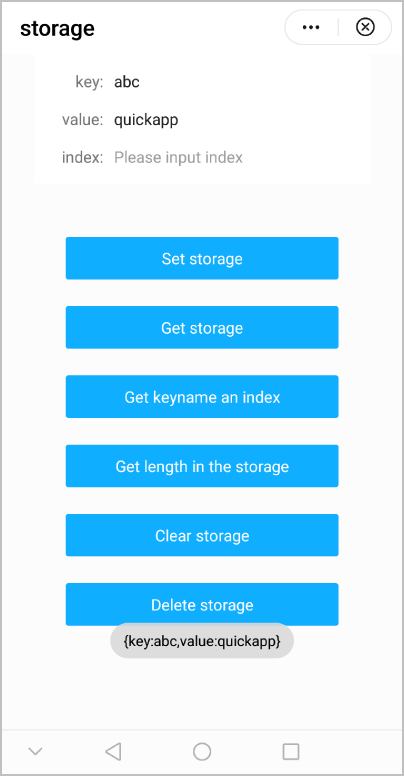
效果图如下: