[h2]tts.speak(OBJECT)
描述
进行语音播报。
OBJECT参数
参数 |
类型 |
是否必填 |
说明 |
|---|---|---|---|
text |
string |
是 |
需要播报的文本。 |
queueMode |
number |
否 |
可设置的模式。默认值为1。 1: add 0: flush |
volume |
number |
否 |
音频的音量,0.0为音量最小,1.0为最大。 默认为系统当前设置音量。 |
success |
function |
否 |
接口调用成功的回调函数。 |
fail |
function |
否 |
接口调用失败的回调函数。 |
complete |
function |
否 |
接口调用结束的回调函数(调用成功、失败都会执行)。 |
fail返回错误码:
错误码 |
错误码描述 |
说明 |
|---|---|---|
200 |
error |
通用错误。 |
202 |
invalidParam |
参数错误。 |
1001 |
error network |
网络连接错误。 |
1002 |
error network timeout |
网络连接超时。 |
1003 |
error not installed yet |
下载语音数据未完成。 |
1004 |
error output |
输出到音频设备失败。 |
1005 |
error service |
TTS服务失败。 |
1006 |
error synthesis |
TTS引擎合成语音失败。 |
示例代码
tts.speak ({
    text: '测试',
    volume: 1,
    queueMode: 0,
        success: function(data) {
            console.log("handling success");
        },
        fail: function(data, code) {
            console.log("handling fail, code=" + code);
        }
})
Demo
<template>
  <!-- Only one root node is allowed in template. -->
  <div class="container">
    <div  class="item-container">
    <text class="title">cheji Test</text>
    <text class="title">{{ttsspeakinfo}}</text>
    <input class="btn" type="button" value="TTS" onclick="test_tts" />
    </div>
  </div>
</template>

<style>
  .container {
    flex-direction: column;
    justify-content: center;
    align-items: center;
  }

  .title {
    font-size: 40px;
    color: #f0fff0;
  }
  .item-container {
    margin-bottom: 50px;
    margin-right: 60px;
    margin-left: 60px;
    flex-direction: column;
  }

  .btn {
      background-color: #00bfff;
      color: #ffffff;
  }
</style>

<script>
  import tts from '@system.tts'
  module.exports = {
    data: {
      ttsspeakinfo:''
    },
    onInit() {
      this.$page.setTitleBar({
        text: 'tts',
        textColor: '#ffffff',
        backgroundColor: '#007DFF',
        backgroundOpacity: 0.5,
        menu: true
      });
    },
    test_tts() {
      var that = this
      tts.speak({
        text: 'this is the test',

        queueMode: 0,
        success: function () {
          console.log("handling success");
          that.ttsspeakinfo = 'handling success'
        },
        fail: function (data, code) {
          console.log("handling fail, code=" + code);
        }
      })
    }
  }
</script>
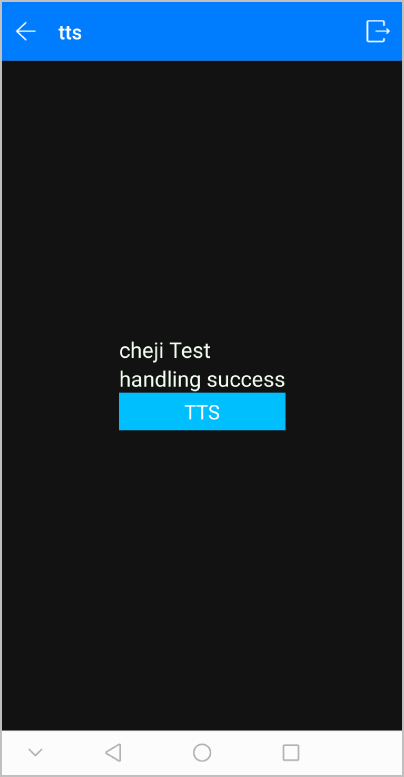
效果图如下: