接口定义
接口 |
描述 |
|---|---|
创建视频压缩任务实例, 可通过压缩接口实现对视频的压缩。 |
|
压缩视频。 |
|
订阅对当前压缩视频压缩进度的监听。 |
|
若当前有视频未压缩完成,则中断压缩进程,释放资源。 |
|
获取视频信息。 |
|
获取视频缩略图。 |
[h2]创建任务实例(1072+)
描述
创建视频压缩任务实例,可通过压缩接口实现对视频的压缩。

- 每个对象每次只能创建一个压缩任务,只有待任务执行完,才可以创建新的压缩任务。
- 当创建了多个压缩任务时,多个任务将串行执行。
参数
参数 |
类型 |
是否必填 |
默认值 |
说明 |
|---|---|---|---|---|
uri |
string |
是 |
- |
原视频文件地址。一般通过 media.takeVideo 或 media.pickVideo 获取。 |
height |
number |
否 |
原视频高 |
压缩后视频的高度,单位像素。 部分视频压缩后实际高度会向上调整为能被16整除的数值(如传参数300压缩后为304)。如果原视频旋转角度为90或者270,压缩后视频旋转角度调整为0,即压缩后视频的宽高和设置的宽高互换。 |
width |
number |
否 |
原视频宽 |
压缩后视频的宽度,单位像素。 部分视频压缩后实际宽度会向上调整为能被16整除的数值(如传参数300压缩后为304)。如果原视频旋转角度为90或者270,压缩后视频旋转角度调整为0,即压缩后视频的宽高和设置的宽高互换。 |
bitrate |
number |
否 |
原视频码率的1/2 |
压缩后视频的码率,单位bps(比特/秒),默认为原视频码率的1/2。受硬件平台限制,实际压缩后的码率可能无法完全和设置的码率一致。 |
framerate |
number |
否 |
原视频帧率 |
压缩后视频的帧率,单位fps(帧/秒),默认为原视频帧率,如果未能获取原视频帧率,则默认为30。 受硬件平台限制,实际压缩后的帧率可能无法完全和设置的帧率一致。 说明:
为了保证压缩的有效性,当传入帧率大于原视频帧率,则采用原视频帧率。 |
返回值
参数 |
说明 |
|---|---|
Video |
Video对象。 |
示例代码
var mVideoTask = new Video({
  // uri支持的类型参见https://developer.huawei.com/consumer/cn/doc/development/quickApp-References/quickapp-filestructure
  // uri一般通过media.takeVideo或者media.pickVideo获取
  uri:'internal://xxx'
})
[h2]compressVideo(OBJECT)(1072+)
描述
压缩视频。
参数
参数 |
类型 |
是否必填 |
默认值 |
说明 |
|---|---|---|---|---|
success |
function |
否 |
- |
成功回调。 |
fail |
function |
否 |
- |
失败回调。 |
complete |
function |
否 |
- |
执行结束回调。 |
success返回值
参数 |
类型 |
说明 |
|---|---|---|
uri |
string |
压缩后视频文件地址。 |
name |
string |
视频文件名称。 |
size |
number |
视频文件大小,单位B。 |
fail错误码返回值
参数 |
说明 |
|---|---|
200 |
接口功能异常。 |
202 |
参数错误。 |
300 |
IO错误。 |
1001 |
原视频无效。 |
205 |
压缩任务已创建,无需再调用第二次。 |
203 |
找不到实例。 |
示例代码
mVideoTask.compressVideo({
  success: function (res) {
    console.log(`success: ${res.uri}`)
  },
  fail: function (data, code) {
    console.log(`fail code:${code}, msg:${data}`)
  },
})
[h2]onprogressupdate(OBJECT)(1072+)
描述
订阅对当前压缩视频压缩进度的监听。
参数
参数 |
类型 |
是否必填 |
默认值 |
说明 |
|---|---|---|---|---|
callback |
function |
否 |
- |
压缩进度变化时触发,监听频率为秒。 |
callback返回值
参数 |
类型 |
说明 |
|---|---|---|
progress |
int |
压缩进度,0~100,每秒有变化时更新。 |
示例代码
mVideoTask.onprogressupdate = function(res) {
  console.log(`current progress: ${res.progress}`)
}
[h2]abort(OBJECT)(1072+)
描述
若当前有视频未压缩完成,则中断压缩进程,释放资源。
参数 |
类型 |
是否必填 |
默认值 |
说明 |
|---|---|---|---|---|
success |
function |
否 |
- |
成功回调。 |
fail |
function |
否 |
- |
失败回调。 |
complete |
function |
否 |
- |
执行结束回调。 |
示例代码
mVideoTask.abort()
mVideoTask = null
[h2]Video.getVideoInfo(OBJECT)(1072+)
描述
获取视频信息。
参数
参数 |
类型 |
是否必填 |
默认值 |
说明 |
|---|---|---|---|---|
uri |
string |
是 |
- |
视频文件地址。一般通过media.takeVideo或media.pickVideo获取,或在compressVideo()后产生。 |
success |
function |
否 |
- |
成功回调。 |
fail |
function |
否 |
- |
失败回调。 |
complete |
function |
否 |
- |
执行结束回调。 |
success返回值
参数 |
类型 |
说明 |
|---|---|---|
uri |
string |
视频文件地址。 |
name |
string |
视频文件名称。 |
size |
number |
视频文件大小,单位B。 |
height |
number |
视频高度,单位像素。 |
width |
number |
视频宽度,单位像素。 |
bitrate |
number |
视频码率,单位bps(比特/秒)。 |
framerate |
number |
视频帧率,单位fps(帧/秒)。 |
duration |
number |
视频时长,单位s。 |
示例代码
Video.getVideoInfo({
  success: function (data) {
   console.log(`success: ${data.size}`)
  },
  fail: function() {
  }
})
[h2]Video.getVideoThumbnail(OBJECT)(1072+)
描述
获取视频缩略图。
参数
参数 |
类型 |
是否必填 |
默认值 |
说明 |
|---|---|---|---|---|
uri |
string |
是 |
- |
视频文件地址。 |
success |
function |
否 |
- |
成功回调。 |
fail |
function |
否 |
- |
失败回调。 |
complete |
function |
否 |
- |
执行结束回调。 |
success返回值
参数 |
类型 |
说明 |
|---|---|---|
uri |
string |
视频缩略图地址。 |
示例代码
Video.getVideoThumbnail({
  success: function (data) {
    console.log(`success: ${data.uri}`)
  },
  fail: function() {
  }
})
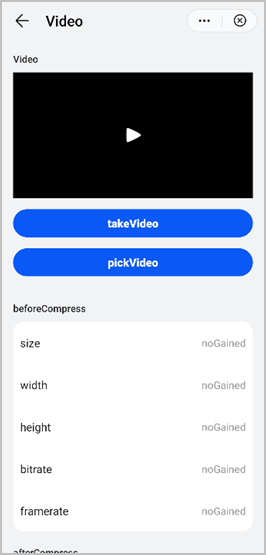
Demo
<template>
  <!-- Only one root node is allowed in template. -->
  <div class="container">
    <div class="case-title">
      <text class="title">Video</text>
    </div>
    <div class="mlr-container">
      <video src="{{videoUri}}" poster="{{posterUri}}" class="video"></video>
    </div>
    <div class="mlr-container mt-btn">
      <input onclick="takeVideo" type="button" value="takeVideo" class="btn-blue" />
    </div>
    <div class="mlr-container mt-btn">
      <input onclick="pickVideo" type="button" value="pickVideo" class="btn-blue" />
    </div>
    <div class="mlr-container mt-btn">
      <div class="btn-gray" if="{{videoUri && isOriginInfoGetted }}" onclick="compressVideo">
        <text class="color-a">compressVideo</text>
      </div>
    </div>
    <!-- 压缩前 -->
    <div class="case-title">
      <text class="title">beforeCompress</text>
    </div>
    <div class="info-container">
      <div class="info-item border-bottom-1">
        <text class="title color-primary">size</text>
        <text class="result">{{isOriginInfoGetted ? originInfo.size : noGained}}</text>
      </div>
      <div class="info-item border-bottom-1">
        <text class="title color-primary">width</text>
        <text class="result">{{isOriginInfoGetted ? originInfo.width : noGained}}</text>
      </div>
      <div class="info-item border-bottom-1">
        <text class="title color-primary">height</text>
        <text class="result">{{isOriginInfoGetted ? originInfo.height : noGained}}</text>
      </div>
      <div class="info-item border-bottom-1">
        <text class="title color-primary">bitrate</text>
        <text class="result">{{isOriginInfoGetted ? originInfo.bitrate : noGained}}</text>
      </div>
      <div class="info-item">
        <text class="title color-primary">framerate</text>
        <text class="result">{{isOriginInfoGetted ? originInfo.framerate : noGained}}</text>
      </div>
    </div>
    <!-- 压缩后 -->
    <div class="case-title">
      <text class="title">afterCompress</text>
    </div>
    <div class="info-container">
      <div class="info-item border-bottom-1">
        <text class="title color-primary">size</text>
        <text class="result">{{isCompressInfoGetted ? compressInfo.size : noGained}}</text>
      </div>
      <div class="info-item border-bottom-1">
        <text class="title color-primary">width</text>
        <text class="result">{{isCompressInfoGetted ? compressInfo.width : noGained}}</text>
      </div>
      <div class="info-item border-bottom-1">
        <text class="title color-primary">height</text>
        <text class="result">{{isCompressInfoGetted ? compressInfo.height : noGained}}</text>
      </div>
      <div class="info-item border-bottom-1">
        <text class="title color-primary">bitrate</text>
        <text class="result">{{isCompressInfoGetted ? compressInfo.bitrate : noGained}}</text>
      </div>
      <div class="info-item">
        <text class="title color-primary">framerate</text>
        <text class="result">{{isCompressInfoGetted ? compressInfo.framerate : noGained}}</text>
      </div>
    </div>
  </div>
</template>


<style >
  .btn-blue {
    background-color: #0a59f7;
    width: 100%;
    height: 80px;
    border-radius: 40px;
    color: #fff;
    font-size: 32px;
    font-weight: 500;
  }
  .color-a {
    color: #0a59f7;
  }
  .container {
    flex-direction: column;
    background-color: #F1F3F5;
    padding-bottom: 50px;
  }
  .case-title {
    margin-left: 32px;
    margin-right: 32px;
    margin-bottom: 20px;
    flex-direction: column;
    margin-top: 40px;
  }

  .case-title .title {
    color: rgba(0, 0, 0, 0.6);
    font-size: 28px;
    font-weight: 500;
  }
  .mlr-container {
    margin-right: 32px;
    margin-left: 32px;
  }
  .mt-btn {
    margin-top: 32px;
  }
  .video {
    width: 100%;
    height: 360px;
  }
  .btn-gray {
    background-color: rgba(0, 0, 0, 0.05);
    width: 100%;
    height: 80px;
    border-radius: 40px;
    align-items: center;
    justify-content: center;
  }
  .case-title {
    margin-left: 32px;
    margin-right: 32px;
    margin-bottom: 20px;
    flex-direction: column;
  }
  .case-title .title {
    color: #232325;
    font-size: 28px;
    font-weight: 500;
  }
  .info-container {
    margin-left: 32px;
    margin-right: 32px;
    padding-right: 20px;
    padding-left: 20px;
    background-color: #fff;
    border-radius: 32px;
    flex-direction: column;
  }
  .info-container .info-item {
    height: 120px;
    border-bottom-color: rgba(0, 0, 0, 0.05);
  }
  .info-container .info-item .title {
    flex-shrink: 0;
    font-size: 32px;
    color: rgba(0, 0, 0, 0.9);
  }
  .info-container .info-item .result {
    width: 100%;
    justify-content: flex-end;
    text-align: right;
    color: #999;
  }
  .case-title {
    margin-left: 32px;
    margin-right: 32px;
    margin-bottom: 20px;
    flex-direction: column;
  }
  .case-title .title {
    color: #232325;
    font-size: 28px;
    font-weight: 500;
  }
</style>

<script>

  import media from '@system.media';
  import Video from '@hap.io.Video';
  import prompt from '@system.prompt';
  module.exports = {
    public: {
      videoUri: '',
      posterUri: '',
      originInfo: {
        size: 0,
        width: 0,
        height: 0,
        bitrate: 0,
        framerate: 0,
      },
      compressInfo: {
        size: 0,
        width: 0,
        height: 0,
        bitrate: 0,
        framerate: 0,
      },
      isOriginInfoGetted: false,
      isCompressInfoGetted: false,
      noGained: "noGained"
    },
    onInit: function () {
      this.$page.setTitleBar({ text: this.$t('Video') });
    },
    pickVideo() {
      let that = this;
      media.pickVideo({
        success: function (data) {
          console.log("handling success: " + data.uri);
          that.videoUri = data.uri;
          Video.getVideoThumbnail({
            uri: data.uri,
            success: function ({ uri }) {
              that.posterUri = uri;
            }
          });
          Video.getVideoInfo({
            uri: data.uri,
            success: function (videoInfo) {
              that.isOriginInfoGetted = true;
              that.originInfo = {
                size: videoInfo.size,
                width: videoInfo.width,
                bitrate: videoInfo.bitrate,
                framerate: videoInfo.framerate,
                height: videoInfo.height,
              }
            }
          })
        },
        fail: function (data, code) {
          console.log("handling fail, code=" + code);
        }
      })

    },
    takeVideo() {
      let that = this;
      media.takeVideo({
        success: function (data) {
          console.log("data.uri " + data.uri);
          that.videoUri = data.uri;
          Video.getVideoThumbnail({
            uri: data.uri,
            success: function ({ uri }) {
              that.posterUri = uri;
            }
          });
          Video.getVideoInfo({
            uri: data.uri,
            success: function (videoInfo) {
              that.isOriginInfoGetted = true;
              that.originInfo = {
                size: videoInfo.size,
                width: videoInfo.width,
                bitrate: videoInfo.bitrate,
                framerate: videoInfo.framerate,
                height: videoInfo.height,
              }
            }
          })
        }
      })
    },

    compressVideo() {
      let that = this;
      prompt.showLoading({
        message: this.$t('loading1'),
        loadingColor: '#0faeff',
        mask: true
      })
      console.log(" this.videoUri:" + this.videoUri);
      console.log(" this.originInfo.width / 2:" + this.originInfo.width / 2);
      console.log("  this.originInfo.height / 2:" + this.originInfo.height / 2);

      let videoTask = new Video({
        uri: this.videoUri,
        width: this.originInfo.width / 2,
        height: this.originInfo.height / 2
      });
      console.log("  videoTask.compressVideo ready");
      videoTask.compressVideo({
        success: function ({ uri }) {
          console.log("compressVideo uri" + uri);
          console.log("  videoTask.compressVideo go");
          Video.getVideoInfo({
            uri: uri,
            success: function (videoInfo) {
              that.isCompressInfoGetted = true;
              that.compressInfo = {
                size: videoInfo.size,
                width: videoInfo.width,
                bitrate: videoInfo.bitrate,
                framerate: videoInfo.framerate,
                height: videoInfo.height,
              }
            }
          })
        },
        fail: function (data, code) {
          console.log("handling fail, code=" + code);
           console.log("handling fail, data=" + data);
        },
        complete: function ({ uri }) {
          console.log("complete compressVideo uri" + uri);
        }


      });

      videoTask.onprogressupdate = function ({ progress }) {
        console.log(progress)
        if (progress >= 100) {
          prompt.hideLoading();
        }
      };
    }
  }
</script>
效果图如下: