属性
除了支持 通用属性 以外,还支持如下属性。
名称 |
类型 |
默认值 |
是否必填 |
描述 |
|---|---|---|---|---|
href |
string |
- |
否 |
支持的格式参见页面路由中的uri参数。额外的:
示例: <a href="About?param1=value1"> <a href="/about?param1=value1"> <a href="https://www.example.com/?param1=value1"> |
示例代码
页面hello.ux代码:
<template>
  <div class="container">
    <div class="page-title-wrap">
      <text class="page-title">{{componentName}}</text>
    </div>

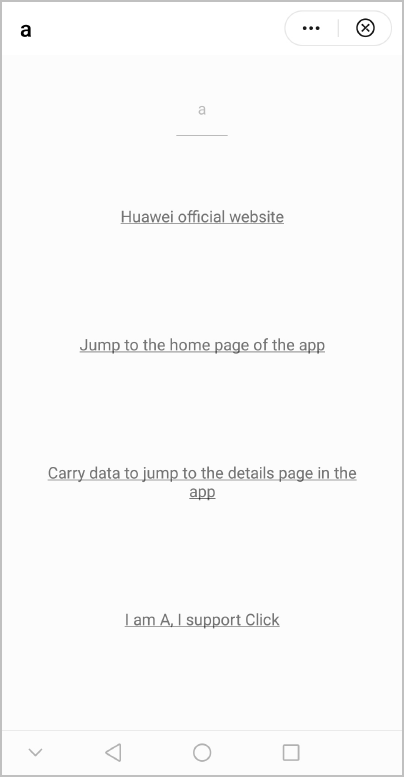
    <a href="https://www.huawei.com/" value="Huawei official website"></a>
    <a href="/Hello" value="Jump to the home page of the app"></a>
    <a href="/Hello/Basic/a/detail?pageInfo='I am A... I am the data from the previous page.'" value="Carry data to jump to the details page in the app"></a>
    <a href="https://www.huawei.com/" onclick="clickme">I am A, I support Click</a>
    <a onclick="clickme">"I am A, I support Click</a>
    <a href="/Hello" value="font-family is serif" style="font-family:serif;"></a>
  </div>
</template>

<style>
  .container {
    flex: 1;
    flex-direction: column;
  }
  .page-title-wrap {
    padding-top: 50px;
    padding-bottom: 80px;
    justify-content: center;
  }
  .page-title {
    padding-top: 30px;
    padding-bottom: 30px;
    padding-left: 40px;
    padding-right: 40px;
    border-color: #bbbbbb;
    color: #bbbbbb;
    border-bottom-width: 2px;
  }
  a {
    margin-left: 75px;
    width: 600px;
    padding-top: 50px;
    padding-bottom: 50px;
    margin-bottom: 100px;
    text-decoration: underline;
    text-align: center;
  }
</style>

<script>
  export default {
    data: {
      componentName: 'a',
      as: 123,
    },
    onInit() {
      this.$page.setTitleBar({ text: 'a' })
    },
    clickme() {
      this.$page.setTitleBar({ text: "After clicking A, I became B." })
    }
  }
</script>
detail.ux代码:
<template>
  <div class="container">
    <div class="page-title-wrap">
      <text class="page-title">page parameters</text>
    </div>
    <div class="item-container">
      <input type="button" class="btn" onclick="getQuery" value="get page parameters by 'this.$page.query'" />
      <div class="item-content">
        <text class="title">page parameters:</text>
        <text class="text">{{privateData}}</text>
        <text class="text">{{protectedData}}</text>
        <text class="text">{{publicData}}</text>
      </div>
      <div class="item-content">
        <text class="title">deeplink uri of page:</text>
        <text class="text">{{uri}}</text>
      </div>
    </div>
  </div>
</template>

<style>
  .container {
    flex: 1;
    flex-direction: column;
  }
  .page-title-wrap {
    padding-top: 50px;
    padding-bottom: 80px;
    justify-content: center;
  }
  .page-title {
    padding-top: 30px;
    padding-bottom: 30px;
    padding-left: 40px;
    padding-right: 40px;
    border-color: #bbbbbb;
    color: #bbbbbb;
    border-bottom-width: 2px;
  }

  .item-container {
    flex: 1;
    margin: 0px 60px 50px 60px;
    flex-direction: column;
    justify-content: center;
    align-content: center;
  }

  .item-content {
    flex-direction: column;
    background-color: #ffffff;
    padding: 20px 30px;
    margin-bottom: 30px;
    align-items: flex-start;
  }

  .title {
    padding: 20px 5px;
    font-weight: bold;
  }
  .btn {
    height: 80px;
    text-align: center;
    border-radius: 5px;
    margin-right: 60px;
    margin-left: 60px;
    margin-bottom: 50px;
    color: #ffffff;
    font-size: 30px;
    background-color: #0faeff;
  }

  .text {
    padding: 15px;
  }
</style>

<script>
  import prompt from '@system.prompt'

  export default {
    private: {
      privateData: 'privateData',
      uri: 'cannot get uri'
    },
    protected: {
      protectedData: 'protectedData'
    },
    public: {
      publicData: 'publicData'
    },
    onInit(params) {
      this.$page.setTitleBar({ text: 'detail' })
      if (this.$page.uri) {
        this.uri = decodeURIComponent(this.$page.uri)
      }
      const message = JSON.stringify(params)
      prompt.showToast({
        message: message,
        duration: 2000,
        gravity: 'center'
      })
    },
    onRefresh(params) {
      if (this.$page.uri) {
        this.uri = decodeURIComponent(this.$page.uri)
      }
    },
    getQuery() {
      const message = JSON.stringify(this.$page.query)
      prompt.showToast({
        message: message,
        duration: 2000,
        gravity: 'center'
      })
    },
  }
</script>
效果图如下: