子组件
支持。

- 建议不要在custommarker内部嵌套dom层级过深或者添加过多子组件,否则会引起性能问题。
- custommarker中禁止嵌套custommarker。
- 建议内部子组件使用stack、div、text、image等完成布局,不要使用tab、tab-bar、tab-content、swiper、list、map等组件。
属性
除了支持 通用属性 以外,还支持如下属性。
名称 | 类型 | 默认值 | 是否必填 | 描述 |
|---|---|---|---|---|
custommarkerattr | object | - | 是 | custommarker的位置信息。 |
custommarkerattr说明
名称 | 类型 | 默认值 | 是否必填 | 描述 |
|---|---|---|---|---|
id | number | -1 | 否 | 每个标记点的唯一标识。 |
latitude | number | - | 是 | 标记点纬度。 |
longitude | number | - | 是 | 标记点经度。 |
coordType | string | - | 否 | 标记点坐标的坐标系,如不为空,组件将自动做坐标转换。可选值可通过map组件的getSupportedCoordTypes获取。 |
anchorX | number | 0 | 否 | 原点是对应的经纬度,数值为相对X轴的偏移。 |
anchorY | number | 0 | 否 | 原点是对应的经纬度,数值为相对Y轴的偏移。 |
示例代码
<template>
    <div>
        <map latitude=39.906901 longitude=116.397972>
            <custommarker class='cm1' custommarkerattr="{{tcustommarkerattr1}}">
                <text>hello world</text>
                <image src="/Common/logo.png"></image>
            </custommarker>
            <custommarker class='cm2' custommarkerattr="{{tcustommarkerattr2}}">
                <text>hello quick</text>
                <image src="/Common/logo.png"></image>
            </custommarker>
        </map>
    </div>
</template>
<style>
    .cm1 {
        width: 200px;
        height: 200px;
        background-color: #ff00ff;
    }
    .cm2 {
        width: 200px;
        height: 200px;
        background-color: #00bfff;
        flex-direction: column;
    }
</style>
<script>
    export default {
        data: {
            tcustommarkerattr1: {
                id: 1,
                latitude: 39.906901,
                longitude: 116.397972,
                coordType: 'gcj02',
                anchorX: 100,
                anchorY: 100
            },
            tcustommarkerattr2: {
                id: 2,
                latitude: 39.506901,
                longitude: 116.597972,
                coordType: 'gcj02',
                anchorX: 0,
                anchorY: 0
            }
        }
    }
</script>
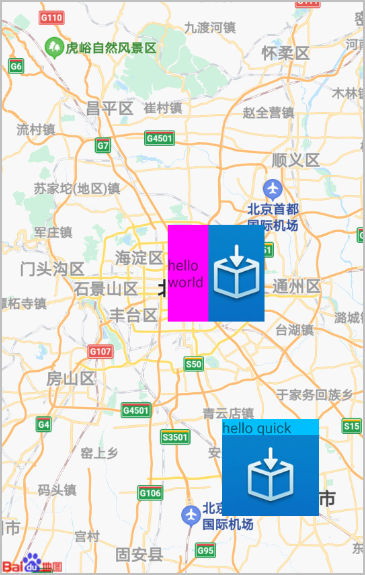
示例代码效果图: