


智能客服
你问我答,随时在线为你解决问题















列表视图容器。
| 限制条件 | 说明 |
|---|---|
| 适用终端 | 手机、平板、智慧屏、车机 |
| 适用区域 | 全球 |
仅支持 <list-item> 子组件。
除了支持 通用属性 以外,还支持如下属性。
| 名称 | 类型 | 默认值 | 是否必填 | 描述 |
|---|---|---|---|---|
| scrollpage | boolean | false | 否 | 是否将list顶部页面中非list部分随list一起滑出可视区域,开启该属性会降低list渲染性能。 注意 list为水平方向时,不支持scrollpage属性。 |
除了支持 通用样式 以外,还支持如下样式。
如果list只设置宽度,未设置高度时,flex-grow样式默认值为0和设置为0的效果不一样。
| 名称 | 类型 | 默认值 | 是否必填 | 描述 |
|---|---|---|---|---|
| flex-direction | column | row | row-reverse(1035+) | column-reverse(1035+) | column | 否 | 设置flex容器主轴的方向,指定flex项如何放置在flex容器中。 在list组件中默认值为column,其他组件默认值为row。 |
| columns | number | 1 | 否 | list显示列数。 |
| layout-type(1070+) | grid | stagger | grid | 否 |
|
除了支持 通用事件 以外,还支持如下事件。
| 名称 | 参数 | 描述 |
|---|---|---|
| scroll | {scrollX:scrollXValue, scrollY:scrollYValue, scrollState:stateValue 1010+,topIndex:topIndexValue 1110+,bottomIndex:bottomIndexValue 1110+} | 列表滑动。
|
| scrollbottom | - | 列表滑动到底部。 |
| scrolltop | - | 列表滑动到顶部。 |
| scrollend(1035+) | - | 列表滑动结束。 |
| scrolltouchup(1035+) | - | 手指抬起并有惯性滑动。 |
| 名称 | 参数 | 描述 |
|---|---|---|
| scrollTo | object | list滚动到指定item位置。 |
| scrollBy | object | 使list的内容滑动一定距离(手机、平板设备从1070版本开始支持)。 注意 智慧屏仅支持dx、dy、smooth参数。 |
scrollTo的参数说明:
| 名称 | 类型 | 是否必填 | 默认值 | 备注 |
|---|---|---|---|---|
| index | number | 是 | - | 指定滚动的目标位置。 |
| smooth(1060+) | boolean | 否 | false | 是否平滑滚动。 |
| behavior(1065+) | string | 否 | auto | 功能同smooth参数,支持参数 smooth(平滑滚动),instant(瞬间滚动),默认值auto,效果等同于instant |
scrollBy的参数说明:
| 名称 | 类型 | 是否必填 | 默认值 | 备注 |
|---|---|---|---|---|
| dx | int | 否 | 0 | 从当前位置水平方向滑动距离,单位px。 |
| dy | int | 否 | 0 | 从当前位置垂直方向滑动距离,单位px。 |
| smooth | boolean | 否 | true | 是否平滑滑动。 |
或者
| 名称 | 类型 | 是否必填 | 默认值 | 备注 |
|---|---|---|---|---|
| left | number | 否 | 0 | 从当前位置水平方向滑动距离,单位px。值为正时向左滑动,为负时向右滑动。flex-direction为column或column-reverse时不生效。 |
| top | number | 否 | 0 | 从当前位置垂直方向滑动距离,单位px。值为正时向上滑动,为负时向下滑动。flex-direction为row或row-reverse时不生效。 |
| behavior | string | 否 | auto | 是否平滑滑动,支持参数 smooth(平滑滚动),instant(瞬间滚动),默认值auto,效果等同于instant。 |
- <template>
- <div class="container">
- <div class="page-title-wrap">
- <text class="page-title">{{componentName}}</text>
- </div>
- <div class="nav">
- <text class="nav-item {{listClass}}"
- onclick="showListMethod">列表组件方法</text>
- <text class="nav-item {{arrayClass}}"
- onclick="showArrayMethod">数组对象方法</text>
- </div>
- <!-- List component method -->
- <div class="btn-wrap-column" show="{{showListBtn}}">
- <input type="button" class="btn" name="listmethod" value="回到第一个item"
- onclick="goIndex" />
- <input type="button" class="btn" name="listmethod" value="向右平滑移动200px"
- onclick="scrollBy" />
- </div>
- <!-- Array object method -->
- <div class="btn-wrap-row" show="{{!showListBtn}}">
- <input type="button" class="btn-little" onclick="clickPush" value="push"></input>
- <input type="button" class="btn-little" onclick="clickPop" value="pop"></input>
- <input type="button" class="btn-little" onclick="clickShift" value="shift"></input>
- <input type="button" class="btn-little" onclick="clickUnshift" value="unshift"></input>
- </div>
- <div class="btn-wrap-row" show="{{!showListBtn}}">
- <input type="button" class="btn-little" onclick="clickSplice" value="splice"></input>
- <input type="button" class="btn-little" onclick="clickSort" value="sort"></input>
- <input type="button" class="btn-little" onclick="clickReverse" value="reverse"></input>
- </div>
- <div class="nav">
- <text class="nav-item {{gridClass}}" onclick="showGridLayout">网格布局</text>
- <text class="nav-item {{staggerClass}}"
- onclick="showStaggerLayout">瀑布流布局</text>
- </div>
- <!-- List -->
- <list show="{{showGridLayout}}" class="list grid" onclick="listClick" onlongpress="listLongPress"
- onscrollbottom="scrollbottom" onscrolltop="scrolltop" onscroll="scroll" onscrollend="scrollend"
- onscrolltouchup="scrolltouchup" id="list" scrollpage="{{scrollPage}}">
- <!-- List elements, when the attribute type values are the same, you need to ensure that the rendered view layout is also the same, use show instead of if to ensure that the layout view is unchanged -->
- <list-item type="listItem" class="item item-color" onlongpress="listItemLongPress" onclick="listItemClick"
- for="{{listData}}">
- <text onclick="textClick" class="txt">{{$item}}--{{$idx}}</text>
- </list-item>
- <!-- Loading More -->
- <list-item type="loadMore" class="load-more" if="{{loadMore}}">
- <progress type="circular"></progress>
- <text>更多...</text>
- </list-item>
- </list>
- <list show="{{!showGridLayout}}" class="list stagger" onclick="listClick" onlongpress="listLongPress"
- onscrollbottom="scrollbottom" onscrolltop="scrolltop" onscroll="scroll" onscrollend="scrollend"
- onscrolltouchup="scrolltouchup" id="list-stagger" scrollpage="{{scrollPage}}">
- <!-- List elements, when the attribute type values are the same, you need to ensure that the rendered view layout is also the same, use show instead of if to ensure that the layout view is unchanged -->
- <list-item style="height: {{$idx % 10}}00px" type="listItem" class="item item-color"
- onlongpress="listItemLongPress" onclick="listItemClick" for="{{listData}}">
- <text onclick="textClick" class="txt">{{$item}}--{{$idx}}</text>
- </list-item>
- <!-- Loading More -->
- <list-item type="loadMore" class="load-more" if="{{loadMore}}">
- <progress type="circular"></progress>
- <text>更多...</text>
- </list-item>
- </list>
- </div>
- </template>
- <style>
- .list {
- height: 800px;
- padding-left: 60px;
- padding-right: 60px;
- columns: 4;
- border-color: #FF0000;
- border-width: 5px;
- }
- .grid {
- flex-direction: row-reverse;
- }
- .stagger {
- flex-direction: column;
- }
- .container{
- flex: 1;
- flex-direction: column;
- }
- .page-title-wrap {
- padding-top: 50px;
- padding-bottom: 80px;
- justify-content: center;
- }
- .page-title{
- padding-top: 30px;
- padding-bottom: 30px;
- padding-left: 40px;
- padding-right: 40px;
- border-color: #bbbbbb;
- color: #bbbbbb;
- border-bottom-width: 2px;
- }
- .btn {
- height: 80px;
- text-align: center;
- border-radius: 5px;
- margin-right: 60px;
- margin-left: 60px;
- margin-bottom: 50px;
- color: #ffffff;
- font-size: 30px;
- background-color: #0faeff;
- }
- .item {
- height: 150px;
- align-items: flex-start;
- margin-bottom: 15px;
- border-color: #9400D3;
- border-width: 5px;
- margin-right: 20px;
- }
- .load-more {
- justify-content: center;
- align-items: center;
- height: 100px;
- border-color: #bbbbbb;
- border-bottom-width: 1px;
- }
- .btn-wrap-column {
- flex-direction: column;
- margin-right: 60px;
- margin-left: 60px;
- }
- .btn-wrap-row {
- margin-right: 60px;
- margin-left: 45px;
- margin-bottom: 30px;
- }
- .btn-little {
- flex: 1;
- height: 80px;
- margin-left: 15px;
- border-radius: 5px;
- color: #ffffff;
- font-size: 30px;
- text-align: center;
- background-color: #0faeff;
- }
- .item-color {
- background-color: #f76160;
- }
- .nav {
- padding-left: 60px;
- padding-right: 60px;
- padding-bottom: 30px;
- }
- .nav-item {
- flex: 1;
- padding-bottom: 30px;
- border-bottom-width: 5px;
- border-color: #fbf9fe;
- font-size: 35px;
- color: #666666;
- text-align: center;
- }
- .selected {
- border-color: #0faeff;
- }
- </style>
- <script>
- import prompt from '@system.prompt'
- export default {
- data: {
- componentName: 'list',
- loadMore: true,
- listAdd: ['A', 'B', 'C', 'D', 'E', 'F', 'G', 'H', 'I', 'J', 'K', 'L', 'M', 'N', 'O', 'P', 'Q', 'R', 'S', 'T', 'U', 'V', 'W', 'X', 'Y', 'Z'],
- listData: [],
- scrollPage: false,
- showListBtn: true,
- showGridLayout: true,
- listClass: 'selected',
- arrayClass: '',
- gridClass: 'selected',
- staggerClass: '',
- },
- onInit: function () {
- this.$page.setTitleBar({ text: 'list' })
- // Initialize list data
- this.listData = [].concat(this.listAdd)
- },
- showListMethod: function () {
- if (!this.showListBtn) {
- this.showListBtn = true
- this.listClass = 'selected'
- this.arrayClass = ''
- }
- },
- showArrayMethod: function () {
- if (this.showListBtn) {
- this.showListBtn = false
- this.listClass = ''
- this.arrayClass = 'selected'
- }
- },
- showStaggerLayout: function () {
- if (this.showGridLayout) {
- this.showGridLayout = false
- this.gridClass = ''
- this.staggerClass = 'selected'
- }
- },
- showGridLayout: function () {
- if (!this.showGridLayout) {
- this.showGridLayout = true
- this.gridClass = 'selected'
- this.staggerClass = ''
- }
- },
- scrollbottom: function () {
- prompt.showToast({
- message: "到底部了"
- })
- // Load next page
- var that = this
- var renderData = [].concat(that.listData, that.listAdd)
- setTimeout(function () {
- that.listData = renderData
- }, 1000)
- },
- scrolltop: function () {
- prompt.showToast({
- message:"在最顶部了"
- })
- },
- scrollend: function () {
- prompt.showToast({
- message: "停止滑动了"
- })
- console.error(this.$t('message.component.list.scrollStoped'))
- },
- scrolltouchup: function () {
- prompt.showToast({
- message: "手指抬起了"
- })
- },
- // monitoring during sliding
- scroll: function (e) {
- let msg = " 滑动中 "+ '.scrollX:' + e.scrollX
- + ' .scrollY:' + e.scrollY
- + ' .scrollState:' + e.scrollState
- console.info(msg)
- },
- goIndex: function () {
- if (this.showGridLayout) {
- this.$element('list').scrollTo({ index: 0, behavior: 'smooth' })
- } else {
- this.$element('list-stagger').scrollTo({ index: 0, behavior: 'smooth' })
- }
- },
- scrollBy: function () {
- console.log('list.scrollBy: left=200, behavior= smooth')
- if (this.showGridLayout) {
- this.$element('list').scrollBy({ left: 200, behavior: 'smooth' })
- } else {
- this.$element('list-stagger').scrollBy({ top: 200, behavior: 'smooth' })
- }
- },
- clickPush: function () {
- this.listData.push('push')
- prompt.showToast({
- message: "向数组的末尾添加一个元素"
- })
- },
- clickPop: function () {
- prompt.showToast({
- message: " 删除数组的最后一个元素 "+ JSON.stringify(this.listData.pop())
- })
- },
- clickShift: function () {
- prompt.showToast({
- message: "删除数组的第一个元素 "+ JSON.stringify(this.listData.shift())
- })
- },
- clickUnshift: function () {
- this.listData.unshift('unshift')
- prompt.showToast({
- message: "向数组的开头添加一个'unshift'元素"
- })
- },
- clickSplice: function () {
- prompt.showToast({
- message: "删除第一个元素 "+ JSON.stringify(this.listData.splice(0, 1, 'splice')[0]) + ',' + "并添加一个'splice元素'"
- })
- },
- clickSort: function () {
- this.listData.sort()
- prompt.showToast({
- message: 'sort'
- })
- },
- clickReverse: function () {
- this.listData.reverse()
- prompt.showToast({
- message: 'reverse'
- })
- },
- listItemClick: function (e) {
- e.stopPropagation()
- console.info('List Item is clicked.')
- prompt.showToast({
- message: 'List Item is clicked.'
- })
- },
- listClick: function (e) {
- e.stopPropagation()
- console.info('List is clicked.')
- prompt.showToast({
- message: 'List is clicked.'
- })
- },
- textClick: function (e) {
- e.stopPropagation()
- console.info('Text is clicked.')
- prompt.showToast({
- message: 'Text is clicked.'
- })
- },
- listLongPress: function (e) {
- e.stopPropagation()
- console.info('List is long pressed.')
- prompt.showToast({
- message: 'List is long pressed.'
- })
- },
- listItemLongPress: function (e) {
- e.stopPropagation()
- console.info('List Item is long pressed.')
- prompt.showToast({
- message: 'List Item is long pressed.'
- })
- },
- }
- </script>
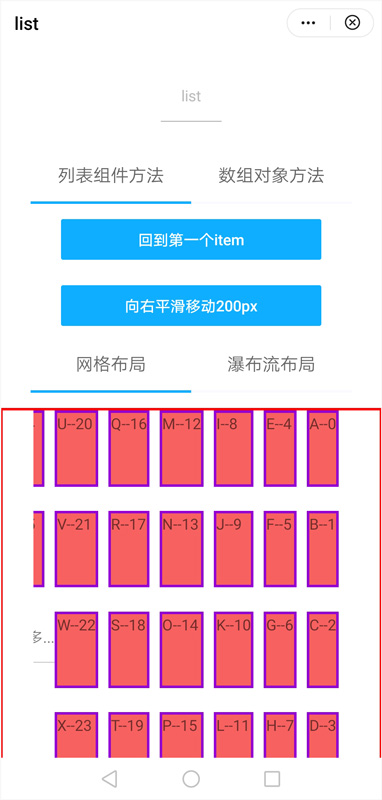
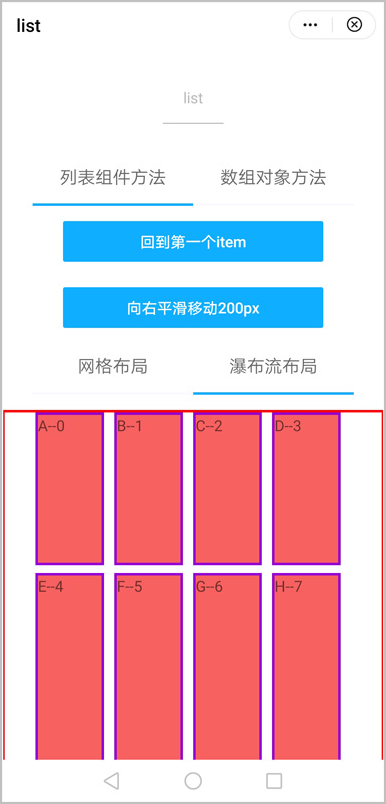
效果图如下:
| 版本 | 发布日期 | 描述 |
|---|---|---|
| 1110 | 2024-02-07 | scroll事件新增topIndex和bottomIndex参数。 |
| 1070 | 2020-05-19 |
|
| 1060 | 2019-12-10 | list的scrollTo增加smooth属性,使页面有平滑滚动的效果。 |
| 1040 | 2019-06-24 |
|
| 1010 | 2018-04-20 | scroll事件增加scrollState设置。 |
调用scrollto方法偶尔会出现无法滚动到指定位置,此问题可能和组件未渲染完成有关,建议延迟50ms再调用。