属性
除了支持 通用属性 以外,还支持如下属性。
名称 | 类型 | 默认值 | 是否必填 | 描述 |
|---|---|---|---|---|
scrollamount | number | 6 | 否 | 设置每次滚动时移动的长度(以像素为单位)。 |
loop | number | -1 | 否 | 设置 marquee 滚动的次数。如果未指定值,默认值为 −1,表示 marquee 将连续滚动。 |
direction | string | left | 否 | 文字滚动方向,支持left,right。 |
样式
除了支持 通用样式 以外,还支持如下样式。
名称 | 类型 | 默认值 | 是否必填 | 描述 |
|---|---|---|---|---|
color | color | 0xde000000 | 否 | 文本颜色 |
font-size | number | 37.5px | 否 | 文本尺寸 |
font-weight | lighter | 100 | 200 | 300 | 400 | 500 | 600 | 700 | 800 | 900 | normal | bold | bolder | normal | 否 | 字体的粗细,默认为normal。 |
font-family | string | - | 否 | 通过该属性可以设置组件中字符串的字体,支持四种系统原生字体:normal,sans-serif,serif,monospace(此四种字体只对英文有效)。 如果需要设置自定义字体,请参见“font-face样式”。 |
事件
除了支持 通用事件 以外,还支持如下事件。
名称 | 参数 | 描述 |
|---|---|---|
onbounce | - | 当 marquee 滚动到结尾时触发。 |
onfinish | - | 当 marquee 完成 loop 属性设置的值时触发。它只能在 loop 属性设置为大于 0 的某个数字时触发。 |
onstart | - | 当 marquee 开始滚动时触发。 |
示例代码
<template>
  <!-- There can only be one root node in the template -->
  <div class="container">
    <marquee id="bbb" loop="2" direction="right" style="font-weight:lighter; width:700px ;
         height:200px;font-family: normal ">huaweiWebsite</marquee>
    <marquee id="aaa" direction="left" scrollamount="30px"
      style="color : red; width:700px ; height:300px;font-family:network,local" onbounce="b" onfinish="f" onstart="s">
      huaweiWebsite
    </marquee>
    <div class="myDiv">
      <input type="button" value="start" onclick="start" />
      <input type="button" value="stop" onclick="stop" />
    </div>
  </div>
</template>

<style>
  .container {
    flex-direction: column;
    justify-content: center;
    align-content: center;
    align-items: center;
  }

  .myDiv {
    flex-direction: row;
  }

  #aaa {
    font-size: 37.5px;
    background-color: #00ffff;
  }

  @font-face {
    font-family: 'sampleA';
    src:
      /* Here is just an example of a local address. Do not use font files in your product.*/
      url('/Common/fonts/FZLTTHBJW.TTF'),
      /* Here is just an example of a local address. Do not use font files in your product.*/
      url('https://lfmemberdev.hwcloudtest.cn:9094/fastapp/download/FZCCHJW.TTF')
  }

  @font-face {
    font-family: 'local';
    /* Here is just an example of a local address. Do not use font files in your product.*/
    src: url('/Common/fonts/FZLTTHBJW.TTF');
  }

  @font-face {
    font-family: 'sample';
    src:
      /* Here is just an example of a local address. Do not use font files in your product.*/
      url('/Common/fonts/FZLTTHBJW.TTF'),
      /* Here is just an example of a local address. Do not use font files in your product.*/
      url('https://lfmemberdev.hwcloudtest.cn:9094/fastapp/download/FZCCHJW.TTF'),
      local(serif);
  }

  @font-face {
    font-family: 'system';
    src: local('serif');
  }

  @font-face {
    font-family: 'network';
    /* Here is just an example of a local address. Do not use font files in your product.*/
    src: url('https://lfmemberdev.hwcloudtest.cn:9094/fastapp/download/FZCCHJW.TTF');
  }
</style>

<script>
  module.exports = {
    onInit() {
         this.$page.setTitleBar({ text: 'marquee' })
    },
    onReady: function () {
      console.log('onReady ')
    },
    stop: function () {
      this.$element('aaa').stop()
      this.$element('bbb').stop()
    },
    start: function () {
      this.$element('aaa').start()
      this.$element('bbb').start()
    },
    b: function () {
      console.log('onBounce')
    },
    f: function () {
      console.log('onFinish')
    },
    s: function () {
      console.log('onStart')
    }
  }
</script>
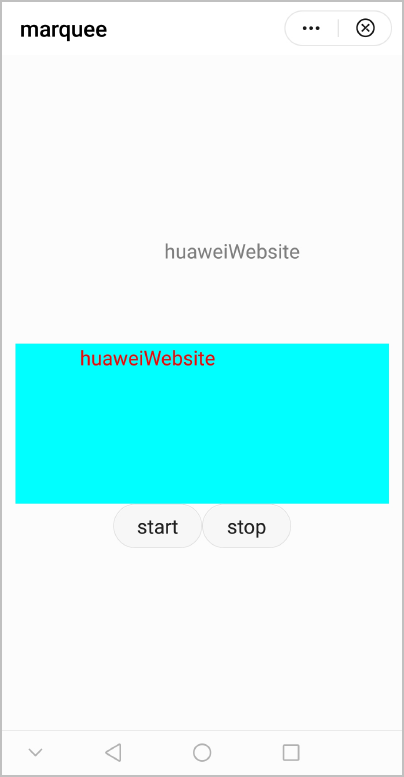
效果图如下: