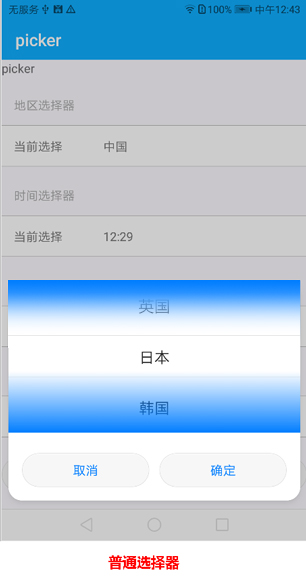
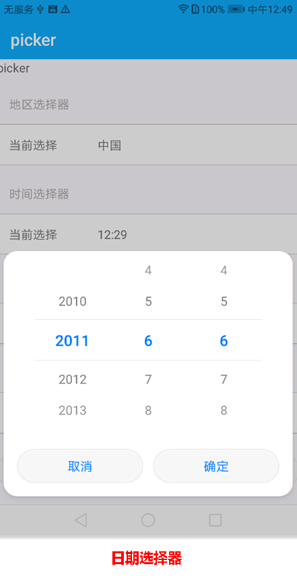
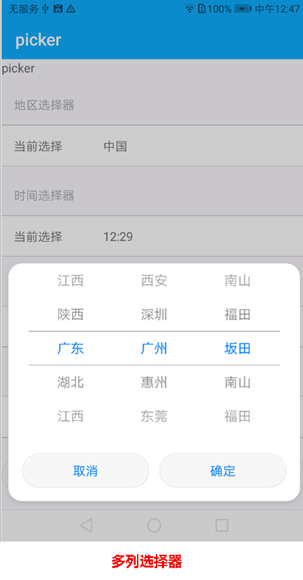
属性
除了支持 通用属性 以外,还支持如下属性。
普通选择器:type="text"
属性名 |
类型 |
默认值 |
是否必填 |
描述 |
|---|---|---|---|---|
range |
array |
- |
否 |
选择器的取值范围 |
selected |
string |
0 |
否 |
选择器的默认取值,取值为range的索引。 |
value |
string |
- |
否 |
选择器的值 |
日期选择器:type="date"
属性名 |
类型 |
默认值 |
是否必填 |
描述 |
|---|---|---|---|---|
start |
time |
1970-1-1 |
否 |
起始时间,格式为yyyy-(M)M-dd。 |
end |
time |
2100-12-31 |
否 |
结束时间,格式为yyyy-(M)M-dd。 |
selected |
string |
当前时间 |
否 |
选择器的默认取值,格式为yyyy-(M)M-(d)d。 |
value |
string |
- |
否 |
选择器的值 |
时间选择器:type="time"
属性名 |
类型 |
默认值 |
是否必填 |
描述 |
|---|---|---|---|---|
selected |
string |
当前时间 |
否 |
选择器的默认取值,格式为(h)h:(m)m。 |
value |
string |
- |
否 |
选择器的值 |
多列选择器:type="multi-text"(智慧屏不支持)
属性名 |
类型 |
默认值 |
是否必填 |
描述 |
|---|---|---|---|---|
range |
array |
- |
是 |
选择器的取值范围,为二维数组。 |
selected |
array |
[0,0,0,0] |
否 |
每一列被选中项对应的索引构成的数组,格式为[0,1,2,1] |
value |
array |
- |
否 |
每一列被选中项对应的值构成的数组。 |
事件
支持除click、swipe 外所有 通用事件,同时还支持如下事件。
事件名称 |
参数 |
描述 |
|---|---|---|
change |
|
滚动选择器选择值后,确定时触发(newSelected为索引)。 当type=date时,返回的month值为实际显示的月份减去1。 |
columnchange |
{column:0, newValue: “value1”,newSelected: 2} |
type为 multi-text 时使用
|
cancel |
- |
type为 multi-text 时使用。 取消选择。用户点击“选择界面”的“取消”按钮触发。 |
示例代码
<template>
    <div class="container">
        <div class="page-title-wrap">
            <text class="page-title">{{componentName}}</text>
        </div>
        <div class="item-container">
            <text class="item-title">地区选择器</text>
            <div class="item-content">
                <text class="label">当前选择</text>
                <picker class="picker" type="text" range="{{list}}" value="{{country}}"
                        onchange="getCountry" id="picker" selected="2"></picker>
            </div>
        </div>
        <div class="item-container">
            <text class="item-title">时间选择器</text>
            <div class="item-content">
                <text class="label">当前选择</text>
                <picker class="picker" type="time" value="{{time}}" selected="05:20" onchange="getTime"></picker>
            </div>
        </div>
        <div class="item-container">
            <text class="item-title">日期选择器</text>
            <div class="item-content">
                <text class="label">当前选择</text>
                <picker class="picker" type="date" start=2010-01-02 end=2020-12-31 value="{{date}}" selected="2011-6-6"
                        onchange="getDate"></picker>
            </div>
        </div>
<div class="item-container">
            <text class="item-title">多列选择器</text>
            <div class="item-content">
                <text class="label">当前选择</text>
                <picker class="picker" type="multi-text" range ="{{address}}" value="{{ addvalue }}" selected="{{addselected}}" onchange=" getAddress" oncolumnchange="getColumdata" oncancel="cancelselect"></picker>
            </div>
        </div>
        <input type="button" class="btn" style="margin-top: 50px;" value="通过代码调取地区选择器" onclick="show"/>
    </div>
</template>
<style>
    .item-container {
        margin-top: 20px;
        flex-direction: column;
    }
    .item-title {
        padding-left: 30px;
        padding-bottom: 30px;
        padding-top: 30px;
        border-bottom-width: 1px;
        border-color: #bbbbbb;
        color: #aaaaaa;
    }
    .item-content {
        background-color: #ffffff;
        border-bottom-width: 1px;
        border-color: #bbbbbb;
        padding-left: 30px;
        padding-right: 30px;
    }
    .picker {
        flex: 1;
    }
    .label {
        padding-bottom: 30px;
        padding-top: 30px;
        padding-right: 100px;
    }
    .input-text {
        height: 80px;
        line-height: 80px;
        padding-left: 30px;
        padding-right: 30px;
        margin-left: 30px;
        margin-right: 30px;
        border-top-width: 1px;
        border-bottom-width: 1px;
        border-color: #999999;
        font-size: 30px;
        background-color: #ffffff;
    }
</style>
<script>
    export default {
        data: {
            componentName: 'picker',
            list: ['中国', '英国', '日本', '韩国'],
            country: '中国',
            address:[['广东','湖北','江西','陕西'],['深圳','广州','惠州','东莞','咸阳'],['南山','福田','坂田']],
            addselected:[0,1,2],
            addvalue:['广东','广州','坂田'],
            time: '',
            date: ''
        },
        onInit: function () {
            var date = new Date();
            var Y = date.getFullYear();
            var M = date.getMonth() + 1;
            var D = date.getDate();
            var H = date.getHours();
            var m = date.getMinutes();
            this.date = Y + '-' + M + '-' + D;
            this.time = H + ':' + m;
            this.$page.setTitleBar({text: 'picker'})
        },
        getCountry: function (e) {
            this.country = e.newValue;
        },
        getTime: function (e) {
            this.time = e.hour + ':' + e.minute;
        },
        getDate: function (e) {
            this.date = e.year + '-' + (e.month + 1) + '-' + e.day;
        },
        getAddress: function (e) {
           this.addvalue=e.newValue;
        },
        getColumdata: function (e) {
           var colum=e.column;
           var newValue=e.newValue;
           var newSelected=e.newSelected;
           console.log("getColumdata colum="+  colum);
           console.log("getColumdata newSelected="+  newSelected);
           console.log("getColumdata newValue="+  newValue);
           if(colum==1 && newValue=='深圳'){
              this.address=[['广东','湖北','江西','陕西'],['宝鸡','渭南','韩城','咸阳'],['深圳1','深圳2','深圳3','深圳4']];
           }
        },
        cancelselect: function (e) {
          console.log("cancelselect");
        },
        show: function () {
            this.$element('picker').show();
        }
    }
</script>
示例代码效果图: