














合作咨询
我们的专家服务团队将竭诚为您提供专业的合作咨询服务
下拉选择按钮,点击将弹出包含所有可选值的下拉菜单,从该菜单中可以选择一个新值。
限制条件 |
说明 |
|---|---|
适用终端 |
手机、平板、车机 |
适用区域 |
全球 |
仅支持 <option> 子组件。
支持 通用属性
除了支持 通用样式 以外,还支持如下样式。
名称 |
类型 |
默认值 |
是否必填 |
描述 |
|---|---|---|---|---|
font-family(1030+) |
string |
- |
否 |
通过该属性可以设置组件中字符串的字体,支持四种系统原生字体:normal,sans-serif,serif,monospace(此四种字体只对英文有效)。 如果需要设置自定义字体,请参见“font-face样式”。 |
color |
color |
- |
否 |
文本颜色。 |
font-size |
number |
- |
否 |
文本尺寸。 |
font-weight |
lighter | 100 | 200 | 300 | 400 | 500 | 600 | 700 | 800| 900 | normal | bold | bolder |
normal |
否 |
字体的粗细。 |
text-decoration |
underline | line-through | none |
none |
否 |
对文本设置某种效果。 |
font-style |
normal | italic |
normal |
否 |
设定通过font family选定某个字体的子样式。 |
不支持 click 事件、longpress事件和 swipe 事件,除了支持 通用事件 以外,还支持如下事件。
名称 |
参数 |
描述 |
|---|---|---|
change |
{newValue:newValue} |
下拉选择器选择值后触发 |
<template>
    <div class="container">
        <div class="page-title-wrap">
            <text class="page-title">{{componentName}}</text>
        </div>
        <div class="item-container">
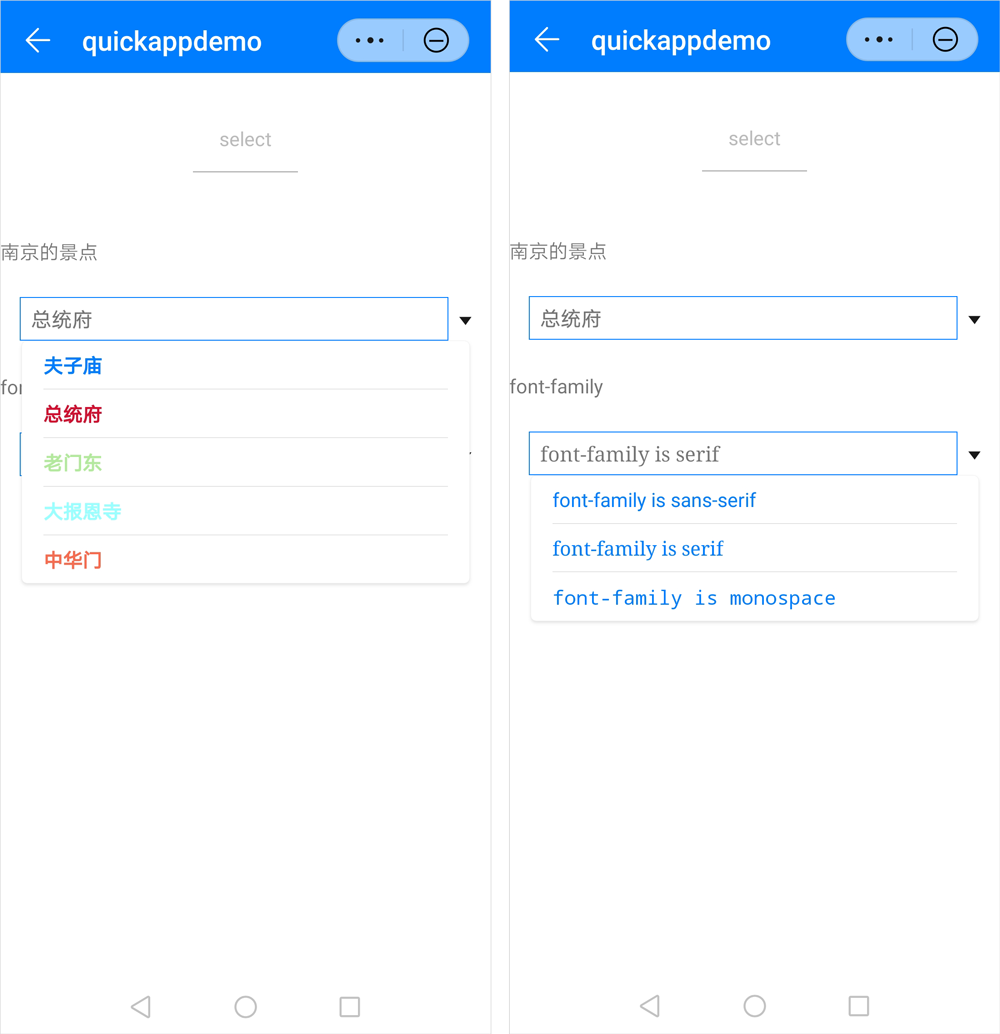
            <text style="margin-bottom: 50px">南京的景点</text>
            <select class="select" onchange="changeValue">
                <option class="option" value="夫子庙">夫子庙</option>
                <option class="optionrgb" value="总统府" selected="true">总统府</option>
                <option class="optionrgba" value="老门东">老门东</option>
                <option class="optionhsl" value="大报恩寺">大报恩寺</option>
                <option class="optionhsla" value="中华门">中华门</option>
            </select>
        </div>
        <div class="item-container">
            <text style="margin-bottom: 50px">font-family</text>
            <select class="select font-family2" onchange="changeValue">
                <option class="option font-family1" value="sans-serif">font-family is sans-serif</option>
                <option class="option font-family2" value="serif" selected="true">font-family is serif</option>
                <option class="option font-family3" value="monospace">font-family is monospace</option>
            </select>
        </div>
    </div>
</template>
<script>
    import prompt from '@system.prompt'
    export default {
        data: {
            componentName: 'select'
        },
        changeValue(e) {
            prompt.showToast({
                message: `[${e.newValue}] selected`,
                duration: 2000,
                gravity: 'center'
            })
        }
    }
</script>
<style>
    .container {
        flex: 1;
        flex-direction: column;
    }
    .page-title-wrap {
        padding-top: 50px;
        padding-bottom: 80px;
        justify-content: center;
    }
    .page-title {
        padding-top: 30px;
        padding-bottom: 30px;
        padding-left: 40px;
        padding-right: 40px;
        border-color: #bbbbbb;
        color: #bbbbbb;
        border-bottom-width: 2px;
    }
    .item-container {
        margin-top: 20px;
        margin-bottom: 30px;
        flex-direction: column;
    }
    .item-title {
        padding-left: 30px;
        padding-bottom: 30px;
        padding-top: 30px;
        border-bottom-width: 1px;
        border-color: #bbbbbb;
        color: #aaaaaa;
    }
    .item-content {
        background-color: #ffffff;
        border-bottom-width: 1px;
        border-color: #bbbbbb;
        padding-left: 30px;
        padding-right: 30px;
    }
    .select {
        margin-left: 30px;
        margin-right: 30px;
        align-items: flex-start;
        border-color: #007DFF;
        border-width: 1px;
    }
    .option {
        color: #007DFF;
        font-size: 30px;
        font-weight: bold;
    }
    .optionrgb {
        color: rgb(207, 18, 49);
        font-size: 30px;
        font-weight: bold;
    }
    .optionrgba {
        color: rgba(86, 206, 38, 0.452);
        font-size: 30px;
        font-weight: bold;
    }
    .optionhsl {
        color: hsl(180, 100%, 80%);
        font-size: 30px;
        font-weight: bold;
    }
    .optionhsla {
        color: hsla(10, 90%, 60%, 0.9);
        font-size: 30px;
        font-weight: bold;
    }
    .font-family1 {
        font-family: sans-serif;
    }
    .font-family2 {
        font-family: serif;
    }
    .font-family3 {
        font-family: monospace;
    }
</style>
效果图如下:
版本 |
发布日期 |
描述 |
|---|---|---|
1030 |
2018-10-31 |
新增font-family样式的设置,支持四种系统原生字体:normal , sans-serif , serif , monospace。 |