样式
支持active伪类。除了支持 通用样式以外,还支持如下样式。
名称 | 类型 | 默认值 | 是否必填 | 描述 |
|---|---|---|---|---|
lines | number | -1 | 否 | 文本行数,-1代表不限定行数。 |
color | color | rgba(0, 0, 0, 0.54) | 否 | 文本颜色。 |
letter-spacing(1020+) | normal(1100+) | number | normal | 否 | 字符间距(华为扩展接口,非厂商联盟规范,在其他厂商应用中设置无效)。 |
font-size | number | 30px | 否 | 文本尺寸。 |
font-style | normal | italic | normal | 否 | 设定通过font family选定某个字体的子样式。 |
font-weight | lighter (200) | light(350) | regular(400) | medium(500) | 100 | 200 | 300 | 350 | 400 | 500 | 550 | 600 | 700 | 750 | 800| 900 | 1000 | normal | bold | bolder | normal | 否 | 字体的粗细,默认为normal。 |
text-decoration | underline | line-through | none | none | 否 | 如果使用text-decoration属性,则必须对value属性进行赋值。 |
text-indent | length | percentage | cm | em | - | 否 | 文本块首行的缩进。 |
text-align | left | center | right | left | 否 | 定义文字相对它的父元素对齐方向。 默认适配多语言,如果需要固定方向请配合通用属性 dir 使用。 |
line-height | length | - | 否 | 文本行高。 |
text-overflow | clip | ellipsis | clip | 否 | 在设置了行数的情况下生效。 |
font-family(1030+) | string | - | 否 | 通过该属性可以设置组件中字符串的字体,支持四种系统原生字体:normal,sans-serif,serif,monospace(此四种字体只对英文有效)。 如果需要设置自定义字体,请参见“font-face样式”。 |
示例代码
<template>
  <div class="container">
    <div class="page-title-wrap">
      <text class="page-title">{{componentName}}</text>
    </div>
    <div class="item-content">
      <text class="hslbgcolor">hsla background-color</text>
      <text class="item color-1">text-align:center</text>
      <text class="item1 color-1">text-align:left</text>
      <text class="item2 color-1">text-align:right</text>
    </div>

    <div class="item-content">
      <text style="font-weight: bold;">text-font-weight-bold</text>
      <text style="font-weight: bolder;">text-font-weight-bolder</text>
      <text style="font-weight: lighter;">text-font-weight-lighter</text>
      <text>text-font-weight-normal</text>
      <text style="font-weight: 300;">text-font-weight-300</text>
      <text style="font-weight: 400;">text-font-weight-400</text>
      <text style="font-weight: 500;">text-font-weight-500</text>
      <text style="font-weight: 900;">text-font-weight-900</text>
      <text><span style="font-weight: bold;">font-weight-bold</span></text>
      <text><span style="font-weight: bolder;">font-weight-bolder</span></text>
      <text><span style="font-weight: 400;">font-weight-400</span></text>
      <text><span style="font-weight: 500;">font-weight-500</span></text>
    </div>

    <div class="item-container">
      <!-- style -->
      <text class="item-title">lines: default -1</text>
      <text class="txt">This framework is a framework for application development based on the front-end development technology stack. It adopts the popular front-end development model to fit the thinking habits of mainstream front-end developers, while greatly improving the performance of the application and providing a large number of systems that cannot be used in the front-end environment. Capabilities, as well as the ability to connect with many third-party services.</text>
      <text class="item-title">lines:set as 3; text-overflow: clip</text>
      <text class="txt" style="lines: 3;">This framework is a framework for application development based on the front-end development technology stack. It adopts the popular front-end development model to fit the thinking habits of mainstream front-end developers, while greatly improving the performance of the application and providing a large number of systems that cannot be used in the front-end environment. Capabilities, as well as the ability to connect with many third-party services.</text>
      <text class="item-title">lines:set as 3; text-overflow: ellipsis</text>
      <text class="txt" style="lines: 3; text-overflow: ellipsis;">This framework is a framework for application development based on the front-end development technology stack. It adopts the popular front-end development model to fit the thinking habits of mainstream front-end developers, while greatly improving the performance of the application and providing a large number of systems that cannot be used in the front-end environment. Capabilities, as well as the ability to connect with many third-party services.</text>
      <text class="item-title">line-height:set as 50px</text>
      <text class="txt" style="line-height: 50px;">This framework is a framework for application development based on the front-end development technology stack. It adopts the popular front-end development model to fit the thinking habits of mainstream front-end developers, while greatly improving the performance of the application and providing a large number of systems that cannot be used in the front-end environment. Capabilities, as well as the ability to connect with many third-party services.</text>
      <text class="item-letterspacing" style="line-height: 50px;">letter spacing</text>
    </div>

    <div class="item-container">
      <text>abcdefghijklmn</text>
      <text style="text-indent: 100px">abcdefghijklmn</text>
      <text style="text-indent: 3cm">abcdefghijklmn</text>
      <text style="text-indent: 4em">abcdefghijklmn</text>
      <text style="text-indent: 20%">abcdefghijklmn</text>
    </div>
  </div>
</template>

<style>
    .container {
      flex: 1;
      flex-direction: column;
    }
    .page-title-wrap {
      padding-top: 50px;
      padding-bottom: 80px;
      justify-content: center;
    }
    .page-title {
      padding-top: 30px;
      padding-bottom: 30px;
      padding-left: 40px;
      padding-right: 40px;
      border-color: #bbbbbb;
      color: #bbbbbb;
      border-bottom-width: 2px;
    }
    .hslbgcolor {
      text-align: center;
      background-color: hsla(360, 50%, 50%, 0.5);
    }

    .item-container {
      margin-bottom: 50px;
      margin-right: 60px;
      margin-left: 60px;
      flex-direction: column;
    }

    .item-title {
      padding-top: 50px;
      padding-bottom: 20px;
      color: #aaaaaa;
    }

    .item-content {
      flex-direction: column;
      margin-right: 60px;
      margin-left: 60px;
    }

    .item {
      height: 150px;
      width: 550px;
      text-align: center;
    }

    .item1 {
      height: 150px;
      width: 550px;
    }

    .item2 {
      height: 150px;
      width: 550px;
      text-align: right;
    }

    .item-letterspacing {
      font-size: 30px;
      letter-spacing: 30px;
    }

    .color-1 {
      background-color: #09ba07;
    }
</style>

<script>
    export default {
        data: {
            componentName: 'text'
        },
        onInit() {
            this.$page.setTitleBar({ text: 'text' })
        }
    }
</script>
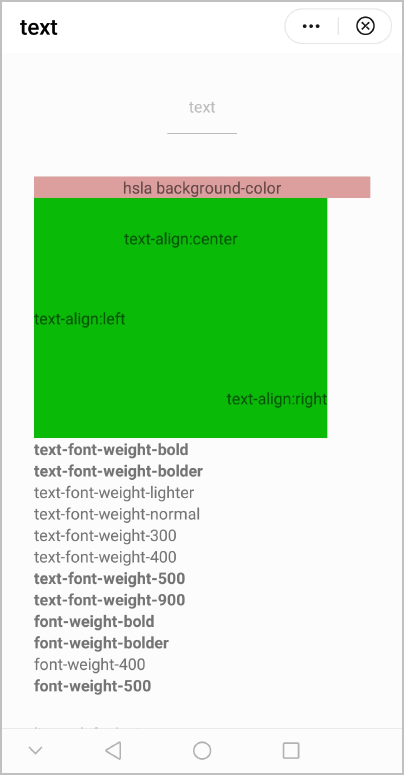
效果图如下:
版本更新说明
版本 | 发布日期 | 描述 |
|---|---|---|
1110 | 2024-02-07 | font-weight样式新增了适用的类型。 |
1100 | 2022-07-07 |
|
1030 | 2018-10-31 |
|
1020 | 2018-06-20 | 新增了样式letter-spacing的设置。 |
1010 | 2018-04-20 | 支持active伪类效果。 |