















合作咨询
我们的专家服务团队将竭诚为您提供专业的合作咨询服务
视频播放器。
支持 HTTP/HTTPS/RTSP 协议。在主流的视频编码格式(如:H.263,H.264,MPEG-4 等)和主流的音频编码格式(AAC,FLAC,MP3 等)下,支持主流的音视频封装格式如:MPEG-4(.mp4)、3GPP(.3gp)、MPEG-TS(.ts,not seekable)、Matroska(.mkv)、Ogg(.ogg)等。
| 限制条件 | 说明 |
|---|---|
| 适用终端 | 手机、平板、智慧屏、车机 |
| 适用区域 | 全球 |
不支持。
支持 <text> 属性,同时除了支持 通用属性 以外,还支持如下属性。
| 名称 | 类型 | 默认值 | 是否必填 | 描述 |
|---|---|---|---|---|
| muted(1030+) | boolean | false | 否 | 视频是否静音播放。 |
| src | uri | - | 否 | 视频播放内容的uri,可以设置为绝对路径或者相对路径。uri详细说明请参见“文件组织”中的“URI”章节。 注意 如果uri中需携带参数,参数中请勿包含中文,否则将导致视频播放出错。 |
| preCacheUrl(1117+) | <uri> | false | 否 | 提前缓存在线视频部分内容,提升该视频的首次加载速度。 |
| showLoading(1117+) | <boolean> | true | 否 | 控制视频加载loding条的展示,默认展示,当设置为false时,隐藏loading条。 |
| adIndex(1111+) | number | - | 否 | 作为ad-native-view一级子组件时使用,用来加载广告素材返回的videoUrlList列表中的视频路径,参考广告onLoad接口,例如,设置0时,表示加载videoUrlList中第一个视频。 注意 当video作为ad-native-view的一级子组件时 src、adIndex加载视频资源的优先级为adIndex > src。 |
| autoplay | boolean | false | 否 | 渲染后是否自动播放。 |
| poster | uri | - | 否 | 视频预览海报。 |
| controls | boolean | true | 否 | 控制视频播放控制条是否显示,如果设置为false,则不显示控制条。默认为true,由平台自己显示或隐藏控制条。 |
| orientation(1070+) | string | landscape | 否 | 控制视频进入全屏时的布局方向。 当用户点击控件的全屏按钮,如果设置为landscape,则横屏播放;如果设置为portrait,则竖屏播放。 |
| titlebar(1072+) | boolean | true | 否 | 指定视频组件全屏播放时是否显示顶栏。
在非全屏时均不显示顶栏。当controls为false时,设置titlebar无效。 |
| title(1072+) | string | - | 否 | 全屏播放时顶栏显示的标题,只支持一行文案,超出内容自动以省略号结尾截断。 |
| playcount(1080+) | integer | 1 | 否 | 循环播放次数,可设置为 infinite,表示无限次播放。 |
| initialtime(1101+) | number | 0 | 否 | 指定视频初始播放位置。 |
| duration(1101+) | number | 0 | 否 | 指定视频长度。 |
| showprogress(1101+) | boolean | true | 否 | 是否显示进度条。如果不设置,则仅在宽度大于 240 时显示。 |
| showfullscreenbtn(1101+) | boolean | true | 否 | 是否显示全屏按钮。 |
| showplaybtn(1101+) | boolean | true | 否 | 是否在视频底部的控制条中显示播放按钮。 |
| showcenterplaybtn(1101+) | boolean | true | 否 | 是否在视频中间显示播放按钮。 |
| showmutebtn(1101+) | boolean | false | 否 | 是否显示静音按钮。 |
| enableplaygesture(1101+) | boolean | false | 否 | 是否可以手势播放,即双击切换播放/暂停。 |
| enableprogressgesture(1101+) | boolean | true | 否 | 是否可以通过手势控制进度。 |
| playbtnposition (1101+) | string | bottom | 否 | 播放按钮的位置。 |
| showscreenlockbutton(1101+) | boolean | false | 否 | 是否显示锁屏按钮。锁屏后,仅在全屏时显示控制条操作。 |
| showsnapshotbutton(1101+) | boolean | false | 否 | 是否显示截屏按钮。仅在全屏时生效。 |
| isdrm(1101+) | boolean | false | 否 | 是否为 DRM 视频源。 |
| provisionurl(1101+) | string | - | 否 | DRM设备认证url。仅在isdrm为true时生效。 |
| licenseurl(1101+) | string | - | 否 | DRM获取加密信息url。仅在isdrm为true时生效。 |
| direction(1101+) | integer | - | 否 | 设置视频的方向,不指定则根据宽高比自动判断。
仅在视频全屏时生效。 |
| enableautorotation(1101+) | boolean | false | 否 | 当设备(手机、平板电脑等)旋转时,视频是否变成横屏。 |
| enabledanmu(1101+) | boolean | false | 否 | 是否显示弹幕。 |
| danmubtn(1101+) | boolean | false | 否 | 是否显示弹幕按钮。该属性仅在初始化时有效,不能动态更改。 |
| danmulist(1101+) | array<object> | - | 否 | 弹幕列表。输入数组中的弹幕对象,如下所示: { "text": "hello", "color": "#0000ff", "time": 10 } |
| vslidegesture(1101+) | boolean | false | 否 | 非全屏模式下,是否可以通过手势调节亮度和音量。 |
| vslidegestureinfullscreen(1101+) | boolean | true | 否 | 全屏模式下,是否可以通过手势调节亮度和音量。 |
| picinpicmode(1101+) | string/array | - | 否 | 设置pop小窗口模式。 支持空字符串或者以数组形式设置多种模式(例如:["pop"])。 |
| picinpicshowprogress(1101+) | boolean | false | 否 | 是否在小窗口模式下显示播放进度。 |
| showbgplaybackbutton(1101+) | boolean | false | 否 | 进入后台音频播放后,是否展示通知栏图标。 |
| autopauseifnavigate(1101+) | boolean | true | 否 | 跳转到本快应用的其他页面时是否自动暂停本页面的视频播放。 |
| autopauseifopennative(1101+) | boolean | true | 否 | 跳转到其他应用或快应用时是否自动暂停本页面的视频播放。 |
| speed(1109+) | number | 1 | 否 | 视频播放速度。最小值为0,可以是小数。 |
| headers(1109+) | string | - | 否 | CDN侧进行认证所需的头信息。如下所示: headers:{key: 'value'} |
| watermarkurl(1109+) | uri | - | 否 | 水印内容的url。 可以设置为绝对路径或者相对路径。uri详细说明请参见“文件组织”中的“URI”章节。 注意 如果uri中需携带参数,参数中请勿包含中文,否则将导致视频播放出错。 |
| watermarkpositionx(1109+) | string | 10px | 否 | 以视频播放内容的左上角为原点,横向为X轴,纵向为Y轴。 该字段表示水印距X轴的位置。 默认情况下,水印显示在距X轴10px处。 |
| watermarkpositiony(1109+) | string | 10px | 否 | 以视频播放内容的左上角为原点,横向为X轴,纵向为Y轴。 该字段表示水印距Y轴的位置。 默认情况下,水印显示在距Y轴10px处。 |
| watermarkwidth(1109+) | string | - | 否 | 指定水印的宽度值。 |
| watermarkheight(1109+) | string | - | 否 | 指定水印的高度值。 |
| codec(1109+) | string | - | 否 | 尝试使用给定的编解码器去解码视频。 |
| minbufferms(1109+) | int | - | 否 | 设置视频播放器的最小缓冲项。如下所示: "minbufferms":50000 |
| maxbufferms(1109+) | int | - | 否 | 设置视频播放器的最大缓冲项。如下所示: "maxbufferms":50000 |
除了支持 通用样式以外,还支持如下样式。
| 名称 | 类型 | 默认值 | 是否必填 | 描述 |
|---|---|---|---|---|
| object-fit(1035+) | contain | cover | fill | none | scale-down | contain | 否 | 视频源的缩放类型。如果poster设置了值,那么此配置还会影响视频海报缩放类型。 |
object-fit 类型说明(1035+):
| 类型 | 说明 |
|---|---|
| cover | 保持宽高比缩小或放大,使得两边都大于或等于显示边界,居中显示。 |
| contain | 保持宽高比,缩小或者放大,使得视频完全显示在显示边界内,居中显示。 |
| fill | 不保存宽高比,填充满显示边界。 |
| none | 保持原有尺寸比例,同时保持替换内容原始尺寸大小。 |
| scale-down | 类似依次设置了none或contain, 最终呈现的是尺寸比较小的那个。 |
不支持swipe事件,低于1040版本点击视频播放控制条不会触发click事件。除了支持 通用事件 以外,还支持如下事件。
| 名称 | 参数 | 描述 |
|---|---|---|
| prepared | - | 视频连接成功时触发。 |
| start | - | 开始播放时触发。当manifest.json文件中最小平台版本号minPlatform>=1076时,该事件只会被触发一次;当minPlatform<1076时,该事件可以被触发多次。 |
| pause | {pauseCode: integer} (1109+) | 暂停时触发。 事件返回pauseCode参数。 有以下3个返回值:
|
| finish | - | 播放结束时触发。 |
| error | {what: integer, extra: integer, errorType: integer, errorCode: integer, errorMsg: string} (1109 +) | 播放失败时触发。 错误类型errorType的返回值如下:
错误码errorCode的返回值如下:
|
| seeking | {currenttime: value(秒)} | 用户操作进度条过程中,上报Seeking时间信息。 |
| seeked | {currenttime: value(秒)} | 用户操作进度条,抬起时上报播放时间信息。 |
| timeupdate | {currenttime: value(秒)} | 播放进度变化时触发,250ms发送一次。 |
| fullscreenchange | {fullscreen: fullscreenValue} | 视频进入和退出全屏时触发。 |
| waiting(1101+) | {status: string} (1109+) | 视频出现卡顿时触发,当卡顿的视频再次播放时也会触发。 status返回值如下:
|
| loadedmetadata(1101+) | {width, height, duration} | 加载视频元数据时触发。 |
| controlstoggle(1101+) | {show} | 在切换显示/隐藏控件时触发。 |
| enterpictureinpicture(1101+) | - | 用户进入小窗口。 |
| leavepictureinpicture(1101+) | - | 用户退出小窗口。 |
| renderedfirstframe(1109+) | - | 视频第一帧加载成功时触发。 |
| 名称 | 参数 | 描述 |
|---|---|---|
| start | - | 开始播放视频。 |
| pause | {pauseCode: integer} (1109+) | 暂停播放视频。 事件返回pauseCode参数。 有以下3个返回值:
|
| setCurrentTime | {currenttime: value(秒)} | 指定视频播放位置。 |
| requestFullscreen(1050+) | { screenOrientation : "portrait" | "landscape" } | 请求进入全屏模式。minPlatformVersion < 1050: 默认参数为 "landscape"; minPlatformVersion >= 1050: 默认参数为 "portrait"。 |
| exitFullscreen | - | 视频退出全屏。 |
| snapshot(1100+) | {success: Function, fail: Function} | 截取当前视频帧。 |
| getSupportedVideoCodecs (1109+) | {callback: Function} | 获取支持的媒体编解码器。 |
snapshot方法的success返回值data对象有以下属性:
| 参数 | 类型 | 说明 |
|---|---|---|
| uri | string | 截屏图片的路径。 |
| name | string | 图片文件的名称。 |
| size | number | 图片的大小,单位B。 |
snapshot方法的fail返回值:
| 参数 | 类型 | 说明 |
|---|---|---|
| errorMsg | string | 错误信息。 |
| errorCode | string | 错误编码。 |
getSupportedVideoCodecs方法的callback返回值:
| 参数 | 类型 | 说明 |
|---|---|---|
| mediaCodecs(1109+) | array | 支持的媒体编解码器列表。 |
您经常会遇到需要全屏显示自定义组件的场景,如“画质切换”,“分享”按钮等。
1080 版本开始,支持此特性。请按照以下步骤实现:
详情请参见 div 组件中的enablevideofullscreencontainer属性解释。
<template>
  <div class="container">
    <div class="page-title-wrap">
      <text class="page-title">{{componentName}}</text>
    </div>
    <div class="item-container">
      <text class="item-title">Play MP4 format</text>
      <stack id="stackDemo01" class="s1">
        <video id="video" style="width:{{twidth}};height:{{theight}}" poster="https://www.quickapp.cn/assets/images/home/video.png" orientation="portrait" onprepared="prepared" onstart="start" onpause="pause" onfinish="finish" onerror="error" onseeking="eventSeeking" onseeked="eventSeeked" ontimeupdate="eventTimeupdate" src="https://ss0.bdstatic.com/-0U0bnSm1A5BphGlnYG/cae-legoup-video-target/93be3d88-9fc2-4fbd-bd14-833bca731ca7.mp4" @fullscreenchange="onFullscreenchange" controls="{{showControls}}" muted="{{muted}}" titlebar="{{titlebar}}" title="Quick APP Introduction video"></video>
        <div class="d1">
          <text style="color:#7fffd4;flex:1">stack Add overlay</text>
          <input type="button" class="btn" value="exit full screen" onclick="exitFullScreen" />
        </div>
      </stack>
    </div>

    <div class="item-container">
      <input type="button" class="btn" value="play" onclick="btnstart" />
    </div>
    <div class="item-container">
      <input type="button" class="btn" value="pause" onclick="btnpause" />
    </div>
    <div class="item-container">
      <input type="button" class="btn" value="seek" onclick="btnSeek" />
    </div>
    <div class="item-container">
      <input type="button" class="btn" value="full landscape" onclick="btnEnterFullLandscape" />
    </div>
    <div class="item-container">
      <input type="button" class="btn" value="full portrait" onclick="btnEnterFullPortrait" />
    </div>
    <div class="item-container">
      <input type="button" class="btn" value="show or hide contorls" onclick="switchShowControls" />
    </div>
    <div class="item-container">
      <input type="button" class="btn" value="show or hide title" onclick="switchShowtitle" />
    </div>
    <div class="item-container">
      <input type="button" class="btn" value="stack full screen" onclick="requestStackFullscreen" />
    </div>
  </div>
</template>

<style>
  .container {
    flex: 1;
    flex-direction: column;
  }

  .page-title-wrap {
    padding-top: 50px;
    padding-bottom: 80px;
    justify-content: center;
  }
  .page-title {
    padding-top: 30px;
    padding-bottom: 30px;
    padding-left: 40px;
    padding-right: 40px;
    border-color: #bbbbbb;
    color: #bbbbbb;
    border-bottom-width: 2px;
  }
  .item-container {
    margin-bottom: 50px;
    margin-right: 60px;
    margin-left: 60px;
    flex-direction: column;
  }

  .d1 {
    flex-direction: column;
    margin-bottom: 20px;
  }

  .s1 {
    height: 350px;
  }

  .item-title {
    padding-left: 30px;
    padding-bottom: 20px;
  }

  .btn {
    height: 80px;
    text-align: center;
    border-radius: 5px;
    margin-right: 60px;
    margin-left: 60px;
    color: #ffffff;
    font-size: 30px;
    background-color: #0faeff;
  }
</style>

<script>
  import prompt from '@system.prompt'

  export default {
    data: {
      componentName: 'video',
      showmask: true,
      showicon: true,
      ignorenet: false,
      showControls: true,
      muted: false,
      objectFitValues: [
        'cover', 'contain', 'fill', 'none', 'scale-down'
      ],
      objectFitClass: '',
      fullScreen: false,
      titlebar: true,
      twidth: '100%',
      theight: '100%'
    },
    onInit() {
      this.$page.setTitleBar({ text: 'video' })
    },
    prepared: function () {
      console.log("play")
      prompt.showToast({ message:"play"})
    },
    start: function () {
      console.log("play")
      prompt.showToast({ message: "play" })
    },
    pause: function () {
      console.log("pause")
      prompt.showToast({ message:"pause" })
    },
    finish: function () {
      console.log("finish play")
      prompt.showToast({ message: "finish play" })
    },
    error: function () {
      console.log("play error")
      prompt.showToast({ message:"play error"})
    },
    eventSeeking: function (e) {
      let msg = "event:" + 'Seeking to ' + e.currenttime
      console.log(msg)
      prompt.showToast({ message: msg })
    },
    eventSeeked: function (e) {
      let msg = "event:" + 'Seeked to ' + e.currenttime
      console.log(msg)
      prompt.showToast({ message: msg })
    },
    eventTimeupdate: function (e) {
      let msg = "event:"+ 'Timeupdate : ' + e.currenttime
      console.log(msg)
      if (e.currenttime === 10) {
        this.$element('video').requestFullscreen()
      } else if (e.currenttime === 20) {
        this.$element('video').exitFullscreen()
      }
    },
    eventFullscreenchange: function (e) {
      let msg = "event:" + 'Fullscreenchange : ' + e.fullscreen
      console.log(msg)
      prompt.showToast({ message: msg })
      this.fullScreen = true
    },
    btnstart: function () {
      this.$element('video').start()
      prompt.showToast({ message: "Click the play button to start playing" })
    },
    btnpause: function () {
      this.$element('video').pause()
      prompt.showToast({ message: "Click the pause button to pause playback" })
    },
    btnSeek: function () {
      this.$element('video').setCurrentTime({ currenttime: 60 })
      prompt.showToast({ message:  "seek 60" })
    },
    btnEnterFullLandscape: function () {
      this.$element('video').requestFullscreen({ screenOrientation: 'landscape' })
      prompt.showToast({ message: 'requestFullscreen landscape' })
    },
    btnEnterFullPortrait() {
      this.$element('video').requestFullscreen({ screenOrientation: 'portrait' })
      prompt.showToast({ message: 'requestFullscreen portrait' })
    },
    onFullscreenchange(data) {
      this.fullScreen = data.fullscreen
    },
    switchShowControls(e) {
      this.showControls = !this.showControls
    },
    onMutedSwitched(e) {
      this.muted = e.checked
    },
    onMulchSwitched(e) {
      this.$element('stackDemo01').requestFullscreen({ screenOrientation: 'landscape' })
    },
    changeOption(e) {
      this.objectFitClass = e.newValue
      prompt.showToast({ message: 'object-fit Successfully switched' })
    },
    switchShowtitle() {
      this.titlebar = !this.titlebar
    },
    requestStackFullscreen() {
      this.$element('stackDemo01').requestFullscreen({ 'screenOrientation': 'landscape' })
    },
    exitFullScreen() {
      this.$element('video').exitFullscreen()
      this.twidth = '100%'
      this.theight = '100%'
    }
  }
</script>
效果图如下:
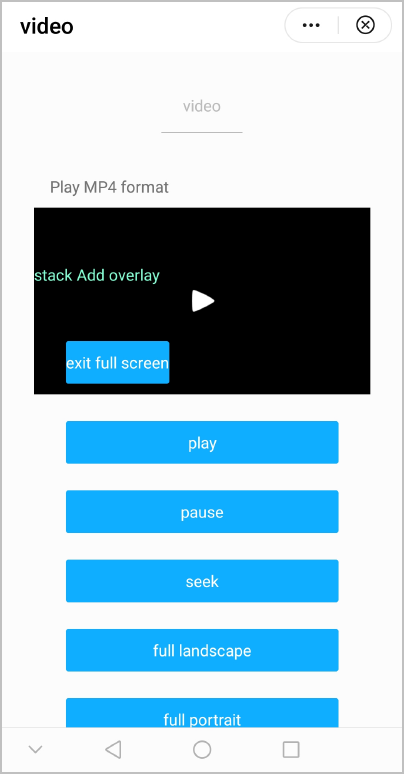
1101以上版本内容相关示例代码:
<template>
  <div class="container">
    <video id="video" class="video" src="{{videoSrc}}" poster="{{videoPoster}}" title={{videoTitle}} showcastingbutton={{showCastingButton}}
    initialtime={{initialTime}} duration={{duration}} danmubtn={{danmuBtn}} enabledanmu={{enableDanmu}} danmulist={{danmuList}} picinpicmode="['pop']"
    picinpicshowprogress={{picInPicShowProgress}} onleavepictureinpicture="onLeavePictureInPicture" onenterpictureinpicture="onEnterPictureInPicture" showprogress={{showProgress}}
    showfullscreenbtn={{showFullScreenButton}} showplaybtn={{showPlayBtn}} showcenterplaybtn={{showCenterPlayBtn}} enableprogressgesture={{enableProgressGesture}}
    autopauseifnavigate={{autoPauseIfNavigate}} autopauseifopennative={{autoPauseIfOpenNative}} showmutebtn={{showMuteButton}} playbtnposition={{playButtonPosition}}
    enableplaygesture={{enablePlayGesture}} vslidegesture={{vSlideGesture}} vslidegestureinfullscreen={{vSlideGestureInFullscreen}} enableautorotation={{enableAutoRotation}}
    showscreenlockbutton={{showScreenLockButton}} showsnapshotbutton={{showSnapshotButton}} showbgplaybackbutton={{showBgPlaybackButton}} isdrm={{isDrm}}
    licenseurl={{licenseUrl}} provisionurl={{provisionUrl}}></video>
  </div>
</template>

<style>
  .container {
    flex-direction: column;
    justify-content: center;
    align-items: center;
  }

  .video {
    width: 600px;
    height: 400px;
  }
</style>

<script>
  export default {
    data: {
      videoSrc: 'https://ss0.bdstatic.com/-0U0bnSm1A5BphGlnYG/cae-legoup-video-target/93be3d88-9fc2-4fbd-bd14-833bca731ca7.mp4',
      videoPoster: 'https://www.quickapp.cn/assets/images/home/video.png',
      videoTitle: 'Sample Video',
      showCastingButton: true,
      initialTime: 10,
      duration: 20,
      direction: 90,
      danmuBtn: true,
      enableDanmu: true,
      danmuList: [{ text: 'Danmu test 6 second', color: '#0000ff', time: 6 }, { text: 'Danmu test 12 second', color: '#f0000f', time: 12 }, { text: 'Danmu test 18 second', color: '#0ffff0', time: 18 }],
      showProgress: true,
      showFullScreenButton: true,
      picInPicShowProgress: false,
      showPlayBtn: true,
      showCenterPlayBtn: true,
      enableProgressGesture: true,
      autoPauseIfNavigate: true,
      autoPauseIfOpenNative: true,
      showMuteButton: true,
      playButtonPosition: "bottom",
      enablePlayGesture: true,
      vSlideGesture: true,
      vSlideGestureInFullscreen: true,
      enableAutoRotation: true,
      showScreenLockButton: true,
      showSnapshotButton: true,
      showBgPlaybackButton: true,
      isDrm: false,
      licenseUrl: "",
      provisionUrl: ""
    },
    onEnterPictureInPicture() {
      console.log("onenterpictureinpicture called.")
    },
    onLeavePictureInPicture() {
      console.log("onleavepictureinpicture called.")
    }
  }
</script>
1109以上版本内容相关示例代码:
<template>
<!-- Only one root node is allowed in template. -->
  <div class="container">
    <div enablevideofullscreencontainer="true"class="mt-item mlr-container">
     <video title="Video component"titlebar="{{showTitleBar}}"controls="{{showControls}}"src="{{videoUrl}}"onPause="pauseMethod"class="video"id="video" onwaiting="waiting" headers="{{headers}}" minbufferms="{{minbufferms}}"  maxbufferms="{{maxbufferms}}" onrenderedfirstframe="{{renderedfirstframe}}" watermark="{{watermarkUri}}" onerror="error" codec="{{codec}}"></video>
    </div>
      <list class="mlr-container btn-list">
        <list-item type="btn"class="btn-item">
          <text class="btn-transparent"onclick="startVideo">{{$t('message.component.video.play')}}</text>
        </list-item>
        <list-item type="btn"class="btn-item">
          <text class="btn-transparent"onclick="stopVideo">{{$t('message.component.video.pause')}}</text>
        </list-item>
        <list-item type="btn"class="btn-item">
          <text class="btn-transparent"onclick="fullscreen">{{$t('message.component.video.enterFullScreen')}}</text>
        </list-item>
        <list-item type="btn"class="btn-item">
          <text class="btn-transparent"onclick="switchControls">{{$t('message.component.video.switchControl')}}</text>
        </list-item>
        <list-item type="btn"class="btn-item">
          <text class="btn-transparent"onclick="switchTitleBar">{{$t('message.component.video.switchTitle')}}</text>
        </list-item>
        <list-item type="btn"class="btn-item">
          <text class="btn-transparent"onclick="setTime">{{$t('message.component.video.seek')}}</text>
        </list-item>
        <list-item type="btn"class="btn-item">
          <text class="btn-transparent"onclick="snapShot">{{$t('message.component.video.snapShot')}}</text>
        </list-item>
        <list-item type="btn"class="btn-item">
          <text class="btn-transparent"onclick="mediaCodecs">{{$t('message.component.video.mediaCodecs')}}</text>
        </list-item>
      </list>
  </div>
</template>
<style lang="sass">
@import '../../../Common/css/common.scss';
@import '../../../Common/css/button.scss';
.btn-list{
  columns: 2;
  .btn-item{
  height: 140px;
  align-items: center;
  justify-content: center;
  }
}
</style>
<script>
import { huaweiAdVideo } from '../../../Common/js/static';
import media from '@system.media';
import share from '@system.share';
import prompt from '@system.prompt';
module.exports = {
  public: {
    videoUrl:huaweiAdVideo,
    showControls:true,
    showTitleBar:true,
    deocder:"OMX.hisi.video.decoder.avc",
    headers:"{Authorization: 'secret_key_x'}",
    watermarkUri:"/Common/logo.png",
    minbufferms:"50000",
    maxbufferms:"50000"
  },
  onInit:function () {
    this.$page.setTitleBar({ text:this.$t('message.component.video.barTitle') });
  },
  startVideo(){
    this.$element('video').start();
  },
  stopVideo(){
    this.$element('video').pause();
  },
  pauseMethod(event){
    console.log('pauseCode: '+event.pauseCode)
  },
  fullscreen(){
    this.$element('video').requestFullscreen();
  },
  exitFullscreen(){
    this.$element('video').exitFullscreen();
  },
  switchControls(){
    this.showControls = !this.showControls;
  },
  switchTitleBar(){
    this.showTitleBar = !this.showTitleBar;
  },
  setTime(){
    this.$element('video').setCurrentTime({currenttime:60});
  },
  renderedfirstframe: function () {
    console.log("renderedfirstframe")
    prompt.showToast({ message:"renderedfirstframe })
  },
  waiting (data) {
    if(data.status === null || data.status === undefined){
      prompt.showToast({ message: 'Freezing info: start' })
    }else  if(data.status === "end"){
      prompt.showToast({ message: 'Freezing info: end' })
    }
  },
  error: function(event){
    let msg = "Error Type: " + event.errorType + " " +  "Error Code: " + event.errorCode + " " + "Error Message: " + event.errorMsg
    prompt.showToast({message.msg})
  },
  mediaCodecs(){
    this.$element('video').getSupportedVideoCodes({
      callback: function (data) {
        prompt.showToast({
          message: data.supportedMediaCodecs,
          duration: 2000,
          gravity: 'bottom'
        });
      },
    });
  },
  snapShot() {
  // 获取video组件并调用snapshot方法进行截屏
    this.$element('video').snapshot({
      success: (data) => {
        console.log(`图片路径:${data.uri}, 图片名称:${data.name}, 图片大小:${data.size}`)
        const imagePath = data.uri
        if (imagePath && imagePath.length > 0) {
          share.share({
            type:"image/jpeg",
              data:data.uri,
                success:function (data) {
                  prompt.showToast({
                    message:'success',
                    duration:2000,
                    gravity:'bottom'
                  })
                },
                fail:function () {
                  prompt.showToast({
                    message:'fail',
                    duration:2000,
                    gravity:'bottom'
                  })
                }
          })
        }
      },
      fail: (errorMsg, errorCode) => {
        console.log(`fail message: ${errorMsg}`)
        console.log(`fail code: ${errorCode}`)
      }
    })
  }
}
</script> | 版本 | 发布日期 | 描述 |
|---|---|---|
| 1109 | 2023-12-19 |
|
| 1101 | 2022-09-10 | 新增1101规范的属性和事件。 |
| 1100 | 2022-07-07 | 新增视频截屏方法snapshot。 |
| 1080 | 2021-12-28 |
|
| 1070 | 2020-05-19 | 新增orientation属性,用于控制视频进入全屏时的布局方向。 |
| 1050 | 2019-09-20 | 新增 requestFullscreen 方法,请求进入全屏模式。 |
| 1030 | 2018-10-31 | 新增muted属性,用于控制视频播放时是否静音。 |
| 1010 | 2018-04-20 | 新增controls属性,用于控制视频播放控制条的显示和隐藏。 |