Overview
Code obfuscation increases the complexity and ambiguity of code, making it more difficult for attackers to analyze the code. Code obfuscation has the following functions:
- Protect intellectual property: Code obfuscation prevents others from easily copying and stealing software code, and increases the difficulty of reverse engineering.
- Prevent reverse engineering: Reverse engineering is the process of analyzing software and understanding its working principles and implementation details. Code obfuscation increases the difficulty of reverse engineering and protects apps from malicious modification or damage.
- Improve security: Code obfuscation reduces vulnerabilities and security risks, and increases the difficulty for attackers to exploit vulnerabilities.
- Reduce the risk of anti-piracy and fraud: Code obfuscation increases the difficulty for attackers to crack the software license verification system or modify the code to bypass the payment mechanism.
Obfuscation of project source code can increase the difficulty of cracking the project, shorten the names of classes and members, and reduce the app size.
Enabling Obfuscation
From DevEco Studio 4.0 Beta1, the hvigor plug-in provides the code obfuscation feature. The conditions for enabling obfuscation are as follows:
- The project is developed in the stage model.
- The release compilation mode is used.
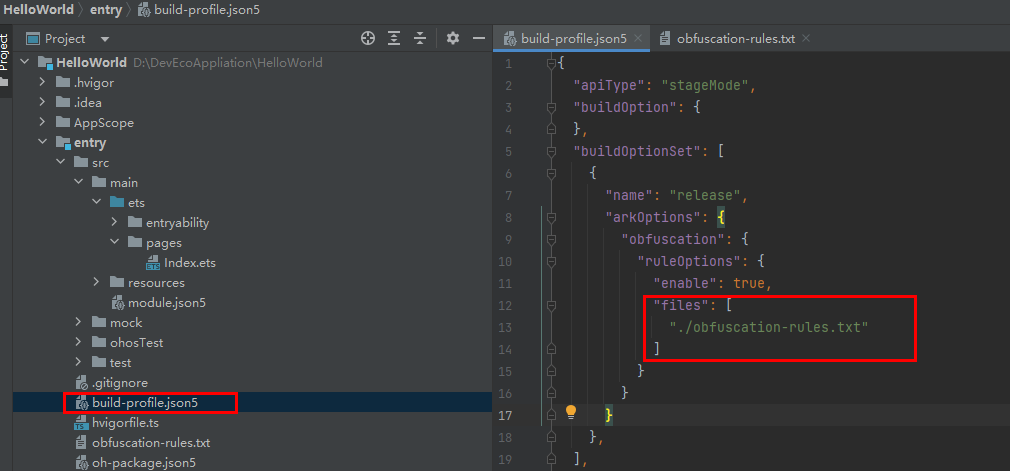
- Obfuscation configuration is enabled in the build-profile.json5 file.
"arkOptions": {
  "obfuscation": {
    "ruleOptions": {
      "enable": true,
      // ...
    }
  }
},

The default value of enable is false, indicating that code obfuscation is disabled.
When the preceding conditions are met, select the target module and choose Build > Make Module to start compilation.
If your project or module is a static library, you need to build a HAR.
You can build a HAR in any of the following ways:
- Build a HAR in debug mode. In this case, the source code is directly packaged without code obfuscation.
- If a HAR is built in release mode, the code is compiled, obfuscated, and compressed.
- Build a HAR in the bytecode format. When obfuscation is enabled, the compiler obfuscates the intermediate files of the source code and then generates the abc bytecode.
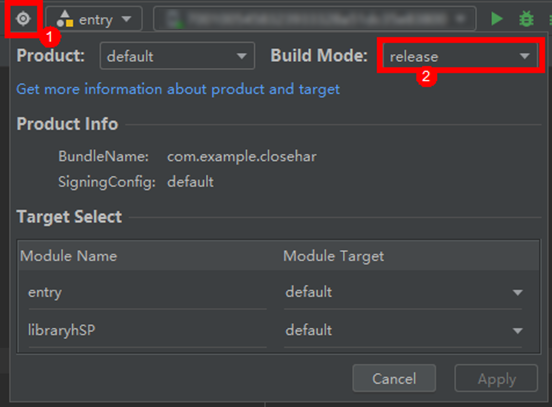
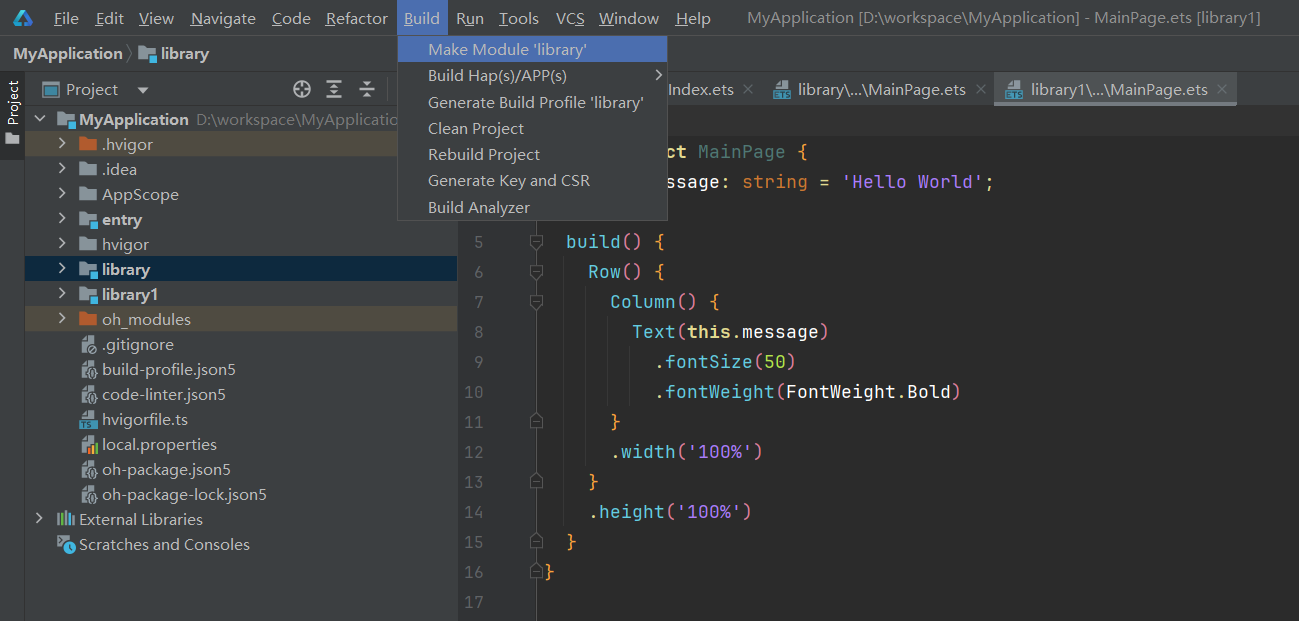
[h2]Compilation Option
For DevEco Studio earlier than 5.0.3.600, only parameter names and local variable names are obfuscated by default. From DevEco Studio 5.0.3.600, the following four recommended obfuscation options are enabled by default: -enable-property-obfuscation, -enable-toplevel-obfuscation, -enable-filename-obfuscation, and -enable-export-obfuscation. You can modify the obfuscation configuration as required.
If obfuscation is enabled in a pipeline and the release build mode is used, add -p buildMode=release -p debuggable=false to the compilation parameters.
[h2]Obfuscation Configuration
You can find the build-profile.json5 file in each module, as shown in the following figure. You can configure whether to enable obfuscation and the obfuscation configuration file in this file.
When a project is created, the obfuscation-rules.txt file is available in each module for configuring obfuscation.
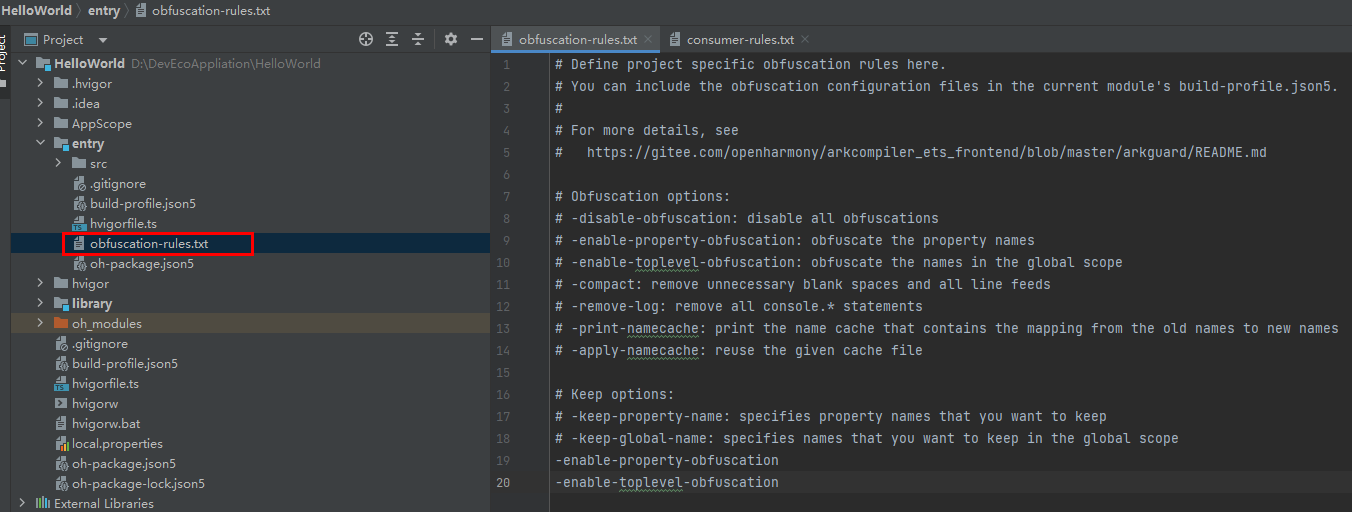
In the preceding figure, -enable-property-obfuscation and -enable-toplevel-obfuscation are added to the obfuscation-rules.txt file, indicating that property obfuscation and top-level scope name obfuscation are enabled.
The options and functions of DevEco Studio obfuscation are described as follows.
Custom Obfuscation Option Name | Description | |
Obfuscate Options | -disable-obfuscation | Disables obfuscation. |
-enable-property-obfuscation | Enables property obfuscation. | |
-enable-toplevel-obfuscation | Enables top-level scope name obfuscation. | |
-enable-filename-obfuscation | Enables file name obfuscation. | |
-enable-export-obfuscation | Enables the exported name and property obfuscation. | |
-compact | Enables code compression. | |
-remove-log | Deletes the console.* method. | |
-print-namecache filepath | Outputs the namecache.json file and its content in a specified path. | |
-apply-namecache filepath | Reuses the specified name cache file. | |
-remove-comments | Deletes comments. | |
Keep Options | -keep-property-name | Keeps the property names from being obfuscated. |
-keep-global-name | Keeps the top-level scope and exported element names from being obfuscated. | |
-keep-file-name | Keeps the specified file/folder names from being obfuscated. | |
-keep-dts | Reads the names in the specified .d.ts file as the trustlist. | |
-keep-comments | Keeps the classes, functions, namespaces, enums, structs, interfaces, modules, types, and JsDoc comments above properties in the declaration file generated after compilation from being obfuscated. | |
-keep | Keeps all names (such as variable names, class names, and property names) in the specified relative path from being obfuscated. | |
Wildcard | Allows wildcards in all the keep options of the name classes and path classes. |
For details, see ArkGuard.
Obfuscation Optimization Suggestions
When obfuscating a project, you may find that a large number of source code names in the cache file or SDK file are not obfuscated. The possible causes are as follows:
- Only a few obfuscation options are enabled. You can enable the -enable-property-obfuscation, -enable-toplevel-obfuscation, -enable-export-obfuscation and -enable-filename-obfuscation options.
- The source code name is the same as that in the system trustlist or language trustlist. You can add a suffix to avoid using the same name in the trustlist.
[h2]Obfuscation Rule Merge Policy
During module compilation, the effective obfuscation rules are the merged result of the current module's obfuscation rules and the dependent modules' obfuscation rules. The specific rules are as follows: For details, see Obfuscation Rule Merging Strategies.
Viewing the Obfuscation Result
You can find the cache files generated during compilation and obfuscation, obfuscation name mapping table, and system API trustlist file in the build directory of the compilation module.
- Directory of the source code compilation and obfuscation cache file: build/[...]/release/Module_name
- Directory of the name mapping file and system API trustlist file: build/[…]/release/obfuscation
- Name mapping table: nameCache.json, which records the source code name mapping.
- System API trustlist: systemApiCache.json, which records the SDK APIs and property names.
Figure 5 DevEco Studio compilation products and cache files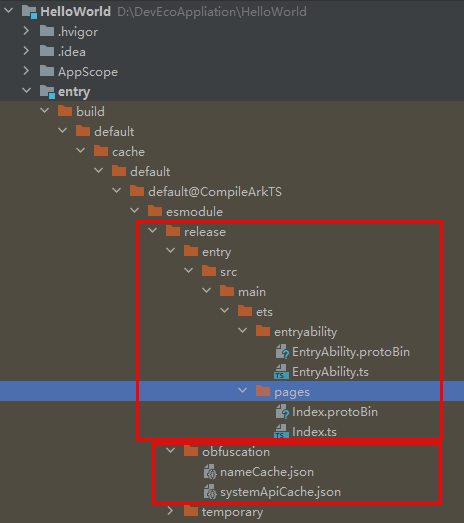
Debugging
The name of the code processed by the obfuscation tool will change, which may make the crash stack log difficult to understand because the stack is inconsistent with the source code. If debugging information is not retained, changes on line numbers and names may make it difficult to locate the problem. In addition, after options such as -enable-property-obfuscation and -enable-toplevel-obfuscation are enabled, code obfuscation may cause runtime crashes or functional errors. You need to restore the error stack, locate and rectify the fault, and configure the trustlist to ensure normal running.
[h2]Function Call Stack Restoration
The code name in the obfuscated app changes. Therefore, the error stack is different from the source code, and the error stack printed during crash is difficult to understand. For details about how to rectify the fault, see Deobfuscating Error Stacks.
[h2]Anti-Obfuscation Tool hstack
Node.js needs to be configured in environment variables for hstack. For details, see Using hstack.
Using Third-Party Hardening
In addition to the code obfuscation capabilities provided by HarmonyOS, there are also advanced obfuscation and hardening capabilities provided by third-party security vendors. As many security hardening vendors have started HarmonyOS development, you can select services provided by these vendors as required, and communicate with them about the cooperation mode and scope, which will not described in this document. The relationship between the official and third-party code obfuscation capabilities is as follows.
Feature | Description | HarmonyOS | Third Party |
Name obfuscation | Obfuscates classes, fields, properties, methods, and file names. | √ | √ |
Control obfuscation | Obfuscates control flows within the method to defend against automatic or manual code analysis, including fake control flows and control flow flattening. | × | √ |
Command conversion | Converts simple arithmetic and logical expressions into code that is difficult to analyze to protect proprietary formulas. | × | √ |
Data obfuscation | Encrypts sensitive strings to prevent hacker attacks through search attempts. It is also used to encrypt classes, asset files, resource files, and native libraries. | × | √ |
Code virtualization | Converts the method implementation into a sequence of randomly generated VM instructions | × | √ |
Calling hidden APIs | Adds reflection for access-sensitive APIs, such as standard APIs for signature verification and password operations. | × | √ |
Removing log code | Removes logging, debugging, and testing code to prevent any attempt to exploit this information. | × | √ |
Due to the restrictions of security mechanisms of HarmonyOS code signature and app encryption, and the pure security requirements of app release review on AGC, the third-party security hardening capabilities must meet the following requirements:
1. Do not hide sensitive system API calls. Ensure that reviewers can clearly view app features.
2. Do not obfuscate SDKs that are not developed in-house. SDKs should be obfuscated by SDK vendors. Otherwise, the fingerprint information of the SDKs will be affected during app review.
3. Ensure that the app hardened by a third party does not contain malicious behavior to avoid impact on the ecosystem. This is a mandatory requirement. If this requirement is not met, the app may be removed from the app market.
4. Do not use third-party VMs, as HarmonyOS uses code signature to restrict dynamic code loading. Otherwise, apps cannot run properly.
5. Do not tamper with the ARK bytecode file. Otherwise, the app may fail to run properly, and its purity and security review may fail as well.
6. Do not hook system libraries. Otherwise, the app's purity and security review may fail.