Description
hstack is a tool to help you deobfuscate crash stacks from release apps and restore them to the corresponding source code stacks. It supports Windows, macOS, and Linux platforms. For details on the principles of stack trace parsing, see Exception Stack Trace Analysis.
The hstack command format is as follows:
hstack [options]
options: indicates available configurations. For details, see hstack command configurations.
Parameter | Description |
|---|---|
-i/--input | (Optional) Specifies the archive directory of the project crash files. This parameter is supported since version 26.0.0. |
-c/--crash | (Optional) Specifies a crash stack. |
-o/--output | (Optional) Specifies the output directory or file of the parsing result.
|
-s/--sourcemapDir | (Optional) Specifies the archive directory of the sourceMap file of the project. This parameter is supported since version 26.0.0. |
--so/--soDir | (Optional) Specifies the archive directory of the shared object file of the project. This parameter is supported since version 26.0.0. |
-n/--nameObfuscation | (Optional) Specifies the archive directory of the nameCache file of the project. This parameter is supported since version 26.0.0. |
-v/--version | Displays the hstack version. |
-h/--help | Displays help information about the hstack command. |

- Either the crash file/archive directory or crash stack must be provided.
- At least one of the following must be provided: the sourceMap file, or the shared object files (or their archive directories).
- To resolve and restore method names, both the sourceMap and nameCache files must be provided.
- A directory does not support the following special characters: `~!@#$^&*=|{};,\s\[\]<>?~
Environment Setup
- Configure the bin directory of Command Line Tools (where the hstack tool is located) to the PATH variable.
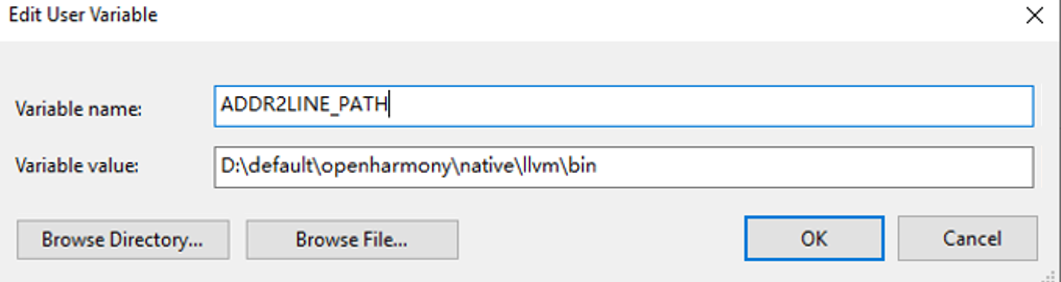
- To parse exceptions generated by C++ files, configure the native\llvm\bin directory in the SDK to an environment variable and set the variable name ADDR2LINE_PATH.
Example
- Archive the crash files generated by the app to the crashDir directory (or specify a crash stack via -c). For details about how to obtain the stack, see Crash Detection.
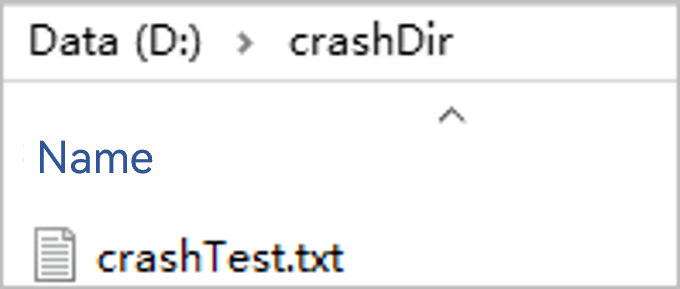
- Use -o to specify the output directory. If it is not provided, the result is output to the crashDir directory specified by -i. (When the input is a crash stack specified by -c, you can use -o to specify an output file; or you can omit it, and the results will be directly output to the console.)
- (Optional) Use -s to specify the archive directory of the sourceMap file of the project. (One or both of the archive directories for sourceMap files and shared object files must be provided.)

- (Optional) Use --so to specify the archive directory of the shared object file. (One or both of the archive directories for sourceMap files and shared object files must be provided.)
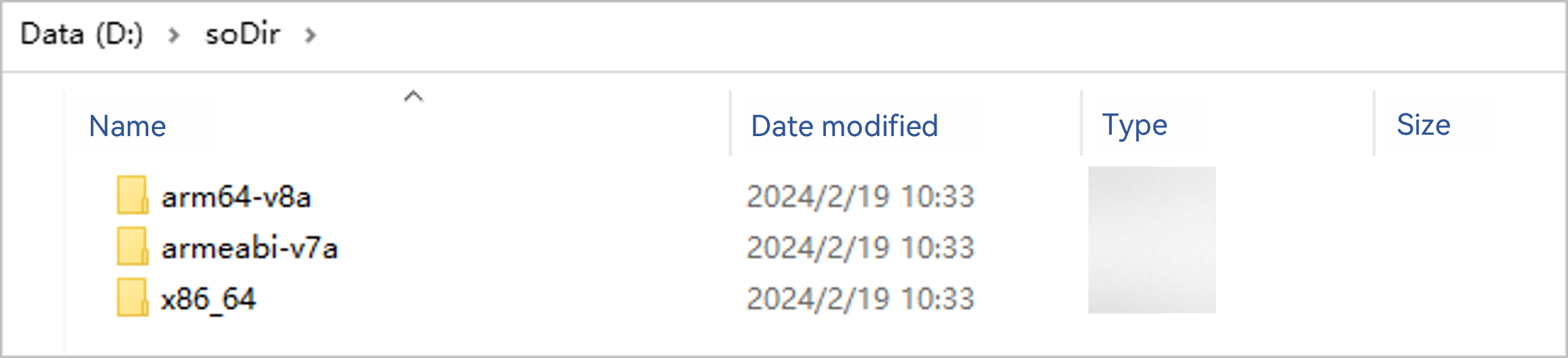
- (Optional) Use -n to specify the nameCache file archive directory.

- Run the following command to parse crash stacks of the release app into source code stacks.
# Use -i to specify the crash file archive directory and output the parsing result to the outputDir directory.
hstack -i D:\crashDir -o D:\outputDir -s D:\sourcemapDir --so D:\soDir -n D:\nameCacheDir
# Use -c to specify a stack and output the parsing result to the out.txt file.
hstack -c "at anonymous (entry|entry|1.0.0|src/main/ets/pages/Index.ts:401:1)" -o D:\outputDir\out.txt -s D:\sourcemapDir --so D:\soDir -n D:\nameCacheDir


If you specify the archive directory for crash files, corresponding parsing results are generated in the outputDir directory after parsing. Each output file is named after the original crash file and prefixed with an underscore (_). The C++ logs and ArkTS logs in the crash stack have been parsed into the file path, row number, and column number corresponding to the source code, as shown in the following figure.

When a release app is built, the .so file does not contain symbol table information by default. To generate a .so file that contains symbol table information, set buildOption in the module-level build-profile.json5 file as follows:
"buildOption": {
  "externalNativeOptions": {
    "arguments": "-DCMAKE_BUILD_TYPE=RelWithDebInfo"
  }
}
Stack Parsing Solution Description
The following code is used as an example.
In this example, the Entry module references the har method in the har module through an independent har file.
import {har} from 'Har'
@Entry
@Component
struct Index {
  @State har: string = 'Har';
  build() {
    Row() {
      Column() {
        Text(this.har)
          .fontSize(50)
          .fontWeight(FontWeight.Bold)
          .onClick(() => {
            let entryClass = new EntryClass();
            entryClass.callHarFunction();
          })
      }
      .width('100%')
    }
    .height('100%')
  }
}

class EntryClass {
  callHarFunction() {
    har()
  }
}
@Component
export struct MainPage {
@State message: string = 'Hello World';
build() {
Row() {
Column() {
Text(this.message)
.fontSize(50)
.fontWeight(FontWeight.Bold)
}
.width('100%')
}
.height('100%')
}
}
export function har() {
BigInt(1.1)
} The generated crash report is as follows:
at har (entry|har|1.0.0|src/main/ets/components/mainpage/MainPage.js:58:58)
at i (entry|entry|1.0.0|src/main/ets/pages/Index.ts:71:71)
at anonymous (entry|entry|1.0.0|src/main/ets/pages/Index.ts:55:55)
The crash report contains obfuscated method names (or property names), path information, and obfuscated line and column number information, where:
- The method names are obfuscated after the corresponding obfuscation rules are configured (for example, callHarFunction in EntryClass is obfuscated to i in the above example). The mapping relationship between the obfuscated and non-obfuscated method names is saved in the nameCache file of the corresponding module's build product.
- The path information follows the format: entry-packageName of the referencing party|packageName the referenced party|version|relative source code path, where packageName and version are saved in the sourceMap file of the corresponding module's build product.
- The mapping between obfuscated and original line and column numbers is stored in the sourceMap file of the corresponding module's build product. The mappings field in the file can be used to parse obfuscated line and column numbers and restore them to original ones.
To restore a stack, perform the following steps:
- Locate the sourceMap file of the referencing module using its path information. For example, the first stack trace:
at har (entry|har|1.0.0|src/main/ets/components/mainpage/MainPage.js:58:58)
You can find the following fields in the sourceMap file of the entry module at entry|har|1.0.0|src/main/ets/components/mainpage/MainPage.js:
"entry|har|1.0.0|src/main/ets/components/mainpage/MainPage.js": { "version": 3, "file": "MainPage.js", "sources": [ "oh_modules/.ohpm/Har@ue9rwlwgmslvadnmypsedjcin6a=/oh_modules/Har/src/main/ets/components/mainpage/MainPage.js" ], "names": [], "mappings": "AAAA,IAAA,CAAA,CAAA,sBAAA,IAAA,MAAA,CAAA,SAAA,CAAA,EAAA;IACA,OAAA,CAAA,GAAA,CAAA,MAAA,CAAA,SAAA,EAAA,sBAAA,EAAA,GAAA,EAAA,GAAA,CAAA,CAAA,CAAA;CACA;AACA,MAAA,OAAA,QAAA,SAAA,MAAA;IACA,YAAA,CAAA,EAAA,EAAA,EAAA,CAAA,EAAA,CAAA,GAAA,CAAA,CAAA,EAAA,CAAA,GAAA,SAAA,EAAA,CAAA;QACA,KAAA,CAAA,CAAA,EAAA,CAAA,EAAA,CAAA,EAAA,CAAA,CAAA,CAAA;QACA,IAAA,OAAA,CAAA,KAAA,UAAA,EAAA;YACA,IAAA,CAAA,gBAAA,GAAA,CAAA,CAAA;SACA;QACA,IAAA,EAAA,GAAA,IAAA,wBAAA,CAAA,aAAA,EAAA,IAAA,EAAA,SAAA,CAAA,CAAA;QACA,IAAA,CAAA,yBAAA,IAAA,CAAA;QACA,IAAA,CAAA,oBAAA,EAAA,CAAA;IACA,CAAA;IACA,yBAAA,CAAA,EAAA;QACA,IAAA,GAAA,OAAA,KAAA,SAAA,EAAA;YACA,IAAA,CAAA,OAAA,GAAA,GAAA,OAAA,CAAA;SACA;IACA,CAAA;IACA,eAAA,CAAA,CAAA;IACA,CAAA;IACA,iCAAA,CAAA,CAAA;QACA,IAAA,EAAA,CAAA,uBAAA,CAAA,CAAA,CAAA,CAAA;IACA,CAAA;IACA,gBAAA;QACA,IAAA,EAAA,CAAA,gBAAA,EAAA,CAAA;QACA,iBAAA,CAAA,GAAA,EAAA,CAAA,MAAA,CAAA,IAAA,CAAA,IAAA,EAAA,CAAA,CAAA;QACA,IAAA,CAAA,wBAAA,EAAA,CAAA;IACA,CAAA;IACA,IAAA,OAAA;QACA,OAAA,IAAA,EAAA,CAAA,GAAA,EAAA,CAAA;IACA,CAAA;IACA,IAAA,OAAA,CAAA,EAAA;QACA,IAAA,EAAA,CAAA,GAAA,IAAA,CAAA;IACA,CAAA;IACA,aAAA;QACA,IAAA,CAAA,yBAAA,CAAA,CAAA,CAAA,EAAA,EAAA,EAAA,EAAA;YACA,GAAA,CAAA,MAAA,EAAA,CAAA;YACA,GAAA,CAAA,MAAA,CAAA,MAAA,CAAA,CAAA;QACA,CAAA,EAAA,GAAA,CAAA,CAAA;QACA,IAAA,CAAA,yBAAA,CAAA,CAAA,CAAA,EAAA,CAAA,EAAA,EAAA;YACA,MAAA,CAAA,MAAA,EAAA,CAAA;YACA,MAAA,CAAA,KAAA,CAAA,MAAA,CAAA,CAAA;QACA,CAAA,EAAA,MAAA,CAAA,CAAA;QACA,IAAA,CAAA,yBAAA,CAAA,CAAA,CAAA,EAAA,CAAA,EAAA,EAAA;YACA,IAAA,CAAA,MAAA,CAAA,IAAA,CAAA,OAAA,CAAA,CAAA;YACA,IAAA,CAAA,QAAA,CAAA,EAAA,CAAA,CAAA;YACA,IAAA,CAAA,UAAA,CAAA,UAAA,CAAA,IAAA,CAAA,CAAA;QACA,CAAA,EAAA,IAAA,CAAA,CAAA;QACA,IAAA,CAAA,GAAA,EAAA,CAAA;QACA,MAAA,CAAA,GAAA,EAAA,CAAA;QACA,GAAA,CAAA,GAAA,EAAA,CAAA;IACA,CAAA;IACA,QAAA;QACA,IAAA,CAAA,mBAAA,EAAA,CAAA;IACA,CAAA;CACA;AACA,MAAA,UAAA,GAAA;IACA,MAAA,CAAA,GAAA,CAAA,CAAA;AACA,CAAA", "entry-package-info": "entry|1.0.0", "package-info": "har|1.0.0" } - Use the corresponding sourceMap file to restore stack trace paths, line numbers, and column numbers.
Use the sources and mappings fields in the sourceMap file obtained in step 1 for parsing to restore the details as follows:
at har (oh_modules/.ohpm/Har@ue9rwlwgmslvadnmypsedjcin6a=/oh_modules/Har/src/main/ets/components/mainpage/MainPage.js:58:58)
The file is in the oh_modules directory of the entry module.
If the corresponding sourceMap file contains the package-info field, you can use the sourceMap file of the corresponding module in the package-info to perform a secondary parsing on this stack trace. For example, if package-info in this stack trace is har|1.0.0, you can use the sourceMap file in the har module to parse this stack trace again, with the solution as follows:
- Starting from the last oh_modules in the path, go down two levels and truncate the path from the first parsing result. The result is as follows:
src/main/ets/components/mainpage/MainPage.js
- Concatenate the preceding path with package-info to form a new path: packageName|packageName|version|truncatedPath. The obtained path in this example is as follows:
har|har|1.0.0|src/main/ets/components/mainpage/MainPage.js
- Using the concatenated path, find the following fields in the sourceMap file of the har module:
"har|har|1.0.0|src/main/ets/components/mainpage/MainPage.js": { "version": 3, "file": "MainPage.ets", "sources": [ "har/src/main/ets/components/mainpage/MainPage.ets" ], "names": [], "mappings": ";;;AAEA,MAAA,OAAA,QAAA,SAAA,MAAA;IADA,YAAA,CAAA,EAAA,CAAA,EAAA,CAAA,EAAA,IAAA,CAAA,CAAA,EAAA,IAAA,SAAA,EAAA,CAAA;;;;;;;;IADyB,CAAA;;;;;;;;;;;;;;;;;;;;;;IAKvB,aAAA;;;;;;;;;;;;YAGM,IAAA,CAAA,UAAA,CAAA,UAAA,CAAA,IAAA,CAAA,CAAA;;;;;IAOL,CAAA;;;;;AAGH,MAAA,UAAA,GAAA;;AAEA,CAAA", "entry-package-info": "har|1.0.0" } - Use the sources and mappings fields in the sourceMap file for parsing to obtain the corresponding source code information.
at har (har/src/main/ets/components/mainpage/MainPage.ets:20:1)
- Starting from the last oh_modules in the path, go down two levels and truncate the path from the first parsing result. The result is as follows:
- Use the nameCache file to resolve and restore the method name.
The following uses the second stack as an example:
at i (entry|entry|1.0.0|src/main/ets/pages/Index.ts:71:71)
After steps 1 and 2, the path, row number, and column number information of the stack trace are restored as follows:
at i (entry/src/main/ets/pages/Index.ets:25:3)
In the nameCache file of the corresponding module's build product, find the following fields through the obtained file path:
"entry/src/main/ets/pages/Index.ets": {
  "IdentifierCache": {
    "Index#initialRender#__function": "o",
    "Index#initialRender#$2#__function": "t",
    "Index#initialRender#$2#$0#entryClass": "u",
    "$0#__function": "a1"
  },
  "MemberMethodCache": {
    "initialRender:6:20": "initialRender",
    "callHarFunction:24:26": "i"
  },
  "obfName": "entry/src/main/ets/pages/Index.ets"
}
IdentifierCache and MemberMethodCache in this field save the mapping relationship between the original and obfuscated method names, with the format as follows:
"Original method name: starting line number of the method: ending line number of the method": "Obfuscated method name"
The obfuscated method name in the second stack trace is i. Use the above field to restore the method name:
- Look up all entries in the IdentifierCache and MemberMethodCache fields where the obfuscated method name matches "i". In this example, the matching entry is as follows:
"callHarFunction:24:26": "i"
- Determine which entry's line number range includes the line number obtained from step 2. In this example, the restored line number is 25, and it falls within the range 24–26, then the original method name is "callHarFunction."
By the above method, the original method name of the source code can be obtained.
- Look up all entries in the IdentifierCache and MemberMethodCache fields where the obfuscated method name matches "i". In this example, the matching entry is as follows:
- Integrate the results obtained in steps 2 and 3 to get the final stack trace result as follows:
at har (har/src/main/ets/components/mainpage/MainPage.ets:20:1)
at callHarFunction (entry/src/main/ets/pages/Index.ets:25:3)
at anonymous (entry/src/main/ets/pages/Index.ets:14:47)
In the foregoing manner, the crash information of the release app may be parsed and restored by using the build product.