[h2]How to Use
The source code obfuscation feature is integrated into the system and can be enabled in DevEco Studio.
Enabling the obfuscation switch
To enable obfuscation, set the enable field to true under arkOptions.obfuscation.ruleOptions in the build-profile.json5 file of your module.
"arkOptions": {
  "obfuscation": {
    "ruleOptions": {
      "enable": true, // Enable the obfuscation switch.
      "files": ["./obfuscation-rules.txt"] // Specify the obfuscation rule file, which takes effect when the current module is compiled.
    },
    // ...
  }
},
Configuring obfuscation rules
Enabling the obfuscation switch activates the default settings, which include obfuscation of local variables and parameters. To enable additional obfuscation features, customize the obfuscation-rules.txt file specified in the files field. Note that the default values in this file may vary across different versions of DevEco Studio.
For example, in DevEco Studio of version 5.0.3.600 and later, the obfuscation configuration file is as follows, which indicates that property name obfuscation, top-level scope name obfuscation, file name obfuscation, and imported/exported name obfuscation are enabled.
-enable-property-obfuscation
-enable-toplevel-obfuscation
-enable-filename-obfuscation
-enable-export-obfuscation
You can also add comments to the obfuscation rule file by prefixing lines with the # symbol. The sample code is as follows:
# options:
-enable-property-obfuscation
-enable-toplevel-obfuscation
-enable-filename-obfuscation
# -enable-export-obfuscation
-keep-property-name # white list for dynamic property names
For details about how to configure obfuscation options, see Obfuscation Configuration Guidelines. For details about all configuration files involved in obfuscation, see Obfuscation Configuration Files.

- In DevEco Studio versions prior to 5.0.3.600, source code obfuscation is enabled by default for new projects, and code developed on the stage model using API version 10 or later is automatically obfuscated.
- In DevEco Studio 5.0.3.600 and later versions, source code obfuscation is disabled by default for new projects. To enable obfuscation, set the ruleOptions.enable field in the build-profile.json5 file of the module to true. The obfuscation-rules.txt file has the following options enabled by default: -enable-property-obfuscation, -enable-toplevel-obfuscation, -enable-filename-obfuscation, and -enable-export-obfuscation. You can customize the obfuscation settings as needed.
Configuring obfuscation retention options
After obfuscation is enabled, methods, properties, and paths in the code are obfuscated. If methods, properties, or paths that are not obfuscated are accessed during runtime, the functionalities may be unavailable. Therefore, you need to configure retention options based on different scenarios. For details about the scenarios and configuration methods of retention options, see Retention Options.
When checking the scenarios and configuration fields, you are advised to use obfuscation for code hardening to quickly identify the retention options and trustlist fields to be configured.
Specifying release compilation
Source code obfuscation is supported only for release builds, not for debug builds. This means that obfuscation will only be applied when a module is compiled in release mode, not in debug mode. You can view and modify the build mode by referring to Specifying a Build Mode.

The differences between release and debug builds include but are not limited to whether obfuscation is enabled. To determine whether application behavior differences are due to obfuscation, you should enable or disable the obfuscation switch rather than simply switching between release and debug builds.
[h2]Obfuscation Configuration Files
obfuscation-rules.txt
For HAP, HAR, and HSP modules, the arkOptions.obfuscation.ruleOptions.files field in the build-profile.json5 file specifies obfuscation rules applied during module compilation. A default obfuscation rule file, named obfuscation-rules.txt, is created when a new project is set up.
consumer-rules.txt
For HAR and HSP modules, an additional arkOptions.obfuscation.consumerFiles field is available in the build-profile.json5 file. This field specifies obfuscation rules that should be applied when this package is depended upon in the current compilation process. A default consumer-rules.txt file is created when a new HAR or HSP module is set up. The key difference between consumer-rules.txt and obfuscation-rules.txt is as follows: obfuscation-rules.txt applies to the compilation of the current module, whereas consumer-rules.txt applies to the compilation of other modules that depend on the current module.
Configuration example of the build-profile.json5 file:
"arkOptions": {
  "obfuscation": {
    "ruleOptions": {
      "enable": true, // Enable the obfuscation switch.
      "files": ["./obfuscation-rules.txt"] // Specify the obfuscation rule file, which takes effect when the current module is compiled.
    },
    "consumerFiles": ["./consumer-rules.txt"] // Specify the obfuscation rule file, which takes effect when other modules that depend on the current module are compiled.
  }
},
If obfuscation options are configured in the consumer-rules.txt file, the main module that depends on the HAR or HSP may be affected. Therefore, you are advised to configure only retention options in this file.
obfuscation.txt
Unlike the above two files, obfuscation.txt is automatically generated based on consumer-rules.txt and the obfuscation rules of dependent modules during HAR or HSP compilation. It exists as a compilation product within the released HAR or HSP package. When other applications depend on this package, the obfuscation rules are merged and applied to the current compilation process. For details about the generation and merging logic of obfuscation.txt, see Obfuscation Rule Merging Strategies.

For third-party libraries, the obfuscation.txt file takes effect only when the third-party library is depended upon in the oh-package.json5 file of the module. If the dependency is specified in the oh-package.json5 file of the project, the obfuscation.txt file of the third-party library does not take effect.
The following table summarizes the differences between these obfuscation configuration files.
| Configuration File | Configuration Type | Modifiable | Affects Obfuscation of This Module | Affects Obfuscation of Other Modules |
|---|---|---|---|---|
| obfuscation-rules.txt | Customizable | Yes | Yes | No |
| consumer-rules.txt | Customizable | Yes | No | Yes |
| obfuscation.txt | Compilation product | Not applicable (automatically generated during HAR or HSP compilation) | Not applicable | Yes |
[h2]Obfuscation Configuration Guidelines
- When -enable-toplevel-obfuscation is configured, access to global variables using globalThis fails. To rectify the fault, use -keep-global-name to retain the global variable name.
- After the preceding adaptation is successful, configure -enable-property-obfuscation, and perform adaptation in the following scenarios:
If the code statically defines properties but dynamically accesses them (or vice versa), use -keep-property-name to retain the property names. Example:
// Static definition, dynamic access: The property name is static during object definition, but is accessed by dynamically constructing the property name (usually using string concatenation).
// example.ts
const obj001 = {
  staticName: 'value'  // Static definition
};
const fieldName = 'static' + 'Name';  // Dynamically build the property name. You need to use -keep-property-name staticName to retain the property name.
console.info(obj001[fieldName]);  // Use square bracket notation to dynamically access the property.
// Dynamic definition, static access: The property name is determined during object definition through a dynamic expression, but is statically accessed using dot notation (assuming that you know the result of the property name). // example.ts const dynamicExpression = 'dynamicPropertyName'; const obj002 = { [dynamicExpression]: 'value' // Dynamic definition }; console.info(obj002.dynamicPropertyName);// Use dot notation to statically access the property. You need to use -keep-property-name dynamicPropertyName to retain the property name.If the code uses dot notation to access fields not defined in ArkTS/TS/JS code (for example, native so libraries, fixed JSON files, or database fields):
- For API calls to so libraries (for example, import testNapi from 'library.so'; testNapi.foo();), use -keep-property-name to retain the property name foo.
- For fields in JSON files, use -keep-property-name to retain the JSON field names.
- For database-related fields, use -keep-property-name to retain the database field names.
When building a HAR module for use by other modules, use -keep-property-name in the consumer-rules.txt file of the HAR module to retain properties that should not be re-obfuscated. The consumer-rules.txt file generates the obfuscation.txt file during HAR compilation. When the HAR module is depended upon by other modules, DevEco Studio parses the obfuscation.txt file to read the trustlist.
Verify application functionality and identify any missed scenarios. If the application functionality is abnormal, find the code of the error line in the corresponding intermediate products based on the obfuscated error stack, identify the necessary trustlist configurations, and use -keep-property-name to retain them.
- After the preceding adaptations are successful, configure -enable-export-obfuscation, and perform adaptation in the following scenarios:
- For HSP modules that provide interfaces and properties to other modules, use -keep-global-name to retain the interface names and -keep-property-name to retain the property names in exposed classes/interfaces.
- When building HAR modules for use by other modules, use -keep-global-name to retain interface names and -keep-property-name to retain the property names in exposed classes/interfaces in the obfuscation-rules.txt file.
- For API calls to SO libraries (for example, import { napiA } from 'library.so'), use -keep-global-name to retain the so interface name napiA.
- Verify application functionality and interface call functionality when the module is depended upon, and identify any missed scenarios. If the application functionality is abnormal, find the code of the error line in the corresponding intermediate products based on the obfuscated error stack, identify the necessary trustlist configurations, and retain them.
- After the preceding adaptations are successful, configure -enable-filename-obfuscation, and perform adaptation in the following scenarios:
- If the code contains dynamic import statements (for example, const path = './filePath'; import(path)), use -keep-file-name filePath to retain the file path.
- If the application has a routerMap configuration that describes routing information, use -keep-file-name to retain the page source file path, which is specified by pageSourceFile field in the routing information.
- If the code uses ohmUrl for page navigation (for example, router.pushUrl({url: '@bundle:com.example.routerPage/Library/Index'})), use -keep-file-name to retain the path.
- Verify application functionality and identify any missed scenarios. If the application function is abnormal and the error stack contains obfuscated paths, you can query the original path in the build/default/[...]/release/obfuscation/nameCache.json file within the module and then locate the source code file. You can also use the hstack plugin to trigger automatic deobfuscation of error stacks. After locating the paths to retain, use -keep-file-name to retain them.
[h2]Remarks
- Currently, custom obfuscation plugins are not supported in the hvigor build process.
- If a module that depends on an obfuscated HAR enables obfuscation, the HAR will be obfuscated again.
Viewing Obfuscation Effects
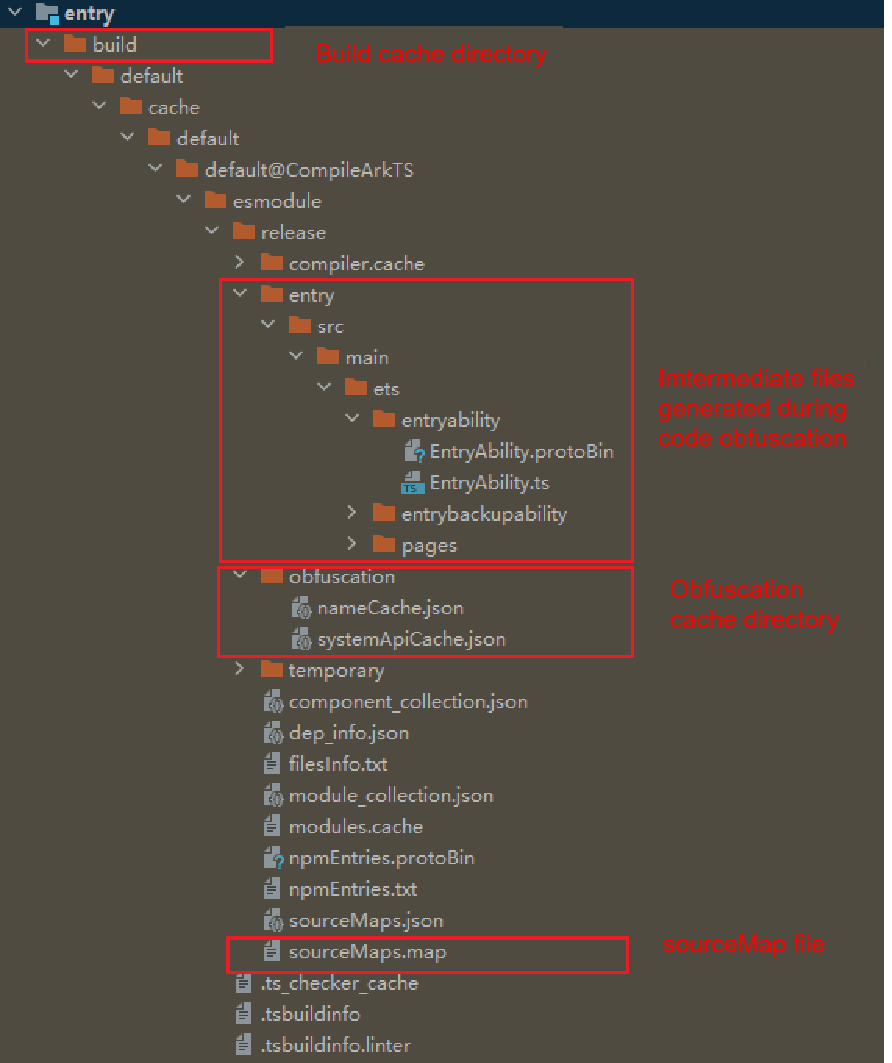
After obfuscation is complete, the obfuscated intermediate products are generated in the build directory of the compilation product. You can view the intermediate products to check the obfuscation effect. In addition, the name mapping file and system API trustlist file are generated in this directory.
Obfuscated file directory: build/default/[...]/release/moduleName
Directory of the name mapping file and system API trustlist file: build/default/[...]/release/obfuscation
- The name mapping file, named nameCache.json, records the mappings between source code names and names after obfuscation.
- The system API trustlist file, named systemApiCache.json, records the APIs and property names that will not be obfuscated in the source code.

Deobfuscating Error Stacks
In applications that have undergone obfuscation, code names are changed, making the error stacks printed during crashes harder to understand. You can use the hstack plugin in Command Line Tools of DevEco Studio to deobfuscate the source code stack and analyze issues.
The deobfuscation tool requires the sourceMaps.map file and the obfuscation name mapping file nameCache.json generated during compilation. Be sure to back them up locally.
If you use a self-built online platform or pipeline to build an application, the sourceMaps.map file and the obfuscation name mapping file namecache.json generated during compilation cannot be obtained. You can use the corresponding files generated during local compilation.
- The source code mapping file, named sourceMaps.map, records the mappings between the compressed/converted code and the original source code.