HUAWEI OneHop is a core part of Huawei's device distributed technology. Based on the traditional NFC technology, HUAWEI OneHop integrates more short-distance technologies to enable a more efficient interaction and collaboration between a smartphone and other devices with a simple tap. HUAWEI OneHop is open to app developers and third-party device manufacturers.
For app developers: Via HUAWEI OneHop, they can enable app data and status synchronization between devices, such as editing a document synced from a smartphone on a tablet.
For device developers: They can integrate the OneHop shortcut preset on Huawei smartphones to achieve one-step operation, such as OneHop projecting and OneHop printing.
This guide is for app developers.
Cross-device app synchronization involves the integration and adaptation of the apps on the mobile phone and the tablet. Currently, only supported on the Huawei smartphones and tablets.
Smartphone apps: As the service initiator and data source, the phone app is responsible for sending the data to be synced, such as the video link and progress.
Tablet apps: As the service succeeding end, the tablet app receives the data and service status synced from the mobile phone.
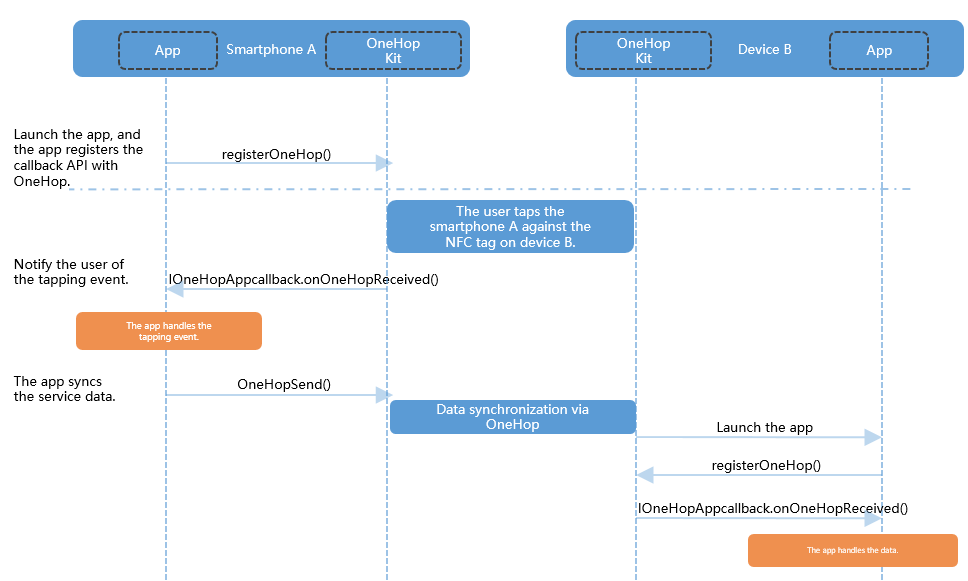
The following figure shows the overall process.
The app integration process on the smartphone is as follows:
Preparation: Ensure that the app on the smartphone is running in the foreground to trigger the HUAWEI OneHop service.
Event listening: The app registers the OneHop listening API with the system and starts the OneHop event listening.
Event processing: After detecting the tapping action of the user, the system notifies the app of the tapping event using the callback function.
Data synchronization: The app on the mobile phone syncs data to the app on the tablet.
The app integration process on the tablet is as follows:
Preparation: The app on the tablet is not required to run in the foreground. After receiving the data synced from the mobile phone, the tablet system automatically starts the corresponding app. If the app is not installed on the tablet, the system will prompt the user to go to HUAWEI AppGallery to download it.
Event listening: The app registers the OneHop listening API with the system and starts the OneHop event listening.
Data receiving: The system transfers the data synced from the mobile phone to the app using the callback function. In this case, the developer needs to parse the data and sync the app status from the mobile phone.
OneHop Kit and the HwOneHopSDK class used to implement the APIs, are contained in a JAR package. The member functions of the HwOneHopSDK class can be invoked by certain apps.
- import com.huawei.onehop.appsdk.HwOneHopSdk;
- import android.emcom.IOneHopSdkCallback;
Obtaining the OneHop Operation Handle
The HwOneHopSdk class is implemented in the form of a single instance. The instance is obtained through the getInstance() method. For example, HwOneHopSdk. getInstance().registerOneHop();
Registering the Event Listener
Code snippet 1: Implementing the listening API ServiceCallBack
- public class ServiceCallBack implements IOneHopSdkCallback.Stub {
- public void onOneHopReceived (String para) {
- //Call the OneHop API OneHopData to notify the current tapping event.
- JSONObject jsonObject = new JSONObject(para);
- //Parse the JSON data and process it…
- }
Code snippet 2: Registering ServiceCallBack with OneHopSDK
- int retcode;
- String packageName = "com.android.example";
- ServiceCallBack servicecallback = new ServiceCallBack();
- retcode = HwOneHopSdk.getInstance().registerOneHop(packageName, HwOneHopSdk.ONEHOP_DATA_TYPE_BUSINESS_CONTINUITY, servicecallback);
- if (HwOneHopSdk.ONEHOP_ERR == retcode) {
- Log.e("OneHop", "register OneHop error.");
- }
Syncing the App Data
Invoking time: When the OneHop SDK uses the onOneHopReceived() callback API registered by the app to notify the app of data synchronization, the app invokes this API to sync data.
Code snippet 1: OneHop data synchronization
- //oneHopSend
- int retcode;
- String packageName = "com.android.example";
- String param={"para1":"xxxxxx", "para2":xxx};
- JSONObject obj = new JSONObject(param);
- retcode = HwOneHopSdk.getInstance().oneHopSend (packageName , obj);
JSON format description:
Table 1: Description of the preset key values
Name | Value | Description |
ONEHOP_DATA_TYPE | "onehop_data_type" | The data type of OneHop |
ONEHOP_RECEIVE_TYPE | "onehop _reveive_type" | The data type of onOneHopReceived |
Table 2 : Value description of ONEHOP_DATA_TYPE
Name | Sub Type | Value | Description |
ONEHOP_DATA_TYPE | ONEHOP_DATA_TYPE_BUSINESS_CONTINUITY | 7 | Service connection |
Table 3: Value description of ONEHOP_DATA_TYPE
Name | Sub Type | Value | Description |
ONEHOP_RECEIVE_TYPE | event | 1 | Triggering event |
data | 2 | Service data |
Parameters in JSON format:
onOneHopReceived(): The NFC tapping event triggers a notification to a third-party app. The parameter is defined in JSON format as follows:
{"OneHop_data_type":7, "onehop _reveive_type":1}
onOneHopReceived(): The synced service data is sent to a third-party app. The parameter is defined in JSON format as follows:
{"OneHop_data_type":7, "onehop _reveive_type":2, "xxx":"xxx", ...}
Here "xxx" refers to the service data.
oneHopSend(): The third-party app sends service connection data to OneHop. The parameter is defined in JSON format as follows:
{"OneHop_data_type":7, "xxx":"xxx", ...}
Here "xxx" refers to the service data.
Permission description
To use the OneHop Kit API, you need to add the following permission to the manifest.xml file of the APK to pass the permission verification:
<uses-permission android:name="com.huawei.permission.ONEHOP"/>
Other APIs
For details, see the section about API reference.
NFC tag handling: Not required for app developers. NFC tags are programmed and attached by hardware vendors and distributed with hardware devices.
Data format parsing: Not required for the app developers. The system will automatically parse the OneHop data in the NFC tag and trigger the corresponding operation procedure.