HUAWEI OneHop Engine is a core part of Huawei's device distributed technology. Based on the traditional NFC technology, OneHop Engine integrates more short-distance technologies to enable more efficient one-tap interaction and collaboration between a phone and other devices. OneHop Engine is open to app developers and device manufacturers.
For app developers: Via OneHop Engine, you can enable app data and status synchronization between devices, such as editing a document synced from a phone on a tablet.
For device developers: You can integrate OneHop Engine's quick operations preset on Huawei phones to achieve one-step operation, such as OneHop projection and OneHop printing.
This guide is oriented to device manufacturers.
The steps for triggering OneHop shortcuts are as follows:
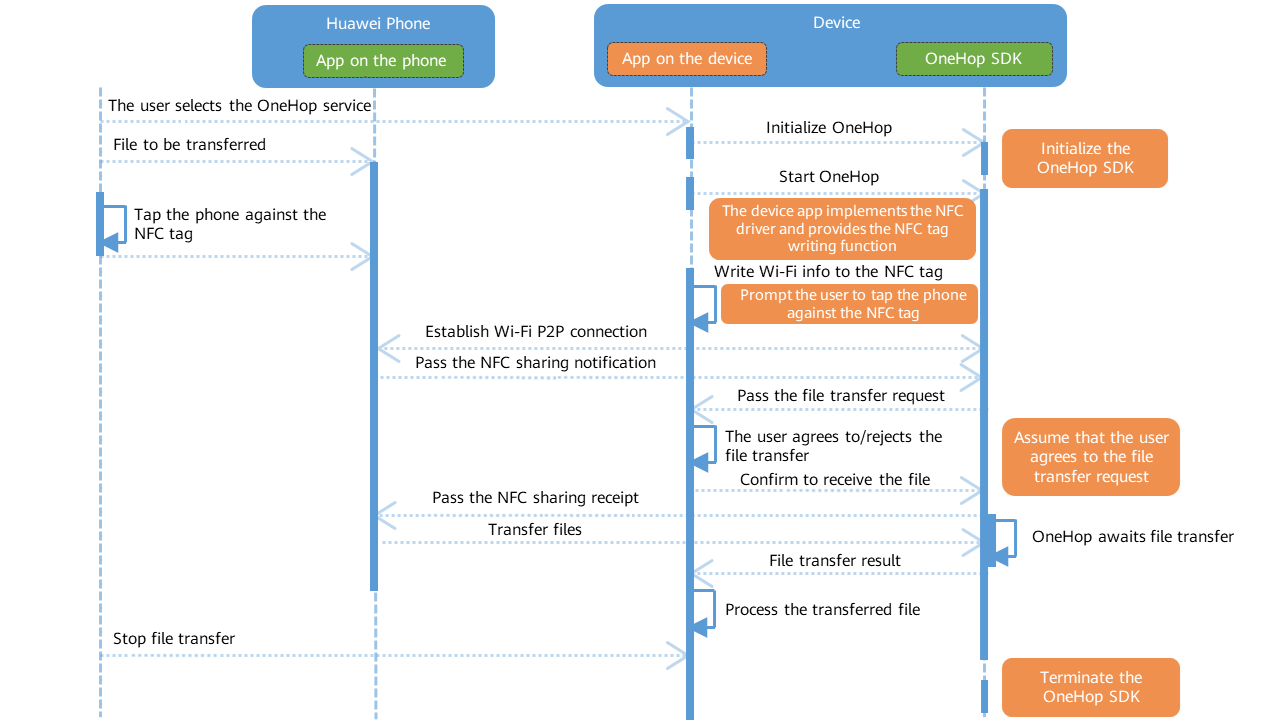
The following figure shows the overall development process.
The app on the device calls OneHop Engine to enable Wi-Fi P2P GO mode and write the Wi-Fi data into the NFC tag. In this step, the app on the device needs to call the APIs to initialize and enable the OneHop service.
The user selects the file they need to transfer on the phone and taps the phone against the NFC tag on the other device.
The phone obtains the Wi-Fi connection data and establishes a connection with the other device.
The phone sends the image transfer notification, and OneHop Engine integrated on the device receives the notification, and sends this notification to the app on the other device to start transferring files, and awaits user's confirmation.
The user confirms the reception, then the phone sends the file, and the other device receives it. After that, the device will send a notification for the app on the device to proceed to the next step. After the app on the device receives the notification, it will start the printing process.
Note:
To enable OneHop Engine to read and write NFC tags, the app on the device needs to have the corresponding driver APIs to use OneHop. For details, refer to the documentation on driver_adapt.h in API Reference.
Possible exceptions may occur if the Wi-Fi-P2P connection is disconnected abnormally during the file transfer, or if there is no operations within 60 seconds, after which OneHop Engine will send a service termination status code via a status modification callback to the app on the device to stop the OneHop service.
For details about the API definitions, refer to the API Reference.
int main()
{
    signal(SIGINT, p_exit);
    InitCallback();
    InitDriverAdapt();
    /* Service Initialization APIs*/
    if (InitOneHop(NULL) != 0) {
        printf("*****Init OneHop failed!*****\n");
        return -1;
    }
    /* OneHop service is running
    * Press Ctrl and C keys to terminate the service
    */
    while (g_running) {
        if (g_serviceEndFlag == SERVICE_STOPPED) {
            g_serviceEndFlag = SERVICE_STARTED;
            printf("#####Start onehop service#####\n");
            if (StartOneHopService(&g_callBack) != 0) {
                printf("*****Start onehop service failed!*****\n");
                if (StopOneHopService() != 0) {
                    printf("*****Stop onehop service failed!*****\n");
                    UninitOneHop();
                    return -1;
                }
                g_serviceEndFlag = SERVICE_STOPPED;
            }
        }
        sleep(1);
    }
    /* Invoke the end OneHop service API */
    printf("#####Stop onehop service#####\n");
    if (StopOneHopService() != 0) {
        printf("*****Stop onehop service failed!*****\n");
        UninitOneHop();
        return -1;
    }
    /* Invoke the deinitialization OneHop service API */
    printf("#####Uninit onehop kit#####\n");
    UninitOneHop();
    return 0;
}
Note: For details on the code sample description, refer to Sample Code. For details on the API description, refer to API Reference.
NFC tag handling: Not required for app developers. NFC tags are distributed with hardware devices and are deployed and promoted by device manufacturers.
Data format parsing: Not required for the app developers. The system will automatically parse the OneHop data in the NFC tag and trigger the corresponding operation procedure.