
提供如下几种方式去开启华为运动健康App对Health Service Kit的开放授权:
- 开发者调用隐私授权状态查询接口查询用户是否打开华为运动健康服务开关,若开关关闭则提示用户前往华为运动健康App开启,路径如下:
- Android手机:在华为运动健康App的“我的 > 隐私管理 > 华为运动健康服务”中开启该授权。
- iOS手机:在华为运动健康App的“我的 > 第三方服务 > 华为运动健康服务”中开启该授权。
- 参照本章节通过Health Service Kit云侧提供的H5页面关联华为运动健康服务
- 用户认证鉴权后,应用即拉取关联华为运动健康服务页面(认证鉴权与关联华为运动健康服务均依赖用户华为账号登录,此方法可依赖cookie能力,减少华为账号二次登录)。
- 开发者在为用户提供的“手动同步”功能中,调用隐私授权状态查询接口判断状态,如果用户没有开启开关,拉起H5授权连接页面。
开发者调用Health Service Kit云侧提供的H5页面关联华为运动健康服务的操作如下:
通过重定向用户浏览器(或手机/桌面应用中的浏览器组件)到授权连接页面的URL,拉起H5授权连接页面。
https://oauth-login.cloud.huawei.com/oauth2/v3/authorize?response_type=code&client_id=106804381&redirect_uri=https%3A%2F%2Fh5hosting.dbankcdn.com%2Fcch5%2Fhealthkit%2Flink%2Fpages%2FprivacyManage.html&access_type=offline&display=touch&state=zh-cn
其中,可供开发者修改的参数如下:
| 参数名称 | 是否必选 | 参数说明 |
|---|---|---|
| display | 否 | 授权页面展示风格规则:PC端为“page”、移动端为“touch”。默认为“page”。 |
| state | 否 | 用于字体语言种类展示,默认为美式英文(en-us)。 |
例如:“client_id”为“101489619”的应用,在通过认证鉴权功能之后,想要访问华为运动健康App的数据,并且以中文的方式“zh-cn”进行展示此页面,则应用需要重定向用户的浏览器到如下URL:
https://oauth-login.cloud.huawei.com/oauth2/v3/authorize?response_type=code&client_id=106804381&redirect_uri=https%3A%2F%2Fh5hosting.dbankcdn.com%2Fcch5%2Fhealthkit%2Flink%2Fpages%2FprivacyManage.html&access_type=offline&state=zh-cn

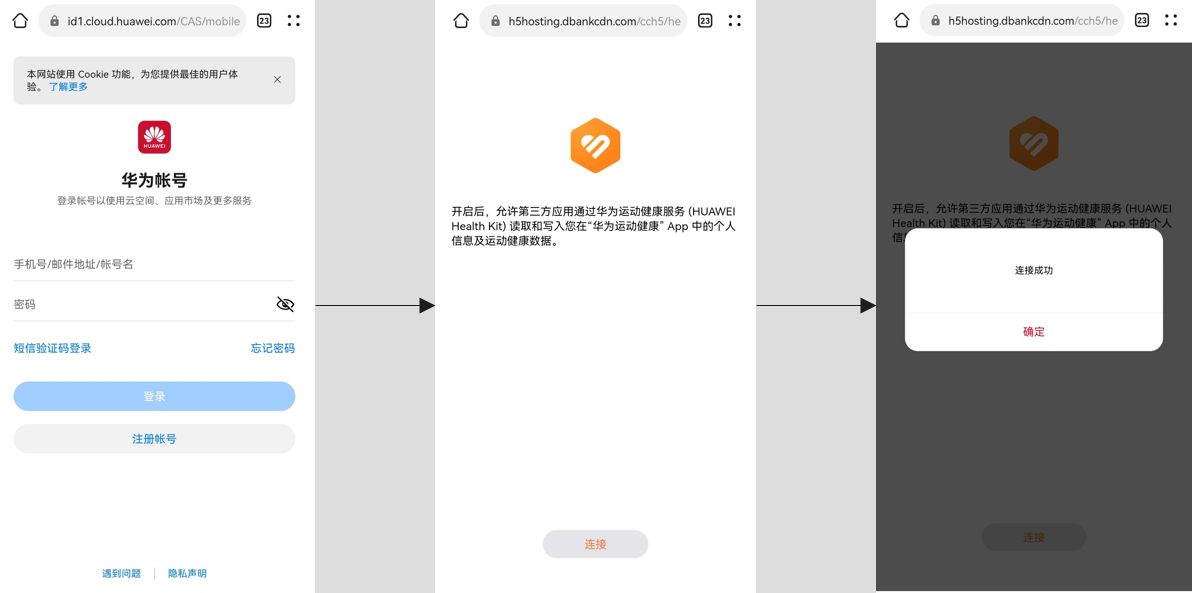
此过程中需要,用户登录华为账号,跳转到连接页面,用户点击即可,如下图所示:
[h2]Android客户端
采用WebView的addJavascriptInterface方法实现客户端与前端的交互。
- 通过Webview.addJavascriptInterface(Object object, "jsToAndroid")方法将java对象注入到Webview。

请使用"jsToAndroid"名称注入到网页框架中,以保持与前端定义的一致性。
- 通过@JavascriptInterface注解实现resultCodeProc(String result)方法,目的是对返回值进行接收和处理。
示例代码如下:
class JsObject {
    @JavascriptInterface
    public String resultCodeProc(String result) {
        // 开发者接收到返回码,实现逻辑处理(也可以在此处关闭webview)
        Log("get the link result:" + result);
        getActivity().finish();
    }
 }
 webview.getSettings().setJavaScriptEnabled(true);
 webView.addJavascriptInterface(new JsObject(), "jsToAndroid");
[h2]iOS客户端
在实现了WebKit的addScriptMessageHandler:name: 方法里,添加处理与用户点击“连接”按钮结果返回码相关的交互消息。
- 在初始化 WKUserContentController 时,通过[WKUserContentController addScriptMessageHandler:self name:@"jsToObj"]注册监听名称为"jsToObj"的消息。

为了防止循环依赖,在-viewWillAppear:方法中执行addScriptMessageHandler操作,在-viewWillDisappear:方法中执行removeScriptMessageHandlerForName操作。
- 当前端完成回调时,可以在-userContentController:didReceiveScriptMessage:方法,读取"jsToObj"的message.body消息数据,作为用户点击“连接”按钮的返回结果。
示例代码如下:
#import <WebKit/WebKit.h>
@interface WKWebViewWKScriptMessageHandlerController () <WKScriptMessageHandler>
//! 添加ScriptMessageHandler,并指明name为"jsToObj"
WKUserContentController *userContentController = [[WKUserContentController alloc] init];
[userContentController addScriptMessageHandler:self name:@"jsToObj"];

//! 配置configuration
WKWebViewConfiguration *configuration = [[WKWebViewConfiguration alloc] init];
configuration.userContentController = userContentController;

//! 初始化webView
_webView = [[WKWebView alloc] initWithFrame:self.view.bounds configuration:configuration];
#pragma mark - WKScriptMessageHandler
//! WKWebView收到ScriptMessage时回调此方法
- (void)userContentController:(WKUserContentController *)userContentController didReceiveScriptMessage:(WKScriptMessage *)message {
    if ([message.name caseInsensitiveCompare:@"jsToObj"] == NSOrderedSame) {
        //! proce message.body
    }
}