问题现象
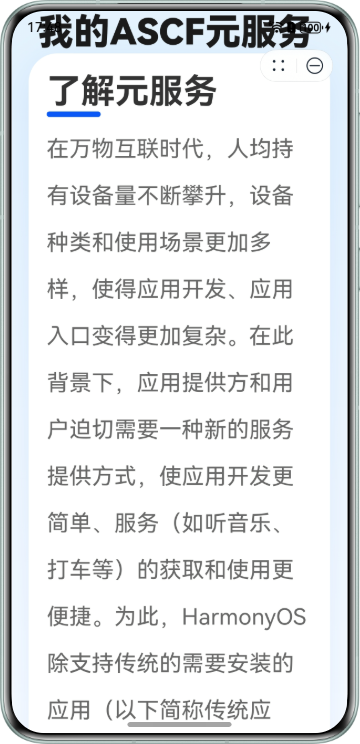
开发ASCF元服务时,为实现全屏沉浸式效果,设置了自定义的navigationBar:
// ascf/ascf_src/app.json
"window": {
    "navigationStyle": "custom"
}
真机拉起元服务后,标题会被元服务的胶囊(Menubar)遮挡,如下图所示:
背景知识
- ASCF(Atomic Service Cross Framework)是元服务为小程序生态定制的一套解决方案,能够使用类似于小程序的开发技术,高效开发元服务。
- 页面json配置:每一个ASCF框架页面也可以使用.json文件来对本页面的窗口表现进行配置。页面中配置项在当前页面会覆盖app.json的window中相同的配置项。
- 元服务UX体验标准:元服务的UX体验标准。
- has.getMenuButtonBoundingClientRect:获取菜单按钮(右上角胶囊按钮)的布局位置信息。坐标信息以屏幕左上角为原点。
解决方案
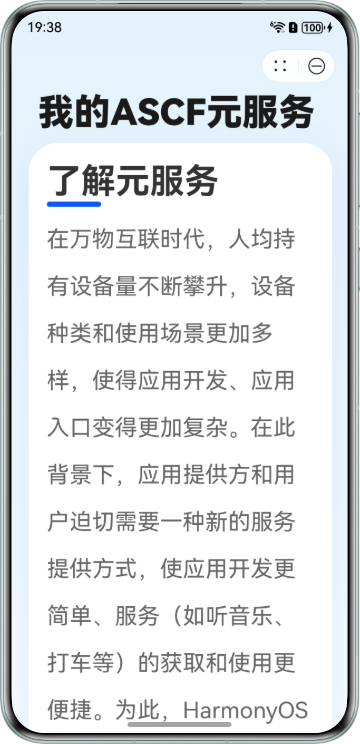
在页面标题上方设置一个顶部占位区,并且通过has.getMenuButtonBoundingClientRect获取当前设备Menubar的精确布局信息,从而实现动态设置顶部占位区的高度。
- 逻辑层(index.js)动态获取高度:
在页面初始化生命周期中调用has.getMenuButtonBoundingClientRect,获取Menubar的bottom坐标,并加上适量的安全边距(例如10px),计算出顶部占位区的占位高度spacerHeight。ascf/ascf_src/pages/index/index.js的代码如下:
Page({ data: { // 兜底高度:必须声明,否则页面可能无法渲染该区域导致白屏 spacerHeight: '90px', title: '我的ASCF元服务' }, onInit() { console.info('Page onInit triggered'); this.calcSafeArea(); }, calcSafeArea() { try { // 1. 安全检查:判断has对象是否存在,防止在非真机/不支持的环境崩溃白屏 if (typeof has === 'undefined') { console.warn('Current environment does not support "has" object'); return; } // 2. 调用API const res = has.getMenuButtonBoundingClientRect(); console.info('Capsule Info:', JSON.stringify(res)); if (res && res.bottom) { // 3. 额外加10px的间距,不要贴太近 const safeHeight = res.bottom + 10; const finalString = safeHeight + 'px'; console.info('准备更新视图,目标高度:', finalString); this.setData({ spacerHeight: finalString }); } } catch (e) { // 4. 捕获异常,防止白屏 console.error('calcSafeArea Error:', e); } } }); - 视图层(index.hxml)绑定动态样式:
在index.hxml中为顶部占位区的style属性绑定在index.js中计算出来的spacerHeight,ascf/ascf_src/pages/index/index.hxml的代码如下:
<div class="container"> <div class="status-spacer" style="height: {{spacerHeight}}"></div> <text class="page-title">{{title}}</text> <div class="content-card"> <text class="card-title">了解元服务</text> <div class="card-line"></div> <text class="card-desc">在万物互联时代,人均持有设备量不断攀升,设备种类和使用场景更加多样,使得应用开发、应用入口变得更加复杂。在此背景下,应用提供方和用户迫切需要一种新的服务提供方式,使应用开发更简单、服务(如听音乐、打车等)的获取和使用更便捷。为此,HarmonyOS除支持传统的需要安装的应用(以下简称传统应用)外,还支持更加方便快捷的免安装的应用,即元服务。</text> </div> </div> - 样式层(index.css)设置::
样式层ascf/ascf_src/pages/index/index.css的代码如下:
.container {
  width: 100%;
  overflow-y: scroll;
  flex-direction: column;
  background: linear-gradient(to bottom, #E3F2FD, #FFFFFF);
}

/* 顶部避让占位区 */
.status-spacer {
  width: 100%;
  flex-shrink: 0; /* 防止被压缩 */
}

.page-title {
  font-size: 40px;
  font-weight: 900;
  color: #1A1A1A;
  margin-left: 30px;
  margin-right: 30px;
  margin-bottom: 30px;
}

.content-card {
  flex-direction: column;
  margin-top: 10px;
  margin-left: 20px;
  margin-right: 20px;
  padding: 20px;
  background-color: #FFFFFF;
  border-radius: 32px;
  box-shadow: 0px 10px 40px rgba(10, 89, 247, 0.1);
  margin-bottom: 50px;
}

.card-title {
  font-size: 38px;
  font-weight: bold;
  color: #333333;
  margin-bottom: 20px;
}

.card-line {
  width: 60px;
  height: 6px;
  background-color: #0A59F7;
  border-radius: 3px;
  margin-bottom: 10px;
}

.card-desc {
  font-size: 25px;
  color: #666666;
  line-height: 52px;
  text-align: justify;
}
添加顶部占位区后的效果图如下所示: