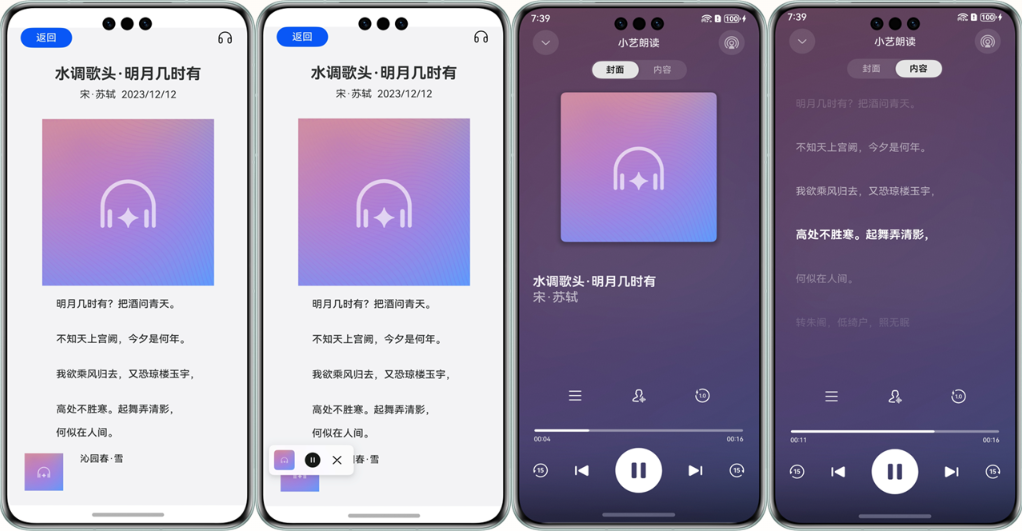
接口说明
以下仅列出demo中调用的部分主要接口,具体API说明详见API参考。
接口名 | 描述 |
|---|---|
init(context: common.BaseContext, readParams: ReaderParam): Promise<void> | 初始化TextReader。 |
start(readInfoList: ReadInfo[], articleId?: string): Promise<void> | 启动TextReader。 |
on(type: string, callback: function): void | 注册所有事件回调,具体事件类型详见API参考。 |
ReaderParam(isVoiceBrandVisible: boolean, businessBrandInfo?: BusinessBrandInfo, isFastForward?: boolean, keepBackgroundRunning?: boolean, online?: number) | 朗读参数。 keepBackgroundRunning参数配置,决定是否使用保持后台运行的功能。
|
开发步骤
- 首先从项目根目录进入/src/main/ets/entryability/EntryAbility.ets文件,将WindowManager添加至工程。
import { WindowManager } from '@kit.SpeechKit'; - 在onWindowStageCreate(windowStage: window.WindowStage)生命周期方法中,添加setWindowStage方法设置窗口管理器。
onWindowStageCreate(windowStage: window.WindowStage): void { console.info('Ability onWindowStageCreate'); WindowManager.setWindowStage(windowStage); windowStage.loadContent('pages/Index', (err, data) => { if (err) { console.error(`Failed to load the content. Code: ${err.code}, message: ${err.message}`); return; } console.info(`Succeeded in loading the content. Data: ${JSON.stringify(data)}.` ); }); } - 从项目根目录进入/src/main/ets/pages/Index.ets文件,在使用朗读控件前,将实现朗读控件和其他相关的类添加至工程。
import { TextReader, TextReaderIcon, ReadStateCode } from '@kit.SpeechKit'; - 简单配置页面的布局,加入听筒图标,并且设置onClick点击事件。
/** * 播放状态 */ @State readState: ReadStateCode = ReadStateCode.WAITING; build() { Column() { TextReaderIcon({ readState: this.readState }) .margin({ right: 20 }) .width(32) .height(32) .onClick(async () => { // 设置点击事件 // ... }) } } - 初始化朗读控件。
// 用于显示当前页的按钮状态 @State isInit: boolean = false; // 初始化朗读控件 const readerParam: TextReader.ReaderParam = { isVoiceBrandVisible: true, businessBrandInfo: { panelName: '小艺朗读' } } try{ await TextReader.init(getContext(this), readerParam); // 是否初始化,用于显示听筒按钮的状态 this.isInit = true; } catch (err) { console.error(`TextReader failed to init. Code: ${err.code}, message: ${err.message}`); } - (可选)设置监听,在用户与控件进行交互时触发回调通知开发者。注销监听,监听结束后进行释放。
// 设置监听 setActionListener() { TextReader.on('setArticle', async (id: string) => { console.info(`setArticle ${id}`) }); TextReader.on('clickArticle', (id: string) => {console.info(`onClickArticle ${id}`) }); TextReader.on('clickAuthor', (id: string) => { console.info(`onClickAuthor ${id}`) }); TextReader.on('clickNotification', (id: string) => { console.info(`onClickNotification ${id}`) }); TextReader.on('showPanel', () => { console.info(`onShowPanel`) }); TextReader.on('hidePanel', () => { console.info(`onHidePanel`) }); TextReader.on('stateChange', (state: TextReader.ReadState) => { this.onStateChanged(state) }); // 在列表页无更多内容时,会显示加载失败,需要设置requestMore监听,调用loadMore函数以获得正确的显示信息。 TextReader.on('requestMore', () => { TextReader.loadMore(this.newData, true) }); } // 注销监听 releaseActionListener() { TextReader.off('setArticle'); TextReader.off('clickArticle'); TextReader.off('clickAuthor'); TextReader.off('clickNotification'); TextReader.off('showPanel'); TextReader.off('hidePanel'); TextReader.off('stateChange'); TextReader.off('requestMore'); } - 初始化完成,加载文章列表,启动朗读控件。
// 加载文章列表,启动朗读控件 const readInfoList: TextReader.ReadInfo[] = [{ id: '001', title: { text:'水调歌头.明月几时有', isClickable:true }, author:{ text:'宋.苏轼', isClickable:true }, date: { text:'2024/01/01', isClickable:false }, bodyInfo: '明月几时有?把酒问青天。' }]; TextReader.start(readInfoList).then(() => { console.info(`TextReader succeeded in starting.`); }).catch((err: BusinessError) => { console.error(`TextReader failed to start. Code: ${err.code}, message: ${err.message}`); }) - (可选)若要配置长时任务,需要在module.json5配置文件中添加ohos.permission.KEEP_BACKGROUND_RUNNING权限,并且加入backgroundModes选项,确保朗读控件后台播报正常。
{
  "module": {
    // ...
    "requestPermissions": [
      {
        "name": "ohos.permission.KEEP_BACKGROUND_RUNNING",
        "usedScene": {
          "abilities": [
            "FormAbility"
          ],
          "when": "inuse"
        }
      }
    ],
    "abilities": [
      {
        // ...
        "backgroundModes": [
          "audioPlayback"
        ],
        // ...
      }
    ]
  }
}
开发实例
EntryAbility.ets
import { AbilityConstant, UIAbility, Want } from '@kit.AbilityKit';
import { window } from '@kit.ArkUI';
import { WindowManager } from '@kit.SpeechKit';

export default class EntryAbility extends UIAbility {
  onCreate(want: Want, launchParam: AbilityConstant.LaunchParam): void {
    console.info('Ability onCreate');
  }

  onDestroy(): void {
    console.info('Ability onDestroy');
  }

  onWindowStageCreate(windowStage: window.WindowStage): void {
    console.info('Ability onWindowStageCreate');
    WindowManager.setWindowStage(windowStage);

    windowStage.loadContent('pages/Index', (err, data) => {
      if (err.code) {
        console.error(`Failed to load the content. Code: ${err.code}, message: ${err.message}`);
        return;
      }
      console.info(`Succeeded in loading the content. Data: ${JSON.stringify(data)}.` );
    });
  }

  onWindowStageDestroy(): void {
    console.info('Ability onWindowStageDestroy');
  }

  onForeground(): void {
    console.info('Ability onForeground');
  }

  onBackground(): void {
    console.info('Ability onBackground');
  }
}
Index.ets
import { TextReader, TextReaderIcon, ReadStateCode } from '@kit.SpeechKit'

@Entry
@Component
struct Index {

  /**
   * 待加载的文章
   */
  @State readInfoList: TextReader.ReadInfo[] = [];
  @State selectedReadInfo: TextReader.ReadInfo = this.readInfoList[0];

  /**
   * 播放状态
   */
  @State readState: ReadStateCode = ReadStateCode.WAITING;

  /**
   * 用于显示当前页的按钮状态
   */
  @State isInit: boolean = false;

  async aboutToAppear(){
    /**
     * 加载数据
     */
    let readInfoList: TextReader.ReadInfo[] = [{
      id: '001',
      title: {
        text:'水调歌头.明月几时有',
        isClickable:true
      },
      author:{
        text:'宋.苏轼',
        isClickable:true
      },
      date: {
        text:'2024/01/01',
        isClickable:false
      },
      bodyInfo: '明月几时有?把酒问青天。'
    }];
    this.readInfoList = readInfoList;
    this.selectedReadInfo = this.readInfoList[0];
    this.init();
  }

  /**
   * 初始化
   */
  async init() {
    const readerParam: TextReader.ReaderParam = {
      isVoiceBrandVisible: true,
      businessBrandInfo: {
        panelName: '小艺朗读',
        panelIcon: $r('app.media.startIcon')
      }
    }
    try{
      await TextReader.init(getContext(this), readerParam);
      this.isInit = true;
    } catch (err) {
      console.error(`TextReader failed to init. Code: ${err.code}, message: ${err.message}`);
    }
  }

  // 设置操作监听
  setActionListener() {
    TextReader.on('stateChange', (state: TextReader.ReadState) => {
      this.onStateChanged(state)
    });
    TextReader.on('requestMore', () => this.onStateChanged);
  }

  onStateChanged = (state: TextReader.ReadState) => {
    if (this.selectedReadInfo?.id === state.id) {
      this.readState = state.state;
    } else {
      this.readState = ReadStateCode.WAITING;
    }
  }

  build() {
    Column() {
      TextReaderIcon({ readState: this.readState })
        .margin({ right: 20 })
        .width(32)
        .height(32)
        .onClick(async () => {
          try {
            this.setActionListener();
            await TextReader.start(this.readInfoList, this.selectedReadInfo?.id);
          } catch (err) {
            console.error(`TextReader failed to start. Code: ${err.code}, message: ${err.message}`);
          }
        })
    }
    .height('100%')
  }
}