















合作咨询
我们的专家服务团队将竭诚为您提供专业的合作咨询服务
步骤导航器组件,适用于引导用户按照步骤完成任务的导航场景。
该组件从API Version 8开始支持。后续版本如有新增内容,则采用上角标单独标记该内容的起始版本。
仅能包含子组件StepperItem。
Stepper(value?: { index?: number })
元服务API: 从API version 11开始,该接口支持在元服务中使用。
系统能力: SystemCapability.ArkUI.ArkUI.Full
参数:
| 参数名 | 类型 | 必填 | 说明 |
|---|---|---|---|
| value | { index?: number } | 否 | 设置步骤导航器当前显示StepperItem的索引值。 默认值:0 从API version 10开始,该参数支持$$双向绑定变量。 |
无
onFinish(callback: () => void)
步骤导航器最后一个StepperItem的nextLabel被点击时,并且ItemState属性为Normal时,触发该回调。
元服务API: 从API version 11开始,该接口支持在元服务中使用。
系统能力: SystemCapability.ArkUI.ArkUI.Full
onSkip(callback: () => void)
当前显示的StepperItem状态为ItemState.Skip时,nextLabel被点击时触发该回调。
元服务API: 从API version 11开始,该接口支持在元服务中使用。
系统能力: SystemCapability.ArkUI.ArkUI.Full
onChange(callback: (prevIndex: number, index: number) => void)
点击当前StepperItem的prevLabel进行步骤切换时触发该回调;或点击当前StepperItem的nextLabel,当前页面不为步骤导航器最后一个StepperItem且ItemState属性为Normal时,触发该回调。
元服务API: 从API version 11开始,该接口支持在元服务中使用。
系统能力: SystemCapability.ArkUI.ArkUI.Full
参数:
| 参数名 | 类型 | 必填 | 说明 |
|---|---|---|---|
| prevIndex | number | 是 | 切换前的步骤页索引值。 |
| index | number | 是 | 切换后的步骤页(前一页或者下一页)索引值。 |
onNext(callback: (index: number, pendingIndex: number) => void)
点击StepperItem的nextLabel切换下一步骤时,当前页面不为步骤导航器最后一个StepperItem且ItemState属性为Normal时,触发该回调。
元服务API: 从API version 11开始,该接口支持在元服务中使用。
系统能力: SystemCapability.ArkUI.ArkUI.Full
参数:
| 参数名 | 类型 | 必填 | 说明 |
|---|---|---|---|
| index | number | 是 | 当前步骤页索引值。 |
| pendingIndex | number | 是 | 下一步骤页索引值。 |
onPrevious(callback: (index: number, pendingIndex: number) => void)
点击StepperItem的prevLabel切换上一步骤时触发该回调。
元服务API: 从API version 11开始,该接口支持在元服务中使用。
系统能力: SystemCapability.ArkUI.ArkUI.Full
参数:
| 参数名 | 类型 | 必填 | 说明 |
|---|---|---|---|
| index | number | 是 | 当前步骤页索引值。 |
| pendingIndex | number | 是 | 上一步骤页索引值。 |
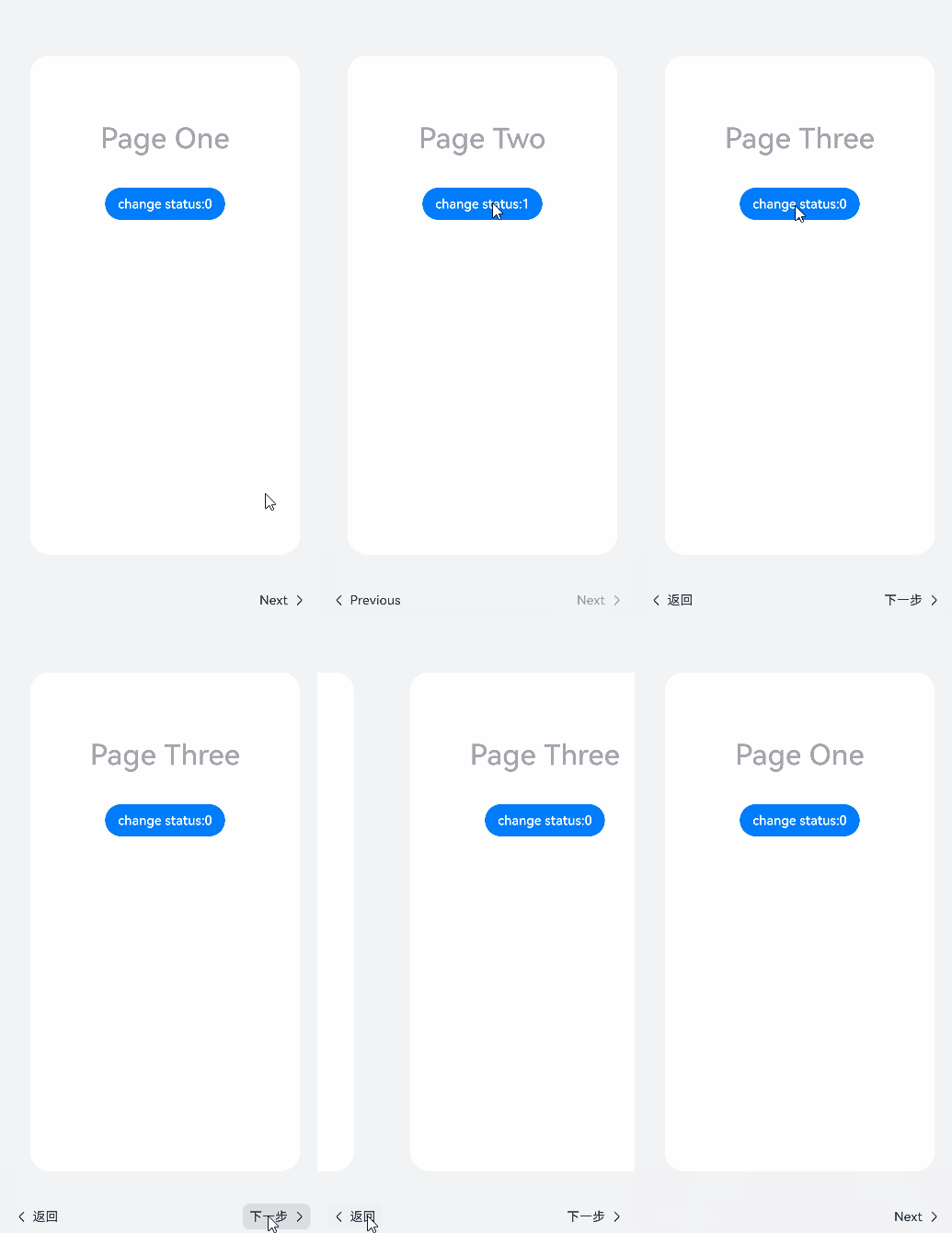
该示例主要演示如何使用步骤导航器组件。
- // xxx.ets
- @Styles function itemStyle () {
- .width(336)
- .height(621)
- .margin({ top: 48, left: 12 })
- .borderRadius(24)
- .backgroundColor('#FFFFFF')
- }
-
- @Extend(Text) function itemTextStyle () {
- .fontColor('#182431')
- .fontSize(36)
- .fontWeight(500)
- .opacity(0.4)
- .margin({ top: 82, bottom: 40 })
- }
-
- @Entry
- @Component
- struct StepperExample {
- @State currentIndex: number = 0
- @State firstState: ItemState = ItemState.Normal
- @State secondState: ItemState = ItemState.Normal
- @State thirdState: ItemState = ItemState.Normal
-
- build() {
- Stepper({
- index: this.currentIndex
- }) {
- // 第一个步骤页
- StepperItem() {
- Column() {
- Text('Page One')
- .itemTextStyle()
- Button('change status:' + this.firstState)
- .backgroundColor('#007dFF')
- .onClick(() => {
- this.firstState = this.firstState === ItemState.Skip ? ItemState.Normal : ItemState.Skip
- })
- }.itemStyle()
- }
- .nextLabel('Next')
- .status(this.firstState)
- // 第二个步骤页
- StepperItem() {
- Column() {
- Text('Page Two')
- .itemTextStyle()
- Button('change status:' + this.secondState)
- .backgroundColor('#007dFF')
- .onClick(() => {
- this.secondState = this.secondState === ItemState.Disabled ? ItemState.Normal : ItemState.Disabled
- })
- }.itemStyle()
- }
- .nextLabel('Next')
- .prevLabel('Previous')
- .status(this.secondState)
- // 第三个步骤页
- StepperItem() {
- Column() {
- Text('Page Three')
- .itemTextStyle()
- Button('change status:' + this.thirdState)
- .backgroundColor('#007dFF')
- .onClick(() => {
- this.thirdState = this.thirdState === ItemState.Waiting ? ItemState.Normal : ItemState.Waiting
- })
- }.itemStyle()
- }
- .status(this.thirdState)
- // 第四个步骤页
- StepperItem() {
- Column() {
- Text('Page Four')
- .itemTextStyle()
- }.itemStyle()
- }
- }
- .backgroundColor('#F1F3F5')
- .onFinish(() => {
- // 此处可处理点击最后一页的Finish时的逻辑,例如路由跳转等
- console.info('onFinish')
- })
- .onSkip(() => {
- // 此处可处理点击跳过时的逻辑,例如动态修改Stepper的index值使其跳转到某一步骤页等
- console.info('onSkip')
- })
- .onChange((prevIndex?: number, index?: number) => {
- if(index){
- this.currentIndex = index
- }
- })
- }
- }
合作咨询
我们的专家服务团队将竭诚为您提供专业的合作咨询服务
解决方案
精准高效的一站式服务支持,助力开发者商业成功