智能客服
你问我答,随时在线为你解决问题















Navigation组件是路由导航的根视图容器,一般作为Page页面的根容器使用,其内部默认包含了标题栏、内容区和工具栏,其中内容区默认首页显示导航内容(Navigation的子组件)或非首页显示(NavDestination的子组件),首页和非首页通过路由进行切换。
该组件从API Version 8开始支持。后续版本如有新增内容,则采用上角标单独标记该内容的起始版本。
该组件从API Version 11开始默认支持安全区避让特性(默认值为:expandSafeArea([SafeAreaType.SYSTEM, SafeAreaType.KEYBOARD, SafeAreaType.CUTOUT], [SafeAreaEdge.TOP, SafeAreaEdge.BOTTOM])),开发者可以重写该属性覆盖默认行为,API Version 11之前的版本需配合expandSafeArea属性实现安全区避让。
NavBar嵌套使用Navigation时,内层Navigation的生命周期不和外层Navigation以及全模态的生命周期进行联动。
Navigation未设置主副标题并且没有返回键时,不显示标题栏。
可以包含子组件。
从API Version 9开始,推荐与NavRouter组件搭配使用。
从API Version 10开始,推荐使用NavPathStack配合navDestination属性进行页面路由。
Navigation()
元服务API: 从API version 11开始,该接口支持在元服务中使用。
系统能力: SystemCapability.ArkUI.ArkUI.Full
Navigation(pathInfos: NavPathStack)
绑定路由栈到Navigation组件。
元服务API: 从API version 11开始,该接口支持在元服务中使用。
系统能力: SystemCapability.ArkUI.ArkUI.Full
参数:
| 参数名 | 类型 | 必填 | 说明 |
|---|---|---|---|
| pathInfos | NavPathStack | 是 | 路由栈信息。 |
除支持通用属性外,还支持以下属性:
title(value: ResourceStr | CustomBuilder | NavigationCommonTitle | NavigationCustomTitle, options?: NavigationTitleOptions)
设置页面标题。
元服务API: 从API version 11开始,该接口支持在元服务中使用。
系统能力: SystemCapability.ArkUI.ArkUI.Full
参数:
| 参数名 | 类型 | 必填 | 说明 |
|---|---|---|---|
| value | ResourceStr10+ | CustomBuilder | NavigationCommonTitle9+ | NavigationCustomTitle9+ | 是 | 页面标题,使用NavigationCustomTitle类型设置height高度时,titleMode属性不会生效。字符串超长时,如果不设置副标题,先缩小再换行(2行)最后截断。如果设置副标题,先缩小最后截断。 |
| options | NavigationTitleOptions11+ | 否 | 标题栏选项。 |
subTitle(value: string)
设置页面副标题。
从API Version 9开始废弃,建议使用title代替。
系统能力: SystemCapability.ArkUI.ArkUI.Full
参数:
| 参数名 | 类型 | 必填 | 说明 |
|---|---|---|---|
| value | string | 是 | 页面副标题。 |
menus(value: Array<NavigationMenuItem> | CustomBuilder)
不支持通过SymbolGlyphModifier对象的fontSize属性修改图标大小、effectStrategy属性修改动效、symbolEffect属性修改动效类型。
设置页面右上角菜单。不设置时不显示菜单项。使用Array<NavigationMenuItem> 写法时,竖屏最多支持显示3个图标,横屏最多支持显示5个图标,多余的图标会被放入自动生成的更多图标。
元服务API: 从API version 11开始,该接口支持在元服务中使用。
系统能力: SystemCapability.ArkUI.ArkUI.Full
参数:
| 参数名 | 类型 | 必填 | 说明 |
|---|---|---|---|
| value | Array<NavigationMenuItem> | CustomBuilder | 是 | 页面右上角菜单。 |
titleMode(value: NavigationTitleMode)
设置页面标题栏显示模式。
元服务API: 从API version 11开始,该接口支持在元服务中使用。
系统能力: SystemCapability.ArkUI.ArkUI.Full
参数:
| 参数名 | 类型 | 必填 | 说明 |
|---|---|---|---|
| value | NavigationTitleMode | 是 | 页面标题栏显示模式。 默认值:NavigationTitleMode.Free |
toolBar(value: object | CustomBuilder)
设置工具栏内容。不设置时不显示工具栏。items均分底部工具栏,在每个均分内容区布局文本和图标,文本超长时,逐级缩小,缩小之后换行,最后截断。
从API version 10开始,该接口不再维护,推荐使用toolbarConfiguration代替。
系统能力: SystemCapability.ArkUI.ArkUI.Full
参数:
| 参数名 | 类型 | 必填 | 说明 |
|---|---|---|---|
| value | object | CustomBuilder | 是 | 工具栏内容。 |
object类型说明:
| 名称 | 类型 | 必填 | 说明 |
|---|---|---|---|
| value | string | 是 | 工具栏单个选项的显示文本。 |
| icon | string | 否 | 工具栏单个选项的图标资源路径。 |
| action | () => void | 否 | 当前选项被选中的事件回调。 |
toolbarConfiguration(value: Array<ToolbarItem> | CustomBuilder, options?: NavigationToolbarOptions)
不支持通过SymbolGlyphModifier对象的fontSize属性修改图标大小、effectStrategy属性修改动效、symbolEffect属性修改动效类型。
设置工具栏内容。不设置时不显示工具栏。
卡片能力: 从API version 10开始,该接口支持在ArkTS卡片中使用。
元服务API: 从API version 11开始,该接口支持在元服务中使用。
系统能力: SystemCapability.ArkUI.ArkUI.Full
参数:
| 参数名 | 类型 | 必填 | 说明 |
|---|---|---|---|
| value | Array<ToolbarItem> | CustomBuilder | 是 | 工具栏内容,使用Array<ToolbarItem>写法设置的工具栏有如下特性: 工具栏所有选项均分底部工具栏,在每个均分内容区布局文本和图标。 文本超长时,若工具栏选项个数小于5个,优先拓展选项的宽度,最大宽度与屏幕等宽,其次逐级缩小,缩小之后换行,最后截断。 竖屏最多支持显示5个图标,多余的图标会被放入自动生成的更多图标。横屏时,如果为Split模式,仍按照竖屏规则显示,如果为Stack模式需配合menus属性的Array<NavigationMenuItem>使用,底部工具栏会自动隐藏,同时底部工具栏所有选项移动至页面右上角菜单。 使用CustomBuilder写法为用户自定义工具栏选项,除均分底部工具栏外不具备以上功能。 |
| options | NavigationToolbarOptions11+ | 否 | 工具栏选项。 |
hideToolBar(value: boolean)
设置是否隐藏工具栏。
元服务API: 从API version 11开始,该接口支持在元服务中使用。
系统能力: SystemCapability.ArkUI.ArkUI.Full
参数:
| 参数名 | 类型 | 必填 | 说明 |
|---|---|---|---|
| value | boolean | 是 | 是否隐藏工具栏。 默认值:false true: 隐藏工具栏。 false: 显示工具栏。 |
hideToolBar(hide: boolean, animated: boolean)
设置是否隐藏工具栏,设置是否使用动画显隐工具栏。
元服务API: 从API version 13开始,该接口支持在元服务中使用。
系统能力: SystemCapability.ArkUI.ArkUI.Full
参数:
| 参数名 | 类型 | 必填 | 说明 |
|---|---|---|---|
| hide | boolean | 是 | 是否隐藏工具栏。 默认值:false true: 隐藏工具栏。 false: 显示工具栏。 |
| animated | boolean | 是 | 设置是否使用动画显隐工具栏。 默认值:false true: 使用动画显示隐藏工具栏。 false: 不使用动画显示隐藏工具栏。 |
hideTitleBar(value: boolean)
设置是否隐藏标题栏。
元服务API: 从API version 11开始,该接口支持在元服务中使用。
系统能力: SystemCapability.ArkUI.ArkUI.Full
参数:
| 参数名 | 类型 | 必填 | 说明 |
|---|---|---|---|
| value | boolean | 是 | 是否隐藏标题栏。 默认值:false true: 隐藏标题栏。 false: 显示标题栏。 |
hideTitleBar(hide: boolean, animated: boolean)
设置是否隐藏标题栏,设置是否使用动画显隐标题栏。
元服务API: 从API version 13开始,该接口支持在元服务中使用。
系统能力: SystemCapability.ArkUI.ArkUI.Full
参数:
| 参数名 | 类型 | 必填 | 说明 |
|---|---|---|---|
| hide | boolean | 是 | 是否隐藏标题栏。 默认值:false true: 隐藏标题栏。 false: 显示标题栏。 |
| animated | boolean | 是 | 设置是否使用动画显隐标题栏。 默认值:false true: 使用动画显示隐藏标题栏。 false: 不使用动画显示隐藏标题栏。 |
hideBackButton(value: boolean)
设置是否隐藏标题栏中的返回键。返回键仅针对titleMode为NavigationTitleMode.Mini时才生效。
元服务API: 从API version 11开始,该接口支持在元服务中使用。
系统能力: SystemCapability.ArkUI.ArkUI.Full
参数:
| 参数名 | 类型 | 必填 | 说明 |
|---|---|---|---|
| value | boolean | 是 | 是否隐藏标题栏中的返回键。 默认值:false true: 隐藏返回键。 false: 显示返回键。 |
navBarWidth(value: Length)
设置导航栏宽度。仅在Navigation组件分栏时生效。
元服务API: 从API version 11开始,该接口支持在元服务中使用。
系统能力: SystemCapability.ArkUI.ArkUI.Full
参数:
| 参数名 | 类型 | 必填 | 说明 |
|---|---|---|---|
| value | Length | 是 | 导航栏宽度。 默认值:240 单位:vp undefined:行为不做处理,导航栏宽度与默认值保持一致。 |
navBarPosition(value: NavBarPosition)
设置导航栏位置。仅在Navigation组件分栏时生效。
元服务API: 从API version 11开始,该接口支持在元服务中使用。
系统能力: SystemCapability.ArkUI.ArkUI.Full
参数:
| 参数名 | 类型 | 必填 | 说明 |
|---|---|---|---|
| value | NavBarPosition | 是 | 导航栏位置。 默认值:NavBarPosition.Start |
mode(value: NavigationMode)
设置导航栏的显示模式,支持单栏(Stack)、分栏(Split)和自适应(Auto)。
元服务API: 从API version 11开始,该接口支持在元服务中使用。
系统能力: SystemCapability.ArkUI.ArkUI.Full
参数:
| 参数名 | 类型 | 必填 | 说明 |
|---|---|---|---|
| value | NavigationMode | 是 | 导航栏的显示模式。 默认值:NavigationMode.Auto 自适应:基于组件宽度自适应单栏和双栏。 |
backButtonIcon(value: string | PixelMap | Resource | SymbolGlyphModifier)
不支持通过SymbolGlyphModifier对象的fontSize属性修改图标大小、effectStrategy属性修改动效、symbolEffect属性修改动效类型。
设置标题栏中返回键图标。
元服务API: 从API version 11开始,该接口支持在元服务中使用。
系统能力: SystemCapability.ArkUI.ArkUI.Full
参数:
| 参数名 | 类型 | 必填 | 说明 |
|---|---|---|---|
| value | string | PixelMap | Resource | SymbolGlyphModifier12+ | 是 | 标题栏中返回键图标。 |
hideNavBar(value: boolean)
设置是否隐藏导航栏。设置为true时,隐藏Navigation的导航栏,包括标题栏、内容区和工具栏。如果此时路由栈中存在NavDestination页面,则直接显示栈顶NavDestination页面,反之显示空白。
从API Version 9开始到API Version 10仅在双栏模式下生效。从API Version 11开始在单栏、双栏与自适应模式均生效。
元服务API: 从API version 11开始,该接口支持在元服务中使用。
系统能力: SystemCapability.ArkUI.ArkUI.Full
参数:
| 参数名 | 类型 | 必填 | 说明 |
|---|---|---|---|
| value | boolean | 是 | 是否隐藏导航栏。 默认值:false |
navDestination(builder: (name: string, param: unknown) => void)
创建NavDestination组件。使用builder函数,基于name和param构造NavDestination组件。builder下只能有一个根节点。builder中允许在NavDestination组件外包含一层自定义组件, 但自定义组件不允许设置属性和事件,否则仅显示空白。
元服务API: 从API version 11开始,该接口支持在元服务中使用。
系统能力: SystemCapability.ArkUI.ArkUI.Full
参数:
| 参数名 | 类型 | 必填 | 说明 |
|---|---|---|---|
| builder | (name: string, param: unknown) => void | 是 | 创建NavDestination组件。name:NavDestination页面名称。param:NavDestination页面详细参数。 |
navBarWidthRange(value: [Dimension, Dimension])
设置导航栏最小和最大宽度(双栏模式下生效)。
规则: 优先级规则详见说明。
元服务API: 从API version 11开始,该接口支持在元服务中使用。
系统能力: SystemCapability.ArkUI.ArkUI.Full
参数:
minContentWidth(value: Dimension)
设置导航栏内容区最小宽度(双栏模式下生效)。
规则: 优先级规则详见说明。
元服务API: 从API version 11开始,该接口支持在元服务中使用。
系统能力: SystemCapability.ArkUI.ArkUI.Full
参数:
| 参数名 | 类型 | 必填 | 说明 |
|---|---|---|---|
| value | Dimension | 是 | 导航栏内容区最小宽度。 默认值:360 单位:vp undefined:行为不做处理,导航栏内容区最小宽度与默认值保持一致。 Auto模式断点计算:默认600vp,minNavBarWidth(240vp) + minContentWidth (360vp) |
仅设置navBarWidth,不支持Navigation分割线拖拽。
navBarWidthRange指定分割线可以拖拽范围。如果不设置值,则按照默认值处理。拖拽范围需要满足navBarWidthRange设置的范围和minContentWidth限制。
Navigation显示范围缩小:a. 缩小内容区大小。如果不设置minContentWidth属性,则可以缩小内容区至0, 否则最小缩小至minContentWidth。b. 缩小导航栏大小,缩小时需要满足导航栏宽度大于navBarRange的下限。c. 对显示内容进行裁切。
ignoreLayoutSafeArea(types?: Array<LayoutSafeAreaType>, edges?: Array<LayoutSafeAreaEdge>)
控制组件的布局,使其扩展到非安全区域
元服务API: 从API version 12开始,该接口支持在元服务中使用。
系统能力: SystemCapability.ArkUI.ArkUI.Full
参数:
| 参数名 | 类型 | 必填 | 说明 |
|---|---|---|---|
| types | Array <LayoutSafeAreaType> | 否 | 配置扩展安全区域的类型。 默认值: [LayoutSafeAreaType.SYSTEM] |
| edges | Array <LayoutSafeAreaEdge> | 否 | 配置扩展安全区域的方向。 默认值: [LayoutSafeAreaEdge.TOP, LayoutSafeAreaEdge.BOTTOM]。 |
组件设置LayoutSafeArea之后生效的条件为:
设置LayoutSafeAreaType.SYSTEM时,组件的边界与非安全区域重合时组件能够延伸到非安全区域下。例如:设备顶部状态栏高度100,组件在屏幕中纵向方位的绝对偏移需要在0到100之间。
若组件延伸到非安全区域内,此时在非安全区域里触发的事件(例如:点击事件)等可能会被系统拦截,优先响应状态栏等系统组件。
systemBarStyle(style: Optional<SystemBarStyle>)
当Navigation中显示Navigation首页时,设置对应系统状态栏的样式。
元服务API: 从API version 12开始,该接口支持在元服务中使用。
系统能力: SystemCapability.ArkUI.ArkUI.Full
参数:
| 参数名 | 类型 | 必填 | 说明 |
|---|---|---|---|
| style | Optional<SystemBarStyle> | 是 | 系统状态栏样式。 |
recoverable(recoverable: Optional<boolean>)
配置Navigation是否可恢复。如配置为可恢复,当应用进程异常退出并重新冷启动时,可自动创建该Navigation,并恢复至异常退出时的页面栈。
系统能力: SystemCapability.ArkUI.ArkUI.Full
参数:
| 参数名 | 类型 | 必填 | 说明 |
|---|---|---|---|
| recoverable | Optional<boolean> | 是 | Navigation是否可恢复,默认为不可恢复。 默认值:false true:页面栈可恢复。 false:页面栈不可恢复。 |
enableDragBar(isEnabled: Optional<boolean>)
控制分栏场景下是否显示拖拽条。
元服务API: 从API version 14开始,该接口支持在元服务中使用。
系统能力: SystemCapability.ArkUI.ArkUI.Full
参数:
| 参数名 | 类型 | 必填 | 说明 |
|---|---|---|---|
| isEnabled | Optional<boolean> | 是 | 是否开启拖拽条,默认为无拖拽条样式。 默认值:false true:有拖拽条样式。 false:无拖拽条样式。 |
onTitleModeChange(callback: (titleMode: NavigationTitleMode) => void)
当titleMode为NavigationTitleMode.Free时,随着可滚动组件的滑动标题栏模式发生变化时触发此回调。
元服务API: 从API version 11开始,该接口支持在元服务中使用。
系统能力: SystemCapability.ArkUI.ArkUI.Full
参数:
| 参数名 | 类型 | 必填 | 说明 |
|---|---|---|---|
| titleMode | NavigationTitleMode | 是 | 标题模式。 |
onNavBarStateChange(callback: (isVisible: boolean) => void)
导航栏显示状态切换时触发该回调。
元服务API: 从API version 11开始,该接口支持在元服务中使用。
系统能力: SystemCapability.ArkUI.ArkUI.Full
参数:
| 参数名 | 类型 | 必填 | 说明 |
|---|---|---|---|
| isVisible | boolean | 是 | isVisible为true时表示显示,为false时表示隐藏。 |
onNavigationModeChange(callback: (mode: NavigationMode) => void)
当Navigation首次显示或者单双栏状态发生变化时触发该回调。
元服务API: 从API version 11开始,该接口支持在元服务中使用。
系统能力: SystemCapability.ArkUI.ArkUI.Full
参数:
| 参数名 | 类型 | 必填 | 说明 |
|---|---|---|---|
| mode | NavigationMode | 是 | NavigationMode.Split: 当前Navigation显示为双栏; NavigationMode.Stack: 当前Navigation显示为单栏。 |
customNavContentTransition(delegate:(from: NavContentInfo, to: NavContentInfo, operation: NavigationOperation) => NavigationAnimatedTransition | undefined)
自定义转场动画回调。
元服务API: 从API version 12开始,该接口支持在元服务中使用。
系统能力: SystemCapability.ArkUI.ArkUI.Full
参数:
| 参数名 | 类型 | 必填 | 说明 |
|---|---|---|---|
| from | NavContentInfo | 是 | 退场Destination的页面。 |
| to | NavContentInfo | 是 | 进场Destination的页面。 |
| operation | NavigationOperation | 是 | 转场类型。 |
返回值:
| 类型 | 说明 |
|---|---|
| NavigationAnimatedTransition | undefined | 自定义转场动画协议。 undefined: 返回未定义,执行默认转场动效。 |
Navigation路由栈,允许被继承12+。开发者可以在派生类中新增属性方法,也可以重写基类NavPathStack的方法。派生类对象可以替代基类NavPathStack对象使用。使用示例参见示例10。
1.连续调用多个页面栈操作方法时,中间过程会被忽略,显示最终的栈操作结果。
例如:在Page1页面先pop再push一个Page1,系统会认为操作前和操作后的结果一致而不进行任何操作,如果需要强行push一个Page1实例,可以使用NEW_INSTANCE模式。
2.不建议开发者通过监听生命周期的方式管理自己的页面栈。
constructor()
元服务API: 从API version 11开始,该接口支持在元服务中使用。
系统能力: SystemCapability.ArkUI.ArkUI.Full
pushPath(info: NavPathInfo, animated?: boolean): void
将info指定的NavDestination页面信息入栈。
元服务API: 从API version 11开始,该接口支持在元服务中使用。
系统能力: SystemCapability.ArkUI.ArkUI.Full
参数:
| 参数名 | 类型 | 必填 | 说明 |
|---|---|---|---|
| info | NavPathInfo | 是 | NavDestination页面的信息。 |
| animated11+ | boolean | 否 | 是否支持转场动画,默认值:true。 |
pushPath(info: NavPathInfo, options?: NavigationOptions): void
将info指定的NavDestination页面信息入栈,具体根据options中指定不同的LaunchMode,有不同的行为。
元服务API: 从API version 12开始,该接口支持在元服务中使用。
系统能力: SystemCapability.ArkUI.ArkUI.Full
参数:
| 参数名 | 类型 | 必填 | 说明 |
|---|---|---|---|
| info | NavPathInfo | 是 | NavDestination页面的信息。 |
| options | NavigationOptions | 否 | 页面栈操作选项。 |
pushPathByName(name: string, param: unknown, animated?: boolean): void
将name指定的NavDestination页面信息入栈,传递的数据为param。
元服务API: 从API version 11开始,该接口支持在元服务中使用。
系统能力: SystemCapability.ArkUI.ArkUI.Full
参数:
| 参数名 | 类型 | 必填 | 说明 |
|---|---|---|---|
| name | string | 是 | NavDestination页面名称。 |
| param | unknown | 是 | NavDestination页面详细参数。 |
| animated11+ | boolean | 否 | 是否支持转场动画,默认值:true。 |
pushPathByName(name: string, param: Object, onPop: Callback<PopInfo>, animated?: boolean): void
将name指定的NavDestination页面信息入栈,传递的数据为param,添加onPop回调接收入栈页面出栈时的返回结果,并进行处理。
元服务API: 从API version 12开始,该接口支持在元服务中使用。
系统能力: SystemCapability.ArkUI.ArkUI.Full
参数:
| 参数名 | 类型 | 必填 | 说明 |
|---|---|---|---|
| name | string | 是 | NavDestination页面名称。 |
| param | Object | 是 | NavDestination页面详细参数。 |
| onPop | Callback<PopInfo> | 是 | Callback回调,用于页面出栈时触发该回调处理返回结果。仅pop中设置result参数后触发。 |
| animated | boolean | 否 | 是否支持转场动画,默认值:true。 |
pushDestination(info: NavPathInfo, animated?: boolean): Promise<void>
将info指定的NavDestination页面信息入栈,使用Promise异步回调返回接口调用结果。
元服务API: 从API version 12开始,该接口支持在元服务中使用。
系统能力: SystemCapability.ArkUI.ArkUI.Full
参数:
| 参数名 | 类型 | 必填 | 说明 |
|---|---|---|---|
| info | NavPathInfo | 是 | NavDestination页面的信息。 |
| animated | boolean | 否 | 是否支持转场动画,默认值:true。 |
返回值:
| 类型 | 说明 |
|---|---|
| Promise<void> | 异常返回结果。 |
错误码:
以下错误码的详细介绍请参见通用错误码和ohos.router(页面路由)错误码。
| 错误码ID | 错误信息 |
|---|---|
| 401 | Parameter error. Possible causes: 1. Mandatory parameters are left unspecified; 2.Incorrect parameters types; 3. Parameter verification failed. |
| 100001 | Internal error. |
| 100005 | Builder function not registered. |
| 100006 | NavDestination not found. |
pushDestination(info: NavPathInfo, options?: NavigationOptions): Promise<void>
将info指定的NavDestination页面信息入栈,使用Promise异步回调返回接口调用结果,具体根据options中指定不同的LaunchMode,有不同的行为。
元服务API: 从API version 12开始,该接口支持在元服务中使用。
系统能力: SystemCapability.ArkUI.ArkUI.Full
参数:
| 参数名 | 类型 | 必填 | 说明 |
|---|---|---|---|
| info | NavPathInfo | 是 | NavDestination页面的信息。 |
| options | NavigationOptions | 否 | 页面栈操作选项。 |
返回值:
| 类型 | 说明 |
|---|---|
| Promise<void> | 异常返回结果。 |
错误码:
以下错误码的详细介绍请参见通用错误码和ohos.router(页面路由)错误码。
| 错误码ID | 错误信息 |
|---|---|
| 401 | Parameter error. Possible causes: 1. Mandatory parameters are left unspecified; 2.Incorrect parameters types; 3. Parameter verification failed. |
| 100001 | Internal error. |
| 100005 | Builder function not registered. |
| 100006 | NavDestination not found. |
pushDestinationByName(name: string, param: Object, animated?: boolean): Promise<void>
将name指定的NavDestination页面信息入栈,传递的数据为param,使用Promise异步回调返回接口调用结果。
元服务API: 从API version 12开始,该接口支持在元服务中使用。
系统能力: SystemCapability.ArkUI.ArkUI.Full
参数:
| 参数名 | 类型 | 必填 | 说明 |
|---|---|---|---|
| name | string | 是 | NavDestination页面名称。 |
| param | Object | 是 | NavDestination页面详细参数。 |
| animated | boolean | 否 | 是否支持转场动画,默认值:true。 |
返回值:
| 类型 | 说明 |
|---|---|
| Promise<void> | 异常返回结果。 |
错误码:
以下错误码的详细介绍请参见通用错误码和ohos.router(页面路由)错误码。
| 错误码ID | 错误信息 |
|---|---|
| 401 | Parameter error. Possible causes: 1. Mandatory parameters are left unspecified; 2.Incorrect parameters types; 3. Parameter verification failed. |
| 100001 | Internal error. |
| 100005 | Builder function not registered. |
| 100006 | NavDestination not found. |
pushDestinationByName(name: string, param: Object, onPop: Callback<PopInfo>, animated?: boolean): Promise<void>
将name指定的NavDestination页面信息入栈,传递的数据为param,并且添加用于页面出栈时处理返回结果的OnPop回调,使用Promise异步回调返回接口调用结果。
元服务API: 从API version 12开始,该接口支持在元服务中使用。
系统能力: SystemCapability.ArkUI.ArkUI.Full
参数:
| 参数名 | 类型 | 必填 | 说明 |
|---|---|---|---|
| name | string | 是 | NavDestination页面名称。 |
| param | Object | 是 | NavDestination页面详细参数。 |
| onPop | Callback<PopInfo> | 是 | Callback回调,用于页面出栈时处理返回结果。仅pop中设置result参数后触发。 |
| animated | boolean | 否 | 是否支持转场动画,默认值:true。 |
返回值:
| 类型 | 说明 |
|---|---|
| Promise<void> | 异常返回结果。 |
错误码:
以下错误码的详细介绍请参见通用错误码和ohos.router(页面路由)错误码。
| 错误码ID | 错误信息 |
|---|---|
| 401 | Parameter error. Possible causes: 1. Mandatory parameters are left unspecified; 2.Incorrect parameters types; 3. Parameter verification failed. |
| 100001 | Internal error. |
| 100005 | Builder function not registered. |
| 100006 | NavDestination not found. |
replacePath(info: NavPathInfo, animated?: boolean): void
将当前页面栈栈顶退出,将info指定的NavDestination页面信息入栈。
元服务API: 从API version 12开始,该接口支持在元服务中使用。
系统能力: SystemCapability.ArkUI.ArkUI.Full
参数:
| 参数名 | 类型 | 必填 | 说明 |
|---|---|---|---|
| info | NavPathInfo | 是 | 新栈顶页面参数信息。 |
| animated11+ | boolean | 否 | 是否支持转场动画,默认值:true。 |
replacePath(info: NavPathInfo, options?: NavigationOptions): void
替换页面栈操作,具体根据options中指定不同的LaunchMode,有不同的行为。
元服务API: 从API version 12开始,该接口支持在元服务中使用。
系统能力: SystemCapability.ArkUI.ArkUI.Full
参数:
| 参数名 | 类型 | 必填 | 说明 |
|---|---|---|---|
| info | NavPathInfo | 是 | 新栈顶页面参数信息。 |
| options | NavigationOptions | 否 | 页面栈操作选项。 |
replacePathByName(name: string, param: Object, animated?: boolean): void
将当前页面栈栈顶退出,将name指定的页面入栈。
元服务API: 从API version 12开始,该接口支持在元服务中使用。
系统能力: SystemCapability.ArkUI.ArkUI.Full
参数:
| 参数名 | 类型 | 必填 | 说明 |
|---|---|---|---|
| name | string | 是 | NavDestination页面名称。 |
| param | Object | 是 | NavDestination页面详细参数。 |
| animated11+ | boolean | 否 | 是否支持转场动画,默认值:true。 |
removeByIndexes(indexes: Array<number>): number
将页面栈内索引值在indexes中的NavDestination页面删除。
元服务API: 从API version 12开始,该接口支持在元服务中使用。
系统能力: SystemCapability.ArkUI.ArkUI.Full
参数:
| 参数名 | 类型 | 必填 | 说明 |
|---|---|---|---|
| indexes | Array<number> | 是 | 待删除NavDestination页面的索引值数组。 |
返回值:
| 类型 | 说明 |
|---|---|
| number | 返回删除的NavDestination页面数量。 |
removeByName(name: string): number
将页面栈内指定name的NavDestination页面删除。
元服务API: 从API version 12开始,该接口支持在元服务中使用。
系统能力: SystemCapability.ArkUI.ArkUI.Full
参数:
| 参数名 | 类型 | 必填 | 说明 |
|---|---|---|---|
| name | string | 是 | 删除的NavDestination页面的名字。 |
返回值:
| 类型 | 说明 |
|---|---|
| number | 返回删除的NavDestination页面数量。 |
removeByNavDestinationId(navDestinationId: string): boolean
将页面栈内指定navDestinationId的NavDestination页面删除。navDestinationId可以在NavDestination的onReady回调中获取,也可以在NavDestinationInfo中获取。
元服务API: 从API version 12开始,该接口支持在元服务中使用。
系统能力: SystemCapability.ArkUI.ArkUI.Full
参数:
| 参数名 | 类型 | 必填 | 说明 |
|---|---|---|---|
| navDestinationId | string | 是 | 删除的NavDestination页面的唯一标识符navDestinationId。 |
返回值:
| 类型 | 说明 |
|---|---|
| boolean | 返回是否成功删除该页面,true为删除成功。 |
pop(animated?: boolean): NavPathInfo | undefined
弹出路由栈栈顶元素。
元服务API: 从API version 11开始,该接口支持在元服务中使用。
系统能力: SystemCapability.ArkUI.ArkUI.Full
参数:
| 参数名 | 类型 | 必填 | 说明 |
|---|---|---|---|
| animated11+ | boolean | 否 | 是否支持转场动画,默认值:true。 |
返回值:
| 类型 | 说明 |
|---|---|
| NavPathInfo | 返回栈顶NavDestination页面的信息。 |
| undefined | 当路由栈为空时返回undefined。 |
pop(result: Object, animated?: boolean): NavPathInfo | undefined
弹出路由栈栈顶元素,并触发onPop回调传入页面处理结果。
元服务API: 从API version 12开始,该接口支持在元服务中使用。
系统能力: SystemCapability.ArkUI.ArkUI.Full
参数:
| 参数名 | 类型 | 必填 | 说明 |
|---|---|---|---|
| result | Object | 是 | 页面自定义处理结果。不支持boolean类型。 |
| animated | boolean | 否 | 是否支持转场动画,默认值:true。 |
返回值:
| 类型 | 说明 |
|---|---|
| NavPathInfo | 返回栈顶NavDestination页面的信息。 |
| undefined | 当路由栈为空时返回undefined。 |
popToName(name: string, animated?: boolean): number
回退路由栈到由栈底开始第一个名为name的NavDestination页面。
元服务API: 从API version 11开始,该接口支持在元服务中使用。
系统能力: SystemCapability.ArkUI.ArkUI.Full
参数:
| 参数名 | 类型 | 必填 | 说明 |
|---|---|---|---|
| name | string | 是 | NavDestination页面名称。 |
| animated11+ | boolean | 否 | 是否支持转场动画,默认值:true。 |
返回值:
| 类型 | 说明 |
|---|---|
| number | 如果栈中存在名为name的NavDestination页面,则返回由栈底开始第一个名为name的NavDestination页面的索引,否则返回-1。 |
popToName(name: string, result: Object, animated?: boolean): number
回退路由栈到由栈底开始第一个名为name的NavDestination页面,并触发onPop回调传入页面处理结果。
元服务API: 从API version 12开始,该接口支持在元服务中使用。
系统能力: SystemCapability.ArkUI.ArkUI.Full
参数:
| 参数名 | 类型 | 必填 | 说明 |
|---|---|---|---|
| name | string | 是 | NavDestination页面名称。 |
| result | Object | 是 | 页面自定义处理结果。不支持boolean类型。 |
| animated | boolean | 否 | 是否支持转场动画,默认值:true。 |
返回值:
| 类型 | 说明 |
|---|---|
| number | 如果栈中存在名为name的NavDestination页面,则返回由栈底开始第一个名为name的NavDestination页面的索引,否则返回-1。 |
popToIndex(index: number, animated?: boolean): void
回退路由栈到index指定的NavDestination页面。
元服务API: 从API version 11开始,该接口支持在元服务中使用。
系统能力: SystemCapability.ArkUI.ArkUI.Full
参数:
| 参数名 | 类型 | 必填 | 说明 |
|---|---|---|---|
| index | number | 是 | NavDestination页面的位置索引。 |
| animated11+ | boolean | 否 | 是否支持转场动画,默认值:true。 |
popToIndex(index: number, result: Object, animated?: boolean): void
回退路由栈到index指定的NavDestination页面,并触发onPop回调传入页面处理结果。
元服务API: 从API version 11开始,该接口支持在元服务中使用。
系统能力: SystemCapability.ArkUI.ArkUI.Full
参数:
| 参数名 | 类型 | 必填 | 说明 |
|---|---|---|---|
| index | number | 是 | NavDestination页面的位置索引。 |
| result | Object | 是 | 页面自定义处理结果。不支持boolean类型。 |
| animated | boolean | 否 | 是否支持转场动画,默认值:true。 |
moveToTop(name: string, animated?: boolean): number
将由栈底开始第一个名为name的NavDestination页面移到栈顶。
元服务API: 从API version 11开始,该接口支持在元服务中使用。
系统能力: SystemCapability.ArkUI.ArkUI.Full
参数:
| 参数名 | 类型 | 必填 | 说明 |
|---|---|---|---|
| name | string | 是 | NavDestination页面名称。 |
| animated11+ | boolean | 否 | 是否支持转场动画,默认值:true。 |
返回值:
| 类型 | 说明 |
|---|---|
| number | 如果栈中存在名为name的NavDestination页面,则返回由栈底开始第一个名为name的NavDestination页面的当前索引,否则返回-1。 |
moveIndexToTop(index: number, animated?: boolean): void
将index指定的NavDestination页面移到栈顶。
元服务API: 从API version 11开始,该接口支持在元服务中使用。
系统能力: SystemCapability.ArkUI.ArkUI.Full
参数:
| 参数名 | 类型 | 必填 | 说明 |
|---|---|---|---|
| index | number | 是 | NavDestination页面的位置索引。 |
| animated11+ | boolean | 否 | 是否支持转场动画,默认值:true。 |
clear(animated?: boolean): void
清除栈中所有页面。
元服务API: 从API version 11开始,该接口支持在元服务中使用。
系统能力: SystemCapability.ArkUI.ArkUI.Full
参数:
| 参数名 | 类型 | 必填 | 说明 |
|---|---|---|---|
| animated11+ | boolean | 否 | 是否支持转场动画,默认值:true。 |
getAllPathName(): Array<string>
获取栈中所有NavDestination页面的名称。
元服务API: 从API version 11开始,该接口支持在元服务中使用。
系统能力: SystemCapability.ArkUI.ArkUI.Full
返回值:
| 类型 | 说明 |
|---|---|
| Array<string> | 返回栈中所有NavDestination页面的名称。 |
getParamByIndex(index: number): unknown | undefined
获取index指定的NavDestination页面的参数信息。
元服务API: 从API version 11开始,该接口支持在元服务中使用。
系统能力: SystemCapability.ArkUI.ArkUI.Full
参数:
| 参数名 | 类型 | 必填 | 说明 |
|---|---|---|---|
| index | number | 是 | NavDestination页面的位置索引。 |
返回值:
| 类型 | 说明 |
|---|---|
| unknown | 返回对应NavDestination页面的参数信息。 |
| undefined | 传入index无效时返回undefined。 |
getParamByName(name: string): Array<unknown>
获取全部名为name的NavDestination页面的参数信息。
元服务API: 从API version 11开始,该接口支持在元服务中使用。
系统能力: SystemCapability.ArkUI.ArkUI.Full
参数:
| 参数名 | 类型 | 必填 | 说明 |
|---|---|---|---|
| name | string | 是 | NavDestination页面名称。 |
返回值:
| 类型 | 说明 |
|---|---|
| Array<unknown> | 返回全部名为name的NavDestination页面的参数信息。 |
getIndexByName(name: string): Array<number>
获取全部名为name的NavDestination页面的位置索引。
元服务API: 从API version 11开始,该接口支持在元服务中使用。
系统能力: SystemCapability.ArkUI.ArkUI.Full
参数:
| 参数名 | 类型 | 必填 | 说明 |
|---|---|---|---|
| name | string | 是 | NavDestination页面名称。 |
返回值:
| 类型 | 说明 |
|---|---|
| Array<number> | 返回全部名为name的NavDestination页面的位置索引。 |
size(): number
获取栈大小。
元服务API: 从API version 11开始,该接口支持在元服务中使用。
系统能力: SystemCapability.ArkUI.ArkUI.Full
返回值:
| 类型 | 说明 |
|---|---|
| number | 返回栈大小。 |
disableAnimation(value: boolean): void
关闭(true)或打开(false)当前Navigation中所有转场动画。
元服务API: 从API version 12开始,该接口支持在元服务中使用。
系统能力: SystemCapability.ArkUI.ArkUI.Full
参数:
| 参数名 | 类型 | 必填 | 说明 |
|---|---|---|---|
| value | boolean | 是 | 是否关闭转场动画,默认值:false。 |
getParent(): NavPathStack | null
获取父NavPathStack。
当出现Navigation嵌套Navigation的情况时(可以是直接嵌套,也可以是间接嵌套),内部Navigation的NavPathStack能够获取到外层Navigation的NavPathStack。
元服务API: 从API version 11开始,该接口支持在元服务中使用。
系统能力: SystemCapability.ArkUI.ArkUI.Full
返回值:
| 类型 | 说明 |
|---|---|
| NavPathStack | null | 如果当前NavPathStack所属Navigation的外层有另外的一层Navigation,则能够获取到外层Navigation的NavPathStack。否则获取不到NavPathStack,返回null。 |
setInterception(interception: NavigationInterception): void
设置Navigation页面跳转拦截回调。
元服务API: 从API version 12开始,该接口支持在元服务中使用。
系统能力: SystemCapability.ArkUI.ArkUI.Full
参数:
| 参数名 | 类型 | 必填 | 说明 |
|---|---|---|---|
| interception | NavigationInterception | 是 | 设置Navigation跳转拦截对象。 |
路由页面信息。
constructor(name: string, param: unknown, onPop?: Callback<PopInfo>, isEntry?: boolean)
元服务API: 从API version 11开始,该接口支持在元服务中使用。
系统能力: SystemCapability.ArkUI.ArkUI.Full
| 参数名 | 类型 | 必填 | 说明 |
|---|---|---|---|
| name | string | 是 | NavDestination页面名称。 |
| param | unknown | 是 | NavDestination页面详细参数。 |
| onPop11+ | Callback<PopInfo> | 否 | NavDestination页面触发pop时返回的回调。仅pop中设置result参数后触发。 |
| isEntry12+ | boolean | 否 | 标记NavDestination是否为入口页面。 默认值:false 标记清理时机:1、在当前navDestination页面触发一次全局back事件。2、应用退至后台。 说明: 入口NavDestination不响应应用内的全局back事件,直接触发应用间的全局back事件。 |
系统能力: SystemCapability.ArkUI.ArkUI.Full
| 名称 | 类型 | 必填 | 说明 |
|---|---|---|---|
| name | string | 是 | NavDestination页面名称。 元服务API: 从API version 11开始,该接口支持在元服务中使用。 |
| param | unknown | 否 | NavDestination页面详细参数。 元服务API: 从API version 11开始,该接口支持在元服务中使用。 |
| onPop11+ | Callback<PopInfo> | 否 | NavDestination页面触发pop时返回的回调。仅pop中设置result参数后触发。 元服务API: 从API version 12开始,该接口支持在元服务中使用。 |
| isEntry12+ | boolean | 否 | 标记NavDestination是否为入口页面。 默认值:false 标记清理时机:1、在当前navDestination页面触发一次全局back事件。2、应用退至后台。 说明: 入口NavDestination不响应应用内的全局back事件,直接触发应用间的全局back事件。 元服务API: 从API version 12开始,该接口支持在元服务中使用。 |
下一个页面返回的回调信息载体。
元服务API: 从API version 12开始,该接口支持在元服务中使用。
系统能力: SystemCapability.ArkUI.ArkUI.Full
| 名称 | 类型 | 必填 | 说明 |
|---|---|---|---|
| info | NavPathInfo | 是 | 页面触发返回时的当前页面信息,系统自动获取填入,无需开发者传入。 |
| result | Object | 是 | 页面触发返回时的结果,开发者自定义对象。 |
跳转Destination信息。
元服务API: 从API version 12开始,该接口支持在元服务中使用。
系统能力: SystemCapability.ArkUI.ArkUI.Full
| 名称 | 类型 | 必填 | 说明 |
|---|---|---|---|
| name | string | 否 | NavDestination名称,如果为根视图(NavBar),则返回值为undefined。 |
| index | number | 是 | NavDestination在NavPathStack中的序号, 如果为根视图(NavBar),则返回值为 -1。 |
| mode | NavDestinationMode | 否 | NavDestination的模式,如果是根视图(NavBar),则返回值为undefined。 |
| param12+ | Object | 否 | NavDestination页面加载的参数。 |
| navDestinationId12+ | string | 否 | NavDestination的唯一标识符。 |
自定义转场动画协议,开发者需实现该协议来定义Navigation路由跳转的跳转动画。
元服务API: 从API version 12开始,该接口支持在元服务中使用。
系统能力: SystemCapability.ArkUI.ArkUI.Full
| 名称 | 类型 | 必填 | 说明 |
|---|---|---|---|
| timeout | number | 否 | 动画超时结束时间。 单位:ms。 默认值:可交互动画无默认值,不可交互动画默认超时时间为1000ms。 |
| transition | (transitionProxy : NavigationTransitionProxy) => void | 是 | 自定义转场动画执行回调。 transitionProxy: 自定义转场动画代理对象。 |
| onTransitionEnd | (success: boolean) => void | 否 | 转场完成回调。 success: 转场是否成功。 |
| isInteractive12+ | boolean | 否 | 本次转场动画是否为可交互转场。 默认值:false。 |
自定义转场动画代理对象。
系统能力: SystemCapability.ArkUI.ArkUI.Full
元服务API: 从API version 12开始,该接口支持在元服务中使用。
系统能力: SystemCapability.ArkUI.ArkUI.Full
| 名称 | 类型 | 必填 | 说明 |
|---|---|---|---|
| from | NavContentInfo | 是 | 退场页面信息。 |
| to | NavContentInfo | 是 | 进场页面信息。 |
| isInteractive12+ | boolean | 否 | 是否为可交互转场动画。 |
finishTransition(): void;
结束本次自定义转场动画,开发者需要主动触发该方法来结束本次转场,否则系统会在timeout的时间后结束本次转场。
元服务API: 从API version 12开始,该接口支持在元服务中使用。
系统能力: SystemCapability.ArkUI.ArkUI.Full
cancelTransition?(): void;
取消本次交互转场,恢复到页面跳转前的页面栈(不支持取消不可交互转场动画)。
元服务API: 从API version 12开始,该接口支持在元服务中使用。
系统能力: SystemCapability.ArkUI.ArkUI.Full
updateTransition?(progress: number): void;
更新交互转场动画进度(不可交互动画不支持动画进度设置)。
元服务API: 从API version 12开始,该接口支持在元服务中使用。
系统能力: SystemCapability.ArkUI.ArkUI.Full
参数:
| 参数名 | 类型 | 必填 | 说明 |
|---|---|---|---|
| progress | number | 是 | 设置交互转场动画进度百分比。取值范围 0-1。 |
Navigation跳转拦截对象。
元服务API: 从API version 12开始,该接口支持在元服务中使用。
系统能力: SystemCapability.ArkUI.ArkUI.Full
| 名称 | 类型 | 必填 | 说明 |
|---|---|---|---|
| willShow | InterceptionShowCallback | 否 | 页面跳转前拦截,允许操作栈,在当前跳转中生效。 |
| didShow | InterceptionShowCallback | 否 | 页面跳转后回调。在该回调中操作栈在下一次跳转中刷新。 |
| modeChange | InterceptionModeCallback | 否 | Navigation单双栏显示状态发生变更时触发该回调。 |
type InterceptionShowCallback = (from: NavDestinationContext|NavBar, to: NavDestinationContext|NavBar, operation: NavigationOperation, isAnimated: boolean) => void
navigation页面跳转前和页面跳转后的拦截回调。
元服务API: 从API version 12开始,该接口支持在元服务中使用。
系统能力: SystemCapability.ArkUI.ArkUI.Full
| 参数名 | 类型 | 必填 | 说明 |
|---|---|---|---|
| from | NavDestinationContext |NavBar | 是 | 页面跳转之前的栈顶页面信息。参数值为navBar,则表示跳转前的页面为Navigation首页。 |
| to | NavDestinationContext |NavBar | 是 | 页面跳转之后的栈顶页面信息。参数值为navBar,则表示跳转的目标页面为Navigation首页。 |
| operation | NavigationOperation | 是 | 当前页面跳转类型。 |
| isAnimated | boolean | 是 | 页面跳转是否有动画。 |
type InterceptionModeCallback = (mode: NavigationMode) => void
navigation单双栏显示状态发生变更时的拦截回调。
元服务API: 从API version 12开始,该接口支持在元服务中使用。
系统能力: SystemCapability.ArkUI.ArkUI.Full
| 参数名 | 类型 | 必填 | 说明 |
|---|---|---|---|
| mode | NavigationMode | 是 | 导航栏的显示模式。 |
type NavBar = 'navBar'
Navigation首页名字。
元服务API: 从API version 12开始,该接口支持在元服务中使用。
系统能力: SystemCapability.ArkUI.ArkUI.Full
| 类型 | 说明 |
|---|---|
| 'navBar' | Navigation首页。 |
系统能力: SystemCapability.ArkUI.ArkUI.Full
| 名称 | 类型 | 必填 | 说明 |
|---|---|---|---|
| value | string | Resource14+ | 是 | API Version 9: 显示菜单栏单个选项的文本。 API Version 10: 不显示菜单栏单个选项的文本。 元服务API: 从API version 11开始,该接口支持在元服务中使用。 |
| icon | string | Resource14+ | 否 | 菜单栏单个选项的图标资源路径。 元服务API: 从API version 11开始,该接口支持在元服务中使用。 |
| isEnabled12+ | boolean | 否 | 使能状态,默认使能(false未使能,true使能)。 元服务API: 从API version 12开始,该接口支持在元服务中使用。 |
| action | () => void | 否 | 当前选项被选中的事件回调。 元服务API: 从API version 11开始,该接口支持在元服务中使用。 |
| symbolIcon12+ | SymbolGlyphModifier | 否 | 菜单栏单个选项的symbol资源(优先级高于icon)。 元服务API: 从API version 12开始,该接口支持在元服务中使用。 |
元服务API: 从API version 11开始,该接口支持在元服务中使用。
系统能力: SystemCapability.ArkUI.ArkUI.Full
| 名称 | 类型 | 必填 | 说明 |
|---|---|---|---|
| value | ResourceStr | 是 | 工具栏单个选项的显示文本。 |
| icon | ResourceStr | 否 | 工具栏单个选项的图标资源路径。 |
| action | () => void | 否 | 当前选项被选中的事件回调。 |
| status | ToolbarItemStatus | 否 | 工具栏单个选项的状态。 默认值:ToolbarItemStatus.NORMAL |
| activeIcon | ResourceStr | 否 | 工具栏单个选项处于ACTIVE态时的图标资源路径。 |
| symbolIcon12+ | SymbolGlyphModifier | 否 | 工具栏单个选项的symbol资源(优先级高于icon)。 元服务API: 从API version 12开始,该接口支持在元服务中使用。 |
| activeSymbolIcon12+ | SymbolGlyphModifier | 否 | 工具栏单个选项处于ACTIVE态时的symbol资源(优先级高于activeIcon)。 元服务API: 从API version 12开始,该接口支持在元服务中使用。 |
元服务API: 从API version 11开始,该接口支持在元服务中使用。
系统能力: SystemCapability.ArkUI.ArkUI.Full
| 名称 | 说明 |
|---|---|
| NORMAL | 设置工具栏单个选项为NORMAL态,该选项显示默认样式,可以触发Hover,Press,Focus事件并显示对应的多态样式。 |
| DISABLED | 设置工具栏单个选项为DISABLED态, 该选项显示DISABLED态样式,并且不可交互。 |
| ACTIVE | 设置工具栏单个选项为ACTIVE态, 该选项通过点击事件可以将icon图标更新为activeIcon对应的图片资源。 |
元服务API: 从API version 11开始,该接口支持在元服务中使用。
系统能力: SystemCapability.ArkUI.ArkUI.Full
| 名称 | 说明 |
|---|---|
| Free | 当内容为满一屏的可滚动组件时,标题随着内容向上滚动而缩小(子标题的大小不变、淡出)。向下滚动内容到顶时则恢复原样。 说明: 标题随着内容滚动大小联动的动效在title设置为ResourceStr和NavigationCommonTitle时生效,设置成其余自定义节点类型时字体样式无法变化,下拉时只影响标题栏偏移。 可滚动组件不满一屏时,如果想使用联动效果,就要使用滚动组件提供的edgeEffect接口将options参数设置为true。未滚动状态,标题栏高度与Full模式一致;滚动时,标题栏的最小高度与Mini模式一致。 |
| Mini | 固定为小标题模式。 默认值:API version 12之前,只有主标题时,标题栏高度为56vp;同时有主标题和副标题时,标题栏高度为82vp。从API version 12开始,该模式下标题栏高度为56vp。 |
| Full | 固定为大标题模式。 默认值:只有主标题时,标题栏高度为112vp;同时有主标题和副标题时,标题栏高度为138vp。 |
元服务API: 从API version 11开始,该接口支持在元服务中使用。
系统能力: SystemCapability.ArkUI.ArkUI.Full
| 名称 | 类型 | 必填 | 说明 |
|---|---|---|---|
| main | string | Resource14+ | 是 | 设置主标题。 |
| sub | string | Resource14+ | 是 | 设置副标题。 |
元服务API: 从API version 11开始,该接口支持在元服务中使用。
系统能力: SystemCapability.ArkUI.ArkUI.Full
| 名称 | 类型 | 必填 | 说明 |
|---|---|---|---|
| builder | CustomBuilder | 是 | 设置标题栏内容。 |
| height | TitleHeight | Length | 是 | 设置标题栏高度。 |
元服务API: 从API version 11开始,该接口支持在元服务中使用。
系统能力: SystemCapability.ArkUI.ArkUI.Full
| 名称 | 说明 |
|---|---|
| Start | 双栏显示时,主列在主轴方向首部。 |
| End | 双栏显示时,主列在主轴方向尾部。 |
元服务API: 从API version 11开始,该接口支持在元服务中使用。
系统能力: SystemCapability.ArkUI.ArkUI.Full
| 名称 | 说明 |
|---|---|
| Stack | 导航栏与内容区独立显示,相当于两个页面。 |
| Split | 导航栏与内容区分两栏显示。 以下navBarWidthRange的值用[minNavBarWidth,maxNavBarWidth]表示 1.当navBarWidth属性的值,在navBarWidthRange属性的值范围以外时,navBarWidth按如下规则显示: navBarWidth < minNavBarWidth时,navBarWidth修正为minNavBarWidth; navBarWidth > maxNavBarWidth,且组件宽度 - minContentWidth - 分割线宽度(1vp) > maxNavBarWidth时,navBarWidth修正为maxNavBarWidth; navBarWidth > maxNavBarWidth,且组件宽度 - minContentWidth - 分割线宽度(1vp) < minNavBarWidth时,navBarWidth修正为minNavBarWidth; navBarWidth > maxNavBarWidth,且组件宽度 - minContentWidth - 分割线宽度(1vp)在navBarWidthRange范围内,navBarWidth修正为组件宽度 - 分割线宽度(1vp) - minContentWidth。 2.当navBarWidth属性的值,在navBarWidthRange属性的值范围以内时,navBarWidth按如下规则显示: minNavBarWidth + minContentWidth + 分割线宽度(1vp) >= 组件宽度时,navBarWidth修正为minNavBarWidth; minNavBarWidth + minContentWidth + 分割线宽度(1vp) < 组件宽度,且navBarWidth + minContentWidth + 分割线宽度(1vp) >= 组件宽度时,navBarWidth修正为组件宽度 - 分割线宽度(1vp) - minContentWidth; minNavBarWidth + minContentWidth + 分割线宽度(1vp) < 组件宽度,且navBarWidth + minContentWidth + 分割线宽度(1vp) < 组件宽度时,navBarWidth为设置的值。 3.缩小组件尺寸时,先缩小内容区的尺寸至minContentWidth,然后再缩小导航栏的尺寸至minNavBarWidth。若继续缩小,先缩小内容区,内容区消失后再缩小导航栏。 4.设置导航栏为固定尺寸时,若持续缩小组件尺寸,导航栏最后压缩显示。 5.若只设置了navBarWidth属性,则导航栏宽度为navBarWidth,且分割线不可拖动。 |
| Auto | API version 9之前:窗口宽度>=520vp时,采用Split模式显示;窗口宽度<520vp时,采用Stack模式显示。 API version 10及以上:窗口宽度>=600vp时,采用Split模式显示;窗口宽度<600vp时,采用Stack模式显示,600vp等于minNavBarWidth(240vp) + minContentWidth (360vp)。 |
元服务API: 从API version 12开始,该接口支持在元服务中使用。
系统能力: SystemCapability.ArkUI.ArkUI.Full
| 名称 | 说明 |
|---|---|
| PUSH | 本次转场为页面进场。 |
| POP | 本次转场为页面退场。 |
| REPLACE | 本次转场为页面替换。 |
标题栏或工具栏的布局样式。NavDestination的工具栏不支持设置该属性。
系统能力: SystemCapability.ArkUI.ArkUI.Full
| 名称 | 说明 |
|---|---|
| STANDARD | 指定该模式的标题栏或工具栏与内容区采用上下布局。 元服务API: 从API version 12开始,该接口支持在元服务中使用。 |
| STACK | 指定该模式的标题栏或工具栏与内容区采用层叠布局,标题栏或工具栏布局在内容区上层。 元服务API: 从API version 12开始,该接口支持在元服务中使用。 |
| SAFE_AREA_PADDING14+ | 将指定该模式的标题栏或工具栏设置为组件级安全区。 元服务API: 从API version 14开始,该接口支持在元服务中使用。 |
系统能力: SystemCapability.ArkUI.ArkUI.Full
| 名称 | 类型 | 必填 | 说明 |
|---|---|---|---|
| backgroundColor | ResourceColor | 否 | 标题栏背景颜色,不设置时为系统默认颜色。 元服务API: 从API version 11开始,该接口支持在元服务中使用。 |
| backgroundBlurStyle | BlurStyle | 否 | 标题栏背景模糊样式,不设置时关闭背景模糊效果。 元服务API: 从API version 11开始,该接口支持在元服务中使用。 |
| barStyle12+ | BarStyle | 否 | 设置标题栏布局方式。 默认值:BarStyle.STANDARD 元服务API: 从API version 12开始,该接口支持在元服务中使用。 |
| paddingStart12+ | LengthMetrics | 否 | 标题栏起始端内间距。 仅支持以下任一场景: 1. 显示返回图标,即hideBackButton为false; 2. 使用非自定义标题,即标题value类型为ResourceStr或NavigationCommonTitle。 默认值: LengthMetrics.resource($r('sys.float.margin_left'))。 元服务API: 从API version 12开始,该接口支持在元服务中使用。 |
| paddingEnd12+ | LengthMetrics | 否 | 标题栏结束端内间距。 仅支持以下任一场景: 1. 使用非自定义菜单,即菜单value为Array<NavigationMenuItem>; 2. 没有右上角菜单,且使用非自定义标题,即标题value类型为ResourceStr或NavigationCommonTitle。 默认值: LengthMetrics.resource($r('sys.float.margin_right'))。 元服务API: 从API version 12开始,该接口支持在元服务中使用。 |
| mainTitleModifier13+ | TextModifier | 否 | 主标题属性修改器。 有如下几点使用规则: 1. 通过Modifier设置的属性会覆盖系统默认的属性(如果Modifier设置了fontSize, maxFontSize, minFontSize任一属性,则系统设置的大小相关属性不生效,以开发者的设置为准); 2. 不设该属性或者设置了异常值,则恢复系统默认设置; 3. Free模式下设置字体大小时,原有滑动改变标题大小的效果失效。 元服务API: 从API version 13开始,该接口支持在元服务中使用。 |
| subTitleModifier13+ | TextModifier | 否 | 子标题属性修改器。 有如下几点使用规则: 1. 通过Modifier设置的属性会覆盖系统默认的属性(如果Modifier设置了fontSize, maxFontSize, minFontSize任一属性,则系统设置的大小相关属性不生效,以开发者的设置为准); 2. 不设该属性或者设置了异常值,则恢复系统默认设置。 元服务API: 从API version 13开始,该接口支持在元服务中使用。 |
| enableHoverMode13+ | boolean | 否 | 是否响应悬停态。 使用规则: 1. 需满足Navigation为全屏大小; 2. 标题栏显示模式为Free时或者标题栏布局方式为STANDARD时,此接口设置无效。 默认值:false。 元服务API: 从API version 13开始,该接口支持在元服务中使用。 |
系统能力: SystemCapability.ArkUI.ArkUI.Full
| 名称 | 类型 | 必填 | 说明 |
|---|---|---|---|
| backgroundColor | ResourceColor | 否 | 工具栏背景颜色,不设置时为系统默认颜色。 元服务API: 从API version 11开始,该接口支持在元服务中使用。 |
| backgroundBlurStyle | BlurStyle | 否 | 工具栏背景模糊样式,不设置时关闭背景模糊效果。 元服务API: 从API version 11开始,该接口支持在元服务中使用。 |
| barStyle14+ | BarStyle | 否 | 设置工具栏布局方式。 元服务API: 从API version 14开始,该接口支持在元服务中使用。 |
元服务API: 从API version 12开始,该接口支持在元服务中使用。
系统能力: SystemCapability.ArkUI.ArkUI.Full
| 名称 | 说明 |
|---|---|
| STANDARD | 系统默认的栈操作模式。 push操作会将指定的NavDestination入栈;replace操作会将当前栈顶NavDestination替换。 |
| MOVE_TO_TOP_SINGLETON | 从栈底向栈顶查找,如果指定的名称已经存在,则将对应的NavDestination页面移到栈顶(replace操作会将最后的栈顶替换成指定的NavDestination),否则行为和STANDARD一致。 |
| POP_TO_SINGLETON | 从栈底向栈顶查找,如果指定的名称已经存在,则将其上方的NavDestination页面全部移除(replace操作会将最后的栈顶替换成指定的NavDestination),否则行为和STANDARD一致。 |
| NEW_INSTANCE | 创建新的NavDestination实例。与STANDARD模式相比,该方法不会复用栈中同名实例。 |
元服务API: 从API version 12开始,该接口支持在元服务中使用。
系统能力: SystemCapability.ArkUI.ArkUI.Full
| 名称 | 类型 | 必填 | 说明 |
|---|---|---|---|
| launchMode | LaunchMode | 否 | 页面栈的操作模式。 默认值:LaunchMode.STANDARD |
| animated | boolean | 否 | 是否支持转场动画。 默认值:true。 |
type SystemBarStyle = SystemBarStyle
状态栏的属性。在设置页面级状态栏属性时使用。
元服务API: 从API version 12开始,该接口支持在元服务中使用。
系统能力: SystemCapability.ArkUI.ArkUI.Full
| 类型 | 说明 |
|---|---|
| SystemBarStyle | 状态栏文字颜色。默认值:'#0xE5FFFFFF'。 |
示例效果请以真机为准,系统路由表不支持预览器,跨平台以及模拟器。
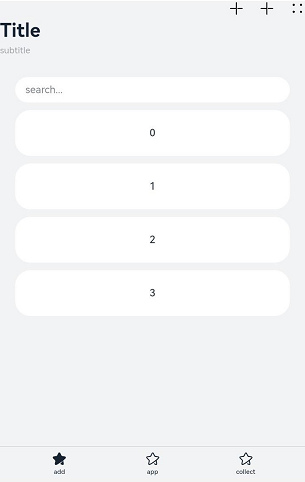
该示例主要演示Navigation页面的布局包括标题栏(title),菜单栏(menus),内容区和工具栏(toolbarConfiguration)。
- // xxx.ets
- class A {
- text: string = ''
- num: number = 0
- }
-
- @Entry
- @Component
- struct NavigationExample {
- private arr: number[] = [0, 1, 2, 3, 4, 5, 6, 7, 8, 9]
- @State currentIndex: number = 0
-
- @Builder
- NavigationTitle() {
- Column() {
- Text('Title')
- .fontColor('#182431')
- .fontSize(30)
- .lineHeight(41)
- .fontWeight(700)
- Text('subtitle')
- .fontColor('#182431')
- .fontSize(14)
- .lineHeight(19)
- .opacity(0.4)
- .margin({ top: 2, bottom: 20 })
- }.alignItems(HorizontalAlign.Start)
- }
-
- @Builder
- NavigationMenus() {
- Row() {
- Image('resources/base/media/ic_public_add.svg')
- .width(24)
- .height(24)
- Image('resources/base/media/ic_public_add.svg')
- .width(24)
- .height(24)
- .margin({ left: 24 })
- Image('common/ic_public_more.svg')
- .width(24)
- .height(24)
- .margin({ left: 24 })
- }
- }
-
- build() {
- Column() {
- Navigation() {
- TextInput({ placeholder: 'search...' })
- .width('90%')
- .height(40)
- .backgroundColor('#FFFFFF')
- .margin({ top: 8 })
-
- List({ space: 12, initialIndex: 0 }) {
- ForEach(this.arr, (item: number) => {
- ListItem() {
- Text('' + item)
- .width('90%')
- .height(72)
- .backgroundColor('#FFFFFF')
- .borderRadius(24)
- .fontSize(16)
- .fontWeight(500)
- .textAlign(TextAlign.Center)
- }
- }, (item: number) => item.toString())
- }
- .height(324)
- .width('100%')
- .margin({ top: 12, left: '10%' })
- }
- .title(this.NavigationTitle)
- .menus(this.NavigationMenus)
- .titleMode(NavigationTitleMode.Full)
- .toolbarConfiguration([
- {
- value: $r("app.string.navigation_toolbar_add"),
- icon: $r("app.media.ic_public_highlightsed")
- },
- {
- value: $r("app.string.navigation_toolbar_app"),
- icon: $r("app.media.ic_public_highlights")
- },
- {
- value: $r("app.string.navigation_toolbar_collect"),
- icon: $r("app.media.ic_public_highlights")
- }
- ])
- .hideTitleBar(false)
- .hideToolBar(false)
- .onTitleModeChange((titleModel: NavigationTitleMode) => {
- console.info('titleMode' + titleModel)
- })
- }.width('100%').height('100%').backgroundColor('#F1F3F5')
- }
- }
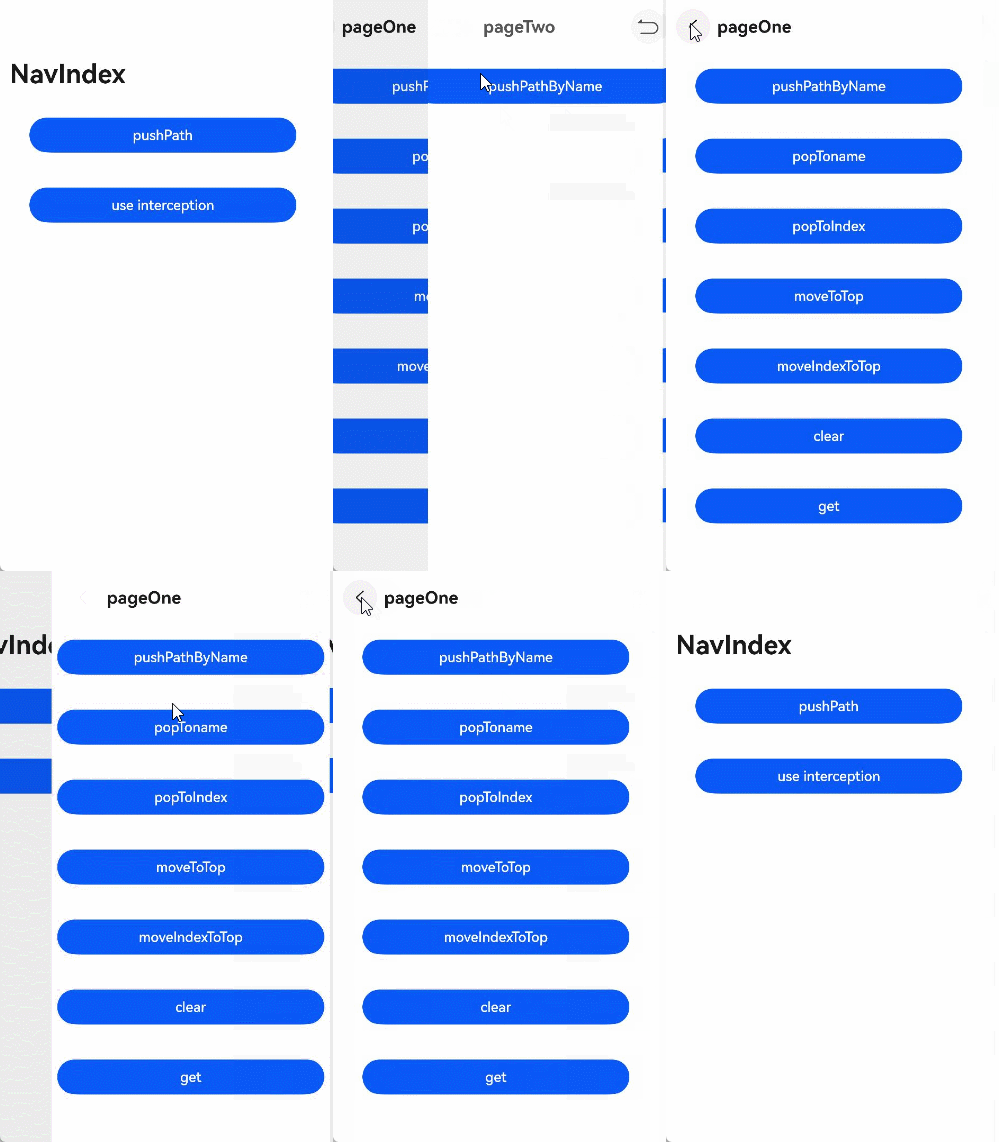
该示例主要演示NavPathStack中方法的使用及路由拦截。
- // Index.ets
- @Entry
- @Component
- struct NavigationExample {
- pageInfos: NavPathStack = new NavPathStack()
- isUseInterception: boolean = false;
-
- registerInterception() {
- this.pageInfos.setInterception({
- // 页面跳转前拦截,允许操作栈,在当前跳转中生效。
- willShow: (from: NavDestinationContext | "navBar", to: NavDestinationContext | "navBar",
- operation: NavigationOperation, animated: boolean) => {
- if (!this.isUseInterception) {
- return;
- }
- if (typeof to === "string") {
- console.log("target page is navigation home");
- return;
- }
- // 重定向目标页面,更改为pageTwo页面到pageOne页面。
- let target: NavDestinationContext = to as NavDestinationContext;
- if (target.pathInfo.name === 'pageTwo') {
- target.pathStack.pop();
- target.pathStack.pushPathByName('pageOne', null);
- }
- },
- // 页面跳转后回调,在该回调中操作栈在下一次跳转中刷新。
- didShow: (from: NavDestinationContext | "navBar", to: NavDestinationContext | "navBar",
- operation: NavigationOperation, isAnimated: boolean) => {
- if (!this.isUseInterception) {
- return;
- }
- if (typeof from === "string") {
- console.log("current transition is from navigation home");
- } else {
- console.log(`current transition is from ${(from as NavDestinationContext).pathInfo.name}`)
- }
- if (typeof to === "string") {
- console.log("current transition to is navBar");
- } else {
- console.log(`current transition is to ${(to as NavDestinationContext).pathInfo.name}`);
- }
- },
- // Navigation单双栏显示状态发生变更时触发该回调。
- modeChange: (mode: NavigationMode) => {
- if (!this.isUseInterception) {
- return;
- }
- console.log(`current navigation mode is ${mode}`);
- }
- })
- }
-
- build() {
- Navigation(this.pageInfos) {
- Column() {
- Button('pushPath', { stateEffect: true, type: ButtonType.Capsule })
- .width('80%')
- .height(40)
- .margin(20)
- .onClick(() => {
- this.pageInfos.pushPath({ name: 'pageOne' }) //将name指定的NavDestination页面信息入栈
- })
- Button('use interception', { stateEffect: true, type: ButtonType.Capsule })
- .width('80%')
- .height(40)
- .margin(20)
- .onClick(() => {
- this.isUseInterception = !this.isUseInterception;
- if (this.isUseInterception) {
- this.registerInterception();
- } else {
- this.pageInfos.setInterception(undefined);
- }
- })
- }
- }.title('NavIndex')
- }
- }
- // PageOne.ets
- class TmpClass {
- count: number = 10
- }
-
- @Builder
- export function PageOneBuilder(name: string, param: Object) {
- PageOne()
- }
-
- @Component
- export struct PageOne {
- pageInfos: NavPathStack = new NavPathStack()
-
- build() {
- NavDestination() {
- Column() {
- Button('pushPathByName', { stateEffect: true, type: ButtonType.Capsule })
- .width('80%')
- .height(40)
- .margin(20)
- .onClick(() => {
- let tmp = new TmpClass()
- this.pageInfos.pushPathByName('pageTwo', tmp) //将name指定的NavDestination页面信息入栈,传递的数据为param
- })
- Button('singletonLaunchMode', { stateEffect: true, type: ButtonType.Capsule })
- .width('80%')
- .height(40)
- .margin(20)
- .onClick(() => {
- this.pageInfos.pushPath({ name: 'pageOne' },
- { launchMode: LaunchMode.MOVE_TO_TOP_SINGLETON }) //从栈底向栈顶查找,如果指定的名称已经存在,则将对应的NavDestination页面移到栈顶
- })
- Button('popToname', { stateEffect: true, type: ButtonType.Capsule })
- .width('80%')
- .height(40)
- .margin(20)
- .onClick(() => {
- this.pageInfos.popToName('pageTwo') //回退路由栈到第一个名为name的NavDestination页面
- console.log('popToName' + JSON.stringify(this.pageInfos),
- '返回值' + JSON.stringify(this.pageInfos.popToName('pageTwo')))
- })
- Button('popToIndex', { stateEffect: true, type: ButtonType.Capsule })
- .width('80%')
- .height(40)
- .margin(20)
- .onClick(() => {
- this.pageInfos.popToIndex(1) // 回退路由栈到index指定的NavDestination页面
- console.log('popToIndex' + JSON.stringify(this.pageInfos))
- })
- Button('moveToTop', { stateEffect: true, type: ButtonType.Capsule })
- .width('80%')
- .height(40)
- .margin(20)
- .onClick(() => {
- this.pageInfos.moveToTop('pageTwo') // 将第一个名为name的NavDestination页面移到栈顶
- console.log('moveToTop' + JSON.stringify(this.pageInfos),
- '返回值' + JSON.stringify(this.pageInfos.moveToTop('pageTwo')))
- })
- Button('moveIndexToTop', { stateEffect: true, type: ButtonType.Capsule })
- .width('80%')
- .height(40)
- .margin(20)
- .onClick(() => {
- this.pageInfos.moveIndexToTop(1) // 将index指定的NavDestination页面移到栈顶
- console.log('moveIndexToTop' + JSON.stringify(this.pageInfos))
- })
- Button('clear', { stateEffect: true, type: ButtonType.Capsule })
- .width('80%')
- .height(40)
- .margin(20)
- .onClick(() => {
- this.pageInfos.clear() //清除栈中所有页面
- })
- Button('get', { stateEffect: true, type: ButtonType.Capsule })
- .width('80%')
- .height(40)
- .margin(20)
- .onClick(() => {
- console.log('-------------------')
- console.log('获取栈中所有NavDestination页面的名称', JSON.stringify(this.pageInfos.getAllPathName()))
- console.log('获取index指定的NavDestination页面的参数信息',
- JSON.stringify(this.pageInfos.getParamByIndex(1)))
- console.log('获取全部名为name的NavDestination页面的参数信息',
- JSON.stringify(this.pageInfos.getParamByName('pageTwo')))
- console.log('获取全部名为name的NavDestination页面的位置索引',
- JSON.stringify(this.pageInfos.getIndexByName('pageOne')))
- console.log('获取栈大小', JSON.stringify(this.pageInfos.size()))
- })
- }.width('100%').height('100%')
- }.title('pageOne')
- .onBackPressed(() => {
- const popDestinationInfo = this.pageInfos.pop() // 弹出路由栈栈顶元素
- console.log('pop' + '返回值' + JSON.stringify(popDestinationInfo))
- return true
- }).onReady((context: NavDestinationContext) => {
- this.pageInfos = context.pathStack
- })
- }
- }
- // PageTwo.ets
- @Builder
- export function PageTwoBuilder(name: string, param: Object) {
- PageTwo()
- }
-
- @Component
- export struct PageTwo {
- pathStack: NavPathStack = new NavPathStack()
- private menuItems: Array<NavigationMenuItem> = [
- {
- value: "1",
- icon: 'resources/base/media/undo.svg',
- },
- {
- value: "2",
- icon: 'resources/base/media/redo.svg',
- isEnabled: false,
- },
- {
- value: "3",
- icon: 'resources/base/media/ic_public_ok.svg',
- isEnabled: true,
- }
- ]
-
- build() {
- NavDestination() {
- Column() {
- Button('pushPathByName', { stateEffect: true, type: ButtonType.Capsule })
- .width('80%')
- .height(40)
- .margin(20)
- .onClick(() => {
- this.pathStack.pushPathByName('pageOne', null)
- })
- }.width('100%').height('100%')
- }.title('pageTwo')
- .menus(this.menuItems)
- .onBackPressed(() => {
- this.pathStack.pop()
- return true
- })
- .onReady((context: NavDestinationContext) => {
- this.pathStack = context.pathStack;
- console.log("current page config info is " + JSON.stringify(context.getConfigInRouteMap()))
- })
- }
- }
- // 工程配置文件module.json5中配置 {"routerMap": "$profile:route_map"}
- // route_map.json
- {
- "routerMap": [
- {
- "name": "pageOne",
- "pageSourceFile": "src/main/ets/pages/PageOne.ets",
- "buildFunction": "PageOneBuilder",
- "data": {
- "description": "this is pageOne"
- }
- },
- {
- "name": "pageTwo",
- "pageSourceFile": "src/main/ets/pages/PageTwo.ets",
- "buildFunction": "PageTwoBuilder"
- }
- ]
- }
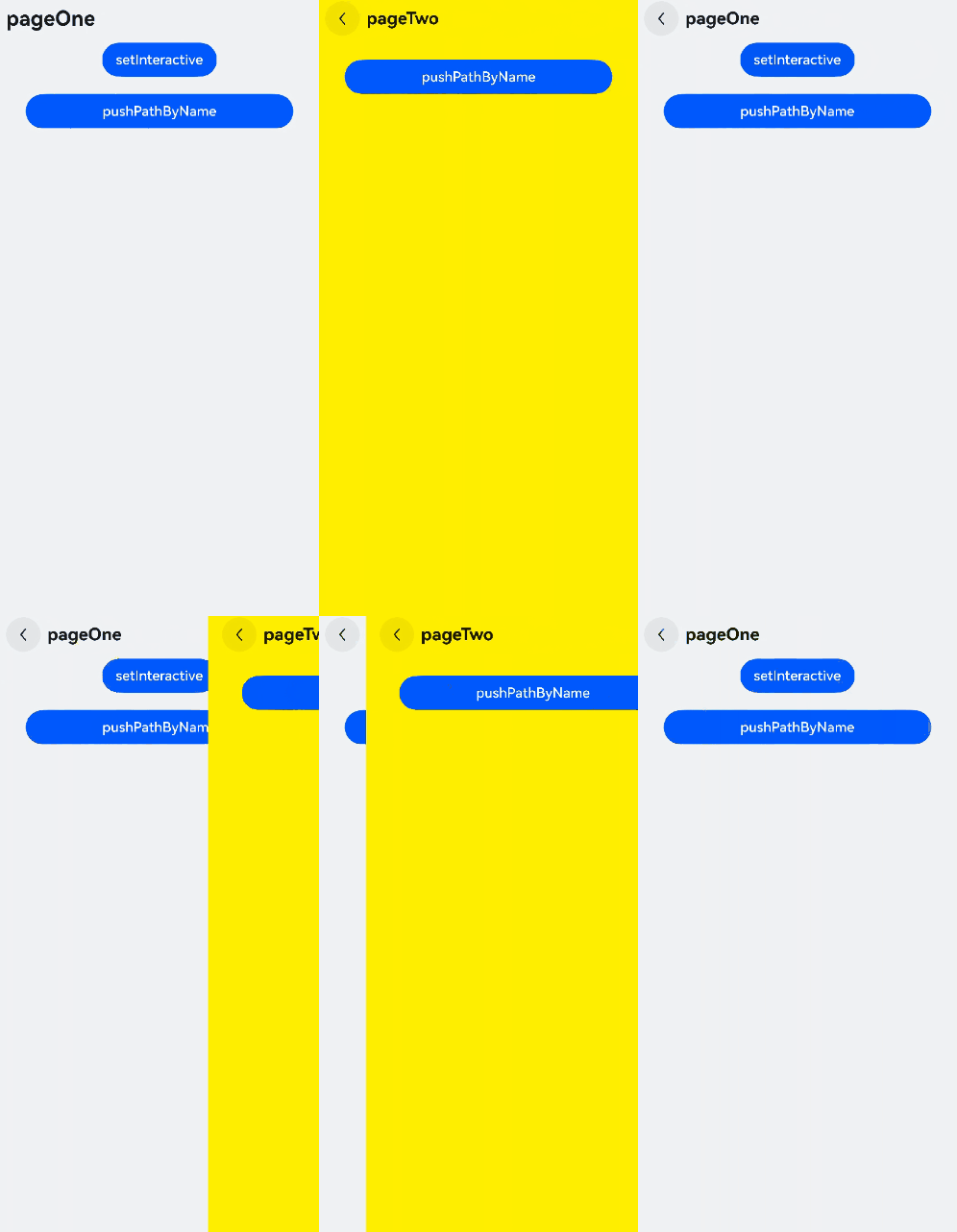
该示例主要演示设置每个NavDestination子页面的自定义转场动画及可交互转场动画。
- // Index.ets
- import { CustomTransition, AnimateCallback } from './CustomNavigationUtils'
-
- @Entry
- @Component
- struct NavigationExample {
- pageInfos: NavPathStack = new NavPathStack();
-
- aboutToAppear() {
- if (this.pageInfos === undefined) {
- this.pageInfos = new NavPathStack();
- }
- this.pageInfos.pushPath({ name: 'pageOne', param: CustomTransition.getInstance().getAnimationId() });
- }
-
- build() {
- Navigation(this.pageInfos) {
- }
- .title('NavIndex')
- .hideNavBar(true)
- .customNavContentTransition((from: NavContentInfo, to: NavContentInfo, operation: NavigationOperation) => {
- if (from.mode == NavDestinationMode.DIALOG || to.mode == NavDestinationMode.DIALOG) {
- return undefined;
- }
-
- // 首页不进行自定义动画
- if (from.index === -1 || to.index === -1) {
- return undefined;
- }
-
- CustomTransition.getInstance().operation = operation;
- if (CustomTransition.getInstance().interactive) {
- let customAnimation: NavigationAnimatedTransition = {
- onTransitionEnd: (isSuccess: boolean) => {
- console.log("===== current transition is " + isSuccess);
- CustomTransition.getInstance().recoverState();
- CustomTransition.getInstance().proxy = undefined;
- },
- transition: (transitionProxy: NavigationTransitionProxy) => {
- CustomTransition.getInstance().proxy = transitionProxy;
- let targetIndex: string | undefined = operation == NavigationOperation.PUSH ?
- (to.navDestinationId) : (from.navDestinationId);
- if (targetIndex) {
- CustomTransition.getInstance().fireInteractiveAnimation(targetIndex, operation);
- }
- },
- isInteractive: CustomTransition.getInstance().interactive
- }
- return customAnimation;
- }
- let customAnimation: NavigationAnimatedTransition = {
- onTransitionEnd: (isSuccess: boolean) => {
- console.log(`current transition result is ${isSuccess}`)
- },
- timeout: 7000,
- // 转场开始时系统调用该方法,并传入转场上下文代理对象
- transition: (transitionProxy: NavigationTransitionProxy) => {
- if (!from.navDestinationId || !to.navDestinationId) {
- return;
- }
- // 从封装类CustomTransition中根据子页面的序列获取对应的转场动画回调
- let fromParam: AnimateCallback = CustomTransition.getInstance().getAnimateParam(from.navDestinationId);
- let toParam: AnimateCallback = CustomTransition.getInstance().getAnimateParam(to.navDestinationId);
- if (operation == NavigationOperation.PUSH) {
- if (toParam.start) {
- toParam.start(true, false);
- }
- animateTo({
- duration: 500, onFinish: () => {
- transitionProxy.finishTransition();
- }
- }, () => {
- if (toParam.finish) {
- toParam.finish(true, false);
- }
- })
- } else {
- if (fromParam.start) {
- fromParam.start(true, true);
- }
- animateTo({
- duration: 500, onFinish: () => {
- transitionProxy.finishTransition();
- }
- }, () => {
- if (fromParam.finish) {
- fromParam.finish(true, true);
- }
- })
- }
- }
- };
- return customAnimation;
- })
- }
- }
- // PageOne.ets
- import { CustomTransition } from './CustomNavigationUtils';
-
- @Builder
- export function PageOneBuilder(name: string, param: Object) {
- PageOne()
- }
-
- @Component
- export struct PageOne {
- pageInfos: NavPathStack = new NavPathStack();
- @State translateX: string = '0';
- pageId: string = '';
- rectWidth: number = 0;
- interactive: boolean = false;
-
- registerCallback() {
- CustomTransition.getInstance().registerNavParam(this.pageId, (isPush: boolean, isExit: boolean) => {
- if (isPush) {
- this.translateX = '100%';
- } else {
- this.translateX = '0';
- }
- }, (isPush: boolean, isExit: boolean) => {
- if (isPush) {
- this.translateX = '0';
- } else {
- this.translateX = '100%';
- }
- }, (isPush: boolean, isExit: boolean) => {
- this.translateX = '0';
- }, (operation: NavigationOperation) => {
- if (operation == NavigationOperation.PUSH) {
- this.translateX = '100%';
- animateTo({
- duration: 1000,
- onFinish: () => {
- this.translateX = '0';
- }
- }, () => {
- this.translateX = '0';
- })
- } else {
- this.translateX = '0';
- animateTo({
- duration: 1000,
- onFinish: () => {
- this.translateX = '0';
- }
- }, () => {
- this.translateX = '100%';
- })
- }
- }, 200);
- }
-
- build() {
- NavDestination() {
- Column() {
- Button(`setInteractive`)
- .onClick(() => {
- CustomTransition.getInstance().interactive = !CustomTransition.getInstance().interactive;
- this.interactive = CustomTransition.getInstance().interactive;
- })
-
- Button('pushPathByName', { stateEffect: true, type: ButtonType.Capsule })
- .width('80%')
- .height(40)
- .margin(20)
- .onClick(() => {
- //将name指定的NavDestination页面信息入栈,传递的数据为param
- this.pageInfos.pushDestinationByName('pageTwo', CustomTransition.getInstance().getAnimationId());
- })
- }
- .size({ width: '100%', height: '100%' })
- }
- .title('pageOne')
- .onDisAppear(() => {
- CustomTransition.getInstance().unRegisterNavParam(this.pageId);
- })
- .onReady((context: NavDestinationContext) => {
- this.pageInfos = context.pathStack;
- if (context.navDestinationId) {
- this.pageId = context.navDestinationId;
- this.registerCallback();
- }
- })
- .translate({ x: this.translateX })
- .backgroundColor('#F1F3F5')
- .gesture(PanGesture()
- .onActionStart((event: GestureEvent) => {
- this.rectWidth = event.target.area.width as number;
- if (event.offsetX < 0) {
- this.pageInfos.pushPath({ name: 'pageTwo', param: CustomTransition.getInstance().getAnimationId() });
- } else {
- this.pageInfos.pop();
- }
- })
- .onActionUpdate((event: GestureEvent) => {
- let rate = event.fingerList[0].localX / this.rectWidth;
- CustomTransition.getInstance().updateProgress(rate);
- })
- .onActionEnd((event: GestureEvent) => {
- let rate: number = event.fingerList[0].localX / this.rectWidth;
- CustomTransition.getInstance().finishInteractiveAnimation(rate);
- }))
- }
- }
- // PageTwo.ets
- import { CustomTransition } from './CustomNavigationUtils'
-
- @Builder
- export function PageTwoBuilder(name: string, param: Object) {
- PageTwo({ param: param as number })
- }
-
- @Component
- export struct PageTwo {
- pageInfos: NavPathStack = new NavPathStack();
- @State translateX: string = '0';
- pageId: string = '';
- rectWidth: number = 0;
- param: number = 0;
-
- registerCallback() {
- CustomTransition.getInstance().registerNavParam(this.pageId, (isPush: boolean, isExit: boolean) => {
- if (isPush) {
- this.translateX = '100%'
- } else {
- this.translateX = '0';
- }
- }, (isPush: boolean, isExit: boolean) => {
- if (isPush) {
- this.translateX = '0';
- } else {
- this.translateX = '100%'
- }
- }, (isPush: boolean, isExit: boolean) => {
- this.translateX = '0';
- }, (operation: NavigationOperation) => {
- if (operation == NavigationOperation.PUSH) {
- this.translateX = '100%';
- animateTo({
- duration: 500, onFinish: () => {
- this.translateX = '0';
- }
- }, () => {
- this.translateX = '0'
- })
- } else {
- this.translateX = '0';
- animateTo({
- duration: 500, onFinish: () => {
- this.translateX = "0"
- }
- }, () => {
- this.translateX = '100%';
- })
- }
- }, 2000)
- }
-
- build() {
- NavDestination() {
- Column() {
- Button('pushPathByName', { stateEffect: true, type: ButtonType.Capsule })
- .width('80%')
- .height(40)
- .margin(20)
- .onClick(() => {
- //将name指定的NavDestination页面信息入栈,传递的数据为param
- this.pageInfos.pushPath({ name: 'pageOne', param: CustomTransition.getInstance().getAnimationId() })
- })
- }
- .size({ width: '100%', height: '100%' })
- }
- .title('pageTwo')
- .gesture(PanGesture()
- .onActionStart((event: GestureEvent) => {
- this.rectWidth = event.target.area.width as number;
- if (event.offsetX < 0) {
- this.pageInfos.pushPath({ name: 'pageOne', param: CustomTransition.getInstance().getAnimationId() });
- } else {
- this.pageInfos.pop();
- }
- })
- .onActionUpdate((event: GestureEvent) => {
- let rate = event.fingerList[0].localX / this.rectWidth;
- CustomTransition.getInstance().updateProgress(rate);
- })
- .onActionEnd((event: GestureEvent) => {
- let rate = event.fingerList[0].localX / this.rectWidth;
- CustomTransition.getInstance().finishInteractiveAnimation(rate);
- }))
- .onAppear(() => {
- this.registerCallback();
- })
- .onDisAppear(() => {
- CustomTransition.getInstance().unRegisterNavParam(this.pageId);
- })
- .onReady((context: NavDestinationContext) => {
- this.pageInfos = context.pathStack;
- if (context.navDestinationId) {
- this.pageId = context.navDestinationId;
- this.registerCallback();
- }
- })
- .translate({ x: this.translateX })
- .backgroundColor(Color.Yellow)
- }
- }
- // CustomNavigationUtils.ets
- // 自定义接口,用来保存某个页面相关的转场动画回调和参数
- export interface AnimateCallback {
- finish: ((isPush: boolean, isExit: boolean) => void | undefined) | undefined;
- start: ((isPush: boolean, isExit: boolean) => void | undefined) | undefined;
- onFinish: ((isPush: boolean, isExit: boolean) => void | undefined) | undefined;
- interactive: ((operation: NavigationOperation) => void | undefined) | undefined;
- timeout: (number | undefined) | undefined;
- }
-
- const customTransitionMap: Map<string, AnimateCallback> = new Map();
-
- export class CustomTransition {
- static delegate = new CustomTransition();
- interactive: boolean = false;
- proxy: NavigationTransitionProxy | undefined = undefined;
- private animationId: number = 0;
- operation: NavigationOperation = NavigationOperation.PUSH
-
- static getInstance() {
- return CustomTransition.delegate;
- }
-
- /* 注册某个页面的动画回调
- * name: 注册页面的唯一id
- * startCallback:用来设置动画开始时页面的状态
- * endCallback:用来设置动画结束时页面的状态
- * onFinish:用来执行动画结束后页面的其他操作
- * interactiveCallback: 注册的可交互转场的动效
- * timeout:转场结束的超时时间
- */
- registerNavParam(name: string, startCallback: (operation: boolean, isExit: boolean) => void,
- endCallback: (operation: boolean, isExit: boolean) => void,
- onFinish: (operation: boolean, isExit: boolean) => void,
- interactiveCallback: (operation: NavigationOperation) => void,
- timeout: number): void {
- if (customTransitionMap.has(name)) {
- let param = customTransitionMap.get(name);
- if (param != undefined) {
- param.start = startCallback;
- param.finish = endCallback;
- param.timeout = timeout;
- param.onFinish = onFinish;
- param.interactive = interactiveCallback;
- return;
- }
- }
- let params: AnimateCallback = {
- timeout: timeout,
- start: startCallback,
- finish: endCallback,
- onFinish: onFinish,
- interactive: interactiveCallback
- };
- customTransitionMap.set(name, params);
- }
-
- getAnimationId() {
- return Date.now();
- }
-
- unRegisterNavParam(name: string): void {
- customTransitionMap.delete(name);
- }
-
- fireInteractiveAnimation(id: string, operation: NavigationOperation) {
- let animation = customTransitionMap.get(id)?.interactive;
- if (!animation) {
- return;
- }
- animation(operation);
- }
-
- updateProgress(progress: number) {
- if (!this.proxy?.updateTransition) {
- return;
- }
- progress = this.operation == NavigationOperation.PUSH ? 1 - progress : progress;
- this.proxy?.updateTransition(progress);
- }
-
- cancelTransition() {
- if (this.proxy?.cancelTransition) {
- this.proxy.cancelTransition();
- }
- }
-
- recoverState() {
- if (!this.proxy?.from.navDestinationId || !this.proxy?.to.navDestinationId) {
- return;
- }
- let fromParam = customTransitionMap.get(this.proxy.from.navDestinationId);
- if (fromParam?.onFinish) {
- fromParam.onFinish(false, false);
- }
- let toParam = customTransitionMap.get(this.proxy?.to.navDestinationId);
- if (toParam?.onFinish) {
- toParam.onFinish(true, true);
- }
- }
-
- finishTransition() {
- this.proxy?.finishTransition();
- }
-
- finishInteractiveAnimation(rate: number) {
- if (this.operation == NavigationOperation.PUSH) {
- if (rate > 0.5) {
- if (this.proxy?.cancelTransition) {
- this.proxy.cancelTransition();
- }
- } else {
- this.proxy?.finishTransition();
- }
- } else {
- if (rate > 0.5) {
- this.proxy?.finishTransition();
- } else {
- if (this.proxy?.cancelTransition) {
- this.proxy.cancelTransition();
- }
- }
- }
- }
-
- getAnimateParam(name: string): AnimateCallback {
- let result: AnimateCallback = {
- start: customTransitionMap.get(name)?.start,
- finish: customTransitionMap.get(name)?.finish,
- timeout: customTransitionMap.get(name)?.timeout,
- onFinish: customTransitionMap.get(name)?.onFinish,
- interactive: customTransitionMap.get(name)?.interactive,
- };
- return result;
- }
- }
- // 工程配置文件module.json5中配置 {"routerMap": "$profile:route_map"}
- // route_map.json
- {
- "routerMap": [
- {
- "name": "pageOne",
- "pageSourceFile": "src/main/ets/pages/PageOne.ets",
- "buildFunction": "PageOneBuilder",
- "data": {
- "description": "this is pageOne"
- }
- },
- {
- "name": "pageTwo",
- "pageSourceFile": "src/main/ets/pages/PageTwo.ets",
- "buildFunction": "PageTwoBuilder"
- }
- ]
- }
该示例主要演示Navigation通过NavPathStack提供的接口来实现将设置的参数传给上一级页面。
- // Index.ets
- @Entry
- @Component
- struct NavigationExample {
- pageInfo: NavPathStack = new NavPathStack()
-
- build() {
- Navigation(this.pageInfo) {
- Column() {
- Button('StartTest', { stateEffect: true, type: ButtonType.Capsule })
- .width('80%')
- .height(40)
- .margin(20)
- .onClick(() => {
- this.pageInfo.pushPath({ name: 'pageOne' }); // 将name指定的NavDestination页面信息入栈。
- })
- }
- }.title('NavIndex')
- }
- }
- // PageOne.ets
- import { BusinessError } from '@kit.BasicServicesKit';
-
- class TmpClass {
- count: number = 10
- }
-
- class ParamWithOp {
- operation: number = 1
- count: number = 10
- }
-
- @Builder
- export function PageOneBuilder(name: string, param: Object) {
- PageOne()
- }
-
- @Component
- export struct PageOne {
- pageInfo: NavPathStack = new NavPathStack();
- @State message: string = 'Hello World'
-
- build() {
- NavDestination() {
- Column() {
- Text(this.message)
- .width('80%')
- .height(50)
- .margin(10)
-
- Button('pushPath', { stateEffect: true, type: ButtonType.Capsule })
- .width('80%')
- .height(40)
- .margin(10)
- .onClick(() => {
- this.pageInfo.pushPath({
- name: 'pageTwo', param: new ParamWithOp(), onPop: (popInfo: PopInfo) => {
- this.message =
- '[pushPath]last page is: ' + popInfo.info.name + ', result: ' + JSON.stringify(popInfo.result);
- }
- }); // 将name指定的NavDestination页面信息入栈,传递的数据为param,添加接收处理结果的onPop回调。
- })
-
- Button('pushPathByName', { stateEffect: true, type: ButtonType.Capsule })
- .width('80%')
- .height(40)
- .margin(10)
- .onClick(() => {
- let tmp = new TmpClass()
- this.pageInfo.pushPathByName('pageTwo', tmp, (popInfo) => {
- this.message =
- '[pushPathByName]last page is: ' + popInfo.info.name + ', result: ' + JSON.stringify(popInfo.result);
- }); // 将name指定的NavDestination页面信息入栈,传递的数据为param,添加接收处理结果的onPop回调。
- })
-
- Button('pushDestination', { stateEffect: true, type: ButtonType.Capsule })
- .width('80%')
- .height(40)
- .margin(10)
- .onClick(() => {
- let tmp = new TmpClass()
- // 将name指定的NavDestination页面信息入栈,传递的数据为param,添加接收处理结果的onPop回调。
- this.pageInfo.pushDestination({
- name: 'pageTwo', param: new ParamWithOp(), onPop: (popInfo: PopInfo) => {
- this.message =
- '[pushDestination]last page is: ' + popInfo.info.name + ', result: ' + JSON.stringify(popInfo.result);
- }
- }).catch((error: BusinessError) => {
- console.error(`[pushDestination]failed, error code = ${error.code}, error.message = ${error.message}.`);
- }).then(() => {
- console.error('[pushDestination]success.');
- });
- })
-
- Button('pushDestinationByName', { stateEffect: true, type: ButtonType.Capsule })
- .width('80%')
- .height(40)
- .margin(10)
- .onClick(() => {
- let tmp = new TmpClass()
- // 将name指定的NavDestination页面信息入栈,传递的数据为param,添加接收处理结果的onPop回调。
- this.pageInfo.pushDestinationByName('pageTwo', tmp, (popInfo) => {
- this.message = '[pushDestinationByName]last page is: ' + popInfo.info.name + ', result: ' +
- JSON.stringify(popInfo.result);
- }).catch((error: BusinessError) => {
- console.error(`[pushDestinationByName]failed, error code = ${error.code}, error.message = ${error.message}.`);
- }).then(() => {
- console.error('[pushDestinationByName]success.');
- });
- })
-
- Button('pushPathWithoutOnPop', { stateEffect: true, type: ButtonType.Capsule })
- .width('80%')
- .height(40)
- .margin(10)
- .onClick(() => {
- this.pageInfo.pushPath({ name: 'pageTwo', param: new ParamWithOp() }); // 将name指定的NavDestination页面信息入栈。
- })
-
- Button('pushPathByNameWithoutOnPop', { stateEffect: true, type: ButtonType.Capsule })
- .width('80%')
- .height(40)
- .margin(10)
- .onClick(() => {
- let tmp = new TmpClass()
- this.pageInfo.pushPathByName('pageTwo', tmp); // 将name指定的NavDestination页面信息入栈,传递的数据为param。
- })
-
- Button('pushDestinationWithoutOnPop', { stateEffect: true, type: ButtonType.Capsule })
- .width('80%')
- .height(40)
- .margin(10)
- .onClick(() => {
- let tmp = new TmpClass()
- // 将name指定的NavDestination页面信息入栈,传递的数据为param,添加接收处理结果的onPop回调。
- this.pageInfo.pushDestination({ name: 'pageTwo', param: new ParamWithOp() })
- .catch((error: BusinessError) => {
- console.error(`[pushDestinationWithoutOnPop]failed, error code = ${error.code}, error.message = ${error.message}.`);
- }).then(() => {
- console.error('[pushDestinationWithoutOnPop]success.');
- });
- })
-
- Button('pushDestinationByNameWithoutOnPop', { stateEffect: true, type: ButtonType.Capsule })
- .width('80%')
- .height(40)
- .margin(10)
- .onClick(() => {
- let tmp = new TmpClass()
- // 将name指定的NavDestination页面信息入栈,传递的数据为param。
- this.pageInfo.pushDestinationByName('pageTwo', tmp)
- .catch((error: BusinessError) => {
- console.error(`[pushDestinationByNameWithoutOnPop]failed, error code = ${error.code}, error.message = ${error.message}.`);
- }).then(() => {
- console.error('[pushDestinationByNameWithoutOnPop]success.');
- });
- })
-
- Button('clear', { stateEffect: true, type: ButtonType.Capsule })
- .width('80%')
- .height(40)
- .margin(10)
- .onClick(() => {
- this.pageInfo.clear(); // 清除栈中所有页面。
- })
- }.width('100%').height('100%')
- }.title('pageOne')
- .onBackPressed(() => {
- this.pageInfo.pop({ number: 1 }) // 弹出路由栈栈顶元素。
- return true
- }).onReady((context: NavDestinationContext) => {
- this.pageInfo = context.pathStack;
- })
- }
- }
- // PageTwo.ets
- class resultClass {
- constructor(count: number) {
- this.count = count;
- }
-
- count: number = 10
- }
-
- @Builder
- export function PageTwoBuilder() {
- PageTwo()
- }
-
- @Component
- export struct PageTwo {
- pathStack: NavPathStack = new NavPathStack()
-
- build() {
- NavDestination() {
- Column() {
- Button('pop', { stateEffect: true, type: ButtonType.Capsule })
- .width('80%')
- .height(40)
- .margin(20)
- .onClick(() => {
- this.pathStack.pop(new resultClass(1)); // 回退到上一个页面,将处理结果传入push的onPop回调中。
- })
-
- Button('popToName', { stateEffect: true, type: ButtonType.Capsule })
- .width('80%')
- .height(40)
- .margin(20)
- .onClick(() => {
- this.pathStack.popToName('pageOne',
- new resultClass(11)); // 将第一个名为name的NavDestination页面移到栈顶,将处理结果传入push的onPop回调中。
- })
-
- Button('popToIndex', { stateEffect: true, type: ButtonType.Capsule })
- .width('80%')
- .height(40)
- .margin(20)
- .onClick(() => {
- this.pathStack.popToIndex(0, new resultClass(111)); // 将index指定的NavDestination页面移到栈顶,将处理结果传入push的onPop回调中。
- })
-
- Button('popWithoutResult', { stateEffect: true, type: ButtonType.Capsule })
- .width('80%')
- .height(40)
- .margin(20)
- .onClick(() => {
- this.pathStack.pop();
- })
-
- Button('popToNameWithoutResult', { stateEffect: true, type: ButtonType.Capsule })
- .width('80%')
- .height(40)
- .margin(20)
- .onClick(() => {
- this.pathStack.popToName('pageOne');
- })
-
- Button('popToIndexWithoutResult', { stateEffect: true, type: ButtonType.Capsule })
- .width('80%')
- .height(40)
- .margin(20)
- .onClick(() => {
- this.pathStack.popToIndex(0);
- })
- }.width('100%').height('100%')
- }.title('pageTwo')
- .onBackPressed(() => {
- this.pathStack.pop(new resultClass(0)); // 回退到上一个页面,将处理结果传入push的onPop回调。
- return true;
- }).onReady((context: NavDestinationContext) => {
- this.pathStack = context.pathStack
- })
- }
- }
- // 工程配置文件module.json5中配置 {"routerMap": "$profile:route_map"}
- // route_map.json
- {
- "routerMap": [
- {
- "name": "pageOne",
- "pageSourceFile": "src/main/ets/pages/PageOne.ets",
- "buildFunction": "PageOneBuilder",
- "data": {
- "description": "this is pageOne"
- }
- },
- {
- "name": "pageTwo",
- "pageSourceFile": "src/main/ets/pages/PageTwo.ets",
- "buildFunction": "PageTwoBuilder"
- }
- ]
- }

该示例主要演示设置Navigation主页的标题栏、工具栏和NavDestination页面的标题栏的背景颜色和背景模糊效果。
- let COLOR1: string = "#80004AAF";
- let COLOR2: string = "#802787D9";
- let BLUR_STYLE_1: BlurStyle = BlurStyle.BACKGROUND_THIN;
- let BLUR_STYLE_2: BlurStyle = BlurStyle.BACKGROUND_THICK;
-
- @Component
- struct BackComponent {
- build() {
- Row() {
- Column() {
- }
- .height('100%')
- .backgroundColor("#3D9DB4")
- .layoutWeight(9)
-
- Column() {
- }
- .height('100%')
- .backgroundColor("#17A98D")
- .layoutWeight(9)
-
- Column() {
- }
- .height('100%')
- .backgroundColor("#FFC000")
- .layoutWeight(9)
- }
- .height('100%')
- .width('100%')
- }
- }
-
- @Component
- struct ColorAndBlur {
- @State useColor1: boolean = true;
- @State useBlur1: boolean = true;
-
- build() {
- NavDestination() {
- Stack({ alignContent: Alignment.Center }) {
- BackComponent()
- .width('100%')
- .height('100%')
- Column() {
- Stack({ alignContent: Alignment.Center }) {
- Button("switch color")
- .onClick(() => {
- this.useColor1 = !this.useColor1;
- })
- }
- .width('100%')
- .layoutWeight(1)
-
- Stack({ alignContent: Alignment.Center }) {
- Button("switch blur")
- .onClick(() => {
- this.useBlur1 = !this.useBlur1;
- })
- }
- .width('100%')
- .layoutWeight(1)
- }
- .width('100%')
- .height('100%')
- }.width('100%')
- .height('100%')
- }
- .width('100%')
- .height('100%')
- // 开发者可以设置标题栏的背景颜色和背景模糊效果
- .title("switch titlebar color and blur", {
- backgroundColor: this.useColor1 ? COLOR1 : COLOR2,
- backgroundBlurStyle: this.useBlur1 ? BLUR_STYLE_1 : BLUR_STYLE_2,
- barStyle: BarStyle.STACK
- })
- }
- }
-
- @Entry
- @Component
- struct Index {
- private stack: NavPathStack = new NavPathStack();
- @State useColor1: boolean = true;
- @State useBlur1: boolean = true;
-
- @Builder
- PageBuilder(name: string) {
- ColorAndBlur()
- }
-
- build() {
- Navigation(this.stack) {
- Stack({ alignContent: Alignment.Center }) {
- BackComponent()
- .width('100%')
- .height('100%')
- Column() {
- Stack({ alignContent: Alignment.Center }) {
- Button("switch color")
- .onClick(() => {
- this.useColor1 = !this.useColor1;
- })
- }
- .width('100%')
- .layoutWeight(1)
-
- Stack({ alignContent: Alignment.Center }) {
- Button("switch blur")
- .onClick(() => {
- this.useBlur1 = !this.useBlur1;
- })
- }
- .width('100%')
- .layoutWeight(1)
-
- Stack({ alignContent: Alignment.Center }) {
- Button("push page")
- .onClick(() => {
- this.stack.pushPath({ name: "page" })
- })
- }
- .width('100%')
- .layoutWeight(1)
- }
- .width('100%')
- .height('80%')
- }.width('100%')
- .height('100%')
- }
- .width('100%')
- .height('100%')
- .navDestination(this.PageBuilder)
- // 开发者可以设置标题栏的背景颜色和背景模糊效果
- .title("NavTitle", {
- backgroundColor: this.useColor1 ? COLOR1 : COLOR2,
- backgroundBlurStyle: this.useBlur1 ? BLUR_STYLE_1 : BLUR_STYLE_2,
- barStyle: BarStyle.STACK
- })
- // 开发者可以设置工具栏的背景颜色和背景模糊效果
- .toolbarConfiguration([
- { value: "a" },
- { value: "b" },
- { value: "c" }
- ], {
- backgroundColor: this.useColor1 ? COLOR1 : COLOR2,
- backgroundBlurStyle: this.useBlur1 ? BLUR_STYLE_1 : BLUR_STYLE_2
- })
- }
- }
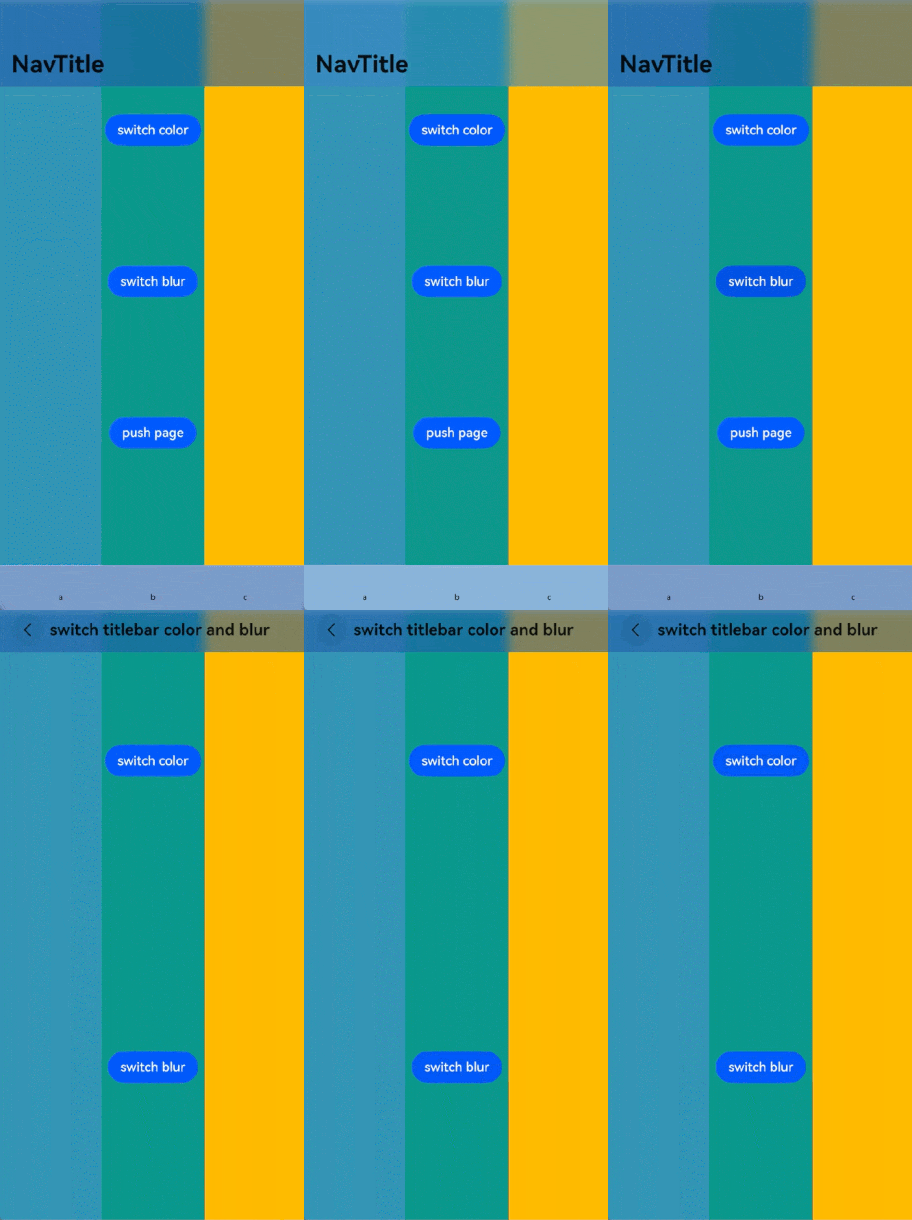
该示例主要演示在嵌套Navigation场景下,如何获取父NavPathStack。
- @Entry
- @Component
- struct NavigationExample1 {
- @State childNavStack: NavPathStack = new NavPathStack();
-
- build() {
- Navigation() {
- Stack({ alignContent: Alignment.Center }) {
- Navigation(this.childNavStack) {
- Button('push Path to parent Navigation', { stateEffect: true, type: ButtonType.Capsule })
- .width('80%')
- .height(40)
- .margin(20)
- .onClick(() => {
- // 可以获取父NavPathStack
- let parentStack = this.childNavStack.getParent();
- parentStack?.pushPath({ name: "pageOne" })
- })
- }
- .clip(true)
- .backgroundColor(Color.Orange)
- .width('80%')
- .height('80%')
- .title('ChildNavigation')
- }
- .width('100%')
- .height('100%')
- }
- .backgroundColor(Color.Green)
- .width('100%')
- .height('100%')
- .title('ParentNavigation')
- }
- }
- // PageOne.ets
- @Builder
- export function PageOneBuilder(name: string) {
- NavDestination() {
- Text("this is " + name)
- }
- .title(name)
- }
- // 工程配置文件module.json5中配置 {"routerMap": "$profile:route_map"}
- // route_map.json
- {
- "routerMap": [
- {
- "name": "pageOne",
- "pageSourceFile": "src/main/ets/pages/PageOne.ets",
- "buildFunction": "PageOneBuilder",
- "data": {
- "description": "this is pageOne"
- }
- }
- ]
- }

该示例主要演示如下两点功能:
NavPathStack无需声明为状态变量,也可以实现页面栈操作功能。
NavDestination通过onReady事件能够拿到对应的NavPathInfo和所属的NavPathStack。
- class PageParam {
- constructor(num_: number) {
- this.num = num_;
- }
-
- num: number = 0;
- }
-
- @Builder
- export function PageOneBuilder(name: string, param: Object) {
- PageOne()
- }
-
- @Component
- struct PageOne {
- private stack: NavPathStack | null = null;
- private name: string = "";
- private paramNum: number = 0;
-
- build() {
- NavDestination() {
- Column() {
- Text("NavPathInfo: name: " + this.name + ", paramNum: " + this.paramNum)
- Button('pushPath', { stateEffect: true, type: ButtonType.Capsule })
- .width('80%')
- .height(40)
- .margin(20)
- .onClick(() => {
- if (this.stack) {
- let p = new PageParam(this.paramNum + 1);
- this.stack.pushPath({ name: "pageOne", param: p });
- }
- })
- Button('pop', { stateEffect: true, type: ButtonType.Capsule })
- .width('80%')
- .height(40)
- .margin(20)
- .onClick(() => {
- this.stack?.pop()
- })
- }
- .width('100%')
- .height('100%')
- }
- .title('pageOne')
- .onReady((ctx: NavDestinationContext) => {
- // 在NavDestination中能够拿到传来的NavPathInfo和当前所处的NavPathStack
- try {
- this.name = ctx?.pathInfo?.name;
- this.paramNum = (ctx?.pathInfo?.param as PageParam)?.num;
- this.stack = ctx.pathStack;
- } catch (e) {
- console.log(`testTag onReady catch exception: ${JSON.stringify(e)}`)
- }
- })
- }
- }
-
- @Entry
- @Component
- struct NavigationExample2 {
- private stack: NavPathStack = new NavPathStack();
-
- build() {
- Navigation(this.stack) {
- Stack({ alignContent: Alignment.Center }) {
- Button('pushPath', { stateEffect: true, type: ButtonType.Capsule })
- .width('80%')
- .height(40)
- .margin(20)
- .onClick(() => {
- let p = new PageParam(1);
- this.stack.pushPath({ name: "pageOne", param: p })
- })
- }
- .width('100%')
- .height('100%')
- }
- .width('100%')
- .height('100%')
- .title('Navigation')
- }
- }
- // 工程配置文件module.json5中配置 {"routerMap": "$profile:route_map"}
- // route_map.json
- {
- "routerMap": [
- {
- "name": "pageOne",
- "pageSourceFile": "src/main/ets/pages/Index.ets",
- "buildFunction": "PageOneBuilder",
- "data": {
- "description": "this is pageOne"
- }
- }
- ]
- }
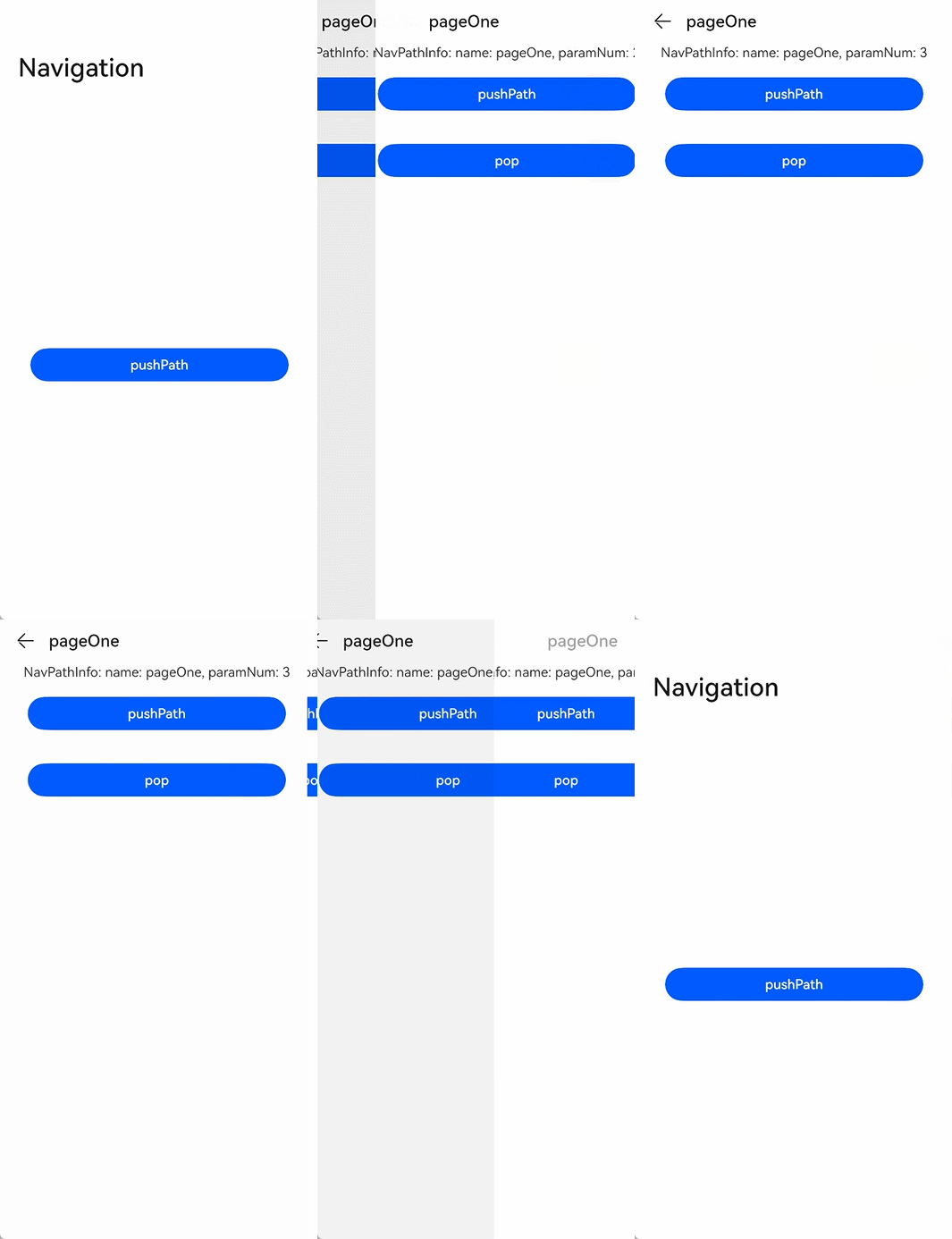
该示例演示NavDestination的onAppear,onDisAppear,onShown,onHidden,onWillAppear,onWillDisappear,onWillShow,onWillHide接口的生命周期时序。
- @Builder
- export function PageOneBuilder(name: string, param: Object) {
- PageOneComponent()
- }
-
- @Component
- struct PageOneComponent {
- private stack: NavPathStack | null = null;
- @State eventStr: string = "";
-
- build() {
- NavDestination() {
- Column() {
- Text("event: " + this.eventStr)
- Button('pushPath', { stateEffect: true, type: ButtonType.Capsule })
- .width('80%')
- .height(40)
- .margin(20)
- .onClick(() => {
- if (this.stack) {
- this.stack.pushPath({ name: "pageOne" });
- }
- })
- Button('pop', { stateEffect: true, type: ButtonType.Capsule })
- .width('80%')
- .height(40)
- .margin(20)
- .onClick(() => {
- this.stack?.pop()
- })
- }
- .width('100%')
- .height('100%')
- }
- .title('pageOne')
- .onAppear(() => {
- this.eventStr += "<onAppear>";
- })
- .onDisAppear(() => {
- this.eventStr += "<onDisAppear>";
- })
- .onShown(() => {
- this.eventStr += "<onShown>";
- })
- .onHidden(() => {
- this.eventStr += "<onHidden>";
- })
- .onWillAppear(() => {
- this.eventStr += "<onWillAppear>";
- })
- .onWillDisappear(() => {
- this.eventStr += "<onWillDisappear>";
- })
- .onWillShow(() => {
- this.eventStr += "<onWillShow>";
- })
- .onWillHide(() => {
- this.eventStr += "<onWillHide>";
- })
- // onReady会在onAppear之前调用
- .onReady((ctx: NavDestinationContext) => {
- try {
- this.eventStr += "<onReady>";
- this.stack = ctx.pathStack;
- } catch (e) {
- console.log(`testTag onReady catch exception: ${JSON.stringify(e)}`)
- }
- })
- }
- }
-
- @Entry
- @Component
- struct NavigationExample3 {
- private stack: NavPathStack = new NavPathStack();
-
- build() {
- Navigation(this.stack) {
- Stack({ alignContent: Alignment.Center }) {
- Button('pushPath', { stateEffect: true, type: ButtonType.Capsule })
- .width('80%')
- .height(40)
- .margin(20)
- .onClick(() => {
- this.stack.pushPath({ name: "pageOne" })
- })
- }
- .width('100%')
- .height('100%')
- }
- .width('100%')
- .height('100%')
- .title('Navigation')
- }
- }
- // 工程配置文件module.json5中配置 {"routerMap": "$profile:route_map"}
- // route_map.json
- {
- "routerMap": [
- {
- "name": "pageOne",
- "pageSourceFile": "src/main/ets/pages/Index.ets",
- "buildFunction": "PageOneBuilder",
- "data": {
- "description": "this is pageOne"
- }
- }
- ]
- }
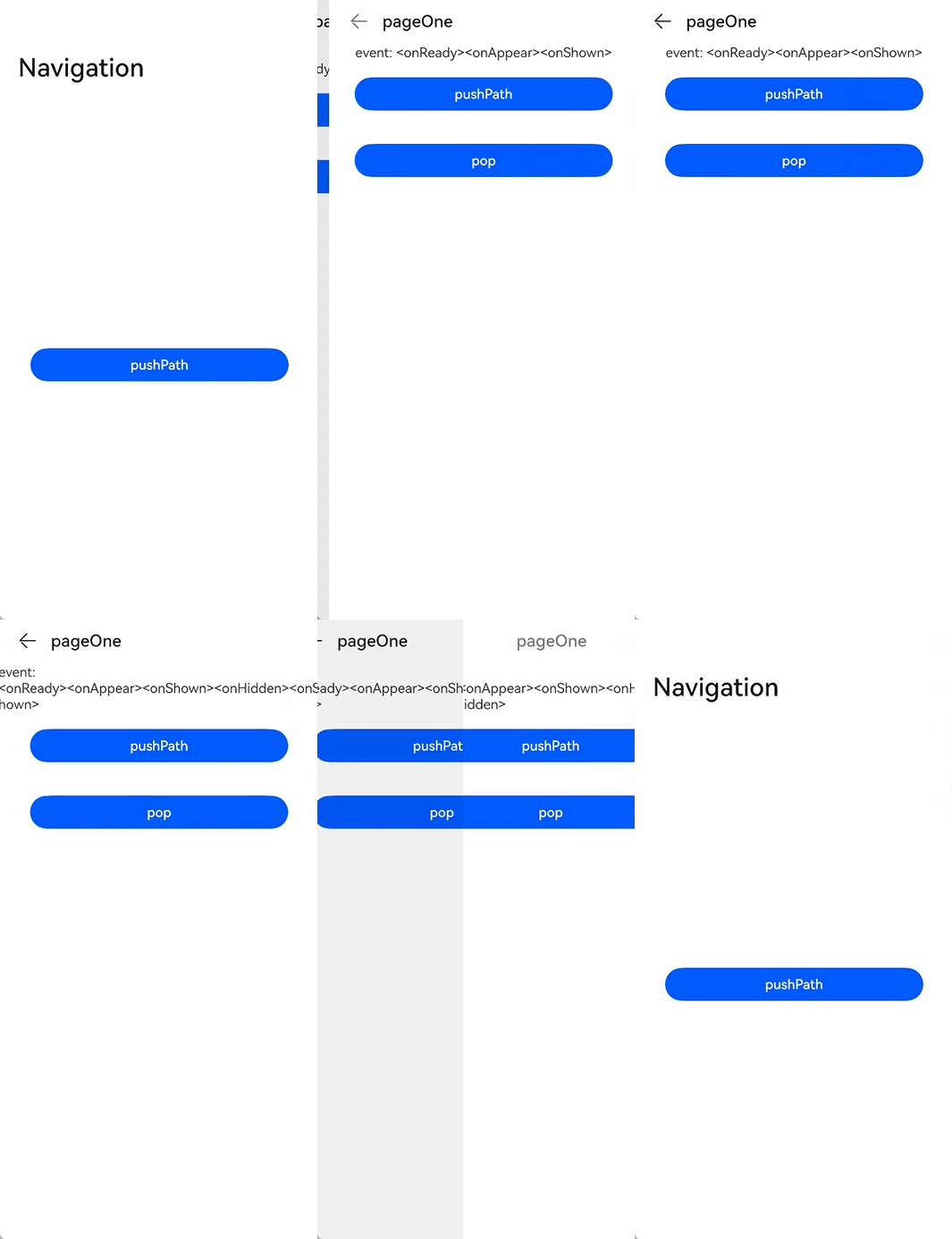
该示例演示Navigation标题栏STACK布局效果。
- @Entry
- @Component
- struct NavigationExample {
- private arr: number[] = [0, 1, 2, 3, 4, 5, 6, 7, 8, 9, 10, 11];
- private scrollerForScroll: Scroller = new Scroller();
- @State barStyle: BarStyle = BarStyle.STANDARD;
-
- build() {
- Column() {
- Navigation() {
- Column() {
- Scroll(this.scrollerForScroll) {
- Column() {
- Image($r('app.media.image_1'))// 设置与标题栏高度一致,以便观察STACK效果
- .height(138)
- .width('100%')
- Button('BarStyle.STANDARD')
- .height('50vp')
- .onClick(() => {
- this.barStyle = BarStyle.STANDARD;
- })
- Button('BarStyle.STACK')
- .height('50vp')
- .margin({ top: 12 })
- .onClick(() => {
- this.barStyle = BarStyle.STACK;
- })
-
- ForEach(this.arr, (item: number) => {
- ListItem() {
- Text('' + item)
- .width('100%')
- .height(100)
- .fontSize(16)
- .textAlign(TextAlign.Center)
- .borderRadius(10)
- .backgroundColor(Color.Orange)
- .margin({ top: 12 })
- }
- }, (item: string) => item)
- }
- }
- }
- .width('100%')
- .height('100%')
- .backgroundColor(0xDCDCDC)
- }
- .title(
- {
- main: 'NavTitle',
- sub: 'subtitle'
- },
- {
- backgroundBlurStyle: BlurStyle.COMPONENT_THICK,
- barStyle: this.barStyle,
- }
- )
- .titleMode(NavigationTitleMode.Free)
- .hideTitleBar(false)
- }.width('100%').height('100%').backgroundColor('#F1F3F5')
- }
- }
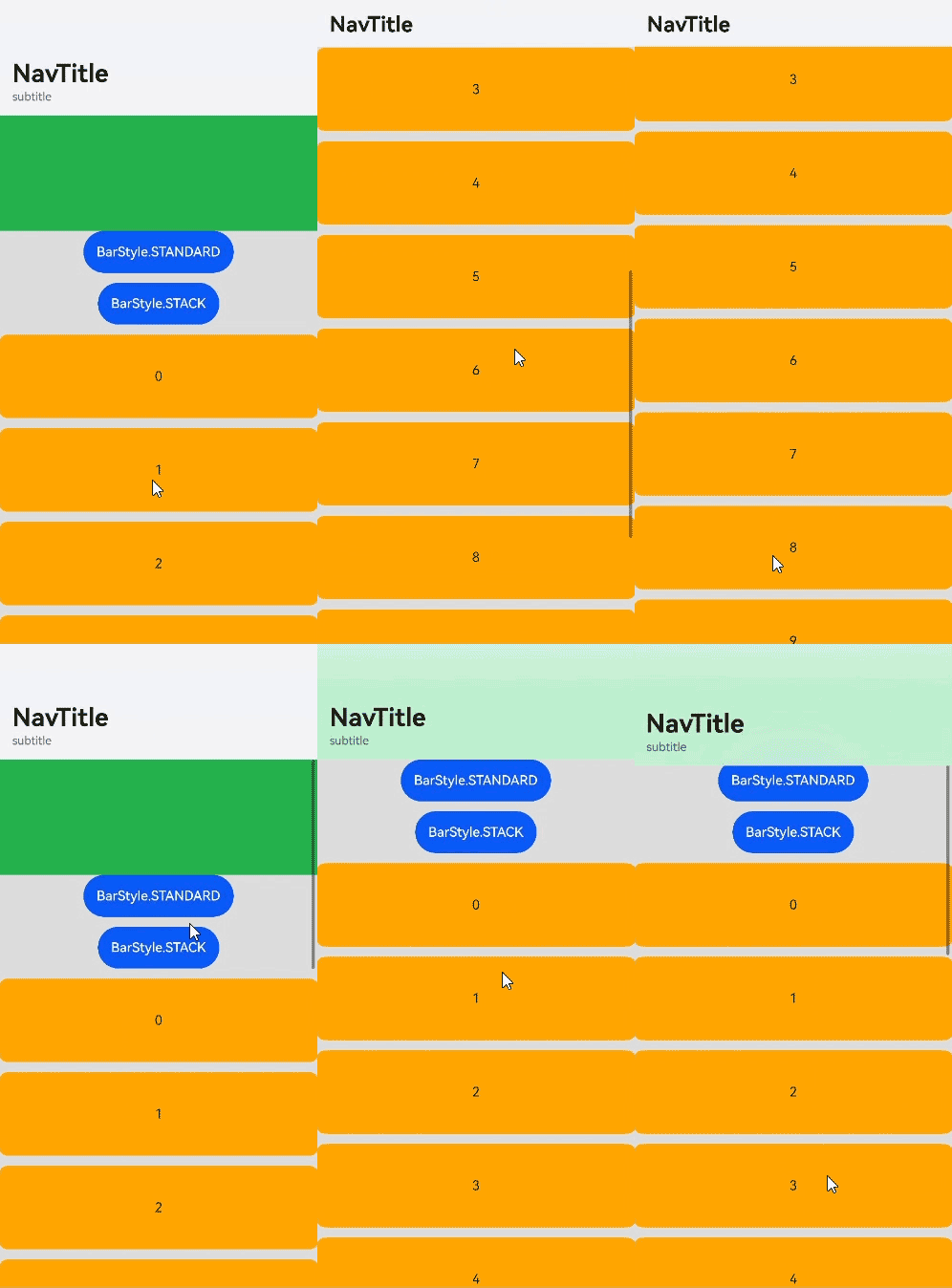
该示例主要演示如何定义NavPathStack的派生类和派生类在Navigation中的基本用法。
- class DerivedNavPathStack extends NavPathStack {
- // usr defined property 'id'
- id: string = "__default__"
-
- // new function in derived class
- setId(id: string) {
- this.id = id;
- }
-
- // new function in derived class
- getInfo(): string {
- return "this page used Derived NavPathStack, id: " + this.id
- }
-
- // overwrite function of NavPathStack
- pushPath(info: NavPathInfo, animated?: boolean): void
- pushPath(info: NavPathInfo, options?: NavigationOptions): void
- pushPath(info: NavPathInfo, secArg?: boolean | NavigationOptions): void {
- console.log('[derive-test] reached DerivedNavPathStack\'s pushPath');
- if (typeof secArg === 'boolean') {
- super.pushPath(info, secArg);
- } else {
- super.pushPath(info, secArg);
- }
- }
-
- // overwrite and overload function of NavPathStack
- pop(animated?: boolean | undefined): NavPathInfo | undefined
- pop(result: Object, animated?: boolean | undefined): NavPathInfo | undefined
- pop(result?: Object, animated?: boolean | undefined): NavPathInfo | undefined {
- console.log('[derive-test] reached DerivedNavPathStack\'s pop');
- return super.pop(result, animated);
- }
-
- // other function of base class...
- }
-
- class param {
- info: string = "__default_param__";
-
- constructor(info: string) {
- this.info = info
- }
- }
-
- @Entry
- @Component
- struct Index {
- derivedStack: DerivedNavPathStack = new DerivedNavPathStack();
-
- aboutToAppear(): void {
- this.derivedStack.setId('origin stack');
- }
-
- @Builder
- pageMap(name: string) {
- PageOne()
- }
-
- build() {
- Navigation(this.derivedStack) {
- Button('to Page One').margin(20).onClick(() => {
- this.derivedStack.pushPath({
- name: 'pageOne',
- param: new param('push pageOne in homePage when stack size: ' + this.derivedStack.size())
- });
- })
- }.navDestination(this.pageMap)
- .title('Home Page')
- }
- }
-
- @Component
- struct PageOne {
- derivedStack: DerivedNavPathStack = new DerivedNavPathStack();
- curStringifyParam: string = "NA";
-
- build() {
- NavDestination() {
- Column() {
- Text(this.derivedStack.getInfo())
- .margin(10)
- .fontSize(25)
- .fontWeight(FontWeight.Bold)
- .textAlign(TextAlign.Start)
- Text('current page param info:')
- .margin(10)
- .fontSize(25)
- .fontWeight(FontWeight.Bold)
- .textAlign(TextAlign.Start)
- Text(this.curStringifyParam)
- .margin(20)
- .fontSize(20)
- .textAlign(TextAlign.Start)
- }.backgroundColor(Color.Pink)
-
- Button('to Page One').margin(20).onClick(() => {
- this.derivedStack.pushPath({
- name: 'pageOne',
- param: new param('push pageOne in pageOne when stack size: ' + this.derivedStack.size())
- });
- })
- }.title('Page One')
- .onReady((context: NavDestinationContext) => {
- console.log('[derive-test] reached PageOne\'s onReady');
- // get derived stack from navdestinationContext
- this.derivedStack = context.pathStack as DerivedNavPathStack;
- console.log('[derive-test] -- got derivedStack: ' + this.derivedStack.id);
- this.curStringifyParam = JSON.stringify(context.pathInfo.param);
- console.log('[derive-test] -- got param: ' + this.curStringifyParam);
- })
- }
- }
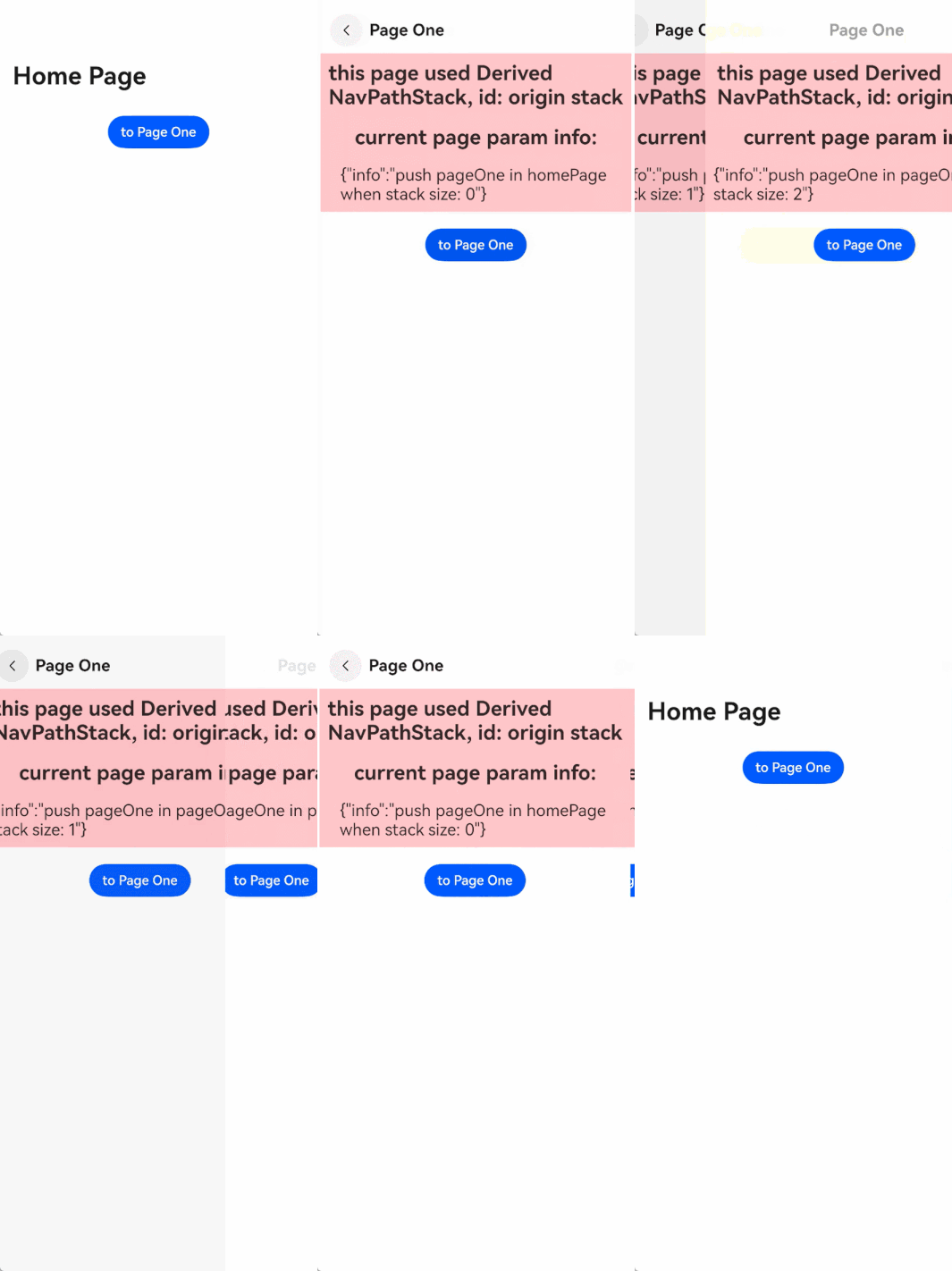
该示例主要演示Navigation和NavDestination如何使用Symbol组件。
- import { SymbolGlyphModifier } from '@kit.ArkUI';
-
- @Entry
- @Component
- struct NavigationExample {
- @Provide('navPathStack') navPathStack: NavPathStack = new NavPathStack();
- @State menuItems: Array<NavigationMenuItem> = [
- {
- value: 'menuItem1',
- icon: 'resources/base/media/ic_public_ok.svg' // 图标资源路径
- },
- {
- value: 'menuItem2',
- icon: 'resources/base/media/ic_public_ok.svg', // 图标资源路径
- symbolIcon: new SymbolGlyphModifier($r('sys.symbol.ohos_folder_badge_plus')).fontColor([Color.Red, Color.Green])
- .renderingStrategy(SymbolRenderingStrategy.MULTIPLE_COLOR),
- },
- {
- value: 'menuItem3',
- symbolIcon: new SymbolGlyphModifier($r('sys.symbol.ohos_lungs')),
- },
- ]
- @State toolItems: Array<ToolbarItem> = [
- {
- value: 'toolItem1',
- icon: 'resources/base/media/ic_public_ok.svg', // 图标资源路径
- symbolIcon: new SymbolGlyphModifier($r('sys.symbol.ohos_lungs')),
- status: ToolbarItemStatus.ACTIVE,
- activeSymbolIcon: new SymbolGlyphModifier($r('sys.symbol.ohos_folder_badge_plus')).fontColor([Color.Red,
- Color.Green]).renderingStrategy(SymbolRenderingStrategy.MULTIPLE_COLOR),
- action: () => {
- }
- },
- {
- value: 'toolItem2',
- symbolIcon: new SymbolGlyphModifier($r('sys.symbol.ohos_star')),
- status: ToolbarItemStatus.ACTIVE,
- activeIcon: 'resources/base/media/ic_public_more.svg', // 图标资源路径
- action: () => {
- }
- },
- {
- value: 'toolItem3',
- symbolIcon: new SymbolGlyphModifier($r('sys.symbol.ohos_star')),
- status: ToolbarItemStatus.ACTIVE,
- activeSymbolIcon: new SymbolGlyphModifier($r('sys.symbol.ohos_lungs')),
- action: () => {
- }
- }
- ]
-
- @Builder
- myRouter(name: string, param?: Object) {
- if (name === 'NavigationMenu') {
- NavigationMenu();
- }
- }
-
- build() {
- Navigation(this.navPathStack) {
- Column() {
- Button('跳转').onClick(() => {
- this.navPathStack.pushPathByName('NavigationMenu', null);
- })
- }
- }
- .backButtonIcon(new SymbolGlyphModifier($r('sys.symbol.ohos_wifi')))
- .titleMode(NavigationTitleMode.Mini)
- .menus(this.menuItems)
- .toolbarConfiguration(this.toolItems)
- .title('一级页面')
- .navDestination(this.myRouter)
- }
- }
-
- @Component
- export struct NavigationMenu {
- @Consume('navPathStack') navPathStack: NavPathStack;
- @State menuItems: Array<NavigationMenuItem> = [
- {
- value: 'menuItem1',
- icon: 'resources/base/media/ic_public_ok.svg', // 图标资源路径
- action: () => {
- }
- },
- {
- value: 'menuItem2',
- symbolIcon: new SymbolGlyphModifier($r('sys.symbol.ohos_folder_badge_plus')).fontColor([Color.Red, Color.Green])
- .renderingStrategy(SymbolRenderingStrategy.MULTIPLE_COLOR),
- action: () => {
- }
- },
- {
- value: 'menuItem3',
- symbolIcon: new SymbolGlyphModifier($r('sys.symbol.repeat_1')),
- action: () => {
- }
- },
- ]
-
- build() {
- NavDestination() {
- Row() {
- Column() {
- }
- .width('100%')
- }
- .height('100%')
- }
- .hideTitleBar(false)
- .title('NavDestination title')
- .backgroundColor($r('sys.color.ohos_id_color_titlebar_sub_bg'))
- .backButtonIcon(new SymbolGlyphModifier($r('sys.symbol.ohos_star')).fontColor([Color.Blue]))
- .menus(this.menuItems)
- }
- }
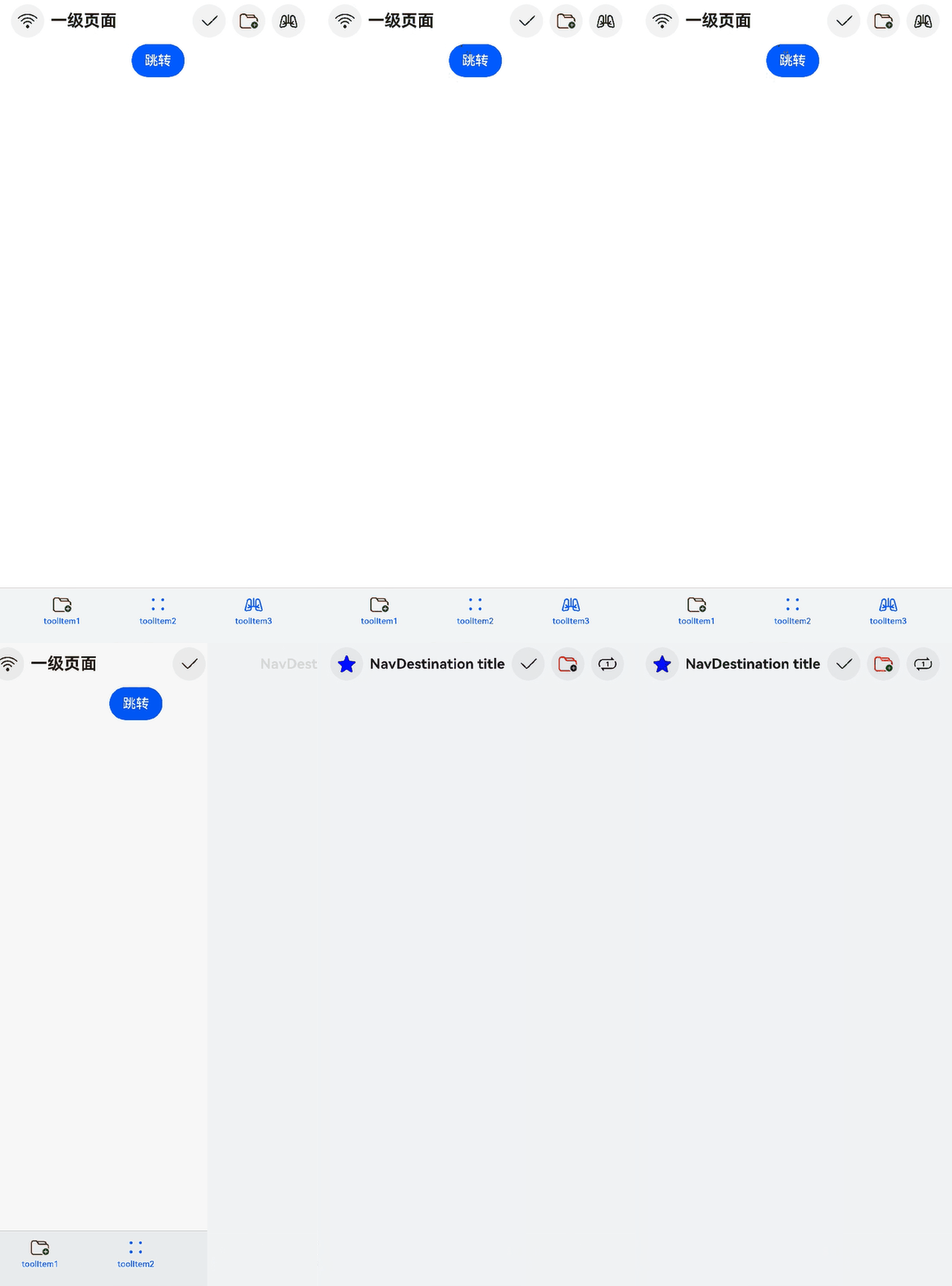
该示例主要演示Navigation和NavDestination如何设置自定义标题栏边距,如何通过TextModifier修改主副标题文本样式。
- import { LengthMetrics } from '@kit.ArkUI';
- import { TextModifier } from '@ohos.arkui.modifier';
-
- class MainTitleTextModfier extends TextModifier {
- useStyle1: boolean = true;
-
- applyNormalAttribute(instance: TextModifier): void {
- if (this.useStyle1) {
- console.log(`testTag mainTitle use style1`);
- instance.fontColor('#FFFFC000')
- instance.fontSize(35)
- instance.fontWeight(FontWeight.Bolder)
- instance.fontStyle(FontStyle.Normal)
- instance.textShadow({ radius: 5, offsetX: 9 })
- } else {
- console.log(`testTag mainTitle use style2`);
- instance.fontColor('#FF23A98D')
- instance.fontSize(20)
- instance.heightAdaptivePolicy(TextHeightAdaptivePolicy.MIN_FONT_SIZE_FIRST)
- instance.fontWeight(FontWeight.Lighter)
- instance.fontStyle(FontStyle.Italic)
- instance.textShadow({ radius: 3, offsetX: 3 })
- }
- }
- }
-
- class SubTitleTextModfier extends TextModifier {
- useStyle1: boolean = true;
-
- applyNormalAttribute(instance: TextModifier): void {
- if (this.useStyle1) {
- console.log(`testTag subTitle use style1`);
- instance.fontColor('#FFFFC000')
- instance.fontSize(15)
- instance.fontWeight(FontWeight.Bolder)
- instance.fontStyle(FontStyle.Normal)
- instance.textShadow({ radius: 5, offsetX: 9 })
- } else {
- console.log(`testTag subTitle use style2`);
- instance.fontColor('#FF23A98D')
- instance.fontSize(10)
- instance.fontWeight(FontWeight.Lighter)
- instance.fontStyle(FontStyle.Italic)
- instance.textShadow({ radius: 3, offsetX: 3 })
- }
- }
- }
-
- @Entry
- @Component
- struct NavigationExample {
- private navPathStack: NavPathStack = new NavPathStack();
- // 初始化标题栏起始端内间距
- @State paddingStart: LengthMetrics = LengthMetrics.vp(0);
- // 初始化标题栏结束端内间距
- @State paddingEnd: LengthMetrics = LengthMetrics.vp(0);
- // 主标题样式修改器
- @State mainTitleModifier: MainTitleTextModfier = new MainTitleTextModfier();
- // 副标题样式修改器
- @State subTitleModifier: SubTitleTextModfier = new SubTitleTextModfier();
- @State applyModifier: boolean = false;
- @State useStyle1: boolean = true;
-
- @Builder
- myRouter(name: string, param?: Object) {
- if (name === 'NavDestinationExample') {
- NavDestinationExample();
- }
- }
-
- build() {
- Navigation(this.navPathStack) {
- Column() {
- // 标题栏内间距切换
- Button('apply padding 32vp')
- .onClick(() => {
- this.paddingStart = LengthMetrics.vp(32);
- this.paddingEnd = LengthMetrics.vp(32);
- })
- .margin({ top: 70 })
- .width(180)
- Button('apply padding 20vp')
- .onClick(() => {
- this.paddingStart = LengthMetrics.vp(20);
- this.paddingEnd = LengthMetrics.vp(20);
- })
- .margin({ top: 40 })
- .width(180)
- Button('pushPage')
- .onClick(() => {
- this.navPathStack.pushPath({ name: 'NavDestinationExample' })
- })
- .margin({ top: 40 })
- .width(180)
- Row() {
- Text(`apply Modifier`)
- Toggle({ isOn: this.applyModifier, type: ToggleType.Switch }).onChange((isOn: boolean) => {
- this.applyModifier = isOn;
- })
- }
- .padding({ top: 95, left: 5, right: 5 })
- .width(180)
- .justifyContent(FlexAlign.SpaceBetween)
-
- Row() {
- Text(`use Style1`)
- Toggle({ isOn: this.useStyle1, type: ToggleType.Switch }).onChange((isOn: boolean) => {
- this.mainTitleModifier.useStyle1 = isOn;
- this.subTitleModifier.useStyle1 = isOn;
- this.useStyle1 = isOn;
- })
- }
- .padding({ top: 40, left: 5, right: 5 })
- .width(180)
- .justifyContent(FlexAlign.SpaceBetween)
- }
- .width('100%')
- .height('100%')
- }
- .titleMode(NavigationTitleMode.Full)
- .title(
- { main: "Title", sub: "subTitle" },
- this.applyModifier ?
- {
- paddingStart: this.paddingStart,
- paddingEnd: this.paddingEnd,
- mainTitleModifier: this.mainTitleModifier,
- subTitleModifier: this.subTitleModifier,
- } : {
- paddingStart: this.paddingStart,
- paddingEnd: this.paddingEnd
- })
- .navDestination(this.myRouter)
- }
- }
-
- @Component
- export struct NavDestinationExample {
- @State menuItems: Array<NavigationMenuItem> = [
- {
- value: 'menuItem1',
- icon: 'resources/base/media/ic_public_ok.svg', // 图标资源路径
- action: () => {
- }
- }
- ]
- @State paddingStart: LengthMetrics = LengthMetrics.vp(0);
- @State paddingEnd: LengthMetrics = LengthMetrics.vp(0);
- // 主标题样式修改器
- @State mainTitleModifier: MainTitleTextModfier = new MainTitleTextModfier();
- // 副标题样式修改器
- @State subTitleModifier: SubTitleTextModfier = new SubTitleTextModfier();
- @State applyModifier: boolean = false;
- @State useStyle1: boolean = true;
-
- build() {
- NavDestination() {
- Column() {
- // 标题栏内间距切换
- Button('apply padding 32vp')
- .onClick(() => {
- this.paddingStart = LengthMetrics.vp(32);
- this.paddingEnd = LengthMetrics.vp(32);
- })
- .margin({ top: 150 })
- .width(180)
- Button('apply padding 20vp')
- .onClick(() => {
- this.paddingStart = LengthMetrics.vp(20);
- this.paddingEnd = LengthMetrics.vp(20);
- })
- .margin({ top: 40 })
- .width(180)
- Row() {
- Text(`apply Modifier`)
- Toggle({ isOn: this.applyModifier, type: ToggleType.Switch }).onChange((isOn: boolean) => {
- this.applyModifier = isOn;
- })
- }
- .padding({ top: 95, left: 5, right: 5 })
- .width(180)
- .justifyContent(FlexAlign.SpaceBetween)
-
- Row() {
- Text(`use Style1`)
- Toggle({ isOn: this.useStyle1, type: ToggleType.Switch }).onChange((isOn: boolean) => {
- this.mainTitleModifier.useStyle1 = isOn;
- this.subTitleModifier.useStyle1 = isOn;
- this.useStyle1 = isOn;
- })
- }
- .padding({ top: 40, left: 5, right: 5 })
- .width(180)
- .justifyContent(FlexAlign.SpaceBetween)
- }
- .width('100%')
- .height('90%')
- }
- .hideTitleBar(false)
- .title(
- { main: "Title", sub: "subTitle" },
- this.applyModifier ?
- {
- paddingStart: this.paddingStart,
- paddingEnd: this.paddingEnd,
- mainTitleModifier: this.mainTitleModifier,
- subTitleModifier: this.subTitleModifier,
- } : {
- paddingStart: this.paddingStart,
- paddingEnd: this.paddingEnd
- })
- .menus(this.menuItems)
- }
- }
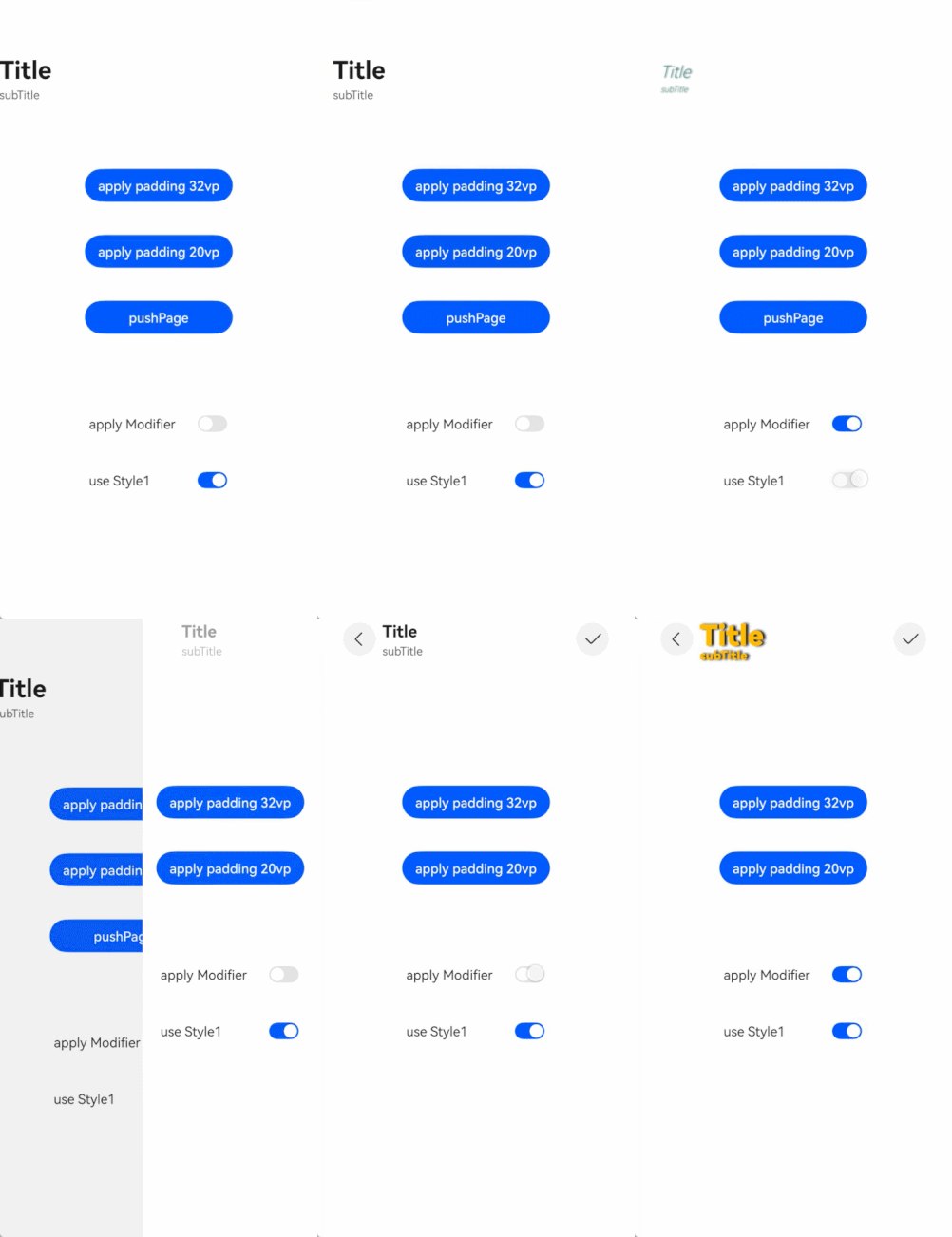
该示例主要实现Navigation简单的自定义转场动画。
- // Index.ets
- import { AnimateCallback, CustomTransition } from './CustomTransitionUtils'
-
- @Entry
- @Component
- struct NavigationCustomTransitionExample {
- pageInfos: NavPathStack = new NavPathStack();
-
- aboutToAppear() {
- this.pageInfos.pushPath({ name: 'PageOne' }, false);
- }
-
- build() {
- Navigation(this.pageInfos) {
- }
- .hideNavBar(true)
- .customNavContentTransition((from: NavContentInfo, to: NavContentInfo, operation: NavigationOperation) => {
- // 首页不进行自定义动画
- if (from.index === -1 || to.index === -1) {
- return undefined;
- }
-
- let customAnimation: NavigationAnimatedTransition = {
- timeout: 2000,
- // 转场开始时系统调用该方法,并传入转场上下文代理对象
- transition: (transitionProxy: NavigationTransitionProxy) => {
- if (!from.navDestinationId || !to.navDestinationId) {
- return;
- }
- // 从封装类CustomTransition中根据子页面的序列获取对应的转场动画回调
- let fromParam: AnimateCallback = CustomTransition.getInstance().getAnimateParam(from.navDestinationId);
- let toParam: AnimateCallback = CustomTransition.getInstance().getAnimateParam(to.navDestinationId);
- // Push动画
- if (operation == NavigationOperation.PUSH) {
- if (fromParam.start && toParam.start) {
- // 设置Push转场的两个页面的动画起点
- fromParam.start(true, true);
- toParam.start(true, false);
- }
- animateTo({
- duration: 500, curve: Curve.Friction, onFinish: () => {
- // 动画结束后需要手动调用finishTransition,否则在timeout时间后由系统调用
- transitionProxy.finishTransition();
- }
- }, () => {
- if (fromParam.finish && toParam.finish) {
- // 设置Push转场的两个页面的动画终点
- fromParam.finish(true, true);
- toParam.finish(true, false);
- }
-
- })
- } else if (operation == NavigationOperation.POP) {
- // Pop动画
- if (fromParam.start && toParam.start) {
- // 设置Pop转场的两个页面的动画起点
- fromParam.start(false, true);
- toParam.start(false, false);
- }
- animateTo({
- duration: 500, curve: Curve.Friction, onFinish: () => {
- // 动画结束后需要手动调用finishTransition,否则在timeout时间后由系统调用
- transitionProxy.finishTransition();
- }
- }, () => {
- if (fromParam.finish && toParam.finish) {
- // 设置Pop转场的两个页面的动画终点
- fromParam.finish(false, true);
- toParam.finish(false, false);
- }
- })
- } else {
- // Replace不做动画
- }
- }
- };
- return customAnimation;
- })
- }
- }
-
-
- // PageOne
- @Builder
- export function PageOneBuilder() {
- PageContainer({ title: "PageOne" })
- }
-
- // PageTwo
- @Builder
- export function PageTwoBuilder() {
- PageContainer({ title: "PageTwo" })
- }
-
- @Component
- export struct PageContainer {
- pageInfos: NavPathStack = new NavPathStack();
- @State translateY: string = '0';
- pageId: string = '';
- title: string = ''
-
- registerCallback() {
- CustomTransition.getInstance().registerNavParam(this.pageId,
- // 设置转场动画起点,根据不同的转场类型分别设置
- (isPush: boolean, isExit: boolean) => {
- if (isPush) {
- if (isExit) {
- this.translateY = '0';
- } else {
- this.translateY = '100%';
- }
- } else {
- if (isExit) {
- this.translateY = '0';
- } else {
- this.translateY = '0';
- }
- }
- },
- // 设置转场动画终点,根据不同的转场类型分别设置
- (isPush: boolean, isExit: boolean) => {
- if (isPush) {
- if (isExit) {
- this.translateY = '0';
- } else {
- this.translateY = '0';
- }
- } else {
- if (isExit) {
- this.translateY = '100%';
- } else {
- this.translateY = '0';
- }
- }
- });
- }
-
- build() {
- NavDestination() {
- Column() {
- Button('push next page', { stateEffect: true, type: ButtonType.Capsule })
- .width('80%')
- .height(40)
- .margin(20)
- .onClick(() => {
- this.pageInfos.pushPath({ name: this.title == 'PageOne' ? "PageTwo" : "PageOne" })
- })
- }
- .size({ width: '100%', height: '100%' })
- }
- .title(this.title)
- .onDisAppear(() => {
- // 页面销毁时解注册自定义转场动画参数
- CustomTransition.getInstance().unRegisterNavParam(this.pageId);
- })
- .onReady((context: NavDestinationContext) => {
- this.pageInfos = context.pathStack;
- if (context.navDestinationId) {
- this.pageId = context.navDestinationId;
- // 页面创建时注册自定义转场动画参数
- this.registerCallback();
- }
- })
- .translate({ y: this.translateY })
- .backgroundColor(this.title == 'PageOne' ? '#F1F3F5' : '#ff11dee5')
- }
- }
- // CustomNavigationUtils.ts 工具类,用来管理所有页面的自定义动画参数注册和获取等
-
- // 自定义接口,用来保存某个页面相关的转场动画回调和参数
- export interface AnimateCallback {
- start: ((isPush: boolean, isExit: boolean) => void | undefined) | undefined;
- finish: ((isPush: boolean, isExit: boolean) => void | undefined) | undefined
- }
-
- const customTransitionMap: Map<string, AnimateCallback> = new Map();
-
- export class CustomTransition {
- static delegate = new CustomTransition();
-
- static getInstance() {
- return CustomTransition.delegate;
- }
-
- /* 注册某个页面的动画回调
- * name: 注册页面的唯一id
- * startCallback:用来设置动画开始时页面的状态
- * endCallback:用来设置动画结束时页面的状态
- */
- registerNavParam(name: string, startCallback: (isPush: boolean, isExit: boolean) => void,
- endCallback: (isPush: boolean, isExit: boolean) => void): void {
- if (customTransitionMap.has(name)) {
- let param = customTransitionMap.get(name);
- if (param != undefined) {
- param.start = startCallback;
- param.finish = endCallback;
- return;
- }
- }
- let params: AnimateCallback = { start: startCallback, finish: endCallback };
- customTransitionMap.set(name, params);
- }
-
- unRegisterNavParam(name: string): void {
- customTransitionMap.delete(name);
- }
-
- getAnimateParam(name: string): AnimateCallback {
- let result: AnimateCallback = {
- start: customTransitionMap.get(name)?.start,
- finish: customTransitionMap.get(name)?.finish
- };
- return result;
- }
- }
- // 工程配置文件module.json5中配置 {"routerMap": "$profile:route_map"}
- // route_map.json
- {
- "routerMap": [
- {
- "name": "PageOne",
- "pageSourceFile": "src/main/ets/pages/Index.ets",
- "buildFunction": "PageOneBuilder",
- "data": {
- "description": "this is pageOne"
- }
- },
- {
- "name": "PageTwo",
- "pageSourceFile": "src/main/ets/pages/Index.ets",
- "buildFunction": "PageTwoBuilder"
- }
- ]
- }