合作咨询
我们的专家服务团队将竭诚为您提供专业的合作咨询服务
在manifest.json文件的 features属性中增加如下配置。
{"name": "system.battery"} 在调用接口页面的<script>部分增加如下配置。
import battery from '@system.battery'battery.getStatus(OBJECT)
或
var battery = require("@system.battery") 限制条件 | 说明 |
|---|---|
适用终端 | 手机、平板 |
适用区域 | 全球 |
接口 | 描述 |
|---|---|
获取当前设备的电量信息。 |
描述
获取当前设备的电量信息。
OBJECT参数
参数 | 类型 | 是否必填 | 说明 |
|---|---|---|---|
success | function | 否 | 成功回调。 |
fail | function | 否 | 失败回调。 |
complete | function | 否 | 执行结束后的回调。 |
success返回值:
参数名 | 类型 | 说明 |
|---|---|---|
charging | boolean | 是否正在充电。 |
level | float | 当前电量,0.0 ~ 1.0 之间。 |
示例代码
battery.getStatus({
    success:function(ret){console.log("handling success");}
}) <template>
<!-- Only one root node is allowed in template. -->
<div class="container">
<div class="info-container ">
<div class="info-item">
<text class="title">level</text>
<text class="result">{{batteryInfoGeted ? batteryNum +'%' : 'please get current level'}}</text>
</div>
<div class="info-item">
<text class="title">charging</text>
<text class="result">{{batteryInfoGeted ? isCharging : 'please get charging status'}}</text>
</div>
</div>
<div class="mlr-container row-center mt-item">
<input type="button" class="btn-blue" value="Get Battery Info" onclick="getBatteryInfo" />
</div>
</div>
</template>
<style lang="sass">
.container {
flex-direction: column;
padding-bottom: 50px;
}
.mt-item {
margin-top: 40px;
}
.info-container {
margin-left: 32px;
margin-right: 32px;
padding-right: 20px;
padding-left: 20px;
background-color: #fff;
border-radius: 32px;
flex-direction: column;
}
.info-item {
height: 120px;
border-bottom-color: rgba(0, 0, 0, 0.05);;
}
.title {
flex-shrink: 0;
font-size: 32px;
color: rgba(0, 0, 0, 0.9);
}
.result {
width: 100%;
justify-content: flex-end;
text-align: right;
color: #999;
}
.mlr-container {
margin-right:32px;
margin-left:32px;
}
.mt-btn {
margin-top: 32px;
}
.btn-blue {
background-color: #0faeff;
width: 100%;
height: 80px;
border-radius: 40px;
color: #fff;
font-size: 32px;
font-weight: 500;
}
</style>
<script>
import battery from '@system.battery';
import prompt from '@system.prompt';
module.exports = {
public: {
batteryNum: 0,
isCharging: false,
batteryInfoGeted: false,
},
onInit: function () {
this.$page.setTitleBar({ text: 'battery level'});
},
getBatteryInfo() {
let that = this;
battery.getStatus({
success: function (ret) {
that.batteryInfoGeted = true;
that.batteryNum = ret.level * 100;
that.isCharging = ret.charging;
},
fail: function () {
prompt.showToast({
message: 'fail',
duration: 2000,
gravity: 'bottom'
})
}
})
}
}
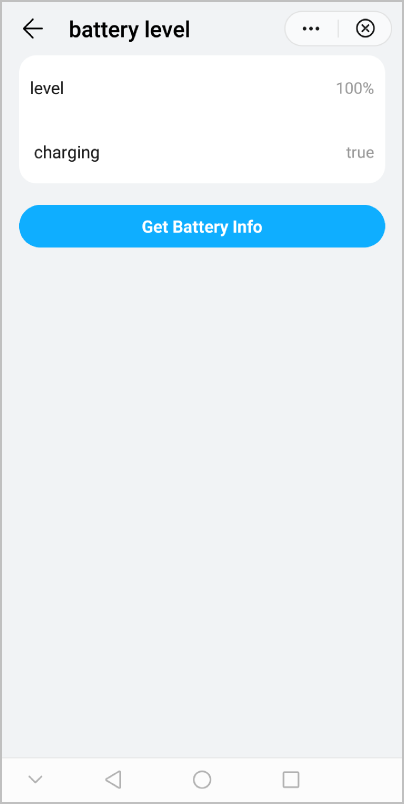
</script> 效果图如下: