has.createAnimation
has.createAnimation(Object object): Animation
Creates an animation instance. The instance's method is called to describe the animation and the animation data is exported using the Animation.export method of the animation instance and passed to the animation attribute of the component.
Since: 1.0.10
Parameters
The input parameter is an object containing the following fields.
| Parameter | Type | Default Value | Mandatory | Description |
|---|---|---|---|---|
| duration | number | 400 | No | Animation duration, in milliseconds. |
| timingFunction | string | 'linear' | No | Animation effect. Valid values: - 'linear': The animation speed is the same from the beginning to the end. - 'ease': The animation starts slowly, accelerates, and then slows down towards the end. - 'ease-in': The animation starts at a low speed. - 'ease-in-out': The animation starts and ends at a low speed. - 'ease-out': The animation ends at a low speed. - 'step-start': The animation jumps to the end state at the first frame and remains in the end state until the animation ends. - 'step-end': The animation remains in the start state throughout most of the duration, and only jumps to the end state at the last frame. |
| delay | number | 0 | No | Animation delay, in milliseconds. |
| transformOrigin | string | '50% 50% 0' | No | Animation reference origin. |
Returns
Animation object.
Example:
HXML file:
<view class="animation-view" animation="{{animationData}}">test view</view> JavaScript file:
// animationData: {} must be declared in data of the page.
this.animationData = has.createAnimation({
  duration: 2000,
  timingFunction: 'linear',
  transformOrigin: '50% 50% 0',
  delay: 400
}); [h2]Animation.backgroundColor
Animation.backgroundColor(string value): Animation
Sets the background color for an animation object.
Since: 1.0.10
Parameters
| Parameter | Type | Mandatory | Description |
|---|---|---|---|
| value | string | No | Color value to set. If this parameter is not passed, the property is restored to the default value of the CSS style of the component. |
Returns
Animation object.
Example:
HXML file:
<view class="animation-view" animation="{{animationData}}">test view</view> JavaScript file:
// animationData: {} must be declared in data of the page.
this.animationData = has.createAnimation({
  duration: 2000,
  timingFunction: 'linear',
  transformOrigin: '50% 50% 0',
  delay: 400
});
this.animationData.backgroundColor('#ff0000').step();
this.setData({
  animationData: this.animationData.export()
});
[h2]Animation.bottom
Animation.bottom(number|string value): Animation
Sets the bottom value of an animation object, which represents the distance from the bottom.
Since: 1.0.10
Parameters
| Parameter | Type | Mandatory | Description |
|---|---|---|---|
| value | number|string | No | Length value. If a number is passed, px is used by default. You can pass a length value in other custom units. If this parameter is not passed, the property is restored to the default value of the CSS style of the component. |
Returns
Animation object.
Example:
HXML file:
<view class="animation-view" animation="{{animationData}}">test view</view> JavaScript file:
// animationData: {} must be declared in data of the page.
this.animationData = has.createAnimation({
  duration: 2000,
  timingFunction: 'linear',
  transformOrigin: '50% 50% 0',
  delay: 400
});
this.animationData.bottom(100).step();
this.setData({
  animationData: this.animationData.export()
});
[h2]Animation.export
Animation.export(): Object
Exports the animation queue and clears the previous animation operations.
Since: 1.0.10
Returns
List object containing the exported animation operation queue.
Example:
HXML file:
<view class="animation-view" animation="{{animationData}}">test view</view> JavaScript file:
// animationData: {} must be declared in data of the page.
this.animationData = has.createAnimation({
  duration: 2000,
  timingFunction: 'linear',
  transformOrigin: '50% 50% 0',
  delay: 400
});
this.animationData.width(100).step();
this.setData({
  animationData: this.animationData.export()
});
[h2]Animation.height
Animation.height(number|string value): Animation
Sets the height for an animation object.
Since: 1.0.10
Parameters
| Parameter | Type | Mandatory | Description |
|---|---|---|---|
| value | number|string | No | Length value. If a number is passed, px is used by default. You can pass a length value in other custom units. If this parameter is not passed, the property is restored to the default value of the CSS style of the component. |
Returns
Animation object.
Example:
HXML file:
<view class="animation-view" animation="{{animationData}}">test view</view> JavaScript file:
// animationData: {} must be declared in data of the page.
this.animationData = has.createAnimation({
  duration: 2000,
  timingFunction: 'linear',
  transformOrigin: '50% 50% 0',
  delay: 400
});
this.animationData.height(100).step();
this.setData({
  animationData: this.animationData.export()
});
[h2]Animation.left
Animation.left(number|string value): Animation
Sets the left value of an animation object, which represents the distance from the left edge.
Since: 1.0.10
Parameters
| Parameter | Type | Mandatory | Description |
|---|---|---|---|
| value | number|string | No | Length value. If a number is passed, px is used by default. You can pass a length value in other custom units. If this parameter is not passed, the property is restored to the default value of the CSS style of the component. |
Returns
Animation object.
Example:
HXML file:
<view class="animation-view" animation="{{animationData}}">test view</view> JavaScript file:
// animationData: {} must be declared in data of the page.
this.animationData = has.createAnimation({
  duration: 2000,
  timingFunction: 'linear',
  transformOrigin: '50% 50% 0',
  delay: 400
});
this.animationData.left(100).step();
this.setData({
  animationData: this.animationData.export()
});
[h2]Animation.matrix
Animation.matrix(number a, number b, number c, number d, number tx, number ty): Animation
Applies a matrix transformation to an animation object. For details, see the MDN criterion.
Since: 1.0.10
Parameters
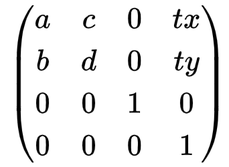
The following figure shows the positions of the parameters in the 4 × 4 transformation matrix matrix3d.
| Parameter | Type | Default Value | Mandatory | Description |
|---|---|---|---|---|
| a | number | 1 | No | Parameter in the first row and first column of the transformation matrix. |
| b | number | 0 | No | Parameter in the second row and first column of the transformation matrix. |
| c | number | 0 | No | Parameter in the first row and second column of the transformation matrix. |
| d | number | 1 | No | Parameter in the second row and second column of the transformation matrix. |
| tx | number | 1 | No | Parameter in the first row and fourth column of the transformation matrix. |
| ty | number | 1 | No | Parameter in the second row and fourth column of the transformation matrix. |
Returns
Animation object.
Example:
HXML file:
<view class="animation-view" animation="{{animationData}}">test view</view> JavaScript file:
// animationData: {} must be declared in data of the page.
this.animationData = has.createAnimation({
  duration: 2000,
  timingFunction: 'linear',
  transformOrigin: '50% 50% 0',
  delay: 400
});
this.animationData.matrix(1.2, 0.2, -1, 0.9, 0, 20).step();
this.setData({
  animationData: this.animationData.export()
});
[h2]Animation.matrix3d
Animation.matrix3d(number a1, number b1, number c1, number d1, number a2, number b2, number c2, number d2, number a3, number b3, number c3, number d3, number a4, number b4, number c4, number d4): Animation
Applies a matrix3d transformation to an animation object. For details, see the MDN criterion.
Since: 1.0.10
Parameters
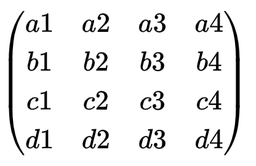
The following figure shows the positions of the parameters in the 4 × 4 transformation matrix matrix3d.
| Parameter | Type | Default Value | Mandatory | Description |
|---|---|---|---|---|
| a1 | number | 1 | No | Parameter in the first row and first column of the transformation matrix. |
| a2 | number | 0 | No | Parameter in the first row and second column of the transformation matrix. |
| a3 | number | 0 | No | Parameter in the first row and third column of the transformation matrix. |
| a4 | number | 0 | No | Parameter in the first row and fourth column of the transformation matrix. |
| b1 | number | 0 | No | Parameter in the second row and first column of the transformation matrix. |
| b2 | number | 1 | No | Parameter in the second row and second column of the transformation matrix. |
| b3 | number | 0 | No | Parameter in the second row and third column of the transformation matrix. |
| b4 | number | 0 | No | Parameter in the second row and fourth column of the transformation matrix. |
| c1 | number | 0 | No | Parameter in the third row and first column of the transformation matrix. |
| c2 | number | 0 | No | Parameter in the third row and second column of the transformation matrix. |
| c3 | number | 1 | No | Parameter in the third row and third column of the transformation matrix. |
| c4 | number | 0 | No | Parameter in the third row and fourth column of the transformation matrix. |
| d1 | number | 0 | No | Parameter in the fourth row and first column of the transformation matrix. |
| d2 | number | 0 | No | Parameter in the fourth row and second column of the transformation matrix. |
| d3 | number | 0 | No | Parameter in the fourth row and third column of the transformation matrix. |
| d4 | number | 1 | No | Parameter in the fourth row and fourth column of the transformation matrix. |
Returns
Animation object.
Example:
HXML file:
<view class="animation-view" animation="{{animationData}}">test view</view> JavaScript file:
// animationData: {} must be declared in data of the page.
this.animationData = has.createAnimation({
  duration: 2000,
  timingFunction: 'linear',
  transformOrigin: '50% 50% 0',
  delay: 400
});
this.animationData.matrix3d(
  0.5, 0, -0.866025, 0,
  0.595877, 1.2, -1.03209, 0,
  0.866025, 0, 0.5, 0,
  25.9808, 0, 15, 1
).step();
this.setData({
  animationData: this.animationData.export()
});
[h2]Animation.opacity
Animation.opacity(number value): Animation
Sets the opacity for an animation object.
Since: 1.0.10
Parameters
| Parameter | Type | Mandatory | Description |
|---|---|---|---|
| value | number | No | Opacity. The value ranges from 0 to 1. The value 0 indicates transparent and the value 1 indicates opaque. If this parameter is not passed, the property is restored to the default value of the CSS style of the component. |
Returns
Animation object.
Example:
HXML file:
<view class="animation-view" animation="{{animationData}}">test view</view> JavaScript file:
// animationData: {} must be declared in data of the page.
this.animationData = has.createAnimation({
  duration: 2000,
  timingFunction: 'linear',
  transformOrigin: '50% 50% 0',
  delay: 400
});
this.animationData.opacity(0.5).step();
this.setData({
  animationData: this.animationData.export()
});
[h2]Animation.right
Animation.right(number|string value): Animation
Sets the right value of an animation object, which represents the distance from the right edge.
Since: 1.0.10
Parameters
| Parameter | Type | Mandatory | Description |
|---|---|---|---|
| value | number|string | No | Length value. If a number is passed, px is used by default. You can pass a length value in other custom units. If this parameter is not passed, the property is restored to the default value of the CSS style of the component. |
Returns
Animation object.
Example:
HXML file:
<view class="animation-view" animation="{{animationData}}">test view</view> JavaScript file:
// animationData: {} must be declared in data of the page.
this.animationData = has.createAnimation({
  duration: 2000,
  timingFunction: 'linear',
  transformOrigin: '50% 50% 0',
  delay: 400
});
this.animationData.right(100).step();
this.setData({
  animationData: this.animationData.export()
});
[h2]Animation.rotate
Animation.rotate(number angle): Animation
Rotates the animation object clockwise by a specified angle.
Since: 1.0.10
Parameters
| Parameter | Type | Mandatory | Description |
|---|---|---|---|
| angle | number | No | Rotation angle. A positive number indicates clockwise rotation. If this parameter is not passed, the property is restored to the default value of the CSS style of the component. |
Returns
Animation object.
Example:
HXML file:
<view class="animation-view" animation="{{animationData}}">test view</view> JavaScript file:
// animationData: {} must be declared in data of the page.
this.animationData = has.createAnimation({
  duration: 2000,
  timingFunction: 'linear',
  transformOrigin: '50% 50% 0',
  delay: 400
});
this.animationData.rotate(45).step();
this.setData({
  animationData: this.animationData.export()
});
[h2]Animation.rotate3d
Animation.rotate3d(number x, number y, number z, number angle): Animation
Rotates the animation object clockwise around the rotation axis by a specified angle.
Since: 1.0.10
Parameters
| Parameter | Type | Mandatory | Description |
|---|---|---|---|
| x | number | No | X coordinate of the rotation axis. The default value is 0. |
| y | number | No | Y coordinate of the rotation axis. The default value is 0. |
| z | number | No | Z coordinate of the rotation axis. The default value is 0. |
| angle | number | No | Rotation angle. A positive number indicates clockwise rotation. If this parameter is not passed, the property is restored to the default value of the CSS style of the component. |
Returns
Animation object.
Example:
HXML file:
<view class="animation-view" animation="{{animationData}}">test view</view> JavaScript file:
// animationData: {} must be declared in data of the page.
this.animationData = has.createAnimation({
  duration: 2000,
  timingFunction: 'linear',
  transformOrigin: '50% 50% 0',
  delay: 400
});
this.animationData.rotate3d(1, 1, 1, 45).step();
this.setData({
  animationData: this.animationData.export()
});
[h2]Animation.rotateX
Animation.rotateX(number angle): Animation
Rotates the animation object clockwise around the X-axis by a specified angle.
Since: 1.0.10
Parameters
| Parameter | Type | Mandatory | Description |
|---|---|---|---|
| angle | number | No | Rotation angle. A positive number indicates clockwise rotation. If this parameter is not passed, the property is restored to the default value of the CSS style of the component. |
Returns
Animation object.
Example:
HXML file:
<view class="animation-view" animation="{{animationData}}">test view</view> JavaScript file:
// animationData: {} must be declared in data of the page.
this.animationData = has.createAnimation({
  duration: 2000,
  timingFunction: 'linear',
  transformOrigin: '50% 50% 0',
  delay: 400
});
this.animationData.rotateX(45).step();
this.setData({
  animationData: this.animationData.export()
});
[h2]Animation.rotateY
Animation.rotateY(number angle): Animation
Rotates the animation object clockwise around the Y-axis by a specified angle.
Since: 1.0.10
Parameters
| Parameter | Type | Mandatory | Description |
|---|---|---|---|
| angle | number | No | Rotation angle. A positive number indicates clockwise rotation. If this parameter is not passed, the property is restored to the default value of the CSS style of the component. |
Returns
Animation object.
Example:
HXML file:
<view class="animation-view" animation="{{animationData}}">test view</view> JavaScript file:
// animationData: {} must be declared in data of the page.
this.animationData = has.createAnimation({
  duration: 2000,
  timingFunction: 'linear',
  transformOrigin: '50% 50% 0',
  delay: 400
});
this.animationData.rotateY(45).step();
this.setData({
  animationData: this.animationData.export()
});
[h2]Animation.rotateZ
Animation.rotateZ(number angle): Animation
Rotates the animation object clockwise around the Z-axis by a specified angle.
Since: 1.0.10
Parameters
| Parameter | Type | Mandatory | Description |
|---|---|---|---|
| angle | number | No | Rotation angle. A positive number indicates clockwise rotation. If this parameter is not passed, the property is restored to the default value of the CSS style of the component. |
Returns
Animation object.
Example:
HXML file:
<view class="animation-view" animation="{{animationData}}">test view</view> JavaScript file:
// animationData: {} must be declared in data of the page.
this.animationData = has.createAnimation({
  duration: 2000,
  timingFunction: 'linear',
  transformOrigin: '50% 50% 0',
  delay: 400
});
this.animationData.rotateZ(45).step();
this.setData({
  animationData: this.animationData.export()
});
[h2]Animation.scale
Animation.scale(number sx, number sy): Animation
Scales an animation object along the X-axis and Y-axis.
Since: 1.0.10
Parameters
| Parameter | Type | Mandatory | Description |
|---|---|---|---|
| sx | number | No | Scale factor along the X-axis. If only the sx parameter is provided, the object is scaled by sx times along the X-axis and Y-axis. If this parameter is not passed, the property is restored to the default value of the CSS style of the component. |
| sy | number | No | Scale factor along the Y-axis. If this parameter is not passed, the property is restored to the default value of the CSS style of the component. |
Returns
Animation object.
Example:
HXML file:
<view class="animation-view" animation="{{animationData}}">test view</view> JavaScript file:
// animationData: {} must be declared in data of the page.
this.animationData = has.createAnimation({
  duration: 2000,
  timingFunction: 'linear',
  transformOrigin: '50% 50% 0',
  delay: 400
});
this.animationData.scale(2, 2).step();
this.setData({
  animationData: this.animationData.export()
});
[h2]Animation.scale3d
Animation.scale3d(number sx, number sy, number sz): Animation
Scales an animation object along the X-axis, Y-axis, and Z-axis.
Since: 1.0.10
Parameters
| Parameter | Type | Mandatory | Description |
|---|---|---|---|
| sx | number | No | Scale factor along the X-axis. If this parameter is not passed, the property is restored to the default value of the CSS style of the component. |
| sy | number | No | Scale factor along the Y-axis. If this parameter is not passed, the property is restored to the default value of the CSS style of the component. |
| sz | number | No | Scale factor along the Z-axis. If this parameter is not passed, the property is restored to the default value of the CSS style of the component. |
Returns
Animation object.
Example:
HXML file:
<view class="animation-view" animation="{{animationData}}">test view</view> JavaScript file:
// animationData: {} must be declared in data of the page.
this.animationData = has.createAnimation({
  duration: 2000,
  timingFunction: 'linear',
  transformOrigin: '50% 50% 0',
  delay: 400
});
this.animationData.scale3d(2, 2, 2).step();
this.setData({
  animationData: this.animationData.export()
});
[h2]Animation.scaleX
Animation.scaleX(number scale): Animation
Scales an animation object along the X-axis.
Since: 1.0.10
Parameters
| Parameter | Type | Mandatory | Description |
|---|---|---|---|
| scale | number | No | Scale factor along the X-axis. If this parameter is not passed, the property is restored to the default value of the CSS style of the component. |
Returns
Animation object.
Example:
HXML file:
<view class="animation-view" animation="{{animationData}}">test view</view> JavaScript file:
// animationData: {} must be declared in data of the page.
this.animationData = has.createAnimation({
  duration: 2000,
  timingFunction: 'linear',
  transformOrigin: '50% 50% 0',
  delay: 400
});
this.animationData.scaleX(2).step();
this.setData({
  animationData: this.animationData.export()
});
[h2]Animation.scaleY
Animation.scaleY(number scale): Animation
Scales an animation object along the Y-axis.
Since: 1.0.10
Parameters
| Parameter | Type | Mandatory | Description |
|---|---|---|---|
| scale | number | No | Scale factor along the Y-axis. If this parameter is not passed, the property is restored to the default value of the CSS style of the component. |
Returns
Animation object.
Example:
HXML file:
<view class="animation-view" animation="{{animationData}}">test view</view> JavaScript file:
// animationData: {} must be declared in data of the page.
this.animationData = has.createAnimation({
  duration: 2000,
  timingFunction: 'linear',
  transformOrigin: '50% 50% 0',
  delay: 400
});
this.animationData.scaleY(2).step();
this.setData({
  animationData: this.animationData.export()
});
[h2]Animation.scaleZ
Animation.scaleZ(number scale): Animation
Scales an animation object along the Z-axis.
Since: 1.0.10
Parameters
| Parameter | Type | Mandatory | Description |
|---|---|---|---|
| scale | number | No | Scale factor along the Z-axis. If this parameter is not passed, the property is restored to the default value of the CSS style of the component. |
Returns
Animation object.
Example:
HXML file:
<view class="animation-view" animation="{{animationData}}">test view</view> JavaScript file:
// animationData: {} must be declared in data of the page.
this.animationData = has.createAnimation({
  duration: 2000,
  timingFunction: 'linear',
  transformOrigin: '50% 50% 0',
  delay: 400
});
this.animationData.scaleZ(2).step();
this.setData({
  animationData: this.animationData.export()
});
[h2]Animation.skew
Animation.skew(number ax, number ay): Animation
Skews an animation object along the X-axis and Y-axis.
Since: 1.0.10
Parameters
| Parameter | Type | Mandatory | Description |
|---|---|---|---|
| ax | number | No | Skew angle of the X-axis. When a positive value is passed, the object skews to the right. If this parameter is not passed, the property is restored to the default value of the CSS style of the component. |
| ay | number | No | Skew angle of the Y-axis. When a positive value is passed, the object skews to the bottom. If this parameter is not passed, the property is restored to the default value of the CSS style of the component. |
Returns
Animation object.
Example:
HXML file:
<view class="animation-view" animation="{{animationData}}">test view</view> JavaScript file:
// animationData: {} must be declared in data of the page.
this.animationData = has.createAnimation({
  duration: 2000,
  timingFunction: 'linear',
  transformOrigin: '50% 50% 0',
  delay: 400
});
this.animationData.skew(45, 45).step();
this.setData({
  animationData: this.animationData.export()
});
[h2]Animation.skewX
Animation.skewX(number angle): Animation
Skews an animation object along the X-axis.
Since: 1.0.10
Parameters
| Parameter | Type | Mandatory | Description |
|---|---|---|---|
| angle | number | No | Skew angle. When a positive value is passed, the object skews to the right. If this parameter is not passed, the property is restored to the default value of the CSS style of the component. |
Returns
Animation object.
Example:
HXML file:
<view class="animation-view" animation="{{animationData}}">test view</view> JavaScript file:
// animationData: {} must be declared in data of the page.
this.animationData = has.createAnimation({
  duration: 2000,
  timingFunction: 'linear',
  transformOrigin: '50% 50% 0',
  delay: 400
});
this.animationData.skewX(45).step();
this.setData({
  animationData: this.animationData.export()
});
[h2]Animation.skewY
Animation.skewY(number angle): Animation
Skews an animation object along the Y-axis.
Since: 1.0.10
Parameters
| Parameter | Type | Mandatory | Description |
|---|---|---|---|
| angle | number | No | Skew angle. When a positive value is passed, the object skews to the bottom. If this parameter is not passed, the property is restored to the default value of the CSS style of the component. |
Returns
Animation object.
Example:
HXML file:
<view class="animation-view" animation="{{animationData}}">test view</view> JavaScript file:
// animationData: {} must be declared in data of the page.
this.animationData = has.createAnimation({
  duration: 2000,
  timingFunction: 'linear',
  transformOrigin: '50% 50% 0',
  delay: 400
});
this.animationData.skewY(45).step();
this.setData({
  animationData: this.animationData.export()
});
[h2]Animation.step
Animation.step(Object object): Animation
Indicates that a group of animations is complete. You can call any number of animation methods in a group of animations. All animations in a group will start simultaneously, and the next group of animations will begin only after the current group is complete.
Since: 1.0.10
Parameters
The input parameter is an object containing the following fields.
| Parameter | Type | Default Value | Mandatory | Description |
|---|---|---|---|---|
| duration | number | 400 | No | Animation duration, in milliseconds. |
| timingFunction | string | 'linear' | No | Animation effect. Valid values: - 'linear': The animation speed is the same from the beginning to the end. - 'ease': The animation starts slowly, accelerates, and then slows down towards the end. - 'ease-in': The animation starts at a low speed. - 'ease-in-out': The animation starts and ends at a low speed. - 'ease-out': The animation ends at a low speed. - 'step-start': The animation jumps to the end state at the first frame and remains in the end state until the animation ends. - 'step-end': The animation remains in the start state throughout most of the duration, and only jumps to the end state at the last frame. |
| delay | number | 0 | No | Animation delay, in milliseconds. |
| transformOrigin | string | '50% 50% 0' | No | Animation reference origin. |
Returns
Animation object.
Example:
HXML file:
<view class="animation-view" animation="{{animationData}}">test view</view> JavaScript file:
// animationData: {} must be declared in data of the page.
this.animationData = has.createAnimation({
  duration: 2000,
  timingFunction: 'linear',
  transformOrigin: '50% 50% 0',
  delay: 400
});
this.animationData.skewY(45).step();
this.setData({
  animationData: this.animationData.export()
});
[h2]Animation.top
Animation.top(number|string value): Animation
Sets the top value of an animation object, which represents the distance from the top.
Since: 1.0.10
Parameters
| Parameter | Type | Mandatory | Description |
|---|---|---|---|
| value | number|string | No | Length value. If a number is passed, px is used by default. You can pass a length value in other custom units. If this parameter is not passed, the property is restored to the default value of the CSS style of the component. |
Returns
Animation object.
Example:
HXML file:
<view class="animation-view" animation="{{animationData}}">test view</view> JavaScript file:
// animationData: {} must be declared in data of the page.
this.animationData = has.createAnimation({
  duration: 2000,
  timingFunction: 'linear',
  transformOrigin: '50% 50% 0',
  delay: 400
});
this.animationData.top(100).step();
this.setData({
  animationData: this.animationData.export()
});
[h2]Animation.translate
Animation.translate(number tx, number ty): Animation
Translates an animation object along the X-axis and Y-axis.
Since: 1.0.10
Parameters
| Parameter | Type | Mandatory | Description |
|---|---|---|---|
| tx | number | No | Translation distance along the X-axis, in px. If this parameter is not passed, the property is restored to the default value of the CSS style of the component. |
| ty | number | No | Translation distance along the Y-axis, in px. If this parameter is not passed, the property is restored to the default value of the CSS style of the component. |
Returns
Animation object.
Example:
HXML file:
<view class="animation-view" animation="{{animationData}}">test view</view> JavaScript file:
// animationData: {} must be declared in data of the page.
this.animationData = has.createAnimation({
  duration: 2000,
  timingFunction: 'linear',
  transformOrigin: '50% 50% 0',
  delay: 400
});
this.animationData.translate(100, 100).step();
this.setData({
  animationData: this.animationData.export()
});
[h2]Animation.translate3d
Animation.translate3d(number tx, number ty, number tz): Animation
Translates an animation object along the X-axis, Y-axis, and Z-axis.
Since: 1.0.10
Parameters
| Parameter | Type | Mandatory | Description |
|---|---|---|---|
| tx | number | No | Translation distance along the X-axis, in px. If this parameter is not passed, the property is restored to the default value of the CSS style of the component. |
| ty | number | No | Translation distance along the Y-axis, in px. If this parameter is not passed, the property is restored to the default value of the CSS style of the component. |
| tz | number | No | Translation distance along the Z-axis, in px. If this parameter is not passed, the property is restored to the default value of the CSS style of the component. |
Returns
Animation object.
Example:
HXML file:
<view class="animation-view" animation="{{animationData}}">test view</view> JavaScript file:
// animationData: {} must be declared in data of the page.
this.animationData = has.createAnimation({
  duration: 2000,
  timingFunction: 'linear',
  transformOrigin: '50% 50% 0',
  delay: 400
});
this.animationData.translate3d(100, 100, 100).step();
this.setData({
  animationData: this.animationData.export()
});
[h2]Animation.translateX
Animation.translateX(number translation): Animation
Translates an animation object along the X-axis.
Since: 1.0.10
Parameters
| Parameter | Type | Mandatory | Description |
|---|---|---|---|
| translation | number | No | Translation distance along the X-axis, in px. If this parameter is not passed, the property is restored to the default value of the CSS style of the component. |
Returns
Animation object.
Example:
HXML file:
<view class="animation-view" animation="{{animationData}}">test view</view> JavaScript file:
// animationData: {} must be declared in data of the page.
this.animationData = has.createAnimation({
  duration: 2000,
  timingFunction: 'linear',
  transformOrigin: '50% 50% 0',
  delay: 400
});
this.animationData.translateX(100).step();
this.setData({
  animationData: this.animationData.export()
});
[h2]Animation.translateY
Animation.translateY(number translation): Animation
Translates an animation object along the Y-axis.
Since: 1.0.10
Parameters
| Parameter | Type | Mandatory | Description |
|---|---|---|---|
| translation | number | No | Translation distance along the Y-axis, in px. If this parameter is not passed, the property is restored to the default value of the CSS style of the component. |
Returns
Animation object.
Example:
HXML file:
<view class="animation-view" animation="{{animationData}}">test view</view> JavaScript file:
// animationData: {} must be declared in data of the page.
this.animationData = has.createAnimation({
  duration: 2000,
  timingFunction: 'linear',
  transformOrigin: '50% 50% 0',
  delay: 400
});
this.animationData.translateY(100).step();
this.setData({
  animationData: this.animationData.export()
});
[h2]Animation.translateZ
Animation.translateZ(number translation): Animation
Translates an animation object along the Z-axis.
Since: 1.0.10
Parameters
| Parameter | Type | Mandatory | Description |
|---|---|---|---|
| translation | number | No | Translation distance along the Z-axis, in px. If this parameter is not passed, the property is restored to the default value of the CSS style of the component. |
Returns
Animation object.
Example:
HXML file:
<view class="animation-view" animation="{{animationData}}">test view</view> JavaScript file:
// animationData: {} must be declared in data of the page.
this.animationData = has.createAnimation({
  duration: 2000,
  timingFunction: 'linear',
  transformOrigin: '50% 50% 0',
  delay: 400
});
this.animationData.translateZ(100).step();
this.setData({
  animationData: this.animationData.export()
});
[h2]Animation.width
Animation.width(number|string value): Animation
Sets the width for an animation object.
Since: 1.0.10
Parameters
| Parameter | Type | Mandatory | Description |
|---|---|---|---|
| value | number|string | No | Length value. If a number is passed, px is used by default. You can pass a length value in other custom units. If this parameter is not passed, the property is restored to the default value of the CSS style of the component. |
Returns
Animation object.
Example:
HXML file:
<view class="animation-view" animation="{{animationData}}">test view</view> JavaScript file:
// animationData: {} must be declared in data of the page.
this.animationData = has.createAnimation({
  duration: 2000,
  timingFunction: 'linear',
  transformOrigin: '50% 50% 0',
  delay: 400
});
this.animationData.width(100).step();
this.setData({
  animationData: this.animationData.export()
});