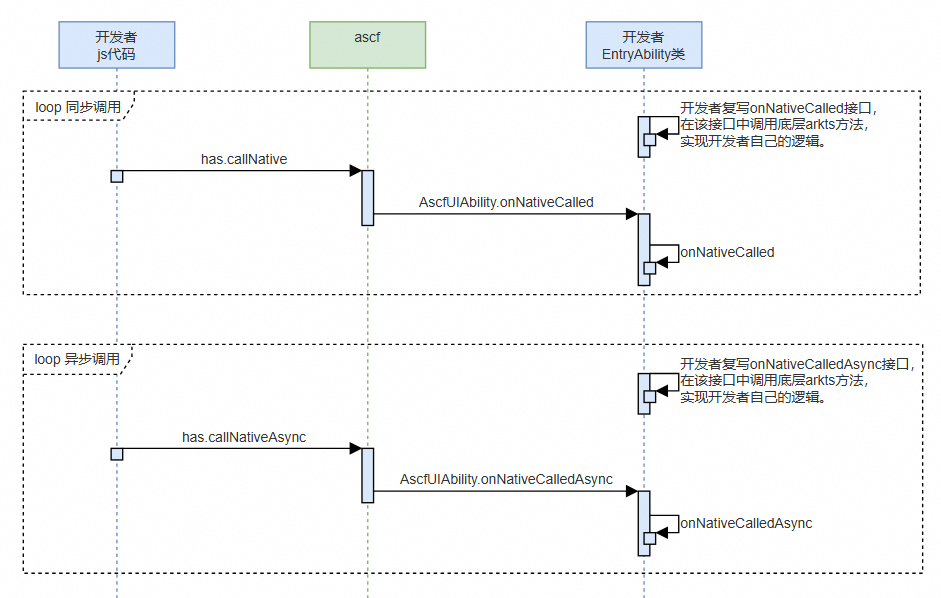
Currently, the system capabilities that can be called by the ASCF are fewer than those that can be called by the atomic services in the ArkTS. You can streamline the calling capabilities from the ASCF to the ArkTS to quickly supplement the missing capabilities of the ASCF. You can overwrite the onNativeCalled or onNativeCalledAsync API in the EntryAbility class to call system capabilities to implement your own functions. Then, call has.callNative or has.callNativeAsync in the JS code to trigger the logic for calling system capabilities written in the EntryAbility class, thereby calling ArkTS system capabilities in the JS code.
AscfUIAbility.onNativeCalled
string AscfUIAbility.onNativeCalled(string|object params)
Processes the call of the local synchronous method.
Since: 1.0.22
Parameters
| Parameter | Type | Mandatory | Description |
|---|---|---|---|
| params | string | object | Yes | Used to call the local synchronous method. |
Returns:
A string, which is the synchronous call result of the local method.
Example:
import { AscfUIAbility } from '@atomicservice/ascfapi';
import { atomicService } from '@kit.ScenarioFusionKit';

const SYSTEM_INFO_STATE_ARRAY: atomicService.SystemInfoType[] = [
  'brand', 'deviceModel', 'screenWidth', 'screenHeight',
  'statusBarHeight', 'screenSafeArea', 'language', 'osFullName', 'fontSizeSetting',
  'sdkApiVersion', 'bluetoothEnabled', 'wifiEnabled', 'locationEnabled',
  'deviceOrientation', 'theme', 'windowWidth', 'windowHeight'
];

export default class EntryAbility extends AscfUIAbility {
  onNativeCalled(params: string | object): string {
    // Example 1: Obtain SystemInfo.
    if (typeof params === 'string' && params === 'getSystemInfo') {
      let systemInfo: atomicService.SystemInfo = atomicService.getSystemInfoSync(SYSTEM_INFO_STATE_ARRAY);
      return JSON.stringify(systemInfo);
    }
    // Example 2: Perform computation.
    if (typeof params === 'object') {
      const paramObj: Record<string, Object> = params as Record<string, Object>;
      if (paramObj.action === 'calculate' && paramObj.args) {
        const numbers: number[] = paramObj.args as number[];
        const sum: number = numbers.reduce((num1, num2) => num1 + num2, 0);
        return sum.toString();
      }
    }
    // Return an empty string for unprocessed requests.
    return '';
  }
}
AscfUIAbility.onNativeCalledAsync
Promise<object> AscfUIAbility.onNativeCalledAsync(string|object params)
Processes the call of the local asynchronous method.
Since: 1.0.22
Parameters
| Parameter | Type | Mandatory | Description |
|---|---|---|---|
| params | string | object | Yes | Used to call the local asynchronous method. |
Returns:
Promise<object> used to return the local asynchronous method call result.
Example:
import { AscfUIAbility } from '@atomicservice/ascfapi';
import { atomicService } from '@kit.ScenarioFusionKit';
import { call } from '@kit.TelephonyKit';

const SYSTEM_INFO_STATE_ARRAY: atomicService.SystemInfoType[] = [
  'brand', 'deviceModel', 'screenWidth', 'screenHeight',
  'statusBarHeight', 'screenSafeArea', 'language', 'osFullName', 'fontSizeSetting',
  'sdkApiVersion', 'bluetoothEnabled', 'wifiEnabled', 'locationEnabled',
  'deviceOrientation', 'theme', 'windowWidth', 'windowHeight'
];

export default class EntryAbility extends AscfUIAbility {
  onNativeCalledAsync(params: string | object): Promise<object> {
    // Example 1: Obtain SystemInfo.
    if (typeof params === 'string' && params === 'getSystemInfo') {
      return atomicService.getSystemInfo(SYSTEM_INFO_STATE_ARRAY);
    }
    // Example 2: Make a call.
    if (typeof params === 'object') {
      const paramObj: Record<string, Object> = params as Record<string, Object>;
      if (paramObj.action === 'makeCall' && paramObj.args) {
        let phoneNumber: string = paramObj.args as string;
        return call.makeCall(phoneNumber).then(() => {
          return {} as Record<string, string>;
        });
      }
    }
    // Return an error for unprocessed requests.
    return Promise.reject(new Error('Unknown asynchronous operation');
  }
}
Inter-Framework Communication Usage Guide
To call ArkTS system capabilities in the JS code, you need to overwrite the onNativeCalled or onNativeCalledAsync API in the EntryAbility class and then call has.callNative or has.callNativeAsync in the JS code.

Currently, this API allows only the ArkTS side to call underlying APIs. It is not recommended that any UI logic be implemented on the ArkTS side.
[h2]Preparations
Before using this function, you need to apply for the inter-framework communication permission for atomic services. To apply for this permission, send an email. Huawei operations personnel will provide the handling result within three working days.
- Email address: atomicservice@huawei.com
- Email title: [Applying for Inter-Framework Communication for an Atomic Service]-[Atomic Service Name]-[App ID]. For details about how to query the app ID, see the following basic information.
- Email content: Describe your request in detail.
- Explain that you are aware that this capability cannot be used in HarmonyOS 4 or earlier versions. If necessary, you will handle the code logic isolation by yourself to ensure user experience.
| Basic Information | Description |
|---|---|
| Atomic service name | Name of the atomic service to be released on AppGallery. |
| APP ID | Sign in to HUAWEI Developers, click Development and services, find the desired project, go to Project settings > General information, and obtain the app ID in the App information area. |
| Core application scenarios and reasons | Provide the process screenshots/low-fidelity images of the core application scenarios and the reasons for applying for inter-framework communication. |
| Application opening time | Estimated time for using the capability (long-term/to a specified time point) |
[h2]Synchronous Call
Write the following code in your JS code:
const res = has.callNative('getSystemInfo');
console.info('callNative getSystemInfo res: ', res);

const sumRes = has.callNative({
  action: 'calculate',
  args: [1, 2, 3, 4, 5]
});
console.info('callNative calculate res: ', sumRes);
Overwrite the onNativeCalled API in the EntryAbility class.
import { AscfUIAbility } from '@atomicservice/ascfapi';
import { atomicService } from '@kit.ScenarioFusionKit';

const SYSTEM_INFO_STATE_ARRAY: atomicService.SystemInfoType[] = [
  'brand', 'deviceModel', 'screenWidth', 'screenHeight',
  'statusBarHeight', 'screenSafeArea', 'language', 'osFullName', 'fontSizeSetting',
  'sdkApiVersion', 'bluetoothEnabled', 'wifiEnabled', 'locationEnabled',
  'deviceOrientation', 'theme', 'windowWidth', 'windowHeight'
];

export default class EntryAbility extends AscfUIAbility {
  onNativeCalled(params: string | object): string {
    // Example 1: Obtain SystemInfo.
    if (typeof params === 'string' && params === 'getSystemInfo') {
      let systemInfo: atomicService.SystemInfo = atomicService.getSystemInfoSync(SYSTEM_INFO_STATE_ARRAY);
      return JSON.stringify(systemInfo);
    }
    // Example 2: Perform computation.
    if (typeof params === 'object') {
      const paramObj: Record<string, Object> = params as Record<string, Object>;
      if (paramObj.action === 'calculate' && paramObj.args) {
        const numbers: number[] = paramObj.args as number[];
        const sum: number = numbers.reduce((num1, num2) => num1 + num2, 0);
        return sum.toString();
      }
    }
    // Return an empty string for unprocessed requests.
    return '';
  }
}
[h2]Asynchronous Call
Write the following code in your JS code:
has.callNativeAsync({
  params: 'getSystemInfo',
  success: (res) => {
    console.info('callNativeAsync getSystemInfo success:', res);
  },
  fail: (err) => {
    console.error('callNativeAsync getSystemInfo fail:', err);
  },
  complete: (res) => {
    console.info('callNativeAsync getSystemInfo complete:', res);
  }
});
has.callNativeAsync({
  params: { action: 'makeCall', args: '13112341234' },
  success: (res) => {
    console.info('callNativeAsync makeCall success:', res);
  },
  fail: (err) => {
    console.error('callNativeAsync makeCall fail:', err);
  },
  complete: (res) => {
    console.info('callNativeAsync makeCall complete:', res);
  }
});
Overwrite the onNativeCalledAsync API in the EntryAbility class.
import { AscfUIAbility } from '@atomicservice/ascfapi';
import { atomicService } from '@kit.ScenarioFusionKit';
import { call } from '@kit.TelephonyKit';

const SYSTEM_INFO_STATE_ARRAY: atomicService.SystemInfoType[] = [
  'brand', 'deviceModel', 'screenWidth', 'screenHeight',
  'statusBarHeight', 'screenSafeArea', 'language', 'osFullName', 'fontSizeSetting',
  'sdkApiVersion', 'bluetoothEnabled', 'wifiEnabled', 'locationEnabled',
  'deviceOrientation', 'theme', 'windowWidth', 'windowHeight'
];

export default class EntryAbility extends AscfUIAbility {
  onNativeCalledAsync(params: string | object): Promise<object> {
    // Example 1: Obtain SystemInfo.
    if (typeof params === 'string' && params === 'getSystemInfo') {
      return atomicService.getSystemInfo(SYSTEM_INFO_STATE_ARRAY);
    }
    // Example 2: Make a call.
    if (typeof params === 'object') {
      const paramObj: Record<string, Object> = params as Record<string, Object>;
      if (paramObj.action === 'makeCall' && paramObj.args) {
        let phoneNumber: string = paramObj.args as string;
        return call.makeCall(phoneNumber).then(() => {
          return {} as Record<string, string>;
        });
      }
    }
    // Return an error for unprocessed requests.
    return Promise.reject(new Error('Unknown asynchronous operation');
  }
}