In ASCF atomic services, you cannot set the referer field in the headers of all network requests, including network request APIs and network-related components (such as image and video).
Configuration
Unprotected resources such as images, audios, and videos used in the atomic service may be directly referenced by others, causing traffic hijacking and server load increase. To prevent these issues, ASCF provides the referer validation functionality.
[h2]referer
The referer value of the ASCF atomic service is https://hoas.huawei.com/{appId}/.

Currently, referer of the network APIs contains appId, while that of the network images and videos sent by the view layer contains only the domain name, that is, https://hoas.huawei.com.
Enabling Referer Validation
The following shows how to configure referer validation on Huawei Cloud CDN.
In the domain list, click the target domain name or click Configure in the Operation column.
In the Referer Validation area, click Edit. The Edit Referer Validation dialog box is displayed.
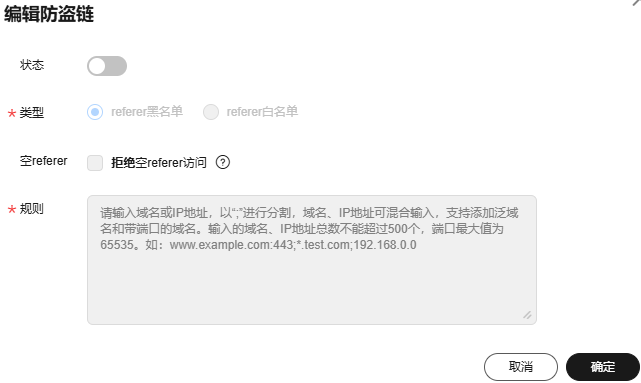
- Switch on Status to enable this configuration item.
- Select a type, select the referer whitelist, and set referer parameters based on service requirements.
- Set Rule to https://hoas.huawei.com.