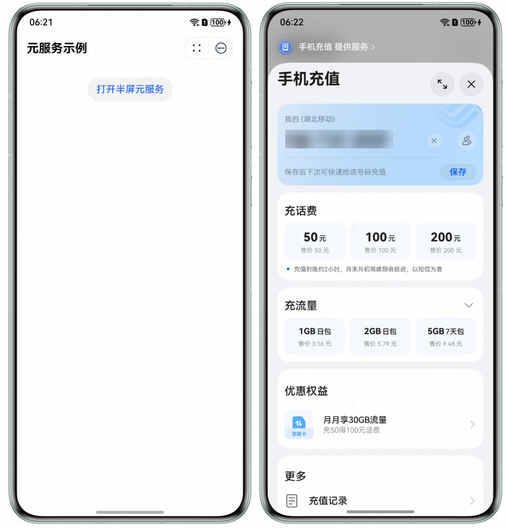
When an atomic service needs to open another atomic service for quick operations, you can use this component to redirect the service to be opened in half-screen mode.
Since: 1.0.17
Dependency: HarmonyOS SDK version 5.1.0(18) or later
Constraints:
Note that some APIs are not available in atomic services launched in half-screen mode. For example:
The has.setScreenBrightness, has.onUserCaptureScreen, and has.setKeepScreenOn APIs becomes invalid.
The has.getSystemInfo API becomes invalid, and the has.getSystemInfoSync and has.getWindowInfo APIs cannot obtain the correct security zone and window width and height.
The attributes related to the full-screen direction set for the video component becomes invalid.
The has.requestSubscribeMessage API becomes invalid.
The [has.onWindowResize]../references-apis/apis-window.md#hasonwindowresize) API cannot obtain the correct window width and height.
Attributes
| Name | Type | Mandatory | Description |
|---|---|---|---|
| appid | string | Yes | App ID of the atomic service to be redirected to in half-screen mode. |
| path | string | No | Path of the page to be opened. The path can contain parameters. The path and parameters are separated by question marks (?), parameters and values are separated by equal signs (=), and multiple parameters are separated by ampersands (&). You can obtain the query parameter in the callbacks of App.onLaunch, App.onShow, and Page.onLoad of an atomic service. - If path is empty or invalid, the home page is opened. - If path is not empty, the page path must be the code package path defined in the app.json file. For example, if page/path/index is defined in the app.json file, the valid in-application page path is page/path/index?key1=value1&key2=value2. Note: This field can be directly used only when the target atomic service is developed based on the ASCF framework. For atomic services developed using ArkTS, both parties need to agree on the implementation. The parameters will be passed through the parameters field of the Want object of the target atomic service. |
| want-param | object | No | Data to be passed to the target atomic service. - If the target atomic service is developed based on ASCF, pass service data through the ascfPara.extraData field. Example: {ascfPara: {extraData: {data: "test"}}} - If the target atomic service is developed using ArkTS, pass parameters in the flat key-value pair format, for example, {data: "test"}. Note: subPackageName is a reserved field and cannot be used. |
| bindterminated | eventhandle | No | Callback event of an exit. This callback is triggered when the target atomic service exits normally. The return value is event.detail = { params }, in which params indicates the data returned when the atomic service exits. - If the target atomic service is developed using ArkTS, this callback is triggered when the atomic service exits normally by calling terminateSelfWithResult or terminateSelf. - If the target atomic service is developed based on ASCF, this callback is triggered when the atomic service exits by calling has.terminateSelf since version 1.0.18. |
| binderror | eventhandle | No | Callback event of an exception. This callback function is triggered when the atomic service opened in half-screen mode encounters a runtime exception. The return value is event.detail = { errCode, errMsg }. |
Error code information
| Error Code | Error Message |
|---|---|
| 10001 | An exception occurs during the running of the opened atomic service. |
Example:
HXML file:
<view class="container">
    <open-embedded-atomicservice
        appid="{{appid}}"
        binderror="onError"
        bindterminated="onTerminated">
        <button>Open atomic service in half-screen</button>
    </open-embedded-atomicservice>
</view>
JavaScript file:
Page({
  data: {
    appid: "57xxxxxxxxx", // Replace this value with the ID of the atomic service that can be opened.
  },

  onError(err) {
    has.showModal({
      title: 'Failed to open the atomic service or a runtime exception occurs',
      content: JSON.stringify(err.detail),
    })
  },

  onTerminated(info) {
    has.showModal({
      title: 'The opened atomic service exits',
      content: JSON.stringify(info.detail.params),
    });
  }
});
CSS file:
.container {
  display: flex;
  justify-content: center;
  margin-top: 20px;
}
Below shows the UI effect.