NOTE
If CanvasRenderingContext2D is used, the ASCF runtime version must be 2.0.2 or later.
CanvasRenderingContext2D drawing context.
Attributes
| Name | Type | Description |
|---|---|---|
| direction | string | Text direction during text drawing. The default value is 'ltr'. Valid values: - 'ltr': The text direction is from left to right. - 'rtl': The text direction is from right to left. - 'inherit': The text direction is inherited from the corresponding canvas element or document. |
| filter | string | Filter effect, such as blur and grayscale. |
| fillStyle | string|CanvasGradient|CanvasPattern | Color, gradient, or pattern inside the shape. The default value is '#000000'. |
| font | string | Font attributes used for drawing text, including the font weight, size, and style (ctx.font = 'bold 48px serif'). The default font is 10-pixel sans-serif. |
| globalAlpha | number | Global brush opacity. The default value is 1. The value ranges from 0 (completely transparent) to 1 (completely opaque). |
| lineCap | string | End style of a line. The default value is 'butt'. Valid values: - 'butt': The line end is rectangular. - 'round': The line end is round. - 'square': The line end is square. |
| lineDashOffset | number | Dashed line offset. The default value is 0. |
| lineJoin | string | Intersection style of a line. The default value is 'miter'. Valid values: - 'bevel': bevel angle. - 'round': rounded corner. - miter: sharp corner. |
| lineWidth | number | Line width. The default value is 1. |
| miterLimit | number | Maximum miter length. The default value is 10. |
| shadowBlur | number | Shadow blur level. The default value is 0. |
| shadowColor | string | Shadow color. The default value is completely transparent black. |
| shadowOffsetX | number | Horizontal shadow offset against the drawn object. The default value is 0. |
| shadowOffsetY | number | Vertical shadow offset against the drawn object. The default value is 0. |
| strokeStyle | string|CanvasGradient|CanvasPattern | Stroke color. The default value is '#000000'. |
| textAlign | string | Text alignment method. The default value is 'start'. Valid values: -'left': The text is left-aligned. -'right': The text is right-aligned. -'center': The text is center-aligned. -'start': The text is aligned with the start bound. -'end': The text is aligned with the end bound. |
| textBaseline | string | Text baseline used for drawing text. The default value is 'alphabetic'. Valid values: -'top': The text baseline is on the top of the text bounding box. -'hanging': The text baseline is a hanging baseline over the text. -'middle': The text baseline is in the middle of the text bounding box. -'alphabetic': The text baseline is the normal alphabetic baseline. -'ideographic': The text baseline is the ideographic baseline. -'bottom': The text baseline is at the bottom of the text bounding box. |
| imageSmoothingEnabled | boolean | Whether the image is smooth. The default value is true. |
| imageSmoothingQuality | string | Smoothing quality of the image during scaling. The default value is 'low'. Valid values: -'low': low quality. -'medium': medium quality. -'high': high quality. |
| globalCompositeOperation | string | Global composite operation to use when drawing a new shape. The default value is 'source-over'. The following operations are supported: -'source-over': draws a new shape on the existing canvas. -'source-atop': draws a new shape only in the area where it overlaps with the existing canvas content. -'source-in': draws a new shape only in the overlapping area of the new shape and the target canvas. -'source-out': retains only the parts of the existing canvas content that do not overlap with the new shape. -'destination-over': draws a new shape behind the existing canvas content. -'destination-atop': retains only the parts of the existing canvas that overlap with the new shape, and draws the new shape behind the canvas content. -'destination-in': retains only the parts of the existing canvas content that overlap with the new shape, and makes all other content transparent. -'destination-out': retains only the parts of the existing content that do not overlap with the new shape. -'lighter': determines the color in the overlapping area of the two shapes by adding the color values. -'copy': displays only the new shape. -'xor': makes the shape transparent in the overlapping area of the two shapes and draws the shape normally in all other areas. |
CanvasRenderingContext2D.arc
CanvasRenderingContext2D.arc(number x, number y, number r, number sAngle, number eAngle, boolean counterclockwise)
Adds an arc to the current subpath.
Since: 2.0.2
Parameters
| Parameter | Type | Default Value | Mandatory | Description |
|---|---|---|---|---|
| x | number | - | Yes | X coordinate of the circle center. |
| y | number | - | Yes | Y coordinate of the circle center. |
| r | number | - | Yes | Radius of a circle. |
| sAngle | number | - | Yes | Start radian at the direction of 3 o'clock. |
| eAngle | number | - | Yes | End radian. |
| counterclockwise | boolean | false | No | Whether the radian direction is anticlockwise. |
Example:
has.createSelectorQuery().select('#myCanvas')
  .node((res) => {
    const canvas = res.node;
    const ctx = canvas.getContext('2d');
    ctx.arc(100, 75, 50, 0, 2 * Math.PI);
    ctx.stroke();
  })
  .exec();
CanvasRenderingContext2D.arcTo
CanvasRenderingContext2D.arcTo(number x1, number y1, number x2, number y2, number radius)
Adds an arc to the current subpath based on the given control points and radius.
Since: 2.0.2
Parameters
| Parameter | Type | Mandatory | Description |
|---|---|---|---|
| x1 | number | Yes | X coordinate of the first control point. |
| y1 | number | Yes | Y coordinate of the first control point. |
| x2 | number | Yes | X coordinate of the second control point. |
| y2 | number | Yes | Y coordinate of the second control point. |
| radius | number | Yes | Arc radius. |
Example:
has.createSelectorQuery().select('#myCanvas')
  .node((res) => {
    const canvas = res.node;
    const ctx = canvas.getContext('2d');
    ctx.moveTo(200, 20);
    ctx.arcTo(200, 130, 50, 20, 40);
    ctx.stroke();
  })
  .exec();
CanvasRenderingContext2D.beginPath
CanvasRenderingContext2D.beginPath()
Starts to create a new path.
Since: 2.0.2
Example:
has.createSelectorQuery().select('#myCanvas')
  .node((res) => {
    const canvas = res.node;
    const ctx = canvas.getContext('2d');
    // First path
    ctx.beginPath();
    ctx.strokeStyle = 'blue';
    ctx.moveTo(20, 20);
    ctx.lineTo(200, 20);
    ctx.stroke();
    // Second path
    ctx.beginPath();
    ctx.strokeStyle = 'green';
    ctx.moveTo(20, 20);
    ctx.lineTo(120, 120);
    ctx.stroke();
  })
  .exec();
CanvasRenderingContext2D.bezierCurveTo
CanvasRenderingContext2D.bezierCurveTo(number cp1x, number cp1y, number cp2x, number cp2y, number x, number y)
Draws a cubic Bezier curve.
Since: 2.0.2
Parameters
| Parameter | Type | Mandatory | Description |
|---|---|---|---|
| cp1x | number | Yes | X coordinate of the first Bezier control point. |
| cp1y | number | Yes | Y coordinate of the first Bezier control point. |
| cp2x | number | Yes | X coordinate of the second Bezier control point. |
| cp2y | number | Yes | Y coordinate of the second Bezier control point. |
| x | number | Yes | X coordinate of the end point. |
| y | number | Yes | Y coordinate of the end point. |
Example:
has.createSelectorQuery().select('#myCanvas')
  .node((res) => {
    const canvas = res.node;
    const ctx = canvas.getContext('2d');
    ctx.beginPath();
    ctx.moveTo(30, 30);
    ctx.bezierCurveTo(120, 160, 180, 10, 220, 140);
    ctx.stroke();
  })
  .exec();
CanvasRenderingContext2D.clearRect
CanvasRenderingContext2D.clearRect(number x, number y, number width, number height)
Erases a rectangular area on the canvas to make the area transparent.
Since: 2.0.2
Parameters
| Parameter | Type | Mandatory | Description |
|---|---|---|---|
| x | number | Yes | Top-left X coordinate of the rectangle path. |
| y | number | Yes | Top-left Y coordinate of the rectangle path. |
| width | number | Yes | Width of the rectangle path. |
| height | number | Yes | Height of the rectangle path. |
Example:
has.createSelectorQuery().select('#myCanvas')
  .node((res) => {
    const canvas = res.node;
    const ctx = canvas.getContext('2d');
    ctx.fillStyle = 'red';
    ctx.fillRect(0, 0, 200, 100);
    ctx.clearRect(10, 10, 75, 75);
  })
  .exec();
CanvasRenderingContext2D.clip
CanvasRenderingContext2D.clip(Path2D path, string fillRule)
Cuts the canvas using the current path or a specified Path2D path.
Since: 2.0.2
Parameters
| Parameter | Type | Default Value | Mandatory | Description |
|---|---|---|---|---|
| path | Path2D | - | No | Path for clipping. If this parameter is not passed, the current path is used as the clipping canvas. |
| fillRule | string | 'nonzero' | No | Filling rule, which is used to determine whether a point is inside a path. The default value is 'nonzero'. Valid values: -'nonzero': non-zero surround rule -'evenodd': even-odd surround rule |
Example:
has.createSelectorQuery().select('#myCanvas')
  .node((res) => {
    const canvas = res.node;
    const ctx = canvas.getContext('2d');
    // Create a clipping path.
    const region = canvas.createPath2D();
    region.rect(80, 10, 20, 130);
    region.rect(40, 50, 100, 50);
    ctx.clip(region, 'nonzero');
    // Draw the clipped content.
    ctx.fillStyle = 'blue';
    ctx.fillRect(0, 0, canvas.width, canvas.height);
  })
  .exec();
CanvasRenderingContext2D.closePath
CanvasRenderingContext2D.closePath()
Closes a path to connect the start point and end point. If fill or stroke is not called and a new path is opened after the path is closed, the previous path will not be rendered.
Since: 2.0.2
Example:
has.createSelectorQuery().select('#myCanvas')
  .node((res) => {
    const canvas = res.node;
    const ctx = canvas.getContext('2d');
    ctx.beginPath();
    ctx.moveTo(20, 140);
    ctx.lineTo(120, 10);
    ctx.lineTo(220, 140);
    ctx.closePath();
    ctx.stroke();
  })
  .exec();
CanvasRenderingContext2D.createConicGradient
CanvasRenderingContext2D.createConicGradient(number startAngle, number x, number y): CanvasGradient
Creates a gradient around a specified coordinate point.
Since: 2.0.2
Parameters
| Parameter | Type | Mandatory | Description |
|---|---|---|---|
| startAngle | number | Yes | Start angle of the gradient, in radians. The angle starts from the center to the right horizontal line and rotates clockwise. |
| x | number | Yes | X coordinate of the gradient center. |
| y | number | Yes | Y coordinate of the gradient center. |
Returns:
CanvasGradient object.
Example:
has.createSelectorQuery().select('#myCanvas')
  .node((res) => {
    const canvas = res.node;
    const ctx = canvas.getContext('2d');
    const gradient = ctx.createConicGradient(0, 100, 100);
    // Add five color stops.
    gradient.addColorStop(0, 'red');
    gradient.addColorStop(0.25, 'orange');
    gradient.addColorStop(0.5, 'yellow');
    gradient.addColorStop(0.75, 'green');
    gradient.addColorStop(1, 'blue');
    // Set the fill style and draw a rectangle.
    ctx.fillStyle = gradient;
    ctx.fillRect(20, 10, 150, 130);
  })
  .exec();
CanvasRenderingContext2D.createLinearGradient
CanvasRenderingContext2D.createLinearGradient(number x0, number y0, number x1, number y1): CanvasGradient
Creates a linear gradient.
Since: 2.0.2
Parameters
| Parameter | Type | Mandatory | Description |
|---|---|---|---|
| x0 | number | Yes | X coordinate of the start point. |
| y0 | number | Yes | Y coordinate of the start point. |
| x1 | number | Yes | X coordinate of the end point. |
| y1 | number | Yes | Y coordinate of the end point. |
Returns:
CanvasGradient object.
Example:
has.createSelectorQuery().select('#myCanvas')
  .node((res) => {
    const canvas = res.node;
    const ctx = canvas.getContext('2d');
    const gradient = ctx.createLinearGradient(20, 0, 220, 0);
    // Add three color stops.
    gradient.addColorStop(0, 'green');
    gradient.addColorStop(0.5, 'cyan');
    gradient.addColorStop(1, 'green');
    // Set the fill style and draw a rectangle.
    ctx.fillStyle = gradient;
    ctx.fillRect(20, 20, 200, 100);
  })
  .exec();
CanvasRenderingContext2D.createRadialGradient
CanvasRenderingContext2D.createRadialGradient(number x0, number y0, number r0, number x1, number y1, number r1): CanvasGradient
Creates a radial gradient color.
Since: 2.0.2
Parameters
| Parameter | Type | Mandatory | Description |
|---|---|---|---|
| x0 | number | Yes | X coordinate of the start circle. |
| y0 | number | Yes | Y coordinate of the start circle. |
| r0 | number | Yes | Radius of the start circle. |
| x1 | number | Yes | X coordinate of the end circle. |
| y1 | number | Yes | Y coordinate of the end circle. |
| r1 | number | Yes | Radius of the end circle. |
Returns:
CanvasGradient object.
Example:
has.createSelectorQuery().select('#myCanvas')
  .node((res) => {
    const canvas = res.node;
    const ctx = canvas.getContext('2d');
    const gradient = ctx.createRadialGradient(100, 80, 30, 100, 80, 60);
    // Add three color stops.
    gradient.addColorStop(0, 'pink');
    gradient.addColorStop(0.9, 'white');
    gradient.addColorStop(1, 'green');
    // Set the fill style and draw a rectangle.
    ctx.fillStyle = gradient;
    ctx.fillRect(20, 10, 150, 130);
  })
  .exec();
CanvasRenderingContext2D.createPattern
CanvasRenderingContext2D.createPattern(Image image, string repetition): CanvasPattern
Creates a pattern using a specified image or by repeating an image.
Since: 2.0.2
Parameters
| Parameter | Type | Mandatory | Description |
|---|---|---|---|
| image | Image | Yes | Original image source of the pattern. |
| repetition | string | Yes | How to repeat an image. Valid values: -'repeat': Repeat an image in both horizontal and vertical directions. -'repeat-x': Repeat an image in the horizontal direction. -'repeat-y': Repeat an image in the vertical direction. -'no-repeat': Do not repeat an image in either direction. |
Returns:
CanvasPattern object.
Example:
has.createSelectorQuery().select('#myCanvas')
  .node((res) => {
    const canvas = res.node;
    const ctx = canvas.getContext('2d');
    const img = canvas.createImage();
    img.src = 'https://www.example.com/xxxx.png'; // Replace the example with the actual image resource address.
    img.onload = () => {
      const pattern = ctx.createPattern(img, 'repeat');
      ctx.fillStyle = pattern;
      ctx.fillRect(0, 0, 200, 150);
    },
    img.onerror = (err) => {
      console.error('createImage error', err);
    };
  })
  .exec();
CanvasRenderingContext2D.drawImage
CanvasRenderingContext2D.drawImage(Image image, number sx, number sy, number sWidth, number sHeight, number dx, number dy, number dWidth, number dHeight)
Draws an image on the canvas.
Since: 2.0.2
Parameters
Currently, three input parameter modes are at your service.
CanvasRenderingContext2D.drawImage(Image image, number dx, number dy)
CanvasRenderingContext2D.drawImage(Image image, number dx, number dy, number dWidth, number dHeight)
CanvasRenderingContext2D.drawImage(Image image, number sx, number sy, number sWidth, number sHeight, number dx, number dy, number dWidth, number dHeight)
| Parameter | Type | Mandatory | Description |
|---|---|---|---|
| image | Image | Yes | Content to be drawn. |
| sx | number | No | Top-left X coordinate of a rectangle in the source image to be drawn to the canvas. |
| sy | number | No | Top-left Y coordinate of a rectangle in the source image to be drawn to the canvas. |
| sWidth | number | No | Width of a rectangle in the source image to be drawn to the canvas. |
| sHeight | number | No | Height of a rectangle in the source image to be drawn to the canvas. |
| dx | number | Yes | X coordinate of the top-left corner of the image on the target canvas. |
| dy | number | Yes | Y coordinate of the top-left corner of the image on the target canvas. |
| dWidth | number | No | Width of the image to be drawn on the target canvas. The image can be scaled. |
| dHeight | number | No | Height of the image to be drawn on the target canvas. The image can be scaled. |
Example:
has.createSelectorQuery().select('#myCanvas')
  .node((res) => {
    const canvas = res.node;
    const ctx = canvas.getContext('2d');
    const img = canvas.createImage();
    img.src = 'https://www.example.com/xxxx.png'; // Replace the example with the actual image resource address.
    img.onload = () => {
      ctx.drawImage(img, 0, 0);
    };
    img.onerror = (err) => {
      console.error('createImage err', err);
    };
  })
  .exec();
CanvasRenderingContext2D.ellipse
CanvasRenderingContext2D.ellipse(number x, number y, number radiusX, number radiusY, number rotation, number startAngle, number endAngle, boolean counterclockwise)
Adds an elliptical arc to the current subpath.
Since: 2.0.2
Parameters
| Parameter | Type | Default Value | Mandatory | Description |
|---|---|---|---|---|
| x | number | - | Yes | X coordinate of the ellipse center. |
| y | number | - | Yes | Y coordinate of the ellipse center. |
| radiusX | number | - | Yes | Radius of the major axis of the ellipse. |
| radiusY | number | - | Yes | Radius of the minor axis of the ellipse. |
| rotation | number | - | Yes | Angle by which the ellipse is rotated clockwise, in radians. |
| startAngle | number | - | Yes | Centrifugal angle of the start point of the elliptical arc, measured clockwise from the positive x-axis and expressed in radians. |
| endAngle | number | - | Yes | Centrifugal angle of the end point of the elliptical arc, measured clockwise from the positive x-axis and expressed in radians. |
| counterclockwise | boolean | false | No | Whether to draw the ellipse counterclockwise. The default value is false. |
Example:
has.createSelectorQuery().select('#myCanvas')
  .node((res) => {
    const canvas = res.node;
    const ctx = canvas.getContext('2d');
    ctx.beginPath();
    ctx.ellipse(150, 75, 50, 30, Math.PI * 0.25, 0, Math.PI);
    ctx.fill();
  })
  .exec();
CanvasRenderingContext2D.fill
CanvasRenderingContext2D.fill(Path2D path, string fillRule)
Fills the current path or a specified Path2D path.
Since: 2.0.2
Parameters
| Parameter | Type | Default Value | Mandatory | Description |
|---|---|---|---|---|
| path | Path2D | - | No | Path2D path to be filled. If this parameter is not passed, the current path will be filled. |
| fillRule | string | 'nonzero' | No | Filling rule, which is used to determine whether a point is in the filled area. The default value is 'nonzero'. Valid values: -'nonzero': non-zero surround rule -'evenodd': even-odd surround rule |
Example:
has.createSelectorQuery().select('#myCanvas')
  .node((res) => {
    const canvas = res.node;
    const ctx = canvas.getContext('2d');
    const region = canvas.createPath2D();
    region.moveTo(30, 90);
    region.lineTo(110, 20);
    region.lineTo(240, 130);
    region.lineTo(60, 130);
    region.lineTo(190, 20);
    region.lineTo(270, 90);
    region.closePath();
    // Fill the path.
    ctx.fillStyle = 'green';
    ctx.fill(region, 'nonzero');
  })
  .exec();
CanvasRenderingContext2D.fillRect
CanvasRenderingContext2D.fillRect(number x, number y, number width, number height)
Draws a solid rectangle.
Since: 2.0.2
Parameters
| Parameter | Type | Mandatory | Description |
|---|---|---|---|
| x | number | Yes | Top-left X coordinate of the rectangle path. |
| y | number | Yes | Top-left Y coordinate of the rectangle path. |
| width | number | Yes | Width of the rectangle path. |
| height | number | Yes | Height of the rectangle path. |
Example:
has.createSelectorQuery().select('#myCanvas')
  .node((res) => {
    const canvas = res.node;
    const ctx = canvas.getContext('2d');
    ctx.fillStyle = 'green';
    ctx.fillRect(20, 10, 150, 100);
  })
  .exec();
CanvasRenderingContext2D.fillText
CanvasRenderingContext2D.fillText(string text, number x, number y, number maxWidth)
Draws the filled text on the canvas.
Since: 2.0.2
Parameters
| Parameter | Type | Mandatory | Description |
|---|---|---|---|
| text | string | Yes | Text to be output on the canvas. |
| x | number | Yes | Top-left X coordinate of the text to be drawn. |
| y | number | Yes | Top-left Y coordinate of the text to be drawn. |
| maxWidth | number | No | Maximum width of a text to be drawn. |
Example:
has.createSelectorQuery().select('#myCanvas')
  .node((res) => {
    const canvas = res.node;
    const ctx = canvas.getContext('2d');
    ctx.font = '50px serif';
    ctx.fillText('Hello world', 50, 90);
  })
  .exec();
CanvasRenderingContext2D.getLineDash
CanvasRenderingContext2D.getLineDash(): Array<number>
Obtains the current dashed line style.
Since: 2.0.2
Returns:
Array<number>
A group of numbers used to describe the line segments and intervals of a dashed line. For example, [10, 5] indicates that the dashed line style is a 10-pixel continuous line segment with a 5-pixel interval, and so on.
Example:
has.createSelectorQuery().select('#myCanvas')
  .node((res) => {
    const canvas = res.node;
    const ctx = canvas.getContext('2d');
    ctx.lineWidth = 1;
    ctx.setLineDash([10, 20]);
    // Draw a dashed line.
    ctx.beginPath();
    ctx.moveTo(0, 50);
    ctx.lineTo(300, 50);
    ctx.stroke();
    const lineDashArray = ctx.getLineDash();
    console.info('getLineDash is ', lineDashArray);
  })
  .exec();
CanvasRenderingContext2D.getTransform
CanvasRenderingContext2D.getTransform(): Object
Obtains the transformation matrix set for the current context.
Since: 2.0.2
Returns:
A DOMMatrix object. The following figure shows the description of the transformation matrix.

Example:
has.createSelectorQuery().select('#myCanvas')
  .node((res) => {
    const canvas = res.node;
    const ctx = canvas.getContext('2d');
    ctx.setTransform(1, 0.2, 0.8, 1, 0, 0);
    ctx.fillRect(0, 0, 100, 100);
    const transform = ctx.getTransform();
    console.info('getTransform is ', transform);
  })
  .exec();
CanvasRenderingContext2D.lineTo
CanvasRenderingContext2D.lineTo(number x, number y)
Adds a line segment to the current subpath.
Since: 2.0.2
Parameters
| Parameter | Type | Mandatory | Description |
|---|---|---|---|
| x | number | Yes | X coordinate of the target position. |
| y | number | Yes | Y coordinate of the target position. |
Example:
has.createSelectorQuery().select('#myCanvas')
  .node((res) => {
    const canvas = res.node;
    const ctx = canvas.getContext('2d');
    ctx.beginPath();
    ctx.moveTo(30, 50);
    ctx.lineTo(150, 100);
    ctx.stroke();
  })
  .exec();
CanvasRenderingContext2D.measureText
CanvasRenderingContext2D.measureText(string text): Object
Measures the text dimensions and measurement information.
Since: 2.0.2
Parameters
| Parameter | Type | Mandatory | Description |
|---|---|---|---|
| text | string | Yes | Content of the text to be measured. |
Returns
Object.
| Attribute | Type | Description |
|---|---|---|
| width | number | Width of the text block. |
| height | number | Height of the text block. |
| actualBoundingBoxAscent | number | Distance from the horizontal line specified by the CanvasRenderingContext2D.textBaseline attribute to the top of the rectangle boundary of the rendered text. |
| actualBoundingBoxDescent | number | Distance from the horizontal line specified by the CanvasRenderingContext2D.textBaseline attribute to the bottom of the rectangle boundary of the rendered text. |
| actualBoundingBoxLeft | number | Distance from the alignment point determined by the CanvasRenderingContext2D.textAlign attribute to the left side of the text rectangle boundary. |
| actualBoundingBoxRight | number | Distance from the alignment point determined by the CanvasRenderingContext2D.textAlign attribute to the right side of the text rectangle boundary, parallel to the baseline. |
| alphabeticBaseline | number | Distance from the horizontal line specified by the CanvasRenderingContext2D.textBaseline attribute to the alphabetic baseline of the line box. |
| fontBoundingBoxAscent | number | Distance from the horizontal line specified by the CanvasRenderingContext2D.textBaseline attribute to the top of the highest rectangle boundary of all fonts of the rendered text. |
| fontBoundingBoxDescent | number | Distance from the horizontal line specified by the CanvasRenderingContext2D.textBaseline attribute to the bottom of the rectangle boundary of all fonts of the rendered text. |
| emHeightAscent | number | Distance from the horizontal line specified by the CanvasRenderingContext2D.textBaseline attribute to the top of the em square in the line box. |
| emHeightDescent | number | Distance from the horizontal line specified by the CanvasRenderingContext2D.textBaseline attribute to the bottom of the em square in the line box. |
| hangingBaseline | number | Distance from the horizontal line specified by the CanvasRenderingContext2D.textBaseline attribute to the hanging baseline of the line box. |
| ideographicBaseline | number | Distance from the horizontal line specified by the CanvasRenderingContext2D.textBaseline attribute to the ideographic baseline of the line box. |
Example:
has.createSelectorQuery().select('#myCanvas')
  .node((res) => {
    const canvas = res.node;
    const ctx = canvas.getContext('2d');
    const text = ctx.measureText('Hello world');
    console.info('text width is ', text.width);
  })
  .exec();
CanvasRenderingContext2D.moveTo
CanvasRenderingContext2D.moveTo(number x, number y)
Specifies the start position of a new subpath.
Since: 2.0.2
Parameters
| Parameter | Type | Mandatory | Description |
|---|---|---|---|
| x | number | Yes | X coordinate of the start position of a new subpath. |
| y | number | Yes | Y coordinate of the start position of a new subpath. |
Example:
has.createSelectorQuery().select('#myCanvas')
  .node((res) => {
    const canvas = res.node;
    const ctx = canvas.getContext('2d');
    ctx.lineWidth = 1;
    ctx.beginPath();
    ctx.moveTo(50, 50); // Start the first subpath.
    ctx.lineTo(200, 50);
    ctx.moveTo(50, 90); // Start the second subpath.
    ctx.lineTo(280, 120);
    ctx.stroke();
  })
  .exec();
CanvasRenderingContext2D.quadraticCurveTo
CanvasRenderingContext2D.quadraticCurveTo(number cpx, number cpy, number x, number y)
Adds a quadratic Bezier curve to the current subpath.
Since: 2.0.2
Parameters
| Parameter | Type | Mandatory | Description |
|---|---|---|---|
| cpx | number | Yes | X coordinate of the Bezier control point. |
| cpy | number | Yes | Y coordinate of the Bezier control point. |
| x | number | Yes | X coordinate of the end point. |
| y | number | Yes | Y coordinate of the end point. |
Example:
has.createSelectorQuery().select('#myCanvas')
  .node((res) => {
    const canvas = res.node;
    const ctx = canvas.getContext('2d');
    ctx.beginPath();
    ctx.moveTo(50, 20);
    ctx.quadraticCurveTo(230, 30, 50, 100);
    ctx.stroke();
  })
  .exec();
CanvasRenderingContext2D.rect
CanvasRenderingContext2D.rect(number x, number y, number width, number height)
Adds a rectangular subpath to the current path.
Since: 2.0.2
Parameters
| Parameter | Type | Mandatory | Description |
|---|---|---|---|
| x | number | Yes | Top-left X coordinate of the rectangle path. |
| y | number | Yes | Top-left Y coordinate of the rectangle path. |
| width | number | Yes | Width of the rectangle path. |
| height | number | Yes | Height of the rectangle path. |
Example:
has.createSelectorQuery().select('#myCanvas')
  .node((res) => {
    const canvas = res.node;
    const ctx = canvas.getContext('2d');
    ctx.beginPath();
    ctx.rect(10, 20, 150, 100);
    ctx.fill();
  })
  .exec();
CanvasRenderingContext2D.reset
CanvasRenderingContext2D.reset()
Resets the rendering context to its default state.
Since: 2.0.2
Example:
has.createSelectorQuery().select('#myCanvas')
  .node((res) => {
    const canvas = res.node;
    const ctx = canvas.getContext('2d');
    ctx.reset();
  })
  .exec();
CanvasRenderingContext2D.resetTransform
CanvasRenderingContext2D.resetTransform()
Resets the transformation matrix of the canvas to an identity matrix.
Since: 2.0.2
Example:
has.createSelectorQuery().select('#myCanvas')
  .node((res) => {
    const canvas = res.node;
    const ctx = canvas.getContext('2d');
    // Add a rotation transformation and draw a rectangle.
    ctx.rotate((45 * Math.PI) / 180);
    ctx.fillRect(60, 0, 100, 30);
    // Reset the transformation and draw a rectangle of the same size at the same coordinates.
    ctx.resetTransform();
    ctx.fillRect(60, 0, 100, 30);
  })
  .exec();
CanvasRenderingContext2D.restore
CanvasRenderingContext2D.restore()
Restores the previously saved drawing context.
Since: 2.0.2
Example:
has.createSelectorQuery().select('#myCanvas')
  .node((res) => {
    const canvas = res.node;
    const ctx = canvas.getContext('2d');
    ctx.fillStyle = 'red';
    // Save the current state.
    ctx.save();
    ctx.fillStyle = 'green';
    ctx.fillRect(10, 10, 100, 100);
    // Restore to the state saved by the latest save() call.
    ctx.restore();
    // fillStyle will change to red in the saved drawing context.
    ctx.fillRect(150, 40, 100, 100);
  })
  .exec();
CanvasRenderingContext2D.rotate
CanvasRenderingContext2D.rotate(number angle)
Rotates the current coordinate axes.
Since: 2.0.2
Parameters
| Parameter | Type | Mandatory | Description |
|---|---|---|---|
| angle | number | Yes | Rotation radian. You can use the following formula to calculate the value: Rotation angle × Math.PI/180. A positive value indicates a clockwise rotation, and a negative value indicates a counterclockwise rotation. |
Example:
has.createSelectorQuery().select('#myCanvas')
  .node((res) => {
    const canvas = res.node;
    const ctx = canvas.getContext('2d');
    // Rectangle that is not rotated
    ctx.fillStyle = 'gray';
    ctx.fillRect(80, 60, 140, 30);
    // Matrix transformation
    ctx.translate(150, 75);
    ctx.rotate(Math.PI / 2);
    ctx.translate(-150, -75);
    // Rectangle after rotation
    ctx.fillStyle = 'red';
    ctx.fillRect(80, 60, 140, 30);
  })
  .exec();
CanvasRenderingContext2D.save
CanvasRenderingContext2D.save()
Saves the context of the canvas.
Since: 2.0.2
Example:
has.createSelectorQuery().select('#myCanvas')
  .node((res) => {
    const canvas = res.node;
    const ctx = canvas.getContext('2d');
    ctx.fillStyle = 'red';
    // Save the current state.
    ctx.save();
    ctx.fillStyle = 'green';
    ctx.fillRect(10, 10, 100, 100);
    // Restore to the state saved by the latest save() call.
    ctx.restore();
    // fillStyle will change to red in the saved drawing context.
    ctx.fillRect(150, 40, 100, 100);
  })
  .exec();
CanvasRenderingContext2D.scale
CanvasRenderingContext2D.scale(number scaleWidth, number scaleHeight)
Adds scaling transformation to the canvas based on the horizontal and vertical directions.
Since: 2.0.2
Parameters
| Parameter | Type | Mandatory | Description |
|---|---|---|---|
| scaleWidth | number | Yes | Horizontal scaling factor. |
| scaleHeight | number | Yes | Vertical scaling factor. |
Example:
has.createSelectorQuery().select('#myCanvas')
  .node((res) => {
    const canvas = res.node;
    const ctx = canvas.getContext('2d');
    // Rectangle after scaling
    ctx.scale(9, 3);
    ctx.fillStyle = 'red';
    ctx.fillRect(10, 10, 8, 20);
    // Reset the current transformation matrix to an identity matrix.
    ctx.setTransform(1, 0, 0, 1, 0, 0);
    // Rectangle before scaling
    ctx.fillStyle = 'gray';
    ctx.fillRect(10, 10, 8, 20);
  })
  .exec();
CanvasRenderingContext2D.setLineDash
CanvasRenderingContext2D.setLineDash(Array<number> pattern)
Sets the dashed line style of a stroke. To set a solid line, pass an empty array.
Since: 2.0.2
Parameters
| Parameter | Type | Mandatory | Description |
|---|---|---|---|
| pattern | Array<number> | Yes | A group of numbers used to describe the line segments and spacing lengths of a dashed line. An array with an odd length will be copied and concatenated into an array with an even length before processing. For example, [1, 2, 3] will be processed as [1, 2, 3, 1, 2, 3]. If an empty array is passed, the line is reset to a solid line. |
Example:
has.createSelectorQuery().select('#myCanvas')
  .node((res) => {
    const canvas = res.node;
    const ctx = canvas.getContext('2d');
    // Dashed line
    ctx.beginPath();
    ctx.setLineDash([5, 15]);
    ctx.moveTo(0, 50);
    ctx.lineTo(300, 50);
    ctx.stroke();
    // Solid line
    ctx.beginPath();
    ctx.setLineDash([]);
    ctx.moveTo(0, 100);
    ctx.lineTo(300, 100);
    ctx.stroke();
  })
  .exec();
CanvasRenderingContext2D.setTransform
CanvasRenderingContext2D.setTransform(number a, number b, number c, number d, number e, number f)
Use the matrix to reset (overwrite) the current transformation. The following figure shows the description of the transformation matrix.

Since: 2.0.2
Parameters
| Parameter | Type | Mandatory | Description |
|---|---|---|---|
| a | number | Yes | Horizontal scaling (cell at row 1, column 1 of the matrix). |
| b | number | Yes | Vertical skew (cell at row 2, column 1 of the matrix). |
| c | number | Yes | Horizontal skew (cell at row 1, column 2 of the matrix). |
| d | number | Yes | Vertical scaling (cell at row 2, column 2 of the matrix). |
| e | number | Yes | Horizontal movement (cell at row 1, column 3 of the matrix). |
| f | number | Yes | Vertical movement (cell at row 2, column 3 of the matrix). |
Example:
has.createSelectorQuery().select('#myCanvas')
  .node((res) => {
    const canvas = res.node;
    const ctx = canvas.getContext('2d');
    ctx.setTransform(1, 0.2, 0.8, 1, 0, 0);
    ctx.fillRect(0, 0, 100, 100);
  })
  .exec();
CanvasRenderingContext2D.stroke
CanvasRenderingContext2D.stroke(Path2D path)
Draws a stroke for all subpaths in the current path or a specified Path2D path.
Since: 2.0.2
Parameters
| Parameter | Type | Mandatory | Description |
|---|---|---|---|
| path | Path2D | No | Path2D path of the stroke. |
Example:
has.createSelectorQuery().select('#myCanvas')
  .node((res) => {
    const canvas = res.node;
    const ctx = canvas.getContext('2d');
    ctx.lineWidth = 1;
    ctx.rect(10, 10, 150, 100);
    ctx.stroke();
  })
  .exec();
CanvasRenderingContext2D.strokeRect
CanvasRenderingContext2D.strokeRect(number x, number y, number width, number height)
Draws a hollow rectangle with only a stroke.
Since: 2.0.2
Parameters
| Parameter | Type | Mandatory | Description |
|---|---|---|---|
| x | number | Yes | Top-left X coordinate of the rectangle path. |
| y | number | Yes | Top-left Y coordinate of the rectangle path. |
| width | number | Yes | Width of the rectangle path. |
| height | number | Yes | Height of the rectangle path. |
Example:
has.createSelectorQuery().select('#myCanvas')
  .node((res) => {
    const canvas = res.node;
    const ctx = canvas.getContext('2d');
    ctx.lineWidth = 1;
    ctx.strokeStyle = 'green';
    ctx.strokeRect(20, 10, 160, 100);
  })
  .exec();
CanvasRenderingContext2D.strokeText
CanvasRenderingContext2D.strokeText(string text, number x, number y, number maxWidth)
Draws hollow text with only a stroke.
Since: 2.0.2
Parameters
| Parameter | Type | Mandatory | Description |
|---|---|---|---|
| text | string | Yes | Text to be drawn. |
| x | number | Yes | X coordinate of the start point of a text. |
| y | number | Yes | Y coordinate of the start point of a text. |
| maxWidth | number | No | Maximum width of a text to be drawn. |
Example:
has.createSelectorQuery().select('#myCanvas')
  .node((res) => {
    const canvas = res.node;
    const ctx = canvas.getContext('2d');
    ctx.font = '50px serif';
    ctx.strokeText("Hello world", 50, 90);
  })
  .exec();
CanvasRenderingContext2D.transform
CanvasRenderingContext2D.transform(number scaleX, number skewX, number skewY, number scaleY, number translateX, number translateY)
Adds the transformation matrix. The following figure shows the description of the transformation matrix.
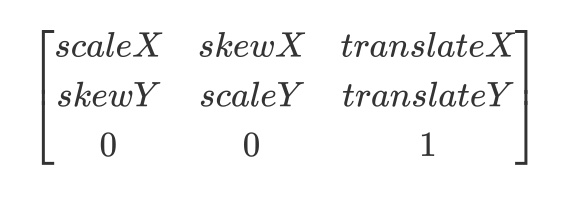
Since: 2.0.2
Parameters
| Parameter | Type | Mandatory | Description |
|---|---|---|---|
| scaleX | number | Yes | Horizontal scaling. |
| skewX | number | Yes | Horizontal skew. |
| skewY | number | Yes | Vertical skew. |
| scaleY | number | Yes | Vertical scaling. |
| translateX | number | Yes | Horizontal translation. |
| translateY | number | Yes | Vertical translation. |
Example:
has.createSelectorQuery().select('#myCanvas')
  .node((res) => {
    const canvas = res.node;
    const ctx = canvas.getContext('2d');
    ctx.lineWidth = 1;
    // No transformation.
    ctx.strokeStyle ='black';
    ctx.strokeRect(0, 0, 100, 100);
    // Add a transformation.
    ctx.transform(1, 0.2, 0.5, 1, 0, 0);
    ctx.strokeStyle ='red';
    ctx.strokeRect(0, 0, 100, 100);
    // Add a transformation based on the current transformation.
    ctx.transform(1, 0.2, 0.5, 1, 0, 0);
    ctx.strokeStyle ='green';
    ctx.strokeRect(0, 0, 100, 100);
  })
  .exec();
CanvasRenderingContext2D.translate
CanvasRenderingContext2D.translate(number x, number y)
Translates the current coordinate system.
Since: 2.0.2
Parameters
| Parameter | Type | Mandatory | Description |
|---|---|---|---|
| x | number | Yes | Horizontal translation amount. A positive value indicates a rightward movement, while a negative value indicates a leftward movement. |
| y | number | Yes | Vertical translation amount. A positive value indicates a downward movement, while a negative value indicates an upward movement. |
Example:
has.createSelectorQuery().select('#myCanvas')
  .node((res) => {
    const canvas = res.node;
    const ctx = canvas.getContext('2d');
    ctx.lineWidth = 1;
    ctx.strokeRect(20, 10, 100, 80);
    ctx.translate(30, 30);
    ctx.strokeRect(20, 10, 100, 80);
  })
  .exec();
CanvasRenderingContext2D.createImageData
CanvasRenderingContext2D.createImageData(number width, number height): ImageData
Creates an ImageData object with the specified width and height.
Since: 2.0.3
Parameters
Currently, two input parameter modes are at your service.
CanvasRenderingContext2D.createImageData(number width, number height): ImageData
CanvasRenderingContext2D.createImageData(ImageData imageData): ImageData
| Parameter | Type | Mandatory | Description |
|---|---|---|---|
| width | number | Yes | Width of the new ImageData object, in pixels. |
| height | number | Yes | Height of the new ImageData object, in pixels. |
| imageData | ImageData | Yes | Image data to be copied. |
Returns:
ImageData object.
Example:
has.createSelectorQuery().select('#myCanvas')
  .node((res) => {
    const canvas = res.node;
    const ctx = canvas.getContext('2d');
    const imageData = ctx.createImageData(100, 100);
    console.info('createImageData, width:', imageData.width);
    console.info('createImageData, height:', imageData.height);
    console.info('createImageData, data length:', imageData.data.length);
  })
  .exec();
CanvasRenderingContext2D.getImageData
CanvasRenderingContext2D.getImageData(number sx, number sy, number sw, number sh): ImageData
Obtains the ImageData object of a specified rectangular area on the canvas.
Since: 2.0.3
Parameters
| Parameter | Type | Mandatory | Description |
|---|---|---|---|
| sx | number | Yes | X coordinate of the upper left corner of the rectangle from which the ImageData object is to be extracted. |
| sy | number | Yes | Y coordinate of the upper left corner of the rectangle from which the ImageData object is to be extracted. |
| sw | number | Yes | Width of the rectangle from which the ImageData object is to be extracted. The value is an absolute value, in pixels. |
| sh | number | Yes | Height of the rectangle from which the ImageData object is to be extracted. The value is an absolute value, in pixels. |
Returns:
ImageData object.
Example:
has.createSelectorQuery().select('#myCanvas')
  .node((res) => {
    const canvas = res.node;
    const ctx = canvas.getContext('2d');
    const imageData = ctx.getImageData(0, 0, 100, 100);
    console.info('getImageData, width:', imageData.width);
    console.info('getImageData, height:', imageData.height);
    console.info('getImageData, data length:', imageData.data.length);
  })
  .exec();
CanvasRenderingContext2D.putImageData
CanvasRenderingContext2D.putImageData(ImageData imageData, number dx, number dy, number dirtyX, number dirtyY, number dirtyWidth, number dirtyHeight)
Draws an ImageData object to the canvas.
Since: 2.0.3
Parameters
Currently, two input parameter modes are at your service.
CanvasRenderingContext2D.putImageData(ImageData imageData, number dx, number dy)
CanvasRenderingContext2D.putImageData(ImageData imageData, number dx, number dy, number dirtyX, number dirtyY, number dirtyWidth, number dirtyHeight)
| Parameter | Type | Mandatory | Description |
|---|---|---|---|
| imageData | ImageData | Yes | ImageData object to be drawn. |
| dx | number | Yes | Horizontal position of the image data. |
| dy | number | Yes | Vertical position of the image data. |
| dirtyX | number | No | Horizontal position of the upper left corner of the image data to be extracted. |
| dirtyY | number | No | Vertical position of the upper left corner of the image data to be extracted. |
| dirtyWidth | number | No | Width of the rectangle to be drawn. The default value is the width of the image data, in pixels. |
| dirtyHeight | number | No | Height of the rectangle to be drawn. The default value is the height of the image data, in pixels. |
Example:
has.createSelectorQuery().select('#myCanvas')
  .node((res) => {
    const canvas = res.node;
    const ctx = canvas.getContext('2d');
    const imageData = ctx.getImageData(0, 0, 100, 100);
    ctx.putImageData(imageData, 50, 50);
  })
  .exec();