


Intelligent Assistant
Chat with our virtual assistant to get answers promptly.
Optical character recognition (OCR) is a technology that converts printed text from various sources, such as bills, cards, tables, newspapers, and books, into image information through optical input methods like scanning or taking photos. The text information is then extracted from the image information using OCR and transformed into character information that can be processed by computers. OCR has the following features:
Detects and recognizes text from images captured from documents, street scenes, and other sources. It can also provide text detection and recognition capabilities, and offer related services such as translation and search based on the detection and recognition results.
Processes image information from various sources such as cameras and image galleries by providing an open capability for automatic text detection, locating, and recognition.
Supports text recognition in scenarios with text tilt within a specific angle range, shooting angle tilt, complex lighting conditions, and complex text backgrounds.
Example:
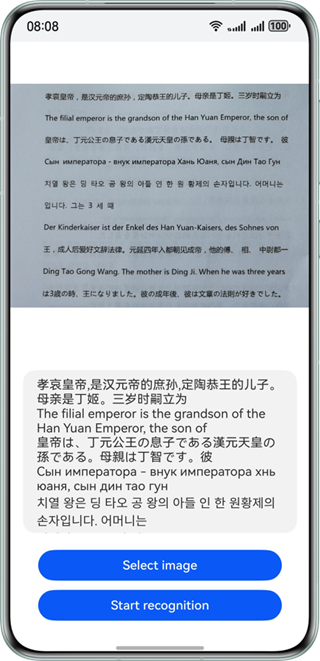
Add the classes for implementing OCR to a project.
import { textRecognition } from '@kit.CoreVisionKit';
import { image } from '@kit.ImageKit';
import { hilog } from '@kit.PerformanceAnalysisKit';
import { BusinessError } from '@kit.BasicServicesKit';
import { fileIo } from '@kit.CoreFileKit';
import { photoAccessHelper } from '@kit.MediaLibraryKit';
Initialization and release: Call textRecognition.init() in aboutToAppear to initialize the text recognition service (load the model), and call textRecognition.release() in aboutToDisappear to release resources.
async aboutToAppear(): Promise<void> {
  const initResult = await textRecognition.init();
  hilog.info(0x0000, 'OCRDemo', `OCR service initialization result:${initResult}`);
}

async aboutToDisappear(): Promise<void> {
  await textRecognition.release();
  hilog.info(0x0000, 'OCRDemo', 'OCR service released successfully');
}
Call photoAccessHelper.PhotoViewPicker to start the gallery to select an image, and use the fileIo and image modules to convert the URI to a PixelMap to prepare input data for the recognition API.
Button('Select image')
  .type(ButtonType.Capsule)
  .fontColor(Color.White)
  .alignSelf(ItemAlign.Center)
  .width('80%')
  .margin(10)
  .onClick(() => {
    // Bring up the gallery to obtain images.
    void this.selectImage();
  })
The method for selecting and decoding images is implemented as follows:
private async selectImage() {
  let uri = await this.openPhoto();
  if (uri === undefined) {
    hilog.error(0x0000, 'OCRDemo', 'Failed to get uri.');
    return;
  }
  this.loadImage(uri);
}

private async openPhoto(): Promise<string> {
  return new Promise<string>((resolve) => {
    let photoPicker: photoAccessHelper.PhotoViewPicker = new photoAccessHelper.PhotoViewPicker();
    photoPicker.select({
      MIMEType: photoAccessHelper.PhotoViewMIMETypes.IMAGE_TYPE,
      maxSelectNumber: 1
    }).then((res: photoAccessHelper.PhotoSelectResult) => {
      resolve(res.photoUris[0]);
    }).catch((err: BusinessError) => {
      hilog.error(0x0000, 'OCRDemo', `Failed to get photo image uri. code: ${err.code}, message: ${err.message}`);
      resolve('');
    });
  });
}

private loadImage(name: string) {
  setTimeout(async () => {
    let fileSource = await fileIo.open(name, fileIo.OpenMode.READ_ONLY);
    this.imageSource = image.createImageSource(fileSource.fd);
    this.chooseImage = await this.imageSource.createPixelMap();
    await fileIo.close(fileSource);
  }, 100);
}
Construct VisionInfo, pass the pixel map of the image to be recognized, configure TextRecognitionConfiguration to determine whether to support direction detection, and call the textRecognition.recognizeText API to obtain the text recognition result and display it on the UI.
Button('Start recognition')
  .type(ButtonType.Capsule)
  .fontColor(Color.White)
  .alignSelf(ItemAlign.Center)
  .width('80%')
  .margin(10)
  .onClick(() => {
    this.textRecognitionTest();
  })
The text recognition method is implemented as follows:
private textRecognitionTest() {
  if (!this.chooseImage) {
    return;
  }
  // Call the text recognition API.
  let visionInfo: textRecognition.VisionInfo = {
    pixelMap: this.chooseImage
  };
  let textConfiguration: textRecognition.TextRecognitionConfiguration = {
    isDirectionDetectionSupported: false
  };
  textRecognition.recognizeText(visionInfo, textConfiguration)
    .then((data: textRecognition.TextRecognitionResult) => {
      // The recognition is successful. Obtain the corresponding result.
      let recognitionString = JSON.stringify(data);
      hilog.info(0x0000, 'OCRDemo', `Succeeded in recognizing text: ${recognitionString}`);
      // Update the result to **Text**.
      this.dataValues = data.value;
    })
    .catch((error: BusinessError) => {
      hilog.error(0x0000, 'OCRDemo', `Failed to recognize text. Code: ${error.code}, message: ${error.message}`);
      this.dataValues = `Error: ${error.message}`;
    });
} After button taps, recognize texts within an image, and print the recognition result to logs.
import { textRecognition } from '@kit.CoreVisionKit';
import { image } from '@kit.ImageKit';
import { hilog } from '@kit.PerformanceAnalysisKit';
import { BusinessError } from '@kit.BasicServicesKit';
import { fileIo } from '@kit.CoreFileKit';
import { photoAccessHelper } from '@kit.MediaLibraryKit';

@Entry
@Component
struct Index {
  private imageSource: image.ImageSource | undefined = undefined;
  @State chooseImage: PixelMap | undefined = undefined;
  @State dataValues: string = '';

  async aboutToAppear(): Promise<void> {
    const initResult = await textRecognition.init();
    hilog.info(0x0000, 'OCRDemo', `OCR service initialization result:${initResult}`);
  }

  async aboutToDisappear(): Promise<void> {
    await textRecognition.release();
    hilog.info(0x0000, 'OCRDemo', 'OCR service released successfully');
  }

  build() {
    Column() {
      Image(this.chooseImage)
        .objectFit(ImageFit.Fill)
        .height('60%')

      Text(this.dataValues)
        .copyOption(CopyOptions.LocalDevice)
        .height('15%')
        .margin(10)
        .width('60%')

      Button('Select image')
        .type(ButtonType.Capsule)
        .fontColor(Color.White)
        .alignSelf(ItemAlign.Center)
        .width('80%')
        .margin(10)
        .onClick(() => {
          // Bring up the gallery to obtain images.
          void this.selectImage();
        })

      Button('Start recognition')
        .type(ButtonType.Capsule)
        .fontColor(Color.White)
        .alignSelf(ItemAlign.Center)
        .width('80%')
        .margin(10)
        .onClick(() => {
          this.textRecognitionTest();
        })
    }
    .width('100%')
    .height('100%')
    .justifyContent(FlexAlign.Center)
  }

  private textRecognitionTest() {
    if (!this.chooseImage) {
      return;
    }
    // Call the text recognition API.
    let visionInfo: textRecognition.VisionInfo = {
      pixelMap: this.chooseImage
    };
    let textConfiguration: textRecognition.TextRecognitionConfiguration = {
      isDirectionDetectionSupported: false
    };
    textRecognition.recognizeText(visionInfo, textConfiguration)
      .then((data: textRecognition.TextRecognitionResult) => {
        // The recognition is successful. Obtain the corresponding result.
        let recognitionString = JSON.stringify(data);
        hilog.info(0x0000, 'OCRDemo', `Succeeded in recognizing text: ${recognitionString}`);
        // Update the result to **Text**.
        this.dataValues = data.value;
      })
      .catch((error: BusinessError) => {
        hilog.error(0x0000, 'OCRDemo', `Failed to recognize text. Code: ${error.code}, message: ${error.message}`);
        this.dataValues = `Error: ${error.message}`;
      });
  }

  private async selectImage() {
    let uri = await this.openPhoto();
    if (uri === undefined) {
      hilog.error(0x0000, 'OCRDemo', 'Failed to get uri.');
      return;
    }
    this.loadImage(uri);
  }

  private async openPhoto(): Promise<string> {
    return new Promise<string>((resolve) => {
      let photoPicker: photoAccessHelper.PhotoViewPicker = new photoAccessHelper.PhotoViewPicker();
      photoPicker.select({
        MIMEType: photoAccessHelper.PhotoViewMIMETypes.IMAGE_TYPE,
        maxSelectNumber: 1
      }).then((res: photoAccessHelper.PhotoSelectResult) => {
        resolve(res.photoUris[0]);
      }).catch((err: BusinessError) => {
        hilog.error(0x0000, 'OCRDemo', `Failed to get photo image uri. code: ${err.code}, message: ${err.message}`);
        resolve('');
      });
    });
  }

  private loadImage(name: string) {
    setTimeout(async () => {
      let fileSource = await fileIo.open(name, fileIo.OpenMode.READ_ONLY);
      this.imageSource = image.createImageSource(fileSource.fd);
      this.chooseImage = await this.imageSource.createPixelMap();
      await fileIo.close(fileSource);
    }, 100);
  }
}