Intelligent Assistant
Chat with our virtual assistant to get answers promptly.
A path object allows you to describe a path through its APIs and render it using the Canvas stroke API. For details, see Path2D.
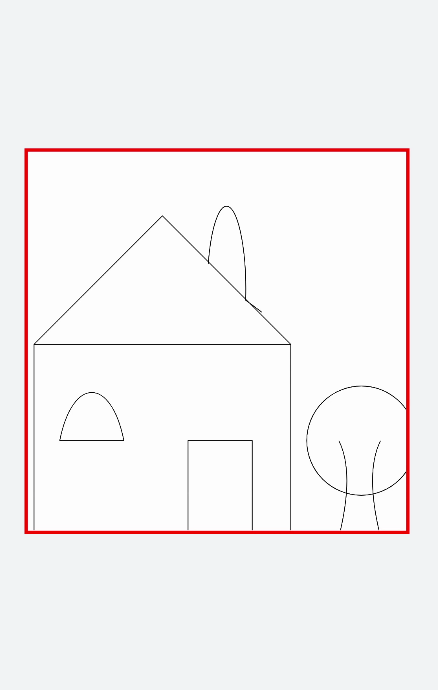
Create a Path2D object and use line segments to create different shapes.
- <!-- xxx.hml -->
- <div class="container">
- <canvas ref="canvas"></canvas>
- </div>
- /* xxx.css */
- .container {
- flex-direction: column;
- background-color: #F1F3F5;
- align-items: center;
- justify-content: center;
- width: 100%;
- height: 100%;
- }
-
- canvas {
- width: 600px;
- height: 600px;
- background-color: #fdfdfd;
- border: 5px solid red;
- }
- // xxx.js
- export default {
- onShow() {
- let ctx = this.$refs.canvas.getContext('2d', {
- antialias: true
- });
- let path = ctx.createPath2D();
- // Roof
- path.moveTo(10, 300);
- path.lineTo(210, 100);
- path.lineTo(410, 300);
- // House
- path.moveTo(10, 300);
- path.lineTo(410, 300);
- path.lineTo(410, 600);
- path.lineTo(10, 600);
- path.closePath();
- // Window
- path.moveTo(50, 450);
- path.bezierCurveTo(70, 350, 130, 350, 150, 450);
- path.closePath();
- // Door
- path.moveTo(250, 450);
- path.rect(250, 450, 100, 600);
- path.closePath();
- // Chimney
- path.moveTo(365, 250);
- path.ellipse(310, 215, 30, 130, 0, Math.PI * 0.04, Math.PI * 1.1, 1);
- // Tree
- path.moveTo(485, 450);
- path.quadraticCurveTo(510, 500, 485, 600);
- path.moveTo(550, 450);
- path.quadraticCurveTo(525, 500, 550, 600);
- path.moveTo(600, 535);
- path.arc(520, 450, 85, 0, 6);
- ctx.stroke(path);
- }
- }
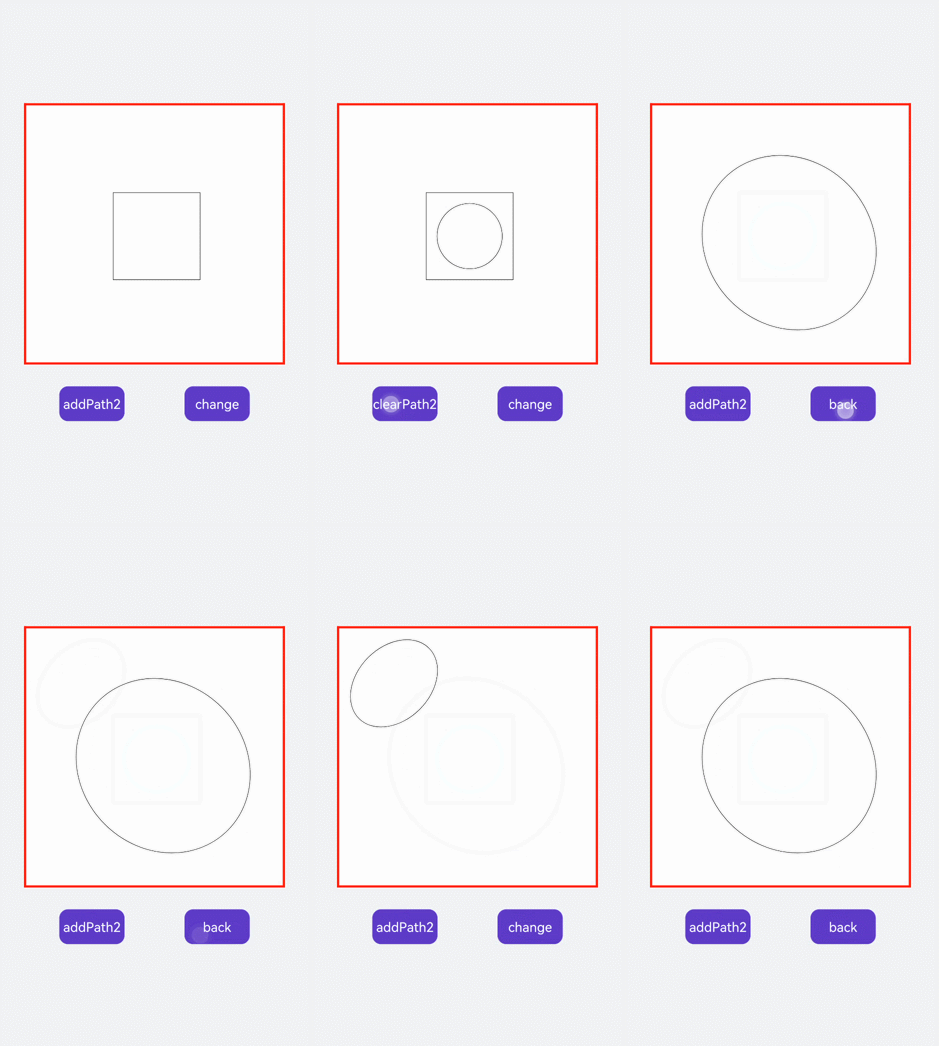
First, use createPath2D to create path objects. Only the path1 path is stroked, so only the path1 graphic appears on the canvas. When you tap the text component, the addPath method is triggered, which passes the path1 path object as a parameter into path2. After the path2 object is stroked, both the path1 and path2 graphics appear on the canvas. When you tap the change text, the setTransform attribute value is changed to setTransform(2, 0.1, 0.1, 2, 0, 0), causing the graphic to enlarge and tilt to the left.
- <!-- xxx.hml -->
- <div class="container">
- <canvas ref="canvas"></canvas>
- <div class="content">
- <text onclick="addPath">{{ isAdd }}</text>
- <text onclick="setTransform">{{ textName }}</text>
- </div>
- </div>
- /* xxx.css */
- .container {
- flex-direction: column;
- background-color: #F1F3F5;
- align-items: center;
- justify-content: center;
- width: 100%;
- height: 100%;
- }
-
- canvas {
- width: 600px;
- height: 600px;
- background-color: #fdfdfd;
- border: 5px solid red;
- }
-
- .content {
- width: 80%;
- margin-top: 50px;
- margin-bottom: 50px;
- display: flex;
- flex-wrap: wrap;
- justify-content: space-around;
- }
-
- text {
- width: 150px;
- height: 80px;
- color: white;
- border-radius: 20px;
- text-align: center;
- background-color: #6060e7;
- margin-bottom: 30px;
- }
- // xxx.js
- export default {
- data: {
- ctx: null,
- path1: null,
- path2: null,
- path3: null,
- isAdd: 'addPath2',
- isChange: true,
- textName: 'change'
- },
- onShow() {
- this.ctx = this.$refs.canvas.getContext('2d', {
- antialias: true
- });
- this.path1 = this.ctx.createPath2D();
- // Square
- this.path1.moveTo(200, 200);
- this.path1.lineTo(400, 200);
- this.path1.lineTo(400, 400);
- this.path1.lineTo(200, 400);
- this.path1.closePath();
- this.path2 = this.ctx.createPath2D();
- // Arc
- this.path2.arc(300, 300, 75, 0, 6.28);
- this.ctx.stroke(this.path1);
- },
- addPath() {
- if (this.isAdd == 'addPath2') {
- // Clear the specified area on the canvas.
- this.ctx.clearRect(0, 0, 600, 600);
- this.ctx.beginPath();
- // Add a path to the current path.
- this.path2.addPath(this.path1);
- this.ctx.stroke(this.path2);
- this.isAdd = 'clearPath2';
- } else {
- this.ctx.clearRect(0, 0, 600, 600);
- this.ctx.stroke(this.path1);
- this.isAdd = 'addPath2';
- }
- },
- setTransform() {
- if (this.isChange) {
- this.ctx.clearRect(0, 0, 600, 600);
- this.path3 = this.ctx.createPath2D();
- this.path3.arc(150, 150, 100, 0, 6.28);
- // Reset and create a new transformation matrix.
- this.path3.setTransform(2, 0.1, 0.1, 2, 0, 0);
- this.ctx.stroke(this.path3);
- this.isChange = !this.isChange;
- this.textName = 'back';
- } else {
- this.ctx.clearRect(0, 0, 600, 600);
- this.path3.setTransform(0.5, -0.1, -0.1, 0.5, 0, 0);
- this.ctx.stroke(this.path3);
- this.isChange = !this.isChange;
- this.textName = 'change';
- }
- }
- }