[h2]System Capabilities and APIs
SysCap is short for SystemCapability. It refers to a standalone feature in the operating system, such as Bluetooth, Wi-Fi, NFC, and camera. Each SysCap corresponds to multiple APIs, whose availability depends on the support of the target device. These APIs can be provided in DevEco Studio for association.
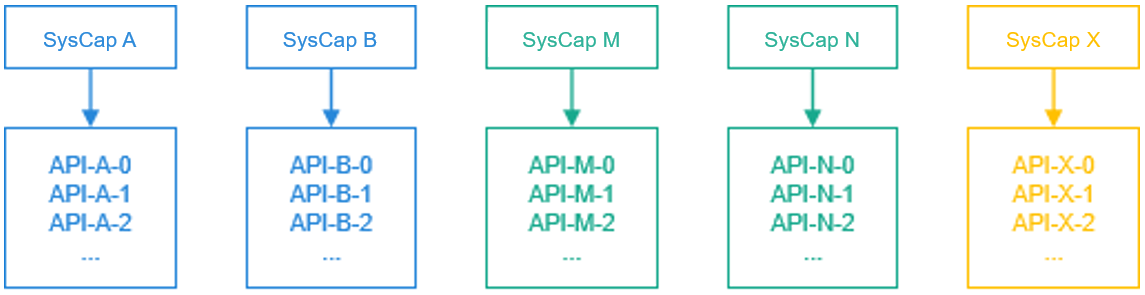
For details about the SysCap sets in HarmonyOS, see SysCap List.
[h2]Supported, Associated, and Required SysCap Sets
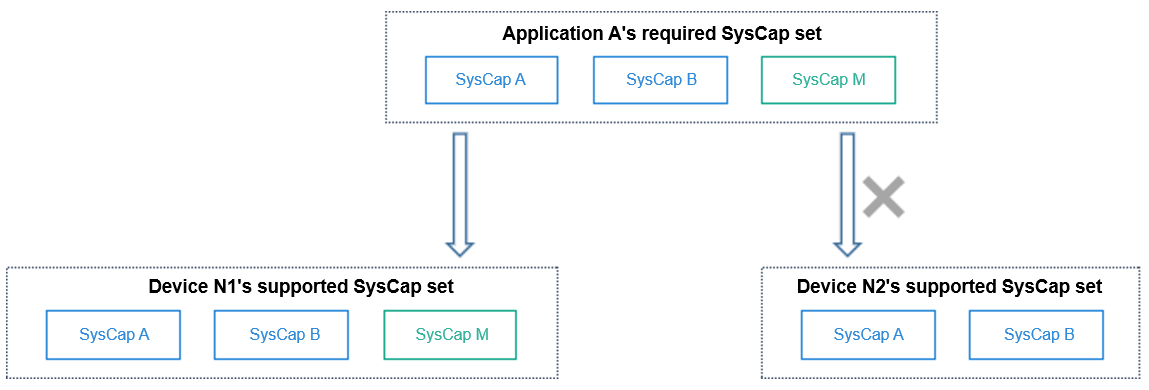
The supported, associated, and required SysCap sets are collections of SysCaps.
The supported SysCap set covers the device capabilities, and the required SysCap set covers the application capabilities. If the SysCap set required by application A is a subset of the SysCap set supported by device N, application A can be distributed to device N for installation and running. Otherwise, application A cannot be distributed.
The associated SysCap set covers the system capabilities of associated APIs that DevEco Studio offers during application development.
[h2]Devices and Supported SysCap Sets
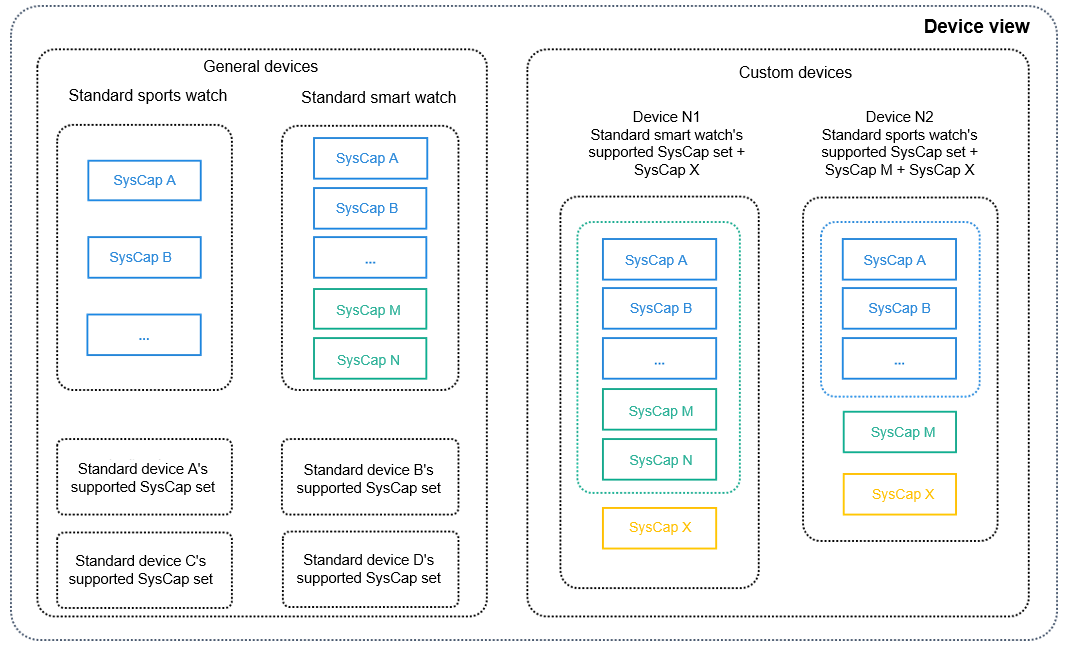
Each device provides a SysCap set that matches its hardware capability.
The SDK classifies devices into general devices and custom devices. The general devices' supported SysCap set is defined by HarmonyOS, and the custom devices' is defined by device vendors.
[h2]Mapping Between Devices and SDK Capabilities
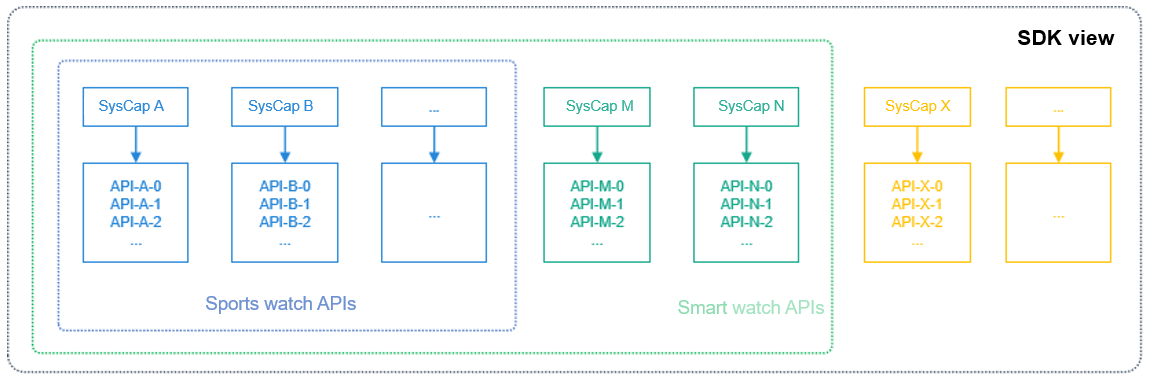
The SDK provides APIs for DevEco Studio. DevEco Studio identifies the device form selected in the developer project, locates the capability set supported by the device, obtains the APIs matching the capability set, and provides the APIs for development.
[h2]Adding Custom SysCap
For a specific device model, the capabilities may exceed the capability set defined for the default device. To use these capabilities, you need to configure a custom SysCap.
In the /src/main directory of a project in DevEco Studio, manually create the syscap.json file. For example, right-click entry/src/main and choose New > File.
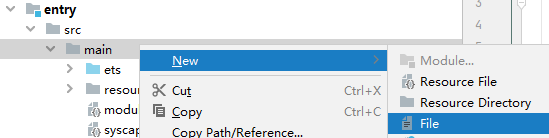
Create a file and name it syscap.json.

Open the syscap.json file.
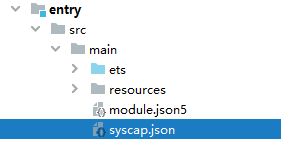
Enter the required SysCaps in the following format. The following is an example of the syscap.json file for using the NFC capability:
{
  "devices": {
    "general": [
      // Each typical device corresponds to a SysCap set. Multiple typical devices can be configured. The devices must be the same as those selected in the project.
      "phone"
    ]
  },
  "development": {
    // The SysCap set in addedSysCaps and the SysCap set supported by each device configured in devices form the associated SysCap set.
    "addedSysCaps": [
      "SystemCapability.Communication.NFC.Core",
      "SystemCapability.Communication.NFC.CardEmulation",
      "SystemCapability.Communication.NFC.Tag"
    ]
  }
}
[h2]Single-Device Application Development
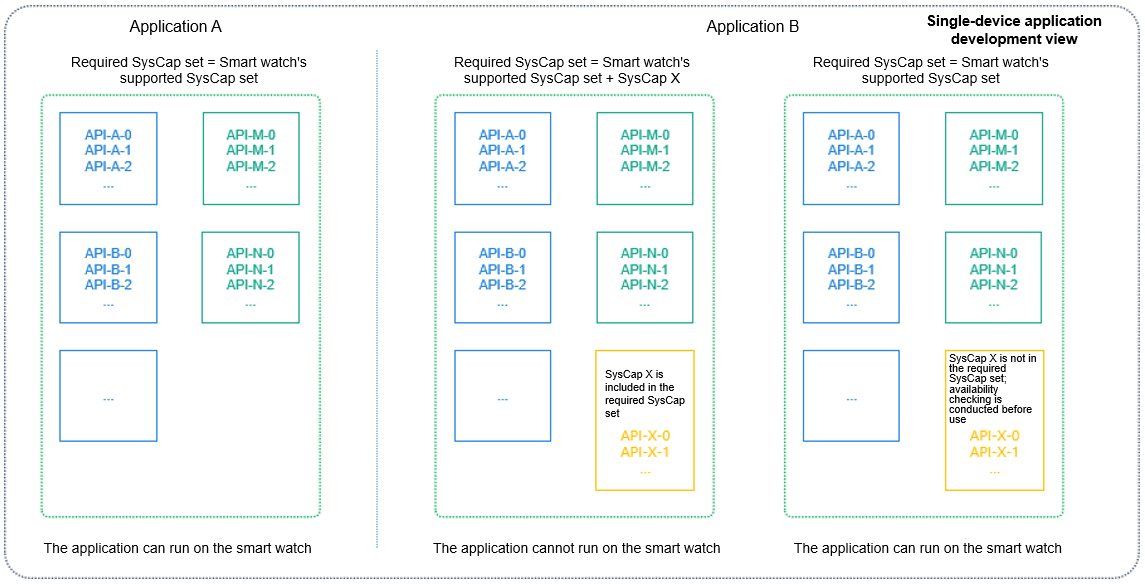
By default, the associated SysCap set and required SysCap set of the application are the same as the supported SysCap set of the device. Exercise caution when modifying the required SysCap set.
[h2]Cross-Device Application Development
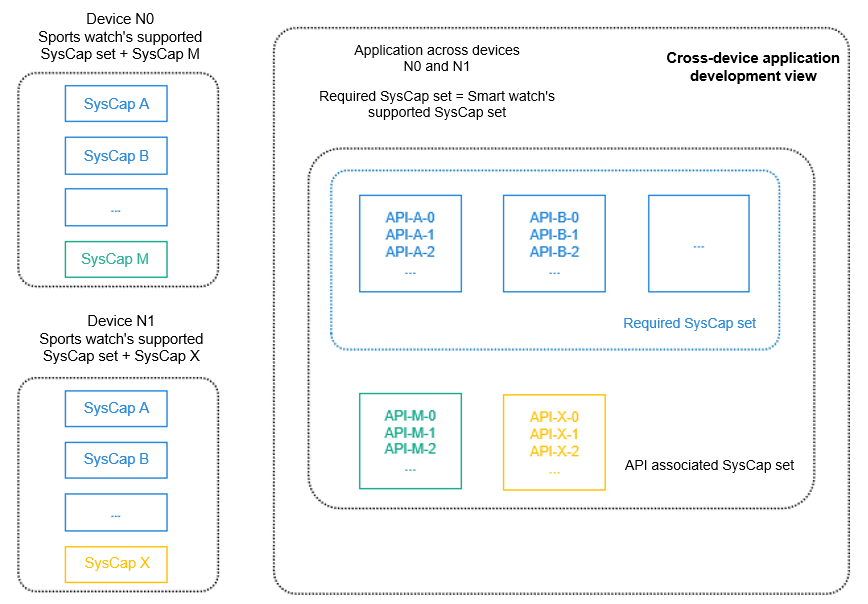
By default, the associated SysCap set of an application is the union of multiple devices' supported SysCap sets, while the required SysCap set is the intersection of the devices' supported SysCap sets.
[h2]Checking Whether an API Is Available
You can use either the ArkTS or native API to determine whether an API is available.
ArkTS API
Method 1: Use canIUse() defined by the system to check whether a SysCap is supported.
if (canIUse("SystemCapability.ArkUI.ArkUI.Full")) {
   console.log("This device supports SystemCapability.ArkUI.ArkUI.Full.");
} else {
   console.log("This device does not support SystemCapability.ArkUI.ArkUI.Full.");
}
Method 2: Import a module using the import API. If the current device does not support the module, the import result is undefined. Before using an API, you must make sure the API is available.
import geolocationManager from '@ohos.geoLocationManager';

if (geolocationManager) {
geolocationManager.getCurrentLocation((location) => {
    console.log('current location: ' + JSON.stringify(location));
});
} else {
console.log('This device does not support location information.');
}
Native API
#include <stdio.h>
#include <stdlib.h>
#include "syscap_ndk.h"

char syscap[] = "SystemCapability.ArkUI.ArkUI.Full";
bool result = canIUse(syscap);
if (result) {
    printf("SysCap: %s is supported!\n", syscap);
} else {
    printf("SysCap: %s is not supported!\n", syscap);
}
You can also find out the SysCap to which an API belongs by referring to the API reference document.
[h2]Checking the Differences Between Devices with a Specific SysCap
The performance of a SysCap may vary by device type. For example, a tablet is superior to a smart wearable in terms of the camera capability.
import userAuth from '@ohos.userIAM.userAuth';

const authenticator = userAuth.getAuthenticator();
const result = authenticator.checkAbility('FACE_ONLY', 'S1');

if (result == authenticator.CheckAvailabilityResult.AUTH_NOT_SUPPORT) {
    console.log('This device does not support facial recognition.');
}
// If an unsupported API is forcibly called, an error message is returned, but no syntax error occurs.
authenticator.execute('FACE_ONLY', 'S1', (err, result) => {
    if (err) {
        console.log(err.message);
        return;
    }
})
[h2]How Do SysCap Differences Arise Between Devices
The device SysCaps in product solutions vary according to the component combination defined by the product solution vendor. The following figure shows the overall process.
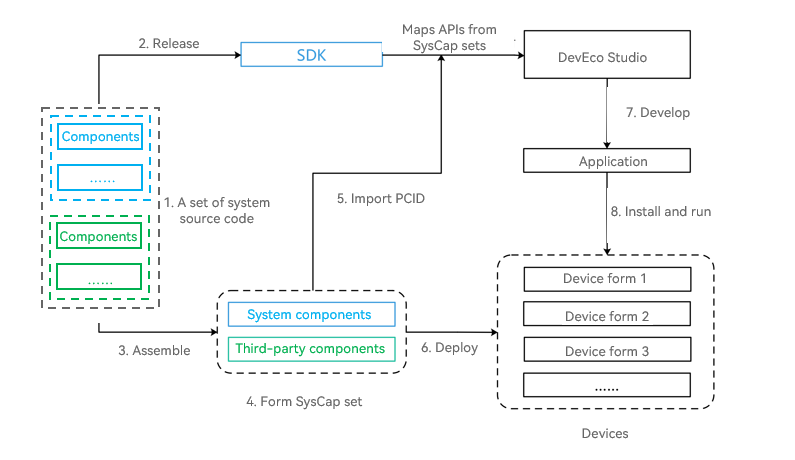
A set of operating system source code consists of optional and mandatory components. Different components represent different SysCaps.
In a normalized released SDK, APIs are mapped to SysCap sets.
Product solution vendors can assemble components based on hardware capabilities and product requirements.
The components configured for a product can be system components or proprietary components developed by a third party. Since there is mapping between components and SysCap, the SysCap set of the product can be obtained after all components are assembled.
The SysCap set is encoded to generate the PCID. You can import the PCID to DevEco Studio and decode it into SysCaps. During development, compatibility processing is performed to mitigate the SysCap differences of devices.
System parameters deployed on devices contain the SysCap set. The system provides native interfaces and application interfaces for components and applications to check whether a specific SysCap is available.
During application development, the SysCap set required by the application is encoded into the Required Product Compatibility ID (RPCID) and written into the application installation package. During application installation, the package manager decodes the RPCID to obtain the SysCap set required by the application and compares it with the SysCap set supported by the device. If the SysCap set required by the application is met, the application can be installed on the device.
When an application is running on a device, the canIUse API can be used to query whether the device is compatible with a specific SysCap.