


Intelligent Assistant
Chat with our virtual assistant to get answers promptly.
Due to business adjustments, we will no longer support new developer registrations for Nearby Service starting from September 10, 2024. Existing developers who have already activated Nearby Service can continue to use it. We will notify you separately if there are any changes. Thank you for your support!
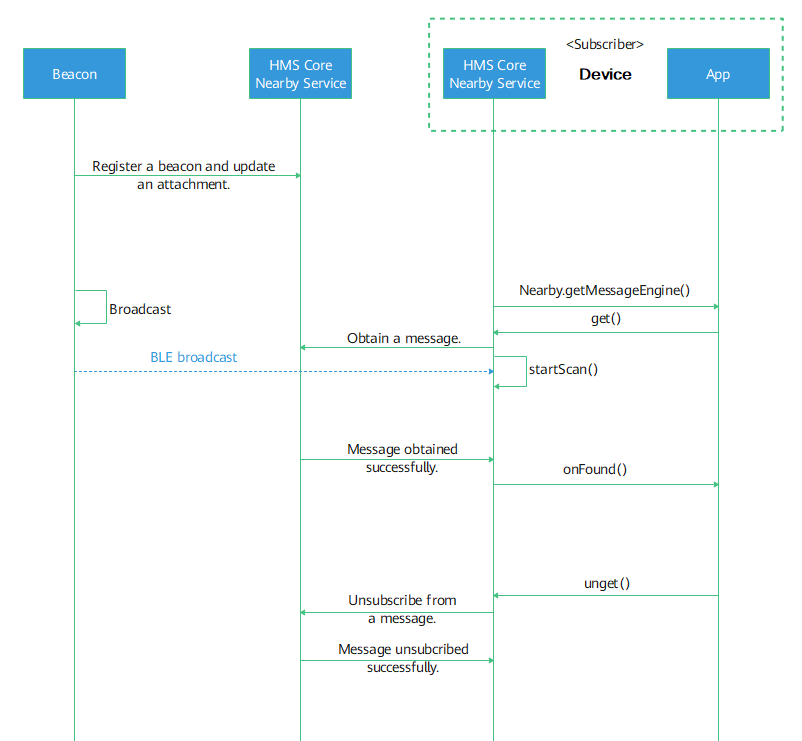
A Bluetooth beacon is a physical device based on the BLE technology. Eddystone and iBeacon are the two major beacon protocols. After purchasing a Bluetooth beacon, you can use the app provided by the beacon vendor to configure beacon parameters. In scenarios where messages are published and subscribed to based on Bluetooth beacons, the Nearby Service cloud provides beacon parameters and attachment management capabilities. For details, please refer to REST. You can use the Nearby Service cloud to configure and publish messages, and use Nearby Message API to scan beacons and obtain published messages. Beacon message subscription can be implemented in one of the following ways: Subscribing to Beacon Messages in the Foreground, Subscribing to Beacon Messages in the Background, and Registering a Beacon Scanning Task (Beta). Foreground subscription discovers surrounding Bluetooth beacons more quickly; background subscription consumes less power than foreground subscription does; beacon scanning task registrationbeta keeps scanning beacons in the background. Beacon scanning task registration gives a timely notification when a beacon is discovered, even when the app is closed, but consumes slightly more power than the former two ways do.
For details about how to configure a beacon, please refer to Beacon Management.
When configuring a beacon, you can associate the beacon ID with an attachment, which is a specific byte stream. Nearby Message stores the attachment without parsing it. An attachment can contain up to 1024 characters. One beacon ID can be associated with up to 9 attachments.
Foreground subscription allows your app to discover devices faster, but may be more power-consuming. Note that foreground subscription can only be enabled when your app is running in the foreground. When your app exits the foreground, the message subscription will stop.
MessageHandler mMessageHandler = new MessageHandler() {
     // Obtain new messages from nearby devices.
    @Override
    public void onFound(Message message) {
        super.onFound(message);
        // Called back when a new message is found. Process your service.
    }
     // Called back when no Bluetooth device is found or the cloud message is lost.
    @Override
    public void onLost(Message message) {
        super.onLost(message);
        // Called back when a new message is found. Process your service.
    }
};
// By default, all types of messages are subscribed to. Multiple filtering rules can be added.
MessagePicker msgPicker = new MessagePicker.Builder()
            .includeNamespaceType("dev91050203040506", "HMS")
            .includeEddystoneUids("5dc33487f02e477d4058", "0117c5986919")
            .includeIBeaconIds(UUID.fromString("01122334-4556-6778-899a-abbccddeeff0"), (short)0x3e8, (short)0x2711)
            .build();
Policy policy = Policy.BLE_ONLY;
GetOption getOption = new GetOption.Builder().setPicker(msgPicker).setPolicy(policy).build();
Task<Void> task = Nearby.getMessageEngine(getApplicationContext()).get(mMessageHandler, getOption); Examples of beacon message filtering conditions
| Mode | Example | Filtering Condition | Remarks |
|---|---|---|---|
| NamespaceType | includeNamespaceType("dev91050203040506", "HMS") | Scan only beacons whose beacon IDs use the default prefix 6bff00f723fdf7471402 and filter beacon messages whose namespace is dev91050203040506 and type is HMS. |
|
| Eddystone UID | includeEddystoneUids("5dc33487f02e477d40580117c5986919", "0117c5986919") | Scan only beacons of the Eddystone UID format, whose beacon IDs are 5dc33487f02e477d40580117c5986919. In the Eddystone UID, the Namespace ID is 5dc33487f02e477d4058, and Instance ID is 0117c5986919. | This condition allows an app to scan and discover beacons, without obtaining the message attachment. Therefore, you do not need to configure beacons in AppGallery Connect. |
| iBeacon | includeIBeaconIds(UUID.fromString("14a01af0232a45189c0e899aabbccddeeff03e82711"), (short)0x3e8, (short)0x2711) | Scan only beacons of the iBeacon format, whose beacon IDs are 14a01af0232a45189c0e899aabbccddeeff03e82711. The iBeacon UUID is 14a01af0-232a-4518-9c0e-899a-abbccddeeff0, Major value is (short)0x3e8, and Minor value is (short)0x2711. | This condition allows an app to scan and discover beacons, without obtaining the message attachment. Therefore, you do not need to configure beacons in AppGallery Connect. |
The device discovery speed for this mode is much slower than that for the foreground subscription, but this mode is more power-efficient.
PendingIntent pendingIntent = PendingIntent.getService(this, 0, new Intent(this, BackgroundGetIntentService.class), PendingIntent.FLAG_UPDATE_CURRENT);
Nearby.getMessageEngine(this).get(pendingIntent);

// This IntentService is triggered when the target device is discovered in the background.
public class BackgroundGetIntentService extends IntentService {
    public BackgroundGetIntentService(String name) {
        super(name);
    }
    protected void onHandleIntent(Intent intent) {
        MessageEngine messageEngine = Nearby.getMessageEngine(context);// context is the instance of Context.
        messageEngine.handleIntent(intent, new MessageHandler() {
            @Override
            public void onFound(Message message) {
                Log.i(TAG, "onFound " + new String(message.getContent()));
            }

            @Override
            public void onLost(Message message) {
                Log.i(TAG, "onLost " + new String(message.getContent()));
            }
        });
    }
} This function is not recommended for non-Huawei phones. If it is used on such a phone, exceptions may occur.
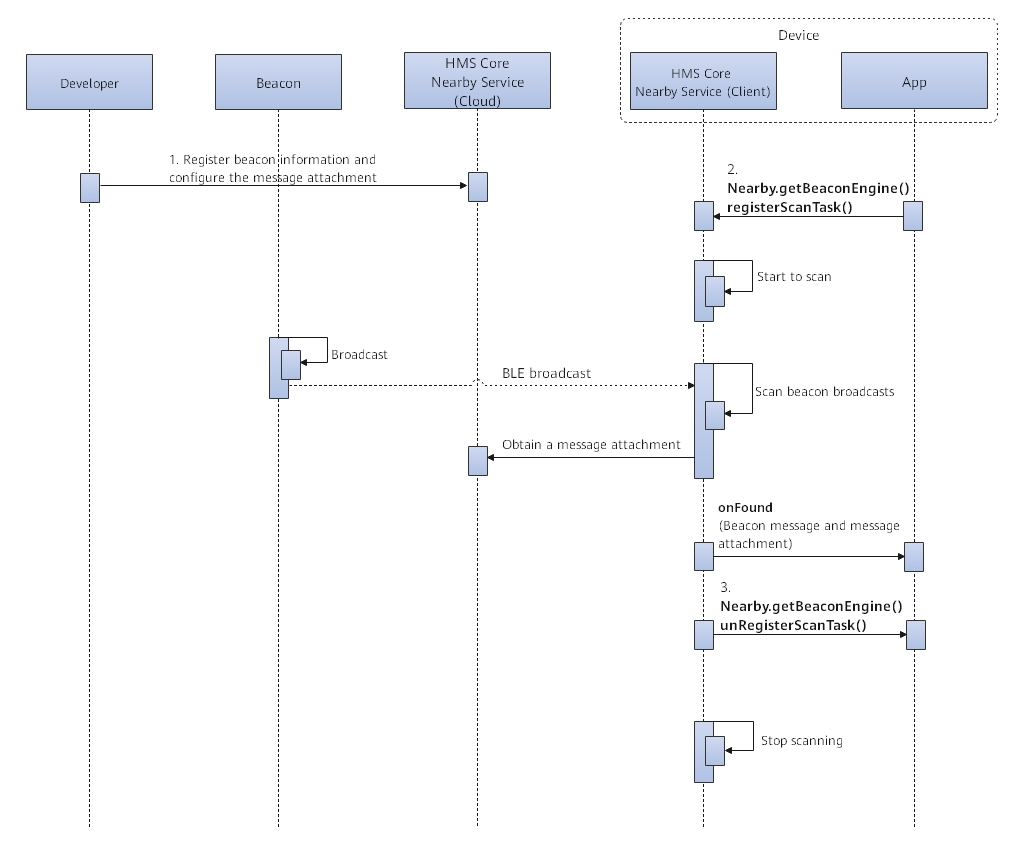
A beacon scanning task keeps running in the background. When detecting a beacon, the task will notify your app of the beacon in Broadcast or Service mode. An app can register only one scanning task. When it is necessary to modify configuration parameters of a registered task, the app needs to unregister the task and then register a new one.
If you need your app to receive beacon messages when it is closed, it is recommended that the following switches be toggled on for your app: Secondary launch and Run in background. Specifically speaking, go to Settings > Apps & services > App launch. Find the app as needed, toggle off Auto-launch, and toggle on the mentioned two switches.
The following is an example for calling registerScanTask(Intent intent, GetBeaconOption option) to register a beacon scanning task:
TriggerOption triggerOption = new TriggerOption.Builder()
    // Set the notification mode (TriggerMode).
    .setTriggerMode(2)
    // Set the class name to Broadcast or Service, which should be consistent with TriggerMode.
    .setTriggerClassName(SampleReceiver.class.getName())
    .build();
Intent intent = new Intent();
intent.putExtra(GetBeaconOption.KEY_TRIGGER_OPTION, triggerOption);

BeaconPicker beaconPicker = new BeaconPicker.Builder()
    // Filter beacons based on NamespaceType.
    .includeNamespaceType("dev91050203040506", "HMS")
    // Filter beacons based on the beacon ID prefix and NamespaceType.
    .includeNamespaceType("dev91050203040506", "HMS", "6bff00f723fdf7471402", BeaconPicker.BEACON_TYPE_IBEACON)
    // Filter beacons based on beacon ID prefix.
    .includeBeaconId("6bff00f723fdf7471402", BeaconPicker.BEACON_TYPE_IBEACON)
    .build();
GetBeaconOption getOption = new GetBeaconOption.Builder().picker(beaconPicker).build();
Nearby.getBeaconEngine(this).registerScanTask(intent, getOption).addOnSuccessListener(new OnSuccessListener<Void>() {
    @Override
    public void onSuccess(Void unused) {
        Log.i(TAG, "registerScanTask success");
    }
    }).addOnFailureListener(new OnFailureListener() {
    @Override
    public void onFailure(Exception e) {
        Log.i(TAG, "registerScanTask fail:" + e.getMessage());
    }
});
BeaconPicker defines filtering conditions for Bluetooth beacons and beacon message attachments, which is different from MessagePicker. The former supports beacon filtering based on beacon ID prefix, NamespaceType, or beacon ID prefix + NamespaceType.
Examples of conditions for filtering beacons and beacon message attachments
| Mode | Example | Filtering Condition | Filtering Condition Constraint | Remarks |
|---|---|---|---|---|
| Beacon ID prefix | includeBeaconId("5dc33487f02e477d40", BeaconPicker.BEACON_TYPE_IBEACON) | Scan only beacons of the iBeacon format, whose beacon IDs have, for example, 5dc33487f02e477d40 as the custom prefix. |
| This condition allows an app to scan and discover beacons, without obtaining the message attachment. Therefore, you do not need to configure beacons in AppGallery Connect. |
| NamespaceType | includeNamespaceType("dev91050203040506", "HMS") | Scan only beacons whose beacon IDs use the default prefix 6bff00f723fdf7471402 and filter beacon messages whose namespace is dev91050203040506 and type is HMS. |
| |
| "Beacon ID prefix + NamespaceType" | includeNamespaceType("dev91050203040506", "HMS","5dc33487f02e477d40", BeaconPicker.BEACON_TYPE_IBEACON) | Scan only beacons whose beacon IDs use the custom prefix 5dc33487f02e477d40 and filter beacon messages whose namespace is dev91050203040506 and type is HMS. |
When a beacon that meets the condition is discovered, your app will be notified of the beacon via either the Broadcast or Service mode (based on TriggerMode. For details, see setTriggerMode). The following is the sample code for receiving a beacon message:
public class SampleService extends Service {
    private static final String TAG = "SampleService";
    // 0: A beacon is lost; 1: A beacon is found.
    private static final String KEY_SCAN_ONFOUND_FLAG = "SCAN_ONFOUND_FLAG";
    // Information about the lost or found beacon.
    private static final String KEY_SCAN_BEACON_DATA = "SCAN_BEACON";

    private static final String BEACON_NOTIFY_CHANNEL_ID = "beacon_notification_channel_id";

    private static final String BEACON_NOTIFY_CHANNEL_NAME = "beacon_notification_channel_name";

    private static final int NOTIFICATION_SERVICE_ID = 101;

    public SampleService() {
    }

    @Override
    public void onCreate() {
        Log.i(TAG, "onCreate");
        new Handler().postDelayed(this::startForeground, 1000);
        super.onCreate();
    }

    @Override
    public int onStartCommand(Intent intent, int flags, int startId) {
        Log.i(TAG, "onStartCommand");
        startForeground();
        int onFound = intent.getIntExtra(KEY_SCAN_ONFOUND_FLAG, 0);
        Log.i(TAG, "onFound:" + onFound);

        // Obtain the beacon information for service processing.
        List<BeaconInfo> beaconList = intent.getParcelableArrayListExtra(KEY_SCAN_BEACON_DATA);
        return super.onStartCommand(intent, flags, startId);
    }

    public void startForeground() {
        // The notification bar logic is determined by yourself.
        if (Build.VERSION.SDK_INT >= Build.VERSION_CODES.O) {
            NotificationChannel channel = new NotificationChannel(BEACON_NOTIFY_CHANNEL_ID,
                    BEACON_NOTIFY_CHANNEL_NAME, NotificationManager.IMPORTANCE_LOW);
            NotificationManager notificationManager = (NotificationManager) getSystemService(Context.NOTIFICATION_SERVICE);
            notificationManager.createNotificationChannel(channel);
        }
        Notification notification = new NotificationCompat.Builder(this, BEACON_NOTIFY_CHANNEL_ID)
                // Set the notification icon.
                .setSmallIcon(R.mipmap.ic_launcher)
                // Set the notification title.
                .setContentTitle("Beacon notification")
                // Set the notification content.
                .setContentText("A beacon is found.")
                .setAutoCancel(true)
                .setOngoing(true)
                .build();
        // Android versions later than 8.0 do not want apps to run in the background. Therefore, call startForeground() to avoid ANRs or crashes.
        startForeground(NOTIFICATION_SERVICE_ID, notification);
    }

    @Override
    public IBinder onBind(Intent intent) {
        return null;
    }
}// Register broadcast in the AndroidManifest.xml file.
<receiver
android:name="com.demo.SampleReceiver"
android:enabled="true"
android:exported="true">
<intent-filter>
<action android:name="com.huawei.hms.nearby.action.ONFOUND_BEACON" />
</intent-filter>
</receiver>
// Define the broadcast receiver.
public class SampleReceiver extends BroadcastReceiver {
private static final String TAG = "SampleReceiver";
private static final String ACTION_SCAN_ONFOUND_RESULT = "com.huawei.hms.nearby.action.ONFOUND_BEACON";
// 0: A beacon is lost; 1: A beacon is found.
private static final String KEY_SCAN_ONFOUND_FLAG = "SCAN_ONFOUND_FLAG";
// Information about the lost or found beacon.
private static final String KEY_SCAN_BEACON_DATA = "SCAN_BEACON";
@Override
public void onReceive(Context context, Intent intent) {
String action = intent.getAction();
if (ACTION_SCAN_ONFOUND_RESULT.equals(action)) {
// Obtain the beacon information for service processing.
int onFound = intent.getIntExtra(KEY_SCAN_ONFOUND_FLAG, 0);
List<BeaconInfo> beaconList = intent.getParcelableArrayListExtra(KEY_SCAN_BEACON_DATA);
...
}
}
}MessageHandler mMessageHandler = new MessageHandler() {
// Called back when the distance change of the target device exceeds 1 meter.
@Override
public void onDistanceChanged(Message message, Distance distance) {
super.onDistanceChanged(message, distance); }
// Called back when the RSSI change of the target device exceeds 10 dBm.
@Override
public void onBleSignalChanged(Message message, BleSignal bleSignal) {
super.onBleSignalChanged(message, bleSignal); }
};
// By default, all types of messages are subscribed to. Customize the types of subscribed messages by referring to the API reference.
MessagePicker msgPicker = new MessagePicker.Builder().includeAllTypes().build();
Policy policy = Policy.BLE_ONLY;
GetOption getOption = new GetOption.Builder().setPicker(msgPicker).setPolicy(policy).build();
Task<Void> task = Nearby.getMessageEngine(getApplicationContext()).get(mMessageHandler, getOption);