从API version 7开始支持。后续版本如有新增内容,则采用上角标单独标记该内容的起始版本。
您当前正在浏览HarmonyOS最新文档,覆盖已发布的所有API版本,可在API参考中筛选您使用的API版本。详细的版本配套关系请参考版本说明。
警告弹窗 (AlertDialog)
Phone12+PC/2in113+Tablet12+TV19+Wearable18+
本文导读
显示警告弹窗组件,可设置文本内容与响应回调。
说明
AlertDialogParam对象说明
Phone12+PC/2in113+Tablet12+TV19+Wearable18+
警告弹窗的样式。
系统能力: SystemCapability.ArkUI.ArkUI.Full
| 名称 | 类型 | 只读 | 可选 | 说明 |
|---|---|---|---|---|
| title | ResourceStr | 否 | 是 | 弹窗标题。 默认值:未设置时不显示标题。 API version 20之前,弹窗标题的对齐方式为左对齐。 API version 20及之后,弹窗标题的对齐方式为居中对齐。 元服务API: 从API version 11开始,该接口支持在元服务中使用。 |
| subtitle10+ | ResourceStr | 否 | 是 | 弹窗副标题。 默认值:未设置时不显示副标题。 API version 20之前,弹窗副标题的对齐方式为左对齐。 API version 20及之后,弹窗副标题的对齐方式为居中对齐。 元服务API: 从API version 11开始,该接口支持在元服务中使用。 模型约束: 此接口仅可在Stage模型下使用。 |
| message | ResourceStr | 否 | 否 | 弹窗内容。 API version 20之前,弹窗内容的对齐方式为左对齐。 API version 20及之后,弹窗内容的对齐方式为居中对齐。 元服务API: 从API version 11开始,该接口支持在元服务中使用。 |
| autoCancel | boolean | 否 | 是 | 点击遮罩层时,是否关闭弹窗。值为true表示关闭弹窗,值为false表示不关闭弹窗。 默认值:true 元服务API: 从API version 11开始,该接口支持在元服务中使用。 |
| cancel | VoidCallback | 否 | 是 | 点击遮罩层关闭dialog时的回调。 元服务API: 从API version 11开始,该接口支持在元服务中使用。 |
| alignment | DialogAlignment | 否 | 是 | 弹窗在竖直方向上的对齐方式。 默认值:DialogAlignment.Default 元服务API: 从API version 11开始,该接口支持在元服务中使用。 说明: 若在UIExtension中设置showInSubWindow为true,弹窗将基于UIExtension的宿主窗口对齐。 |
| offset | Offset | 否 | 是 | 弹窗相对alignment所在位置的偏移量。dx表示水平方向偏移,正值为向右偏移,负值为向左偏移;dy表示垂直方向偏移,正值为向下偏移,负值为向上偏移。 默认值:{ dx: 0 , dy: 0 } 单位:vp 元服务API: 从API version 11开始,该接口支持在元服务中使用。 |
| gridCount | number | 否 | 是 | 弹窗容器宽度所占用栅格数。栅格数为弹窗宽度的相对单位,值越大弹窗越宽。 默认值:4 取值范围:大于等于0的整数。 元服务API: 从API version 11开始,该接口支持在元服务中使用。 |
| maskRect10+ | Rectangle | 否 | 是 | 弹窗遮罩层区域,在遮罩层区域内的事件不透传,在遮罩层区域外的事件透传。 默认值:{ x: 0, y: 0, width: '100%', height: '100%' } 说明: showInSubWindow为true时,maskRect不生效。 元服务API: 从API version 11开始,该接口支持在元服务中使用。 模型约束: 此接口仅可在Stage模型下使用。 |
| showInSubWindow11+ | boolean | 否 | 是 | 某弹窗需要显示在主窗口之外时,是否在子窗口显示此弹窗。值为true表示在子窗口显示弹窗。 默认值:false,弹窗显示在应用内,而非独立子窗口。 说明:showInSubWindow为true的弹窗无法触发显示另一个showInSubWindow为true的弹窗。 元服务API: 从API version 12开始,该接口支持在元服务中使用。 模型约束: 此接口仅可在Stage模型下使用。 |
| isModal11+ | boolean | 否 | 是 | 弹窗是否为模态窗口,模态窗口有蒙层,非模态窗口无蒙层。值为true时,弹窗为模态窗口,有蒙层。值为false时,弹窗为非模态窗口,无蒙层。 默认值:true,此时弹窗有蒙层。 元服务API: 从API version 12开始,该接口支持在元服务中使用。 模型约束: 此接口仅可在Stage模型下使用。 |
| backgroundColor11+ | ResourceColor | 否 | 是 | 弹窗背板颜色。 默认值:Color.Transparent 说明: backgroundColor会与模糊属性backgroundBlurStyle叠加产生效果,如果不符合预期,可将backgroundBlurStyle设置为BlurStyle.NONE,即可取消模糊。当设置系统材质systemMaterial时,backgroundColor不生效。 元服务API: 从API version 12开始,该接口支持在元服务中使用。 模型约束: 此接口仅可在Stage模型下使用。 |
| backgroundBlurStyle11+ | BlurStyle | 否 | 是 | 弹窗背板模糊材质。 默认值:从API版本26.0.0开始,为BlurStyle.NONE,API版本26.0.0之前,为BlurStyle.COMPONENT_ULTRA_THICK。 说明: 设置为BlurStyle.NONE即可关闭背景虚化。当设置了backgroundBlurStyle为非NONE值时,则不要设置backgroundColor,否则颜色显示将不符合预期效果。当设置系统材质systemMaterial时,backgroundBlurStyle不生效。 元服务API: 从API version 12开始,该接口支持在元服务中使用。 模型约束: 此接口仅可在Stage模型下使用。 |
| backgroundBlurStyleOptions19+ | BackgroundBlurStyleOptions | 否 | 是 | 弹窗背板模糊效果。默认值请参考BackgroundBlurStyleOptions类型说明。 元服务API: 从API version 19开始,该接口支持在元服务中使用。 模型约束: 此接口仅可在Stage模型下使用。 |
| backgroundEffect19+ | BackgroundEffectOptions | 否 | 是 | 弹窗背板效果参数。当设置系统材质systemMaterial时,backgroundEffect不生效。默认值请参考BackgroundEffectOptions类型说明。 元服务API: 从API version 19开始,该接口支持在元服务中使用。 模型约束: 此接口仅可在Stage模型下使用。 |
| onWillDismiss12+ | Callback<DismissDialogAction> | 否 | 是 | 交互式关闭回调函数。当用户执行点击遮罩层关闭、侧滑(左滑/右滑)、三键back、键盘ESC关闭交互操作时,如果注册该回调函数,则不会立刻关闭弹窗。 说明: 1.在回调函数中可以通过reason得到阻拦关闭弹窗的操作类型,从而根据原因选择是否能关闭弹窗。典型场景如弹窗中存在未保存的表单数据时,拦截关闭并提示用户保存。当前组件返回的reason中,暂不支持CLOSE_BUTTON的枚举值。 2.在onWillDismiss回调中,不能再做onWillDismiss拦截。 元服务API: 从API version 12开始,该接口支持在元服务中使用。 模型约束: 此接口仅可在Stage模型下使用。 |
| cornerRadius12+ | Dimension | BorderRadiuses | LocalizedBorderRadiuses | 否 | 是 | 设置背板的圆角半径。 可分别设置4个圆角的半径。 默认值:{ topLeft: '32vp', topRight: '32vp', bottomLeft: '32vp', bottomRight: '32vp' } 圆角大小受组件尺寸限制,最大值为组件宽或高的一半,若值为负,则按照默认值处理。 百分比参数方式:以父元素弹窗宽和高的百分比来设置弹窗的圆角。 说明: 当cornerRadius属性类型为LocalizedBorderRadiuses时,支持随语言习惯改变布局顺序。 元服务API: 从API version 12开始,该接口支持在元服务中使用。 模型约束: 此接口仅可在Stage模型下使用。 |
| transition12+ | TransitionEffect | 否 | 是 | 设置弹窗显示和退出的过渡效果。 说明: 1.如果不设置,则使用默认的显示/退出动效。 2.显示动效中按back键,打断显示动效,执行退出动效,动画效果为显示动效与退出动效的曲线叠加后的效果。 3.退出动效中按back键,不会打断退出动效,退出动效继续执行,继续按back键退出应用。 元服务API: 从API version 12开始,该接口支持在元服务中使用。 模型约束: 此接口仅可在Stage模型下使用。 |
| width12+ | Dimension | 否 | 是 | 设置弹窗背板的宽度。 说明: - 弹窗宽度默认最大值:400vp。 - 百分比参数方式:弹窗参考宽度为所在窗口的宽度,在此基础上调小或调大。 元服务API: 从API version 12开始,该接口支持在元服务中使用。 模型约束: 此接口仅可在Stage模型下使用。 |
| height12+ | Dimension | 否 | 是 | 设置弹窗背板的高度。 说明: - 弹窗高度默认最大值:0.9 *(窗口高度 - 安全区域)。 - 百分比参数方式:弹窗参考高度为(窗口高度 - 安全区域),在此基础上调小或调大。 元服务API: 从API version 12开始,该接口支持在元服务中使用。 模型约束: 此接口仅可在Stage模型下使用。 |
| borderWidth12+ | Dimension | EdgeWidths | LocalizedEdgeWidths | 否 | 是 | 可分别设置4个边框宽度。当设置系统材质systemMaterial时,borderWidth不生效。 默认值:0 百分比参数方式:以弹窗背板自身宽度的百分比来设置弹窗的边框宽度。 当弹窗左边框和右边框大于弹窗宽度,弹窗上边框和下边框大于弹窗高度,显示可能不符合预期。 说明: 当borderWidth属性类型为LocalizedEdgeWidths时,支持随语言习惯改变布局顺序。 元服务API: 从API version 12开始,该接口支持在元服务中使用。 模型约束: 此接口仅可在Stage模型下使用。 |
| borderColor12+ | ResourceColor | EdgeColors | LocalizedEdgeColors | 否 | 是 | 设置弹窗背板的边框颜色。当设置系统材质systemMaterial时,borderColor不生效。 默认值:Color.Black 如果使用borderColor属性,需要和borderWidth属性一起使用。 说明: 当borderColor属性类型为LocalizedEdgeColors时,支持随语言习惯改变布局顺序。 元服务API: 从API version 12开始,该接口支持在元服务中使用。 模型约束: 此接口仅可在Stage模型下使用。 |
| borderStyle12+ | BorderStyle | EdgeStyles | 否 | 是 | 设置弹窗背板的边框样式。 默认值:BorderStyle.Solid 如果使用borderStyle属性,需要和borderWidth属性一起使用。 元服务API: 从API version 12开始,该接口支持在元服务中使用。 模型约束: 此接口仅可在Stage模型下使用。 |
| shadow12+ | ShadowOptions | ShadowStyle | 否 | 是 | 设置弹窗背板的阴影。 当设备为2in1时,默认场景下获焦阴影值为ShadowStyle.OUTER_FLOATING_MD,失焦为ShadowStyle.OUTER_FLOATING_SM。其他设备默认无阴影。 元服务API: 从API version 12开始,该接口支持在元服务中使用。 模型约束: 此接口仅可在Stage模型下使用。 |
| textStyle12+ | TextStyle | 否 | 是 | 设置弹窗message内容的文本样式。 元服务API: 从API version 12开始,该接口支持在元服务中使用。 模型约束: 此接口仅可在Stage模型下使用。 |
| enableHoverMode14+ | boolean | 否 | 是 | 是否响应悬停态,值为true时,响应悬停态,值为false时,不响应悬停态。 默认值:false,默认不响应。 说明: PC/2in1设备弹窗默认显示在上半屏,在enableHoverMode设置为true时,可以通过设置hoverModeArea参数显示在下半屏。其他设备弹窗在enableHoverMode设置为true时默认显示在下半屏,可以通过设置hoverModeArea参数显示在上半屏。 元服务API: 从API version 14开始,该接口支持在元服务中使用。 模型约束: 此接口仅可在Stage模型下使用。 |
| hoverModeArea14+ | HoverModeAreaType | 否 | 是 | 悬停态下弹窗默认展示区域。 默认值:HoverModeAreaType.BOTTOM_SCREEN。 说明: 此参数仅在enableHoverMode设置为true时生效。 元服务API: 从API version 14开始,该接口支持在元服务中使用。 模型约束: 此接口仅可在Stage模型下使用。 |
| onWillAppear19+ | Callback<void> | 否 | 是 | 弹窗显示动效前的事件回调。 说明: 1.正常时序依次为:onWillAppear >> onDidAppear >> onWillDisappear >> onDidDisappear。 2.在onWillAppear内设置改变弹窗显示效果的回调事件,二次弹出生效。 元服务API: 从API version 19开始,该接口支持在元服务中使用。 模型约束: 此接口仅可在Stage模型下使用。 |
| onDidAppear19+ | Callback<void> | 否 | 是 | 弹窗弹出后的事件回调。 说明: 1.正常时序依次为:onWillAppear >> onDidAppear >> onWillDisappear >> onDidDisappear。 2.在onDidAppear内设置改变弹窗显示效果的回调事件,二次弹出生效。 3.快速点击弹出,关闭弹窗时,onWillDisappear在onDidAppear前生效。 4.弹窗入场动效未完成时彻底关闭弹窗,动效打断,onDidAppear不会触发。 元服务API: 从API version 19开始,该接口支持在元服务中使用。 模型约束: 此接口仅可在Stage模型下使用。 |
| onWillDisappear19+ | Callback<void> | 否 | 是 | 弹窗退出动效前的事件回调。 说明: 正常时序依次为:onWillAppear >> onDidAppear >> onWillDisappear >> onDidDisappear。 元服务API: 从API version 19开始,该接口支持在元服务中使用。 模型约束: 此接口仅可在Stage模型下使用。 |
| onDidDisappear19+ | Callback<void> | 否 | 是 | 弹窗消失后的事件回调。 说明: 正常时序依次为:onWillAppear >> onDidAppear >> onWillDisappear >> onDidDisappear。 元服务API: 从API version 19开始,该接口支持在元服务中使用。 模型约束: 此接口仅可在Stage模型下使用。 |
| levelMode15+ | LevelMode | 否 | 是 | 设置弹窗显示层级。 说明: - 默认值:LevelMode.OVERLAY。 - 当且仅当showInSubWindow属性设置为false时生效。 元服务API: 从API version 15开始,该接口支持在元服务中使用。 模型约束: 此接口仅可在Stage模型下使用。 |
| levelUniqueId15+ | number | 否 | 是 | 设置页面级弹窗需要显示的层级下的getUniqueId。仅在levelMode属性设置为LevelMode.EMBEDDED时生效。 取值范围:大于等于0的数字。 元服务API: 从API version 15开始,该接口支持在元服务中使用。 模型约束: 此接口仅可在Stage模型下使用。 |
| immersiveMode15+ | ImmersiveMode | 否 | 是 | 设置页面内弹窗蒙层效果。 说明: - 默认值:ImmersiveMode.DEFAULT - 当且仅当levelMode属性设置为LevelMode.EMBEDDED时生效。 元服务API: 从API version 15开始,该接口支持在元服务中使用。 模型约束: 此接口仅可在Stage模型下使用。 |
| levelOrder18+ | LevelOrder | 否 | 是 | 设置弹窗显示的顺序。 说明: - 默认值:LevelOrder.clamp(0) - 不支持动态刷新顺序。 元服务API: 从API version 18开始,该接口支持在元服务中使用。 模型约束: 此接口仅可在Stage模型下使用。 |
| systemMaterial | SystemUiMaterial | 否 | 是 | 设置弹窗的系统材质。 说明: - 默认值:ImmersiveOptions的style为ImmersiveStyle.ULTRA_THICK的ImmersiveMaterial对象。设置undefined时与默认值保持一致。 - 不同的材质具有不同的效果,该接口影响背景色backgroundColor、背景模糊backgroundBlurStyle、背景效果backgroundEffect、边框颜色borderColor、边框宽度borderWidth、阴影shadow,当设置系统材质时,上述接口不生效。 起始版本: 26.0.0 模型约束: 此接口仅可在Stage模型下使用。 元服务API: 从API版本26.0.0开始,该接口支持在元服务中使用。 |
LevelOrder18+
Phone18+PC/2in118+Tablet18+TV19+Wearable18+
type LevelOrder = import('../api/@ohos.promptAction').LevelOrder
弹窗的显示顺序。
元服务API: 从API version 18开始,该接口支持在元服务中使用。
模型约束: 此接口仅可在Stage模型下使用。
系统能力: SystemCapability.ArkUI.ArkUI.Full
| 类型 | 说明 |
|---|---|
| import('../api/@ohos.promptAction').LevelOrder | 设置弹窗的显示顺序。 |
AlertDialogParamWithConfirm对象说明
Phone12+PC/2in113+Tablet12+TV19+Wearable18+
继承自AlertDialogParam。
元服务API: 从API version 11开始,该接口支持在元服务中使用。
系统能力: SystemCapability.ArkUI.ArkUI.Full
| 名称 | 类型 | 只读 | 可选 | 说明 |
|---|---|---|---|---|
| confirm | AlertDialogButtonBaseOptions | 否 | 是 | 确认按钮的使能状态、默认焦点、按钮风格、文本内容、文本色、按钮背景色和点击回调。在弹窗获焦且未进行tab键走焦时,该按钮默认响应Enter键。多重弹窗情况下,可自动获焦并连续响应。默认响应Enter键能力在defaultFocus为true时不生效。 |
confirm参数优先级:fontColor、backgroundColor > style > defaultFocus
| backgroundColor | fontColor | style | defaultFocus | 效果 |
|---|---|---|---|---|
| 绿底 | 红字 | - | - | 绿底红字 |
| 绿底 | - | DialogButtonStyle.HIGHLIGHT | - | 绿底白字 |
| 绿底 | - | DialogButtonStyle.DEFAULT | - | 绿底蓝字 |
| 绿底 | - | - | TRUE | 绿底白字 |
| 绿底 | - | - | FALSE/- | 绿底蓝字 |
| - | 红字 | DialogButtonStyle.HIGHLIGHT | - | 蓝底红字 |
| - | 红字 | DialogButtonStyle.DEFAULT | - | 白底红字 |
| - | 红字 | - | TRUE | 蓝底红字 |
| - | 红字 | - | FALSE/- | 白底红字 |
| - | - | DialogButtonStyle.HIGHLIGHT | - | 蓝底白字 |
| - | - | DialogButtonStyle.DEFAULT | - | 白底蓝字 |
| - | - | - | TRUE | 蓝底白字 |
| - | - | - | FALSE/- | 白底蓝字 |
AlertDialogParamWithButtons对象说明
Phone12+PC/2in113+Tablet12+TV19+Wearable18+
继承自AlertDialogParam。
元服务API: 从API version 11开始,该接口支持在元服务中使用。
系统能力: SystemCapability.ArkUI.ArkUI.Full
| 名称 | 类型 | 只读 | 可选 | 说明 |
|---|---|---|---|---|
| primaryButton | AlertDialogButtonBaseOptions | 否 | 否 | 主要按钮的使能状态、默认焦点、按钮风格、文本内容、文本色、按钮背景色和点击回调。在弹窗获焦且未进行tab键走焦时,该按钮默认响应Enter键,且多重弹窗可自动获焦连续响应。默认响应Enter键能力在defaultFocus为true时不生效。具体使用方式请参考示例7。 |
| secondaryButton | AlertDialogButtonBaseOptions | 否 | 否 | 次要按钮的使能状态、默认焦点、按钮风格、文本内容、文本色、按钮背景色和点击回调。 |
AlertDialogParamWithOptions10+对象说明
Phone12+PC/2in113+Tablet12+TV19+Wearable18+
继承自AlertDialogParam。
元服务API: 从API version 11开始,该接口支持在元服务中使用。
模型约束: 此接口仅可在Stage模型下使用。
系统能力: SystemCapability.ArkUI.ArkUI.Full
| 名称 | 类型 | 只读 | 可选 | 说明 |
|---|---|---|---|---|
| buttons | Array<AlertDialogButtonOptions> | 否 | 否 | 弹窗容器中的多个按钮。 |
| buttonDirection | DialogButtonDirection | 否 | 是 | 按钮排布方向默认为DialogButtonDirection.AUTO。建议3个以上按钮使用Auto模式,Auto模式下两个以上按钮会切换为纵向排布,通常能显示更多按钮。非Auto模式下,3个以上按钮可能会显示不全,超出显示范围的按钮会被截断。 |
AlertDialogButtonOptions10+对象说明
Phone12+PC/2in113+Tablet12+TV19+Wearable18+
继承自AlertDialogButtonBaseOptions。
模型约束: 此接口仅可在Stage模型下使用。
系统能力: SystemCapability.ArkUI.ArkUI.Full
| 名称 | 类型 | 只读 | 可选 | 说明 |
|---|---|---|---|---|
| primary12+ | boolean | 否 | 是 | 在弹窗获焦且未进行tab键走焦时,按钮是否默认响应Enter键。多个按钮时,只允许一个按钮的该字段配置为true,否则所有按钮均不响应。多重弹窗可自动获焦连续响应。在defaultFocus为true时不生效。值为true表示按钮默认响应Enter键,值为false时,按钮不默认响应Enter键。 默认值:false 元服务API: 从API version 12开始,该接口支持在元服务中使用。 |
AlertDialogButtonBaseOptions18+对象说明
Phone18+PC/2in118+Tablet18+TV19+Wearable18+
警告弹窗中按钮的样式。
说明
为规范匿名对象的定义,API 18版本修改了此处的元素定义。其中,保留了历史匿名对象的起始版本信息,会出现外层元素@since版本号高于内层元素版本号的情况,但这不影响接口的使用。
元服务API: 从API version 18开始,该接口支持在元服务中使用。
模型约束: 此接口仅可在Stage模型下使用。
系统能力: SystemCapability.ArkUI.ArkUI.Full
| 名称 | 类型 | 只读 | 可选 | 说明 |
|---|---|---|---|---|
| enabled10+ | boolean | 否 | 是 | 点击按钮是否响应,默认值true。 值为true时,按钮可以响应。值为false时,按钮不可以响应。 元服务API: 从API version 11开始,该接口支持在元服务中使用。 |
| defaultFocus10+ | boolean | 否 | 是 | 设置按钮是否是默认焦点,默认值false。值为true表示按钮为默认焦点,值为false表示按钮不为默认焦点。 元服务API: 从API version 11开始,该接口支持在元服务中使用。 |
| style10+ | DialogButtonStyle | 否 | 是 | 设置按钮的风格样式,默认值DialogButtonStyle.DEFAULT。 元服务API: 从API version 11开始,该接口支持在元服务中使用。 |
| value10+ | ResourceStr | 否 | 否 | 按钮的文本内容,若值为null,则该按钮不显示。 元服务API: 从API version 11开始,该接口支持在元服务中使用。 |
| fontColor10+ | ResourceColor | 否 | 是 | 按钮的文本颜色。 元服务API: 从API version 11开始,该接口支持在元服务中使用。 |
| backgroundColor10+ | ResourceColor | 否 | 是 | 按钮背景颜色。 元服务API: 从API version 11开始,该接口支持在元服务中使用。 |
| action10+ | VoidCallback | 否 | 否 | 按钮选中时的回调。 元服务API: 从API version 11开始,该接口支持在元服务中使用。 |
DialogButtonDirection10+枚举说明
Phone12+PC/2in113+Tablet12+TV19+Wearable18+
警告弹窗中按钮的排布方向。
元服务API: 从API version 11开始,该接口支持在元服务中使用。
模型约束: 此接口仅可在Stage模型下使用。
系统能力: SystemCapability.ArkUI.ArkUI.Full
| 名称 | 值 | 说明 |
|---|---|---|
| AUTO | 0 | 两个及以下按钮水平排布,两个以上为竖直排布。 |
| HORIZONTAL | 1 | 按钮水平布局。 |
| VERTICAL | 2 | 按钮竖直布局。 |
DialogAlignment枚举说明
Phone12+PC/2in113+Tablet12+TV19+Wearable18+
警告弹窗的对齐方式。
元服务API: 从API version 11开始,该接口支持在元服务中使用。
系统能力: SystemCapability.ArkUI.ArkUI.Full
| 名称 | 值 | 说明 |
|---|---|---|
| Top | 0 | 垂直顶部对齐。 |
| Center | 1 | 垂直居中对齐。 |
| Bottom | 2 | 垂直底部对齐。 |
| Default | 3 | 默认对齐。 |
| TopStart8+ | 4 | 左上对齐。 |
| TopEnd8+ | 5 | 右上对齐。 |
| CenterStart8+ | 6 | 左中对齐。 |
| CenterEnd8+ | 7 | 右中对齐。 |
| BottomStart8+ | 8 | 左下对齐。 |
| BottomEnd8+ | 9 | 右下对齐。 |
Rectangle8+类型说明
Rectangle是各种Dialog中maskRect参数的类型。
卡片能力: 从API version 9开始,该接口支持在ArkTS卡片中使用。
元服务API: 从API version 11开始,该接口支持在元服务中使用。
系统能力: SystemCapability.ArkUI.ArkUI.Full
说明
x和y可以设置正负值百分比。当x设置为'100%'时表示遮罩层区域往右偏移窗口本身宽度大小,当x设置为'-100%'时表示遮罩层区域往左偏移窗口本身宽度大小。当y设置为'100%'时表示遮罩层区域往下偏移窗口本身高度大小,当y设置为'-100%'时表示遮罩层区域往上偏移窗口本身高度大小。
width和height只能设置正值,支持百分比,如果设置为负值,那么该值将被重置为默认值。
百分比相对于窗口自身宽高进行计算。
DismissDialogAction12+
Phone12+PC/2in113+Tablet12+TV19+Wearable18+
Dialog关闭的信息。
元服务API: 从API version 12开始,该接口支持在元服务中使用。
模型约束: 此接口仅可在Stage模型下使用。
系统能力: SystemCapability.ArkUI.ArkUI.Full
属性
| 名称 | 类型 | 只读 | 可选 | 说明 |
|---|---|---|---|---|
| dismiss | Callback<void> | 否 | 否 | 弹窗关闭回调函数。调用此方法将允许弹窗关闭;不调用此方法将阻拦弹窗关闭。开发者可根据reason判断后,如需关闭则调用dismiss(),如需拦截则不调用。 |
| reason | DismissReason | 否 | 否 | 触发本次拦截弹窗关闭的操作类型。开发者可根据reason的值判断是否调用dismiss()来允许关闭弹窗。 |
TextStyle12+对象说明
Phone12+PC/2in113+Tablet12+TV19+Wearable18+
弹窗中message的文本样式,包含文本截断方式等。
元服务API: 从API version 12开始,该接口支持在元服务中使用。
模型约束: 此接口仅可在Stage模型下使用。
系统能力: SystemCapability.ArkUI.ArkUI.Full
| 名称 | 类型 | 只读 | 可选 | 说明 |
|---|---|---|---|---|
| wordBreak | WordBreak | 否 | 是 | 弹窗message内容的文本截断方式。 默认值:WordBreak.BREAK_ALL |
AlertDialog
Phone12+PC/2in113+Tablet12+TV19+Wearable18+
show(deprecated)
Phone12+PC/2in113+Tablet12+TV19+Wearable18+
static show(value: AlertDialogParamWithConfirm | AlertDialogParamWithButtons | AlertDialogParamWithOptions)
定义警告弹窗并弹出。
说明
从API version 7开始支持,从API version 18开始废弃,建议使用showAlertDialog替代。showAlertDialog需先获取UIContext实例后再进行调用。
从API version 10开始,可以通过使用UIContext中的showAlertDialog来明确UI的执行上下文。
元服务API: 从API version 11开始,该接口支持在元服务中使用。
系统能力: SystemCapability.ArkUI.ArkUI.Full
参数:
| 参数名 | 类型 | 必填 | 说明 |
|---|---|---|---|
| value | AlertDialogParamWithConfirm | AlertDialogParamWithButtons | AlertDialogParamWithOptions10+ | 是 | 定义并显示AlertDialog组件。AlertDialogParamWithConfirm用于只有一个确认按钮的弹窗;AlertDialogParamWithButtons用于有两个按钮(主要按钮和次要按钮)的弹窗;AlertDialogParamWithOptions用于有多个自定义按钮的弹窗。 |
示例
说明
直接使用AlertDialog可能导致UI上下文不明确的问题,建议使用getUIContext()获取UIContext实例,并使用showAlertDialog调用绑定实例的AlertDialog.show()。
示例1(弹出多个按钮的弹窗)
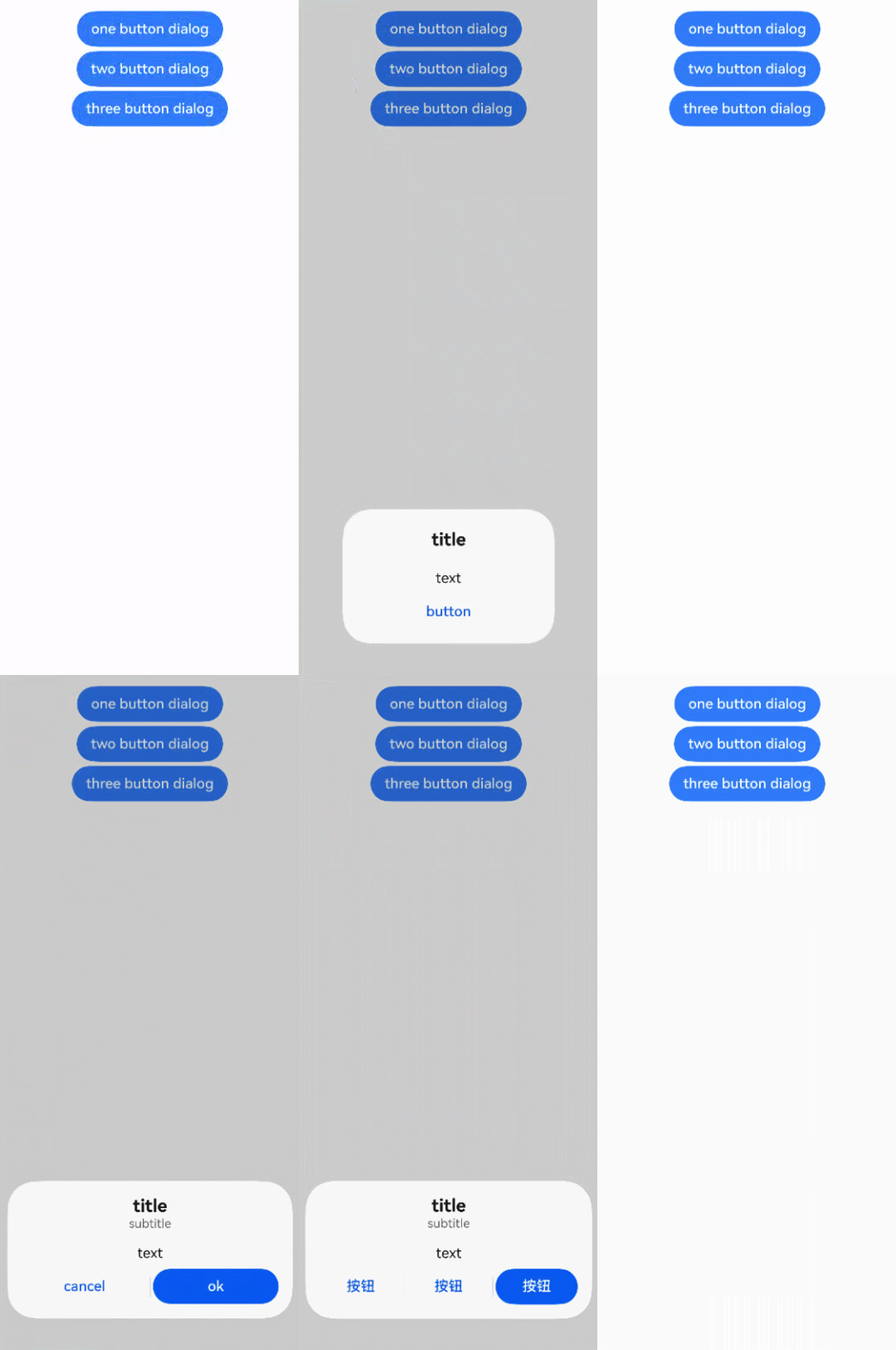
该示例通过AlertDialogParamWithConfirm、AlertDialogParamWithButtons和AlertDialogParamWithOptions实现了分别弹出一、二、三个按钮的弹窗。
- // xxx.ets
- @Entry
- @Component
- struct AlertDialogExample {
- build() {
- Column({ space: 5 }) {
- Button('one button dialog')
- .onClick(() => {
- this.getUIContext().showAlertDialog(
- {
- title: 'title',
- message: 'text',
- autoCancel: true,
- alignment: DialogAlignment.Bottom,
- offset: { dx: 0, dy: -20 },
- gridCount: 3,
- confirm: {
- value: 'button',
- action: () => {
- console.info('Button-clicking callback');
- }
- },
- cancel: () => {
- console.info('Closed callbacks');
- },
- onWillDismiss: (dismissDialogAction: DismissDialogAction) => {
- console.info(`reason= ${dismissDialogAction.reason}`);
- console.info('AlertDialog onWillDismiss');
- if (dismissDialogAction.reason === DismissReason.PRESS_BACK) {
- dismissDialogAction.dismiss();
- }
- if (dismissDialogAction.reason === DismissReason.TOUCH_OUTSIDE) {
- dismissDialogAction.dismiss();
- }
- }
- }
- )
- })
- .backgroundColor(0x317aff)
- Button('two button dialog')
- .onClick(() => {
- this.getUIContext().showAlertDialog(
- {
- title: 'title',
- subtitle: 'subtitle',
- message: 'text',
- autoCancel: true,
- alignment: DialogAlignment.Bottom,
- gridCount: 4,
- offset: { dx: 0, dy: -20 },
- primaryButton: {
- value: 'cancel',
- action: () => {
- console.info('Callback when the first button is clicked');
- }
- },
- secondaryButton: {
- enabled: true,
- defaultFocus: true,
- style: DialogButtonStyle.HIGHLIGHT,
- value: 'ok',
- action: () => {
- console.info('Callback when the second button is clicked');
- }
- },
- cancel: () => {
- console.info('Closed callbacks');
- },
- onWillDismiss: (dismissDialogAction: DismissDialogAction) => {
- console.info(`reason= ${dismissDialogAction.reason}`);
- console.info('AlertDialog onWillDismiss');
- if (dismissDialogAction.reason === DismissReason.PRESS_BACK) {
- dismissDialogAction.dismiss();
- }
- if (dismissDialogAction.reason === DismissReason.TOUCH_OUTSIDE) {
- dismissDialogAction.dismiss();
- }
- }
- }
- )
- }).backgroundColor(0x317aff)
- Button('three button dialog')
- .onClick(() => {
- this.getUIContext().showAlertDialog(
- {
- title: 'title',
- subtitle: 'subtitle',
- message: 'text',
- autoCancel: true,
- alignment: DialogAlignment.Bottom,
- gridCount: 4,
- offset: { dx: 0, dy: -20 },
- buttonDirection: DialogButtonDirection.HORIZONTAL,
- buttons: [
- {
- value: '按钮',
- action: () => {
- console.info('Callback when button1 is clicked');
- }
- },
- {
- value: '按钮',
- action: () => {
- console.info('Callback when button2 is clicked');
- }
- },
- {
- value: '按钮',
- enabled: true,
- defaultFocus: true,
- style: DialogButtonStyle.HIGHLIGHT,
- action: () => {
- console.info('Callback when button3 is clicked');
- }
- },
- ],
- cancel: () => {
- console.info('Closed callbacks');
- },
- onWillDismiss: (dismissDialogAction: DismissDialogAction) => {
- console.info(`reason= ${dismissDialogAction.reason}`);
- console.info('AlertDialog onWillDismiss');
- if (dismissDialogAction.reason === DismissReason.PRESS_BACK) {
- dismissDialogAction.dismiss();
- }
- if (dismissDialogAction.reason === DismissReason.TOUCH_OUTSIDE) {
- dismissDialogAction.dismiss();
- }
- }
- }
- )
- }).backgroundColor(0x317aff)
- }.width('100%').margin({ top: 5 })
- }
- }
示例2(可在主窗外弹出的弹窗)
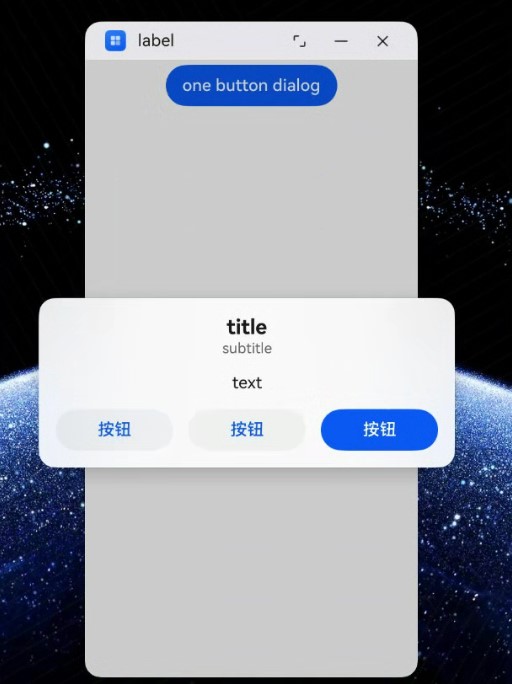
在2in1设备上设置AlertDialogParam中showInSubWindow属性的值为true时,可以弹出在主窗外显示的弹窗。
- // xxx.ets
- @Entry
- @Component
- struct AlertDialogExample {
- build() {
- Column({ space: 5 }) {
- Button('one button dialog')
- .onClick(() => {
- this.getUIContext().showAlertDialog(
- {
- title: 'title',
- subtitle: 'subtitle',
- message: 'text',
- autoCancel: true,
- alignment: DialogAlignment.Center,
- gridCount: 4,
- showInSubWindow: true,
- isModal: true,
- offset: { dx: 0, dy: -20 },
- buttonDirection: DialogButtonDirection.HORIZONTAL,
- buttons: [
- {
- value: '按钮',
- action: () => {
- console.info('Callback when button1 is clicked');
- }
- },
- {
- value: '按钮',
- action: () => {
- console.info('Callback when button2 is clicked');
- }
- },
- {
- value: '按钮',
- enabled: true,
- defaultFocus: true,
- style: DialogButtonStyle.HIGHLIGHT,
- action: () => {
- console.info('Callback when button3 is clicked');
- }
- },
- ],
- cancel: () => {
- console.info('Closed callbacks');
- },
- onWillDismiss: (dismissDialogAction: DismissDialogAction) => {
- console.info(`reason= ${dismissDialogAction.reason}`);
- console.info('AlertDialog onWillDismiss');
- if (dismissDialogAction.reason === DismissReason.PRESS_BACK) {
- dismissDialogAction.dismiss();
- }
- if (dismissDialogAction.reason === DismissReason.TOUCH_OUTSIDE) {
- dismissDialogAction.dismiss();
- }
- }
- })
- })
- }.width('100%').margin({ top: 5 })
- }
- }
示例3(设置弹窗的动画)
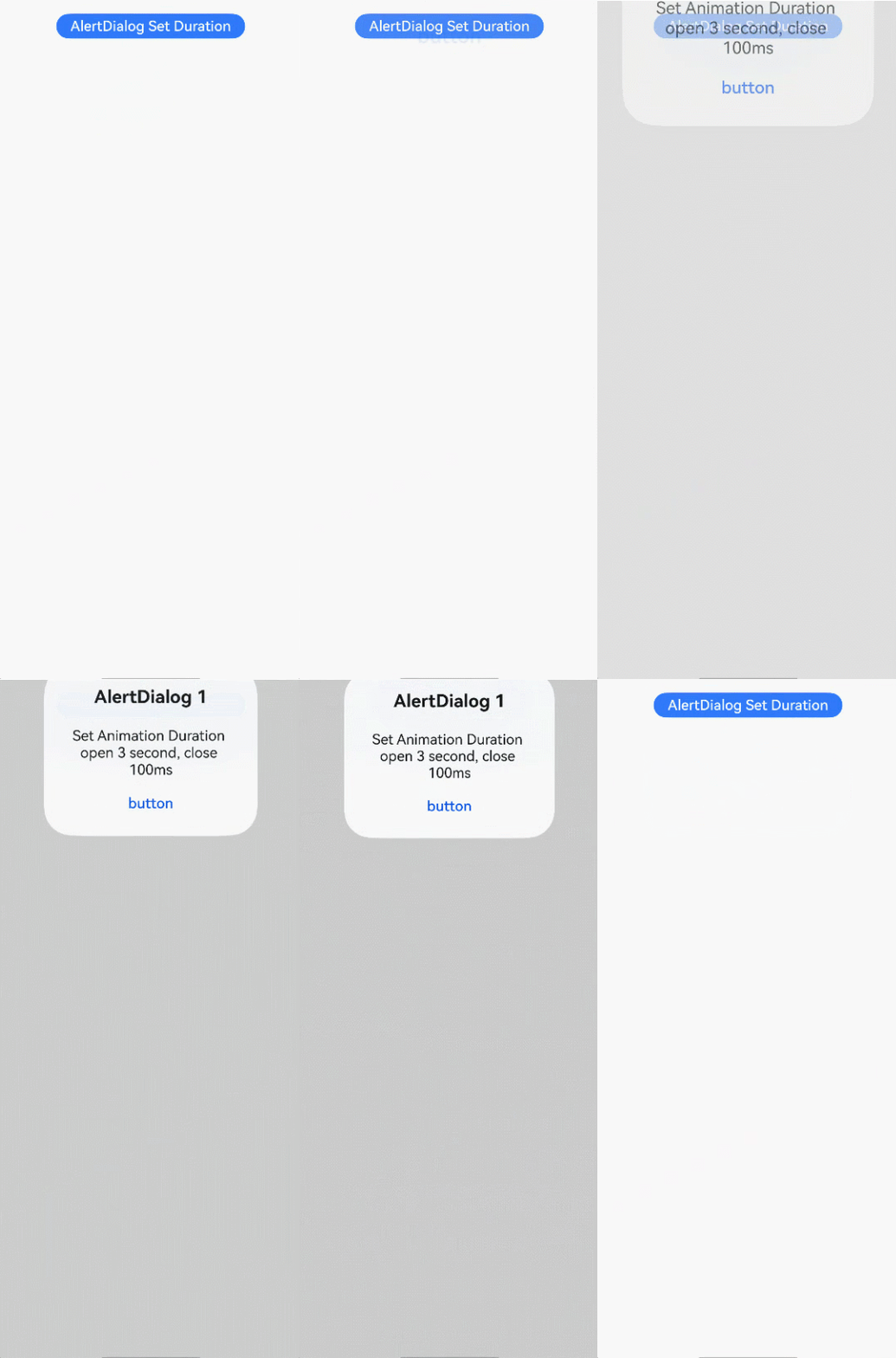
该示例通过配置AlertDialogParam中的transition属性来实现弹窗的显示和消失动画。
- // xxx.ets
- @Entry
- @Component
- struct AlertDialogExample {
- build() {
- Column({ space: 5 }) {
- Button('AlertDialog Set Duration')
- .onClick(() => {
- this.getUIContext().showAlertDialog(
- {
- title: 'AlertDialog 1',
- message: 'Set Animation Duration open 3 second, close 100ms',
- autoCancel: true,
- alignment: DialogAlignment.Top,
- offset: { dx: 0, dy: -20 },
- gridCount: 3,
- transition: TransitionEffect.asymmetric(TransitionEffect.OPACITY
- .animation({ duration: 3000, curve: Curve.Sharp })
- .combine(TransitionEffect.scale({ x: 1.5, y: 1.5 }).animation({ duration: 3000, curve: Curve.Sharp })),
- TransitionEffect.OPACITY.animation({ duration: 100, curve: Curve.Smooth })
- .combine(TransitionEffect.scale({ x: 0.5, y: 0.5 })
- .animation({ duration: 100, curve: Curve.Smooth }))),
- confirm: {
- value: 'button',
- action: () => {
- console.info('Button-clicking callback');
- }
- },
- cancel: () => {
- console.info('Closed callbacks');
- }
- }
- )
- })
- .backgroundColor(0x317aff).height('88px')
- }.width('100%').margin({ top: 5 })
- }
- }
示例4(设置弹窗的样式)
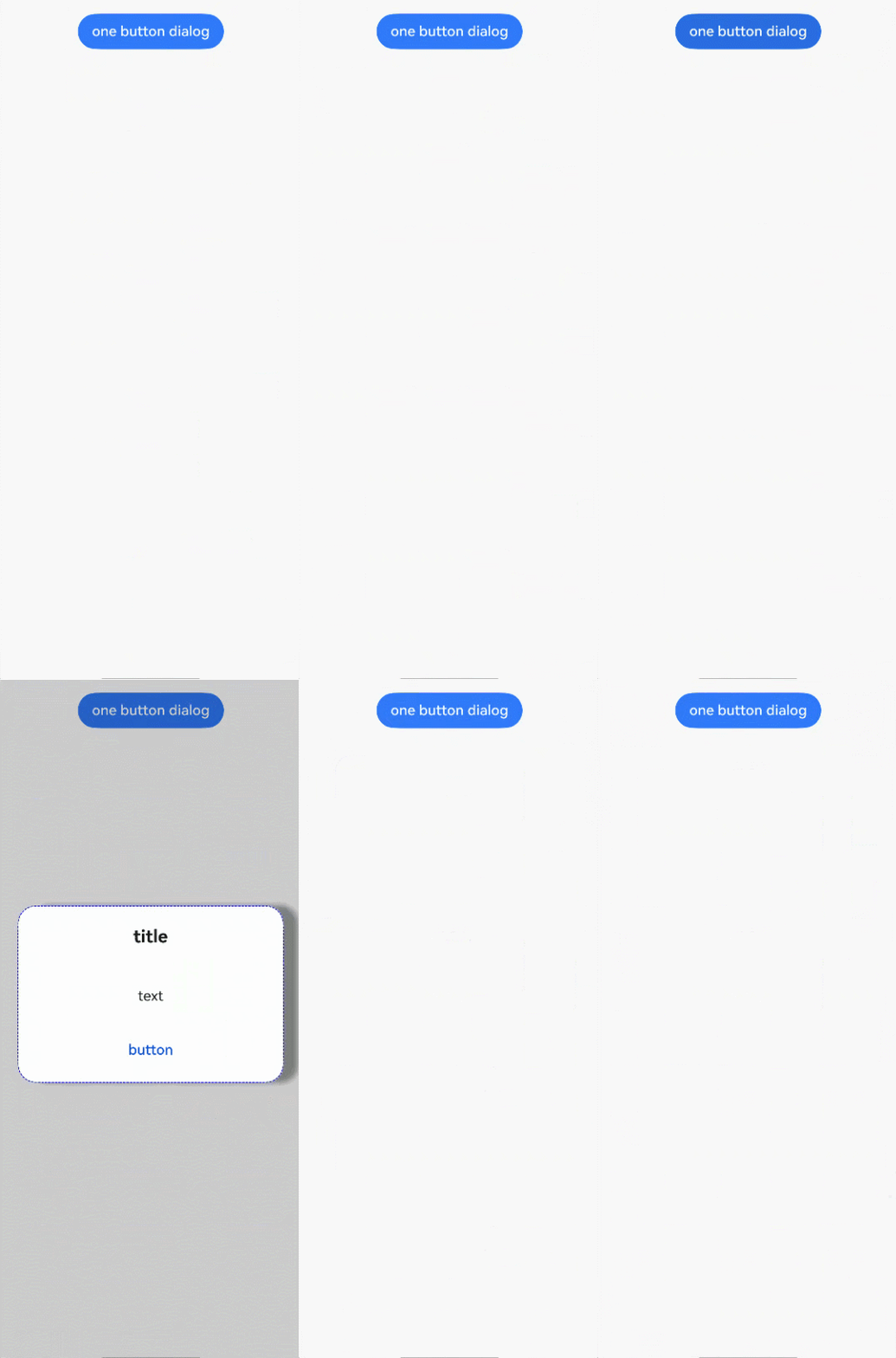
本示例展示了如何设置AlertDialog的样式,包括宽度、高度、背景色、阴影等。
- // xxx.ets
- @Entry
- @Component
- struct AlertDialogExample {
- build() {
- Column({ space: 5 }) {
- Button('one button dialog')
- .onClick(() => {
- this.getUIContext().showAlertDialog(
- {
- title: 'title',
- message: 'text',
- autoCancel: true,
- alignment: DialogAlignment.Center,
- offset: { dx: 0, dy: -20 },
- gridCount: 3,
- width: 300,
- height: 200,
- cornerRadius: 20,
- borderWidth: 1,
- borderStyle: BorderStyle.Dashed, // 使用borderStyle属性,需要和borderWidth属性一起使用
- borderColor: Color.Blue, // 使用borderColor属性,需要和borderWidth属性一起使用
- backgroundColor: Color.White,
- shadow: ({
- radius: 20,
- color: Color.Grey,
- offsetX: 50,
- offsetY: 0
- }),
- textStyle: { wordBreak: WordBreak.BREAK_ALL },
- confirm: {
- value: 'button',
- action: () => {
- console.info('Button-clicking callback');
- }
- },
- cancel: () => {
- console.info('Closed callbacks');
- },
- onWillDismiss: (dismissDialogAction: DismissDialogAction) => {
- console.info(`reason= ${dismissDialogAction.reason}`);
- console.info('AlertDialog onWillDismiss');
- if (dismissDialogAction.reason === DismissReason.PRESS_BACK) {
- dismissDialogAction.dismiss();
- }
- if (dismissDialogAction.reason === DismissReason.TOUCH_OUTSIDE) {
- dismissDialogAction.dismiss();
- }
- }
- }
- )
- })
- .backgroundColor(0x317aff)
- }.width('100%').margin({ top: 5 })
- }
- }
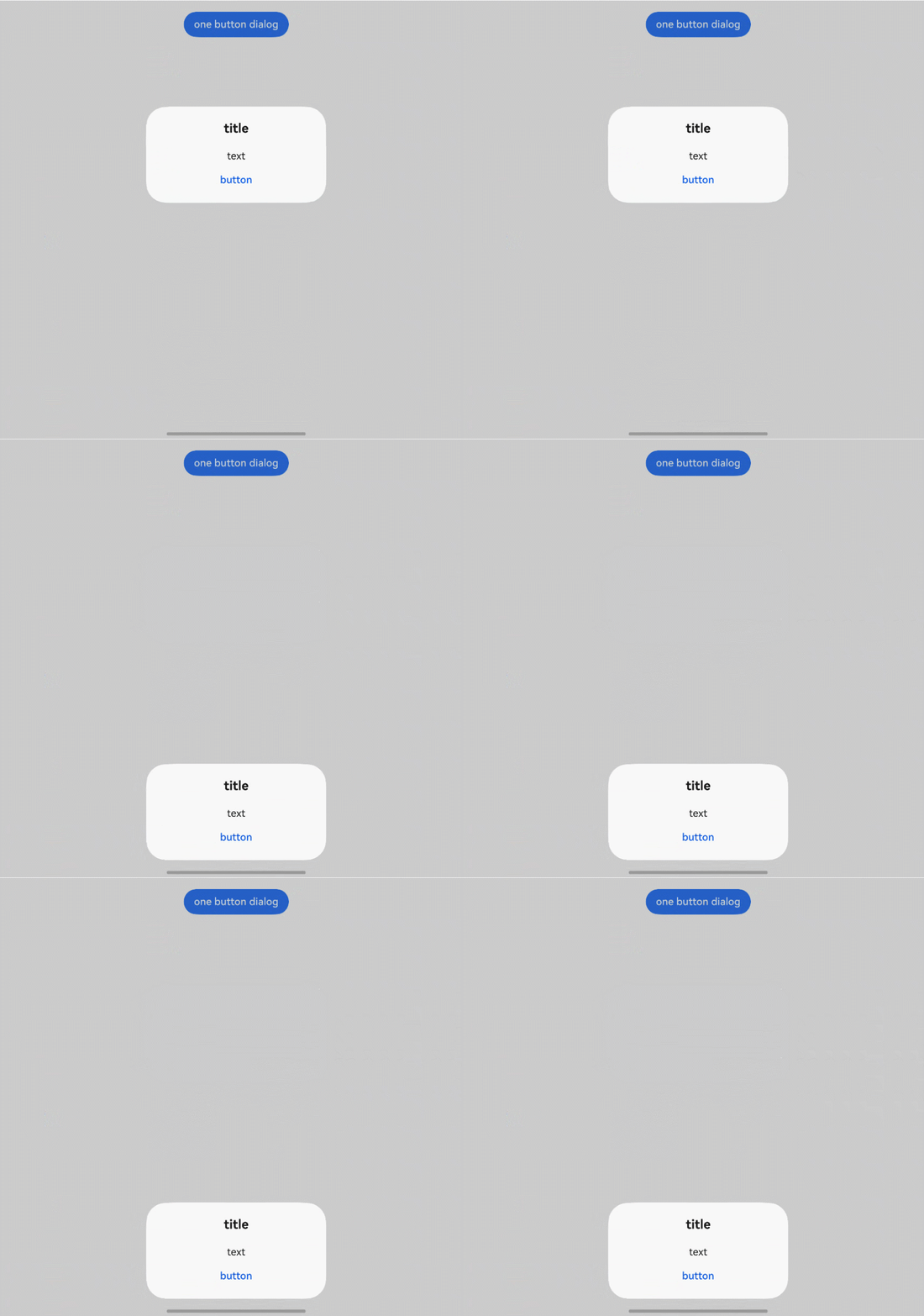
示例5(悬停态弹窗)
该示例展示了在折叠屏悬停态下设置dialog布局区域的效果。
- // xxx.ets
- @Entry
- @Component
- struct AlertDialogExample {
- build() {
- Column({ space: 5 }) {
- Button('one button dialog')
- .onClick(() => {
- this.getUIContext().showAlertDialog(
- {
- title: 'title',
- message: 'text',
- autoCancel: true,
- alignment: DialogAlignment.Bottom,
- gridCount: 3,
- confirm: {
- value: 'button',
- action: () => {
- console.info('Button-clicking callback');
- }
- },
- cancel: () => {
- console.info('Closed callbacks');
- },
- onWillDismiss: (dismissDialogAction: DismissDialogAction) => {
- console.info(`reason= ${dismissDialogAction.reason}`);
- console.info('AlertDialog onWillDismiss');
- if (dismissDialogAction.reason === DismissReason.PRESS_BACK) {
- dismissDialogAction.dismiss();
- }
- if (dismissDialogAction.reason === DismissReason.TOUCH_OUTSIDE) {
- dismissDialogAction.dismiss();
- }
- },
- enableHoverMode: true,
- hoverModeArea: HoverModeAreaType.TOP_SCREEN
- }
- )
- })
- .backgroundColor(0x317aff)
- }.width('100%').margin({ top: 5 })
- }
- }
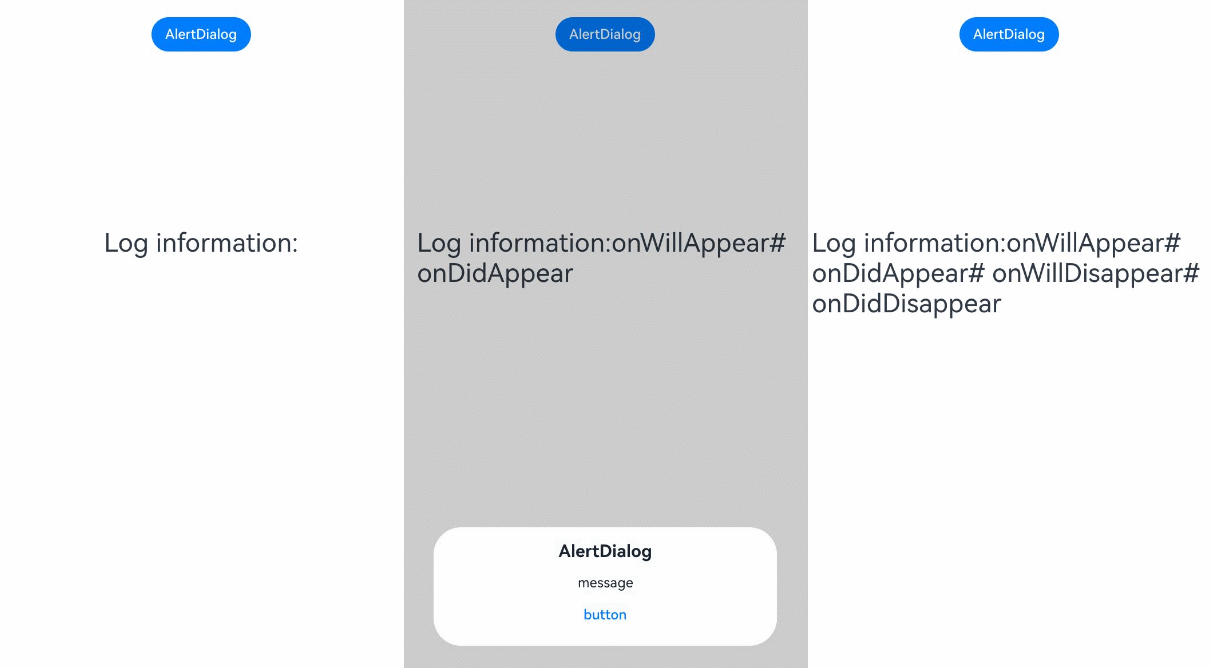
示例6(弹窗生命周期)
该示例展示了弹窗生命周期的相关接口的使用方法。
- // xxx.ets
- @Entry
- @Component
- struct AlertDialogLifecycleExample {
- @State log: string = 'Log information:';
-
- build() {
- Column({ space: 5 }) {
- Button('AlertDialog')
- .onClick(() => {
- this.getUIContext().showAlertDialog({
- title: 'AlertDialog',
- message: 'message',
- autoCancel: true,
- alignment: DialogAlignment.Bottom,
- offset: { dx: 0, dy: -20 },
- confirm: {
- value: 'button',
- action: () => {
- console.info('AlertDialog Button-clicking callback');
- }
- },
- cancel: () => {
- console.info('Closed callbacks');
- },
- onDidAppear: () => {
- this.log += '# onDidAppear';
- console.info('AlertDialog,is onDidAppear!');
- },
- onDidDisappear: () => {
- this.log += '# onDidDisappear';
- console.info('AlertDialog,is onDidDisappear!');
- },
- onWillAppear: () => {
- this.log = 'Log information:onWillAppear';
- console.info('AlertDialog,is onWillAppear!');
- },
- onWillDisappear: () => {
- this.log += '# onWillDisappear';
- console.info('AlertDialog,is onWillDisappear!');
- }
- })
- })
- Text(this.log).fontSize(30).margin({ top: 200 })
- }.width('100%').margin({ top: 5 })
- }
- }
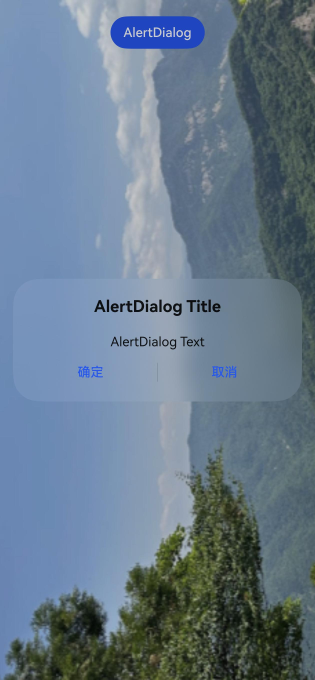
示例7(自定义背景模糊效果参数)
该示例通过配置AlertDialogParam中的backgroundBlurStyleOptions属性,实现了自定义背景模糊效果。
从API version 19开始,在AlertDialogParam中新增了backgroundBlurStyleOptions属性。
- @Entry
- @Component
- struct AlertDialogExample {
- build() {
- Stack({ alignContent: Alignment.Top }) {
- // $r('app.media.bg')需要替换为开发者所需的图像资源文件。
- Image($r('app.media.bg'))
- Column() {
- Button("AlertDialog")
- .margin(20)
- .onClick(() => {
- this.getUIContext().showAlertDialog({
- title: 'AlertDialog Title',
- message: 'AlertDialog Text',
- primaryButton: {
- value: '确定',
- action: () => {
- console.info('primaryButton');
- }
- },
- secondaryButton: {
- value: '取消',
- action: () => {
- console.info('secondaryButton');
- }
- },
- backgroundColor: undefined,
- backgroundBlurStyle: BlurStyle.Thin,
- backgroundBlurStyleOptions: {
- colorMode: ThemeColorMode.LIGHT,
- adaptiveColor: AdaptiveColor.AVERAGE,
- scale: 1,
- blurOptions: { grayscale: [20, 20] },
- },
- });
- })
- }.width('100%')
- }
- }
- }
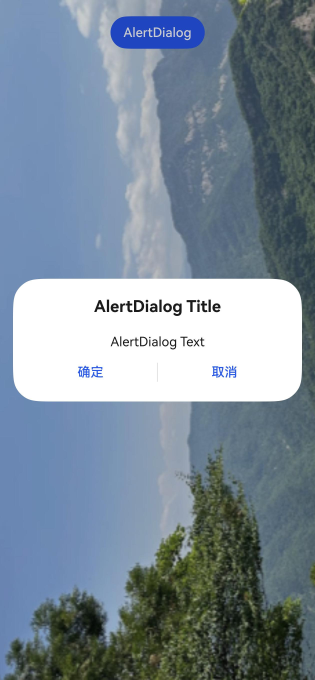
示例8(自定义背景效果参数)
该示例通过配置AlertDialogParam中的backgroundEffect属性,实现自定义背景效果。
从API version 19开始,在AlertDialogParam中新增了backgroundEffect属性。
- @Entry
- @Component
- struct AlertDialogExample {
- build() {
- Stack({ alignContent: Alignment.Top }) {
- // $r('app.media.bg')需要替换为开发者所需的图像资源文件。
- Image($r('app.media.bg'))
- Column() {
- Button("AlertDialog")
- .margin(20)
- .onClick(() => {
- this.getUIContext().showAlertDialog({
- title: 'AlertDialog Title',
- message: 'AlertDialog Text',
- primaryButton: {
- value: '确定',
- action: () => {
- console.info('primaryButton');
- }
- },
- secondaryButton: {
- value: '取消',
- action: () => {
- console.info('secondaryButton');
- }
- },
- backgroundColor: undefined,
- backgroundBlurStyle: BlurStyle.Thin,
- backgroundEffect: {
- radius: 60,
- saturation: 0,
- brightness: 1,
- color: Color.White,
- blurOptions: { grayscale: [20, 20] }
- },
- });
- })
- }.width('100%')
- }
- }
- }
示例9(设置弹窗的沉浸光感效果)
该示例通过AlertDialogParam中的systemMaterial属性设置组件的系统材质,实现沉浸光感效果。设置系统材质后,AlertDialog弹出过程中会有非线性形变和边缘流光。
该示例配图为高算力设备强档效果,组件沉浸光感效果会根据设备算力与用户在系统中设置的沉浸光感效果自适应调整,开发者无需额外适配。
从API版本26.0.0开始,在AlertDialogParam中新增了systemMaterial属性。
- import { uiMaterial } from '@kit.ArkUI';
-
- @Entry
- @Component
- struct AlertDialogExample {
- build() {
- Stack({ alignContent: Alignment.Top }) {
- Column() {
- Button("AlertDialog")
- .margin(20)
- .onClick(() => {
- this.getUIContext().showAlertDialog({
- title: 'AlertDialog Title',
- message: 'AlertDialog Text',
- primaryButton: {
- value: '确定',
- action: () => {
- console.info('primaryButton');
- }
- },
- secondaryButton: {
- value: '取消',
- action: () => {
- console.info('secondaryButton');
- }
- },
- systemMaterial: new uiMaterial.ImmersiveMaterial({ style: uiMaterial.ImmersiveStyle.ULTRA_THICK })
- });
- })
- }
- .height('100%')
- .width('100%')
- // 请开发者替换为实际资源文件
- .backgroundImage($r("app.media.img"))
- .backgroundImageSize({width: '100%', height: '100%'})
- }
- }
- }
未设置系统材质时:

设置系统材质后: