


Intelligent Assistant
Chat with our virtual assistant to get answers promptly.
This section describes only module-specific error codes. For details about universal error codes, please refer to Universal Error Codes.
Message
Failed to check the fingerprint of the app bundle.
Description
The certificate fingerprint of the app fails to be verified.
Possible causes
For details, please refer to 1001500001 Fingerprint Certificate Verification Failure.
Solution
For details, please refer to 1001500001 Fingerprint Certificate Verification Failure.
Message
This error code is reported when a request is already being processed.
Description
Repeated request.
Possible causes
The user requests a page of Account Kit repeatedly.
Solution
No special processing is required.
Message
The scopes or permissions are not supported.
Description
The scopes or permissions are not supported.
Possible causes
The signed-in HUAWEI ID does not support the data requested by the authorized app.
In scenarios such as real-name information retrieval/verification and face-based identity verification, a user signs in with a HUAWEI ID registered in the Chinese mainland but uses a Hong Kong, Macao, and Taiwan Travel Permit for identity verification.
In scenarios such as real-name information verification and face-based identity verification, PCs/2-in-1 devices or devices without a functioning front camera do not support authorization based on the passed verifyRealName and verifyFace scopes.
During the atomic service development, the profile scope is passed when AuthorizationWithHuaweiIDRequest is called and supportAtomicService is not set to true.
During atomic service development, the phone scope is passed when the AuthorizationWithHuaweiIDRequest API is called.
In scenarios such as real-name information verification and face-based identity verification, the HUAWEI ID used for sign-in is a child account.
The app on a wearable or TV requests scopes that are not supported.
In the one-tap sign-in scenario, the HUAWEI ID used is not registered in the Chinese mainland.
Solution
Guide the user to switch to a HUAWEI ID registered in the Chinese mainland or register a new one for re-authentication. In the one-tap sign-in scenario, display alternative sign-in methods in your app.
In scenarios such as real-name information retrieval/verification and face-based identity verification, guide the user to switch to a HUAWEI ID that has completed identity verification with a Chinese mainland ID card.
In scenarios such as real-name information verification and face-based identity verification, use another device with a functioning front camera to authorize the verifyRealName and verifyFace scopes.
During the atomic service development, pass the profile scope when calling AuthorizationWithHuaweiIDRequest and set supportAtomicService to true.
The atomic service cannot directly call this API to obtain the mobile number. Refer to Mobile Number Quick Verification Button to obtain the mobile number.
Guide the user to switch to an adult HUAWEI ID registered in the Chinese mainland or register a new one, and then re-trigger the API.
Guide the user to use another device that supports the API.
Show other ways to sign in.
Message
The account does not support this function.
Description
This function is unavailable for the HUAWEI ID already signed in.
Possible causes
The signed-in HUAWEI ID is not registered in the Chinese mainland. As a result, the API for obtaining the mobile number consistency status cannot be called.
The one-tap HUAWEI ID sign-in API is not supported on TVs if a child account is used.
Solution
Guide the user to switch to a HUAWEI ID registered in the Chinese mainland or register a new one, and then re-trigger the API.
Call the one-tap HUAWEI ID sign-in API using an adult account on TVs.
Message
This function is restricted from being called.
Description
This function is restricted.
Possible causes
The getMobileNumberConsistency API for obtaining the mobile number consistency status has been called for more than 50 times within 24 hours.
Solution
The app limits calls to the API for obtaining the mobile number consistency status to a maximum of 50 within a 24-hour period.
If this error code is displayed during debugging, restart your device to rectify the error.
Message
The user has not logged in with HUAWEI ID.
Description
The user has not signed in with their HUAWEI ID.
Possible causes
The user has not signed in with their HUAWEI ID.
Solution
Call LoginWithHuaweiIDRequest and set forceLogin to true to open the sign-in screen or guide the user to sign in with a HUAWEI ID in system settings.
Message
The application is not authorized.
Description
The app is not authorized.
Possible causes
When the AuthorizationWithHuaweiIDRequest API is called and forceAuthorization is set to false, the user has not granted authorization to the app.
idValue is not correctly passed according to ConsistencyRequest in getMobileNumberConsistency, or the user has revoked authorization for the app.
idValue is not correctly passed according to StateRequest in getHuaweiIDState, or the user has revoked authorization for the app.
Solution
To guide the user to authorize the app, call AuthorizationWithHuaweiIDRequest and set forceAuthorization to true (default value) to open the authorization screen for the user.
Obtain idValue correctly by referring to ConsistencyRequest, or authorize the app again.
Obtain idValue correctly by referring to StateRequest, or authorize the app again.
Message
Invalid input parameter value.
Description
The input parameter value is invalid.
Possible causes
client_id is not configured or is configured incorrectly.
The profile file is invalid.
In one-tap sign-in scenarios, the passed anonymous mobile number is incorrect or the authorization API AuthorizationWithHuaweiIDRequest is not called to obtain the anonymous mobile number.
Incorrect parameters are passed to the API. For example, neither scopes nor permissions is passed when the AuthorizationWithHuaweiIDRequest API is called.
Solution
Sign in to AppGallery Connect, go to Development and services, select the desired project and app, and find the client ID and app ID of the app in the App information area on the General information tab page.
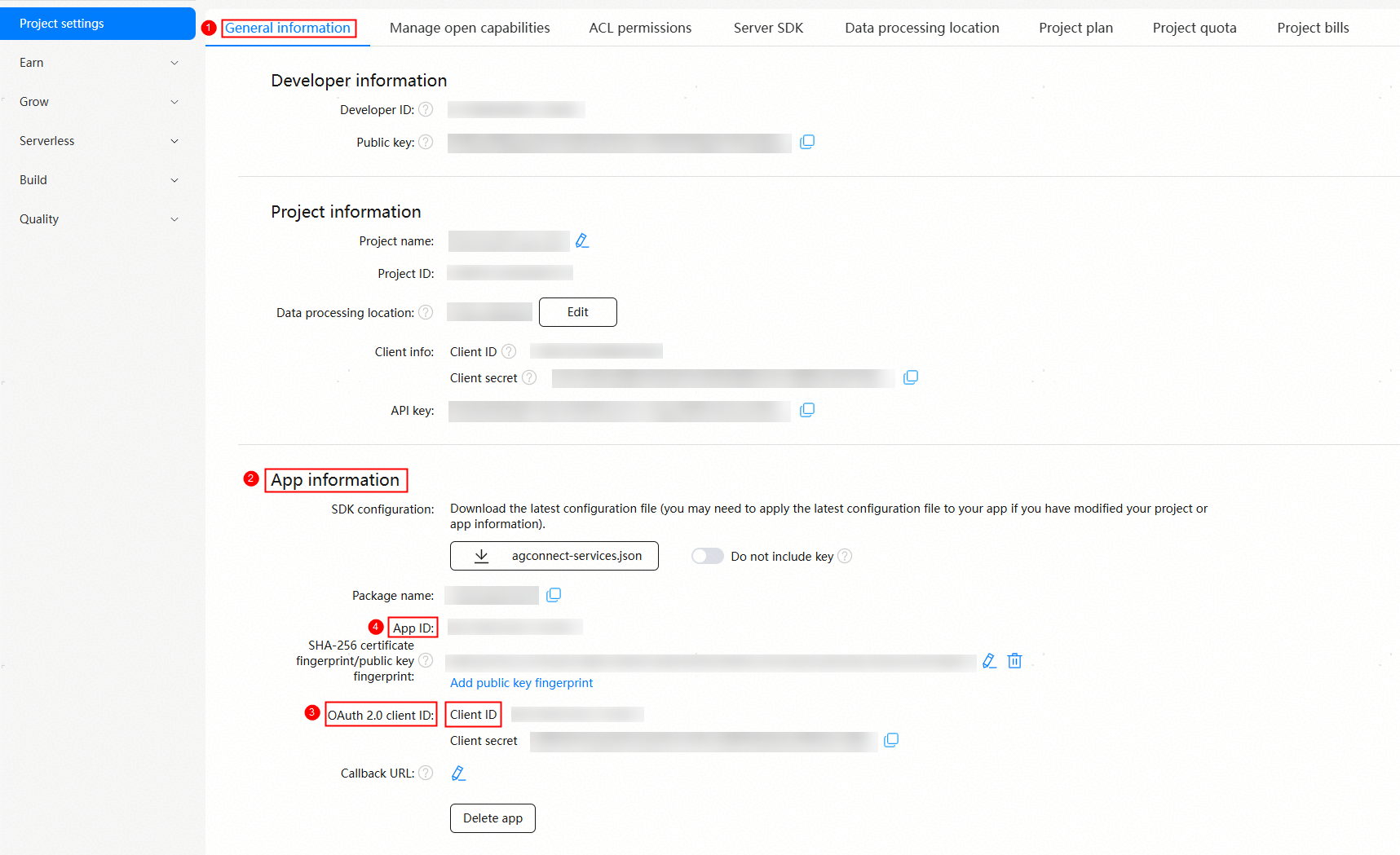
If the client ID and app ID are different, check whether client_id in the module.json5 file of the module whose module type is entry is configured or whether its value is correct. For details, please refer to Configuring the Client ID.
If the client ID and app ID are the same, the client ID can be not configured.
Request a new profile in AppGallery Connect and sign your app again. In the debugging phase, request a profile and manually sign the profile by referring to Requesting a Debug Profile. In the release phase, request a profile and manually sign the profile by referring to Requesting a Release Profile.
Obtain the anonymous mobile number through the AuthorizationWithHuaweiIDRequest API and use it as a parameter to call the one-tap sign-in API.
Check API parameters related to authentication.
Message
Network error.
Description
A network error occurs.
Possible causes
The device is not connected to the network.
Solution
Check the network connection.
Message
Internal error.
Description
An internal error occurred.
Possible causes
Internal errors, such as Account Kit server errors.
Solution
Restart the device and try again.
If the error persists, submit a ticket online. Huawei will get back to you as soon as possible.
Message
The user canceled the authorization.
Description
The user revokes authorization.
Possible causes
The user revokes authorization.
Solution
No special handling is required because the user revokes authorization.
Message
The app does not have the required scopes or permissions.
Description
The app does not have the required scopes or permissions.
Possible causes
For details, please refer to 1001502014 Necessary Scopes Not Requested.
Solution
For details, please refer to 1001502014 Necessary Scopes Not Requested.
Message
The network is unavailable.
Description
The network is unavailable.
Possible causes
The network is not properly connected.
Solution
Ensure that the network is properly connected.
Message
The user has not logged in with HUAWEI ID.
Description
The user has not signed in with their HUAWEI ID.
Possible causes
The user has not signed in with their HUAWEI ID.
Solution
To guide the user to sign in, call LoginWithHuaweiIDRequest and set forceLogin to true to open the sign-in screen or guide the user to sign in with a HUAWEI ID in system settings.
Message
Failed to check the fingerprint of the application bundle.
Description
The certificate fingerprint of the app fails to be verified.
Possible causes
client_id has an incorrect value. (For example, it is set to the project's client ID.)
The certificate fingerprint of the app is not configured or incorrectly configured.
Solution
Make sure that the client ID in the module.json5 file of the module whose module type is entry is correctly set by referring to Configuring the Client ID.
Check the certificate fingerprint of the app in AppGallery Connect. For details, please refer to Adding a Public Key Fingerprint.
Message
The application does not have the required permissions.
Description
The app does not have the required permissions.
Possible causes
The permissions of the corresponding API are not requested.
Solution
Request the required permissions.
Message
The user canceled the current operation.
Description
The user canceled the current operation.
Possible causes
The user canceled the current operation.
Solution
No special processing is required.
Message
The requested verification factors are unavailable on the device.
Description
The verification factor is not supported on the device.
Possible causes
Verification factors, such as the mobile number, security mobile number, email address, and security email address, are not configured for secondary verification.
Solution
Guide the user to go to Personal info or Account security under Settings > HUAWEI ID to configure verification factors.
Message
Internal error.
Description
An internal error occurred.
Possible causes
Internal errors, such as Account Kit server errors.
Solution
Restart the device and try again.
If the error persists, submit a ticket online. Huawei will get back to you as soon as possible.
Message
This device does not support this API.
Description
The device does not support this API.
Possible causes
The device supports the SysCap associated with the API but does not support the API itself.
Solution
Avoid using this API on the device. Alternatively, implement conditional checks in your code to mitigate the impacts arising from the app running on different devices, particularly under abnormal circumstances.
Message
Internal error.
Description
An internal error occurred.
Possible causes
Internal errors, such as Account Kit server errors.
Solution
Restart the device and try again.
If the error persists, submit a ticket online. Huawei will get back to you as soon as possible.
Message
The network is unavailable.
Description
The network is unavailable.
Possible causes
The network is not properly connected.
Solution
Ensure that the network is properly connected.
Message
The user has not signed in with HUAWEI ID.
Description
The user has not signed in with their HUAWEI ID.
Possible causes
The user has not signed in with their HUAWEI ID.
Solution
To guide the user to sign in, call LoginWithHuaweiIDRequest and set forceLogin to true to open the sign-in screen or guide the user to sign in with a HUAWEI ID in system settings.
Message
Failed to check the fingerprint of the app bundle.
Description
The certificate fingerprint of the app fails to be verified.
Possible causes
client_id has an incorrect value. (For example, it is set to the project's client ID.)
The certificate fingerprint of the app is not configured or incorrectly configured.
Solution
Make sure that the client ID in the module.json5 file of the module whose module type is entry is correctly set by referring to Configuring the Client ID.
Check the certificate fingerprint of the app in AppGallery Connect. For details, please refer to Adding a Public Key Fingerprint.
Message
The app does not have the required permissions.
Description
The app does not have the required permissions.
Possible causes
The permissions of the corresponding API are not requested.
Solution
Check whether the permissions of the corresponding API have been requested. For details about how to request the permissions, please refer to Prerequisites.
Message
The user quits the shipping address management service without finishing.
Description
The user exits the shipping address management service without completing the current operation.
Possible causes
The user cancels the operation or closes the shipping address management screen without completing the shipping address selection.
Solution
No special processing is required.
Message
The shipping address management service does not support the HUAWEI ID that is already signed in.
Description
The shipping address management service is unavailable for the HUAWEI ID signed in.
Possible causes
The shipping address management service is unavailable for the HUAWEI ID signed in, for example, a HUAWEI ID registered outside the Chinese mainland.
Solution
Guide the user to switch to a HUAWEI ID registered in the Chinese mainland or register a new one, or use other methods to obtain the shipping address.
Message
The operation was canceled by the user.
Description
The user cancels the invoice service.
Possible causes
The user cancels the operation before it is complete.
Solution
No special processing is required.
Message
System internal error.
Description
Internal system error.
Possible causes
Internal errors, such as Account Kit server errors.
Solution
Restart the device and try again.
If the error persists, submit a ticket online. Huawei will get back to you as soon as possible.
Message
Failed to check the fingerprint of the app bundle.
Description
The certificate fingerprint of the app fails to be verified.
Possible causes
client_id has an incorrect value. (For example, it is set to the project's client ID.)
The certificate fingerprint of the app is not configured or incorrectly configured.
Solution
Make sure that the client ID in the module.json5 file of the module whose module type is entry is correctly set by referring to Configuring the Client ID.
Check the certificate fingerprint of the app in AppGallery Connect. For details, please refer to Adding a Public Key Fingerprint.
Message
Too frequent API calls.
Description
The API is called too frequently.
Possible causes
The API call interval is too short.
Solution
Control the API call frequency.
Message
Network connection error.
Description
Network connection error.
Possible causes
The network is not properly connected.
Solution
Ensure that the network is properly connected.
Message
The HUAWEI ID is not signed in.
Description
The user has not signed in with their HUAWEI ID.
Possible causes
The user has not signed in with their HUAWEI ID.
Solution
To guide the user to sign in, call LoginWithHuaweiIDRequest and set forceLogin to true to open the sign-in screen or guide the user to sign in with a HUAWEI ID in system settings.
Message
Failed to create an invoice title because the title already exists.
Description
Failed to create the invoice title because it already exists.
Possible causes
The invoice title already exists.
Solution
No special processing is required.
Message
The invoice service does not support the logged HUAWEI ID.
Description
The invoice service is unavailable for the HUAWEI ID signed in.
Possible causes
The HUAWEI ID may be registered outside the Chinese mainland.
Solution
Guide the user to switch to a HUAWEI ID registered in the Chinese mainland or register a new one, or use other methods to obtain the invoice title.
Message
The user did not accept the agreement.
Description
The user does not accept the agreement.
Possible causes
When the HUAWEI ID sign-in component is used, the agreement status is not set to ACCEPTED.
Solution
The user needs to manually accept the agreements.
Message
The user did not click the HUAWEI ID login button.
Description
The user does not tap the one-tap HUAWEI ID sign-in button.
Possible causes
You directly call the continueLogin API before the one-tap HUAWEI ID sign-in button is tapped.
Solution
Call the continueLogin API only when the user taps the one-tap HUAWEI ID sign-in button and taps the button for accepting agreements and signing in from the displayed dialog box.
Message
The minors mode is not enabled.
Description
The youth mode is not enabled.
Possible causes
The password verification request is called when the youth mode is not enabled.
Solution
Message
The user canceled the operation.
Description
The user canceled the operation.
Possible causes
A user taps a screen close button.
Solution
Implement the logic for cases where the user cancels the current operation.
Message
The minors mode is already on.
Description
The youth mode is already enabled.
Possible causes
The youth mode enabling API is repeatedly called when the youth mode has been enabled.
Solution
Call getMinorsProtectionInfoSync() or getMinorsProtectionInfo() to check the status of the youth mode. If the youth mode is disabled, call the API to enable it.
Message
The minors mode is already off.
Description
The youth mode is already disabled.
Possible causes
The youth mode disabling API is repeatedly called when the youth mode has been disabled.
Solution
Call getMinorsProtectionInfoSync() or getMinorsProtectionInfo() to check the status of the youth mode. If the youth mode is enabled, call the API to disable it. Otherwise, do not call this API repeatedly.
Message
Unsupported HUAWEI ID.
Description
The account is not supported.
Possible causes
The HUAWEI ID may be registered outside the Chinese mainland.
Solution
Guide the user to sign in with a HUAWEI ID registered in the Chinese mainland.
Message
Service not available.
Description
Service unavailable.
Possible causes
PrivateSpace is active on the device.
Solution
Prompt the user to disable PrivateSpace by going to Settings > Privacy > PrivateSpace, or build your own youth mode as needed.
Message
The network is unavailable.
Description
The network is unavailable.
Possible causes
The network is not properly connected.
Solution
Ensure that the network is properly connected.
Message
The user has not logged in with HUAWEI ID.
Description
The user has not signed in with their HUAWEI ID.
Possible causes
The user has not signed in with their HUAWEI ID.
Solution
To guide the user to sign in, call LoginWithHuaweiIDRequest and set forceLogin to true to open the sign-in screen or guide the user to sign in with a HUAWEI ID in system settings.
Message
Failed to check the fingerprint of the application bundle.
Description
The certificate fingerprint of the app fails to be verified.
Possible causes
client_id has an incorrect value. (For example, it is set to the project's client ID.)
The certificate fingerprint of the app is not configured or incorrectly configured.
Solution
Make sure that the client ID in the module.json5 file of the module whose module type is entry is correctly set by referring to Configuring the Client ID.
Check the certificate fingerprint of the app in AppGallery Connect. For details, please refer to Adding a Public Key Fingerprint.
Message
The application does not have the required permissions.
Description
The app does not have the required permissions.
Possible causes
The permissions of the corresponding API are not requested.
Solution
Check whether the permissions of the corresponding API have been requested. For details about how to request the permissions, please refer to the development prerequisites in the corresponding scenario.
Message
The user canceled the verification of the HUAWEI ID.
Description
The user canceled the verification operation.
Possible causes
The user canceled the verification operation.
Solution
No special processing is required.
Message
Internal error.
Description
An internal error occurred.
Possible causes
An error occurs on the Account Kit server, an API that is not supported by the current device is called, or other internal errors occur.
Solution
Restart the device and try again.
Check whether the current device supports the API. You are advised to use canIUse to check whether the current device supports the API before calling the API.
If the error persists, submit a ticket online. Huawei will get back to you as soon as possible.
Message
Real-name verification is not supported for the HUAWEI ID.
Description
The HUAWEI ID does not support identity verification.
Possible causes
The HUAWEI ID used is not registered in the Chinese mainland.
Solution
Guide the user to sign in with a HUAWEI ID registered in the Chinese mainland and try again.
Message
Real-name channel verification failed.
Description
Failed to validate the identity verification channel.
Possible causes
The identity verification channel ID passed is incorrect.
An error occurred during identity verification channel validation.
Solution
Ensure that the identity verification channel ID is correct.
Submit a ticket online. Huawei will get back to you as soon as possible.
Message
Your face does not match your facial image as proof of identity.
Description
The user's face does not match the facial image used as proof of identity.
Possible causes
The user's face does not match the facial image used as proof of identity.
Solution
Instruct the user to perform facial verification again.
Message
No real-name information is found for the HUAWEI ID.
Description
No real-name information is found.
Possible causes
The account is not verified by real-name information.
Solution
Instruct the user to go to the Real-name authentication menu under Settings > HUAWEI ID > Personal info to complete identity verification.
Message
Your name and ID number do not match.
Description
The name does not match the ID card number.
Possible causes
The user input is incorrect.
The user may have changed the household register recently, or reported the loss of the ID card and obtained a new card. However, the new identity information has not been synchronized with that of the Ministry of Public Security.
Solution
Enter the name and ID card number again and try again.
If the error is caused by cause 2, try again later.
Message
Too many real-name verification attempts.
Description
Too many identity verification attempts.
Possible causes
Too many identity verification attempts.
Solution
Try again 24 hours later.
Message
The verificationToken parameter is incorrectly set.
Description
The verificationToken parameter is invalid.
Possible causes
The verificationToken parameter is invalid.
Solution
Obtain the correct value of verificationToken and try again.
Message
This device does not support this API.
Description
The device does not support this API.
Possible causes
The device's front camera is unavailable in the scenario of verifying the identity by face.
Solution
Rectify the front camera fault or replace the device with one that has a functioning front camera, and try again.
Message
The user has not logged in with HUAWEI ID.
Description
The user has not signed in with their HUAWEI ID.
Possible causes
The user has not signed in with their HUAWEI ID.
Solution
To guide the user to sign in, call LoginWithHuaweiIDRequest and set forceLogin to true to open the sign-in screen or guide the user to sign in with a HUAWEI ID in system settings.
Message
Internal error, possibly an IPC failure.
Description
An internal error occurred.
Possible causes
An internal error occurred in the system.
Solution
Restart the device and try again.
If the error persists, submit a ticket online. Huawei will get back to you as soon as possible.
Message
Server error.
Description
Server error.
Possible causes
An Account Kit server error occurred.
Solution
Restart the device and try again.
If the error persists, submit a ticket online. Huawei will get back to you as soon as possible.
Message
Network error.
Description
A network error occurs.
Possible causes
The device is not connected to the Internet.
Solution
Check the network connection.
Message
Parameter check failed.
Description
Parameter error.
Possible causes
The type or value of the input parameter is invalid.
Solution
Verify that the type and value of the input parameter are valid, and then try again.
Message
Unsupported country/region.
Description
The service is unavailable in the country or region.
Possible causes
The service is unavailable in the country or region where the user is located.
Solution
Guide the user to switch to a HUAWEI ID registered in the Chinese mainland or register a new one.
Message
The user canceled the current operation.
Description
The user canceled the current operation.
Possible causes
The user canceled the operation.
Solution
No special handling is required because the user canceled the operation.
Message
The app does not have the required permissions.
Description
The app does not have the required permissions.
Possible causes
The app does not have the required permissions.
Solution
Apply for the permission to obtain the friend and family member list supported by the My circle feature on the HUAWEI Developers website.