This module is a collection of device management APIs provided by Driver Development Kit. It allows you to query information about external devices and bind or unbind apps to or from peripheral drivers. The APIs of this module can be used to implement the following functions:
- Queries the list of connected peripherals in the system.
- Binds a specified peripheral and obtains the remote driver communication object, so that data can be exchanged with the peripheral driver through inter-process communication (IPC).
- Unbinds the device and releases resources after use.
The peripheral access capability of this module requires the combination of multiple APIs. The typical calling process is as follows: Query the device → Bind the device to obtain the communication object → Interact with the driver through the communication object → Unbind the device to release resources. The lifecycle view of device binding is as follows:
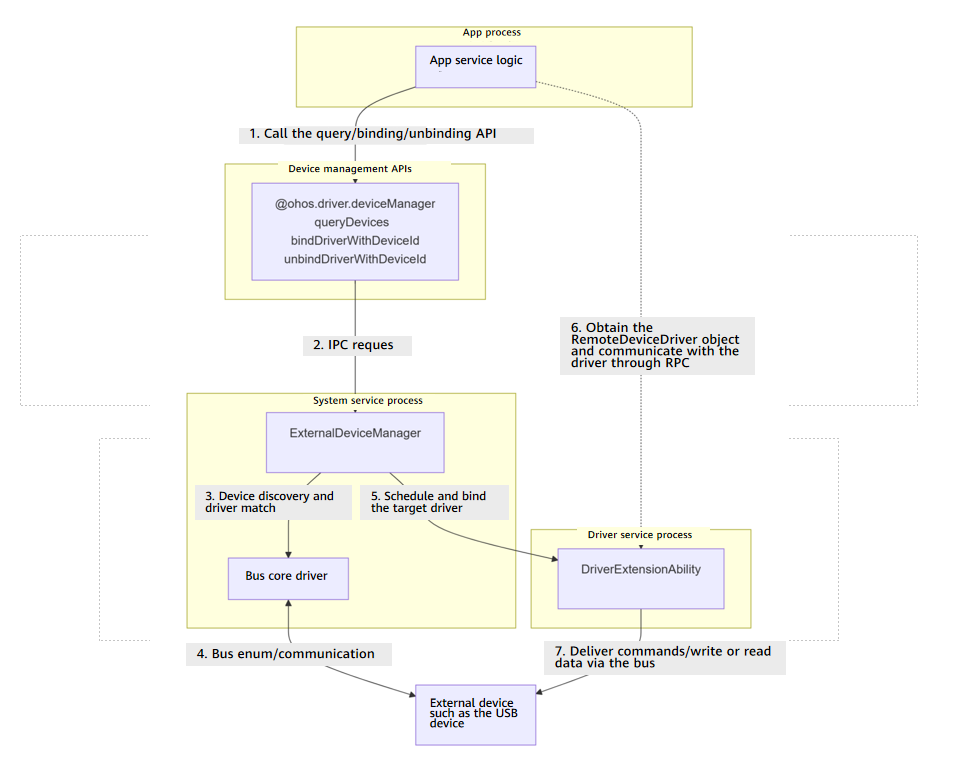

The initial APIs of this module are supported since API version 10. Newly added APIs will be marked with a superscript to indicate their earliest API version. To call the APIs of this module, you need to request ohos.permission.ACCESS_EXTENSIONAL_DEVICE_DRIVER for querying, binding, and unbinding or ohos.permission.ACCESS_DDK_DRIVERS for the binding and unbinding APIs of the new version.
deviceManager.queryDevices
queryDevices(busType?: number): Array<Readonly<Device>>
Queries the list of peripheral devices. If the device has no peripheral device connected, an empty list is returned.
Required permissions: ohos.permission.ACCESS_EXTENSIONAL_DEVICE_DRIVER
System capability: SystemCapability.Driver.ExternalDevice
Parameters
| Name | Type | Mandatory | Description |
|---|---|---|---|
| busType | number | No | Device bus type specified by BusType. If this parameter is left empty, all types of devices are searched. |
Return value
| Type | Description |
|---|---|
| Array<Readonly<Device>> | List of peripheral devices obtained. |
Error codes
For details about the error codes, see Universal Error Codes and Driver Error Codes.
| ID | Error Message |
|---|---|
| 201 | The permission check failed. |
| 22900001 | ExternalDeviceManager service exception or busType parameter error. |
Example
import { deviceManager } from '@kit.DriverDevelopmentKit';

try {
  let devices: Array<deviceManager.Device> = deviceManager.queryDevices(deviceManager.BusType.USB);
  for (let item of devices) {
    let device: deviceManager.USBDevice = item as deviceManager.USBDevice;
    console.info(`Device id is ${device.deviceId}`);
  }
} catch (error) {
  console.error(`Failed to query device. Code is ${error.code}, message is ${error.message}`);
} deviceManager.bindDriverWithDeviceId19+
bindDriverWithDeviceId(deviceId: number, onDisconnect: AsyncCallback<number>): Promise<RemoteDeviceDriver>
Binds a peripheral device based on the device information returned by queryDevices(). This API must be used together with unbindDriverWithDeviceId. This API uses a promise to return the result.
You need to use deviceManager.queryDevices to obtain the peripheral device list.
Required permissions: ohos.permission.ACCESS_DDK_DRIVERS
System capability: SystemCapability.Driver.ExternalDevice
Parameters
| Name | Type | Mandatory | Description |
|---|---|---|---|
| deviceId | number | Yes | Device ID, which can be obtained via queryDevices. |
| onDisconnect | AsyncCallback<number> | Yes | Callback used to return the result. When the bound device is disconnected, the value of err is undefined and the value of data is the ID of the unbound device. Otherwise, err is an error object. |
Return value
| Type | Description |
|---|---|
| Promise<RemoteDeviceDriver> | Promise used to return a RemoteDeviceDriver object. |
Error codes
For details about the error codes, see Universal Error Codes and Driver Error Codes.
| ID | Error Message |
|---|---|
| 201 | The permission check failed. |
| 26300001 | ExternalDeviceManager service exception. |
| 26300002 | The driver service does not allow any client to bind. |
Example
import { deviceManager } from '@kit.DriverDevelopmentKit';
import { BusinessError } from '@kit.BasicServicesKit';

try {
  // For example, deviceId is 12345678. You can use queryDevices() to obtain the deviceId.
  deviceManager.bindDriverWithDeviceId(12345678, (error: BusinessError, data: number) => {
    console.error(`Device is disconnected`);
  }).then((data: deviceManager.RemoteDeviceDriver) => {
    console.info(`bindDriverWithDeviceId success, Device_Id is ${data.deviceId}.
    remote is ${data.remote != null ? data.remote.getDescriptor(): "null"}`);
  }, (error: BusinessError) => {
    console.error(`bindDriverWithDeviceId async fail. Code is ${error.code}, message is ${error.message}`);
  });
} catch (error) {
  console.error(`bindDriverWithDeviceId fail. Code is ${error.code}, message is ${error.message}`);
} deviceManager.unbindDriverWithDeviceId19+
unbindDriverWithDeviceId(deviceId: number): Promise<number>
Unbinds a device. Before calling this method, you must call bindDriverWithDeviceId to bind the device. This API uses a promise to return the result.
Required permissions: ohos.permission.ACCESS_DDK_DRIVERS
System capability: SystemCapability.Driver.ExternalDevice
Parameters
| Name | Type | Mandatory | Description |
|---|---|---|---|
| deviceId | number | Yes | Device ID, which can be obtained via queryDevices. |
Return value
| Type | Description |
|---|---|
| Promise<number> | Promise used to return the ID of the unbound device. |
Error codes
For details about the error codes, see Universal Error Codes and Driver Error Codes.
| ID | Error Message |
|---|---|
| 201 | The permission check failed. |
| 26300001 | ExternalDeviceManager service exception. |
| 26300003 | There is no binding relationship. |
Example
import { deviceManager } from '@kit.DriverDevelopmentKit';
import { BusinessError } from '@kit.BasicServicesKit';

try {
  // For example, deviceId is 12345678. You can use queryDevices() to obtain the deviceId.
  deviceManager.unbindDriverWithDeviceId(12345678).then((data: number) => {
    console.info(`unbindDriverWithDeviceId success, Device_Id is ${data}.`);
  }, (error: BusinessError) => {
    console.error(`unbindDriverWithDeviceId async fail. Code is ${error.code}, message is ${error.message}`);
  });
} catch (error) {
  console.error(`unbindDriverWithDeviceId fail. Code is ${error.code}, message is ${error.message}`);
} deviceManager.bindDevice(deprecated)
bindDevice(deviceId: number, onDisconnect: AsyncCallback<number>, callback: AsyncCallback<{deviceId: number; remote: rpc.IRemoteObject;}>): void
Binds a peripheral device based on the device information returned by queryDevices(). This function must be used in pairs with unbindDevice.
You need to use deviceManager.queryDevices to obtain the peripheral device list.

This API is supported since API version 10 and deprecated since API version 19. You are advised to use deviceManager.bindDriverWithDeviceId instead.
Required permissions: ohos.permission.ACCESS_EXTENSIONAL_DEVICE_DRIVER
System capability: SystemCapability.Driver.ExternalDevice
Parameters
| Name | Type | Mandatory | Description |
|---|---|---|---|
| deviceId | number | Yes | Device ID, which can be obtained via queryDevices. |
| onDisconnect | AsyncCallback<number> | Yes | Callback used to return the result. When the bound device is disconnected, the value of err is undefined and the value of data is the ID of the unbound device. Otherwise, err is an error object. |
| callback | AsyncCallback<{deviceId: number; remote: rpc.IRemoteObject;}> | Yes | Callback used to return the result. When the device is bound successfully, err is undefined, and data contains the device ID and the bound device driver communication object. Otherwise, err is an error object. |
Error codes
For details about the error codes, see Universal Error Codes and Driver Error Codes.
| ID | Error Message |
|---|---|
| 201 | The permission check failed. |
| 401 | Parameter error. Possible causes: 1.Mandatory parameters are left unspecified. 2.Incorrect parameter types. 3.Parameter verification failed. |
| 22900001 | ExternalDeviceManager service exception. |
Example
import { deviceManager } from '@kit.DriverDevelopmentKit';
import { BusinessError } from '@kit.BasicServicesKit';
import { rpc } from '@kit.IPCKit';

interface DataType {
  deviceId: number;
  remote: rpc.IRemoteObject;
}

try {
  // For example, deviceId is 12345678. You can use queryDevices() to obtain the deviceId.
  deviceManager.bindDevice(12345678, (error: BusinessError, data: number) => {
    console.error(`Device is disconnected`);
  }, (error: BusinessError, data: DataType) => {
    if (error) {
      console.error(`bindDevice async fail. Code is ${error.code}, message is ${error.message}`);
      return;
    }
    console.info(`bindDevice success`);
  });
} catch (error) {
  console.error(`bindDevice fail. Code is ${error.code}, message is ${error.message}`);
} deviceManager.bindDeviceDriver(deprecated)
bindDeviceDriver(deviceId: number, onDisconnect: AsyncCallback<number>, callback: AsyncCallback<RemoteDeviceDriver>): void
Binds a peripheral device based on the device information returned by queryDevices(). This function must be used in pairs with unbindDevice.
You need to use deviceManager.queryDevices to obtain the peripheral device list.

This API is supported since API version 11 and deprecated since API version 19. You are advised to use deviceManager.bindDriverWithDeviceId instead.
Required permissions: ohos.permission.ACCESS_EXTENSIONAL_DEVICE_DRIVER
System capability: SystemCapability.Driver.ExternalDevice
Parameters
| Name | Type | Mandatory | Description |
|---|---|---|---|
| deviceId | number | Yes | Device ID, which can be obtained via queryDevices. |
| onDisconnect | AsyncCallback<number> | Yes | Callback used to return the result. When the bound device is disconnected, the value of err is undefined and the value of data is the ID of the unbound device. Otherwise, err is an error object. |
| callback | AsyncCallback<RemoteDeviceDriver> | Yes | Callback used to return the result. When the device driver is successfully bound, err is undefined and data is a RemoteDeviceDriver object that contains the device ID and remote object. Otherwise, err is an error object. |
Error codes
For details about the error codes, see Universal Error Codes and Driver Error Codes.
| ID | Error Message |
|---|---|
| 201 | The permission check failed. |
| 401 | Parameter error. Possible causes: 1.Mandatory parameters are left unspecified. 2.Incorrect parameter types. 3.Parameter verification failed. |
| 22900001 | ExternalDeviceManager service exception. |
Example
import { deviceManager } from '@kit.DriverDevelopmentKit';
import { BusinessError } from '@kit.BasicServicesKit';

try {
  // For example, deviceId is 12345678. You can use queryDevices() to obtain the deviceId.
  deviceManager.bindDeviceDriver(12345678, (error: BusinessError, data: number) => {
    console.error(`Device is disconnected`);
  }, (error: BusinessError, data: deviceManager.RemoteDeviceDriver) => {
    if (error) {
      console.error(`bindDeviceDriver async fail. Code is ${error.code}, message is ${error.message}`);
      return;
    }
    console.info(`bindDeviceDriver success`);
  });
} catch (error) {
  console.error(`bindDeviceDriver fail. Code is ${error.code}, message is ${error.message}`);
} deviceManager.bindDevice(deprecated)
bindDevice(deviceId: number, onDisconnect: AsyncCallback<number>): Promise<{deviceId: number; remote: rpc.IRemoteObject;}>
Binds a peripheral device based on the device information returned by queryDevices(). This function must be used in pairs with unbindDevice. This API uses a promise to return the result.
You need to use deviceManager.queryDevices to obtain the peripheral device list.

This API is supported since API version 10 and deprecated since API version 19. You are advised to use deviceManager.bindDriverWithDeviceId instead.
Required permissions: ohos.permission.ACCESS_EXTENSIONAL_DEVICE_DRIVER
System capability: SystemCapability.Driver.ExternalDevice
Parameters
| Name | Type | Mandatory | Description |
|---|---|---|---|
| deviceId | number | Yes | Device ID, which can be obtained via queryDevices. |
| onDisconnect | AsyncCallback<number> | Yes | Callback used to return the result. When the bound device is disconnected, the value of err is undefined and the value of data is the ID of the unbound device. Otherwise, err is an error object. |
Return value
| Type | Description |
|---|---|
| Promise<{deviceId: number; remote: rpc.IRemoteObject;}> | Promise used to return an object containing the device ID and IRemoteObject. |
Error codes
For details about the error codes, see Universal Error Codes and Driver Error Codes.
| ID | Error Message |
|---|---|
| 201 | The permission check failed. |
| 401 | Parameter error. Possible causes: 1.Mandatory parameters are left unspecified. 2.Incorrect parameter types. 3.Parameter verification failed. |
| 22900001 | ExternalDeviceManager service exception. |
Example
import { deviceManager } from '@kit.DriverDevelopmentKit';
import { BusinessError } from '@kit.BasicServicesKit';

try {
  // For example, deviceId is 12345678. You can use queryDevices() to obtain the deviceId.
  deviceManager.bindDevice(12345678, (error: BusinessError, data: number) => {
    console.error(`Device is disconnected`);
  }).then(data => {
    console.info(`bindDevice success, Device_Id is ${data.deviceId}.
    remote is ${data.remote != null ? data.remote.getDescriptor(): "null"}`);
  }, (error: BusinessError) => {
    console.error(`bindDevice async fail. Code is ${error.code}, message is ${error.message}`);
  });
} catch (error) {
  console.error(`bindDevice fail. Code is ${error.code}, message is ${error.message}`);
} deviceManager.bindDeviceDriver(deprecated)
bindDeviceDriver(deviceId: number, onDisconnect: AsyncCallback<number>): Promise<RemoteDeviceDriver>
Binds a peripheral device based on the device information returned by queryDevices(). This function must be used in pairs with unbindDevice. This API uses a promise to return the result.
You need to use deviceManager.queryDevices to obtain the peripheral device list.

This API is supported since API version 11 and deprecated since API version 19. You are advised to use deviceManager.bindDriverWithDeviceId instead.
Required permissions: ohos.permission.ACCESS_EXTENSIONAL_DEVICE_DRIVER
System capability: SystemCapability.Driver.ExternalDevice
Parameters
| Name | Type | Mandatory | Description |
|---|---|---|---|
| deviceId | number | Yes | Device ID, which can be obtained via queryDevices. |
| onDisconnect | AsyncCallback<number> | Yes | Callback used to return the result. When the bound device is disconnected, the value of err is undefined and the value of data is the ID of the unbound device. Otherwise, err is an error object. |
Return value
| Type | Description |
|---|---|
| Promise<RemoteDeviceDriver> | Promise used to return a RemoteDeviceDriver object. |
Error codes
For details about the error codes, see Universal Error Codes and Driver Error Codes.
| ID | Error Message |
|---|---|
| 201 | The permission check failed. |
| 401 | Parameter error. Possible causes: 1.Mandatory parameters are left unspecified. 2.Incorrect parameter types. 3.Parameter verification failed. |
| 22900001 | ExternalDeviceManager service exception. |
Example
import { deviceManager } from '@kit.DriverDevelopmentKit';
import { BusinessError } from '@kit.BasicServicesKit';

try {
  // For example, deviceId is 12345678. You can use queryDevices() to obtain the deviceId.
  deviceManager.bindDeviceDriver(12345678, (error: BusinessError, data: number) => {
    console.error(`Device is disconnected`);
  }).then((data: deviceManager.RemoteDeviceDriver) => {
    console.info(`bindDeviceDriver success, Device_Id is ${data.deviceId}.
    remote is ${data.remote != null ? data.remote.getDescriptor(): "null"}`);
  }, (error: BusinessError) => {
    console.error(`bindDeviceDriver async fail. Code is ${error.code}, message is ${error.message}`);
  });
} catch (error) {
  console.error(`bindDeviceDriver fail. Code is ${error.code}, message is ${error.message}`);
} deviceManager.unbindDevice(deprecated)
unbindDevice(deviceId: number, callback: AsyncCallback<number>): void
Unbinds a peripheral device. You must call bindDevice to bind the device first.

This API is supported since API version 10 and deprecated since API version 19. You are advised to use deviceManager.unbindDriverWithDeviceId instead.
Required permissions: ohos.permission.ACCESS_EXTENSIONAL_DEVICE_DRIVER
System capability: SystemCapability.Driver.ExternalDevice
Parameters
| Name | Type | Mandatory | Description |
|---|---|---|---|
| deviceId | number | Yes | Device ID, which can be obtained via queryDevices. |
| callback | AsyncCallback<number> | Yes | Callback used to return the result. When the bound device is disconnected, the value of err is undefined and the value of data is the ID of the unbound device. Otherwise, err is an error object. |
Error codes
For details about the error codes, see Universal Error Codes and Driver Error Codes.
| ID | Error Message |
|---|---|
| 201 | The permission check failed. |
| 401 | Parameter error. Possible causes: 1.Mandatory parameters are left unspecified. 2.Incorrect parameter types. |
| 22900001 | ExternalDeviceManager service exception. |
Example
import { deviceManager } from '@kit.DriverDevelopmentKit';
import { BusinessError } from '@kit.BasicServicesKit';

try {
  // For example, deviceId is 12345678. You can use queryDevices() to obtain the deviceId.
  deviceManager.unbindDevice(12345678, (error: BusinessError, data: number) => {
    if (error) {
      console.error(`unbindDevice async fail. Code is ${error.code}, message is ${error.message}`);
      return;
    }
    console.info(`unbindDevice success`);
  });
} catch (error) {
  console.error(`unbindDevice fail. Code is ${error.code}, message is ${error.message}`);
} deviceManager.unbindDevice(deprecated)
unbindDevice(deviceId: number): Promise<number>
Unbinds a peripheral device. You must call bindDevice to bind the device first. This API uses a promise to return the result.

This API is supported since API version 10 and deprecated since API version 19. You are advised to use deviceManager.unbindDriverWithDeviceId instead.
Required permissions: ohos.permission.ACCESS_EXTENSIONAL_DEVICE_DRIVER
System capability: SystemCapability.Driver.ExternalDevice
Parameters
| Name | Type | Mandatory | Description |
|---|---|---|---|
| deviceId | number | Yes | Device ID, which can be obtained via queryDevices. |
Error codes
For details about the error codes, see Universal Error Codes and Driver Error Codes.
| ID | Error Message |
|---|---|
| 201 | The permission check failed. |
| 401 | Parameter error. Possible causes: 1.Mandatory parameters are left unspecified. 2.Incorrect parameter types. 3.Parameter verification failed. |
| 22900001 | ExternalDeviceManager service exception. |
Return value
| Type | Description |
|---|---|
| Promise<number> | Promise used to return the ID of the unbound device. |
Example
import { deviceManager } from '@kit.DriverDevelopmentKit';
import { BusinessError } from '@kit.BasicServicesKit';

try {
  // For example, deviceId is 12345678. You can use queryDevices() to obtain the deviceId.
  deviceManager.unbindDevice(12345678).then((data: number) => {
    console.info(`unbindDevice success, Device_Id is ${data}.`);
  }, (error: BusinessError) => {
    console.error(`unbindDevice async fail. Code is ${error.code}, message is ${error.message}`);
  });
} catch (error) {
  console.error(`unbindDevice fail. Code is ${error.code}, message is ${error.message}`);
}
Device
Represents the peripheral device information.
System capability: SystemCapability.Driver.ExternalDevice
| Name | Type | Read-Only | Optional | Description |
|---|---|---|---|---|
| busType | BusType | No | No | Bus type. |
| deviceId | number | No | No | ID of the peripheral device. |
| description | string | No | No | Description of the peripheral device. |
USBDevice
USB device information, which is inherited from Device.
System capability: SystemCapability.Driver.ExternalDevice
| Name | Type | Read-Only | Optional | Description |
|---|---|---|---|---|
| vendorId | number | No | No | Vendor ID of the USB device. |
| productId | number | No | No | Product ID of the USB device. |
BusType
Enumerates the device bus types.
System capability: SystemCapability.Driver.ExternalDevice
| Name | Value | Description |
|---|---|---|
| USB | 1 | USB bus. |
RemoteDeviceDriver11+
Represents information about a remote device driver.
System capability: SystemCapability.Driver.ExternalDevice
| Name | Type | Read-Only | Optional | Description |
|---|---|---|---|---|
| deviceId | number | No | No | ID of the peripheral device. |
| remote | rpc.IRemoteObject | No | No | Remote driver communication object. |