Module Overview
The customScan module provides the capability of scanning barcodes on a custom UI. It allows you to customize the code scanning UI based on your service needs, render the camera preview stream using the XComponent component, and obtain the scanning result.
[h2]Basic Scanning Process
To use the customScan module for barcode scanning, call the APIs in the following sequence:
- Initialization: Call init to configure the barcode scanning parameters.
- Scanning starting: Call start to start camera streams and start scanning.
- Request processing: Obtain ScanResult from the callback and perform service processing.
- Stopping: Call stop to stop camera streams.
- Release: Call release to release resources.
The pseudo-code of the process is as follows:
// 1. Initialize barcode scanning parameters.
let options: scanBarcode.ScanOptions = {
  scanTypes: [scanCore.ScanType.ALL],
  enableMultiMode: true,
  enableAlbum: true
};
customScan.init(options);

// 2. Create the XComponent, obtain the surface ID of the XComponent, build a ViewControl, and start barcode scanning.
let surfaceId: string = xComponentController.getXComponentSurfaceId();
// Camera control parameters, including width, height, and surfaceId, which are used to configure the dimensions of the camera preview stream and the target surface for rendering on the custom UI.
let viewControl: customScan.ViewControl = {
  width: 360,
  height: 640,
  surfaceId: surfaceId
};

customScan.start(viewControl, (err: BusinessError, data: Array<scanBarcode.ScanResult>) => {
  // 3. Obtain the scanning result from data and process the service.
  // ...
});

// 4. Stop the camera stream after the scanning is complete.
await customScan.stop();

// 5. Release resources when exiting barcode scanning.
await customScan.release();
[h2]Lifecycle and State Machine
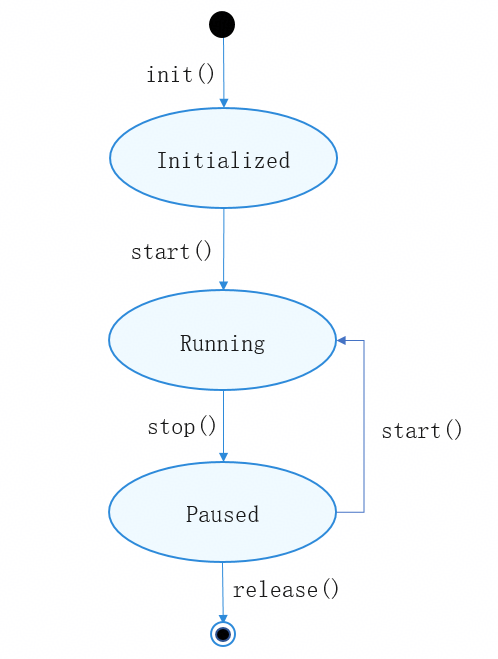
The entire barcode scanning process of the customScan module includes initialization (init), starting camera stream scanning (start), stopping camera streams (stop), and releasing resources (release). The following figure shows the status diagram.
Status description
| Status | Available APIs | Description |
|---|---|---|
| Initialized | start | Barcode scanning has been initialized. Camera streams can be started to scan barcodes. |
| Running | getFlashLightStatus, openFlashLight, closeFlashLight, setZoom, getZoom, setFocusPoint, resetFocus, setAutoZoomEnabled, rescan, on('lightingFlash'), off('lightingFlash'), stop | Barcode scanning is in progress. You can control the flash light, adjust the zoom, set the focus, re-trigger barcode scanning, or stop barcode scanning. |
| Paused | off('lightingFlash'), release, start | Barcode scanning has been stopped. You can release resources or restart barcode scanning. |
To help you quickly get started, you are advised to refer to the official sample project.
Since: 4.1.0(11)
ViewControl
Camera control parameters, which are used to configure the dimensions of the camera preview stream and the target surface for rendering on the custom UI.
Model restriction: This API can be used only in the stage model.
System capability: SystemCapability.Multimedia.Scan.ScanBarcode
Since: 4.1.0(11)
| Name | Type | Read-Only | Optional | Description |
|---|---|---|---|---|
| width | number | No | No | Width of the XComponent component. Supported units are px, lpx, and vp. The default unit is vp. You are advised to use the unit vp for different screen densities to ensure compatibility. |
| height | number | No | No | Height of the XComponent. Supported units are px, lpx, and vp. The default unit is vp. You are advised to use the unit vp for different screen densities to ensure compatibility. |
| surfaceId | string | No | No | ID of the surface held by the XComponent. It specifies the target rendering surface for the camera preview stream. |

When setting parameters for ViewControl, ensure that the values of width and height are the same as those of XComponent. The start API will match the closest camera resolution based on the set values of width and height. If the ratio differs from the camera resolution ratio greatly, the preview stream experience may be compromised. The XComponent component provides the surface for the preview stream, and the capabilities of XComponent are provided by the UI. For details, please refer to XComponent.
For foldable devices, adjust the width and height of XComponent as needed when the folding status changes. The start API will adapt the camera resolution ratio based on the width and height of XComponent.
Example:
import { hilog } from '@kit.PerformanceAnalysisKit';
import { BusinessError } from '@kit.BasicServicesKit';
import { scanBarcode, customScan } from '@kit.ScanKit';

@Entry
@Component
struct CustomScanPage {
  // Set the preview stream height. The default unit is vp.
  @State cameraHeight: number = 640;
  // Set the preview stream width. The default unit is vp.
  @State cameraWidth: number = 360;
  private mXComponentController: XComponentController = new XComponentController();

  build() {
    Stack() {
      XComponent({
        id: 'componentId',
        type: XComponentType.SURFACE,
        controller: this.mXComponentController
      })
        .onLoad(() => {
          hilog.info(0x0001, '[Scan Sample]', 'onLoad is called');
          // Obtain the surface ID of the XComponent.
          let surfaceId: string = this.mXComponentController.getXComponentSurfaceId();
          hilog.info(0x0001, 'viewControl', `onLoad surfaceId: ${surfaceId}`);
          // Set the concerned fields of ViewControl.
          let viewControl: customScan.ViewControl = {
            width: this.cameraWidth,
            height: this.cameraHeight,
            surfaceId: surfaceId
          };
          try {
            customScan.start(viewControl).then((scanResult: Array<scanBarcode.ScanResult>) => {
              hilog.info(0x0001, '[Scan Sample]',
                `Succeeded in getting ScanResult by promise, scanResult length: ${scanResult.length}`);
            }).catch((err: BusinessError) => {
              hilog.error(0x0001, '[Scan Sample]',
                `Failed to get ScanResult by promise. Code: ${err.code}, message: ${err.message}`);
            });
          } catch (err) {
            hilog.error(0x0001, '[Scan Sample]',
              `Failed to start customScan. Code: ${err.code}, message: ${err.message}`);
          }
        })
        .height(this.cameraHeight)
        .width(this.cameraWidth)
        .position({ x: 0, y: 0 })
    }
    .alignContent(Alignment.Bottom)
    .height('100%')
    .width('100%')
    .position({ x: 0, y: 0 })
  }
}
ScanFrame
Camera preview stream (YUV).
Model restriction: This API can be used only in the stage model.
System capability: SystemCapability.Multimedia.Scan.ScanBarcode
Since: 5.0.0(12)
| Name | Type | Read-Only | Optional | Description |
|---|---|---|---|---|
| byteBuffer | ArrayBuffer | No | No | ArrayBuffer array of the camera preview stream. The data format is YUV (NV21 format based on 4:2:0 sampling). |
| width | number | No | No | Width of the camera preview stream, in pixels. |
| height | number | No | No | Height of the camera preview stream, in pixels. |
| scanCodeRects | Array<scanBarcode.ScanCodeRect> | No | Yes | Barcode image position information detected in the preview stream (byteBuffer). Device behavior differences: This attribute can be returned only for devices with the Kirin neural-network processing unit (NPU). For other devices, undefined is returned. |
Example:
import { hilog } from '@kit.PerformanceAnalysisKit';
import { AsyncCallback, BusinessError } from '@kit.BasicServicesKit';
import { scanBarcode, customScan } from '@kit.ScanKit';

@Entry
@Component
struct CustomScanPage {
  // Set the preview stream height. The default unit is vp.
  @State cameraHeight: number = 640;
  // Set the preview stream width. The default unit is vp.
  @State cameraWidth: number = 360;
  private mXComponentController: XComponentController = new XComponentController();
  private callback: AsyncCallback<scanBarcode.ScanResult[]> =
    (err: BusinessError, data: scanBarcode.ScanResult[]) => {
      if (err) {
        hilog.error(0x0001, '[Scan Sample]',
          `Failed to get ScanResult by callback. Code: ${err.code}, message: ${err.message}`);
        return;
      }
      hilog.info(0x0001, '[Scan Sample]',
        `Succeeded in getting ScanResult by callback, result length: ${data.length}`);
    };
  // Obtain ScanFrame via a callback.
  private frameCallback: AsyncCallback<customScan.ScanFrame> =
    (err: BusinessError, frameResult: customScan.ScanFrame) => {
      if (err) {
        hilog.error(0x0001, '[Scan Sample]',
          `Failed to get ScanFrame by callback. Code: ${err.code}, message: ${err.message}`);
        return;
      }
      hilog.info(0x0001, '[Scan Sample]',
        `Succeeded in getting ScanFrame. ByteLength: ${frameResult.byteBuffer.byteLength}, width: ${frameResult.width}, height: ${frameResult.height}.`);
    };

  build() {
    Stack() {
      XComponent({
        id: 'componentId',
        type: XComponentType.SURFACE,
        controller: this.mXComponentController
      })
        .onLoad(() => {
          hilog.info(0x0001, '[Scan Sample]', 'Succeeded in loading, onLoad is called');
          // Obtain the surface ID of the XComponent.
          let surfaceId: string = this.mXComponentController.getXComponentSurfaceId();
          hilog.info(0x0001, '[Scan Sample]', `Succeeded in getting surfaceId: ${surfaceId}`);
          // Set the concerned fields of ViewControl.
          let viewControl: customScan.ViewControl = {
            width: this.cameraWidth,
            height: this.cameraHeight,
            surfaceId: surfaceId
          };
          try {
            customScan.start(viewControl, this.callback, this.frameCallback);
          } catch (err) {
            hilog.error(0x0001, '[Scan Sample]',
              `Failed to start customScan. Code: ${err.code}, message: ${err.message}`);
          }
        })
        .height(this.cameraHeight)
        .width(this.cameraWidth)
        .position({ x: 0, y: 0 })
    }
    .alignContent(Alignment.Bottom)
    .height('100%')
    .width('100%')
    .position({ x: 0, y: 0 })
  }
}
init
init(options?: scanBarcode.ScanOptions): void
Initializes barcode scanning by custom UI.
Model restriction: This API can be used only in the stage model.
Required permission: ohos.permission.CAMERA
System capability: SystemCapability.Multimedia.Scan.ScanBarcode
Device behavior differences: For API version 6.0.2(22) and earlier versions, this API is supported on phones and tablets. For API version 6.1.0(23) and later versions, this API is supported on phones, tablets, and wearables with rear cameras. Error code 1000500001 is returned on wearables without rear cameras after the camera permission is successfully applied for. You can call the getSupportedCameras API to check whether a wearable has a rear camera.
Since: 4.1.0(11)
Parameters:
| Parameter | Type | Mandatory | Description |
|---|---|---|---|
| options | scanBarcode.ScanOptions | No | Barcode scanning parameters for a custom UI. Default value: Refer to the default value of ScanOptions. |
Error codes:
For details about the error codes, please refer to Universal Error Codes and ArkTS API Error Codes.
From API version 5.0.2(14), error code 201 is added to the init API of the customScan module.
For API versions earlier than 5.0.2 (14), when the init API of the customScan module is called without the camera permission, error code 1000500001 is returned.
For API version 5.0.2 (14) or later, when the init API of the customScan module is called without the camera permission, error code 201 is returned.
| ID | Error Message |
|---|---|
| 201 | Permission verification failed. The application does not have the permission required to call the API. Applicable versions: 5.0.2(14)+ |
| 401 | Parameter error. Possible causes: 1. Incorrect parameter types; 2. Parameter verification failed. |
| 1000500001 | Internal error. |
Example:
import { scanBarcode, scanCore, customScan } from '@kit.ScanKit';
import { hilog } from '@kit.PerformanceAnalysisKit';

// Define scanning parameters.
let options: scanBarcode.ScanOptions = {
  scanTypes: [scanCore.ScanType.ALL],
  enableMultiMode: true,
  enableAlbum: true
};
try {
  customScan.init(options);
} catch (err) {
  hilog.error(0x0001, '[Scan Sample]', `Failed to init customScan. Code: ${err.code}, message: ${err.message}`);
}
start
start(viewControl: ViewControl): Promise<Array<scanBarcode.ScanResult>>
Starts barcode scanning camera streams to obtain the scanning result. This API uses a promise to return the result.

This API can be called only after the init API is called. Otherwise, error code 1000500001 is returned.
This API occupies camera resources for a long time. After the barcode scanning is complete, call the stop and release APIs in a timely manner to release the resources.
Model restriction: This API can be used only in the stage model.
Required permission: ohos.permission.CAMERA
System capability: SystemCapability.Multimedia.Scan.ScanBarcode
Device behavior differences: For API version 6.0.2(22) and earlier versions, this API is supported on phones and tablets. For API version 6.1.0(23) and later versions, this API is supported on phones, tablets, and wearables with rear cameras. Error code 1000500001 is returned on wearables without rear cameras after the camera permission is successfully applied for. You can call the getSupportedCameras API to check whether a wearable has a rear camera.
Since: 4.1.0(11)
Parameters:
| Parameter | Type | Mandatory | Description |
|---|---|---|---|
| viewControl | ViewControl | Yes | Camera control parameters, which are used to configure the dimensions of the camera preview stream and the target surface for rendering on the custom UI. |
Returns:
| Type | Description |
|---|---|
| Promise<Array<scanBarcode.ScanResult>> | Promise used to return the scanning result object array. |
Error codes:
For details about the error codes, please refer to Universal Error Codes and ArkTS API Error Codes.
From API version 5.0.2(14), error code 201 is added to the start API of the customScan module.
For API versions earlier than 5.0.2 (14), when the start API of the customScan module is called without the camera permission, error code 1000500001 is returned.
For API version 5.0.2 (14) or later, when the start API of the customScan module is called without the camera permission, error code 201 is returned.
| ID | Error Message |
|---|---|
| 201 | Permission verification failed. The application does not have the permission required to call the API. Applicable versions: 5.0.2(14)+ |
| 401 | Parameter error. Possible causes: 1. Mandatory parameters are left unspecified; 2. Incorrect parameter types; 3. Parameter verification failed. |
| 1000500001 | Internal error. |
Example:
import { hilog } from '@kit.PerformanceAnalysisKit';
import { BusinessError } from '@kit.BasicServicesKit';
import { scanBarcode, customScan } from '@kit.ScanKit';

@Entry
@Component
struct CustomScanPage {
  // Set the preview stream height. The default unit is vp.
  @State cameraHeight: number = 640;
  // Set the preview stream width. The default unit is vp.
  @State cameraWidth: number = 360;
  private mXComponentController: XComponentController = new XComponentController();

  build() {
    Stack() {
      XComponent({
        id: 'componentId',
        type: XComponentType.SURFACE,
        controller: this.mXComponentController
      })
        .onLoad(() => {
          hilog.info(0x0001, '[Scan Sample]', 'Succeeded in loading, onLoad is called');
          // Obtain the surface ID of the XComponent.
          let surfaceId: string = this.mXComponentController.getXComponentSurfaceId();
          hilog.info(0x0001, '[Scan Sample]', `Succeeded in getting surfaceId: ${surfaceId}`);
          // Set the concerned fields of ViewControl.
          let viewControl: customScan.ViewControl = {
            width: this.cameraWidth,
            height: this.cameraHeight,
            surfaceId: surfaceId
          };
          try {
            customScan.start(viewControl).then((scanResult: Array<scanBarcode.ScanResult>) => {
              hilog.info(0x0001, '[Scan Sample]',
                `Succeeded in getting ScanResult by promise, scanResult length: ${scanResult.length}`);
            }).catch((err: BusinessError) => {
              hilog.error(0x0001, '[Scan Sample]',
                `Failed to get ScanResult by promise. Code: ${err.code}, message: ${err.message}`);
            });
          } catch (err) {
            hilog.error(0x0001, '[Scan Sample]',
              `Failed to start customScan. Code: ${err.code}, message: ${err.message}`);
          }
        })
        .height(this.cameraHeight)
        .width(this.cameraWidth)
        .position({ x: 0, y: 0 })
    }
    .alignContent(Alignment.Bottom)
    .height('100%')
    .width('100%')
    .position({ x: 0, y: 0 })
  }
}
start
start(viewControl: ViewControl, callback: AsyncCallback<Array<scanBarcode.ScanResult>>, frameCallback?: AsyncCallback<ScanFrame>): void
Starts barcode scanning camera streams to obtain the scanning result and camera preview stream (YUV NV21 format based on 4:2:0 sampling). This API uses an asynchronous callback to return the result.

This API can be called only after the init API is called. Otherwise, error code 1000500001 is returned.
This API occupies camera resources for a long time. After the barcode scanning is complete, call the stop and release APIs in a timely manner to release the resources.
Model restriction: This API can be used only in the stage model.
Required permission: ohos.permission.CAMERA
System capability: SystemCapability.Multimedia.Scan.ScanBarcode
Device behavior differences: For API version 6.0.2(22) and earlier versions, this API is supported on phones and tablets. For API version 6.1.0(23) and later versions, this API is supported on phones, tablets, and wearables with rear cameras. Error code 1000500001 is returned on wearables without rear cameras after the camera permission is successfully applied for. You can call the getSupportedCameras API to check whether a wearable has a rear camera.
Since: 4.1.0(11)
Parameters:
| Parameter | Type | Mandatory | Description |
|---|---|---|---|
| viewControl | ViewControl | Yes | Camera control parameters, which are used to configure the dimensions of the camera preview stream and the target surface for rendering on the custom UI. |
| callback | AsyncCallback<Array<scanBarcode.ScanResult>> | Yes | Callback function. If the camera stream barcode scanning is started successfully, err is undefined and data is the obtained Array<scanBarcode.ScanResult>. Otherwise, err is an error object. |
| frameCallback | AsyncCallback<ScanFrame> | No | Callback function. If the camera stream is successfully started, the preview stream data is continuously returned. In this case, err is undefined and data is the obtained camera preview stream (YUV) ScanFrame. Otherwise, data is an error object. Since: 5.0.0(12) |
Error codes:
For details about the error codes, please refer to Universal Error Codes and ArkTS API Error Codes.
From API version 5.0.2(14), error code 201 is added to the start API of the customScan module.
For API versions earlier than 5.0.2 (14), when the start API of the customScan module is called without the camera permission, error code 1000500001 is returned.
For API version 5.0.2 (14) or later, when the start API of the customScan module is called without the camera permission, error code 201 is returned.
| ID | Error Message |
|---|---|
| 201 | Permission verification failed. The application does not have the permission required to call the API. Applicable versions: 5.0.2(14)+ |
| 401 | Parameter error. Possible causes: 1. Mandatory parameters are left unspecified; 2. Incorrect parameter types; 3. Parameter verification failed. |
| 1000500001 | Internal error. |
Example:
import { hilog } from '@kit.PerformanceAnalysisKit';
import { AsyncCallback, BusinessError } from '@kit.BasicServicesKit';
import { scanBarcode, customScan } from '@kit.ScanKit';

@Entry
@Component
struct CustomScanPage {
  // Set the preview stream height. The default unit is vp.
  @State cameraHeight: number = 640;
  // Set the preview stream width. The default unit is vp.
  @State cameraWidth: number = 360;
  private mXComponentController: XComponentController = new XComponentController();
  // Return the custom scanning result in a callback.
  private callback: AsyncCallback<Array<scanBarcode.ScanResult>> =
    (err: BusinessError, data: Array<scanBarcode.ScanResult>) => {
      if (err) {
        hilog.error(0x0001, '[Scan Sample]',
          `Failed to get ScanResult by callback. Code: ${err.code}, message: ${err.message}`);
        return;
      }
      hilog.info(0x0001, '[Scan Sample]',
        `Succeeded in getting ScanResult by callback, scanResult length: ${data.length}`);
    };
  // Obtain ScanFrame via a callback.
  private frameCallback: AsyncCallback<customScan.ScanFrame> =
    (err: BusinessError, frameResult: customScan.ScanFrame) => {
      if (err) {
        hilog.error(0x0001, '[Scan Sample]',
          `Failed to get ScanFrame by callback. Code: ${err.code}, message: ${err.message}`);
        return;
      }
      hilog.info(0x0001, '[Scan Sample]',
        `Succeeded in getting ScanFrame. ByteLength: ${frameResult.byteBuffer.byteLength}, width: ${frameResult.width}, height: ${frameResult.height}.`);
    };

  build() {
    Stack() {
      XComponent({
        id: 'componentId',
        type: XComponentType.SURFACE,
        controller: this.mXComponentController
      })
        .onLoad(() => {
          hilog.info(0x0001, '[Scan Sample]', 'Succeeded in loading, onLoad is called');
          // Obtain the surface ID of the XComponent.
          let surfaceId: string = this.mXComponentController.getXComponentSurfaceId();
          hilog.info(0x0001, '[Scan Sample]', `Succeeded in getting surfaceId: ${surfaceId}`);
          // Set the concerned fields of ViewControl.
          let viewControl: customScan.ViewControl = {
            width: this.cameraWidth,
            height: this.cameraHeight,
            surfaceId: surfaceId
          };
          try {
            customScan.start(viewControl, this.callback, this.frameCallback);
          } catch (err) {
            hilog.error(0x0001, '[Scan Sample]',
              `Failed to start customScan. Code: ${err.code}, message: ${err.message}`);
          }
        })
        .height(this.cameraHeight)
        .width(this.cameraWidth)
        .position({ x: 0, y: 0 })
    }
    .alignContent(Alignment.Bottom)
    .height('100%')
    .width('100%')
    .position({ x: 0, y: 0 })
  }
}
getFlashLightStatus
getFlashLightStatus(): boolean
Obtains the current camera flashlight status.

This API must be called after the start API is called to start camera streams and before the stop API is called. If the camera streams are not started, error code 1000500001 will be returned.
Model restriction: This API can be used only in the stage model.
System capability: SystemCapability.Multimedia.Scan.ScanBarcode
Device behavior differences: For API version 6.0.2(22) and earlier versions, this API is supported on phones and tablets. For API version 6.1.0(23) and later versions, this API is supported on phones, tablets, and wearables with rear cameras. Error code 1000500001 is returned on wearables without rear cameras. You can call the getSupportedCameras API to check whether a wearable has a rear camera.
Since: 4.1.0(11)
Returns:
| Type | Description |
|---|---|
| boolean | Returns the current camera flashlight status. The value true indicates that the switch is enabled, and the value false indicates the opposite. |
Error codes:
For details about the error codes, please refer to ArkTS API Error Codes.
| ID | Error Message |
|---|---|
| 1000500001 | Internal error. |
Example:
import { customScan } from '@kit.ScanKit';
import { hilog } from '@kit.PerformanceAnalysisKit';

let flashLightStatus: boolean = false;
try {
  flashLightStatus = customScan.getFlashLightStatus();
  // Turn on or off the flash light based on the flash light status.
  if (flashLightStatus) {
    try {
      customScan.closeFlashLight();
    } catch (err) {
      hilog.error(0x0001, '[Scan Sample]', `Failed to closeFlashLight. Code: ${err.code}, message: ${err.message}`);
    }
  } else {
    try {
      customScan.openFlashLight();
    } catch (err) {
      hilog.error(0x0001, '[Scan Sample]', `Failed to openFlashLight. Code: ${err.code}, message: ${err.message}`);
    }
  }
} catch (err) {
  hilog.error(0x0001, '[Scan Sample]', `Failed to getFlashLightStatus. Code: ${err.code}, message: ${err.message}`);
}
openFlashLight
openFlashLight(): void
Turns on the camera flash light.

This API must be called after the start API is called to start camera streams and before the stop API is called. If the camera streams are not started, error code 1000500001 will be returned.
Model restriction: This API can be used only in the stage model.
System capability: SystemCapability.Multimedia.Scan.ScanBarcode
Device behavior differences: For API version 6.0.2(22) and earlier versions, this API is supported on phones and tablets. For API version 6.1.0(23) and later versions, this API is supported on phones, tablets, and wearables with rear cameras. Error code 1000500001 is returned on wearables without rear cameras. You can call the getSupportedCameras API to check whether a wearable has a rear camera.
Since: 4.1.0(11)
Error codes:
For details about the error codes, please refer to ArkTS API Error Codes.
| ID | Error Message |
|---|---|
| 1000500001 | Internal error. |
Example:
import { customScan } from '@kit.ScanKit';
import { hilog } from '@kit.PerformanceAnalysisKit';

let flashLightStatus: boolean = false;
try {
  flashLightStatus = customScan.getFlashLightStatus();
  // Turn on or off the flash light based on the flash light status.
  if (flashLightStatus) {
    try {
      customScan.closeFlashLight();
    } catch (err) {
      hilog.error(0x0001, '[Scan Sample]', `Failed to closeFlashLight. Code: ${err.code}, message: ${err.message}`);
    }
  } else {
    try {
      customScan.openFlashLight();
    } catch (err) {
      hilog.error(0x0001, '[Scan Sample]', `Failed to openFlashLight. Code: ${err.code}, message: ${err.message}`);
    }
  }
} catch (err) {
  hilog.error(0x0001, '[Scan Sample]', `Failed to getFlashLightStatus. Code: ${err.code}, message: ${err.message}`);
}
closeFlashLight
closeFlashLight(): void
Turns off the camera flash light.

This API must be called after the start API is called to start camera streams and before the stop API is called. If the camera streams are not started, error code 1000500001 will be returned.
Model restriction: This API can be used only in the stage model.
System capability: SystemCapability.Multimedia.Scan.ScanBarcode
Device behavior differences: For API version 6.0.2(22) and earlier versions, this API is supported on phones and tablets. For version 6.1.0(23) and later versions, this API is supported on phones, tablets, and wearables with rear cameras. Error code 1000500001 is returned on wearables without rear cameras. You can call the getSupportedCameras API to check whether a wearable has a rear camera.
Since: 4.1.0(11)
Error codes:
For details about the error codes, please refer to ArkTS API Error Codes.
| ID | Error Message |
|---|---|
| 1000500001 | Internal error. |
Example:
import { customScan } from '@kit.ScanKit';
import { hilog } from '@kit.PerformanceAnalysisKit';

let flashLightStatus: boolean = false;
try {
  flashLightStatus = customScan.getFlashLightStatus();
} catch (err) {
  hilog.error(0x0001, '[Scan Sample]', `Failed to getFlashLightStatus. Code: ${err.code}, message: ${err.message}`);
}
// Turn on or off the flash light based on the flash light status.
if (flashLightStatus) {
  try {
    customScan.closeFlashLight();
  } catch (err) {
    hilog.error(0x0001, '[Scan Sample]', `Failed to closeFlashLight. Code: ${err.code}, message: ${err.message}`);
  }
} else {
  try {
    customScan.openFlashLight();
  } catch (err) {
    hilog.error(0x0001, '[Scan Sample]', `Failed to openFlashLight. Code: ${err.code}, message: ${err.message}`);
  }
}
setZoom
setZoom(zoomValue: number): void
Sets a zoom ratio for the device. The zoom precision is up to two decimal places. If the precision exceeds the supported range, only the value within the precision range is retained.

This API must be called after the start API is called to start camera streams and before the stop API is called. If the camera streams are not started, error code 1000500001 will be returned.
Model restriction: This API can be used only in the stage model.
System capability: SystemCapability.Multimedia.Scan.ScanBarcode
Device behavior differences: For API version 6.0.2(22) and earlier versions, this API is supported on phones and tablets. For API version 6.1.0(23) and later versions, this API is supported on phones, tablets, and wearables with rear cameras. Error code 1000500001 is returned on wearables without rear cameras. You can call the getSupportedCameras API to check whether a wearable has a rear camera.
Since: 5.0.0(12)
Parameters:
| Parameter | Type | Mandatory | Description |
|---|---|---|---|
| zoomValue | number | Yes | Camera zoom ratio, with a maximum precision of two decimal places (for example, 1.45). |
Error codes:
For details about the error codes, please refer to Universal Error Codes and ArkTS API Error Codes.
| ID | Error Message |
|---|---|
| 401 | Parameter error. Possible causes: 1. Mandatory parameters are left unspecified; 2. Incorrect parameter types; 3. Parameter verification failed. |
| 1000500001 | Internal error. |
Example:
import { customScan } from '@kit.ScanKit';
import { hilog } from '@kit.PerformanceAnalysisKit';

// Set a zoom ratio for the device.
let zoomValue = 2.0;
try {
  customScan.setZoom(zoomValue);
} catch (err) {
  hilog.error(0x0001, '[Scan Sample]', `Failed to setZoom. Code: ${err.code}, message: ${err.message}`);
}
getZoom
getZoom(): number
Obtains the zoom ratio in use.

This API must be called after the start API is called to start camera streams and before the stop API is called. If the camera streams are not started, error code 1000500001 will be returned.
Model restriction: This API can be used only in the stage model.
System capability: SystemCapability.Multimedia.Scan.ScanBarcode
Device behavior differences: For API version 6.0.2(22) and earlier versions, this API is supported on phones and tablets. For API version 6.1.0(23) and later versions, this API is supported on phones, tablets, and wearables with rear cameras. Error code 1000500001 is returned on wearables without rear cameras. You can call the getSupportedCameras API to check whether a wearable has a rear camera.
Since: 5.0.0(12)
Returns:
| Type | Description |
|---|---|
| number | Returns the current zoom ratio. |
Error codes:
For details about the error codes, please refer to ArkTS API Error Codes.
| ID | Error Message |
|---|---|
| 1000500001 | Internal error. |
Example:
import { hilog } from '@kit.PerformanceAnalysisKit';
import { customScan } from '@kit.ScanKit';

try {
  // Obtain the zoom ratio.
  let zoomValue = customScan.getZoom();
  hilog.info(0x0001, '[Scan Sample]', `Succeeded in getting zoomValue, zoomValue is ${zoomValue}`);
} catch (err) {
  hilog.error(0x0001, '[Scan Sample]', `Failed to get zoomValue. Code: ${err.code}, message: ${err.message}`);
}
setFocusPoint
setFocusPoint(point: scanBarcode.Point): void
Sets the camera focal point. The focal point must be in the coordinate system (0-1), where the top-left corner is {0, 0} and the bottom-right corner is {1, 1}. The coordinate system is based on the horizontal device direction with the device's charging port on the right. If the layout of the preview screen of an application is based on the vertical direction with the charging port on the lower side, the layout width and height are {w, h}, and the touch point is {x, y}, then the coordinate point after conversion is {y/h, 1-x/w}.

This API must be called after the start API is called to start camera streams and before the stop API is called. If the camera streams are not started, error code 1000500001 will be returned.
Model restriction: This API can be used only in the stage model.
System capability: SystemCapability.Multimedia.Scan.ScanBarcode
Device behavior differences: For API version 6.0.2(22) and earlier versions, this API is supported on phones and tablets. For API version 6.1.0(23) and later versions, this API is supported on phones, tablets, and wearables with rear cameras. Error code 1000500001 is returned on wearables without rear cameras. You can call the getSupportedCameras API to check whether a wearable has a rear camera.
Since: 5.0.0(12)
Parameters:
| Parameter | Type | Mandatory | Description |
|---|---|---|---|
| point | scanBarcode.Point | Yes | Focal point. The value range of x and y must be within [0, 1]. If a value less than 0 is passed, the value 0 is used. If a value greater than 1 is passed, the value 1 is used. |
Error codes:
For details about the error codes, please refer to Universal Error Codes and ArkTS API Error Codes.
| ID | Error Message |
|---|---|
| 401 | Parameter error. Possible causes: 1. Mandatory parameters are left unspecified; 2. Incorrect parameter types; 3. Parameter verification failed. |
| 1000500001 | Internal error. |
Example:
import { customScan } from '@kit.ScanKit';
import { hilog } from '@kit.PerformanceAnalysisKit';

try {
  // Set the focal point.
  customScan.setFocusPoint({ x: 0.5, y: 0.5 });
} catch (err) {
  hilog.error(0x0001, '[Scan Sample]', `Failed to setFocusPoint. Code: ${err.code}, message: ${err.message}`);
}
resetFocus
resetFocus(): void
// Set the focus mode to continuous auto-focus.

This API must be called after the start API is called to start camera streams and before the stop API is called. If the camera streams are not started, error code 1000500001 will be returned.
This API can be used together with setFocusPoint. After the focus point is set using setFocusPoint, you can call resetFocus to restore continuous auto-focus.
Model restriction: This API can be used only in the stage model.
System capability: SystemCapability.Multimedia.Scan.ScanBarcode
Device behavior differences: For API version 6.0.2(22) and earlier versions, this API is supported on phones and tablets. For API version 6.1.0(23) and later versions, this API is supported on phones, tablets, and wearables with rear cameras. Error code 1000500001 is returned on wearables without rear cameras. You can call the getSupportedCameras API to check whether a wearable has a rear camera.
Since: 5.0.0(12)
Error codes:
For details about the error codes, please refer to ArkTS API Error Codes.
| ID | Error Message |
|---|---|
| 1000500001 | Internal error. |
Example:
import { customScan } from '@kit.ScanKit';
import { hilog } from '@kit.PerformanceAnalysisKit';

try {
  // Set the focus mode to continuous auto-focus.
  customScan.resetFocus();
} catch (err) {
  hilog.error(0x0001, '[Scan Sample]', `Failed to resetFocus. Code: ${err.code}, message: ${err.message}`);
}
on('lightingFlash')
on(type: 'lightingFlash', callback: AsyncCallback<boolean>): void
Subscribes to the ambient brightness change event. This API uses a callback to return the flash turn-on or turn-off time asynchronously when the light conditions change. This API uses an asynchronous callback to return the result.

This API must be called after the start API is called to start camera streams and before the stop API is called. If the camera streams are not started, error code 1000500001 will be returned.
Model restriction: This API can be used only in the stage model.
System capability: SystemCapability.Multimedia.Scan.ScanBarcode
Device behavior differences: For API version 6.0.2(22) and earlier versions, this API is supported on phones and tablets. For API version 6.1.0(23) and later versions, this API is supported on phones, tablets, and wearables with rear cameras. Error code 1000500001 is returned on wearables without rear cameras. You can call the getSupportedCameras API to check whether a wearable has a rear camera.
Since: 5.0.0(12)
Parameters:
| Parameter | Type | Mandatory | Description |
|---|---|---|---|
| type | string | Yes | Event type, which is fixed to lightingFlash. This event is triggered when the light conditions change, based on which users can be instructed to turn on or off the flash light. |
| callback | AsyncCallback<boolean> | Yes | Callback function. If true is returned, the light is dim and the flash light can be turned on. If false is returned, the environment is light and the flash light can be turned off. |
Error codes:
For details about the error codes, please refer to ArkTS API Error Codes.
| ID | Error Message |
|---|---|
| 1000500001 | Internal error. |
Example:
import { BusinessError } from '@kit.BasicServicesKit';
import { hilog } from '@kit.PerformanceAnalysisKit';
import { customScan } from '@kit.ScanKit';

let callback = (err: BusinessError, bool: boolean) => {
  if (err) {
    hilog.error(0x0001, '[Scan Sample]',
      `Failed to light Flash by callback. Code: ${err.code}, message: ${err.message}`);
    return;
  }
  hilog.info(0x0001, '[Scan Sample]', `Succeeded in lighting Flash by callback, bool is ${bool}`);
};

try {
  customScan.on('lightingFlash', callback);
} catch (err) {
  hilog.error(0x0001, '[Scan Sample]',
    `Failed to listen lightingFlash. Code: ${err.code}, message: ${err.message}`);
}
off('lightingFlash')
off(type: 'lightingFlash', callback?: AsyncCallback<boolean>): void
Unregisters the ambient brightness change event. This API uses an asynchronous callback to return the result.

This API must be called after the start API is called to start camera streams. If the camera streams are not started, error code 1000500001 will be returned.
Model restriction: This API can be used only in the stage model.
System capability: SystemCapability.Multimedia.Scan.ScanBarcode
Device behavior differences: For API version 6.0.2(22) and earlier versions, this API is supported on phones and tablets. For API version 6.1.0(23) and later versions, this API is supported on phones, tablets, and wearables with rear cameras. Error code 1000500001 is returned on wearables without rear cameras. You can call the getSupportedCameras API to check whether a wearable has a rear camera.
Since: 5.0.0(12)
Parameters:
| Parameter | Type | Mandatory | Description |
|---|---|---|---|
| type | string | Yes | Event type, which is fixed to lightingFlash. This event is triggered when the light conditions change, based on which users can be instructed to turn on or off the flash light. |
| callback | AsyncCallback<boolean> | No | Callback function. If a parameter is specified, it must be the same as the event listened to in customScan.on. Otherwise, all callback functions bound to lightingFlash will be unregistered. |
Error codes:
For details about the error codes, please refer to ArkTS API Error Codes.
| ID | Error Message |
|---|---|
| 1000500001 | Internal error. |
Example:
import { BusinessError } from '@kit.BasicServicesKit';
import { hilog } from '@kit.PerformanceAnalysisKit';
import { customScan } from '@kit.ScanKit';

let callback = (err: BusinessError, bool: boolean) => {
  if (err) {
    hilog.error(0x0001, '[Scan Sample]',
      `Failed to cancel Flash by callback. Code: ${err.code}, message: ${err.message}`);
    return;
  }
  hilog.info(0x0001, '[Scan Sample]', `Succeeded in cancelling Flash by callback, bool is ${bool}`);
};
// If the callback is not specified, listening on all lightingFlash events is canceled. If the callback is specified, the event types to be listened to must be the same as those in customScan.on.
try {
  customScan.off('lightingFlash', callback);
} catch (err) {
  hilog.error(0x0001, '[Scan Sample]',
    `Failed to listen lightingFlash. Code: ${err.code}, message: ${err.message}`);
}
rescan
rescan(): void
Triggers a barcode scanning again. After this API is called, the barcode image in the preview image is detected again. If the recognition is successful, the callback passed to the start API is triggered to return the new barcode scanning result. This API is applicable to scenarios where the barcode scanning result is not as expected or continuous barcode scanning is required.

This API must be called after the start API is called to start camera streams and before the stop API is called. If the camera streams are not started, error code 1000500001 will be returned.
This API is valid only for the callback asynchronous callback of the start API and is invalid for the promise asynchronous callback API.
Model restriction: This API can be used only in the stage model.
System capability: SystemCapability.Multimedia.Scan.ScanBarcode
Device behavior differences: For API version 6.0.2(22) and earlier versions, this API is supported on phones and tablets. For API version 6.1.0(23) and later versions, this API is supported on phones, tablets, and wearables with rear cameras. Error code 1000500001 is returned on wearables without rear cameras. You can call the getSupportedCameras API to check whether a wearable has a rear camera.
Since: 5.0.0(12)
Error codes:
For details about the error codes, please refer to ArkTS API Error Codes.
| ID | Error Message |
|---|---|
| 1000500001 | Internal error. |
Example:
import { hilog } from '@kit.PerformanceAnalysisKit';
import { AsyncCallback, BusinessError } from '@kit.BasicServicesKit';
import { scanBarcode, customScan } from '@kit.ScanKit';

@Entry
@Component
struct CustomScanPage {
  // Set the preview stream height. The default unit is vp.
  @State cameraHeight: number = 640;
  // Set the preview stream width. The default unit is vp.
  @State cameraWidth: number = 360;
  private mXComponentController: XComponentController = new XComponentController();
  // Return the custom scanning result in a callback.
  private callback: AsyncCallback<Array<scanBarcode.ScanResult>> =
    (err: BusinessError, data: Array<scanBarcode.ScanResult>) => {
      if (err) {
        hilog.error(0x0001, '[Scan Sample]',
          `Failed to get ScanResult by callback. Code: ${err.code}, message: ${err.message}`);
        return;
      }
      hilog.info(0x0001, '[Scan Sample]',
        `Succeeded in getting ScanResult by callback, scanResult length: ${data.length}`);
      // Trigger scanning again. If your scanning page needs to trigger scanning again without restarting the camera, call the rescan API in the asynchronous callback of the start API.
      try {
        customScan.rescan();
      } catch (err) {
        hilog.error(0x0001, '[Scan Sample]',
          `Failed to rescan customScan. Code: ${err.code}, message: ${err.message}`);
      }
    };

  build() {
    Stack() {
      XComponent({
        id: 'componentId',
        type: XComponentType.SURFACE,
        controller: this.mXComponentController
      })
        .onLoad(() => {
          hilog.info(0x0001, '[Scan Sample]', 'Succeeded in loading, onLoad is called');
          // Obtain the surface ID of the XComponent.
          let surfaceId: string = this.mXComponentController.getXComponentSurfaceId();
          hilog.info(0x0001, '[Scan Sample]', `Succeeded in getting surfaceId: ${surfaceId}`);
          // Set the concerned fields of ViewControl.
          let viewControl: customScan.ViewControl = {
            width: this.cameraWidth,
            height: this.cameraHeight,
            surfaceId: surfaceId
          };
          try {
            customScan.start(viewControl, this.callback);
          } catch (err) {
            hilog.error(0x0001, '[Scan Sample]',
              `Failed to start customScan. Code: ${err.code}, message: ${err.message}`);
          }
        })
        .height(this.cameraHeight)
        .width(this.cameraWidth)
        .position({ x: 0, y: 0 })
    }
    .alignContent(Alignment.Bottom)
    .height('100%')
    .width('100%')
    .position({ x: 0, y: 0 })
  }
}
setAutoZoomEnabled
setAutoZoomEnabled(enabled: boolean): void
Sets whether to enable the auto zoom function. If this method is not called, the auto zoom function is enabled by default.

This API must be called after the start API is called to start camera streams and before the stop API is called. If the camera streams are not started, error code 1000500001 will be returned.
Model restriction: This API can be used only in the stage model.
System capability: SystemCapability.Multimedia.Scan.ScanBarcode
Device behavior differences: For API version 6.0.2(22) and earlier versions, this API is supported on phones and tablets. For API version 6.1.0(23) and later versions, this API is supported on phones, tablets, and wearables with rear cameras. Error code 1000500001 is returned on wearables without rear cameras. You can call the getSupportedCameras API to check whether a wearable has a rear camera.
Since: 5.1.0(18)
Parameters:
| Parameter | Type | Mandatory | Description |
|---|---|---|---|
| enabled | boolean | Yes | Indicates whether to enable the automatic zoom capability. The value true indicates that the switch is enabled, and the value false indicates the opposite. |
Error codes:
For details about the error codes, please refer to ArkTS API Error Codes.
| ID | Error Message |
|---|---|
| 1000500001 | Internal error. |
Example:
import { customScan } from '@kit.ScanKit';
import { hilog } from '@kit.PerformanceAnalysisKit';

try {
  // Enable or disable the auto zoom function. The options are true and false.
  customScan.setAutoZoomEnabled(false);
} catch (err) {
  hilog.error(0x0001, '[Scan Sample]', `Failed to setAutoZoomEnabled. Code: ${err.code}, message: ${err.message}`);
}
stop
stop(): Promise<void>
Pauses barcode scanning camera streams. This API uses a promise to return the result.

This API must be called after the start API is called to start camera streams. If the camera streams are not started, error code 1000500001 will be returned.
Model restriction: This API can be used only in the stage model.
System capability: SystemCapability.Multimedia.Scan.ScanBarcode
Device behavior differences: For API version 6.0.2(22) and earlier versions, this API is supported on phones and tablets. For API version 6.1.0(23) and later versions, this API is supported on phones, tablets, and wearables with rear cameras. Error code 1000500001 is returned on wearables without rear cameras. You can call the getSupportedCameras API to check whether a wearable has a rear camera.
Since: 4.1.0(11)
Returns:
| Type | Description |
|---|---|
| Promise<void> | Promise that returns no value. |
Error codes:
For details about the error codes, please refer to ArkTS API Error Codes.
| ID | Error Message |
|---|---|
| 1000500001 | Internal error. |
Example:
import { hilog } from '@kit.PerformanceAnalysisKit';
import { customScan } from '@kit.ScanKit';
import { BusinessError } from '@kit.BasicServicesKit';

try {
  customScan.stop().then(() => {
    hilog.info(0x0001, '[Scan Sample]', 'Succeeded in stopping scan by promise');
  }).catch((err: BusinessError) => {
    hilog.error(0x0001, '[Scan Sample]',
      `Failed to stop scan by promise. Code: ${err.code}, message: ${err.message}`);
  });
} catch (err) {
  hilog.error(0x0001, '[Scan Sample]',
    `Failed to stop customScan. Code: ${err.code}, message: ${err.message}`);
}
stop
stop(callback: AsyncCallback<void>): void
Pauses barcode scanning camera streams. This API uses an asynchronous callback to return the result.

This API must be called after the start API is called to start camera streams. If the camera streams are not started, error code 1000500001 will be returned.
Model restriction: This API can be used only in the stage model.
System capability: SystemCapability.Multimedia.Scan.ScanBarcode
Device behavior differences: For API version 6.0.2(22) and earlier versions, this API is supported on phones and tablets. For API version 6.1.0(23) and later versions, this API is supported on phones, tablets, and wearables with rear cameras. Error code 1000500001 is returned on wearables without rear cameras. You can call the getSupportedCameras API to check whether a wearable has a rear camera.
Since: 4.1.0(11)
Parameters:
| Parameter | Type | Mandatory | Description |
|---|---|---|---|
| callback | AsyncCallback<void> | Yes | Callback function. When the camera stream is paused successfully, the value of err is undefined. Otherwise, the value is an error object. |
Error codes:
For details about the error codes, please refer to ArkTS API Error Codes.
| ID | Error Message |
|---|---|
| 1000500001 | Internal error. |
Example:
import { hilog } from '@kit.PerformanceAnalysisKit';
import { customScan } from '@kit.ScanKit';
import { BusinessError } from '@kit.BasicServicesKit';

try {
  customScan.stop((err: BusinessError) => {
    if (err) {
      hilog.error(0x0001, '[Scan Sample]',
        `Failed to stop scan by callback. Code: ${err.code}, message: ${err.message}`);
      return;
    }
    hilog.info(0x0001, '[Scan Sample]', 'Succeeded in stopping scan by callback');
  });
} catch (err) {
  hilog.error(0x0001, '[Scan Sample]',
    `Failed to stop customScan. Code: ${err.code}, message: ${err.message}`);
}
release
release(): Promise<void>
Releases barcode scanning camera streams. This API uses a promise to return the result.

It is recommended that this API be called after the start API is called to start camera streams and before the stop API is called. If the camera streams are not started, error code 1000500001 will be returned.
Model restriction: This API can be used only in the stage model.
System capability: SystemCapability.Multimedia.Scan.ScanBarcode
Device behavior differences: For API version 6.0.2(22) and earlier versions, this API is supported on phones and tablets. For API version 6.1.0(23) and later versions, this API is supported on phones, tablets, and wearables with rear cameras. Error code 1000500001 is returned on wearables without rear cameras. You can call the getSupportedCameras API to check whether a wearable has a rear camera.
Since: 4.1.0(11)
Returns:
| Type | Description |
|---|---|
| Promise<void> | Promise that returns no value. |
Error codes:
For details about the error codes, please refer to ArkTS API Error Codes.
| ID | Error Message |
|---|---|
| 1000500001 | Internal error. |
Example:
import { hilog } from '@kit.PerformanceAnalysisKit';
import { customScan } from '@kit.ScanKit';
import { BusinessError } from '@kit.BasicServicesKit';

try {
  customScan.release().then(() => {
    hilog.info(0x0001, '[Scan Sample]', 'Succeeded in releasing scan by promise');
  }).catch((err: BusinessError) => {
    hilog.error(0x0001, '[Scan Sample]',
      `Failed to release scan by promise. Code: ${err.code}, message: ${err.message}`);
  });
} catch (err) {
  hilog.error(0x0001, '[Scan Sample]',
    `Failed to release customScan. Code: ${err.code}, message: ${err.message}`);
}
release
release(callback: AsyncCallback<void>): void
Releases barcode scanning camera streams. This API uses an asynchronous callback to return the result.

It is recommended that this API be called after the start API is called to start camera streams and before the stop API is called. If the camera streams are not started, error code 1000500001 will be returned.
Model restriction: This API can be used only in the stage model.
System capability: SystemCapability.Multimedia.Scan.ScanBarcode
Device behavior differences: For API version 6.0.2(22) and earlier versions, this API is supported on phones and tablets. For API version 6.1.0(23) and later versions, this API is supported on phones, tablets, and wearables with rear cameras. Error code 1000500001 is returned on wearables without rear cameras. You can call the getSupportedCameras API to check whether a wearable has a rear camera.
Since: 4.1.0(11)
Parameters:
| Parameter | Type | Mandatory | Description |
|---|---|---|---|
| callback | AsyncCallback<void> | Yes | Callback function. When the camera stream is successfully released, err is undefined. Otherwise, err is an error object. |
Error codes:
For details about the error codes, please refer to ArkTS API Error Codes.
| ID | Error Message |
|---|---|
| 1000500001 | Internal error. |
Example:
import { hilog } from '@kit.PerformanceAnalysisKit';
import { customScan } from '@kit.ScanKit';
import { BusinessError } from '@kit.BasicServicesKit';

try {
  customScan.release((err: BusinessError) => {
    if (err) {
      hilog.error(0x0001, '[Scan Sample]',
        `Failed to release scan by callback. Code: ${err.code}, message: ${err.message}`);
      return;
    }
    hilog.info(0x0001, '[Scan Sample]', 'Succeeded in releasing scan by callback');
  });
} catch (err) {
  hilog.error(0x0001, '[Scan Sample]',
    `Failed to release customScan. Code: ${err.code}, message: ${err.message}`);
}