Represents a container that carries a web page.
This component automatically covers the entire page. Only one web-view component can be used in each page.
Since: 1.0.4
Constraints:
To use this component, you must complete the development preparations. For details, see Developing the web-view Component.
Supported emulator: This component can run on the emulator since version 1.0.17.
Attributes
| Name | Type | Mandatory | Description |
|---|---|---|---|
| src | string | Yes | Link to the web page. |
| bindload | eventhandler | No | Event triggered when the web page is successfully loaded. e.detail = { src }. |
| binderror | eventhandler | No | Event triggered when the web page fails to be loaded. e.detail = { src }. |
| bindmessage | eventhandler | No | The web page sends a message to the atomic service using the postMessage method. e.detail = { data }, where data is an array queue consisting of parameters of postMessage. |
Example:
HXML file:
<view>
  <web-view
    src="{{url}}"
    binderror="onError"
    bindload="onWebviewLoad"
    bindmessage="onWebviewMessage">
  </web-view>
</view>
JavaScript file:
Page({
  data: {
    url: 'https://www.example.com' // Replace the example URL with a valid URL accessible by WebView.
  },
  onWebviewMessage(e) {
    console.info('onMessage:', e);
  },
  onError(e) {
    console.error('onError:', e);
  },
  onWebviewLoad(e) {
    console.info('onLoad:', e.detail);
  }
}); [h2]has.ascfweb.reLaunch
has.ascfweb.reLaunch(Object object)
Closes all current pages and opens an in-app page.
Since: 1.0.4
Parameters
The input parameter is an object containing the following fields.
| Parameter | Type | Mandatory | Description |
|---|---|---|---|
| url | string | Yes | Path to the in-app page to open (that is, the code package path defined in app.json). For non-tabBar pages, parameters can be appended to the path in the following format: a question mark (?) between a parameter and the path; an equal sign (=) between a parameter and its value; ampersands (&) between multiple parameters. Supported formats (assuming a page is defined as page/path/path in app.json): - Global absolute path starting with a slash (/). - Relative paths: for example, a.png, ./a.png, and ../a.png. |
| success | function | No | Callback triggered when the API call is successful. |
| fail | function | No | Callback triggered when the API call fails. |
| complete | function | No | Callback triggered when the API call is complete, regardless of success or failure. |
Example:
// Page A redirection.
has.ascfweb.reLaunch({
  url: 'test?id=1'
});

// Page B
// options contains the parameters appended to the path.
Page({
  onLoad (option) {
    console.info(option.query);
  }
});
[h2]has.ascfweb.switchTab
has.ascfweb.switchTab(Object object)
Switches between different tabs within the app. If an app defines multiple tabs, that is, there are tabs at the bottom or top of the client window, this API can be used to redirect to the tabBar page and close all other non-tabBar pages.
Since: 1.0.4
Parameters
The input parameter is an object containing the following fields.
| Parameter | Type | Mandatory | Description |
|---|---|---|---|
| url | string | Yes | Path of the tabBar page (defined in the tabbar field in app.json) to redirect to. The path cannot contain parameters. For example, if page/tab1/tab1 is defined in the tabbar field in app.json, the following formats are supported: - Global absolute path starting with a slash (/): for example, /page/tab1/tab1. - Relative paths: for example, tab1, ./tab1, and ../tab1. |
| success | function | No | Callback triggered when the API call is successful. |
| fail | function | No | Callback triggered when the API call fails. |
| complete | function | No | Callback triggered when the API call is complete, regardless of success or failure. |
Example:
app.json:
  "tabBar": {
    "list": [{
      "pagePath": "index",
      "text": "Home"
    },{
      "pagePath": "other",
      "text": "Others"
    }]
  }
JS code:
has.ascfweb.switchTab({
  url: '/index'
});
[h2]has.ascfweb.redirectTo
has.ascfweb.redirectTo(Object object)
Redirects to an in-app page while closing the current page. This API cannot navigate to the tabBar page.
Since: 1.0.4
Parameters
The input parameter is an object containing the following fields.
| Parameter | Type | Mandatory | Description |
|---|---|---|---|
| url | string | Yes | Path to the in-app non-tabBar page to open (that is, the code package path defined in app.json). Parameters can be appended to the path in the following format: a question mark (?) between a parameter and the path; an equal sign (=) between a parameter and its value; ampersands (&) between multiple parameters. Supported formats (assuming a page is defined as page/path/path in app.json): - Global absolute path starting with a slash (/). - Relative paths: for example, a.png, ./a.png, and ../a.png. |
| success | function | No | Callback triggered when the API call is successful. |
| fail | function | No | Callback triggered when the API call fails. |
| complete | function | No | Callback triggered when the API call is complete, regardless of success or failure. |
Example:
has.ascfweb.redirectTo({
  url: 'test?id=1'
});
[h2]has.ascfweb.postMessage
has.ascfweb.postMessage(Object object)
Sends messages from a web page to an atomic service. The message triggers the method bound to bindmessage. The callback parameter of the method is an array queue of the information sent by the web page using postMessage.
Since: 1.0.4
Parameters
The input parameter is an object containing the following fields.
| Parameter | Type | Mandatory | Description |
|---|---|---|---|
| data | string | object | Yes | Message object or string to send. |
| options | object | No | Optional configuration for sending a message. Currently, the mode field can be configured to control the message sending time. The options are as follows: - 'normal': (default) The message is triggered at a specific time (for example, when the web page is navigated back or the component is destroyed) and sent to the atomic service. - 'realtime': The message is sent to the atomic service immediately. Since: 2.0.4 |
| success | function | No | Callback triggered when the data is stored. The data that is successfully stored is sent to the user through bindmessage when an atomic service is navigated back or a component is destroyed. |
| fail | function | No | Callback triggered when the data fails to be stored. |
| complete | function | No | Callback triggered when the API call is complete, regardless of success or failure. |
Example:
has.ascfweb.postMessage({ data: 'foo' });
has.ascfweb.postMessage({ data: { foo: 'bar' } });
has.ascfweb.postMessage({ data: { foo: 'bar' }, options: { mode: 'realtime' } });
[h2]has.ascfweb.onMessage
has.ascfweb.onMessage(callback: function): void
Listens for and receives messages sent by postMessage.
Since: 2.0.4
Parameters
| Name | Type | Mandatory | Description |
|---|---|---|---|
| callback | function | Yes | Callback method. Method declaration: (data) => void. |
Example:
has.ascfweb.onMessage((data) => {
  console.info('onMessage, data:', data);
});
[h2]has.ascfweb.getEnv
has.ascfweb.getEnv(function callback)
Obtains the current environment. This API uses a callback to return the result.
Since: 1.0.4
Parameters
| Parameter | Type | Mandatory | Description |
|---|---|---|---|
| callback | function | No | Callback used to return the result. |
Return value of callback
An object containing the following fields.
| Parameter | Type | Description |
|---|---|---|
| ascfweb | boolean | Whether the current environment is ASCF Web. |
| systemInfo | object | System information. |
Description of systemInfo
| Parameter | Type | Description |
|---|---|---|
| deviceType | string | Device type. |
| brand | string | Device brand. |
| productModel | string | Product model. |
| osFullName | string | OS version. |
| ascfVersion | string | ASCF version number, which is a three-digit number in the format of [major].[minor].[revision], for example, 1.0.0. |
Example:
has.ascfweb.getEnv(function(res) {
  console.info(res.ascfweb);   // true
  console.info(res.systemInfo);
});
[h2]has.authorize
has.authorize(Object object)
Initiates an authorization request to a user in advance. After the API is called, a dialog box will be displayed immediately, asking the user to authorize the atomic service to use a feature or acquire user data. However, it will not actually call the corresponding API to use the feature or acquire the data. If the user has already agreed to the authorization, no dialog box is displayed and a success message is returned directly.
Since: 2.0.2
Parameters
The input parameter is an object containing the following fields.
| Parameter | Type | Mandatory | Description |
|---|---|---|---|
| scope | string | Yes | Scope of the permission to be obtained. For details, see Scope List. Note: Only the camera lens (scope.camera) and microphone (scope.record) permissions can be requested. |
| success | function | No | Callback triggered when the API call is successful. |
| fail | function | No | Callback triggered when the API call fails. |
| complete | function | No | Callback triggered when the API call is complete, regardless of success or failure. |

To apply for permissions, declare all the permissions one by one in the project configuration file. For details about the configuration method, see Declaring Permissions.
Example:
has.authorize({
  scope: 'scope.camera',
  success: () => {
    console.info('authorize success');
  },
  fail: (err) => {
    console.error('authorize fail', err);
  },
  complete: (res) => {
    console.info('authorize complete', res);
  }
});
[h2]has.checkJsApi
has.checkJsApi(Object object)
Checks whether the current host supports the specified APIs.
Since: 1.0.4
Parameters
The input parameter is an object containing the following fields.
| Parameter | Type | Mandatory | Description |
|---|---|---|---|
| jsApiList | string[] | Yes | Array of API names to check. |
| success | function | No | Callback triggered when the API call is successful. |
| fail | function | No | Callback triggered when the API call fails. |
| complete | function | No | Callback triggered when the API call is complete, regardless of success or failure. |
Example:
has.checkJsApi({
  jsApiList: ['chooseImage', 'previewImage', 'compressImage', 'uploadFile'],
  success(res) {
    console.info('checkJsApi success', res);
  },
  fail(err) {
    console.error('checkJsApi fail', err);
  }
});
[h2]has.chooseImage
has.chooseImage(Object object)
Selects images from the local album or takes photos using the camera.
Since: 1.0.4
Parameters
The input parameter is an object containing the following fields.
| Parameter | Type | Default Value | Mandatory | Description |
|---|---|---|---|---|
| count | number | 9 | No | Maximum number of images that can be selected. The default value is 9, and the maximum value is 20. |
| sizeType | string[] | ['original', 'compressed'] | No | Size of the selected image. - original: original size. - compressed: compressed size. |
| sourceType | string[] | ['album', 'camera'] | No | Image source. - album: selected from the album. - camera: captured using the camera. |
| success | function | - | No | Callback triggered when the API call is successful. |
| fail | function | - | No | Callback triggered when the API call fails. |
| complete | function | - | No | Callback triggered when the API call is complete, regardless of success or failure. |
Return value of success
| Parameter | Type | Description |
|---|---|---|
| tempFilePaths | Array<string> | List of temporary file paths in local. |
| tempFiles | Array<object> | List of local temporary image files. |
Example:
has.chooseImage({
  count: 1, // The default value is 9.
  sizeType: ['original', 'compressed'], // Specify whether the image is an original or a compressed one. By default, both are available.
  sourceType: ['album', 'camera'], // Specify whether the image is chosen from the album or taken using a camera. By default, both are available.
  success: (res) => {
    console.info('chooseImage success', res.tempFilePaths);
  },
  fail: (err) => {
    console.error('chooseImage fail', err);
  },
  complete: (res) => {
    console.info('chooseImage complete', res);
  }
});
[h2]has.previewImage
has.previewImage(Object object)
Previews an image on the new page. During the preview, users can operate the image such as saving it.
Since: 1.0.4
Precautions: To save network resources when calling this API, you need to configure the server domain name first.
Parameters
The input parameter is an object containing the following fields.
| Parameter | Type | Default Value | Mandatory | Description |
|---|---|---|---|---|
| current | string | The first element of urls (that is, the URL of the first image). | No | URL of the current image. |
| urls | string[] | - | Yes | List of images to preview. Both network and local images are supported. The local image path starts with internal://. |
| showmenu | boolean | true | No | Whether to display the touch and hold menu. |
| success | function | - | No | Callback triggered when the API call is successful. |
| fail | function | - | No | Callback triggered when the API call fails. |
| complete | function | - | No | Callback triggered when the API call is complete, regardless of success or failure. |
Example:
has.previewImage({
  current: '', // HTTP link of the currently displayed image.
  urls: [] // List of HTTP links of images to preview.
});
[h2]has.uploadImage
has.uploadImage(Object object)
Uploads a local image to the server.
Since: 1.0.4
Required permissions: ohos.permission.INTERNET, which must be declared in module.json5.
Precautions: Before calling this API, you need to configure the server domain name.
Parameters
The input parameter is an object containing the following fields.
| Parameter | Type | Mandatory | Description |
|---|---|---|---|
| url | string | Yes | Address of your server. |
| filePath | string | Yes | Local path for storing uploaded files. |
| name | string | Yes | Key of a file. You can use this key on the server to obtain the file's binary content. |
| header | string | No | Header of an HTTP request. The header cannot contain a Referer field. |
| formData | Object | No | Additional form data in an HTTP request. |
| success | function | No | Callback triggered when the API call is successful. |
| fail | function | No | Callback triggered when the API call fails. |
| complete | function | No | Callback triggered when the API call is complete, regardless of success or failure. |
Example:
has.chooseImage({
  success (res) {
    const tempFilePaths = res.tempFilePaths;
    has.uploadImage({
      url: 'https://www.example.com', // Replace the example URL with the actual URL.
      filePath: tempFilePaths[0],
      name: 'file',
      formData: {
        'user': 'test'
      },
      success: (res) => {
        const data = res.data;
        // do something
      }
    });
  }});
[h2]has.downloadImage
has.downloadImage(Object object)
Downloads an image to the local host.
Since: 1.0.4
Required permissions: ohos.permission.INTERNET, which must be declared in module.json5.
Precautions: Before calling this API, you need to configure the server domain name.
Parameters
The input parameter is an object containing the following fields.
| Parameter | Type | Mandatory | Description |
|---|---|---|---|
| url | string | Yes | Address of your server. |
| header | string | No | Header of an HTTP request. The header cannot contain a Referer field. |
| filePath | string | No | Path for saving downloaded files. It can only be a local user file path starting with internal://files/. |
| success | function | No | Callback triggered when the API call is successful. |
| fail | function | No | Callback triggered when the API call fails. |
| complete | function | No | Callback triggered when the API call is complete, regardless of success or failure. |
Example:
has.downloadImage({
  url: 'https://www.example.com', // Replace the example URL with the actual URL.
  success(res) {
    // As long as the server has response data, the response content is written into the file and success() is triggered. You need to determine whether the desired content is downloaded based on service requirements.
    if (res.statusCode === 200) {
      let filePath = res.filePath;
    }
  }
});
[h2]has.getNetworkType
has.getNetworkType(Object object)
Obtains the network type.
Since: 1.0.4
Required permissions: ohos.permission.GET_NETWORK_INFO, which must be declared in module.json5
Parameters
The input parameter is an object containing the following fields.
| Parameter | Type | Mandatory | Description |
|---|---|---|---|
| success | function | No | Callback triggered when the API call is successful. |
| fail | function | No | Callback triggered when the API call fails. |
| complete | function | No | Callback triggered when the API call is complete, regardless of success or failure. |
Return value of success
| Parameter | Type | Description |
|---|---|---|
| networkType | string | Network type. - cellular: cellular network - wifi: Wi-Fi network - bluetooth: Bluetooth network - ethernet: Ethernet network - vpn: VPN network - none: no network - unknown: unknown network |
Example:
has.getNetworkType({
  success: (res) => {
    const networkType = res.networkType; // Return the network type, which can be cellular, wifi, bluetooth, ethernet, vpn, none, or unknown.
    console.info('getNetworkType success', networkType);
  }
});
[h2]has.openLocation
has.openLocation(Object object)
Opens a location using the built-in map of the map engine.
Since: 1.0.4
Parameters
The input parameter is an object containing the following fields.
| Parameter | Type | Mandatory | Description |
|---|---|---|---|
| latitude | number | Yes | Latitude. The value ranges from –90 to 90. A negative value indicates a south latitude. Note: Use gcj02 for the Chinese mainland and Hong Kong and Macao regions, and use wgs84 for other regions. |
| longitude | number | Yes | Longitude. The value ranges from –180 to 180. A negative value indicates a west longitude. The coordinate system to be used is determined by the value of type. Note: Use gcj02 for the Chinese mainland and Hong Kong and Macao regions, and use wgs84 for other regions. |
| name | string | Yes | Location name. |
| address | string | No | Detailed address. |
| success | function | No | Callback triggered when the API call is successful. |
| fail | function | No | Callback triggered when the API call fails. |
| complete | function | No | Callback triggered when the API call is complete, regardless of success or failure. |
Example:
has.openLocation({
  latitude: 0, // Latitude, whose value is a floating-point number. The value range is [–90, 90].
  longitude: 0, // Longitude, whose value is a floating-point number. The value range is [–180, 180].
  name: '', // Location name
  address: '' // Detailed address
});
[h2]has.getLocation
has.getLocation(Object object)
Obtains the current location and speed. Use of high-precision positioning may increase the API response time. You can set highAccuracyExpireTime to specify the timeout duration.
Since: 1.0.4
Required permissions: ohos.permission.LOCATION and ohos.permission.APPROXIMATELY_LOCATION, which must be declared in module.json5
Parameters
The input parameter is an object containing the following fields.
| Parameter | Type | Default Value | Mandatory | Description |
|---|---|---|---|---|
| type | string | wgs84 | No | Type of the coordinate system to use. The value wgs84 means the GPS coordinate system, and gcj02 means the coordinate system of Chinese State Bureau of Surveying and Mapping. |
| altitude | boolean | false | No | Whether to return the altitude information. If the value is set to true, the altitude information is returned. Note that this requires high-precision positioning and therefore may increase the API response time. |
| isHighAccuracy | boolean | false | No | Whether to enable high-precision positioning. |
| highAccuracyExpireTime | number | - | No | High-precision positioning timeout interval, in milliseconds. The highest precision within the specified time is returned. High-precision positioning takes effect only when the value is greater than 3000 ms. |
| success | function | - | No | Callback triggered when the API call is successful. |
| fail | function | - | No | Callback triggered when the API call fails. |
| complete | function | - | No | Callback triggered when the API call is complete, regardless of success or failure. |
Return value of success
| Parameter | Type | Description |
|---|---|---|
| latitude | number | Latitude. The value range is [–90, 90]. A negative value indicates the Southern Hemisphere. The coordinate system to be used is determined by the value of type. |
| longitude | number | Longitude. The value range is [–180, 180]. A negative value indicates the Western Hemisphere. The coordinate system to be used is determined by the value of type. |
| speed | number | Speed, in m/s. |
| accuracy | number | Location accuracy, that is, the degree of proximity between the obtained location and the real location. For example, the value 10 indicates that the difference between the obtained location and the real location is 10 m. A smaller value indicates a higher accuracy. |
| altitude | number | Altitude, in meters. |
| verticalAccuracy | number | Vertical accuracy, in meters. |
Example:
has.getLocation({
  type: 'wgs84', // The default value is wgs84, which indicates the GPS coordinate system. To return the Mars coordinate used by openLocation, set type to gcj02.
  success: (res) => {
    let latitude = res.latitude; // Latitude, whose value is a floating-point number. The value range is [–90, 90].
    let longitude = res.longitude; // Longitude, whose value is a floating-point number. The value range is [–180, 180].
    let speed = res.speed; // Speed, in m/s.
    let accuracy = res.accuracy; // Location accuracy.
  }
});
[h2]has.login
has.login(Object object)
Obtains the sign-in credential (code). Use the credential to obtain the user's sign-in status information, including the unique identifier of the user in the current app (openid) and the unique identifier of the user under the platform account (unionid). The session key is used to encrypt and decrypt user data. For details about how to use the obtained information, see Obtaining User Information Associated with a HUAWEI ID.
Since: 1.0.9
Parameters
The input parameter is an object containing the following fields.
| Parameter | Type | Mandatory | Description |
|---|---|---|---|
| success | function | No | Callback triggered when the API call is successful. |
| fail | function | No | Callback triggered when the API call fails. |
| complete | function | No | Callback triggered when the API call is complete, regardless of success or failure. |
Return value of success
| Parameter | Type | Description |
|---|---|---|
| code | string | User sign-in credential (valid for 5 minutes). |
| idToken | string | User information in JWT format. |
| openID | string | Identifier of a HUAWEI ID user when using different apps. A user has different OpenIDs for different apps. |
| unionID | string | Identifier of a HUAWEI ID user in different apps of the same developer. A user has the same UnionID for different apps of the same developer. |
Example:
has.login({
  success: (res) => {
    console.info('login success', res);
  },
  fail: (err) => {
    console.error('login fail', err);
  },
  complete: (res) => {
    console.info('login complete', res);
  }
});
[h2]has.requestPayment
has.requestPayment(Object object)
Launches Huawei Pay or redirects to a third-party payment platform. Before using this API, see Payment Kit – Preparations.
Since: 1.0.9
Parameters
The input parameter is an object containing the following fields.
| Parameter | Type | Mandatory | Description |
|---|---|---|---|
| orderStr | string | Yes | Order information passed when the Huawei Pay checkout screen is launched or a third-party payment platform is redirected to. The value is a JSON string. For details about the data format, see orderStr. |
| payload | string | No | Reserved information. If this input parameter is passed when the API is requested, it will be returned as-is in the API response. NOTE - If this parameter is passed, it indicates a redirection to a third-party payment platform. In H5 payment scenarios, AP is a required fixed value. Since: 1.0.10 |
| success | function | No | Callback triggered when the API call is successful. |
| fail | function | No | Callback triggered when the API call fails. |
| complete | function | No | Callback triggered when the API call is complete, regardless of success or failure. |
Return value of success
When Huawei Pay is launched, the return value is empty. When a third-party payment platform is redirected to, the return value contains the following fields.
| Parameter | Type | Description |
|---|---|---|
| selectedPaymentType | string | Payment method selected by a user. - wechat_pay: WeChat Pay. - ali_pay: Alipay. - Other values (indicating the configurations of third-party payment methods that the merchant applied for and configured when setting up third-party payment options). |
| clientToken | string | Client token. |
| nextStep | string | Next payment step. |
| extraInfo | string | Reserved field. The value is a JSON string. |
| payload | string | Reserved information. If this input parameter is passed when the API is requested, it will be returned as-is in the API response. Note: In the HTML5 payment scenario, the value must be AP. |
Example:
Launch Huawei Pay:
has.requestPayment({
  orderStr: 'xxx',
  success: (res) => {
    console.info('requestPayment success', res);
  },
  fail: (err) => {
    console.error('requestPayment fail', err);
  },
  complete: (res) => {
    console.info('requestPayment complete', res);
  }
});
Redirect to third-party payment:
has.requestPayment({
  orderStr: 'xxx',
  payload: 'AP',
  success: (res) => {
    console.info('requestPayment success', res);
  },
  fail: (err) => {
    console.error('requestPayment fail', err);
  },
  complete: (res) => {
    console.info('requestPayment complete', res);
  }
});
[h2]has.cashierPicker
has.cashierPicker(Object object)
Launches the unified checkout screen.
Since: 1.0.10
Parameters
The input parameter is an object containing the following fields.
| Parameter | Type | Mandatory | Description |
|---|---|---|---|
| tradeSummary | string | No | Order summary. |
| amount | number | No | Total order amount, in cents. |
| currency | string | No | Currency unit. NOTE - If this parameter is not passed, the checkout screen does not display the currency unit. - If this parameter is passed, the checkout screen converts it to a value with the currency symbol (such as ¥) if possible; otherwise, the checkout screen displays the original value. |
| extraInfo | string | No | Reserved field. The value is a JSON string. If this parameter is not set, it is empty by default. NOTE Merchants can use the reserved field to specify the payment method. The following is an example of the payment method list to be displayed on the checkout screen: {"selectPayType":"wechat_pay|xxx"}. |
| success | function | No | Callback triggered when the API call is successful. |
| fail | function | No | Callback triggered when the API call fails. |
| complete | function | No | Callback triggered when the API call is complete, regardless of success or failure. |
Return value of success
| Parameter | Type | Description |
|---|---|---|
| selectedPaymentType | string | Payment method selected by a user. - wechat_pay: WeChat Pay. - ali_pay: Alipay. - Other values (indicating the configurations of third-party payment methods that the merchant applied for and configured when setting up third-party payment options). |
| clientToken | string | Client token. |
Example:
has.cashierPicker({
  tradeSummary: '',
  amount: 100,
  currency: 'CNY',
  extraInfo: '',
  success: (res) => {
    console.info('cashierPicker success', res);
  },
  fail: (err) => {
    console.error('cashierPicker fail', err);
  },
  complete: (res) => {
    console.info('cashierPicker complete', res);
  }
});
[h2]has.queryIapEnvStatus
has.queryIapEnvStatus(Object object)
Checks whether the signed-in account is located in a country or region where IAP Kit is available. Currently, only the Chinese mainland is supported.
Required permissions: Before development, you need to configure the client ID, configure the signing certificate fingerprint, enable merchant service, and enable and activate IAP Kit.
Since: 1.0.10
Parameters
The input parameter is an object containing the following fields.
| Parameter | Type | Mandatory | Description |
|---|---|---|---|
| success | function | No | Callback triggered when the API call is successful. |
| fail | function | No | Callback triggered when the API call fails. |
| complete | function | No | Callback triggered when the API call is complete, regardless of success or failure. |
Error code information
| Error Code | Error Message |
|---|---|
| 401 | Parameter error. |
| 1001860000 | The operation was canceled by the user. |
| 1001860001 | System internal error. |
| 1001860004 | Too frequent API calls. |
| 1001860005 | Network connection error. |
| 1001860050 | The HUAWEI ID is not signed in. |
| 1001860054 | The country or region of the signed-in HUAWEI ID does not support IAP. |
Example:
has.queryIapEnvStatus({
  success() {
    console.info('iap is support');
  },
  fail(err) {
    console.error('iap is not support', err);
  }
});
[h2]has.createIap
has.createIap(Object object)
Initiates a purchase. Consumables, non-consumables, and auto-renewable subscriptions are supported. After a user initiates a purchase for a product already configured in AppGallery Connect, this API brings up the checkout screen of IAP to show information such as the product name and price.
Required permissions: Before development, you need to configure the client ID, configure the signing certificate fingerprint, enable merchant service, and enable and activate IAP Kit.
Since: 1.0.10
Parameters
The input parameter is an object containing the following fields.
| Parameter | Type | Mandatory | Description |
|---|---|---|---|
| productId | string | Yes | ID of the product to purchase. The product IDs come from the product information you have configured in AppGallery Connect. For details, see Configuring Products. |
| productType | number | Yes | Type of products to be queried. 0: consumable 1: non-consumable 2: auto-renewable subscription 3: non-renewable subscription |
| developerPayload | string | No | Information provided by the merchant. If this parameter contains a value, it will be returned to the app unchanged in the payment-success callback result. Note: The value length range is [0, 256]. |
| reservedInfo | string | No | Additional information passed via a JSON string in key-value format. Example: let reservedInfo = "{"key1":"value1","key2":"value2"}"; Note: This parameter is reserved for you to pass additional information. You can choose to set it or not. |
| promotionalOfferId | string | No | Promotional offer ID. The value is the promotion identifier set by you when configuring product information in the AppGallery Connect. For details, see Auto-renewable Subscriptions. The parameter is valid only when being passed with jwsRepresentation. |
| applicationUserName | string | No | Obfuscated string that uniquely identifies a user's account. This parameter can be passed when promotionalOfferId is passed. |
| jwsRepresentation | string | No | Signature data containing purchase parameters, such as the promotion information, in JWS format. For details, see Generating a Signed Purchase Parameter for a Promotion. |
| success | function | No | Callback triggered when the API call is successful. |
| fail | function | No | Callback triggered when the API call fails. |
| complete | function | No | Callback triggered when the API call is complete, regardless of success or failure. |
Return value of success
| Parameter | Type | Description |
|---|---|---|
| purchaseData | string | JSON string containing the payment result. For details about the parameters, see PurchaseData. |
Error code information
| Error Code | Error Message |
|---|---|
| 102 | Param error. |
| 401 | Parameter error. |
| 1001860000 | The operation was canceled by the user. |
| 1001860001 | System internal error. |
| 1001860002 | The application is not authorized. |
| 1001860003 | Invalid product information. |
| 1001860004 | Too frequent API calls. |
| 1001860005 | Network connection error. |
| 1001860007 | The app to which the product belongs is not released in a specified location. |
| 1001860051 | Failed to purchase a product because the user already owns the product. |
| 1001860054 | The country or region of the signed-in HUAWEI ID does not support IAP. |
| 1001860056 | The user is not allowed to make purchase. |
| 1001860059 | Invalid promotional offer id. |
| 1001860060 | Invalid purchase signature. |
Example:
has.createIap({
  // Replace it with the actual product ID.
  productId: 'product_id',
  productType: 0,
  developerPayload: '',
  reservedInfo: JSON.stringify({ key1: 'value1' }),
  promotionalOfferId: '',
  applicationUserName: '',
  jwsRepresentation: '',
  success(res) {
    console.info('createIap success', res);
  },
  fail(err) {
    console.error('createIap fail', err);
  }
});
[h2]has.finishIap
has.finishIap(Object object)
Finalizes the purchase transaction. This API is called after the purchased product is delivered.
Required permissions: Before development, you need to configure the client ID, configure the signing certificate fingerprint, enable merchant service, and enable and activate IAP Kit.
Since: 1.0.10
Parameters
The input parameter is an object containing the following fields.
| Parameter | Type | Mandatory | Description |
|---|---|---|---|
| productType | number | Yes | Type of products to be queried. 0: consumable 1: non-consumable 2: auto-renewable subscription 3: non-renewable subscription |
| purchaseToken | string | Yes | Purchase token returned in the purchase order. For a single purchase, the value corresponds to a purchase order. For a subscription purchase, the value corresponds to a subscription ID. The value is returned by the has.createIap or has.queryIap API. |
| purchaseOrderId | string | Yes | Order ID returned after a purchase. The value is returned by the has.createIap or has.queryIap API. |
| success | function | No | Callback triggered when the API call is successful. |
| fail | function | No | Callback triggered when the API call fails. |
| complete | function | No | Callback triggered when the API call is complete, regardless of success or failure. |
Error code information
| Error Code | Error Message |
|---|---|
| 102 | Param error. |
| 401 | Parameter error. |
| 1001860001 | System internal error. |
| 1001860002 | The application is not authorized. |
| 1001860004 | Too frequent API calls. |
| 1001860005 | Network connection error. |
| 1001860050 | The HUAWEI ID is not signed in. |
| 1001860052 | The purchase cannot be finished because the user has not paid for it. |
| 1001860053 | The purchase has been finished and cannot be finished again. |
| 1001860054 | The country or region of the signed-in HUAWEI ID does not support IAP. |
Example:
has.finishIap({
  productType: 0,
  // Replace it with the actual purchaseToken.
  purchaseToken: '***',
  // Replace it with the actual purchaseOrderId.
  purchaseOrderId: '***',
  success() {
    console.info('finishIap success ');
  },
  fail(err) {
    console.error('finishIap fail', err);
  }
});
[h2]has.queryIap
has.queryIap(Object object)
Queries information about the purchased products, including consumables and non-consumables. Only one type of products can be queried per API call.
-
For consumables, this API returns only the data of purchased but not consumed products. If purchase data is returned, the product may not be delivered due to certain reasons. The app needs to determine whether the product has been delivered and initiate redelivery if necessary.
-
For non-consumables, this API returns information about all purchased products.
Required permissions: Before development, you need to configure the client ID, configure the signing certificate fingerprint, enable merchant service, and enable and activate IAP Kit.
Since: 1.0.10
Parameters
The input parameter is an object containing the following fields.
| Parameter | Type | Default Value | Mandatory | Description |
|---|---|---|---|---|
| productType | number | - | Yes | Type of products to be queried. 0: consumable 1: non-consumable 2: auto-renewable subscription 3: non-renewable subscription |
| continuationToken | string | - | No | Data location flag for a query in pagination mode. This parameter is optional for the first query. If a user owns a large number of products and a continuationToken is returned in the response, the app must call this API again and pass the received continuationToken. If not all products have been retrieved, additional calls must continue to be made until no continuationToken is returned, indicating that all products have been fetched. |
| queryType | number | 1 | No | Query type. The default value is 1. 0: all purchase records of consumables, non-consumables, or auto-renewable subscriptions 1: all purchased consumables, non-consumables, or auto-renewable subscriptions that have not been delivered 2: purchased non-consumables or active auto-renewable subscriptions In the sandbox environment: If productType is set to 1, only information about the purchased non-consumables that have not been delivered will be returned. If productType is set to 2, only information about the active auto-renewable subscriptions is returned. |
| success | function | - | No | Callback triggered when the API call is successful. |
| fail | function | - | No | Callback triggered when the API call fails. |
| complete | function | - | No | Callback triggered when the API call is complete, regardless of success or failure. |
Return value of success
| Parameter | Type | Description |
|---|---|---|
| purchaseDataList | string[] | Array of PurchaseData strings. |
| continuationToken | string | Data location flag for a query in pagination mode. If a user owns a large number of products and a continuationToken is returned in the response, the app must call this API again and pass the received continuationToken. If not all products have been retrieved, additional calls must continue to be made until no continuationToken is returned, indicating that all products have been fetched. |
Error code information
| Error Code | Error Message |
|---|---|
| 102 | Param error. |
| 401 | Parameter error. |
| 1001860001 | System internal error. |
| 1001860002 | The application is not authorized. |
| 1001860004 | Too frequent API calls. |
| 1001860005 | Network connection error. |
| 1001860050 | The HUAWEI ID is not signed in. |
| 1001860054 | The country or region of the signed-in HUAWEI ID does not support IAP. |
Example:
has.queryIap({
  productType: 0,
  queryType: 1,
  success(res) {
    console.info('queryIap success', res);
  },
  fail(err) {
    console.error('queryIap fail', err);
  }
});
[h2]has.queryIapProducts
has.queryIapProducts(Object object)
Obtains the product details configured in AppGallery Connect.
Required permissions: Before development, you need to configure the client ID, configure the signing certificate fingerprint, enable merchant service, and enable and activate IAP Kit.
Since: 1.0.10
Parameters
The input parameter is an object containing the following fields.
| Parameter | Type | Mandatory | Description |
|---|---|---|---|
| productType | number | Yes | Type of products to be queried. 0: consumable 1: non-consumable 2: auto-renewable subscription 3: non-renewable subscription |
| productIds | string[] | Yes | ID list of products to be queried. Each product ID must exist and be unique in your app. The product IDs come from the product information you have configured in AppGallery Connect. For details, see Configuring Products. Note: A maximum of 200 product IDs can be queried at a time. If you need to query more items, it is advised to split the requests into batches. |
| success | function | No | Callback triggered when the API call is successful. |
| fail | function | No | Callback triggered when the API call fails. |
| complete | function | No | Callback triggered when the API call is complete, regardless of success or failure. |
Return value of success
Returns the Product array.
Error code information
| Error Code | Error Message |
|---|---|
| 102 | Param error. |
| 401 | Parameter error. |
| 1001860001 | System internal error. |
| 1001860002 | The application is not authorized. |
| 1001860003 | Invalid product information. |
| 1001860004 | Too frequent API calls. |
| 1001860005 | Network connection error. |
| 1001860007 | The app to which the product belongs is not released in a specified location. |
| 1001860050 | The HUAWEI ID is not signed in. |
| 1001860054 | The country or region of the signed-in HUAWEI ID does not support IAP. |
Example:
has.queryIapProducts({
  productType: 0,
  productIds: ['xxx-1', 'xxx-2'],
  success(res) {
    console.info('queryIapProducts success', res);
  },
  fail(err) {
    console.error('queryIapProducts fail', err);
  }
});
[h2]has.isIapSandboxActivated
has.isIapSandboxActivated(Object object)
Checks whether the sandbox environment is available.
Required permissions: Before development, you need to configure the client ID, configure the signing certificate fingerprint, enable merchant service, and enable and activate IAP Kit.
Since: 1.0.10
Parameters
The input parameter is an object containing the following fields.
| Parameter | Type | Mandatory | Description |
|---|---|---|---|
| success | function | No | Callback triggered when the API call is successful. |
| fail | function | No | Callback triggered when the API call fails. |
| complete | function | No | Callback triggered when the API call is complete, regardless of success or failure. |
Return value of success
A Boolean value, indicating whether the sandbox testing capability takes effect.
Error code information
| Error Code | Error Message |
|---|---|
| 102 | Param error. |
| 401 | Parameter error. |
| 1001860001 | System internal error. |
| 1001860002 | The application is not authorized. |
| 1001860004 | Too frequent API calls. |
| 1001860005 | Network connection error. |
| 1001860050 | The HUAWEI ID is not signed in. |
| 1001860054 | The country or region of the signed-in HUAWEI ID does not support IAP. |
| 1001860057 | The app provision type is not debug. |
| 1001860058 | The HUAWEI ID is not test account. |
Example:
has.isIapSandboxActivated({
  success(res) {
    console.info('isIapSandboxActivated success', res);
  },
  fail(err) {
    console.error('isIapSandboxActivated fail', err);
  }
});
[h2]has.showIapManagedSubscriptions
has.showIapManagedSubscriptions(Object object)
Redirects to the subscription status screen or the subscription details screen.
Required permissions: Before development, you need to configure the client ID, configure the signing certificate fingerprint, enable merchant service, and enable and activate IAP Kit.
Since: 1.0.10
Parameters
The input parameter is an object containing the following fields.
| Parameter | Type | Mandatory | Description |
|---|---|---|---|
| uiParameter | UIWindowParameter | Yes | UIWindowParameter object, which contains the window display mode. |
| groupId | string | No | Subscription group ID, which you have defined in AppGallery Connect. For details, see Auto-renewable Subscriptions. NOTE - If groupId is passed, the subscription details screen will be displayed. - If groupId is not passed, the subscription status screen will be displayed. If a user has only one subscription data record in an app, the screen for showing the details of this subscription will be displayed. |
| success | function | No | Callback triggered when the API call is successful. |
| fail | function | No | Callback triggered when the API call fails. |
| complete | function | No | Callback triggered when the API call is complete, regardless of success or failure. |
Error code information
| Error Code | Error Message |
|---|---|
| 102 | Param error. |
| 401 | Parameter error. |
| 1001860001 | System internal error. |
| 1001860002 | The application is not authorized. |
| 1001860004 | Too frequent API calls. |
| 1001860005 | Network connection error. |
| 1001860050 | The HUAWEI ID is not signed in. |
| 1001860054 | The country or region of the signed-in HUAWEI ID does not support IAP. |
Example:
has.showIapManagedSubscriptions({
  uiParameter: {
    windowScreenMode: 1
  },
  groupId: 'xxx',
  success() {
    console.info('showIapManagedSubscriptions success');
  },
  fail(err) {
    console.error('showIapManagedSubscriptions fail', err);
  }
});
[h2]has.requestSubscribeMessage
has.requestSubscribeMessage(Object object)
Subscribes to messages.
Since: 1.0.10
Parameters
The input parameter is an object containing the following fields.
| Parameter | Type | Mandatory | Description |
|---|---|---|---|
| tmplIds | Array<string> | Yes | IDs of the message templates to be subscribed to. A maximum of three messages can be subscribed to at a time. |
| success | function | No | Callback triggered when the API call is successful. |
| fail | function | No | Callback triggered when the API call fails. |
| complete | function | No | Callback triggered when the API call is complete, regardless of success or failure. |
Return value of success
| Parameter | Type | Description |
|---|---|---|
| errMsg | string | 'requestSubscribeMessage:ok' if the API call is successful. |
| [TEMPLATE_ID:string] | string | TEMPLATE_ID indicates the template ID. The string can be any of the following: 'accept': The user agrees to subscribe to the message of the specified template. 'reject': The user rejects subscribing to the message of the specified template. 'ban': The template is banned by the background. 'filter': The template is filtered out by the background due to duplicate template titles. |
Example:
has.requestSubscribeMessage({
  tmplIds: [''],
  success: (res) => {
    console.info('requestSubscribeMessage success', res);
  },
  fail: (err) => {
    console.error('requestSubscribeMessage fail', err);
  },
  complete: (res) => {
    console.info('requestSubscribeMessage complete', res);
  }
});
[h2]has.getPhoneNumber
has.getPhoneNumber(Object object):void
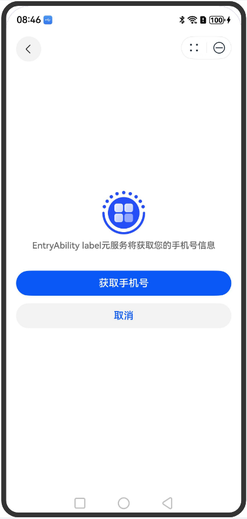
Launches the function page for obtaining a user's phone number. Before using this API, complete the environment configuration by referring to Getting Started. After obtaining the code, send it to your backend, and call the server API to consume the code for obtaining a user-level credential. Then, call the API for obtaining user information to obtain the user's phone number. Each code is valid for 5 minutes and can be consumed only once. The code serves as the authorization code required by the user-level credential acquisition API.
Since: 1.0.12
Parameters
The input parameter is an object containing the following fields.
| Parameter | Type | Mandatory | Description |
|---|---|---|---|
| success | function | No | Callback triggered when the API call is successful. |
| fail | function | No | Callback triggered when the API call fails. |
| complete | function | No | Callback triggered when the API call is complete, regardless of success or failure. |
Return value of success
| Parameter | Type | Description |
|---|---|---|
| code | string | Temporary sign-in credential. |
Return value of fail
| Parameter | Type | Description |
|---|---|---|
| errCode | number | Error code. |
| errMsg | string | Error message. |
Error code information
The error code is 14000201, indicating that the phone number fails to be obtained. For details about the possible causes, see ArkTS Error Codes.
Example:
has.getPhoneNumber({
  success: (res) => {
    console.info('getPhoneNumber success', res);
  },
  fail: (err) => {
    console.error('getPhoneNumber fail', err);
  },
  complete: (res) => {
    console.info('getPhoneNumber complete', res);
  }
});
Below shows the UI effect.
[h2]has.getAvatarInfo
has.getAvatarInfo(Object object): void
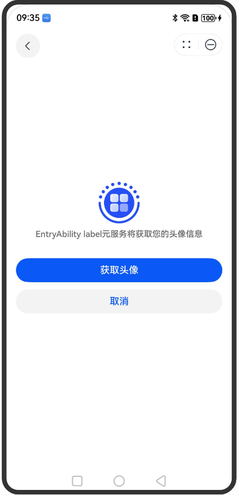
Launches the function page for obtaining a user's profile photo. Before using this API, see Configuring the Client ID.
Since: 1.0.12
Parameters
The input parameter is an object containing the following fields.
| Parameter | Type | Mandatory | Description |
|---|---|---|---|
| success | function | No | Callback triggered when the API call is successful. |
| fail | function | No | Callback triggered when the API call fails. |
| complete | function | No | Callback triggered when the API call is complete, regardless of success or failure. |
Return value of success
| Parameter | Type | Description |
|---|---|---|
| avatarUri | string | Local path of the profile photo. |
Example:
has.getAvatarInfo({
  success: (res) => {
    console.info('getAvatarInfo success', res);
  },
  fail: (err) => {
    console.error('getAvatarInfo fail', err);
  },
  complete: (res) => {
    console.info('getAvatarInfo complete', res);
  }
});
Below shows the UI effect.
[h2]has.getServiceSubscription
has.getServiceSubscription(Object object): void
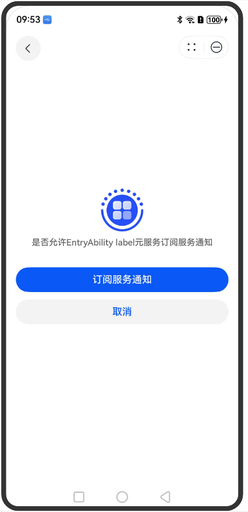
Launches the subscription service page. Before using this API, refer to Enabling Push Kit and Selecting a Subscription Template.
Since: 1.0.12
Parameters
The input parameter is an object containing the following fields.
| Parameter | Type | Mandatory | Description |
|---|---|---|---|
| tmplIds | Array<string> | Yes | IDs of the message templates to be subscribed to. A maximum of three messages can be subscribed to at a time. |
| success | function | No | Callback triggered when the API call is successful. |
| fail | function | No | Callback triggered when the API call fails. |
| complete | function | No | Callback triggered when the API call is complete, regardless of success or failure. |
Return value of success
| Parameter | Type | Description |
|---|---|---|
| errMsg | string | Call result. 'requestSubscribeMessage:ok' is returned if the API call is successful. |
Example:
has.getServiceSubscription({
  tmplIds: [''],
  success: (res) => {
    console.info('getServiceSubscription success', res);
  },
  fail: (err) => {
    console.error('getServiceSubscription fail', err);
  },
  complete: (res) => {
    console.info('getServiceSubscription complete', res);
  }
});
Below shows the UI effect.
[h2]PurchaseData
Represents the order information and subscription status information in JWS format.
Since: 1.0.10
| Name | Type | Mandatory | Description |
|---|---|---|---|
| type | number | Yes | Product type. 0: consumable 1: non-consumable 2: auto-renewable subscription 3: non-renewable subscription |
| jwsPurchaseOrder | string | No | Order information in JWS format. Follow the instructions in Verifying the Signature in the Returned Result to decode and perform signature verification for the returned result to obtain purchase data in JSON format. Check the parameters in the JSON string in PurchaseOrderPayload. |
| jwsSubscriptionStatus | string | No | Subscription status information in JWS format. You can decode the signature verification by referring to Verifying the Signature in the Returned Result to obtain the JSON string containing the subscription status information. |
[h2]PurchaseOrderPayload
Represents the purchase order model, which supports consumables, non-consumables, and auto-renewable subscriptions.
Since: 1.0.10
| Name | Type | Mandatory | Description |
|---|---|---|---|
| environment | string | Yes | Environment type. - NORMAL: normal environment - SANDBOX: sandbox environment |
| purchaseOrderId | string | Yes | Order ID of a purchase. |
| purchaseToken | string | Yes | Purchase token. In a consumable/non-consumable purchase, each purchase token matches a specific order. In a subscription purchase, each purchase token matches a subscription ID. |
| applicationId | string | Yes | App ID. |
| productId | string | Yes | Product ID. |
| productType | string | Yes | Product type. The options are as follows: 0: consumable 1: non-consumable 2: auto-renewable subscription 3: non-renewable subscription |
| purchaseTime | number | Yes | Purchase time (UTC timestamp, in milliseconds). If the purchase is not complete, this parameter is left empty. |
| finishStatus | string | No | Delivery status. The options are as follows: 1: The product is delivered. 2: The product is not delivered. |
| needFinish | boolean | No | Whether the delivery should be acknowledged to complete the purchase process. The options are as follows: - true: Delivery acknowledgement is required. - false: Delivery acknowledgement is optional. |
| price | number | Yes | Price, in cents. |
| currency | string | Yes | Currency. For details, please refer to the ISO 4217 standard. For example, CNY, USD, and MYR. |
| developerPayload | string | No | Information stored on the merchant side, which an app passes when calling the payment API. |
| purchaseOrderRevocationReasonCode | string | No | Reason for revoking an order. 0: others. 1: order revoked at the user's request. |
| revocationTime | number | No | Order revocation time (UTC timestamp, in milliseconds). |
| offerTypeCode | string | No | Offer type. 1: introductory offers for new users. 2: promotional offers for specific user groups. |
| offerId | string | No | Promotional offer ID. |
| countryCode | string | Yes | Country/region code, which is used to identify the country or region. For details, please refer to the ISO 3166 standard. |
| signedTime | number | Yes | Signature time (UTC timestamp, in milliseconds). |
[h2]SubGroupStatusPayload
Represents the subscription status information related to a subscription group.
Since: 1.0.10
| Name | Type | Mandatory | Description |
|---|---|---|---|
| environment | string | Yes | Environment type. - NORMAL: normal environment - SANDBOX: sandbox environment |
| applicationId | string | Yes | App ID. |
| packageName | string | Yes | App package name. |
| subGroupId | string | Yes | Subscription group ID. |
| lastSubscriptionStatus | object | No | Final subscription status (SubscriptionStatus) within a subscription group. For example, if a user switches from subscription A to B and then to C, this parameter indicates the status of subscription C. |
| historySubscriptionStatusList | object[] | No | List of all historical subscription statuses (SubscriptionStatus) within a subscription group. For example, if a user switches from subscription A to B and then to C, this parameter indicates the statuses of subscriptions C, B, and A. |
[h2]SubscriptionStatus
Represents subscription status information.
Since: 1.0.10
| Name | Type | Mandatory | Description |
|---|---|---|---|
| subGroupGenerationId | string | Yes | Subscription group generation ID. - This ID remains unchanged when a user switches between different subscription products in the same group. - This ID will change when a user purchases the product again after the subscription expires and the retention period ends. |
| subscriptionId | string | Yes | Subscription ID. The ID will change when: - A user switches from a subscription to another. - A user purchases the product again after the subscription expires and the retention period ends. |
| purchaseToken | string | Yes | Purchase token. In a consumable/non-consumable purchase, each purchase token matches a specific order. In a subscription purchase, each purchase token matches a subscription ID. |
| status | string | Yes | Subscription status. 1: active. 2: expired. 3: billing retry. 5: revoked. |
| expiresTime | number | Yes | Expiration time of an auto-renewable subscription. The value is a UTC timestamp, in milliseconds. |
| lastPurchaseOrder | object | No | Latest purchase order for a subscription. For details about the parameters contained in the purchase order, see PurchaseOrderPayload. |
| recentPurchaseOrderList | object[] | No | List of the recently purchased subscriptions, including the purchase orders generated upon renewal and balance conversion. For details about the parameters contained in the purchase order, see PurchaseOrderPayload. |
| renewalInfo | object | No | Latest future billing plan of the current subscription. For details about the parameters contained in the billing plan, see SubRenewalInfo. |
[h2]SubRenewalInfo
Represents the renewal information about a subscription.
Since: 1.0.10
| Name | Type | Mandatory | Description |
|---|---|---|---|
| environment | string | Yes | Environment type. - NORMAL: normal environment - SANDBOX: sandbox environment |
| subGroupGenerationId | string | Yes | Subscription group generation ID. - This ID remains unchanged when a user switches between different subscription products in the same group. - This ID will change when a user purchases the product again after the subscription expires and the retention period ends. |
| nextRenewPeriodProductId | string | No | ID of the product to be renewed in the next billing cycle. |
| productId | string | Yes | ID of the product that is currently active. |
| autoRenewStatusCode | string | Yes | Auto-renewal status. 0: disabled. 1: enabled. |
| hasInBillingRetryPeriod | boolean | Yes | Whether the system is still attempting to retry the billing. - true: yes - false: no |
| priceIncreaseStatusCode | string | No | Price increase status code. 1: The user has not agreed to a price increase. 2: The user has agreed to a price increase. |
| offerTypeCode | string | No | Offer type. 1: introductory offers for new users. 2: promotional offers for specific user groups. |
| offerId | string | No | Promotional offer ID. |
| renewalPrice | number | No | Price for the next renewal, in currency sub-units. The specific sub-unit, like cents, varies by currency. This field is not returned if the subscription is revoked. |
| currency | string | No | Currency. For details, please refer to the ISO 4217 standard. For example, CNY, USD, and MYR. |
| renewalTime | number | No | Renewal time (UTC timestamp, in milliseconds). |
| expirationIntent | string | No | Reason for subscription renewal failure. 1: The user canceled the subscription. 2: The product is invalid. 3: The subscription agreement is invalid. 4: An exception occurred during billing. 5: The user did not agree to the price increase. 6: The failure reason is unknown. |
[h2]UIWindowParameter
Window parameters.
Since: 1.0.10
| Name | Type | Mandatory | Description |
|---|---|---|---|
| windowScreenMode | number | Yes | UI window mode. 1: pop-up. 2: full-screen. |
[h2]Product
Details of a product.
Since: 1.0.10
| Name | Type | Mandatory | Description |
|---|---|---|---|
| id | string | Yes | Product ID. |
| type | number | Yes | Product type. 0: consumable 1: non-consumable 2: auto-renewable subscription 3: non-renewable subscription |
| name | string | Yes | Product name, which you set when adding a product. The name is displayed on the checkout screen of IAP Kit. |
| description | string | Yes | Product description, which you set when adding a product. |
| price | string | Yes | Displayed price of a product, in the format Currency+Price, for example, EUR 0.15. In some countries or regions, the value format is Currency symbol+Price, for example, ¥0.15 in the Chinese mainland. The price includes the tax. - For a consumable or non-consumable with a promotional price, this parameter indicates the promotional price. If the product has no promotional price, this parameter indicates its original price. - For an auto-renewable subscription, this parameter indicates its original price. Note: This parameter has been deprecated. You are advised to use localPrice instead. |
| localPrice | string | No | Displayed price of a product, in the format Currency+Price, for example, EUR 0.15. In some countries or regions, the value format is Currency symbol+Price, for example, ¥0.15 in the Chinese mainland. The price includes the tax. - For a consumable or non-consumable with a promotional price, this parameter indicates the promotional price. If the product has no promotional price, this parameter indicates its original price. - For an auto-renewable subscription, this parameter indicates its original price. |
| microPrice | number | Yes | Product price in micro unit, which equals the actual product price multiplied by 1,000,000. For example, if the actual price of a product is US$1.99, the product price in micro unit is 1,990,000 (1.99*1000000). - For a consumable, non-consumable, or non-renewable subscription with a promotional price, this parameter indicates the promotional price in micro unit. If the product has no promotional price, this parameter indicates its original price in micro unit. - For an auto-renewable subscription, this parameter indicates its original price in micro unit. |
| originalLocalPrice | string | Yes | Original price of a product, in the format Currency+Price, for example, EUR 0.15. In some countries or regions, the value format is Currency symbol+Price, for example, ¥0.15 in the Chinese mainland. The price includes the tax. - For a consumable, non-consumable, or non-renewable subscription, this parameter indicates the original price regardless of whether a promotional price is set. - For an auto-renewable subscription, this parameter will not be returned. |
| originalMicroPrice | number | Yes | Original price in micro unit of a product. It equals the original product price multiplied by 1,000,000. For example, if the original price of a product is US$1.99, the product price in micro unit is 1,990,000 (1.99*1000000). - For a consumable, non-consumable, or non-renewable subscription, this parameter indicates the original price in micro unit regardless of whether a promotional price is set. - For an auto-renewable subscription, this parameter will not be returned. |
| currency | string | Yes | Currency used to pay for a product, for example, CNY. |
| status | number | No | Product status. 0: valid. 1: canceled, that is, deleted. Products in this status cannot be renewed or subscribed to. 3: offline. Offline subscriptions cannot be purchased by new users, but existing subscribers can still renew their plans. |
| subscriptionInfo | SubscriptionInfo | No | Information about an auto-renewable subscription. |
| promotionalOffers | PromotionalOffer[] | No | List of promotional offers supported by a subscription. |
| jsonRepresentation | string | No | Original JSON character string of product details. |
[h2]SubscriptionInfo
Subscription information.
Since: 1.0.10
| Name | Type | Mandatory | Description |
|---|---|---|---|
| periodUnit | number | Yes | Unit of the subscription billing cycle. 0: day. 1: week. 2: month. 3: year. 4: minute. (Reserved parameter, which is not supported currently.) |
| periodCount | number | Yes | Number of billing cycles for a subscription. |
| groupId | string | Yes | Subscription group ID. |
| groupLevel | number | Yes | Product level. |
| hasEligibilityForIntroOffer | boolean | No | Whether a user has already enjoyed the promotion of a subscription in the same group. The options are as follows: - true: yes - false: no - Other values: No relevant information is obtained. |
| introductoryOffer | SubscriptionOffer | No | Promotion information. |
[h2]SubscriptionOffer
Promotion information.
Since: 1.0.10
| Name | Type | Mandatory | Description |
|---|---|---|---|
| paymentMode | number | Yes | Payment method for a promotion. 1: free trial. 2: pay-per-use. 3: upfront payment. |
| periodUnit | number | Yes | Unit of the subscription billing cycle. 0: day. 1: week. 2: month. 3: year. 4: minute. (Reserved parameter, which is not supported currently.) |
| periodCount | number | Yes | Period count of a promotion. |
| localPrice | string | Yes | Promotional price of a product, in the format Currency+Price, for example, EUR 0.15. In some countries or regions, the value format is Currency symbol+Price, for example, ¥0.15 in the Chinese mainland. |
| microPrice | number | Yes | Promotional price in micro unit. Promotional price in micro unit, which equals the product price multiplied by 1,000,000. |
| offerType | number | Yes | Promotion type. 0: introductory offers for new users. 1: promotional offers for specific user groups. |
[h2]PromotionalOffer
Promotional offer information that you can define for a subscription.
Since: 1.0.10
| Name | Type | Mandatory | Description |
|---|---|---|---|
| offerId | string | Yes | Promotional offer ID. |
| paymentMode | number | Yes | Payment method for a promotion. 1: free trial. 2: pay-per-use. 3: upfront payment. |
| periodUnit | number | No | Unit of the subscription billing cycle. 0: day. 1: week. 2: month. 3: year. 4: minute. (Reserved parameter, which is not supported currently.) |
| periodCount | number | No | Number of billing cycles for a subscription. |
| localPrice | string | Yes | Discounted price of a product, in the format Currency+Price, for example, EUR 0.15. In some countries or regions, the value format is Currency symbol+Price, for example, ¥0.15 in the Chinese mainland. |
| microPrice | number | Yes | Discounted price in micro unit, which equals the actual product price multiplied by 1,000,000. For example, if the actual price of a product is US$1.99, the product price in micro unit is 1,990,000 (1.99*1000000). |