Intelligent Assistant
Chat with our virtual assistant to get answers promptly.
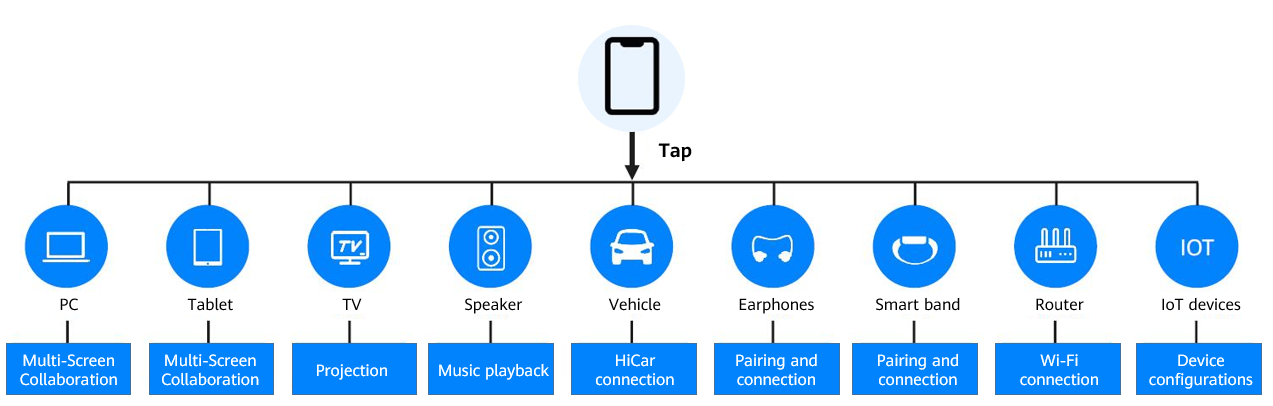
HUAWEI OneHop Engine serves as a full scenario solution for seamless interaction between multiple devices. By leveraging the NFC-enabled one-tap operation, OneHop Engine simplifies the collaboration and interaction between a phone and another device. For example, Huawei's Multi-Screen Collaboration feature released with the EMUI 10.0 system allows users to operate their phone on their tablet or laptop with a simple tap, boosting productivity without requiring additional peripheral devices. The one-tap connection is made possible through HUAWEI OneHop.
In addition, OneHop Engine supports non-Huawei apps and devices. You can utilize OneHop Engine to provide seamless and efficient interaction between phones and other devices across all scenarios.
The following lists the development scenarios of OneHop Engine.
Syncing apps across devices: This capability is oriented to app developers. It allows apps to be opened in another device, with the exact same content and status as it was on the first device so users can easily continue what they were doing on the second device. This feature is currently only available between Huawei devices. Users simply need to tap their Huawei phone against the NFC tag of another Huawei device, then the two devices will connect and sync the data and status of the app running in the foreground, to perfectly transfer it to the second device. With this technology, users can easily switch devices in the middle of editing documents or watching videos without having to worry about saving multiple files or finding the place again. OneHop Engine provides the ability to connect and sync data between different devices effortlessly, letting app collaboration between different devices become simpler and more efficient.
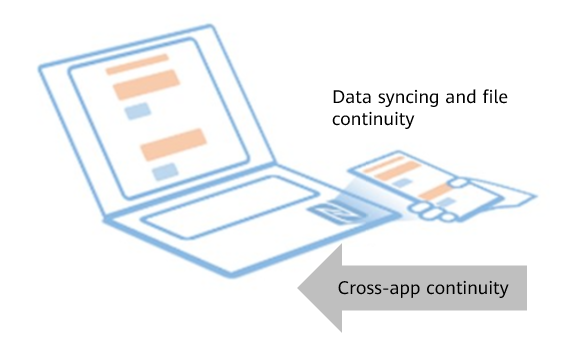
The figure above shows how data is synced between a Huawei phone and laptop after tapping the phone against the NFC tag.
Cross-device quick operations: This capability is oriented to hardware manufacturers. OneHop Engine functions as a bridge between non-Huawei devices and Huawei phones, providing versatile new features that make the interaction between these devices and Huawei phones simpler and more efficiently, such as OneHop File Sharing and projection. When the user taps their Huawei phone against the NFC tag of the non-Huawei device, the system will automatically establish a connection and execute the operations.
The corresponding operations are preset, for example, when tapping the phone against the NFC tag on a printer, it will trigger printing. If a TV is detected, the phone screen will be projected onto it. As for audio devices, it will sync the audio of the phone. Hardware device developers can use the SDK to integrate OneHop Engine to implement the corresponding quick operations, providing instant services for users.
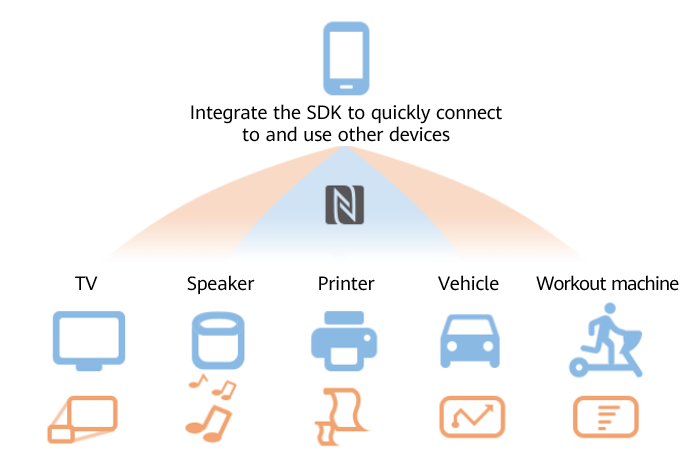
The figure above shows the quick operations that a Huawei phone can trigger with one tap after OneHop Engine is integrated.
Huawei Share OneHop: Enables users to transfer files from their device to another device with an NFC tag, like the OneHop File Sharing feature.
Projection: Enables users to project their device to an external display with an NFC tag.
Connection: Enables users to connect to or pair other devices.
Fast: Faster connecting with just a tap by using NFC technology, instead of QR code scanning.
Simple: Accurate recognition of non-Huawei devices achieved with simple and unified language makes quick operations effective and convenient.
Seamless: Enables seamless interaction between different devices by compacting triggering, detection, device connection, transfer, and app launching into one simple step for users. All connections are initiated locally to ensure data privacy and keep any private data stored on their device.
Hardware requirements: The device initiating connection should support NFC, and the device being connected to should have an NFC tag.
Cross-device quick operations: The following figure shows the corresponding quick operations of devices.