


Intelligent Assistant
Chat with our virtual assistant to get answers promptly.
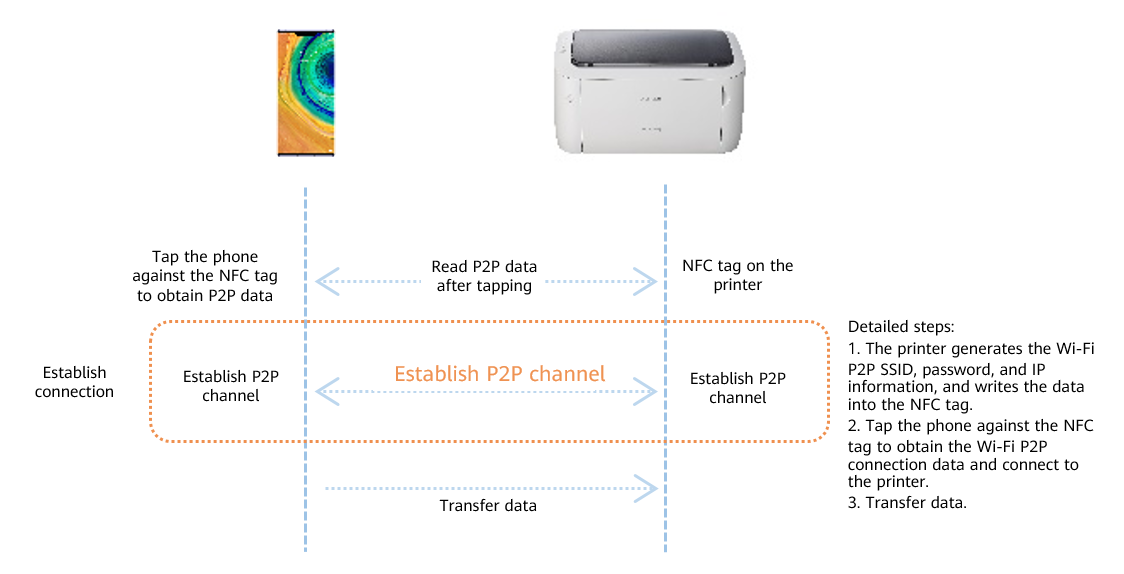
HUAWEI OneHop Engine serves as a full scenario solution for seamless interaction between multiple devices. By leveraging the NFC-enabled one-tap operations, OneHop Engine simplifies the collaboration and interaction between a phone and another device.
| Device Type | Shortcuts | Open Status |
| Linux compatible printers | File printing with a single tap (Currently, only images can be printed) | Opened |
The following image shows an example of tapping the phone against the printer to transfer images to print.
Sign in to HUAWEI Developers with a verified HUAWEI ID. For information about registration, login, and identity verification, see Registration and Verification.
The Linux device to integrate OneHop Engine must meet the following requirements.
| Item | Recommended Configuration | Minimum Configuration |
| Operating system | Linux Kernel 3.10 or later | Kernel version 3.10 or later |
| Indispensable component | The system supports wpa_supplicant 2.6 or later | The system supports wpa_supplicant 2.6 or later |
| Primary chip | None | None |
| RAM | More than 2 MB | More than 1.5 MB |
| ROM | More than 2 MB | More than 1.5 MB |
| Wi-Fi | 802.11g/n/a, 20 MHz or 802.11n, 40 MHz Supports P2P transfer protocols | 802.11g/n/a, 20 MHz or 802.11n, 40 MHz Supports P2P transfer protocols |
| NFC | Supports ISO14443 or ISO15693 standards. Supports Card Emulation Mode Reserved read/write space: 256 bytes Active NFC (data can be written into the tag in real time) | Supports ISO14443 or ISO15693 standards. Supports Card Emulation Mode Reserved read/write space: 100 bytes Active NFC (data can be written into the tag in real time) |
| Bluetooth (Optional) | Supports Bluetooth 2.1 and the RFCOMM protocol Supports BLE, GATT profile | Supports Bluetooth 2.1 standard and the RFCOMM protocol |
Prepare the integration and development tool chain and debugging environment.
Currently, OneHop Engine is compiled using GCC 4.9.0. Be mindful of the GCC compatibility of the Linux system.
| Device Type | Package Acquisition Method |
| Linux compatible printers | Contact HUAWEI Developers technical support to get the development package containing the OneHop printing feature. |
Contact email: devConnect@huawei.com
The file structure contained in the development package is as follows.
| Name | Description |
| onehop_api.h | API definition file |
| driver_adapt.h | Driver API definition file |
| libonehop_kit.so | OneHop Engine library file |
| onehoplog.conf | OneHop Engine log configuration file |
| onehopkit-demo.zip | The sample code in this document. |
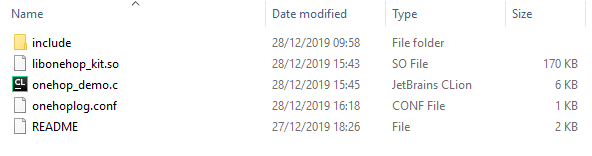
1. Create a project. The specific procedure depends on the actual development environment. The directory structure for the project is as follows.
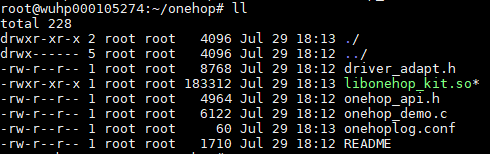
2. Use a tool that can transfer FTP files to upload the project to the Linux environment, as shown in the following figure.
In the Linux development environment, run the compilation commands to compile the project. For details, see the README file in the sample code package. The onehop_demo file is compiled and generated, as shown in the following figures.
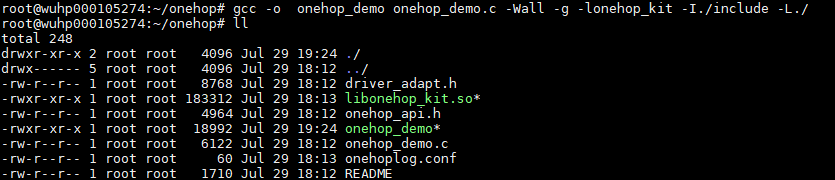
Note: In this example, the executable file for the demo is named as onehop_demo. The name can be set based on your actual requirements.
Configure variables for the Linux environment where the demo program runs. For details about how to configure environment variables, please refer to the README file in the sample code package. After the configuration, you can run the demo program. The following figure shows the commands for configuring environment variables and running the demo program.
