


Intelligent Assistant
Chat with our virtual assistant to get answers promptly.
This animation allows users to change the view by panning or tilting their phones. An example is the theme Ben Granden. You can search for it in HUAWEI Themes to experience the effect.
Some materials used in the demo video:
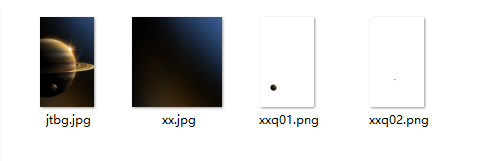
- <?xml version="1.0" encoding="utf-8"?>
- <Lockscreen version="1" frameRate="60" displayDesktop="true" screenWidth="1080">
- <!-- Acceleration sensor, visible variable-->
- <VariableBinders>
- <SensorBinder type="accelerometer">
- <Variable name="x_1" index="0"/>
- <Variable name="y_1" index="1"/>
- </SensorBinder>
- </VariableBinders>
- <!-- The star background references the X-axis direction of the acceleration sensor. That is, the star background changes when the user rotates the mobile phone left or right.-->
- <Image x="#screen_width/2-(#x_1)*30" y="#screen_height/2" align="center" alignV="center" src="xx.jpg" visibility="eq(#dt,1)"/>
- <!-- The small planet references the X-axis and Y-axis directions of the acceleration sensor. That is, the small planet changes when the user rotates the mobile phone up, down, left, or right.-->
- <Image x="#screen_width/2+(#x_1)*20" y="#screen_height/2-(#y_1)*10" align="center" alignV="center" src="xxq01.png" visibility="eq(#dt,1)">
- <SizeAnimation>
- <Size w="1152" h="1920" time="0"/>
- <Size w="1440" h="2400" time="900"/>
- <Size w="1440" h="2400" time="15000"/>
- </SizeAnimation>
- </Image>
- <Image x="#screen_width/2+(#x_1)*10" y="#screen_height/2-(#y_1)*5" align="center" alignV="center" src="xxq02.png" visibility="eq(#dt,1)">
- <SizeAnimation>
- <Size w="1152" h="1920" time="0"/>
- <Size w="1440" h="2400" time="900"/>
- <Size w="1440" h="2400" time="15000"/>
- </SizeAnimation>
- </Image>
- <!-- Slide up to unlock the screen.-->
- <Button x="0" y="0" w="#screen_width" h="#screen_height" visibility="eq(#stapp,1)">
- <Triggers>
- <Trigger action="up">
- <ExternCommand command="unlock" condition="gt(#touch_begin_y-#touch_y,260)"/>
- </Trigger>
- </Triggers>
- </Button>
- </Lockscreen>