


Intelligent Assistant
Chat with our virtual assistant to get answers promptly.
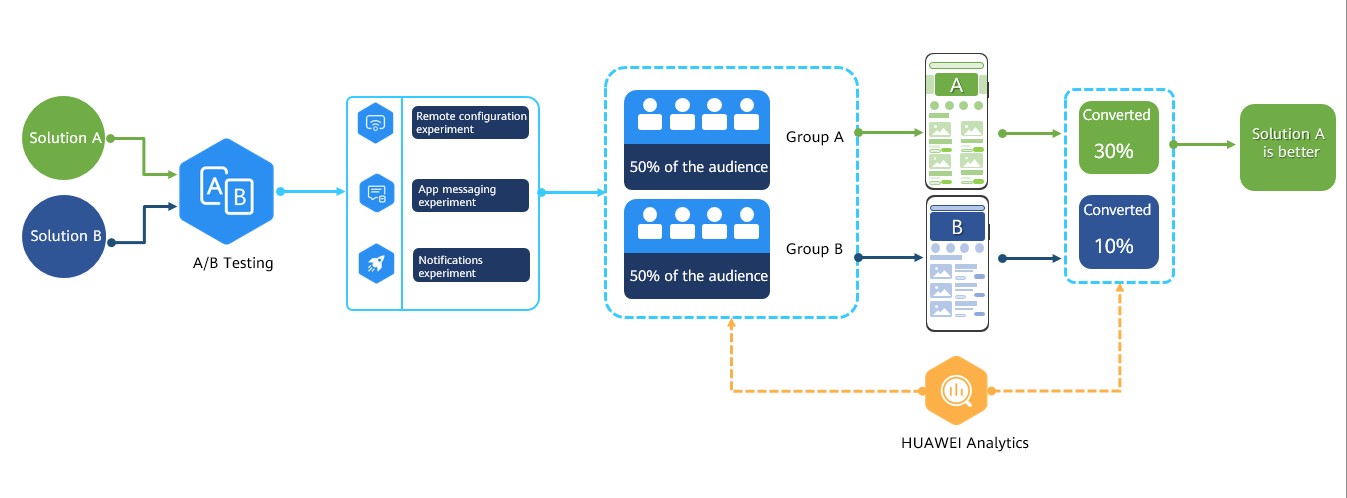
A/B Testing utilizes scientific experimental data to help you optimize your app experience and improve key conversion and growth indicators. You can use the service to create one or more A/B tests engaging different audiences to compare your variants of app UI design, copywriting, product functions, or marketing activities for performance indicators and find the best one that meets user requirements. This helps you make correct decisions. Currently, you can use A/B Testing to run these experiments:
|
Function | Description | Supported App |
|---|---|---|
Improving product use experience through Remote Configuration | In a remote configuration experiment, you can test parameters across various groups to identify the parameter settings that can better address your needs. |
|
Attracting users through push notifications | In a notifications experiment, you can test various notification variants of your notification copywriting and message layout to find the optimal variant. | Android app |
Enhancing user loyalty through in-app messages | In an app messaging experiment, you can test various in-app message variants to find the better message style and layout. |
|
Before you start an A/B test, segment your users to find out audiences for the test, based on the version, language, and other filter conditions such as user attributes and audiences collected by Prediction and HUAWEI Analytics. A notifications experiment, an app messaging experiment, or a remote configuration experiment is available to you to divide target users into different groups by proportion, and you can configure different policies for them. By analyzing user data indicators of various groups collected by HUAWEI Analytics, such as, retention, interaction duration, and click-through rate, you can reach a final solution that better meets user requirements.
Platform | Supported | Supported Experiment Types |
|---|---|---|
Android |
|
|
iOS |
|
|
HarmonyOS |
|
|
Web |
| Remote configuration |
Quick app |
|
|
Server SDK | N/A | N/A |
REST API | N/A | N/A |
No. | Step | Details |
|---|---|---|
1 | Formulate the A/B Testing scheme | Before performing an A/B test, analyze your service, make a testing goal, and specify the testing input. |
2 | Enable A/B Testing | Enable A/B Testing and enable services on which A/B Testing depends, such as Push Kit, HUAWEI Analytics, and Prediction. |
3 | Create an experiment | After creating a remote configuration experiment, an app messaging experiment, or a notifications experiment, you can:
|
4 | Manage the experiment | After an experiment is created, you can manage it as follows:
|
Free of charge.