


Intelligent Assistant
Chat with our virtual assistant to get answers promptly.
|
Video Player is loading. This is a modal window. The media could not be loaded, either because the server or network failed or because the format is not supported.
358
|
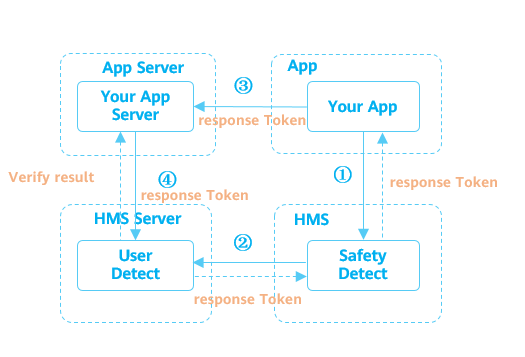
This API can help your app prevent fake user behavior, such as batch registration, credential stuffing attacks, activity bonus hunting, and content crawling.
- private void initUserDetect() {
- // Replace with your activity or context as a parameter.
- SafetyDetectClient client = SafetyDetect.getClient(MainActivity.this);
- client.initUserDetect().addOnSuccessListener(new OnSuccessListener<Void>() {
- @Override
- public void onSuccess(Void v) {
- // Indicates that communication with the service was successful.
- }
- }).addOnFailureListener(new OnFailureListener() {
- @Override
- public void onFailure(Exception e) {
- // An error occurred during communication with the service.
- }
- });
- }
- private fun initUserDetect() {
- // Replace with your activity or context as a parameter.
- val client = SafetyDetect.getClient(this@MainActivity)
- client.initUserDetect().addOnSuccessListener {
- // Indicates that communication with the service was successful.
- }.addOnFailureListener {
- // An error occurred during communication with the service.
- }
- }
To call the UserDetect API, perform the following steps:
To initiate a detection request, you need to call the userDetection method. Generally, this method is triggered when a user touches a UI control (such as a button). To call the userDetection method, perform the following steps:
- public void onClick(View v) {
- SafetyDetectClient client = SafetyDetect.getClient(getActivity());
- String appId = "your_app_id";
- client.userDetection(appId)
- .addOnSuccessListener(new OnSuccessListener<UserDetectResponse>() {
- @Override
- public void onSuccess(UserDetectResponse userDetectResponse) {
- // Indicates that communication with the service was successful.
- String responseToken = userDetectResponse.getResponseToken();
- if (!responseToken.isEmpty()) {
- // Send the response token to your app server, and call the cloud API of HMS Core on your server to obtain the fake user detection result.
- }
- }
- })
- .addOnFailureListener(new OnFailureListener() {
- @Override
- public void onFailure(Exception e) {
- // An error occurred during communication with the service.
- String errorMsg;
- if (e instanceof ApiException) {
- // An error with the HMS API contains some additional details.
- // You can use the apiException.getStatusCode() method to get the status code.
- ApiException apiException = (ApiException) e;
- errorMsg = SafetyDetectStatusCodes.getStatusCodeString(apiException.getStatusCode()) + ": "
- + apiException.getMessage();
- } else {
- // Unknown type of error has occurred.
- errorMsg = e.getMessage();
- }
- Log.i(TAG, "User detection fail. Error info: " + errorMsg);
- }
- });
- }
- override fun onClick(v: View?) {
- val client = SafetyDetect.getClient(activity)
- val appId = "your_app_id"
- client.userDetection(appId)
- .addOnSuccessListener { userDetectResponse ->
- // Indicates that communication with the service was successful.
- val responseToken = userDetectResponse.responseToken
- if (responseToken.isNotEmpty()) {
- // Send the response token to your app server, and call the cloud API of HMS Core on your server to obtain the fake user detection result.
- }
- }
- .addOnFailureListener { // There was an error communicating with the service.
- val errorMsg: String? = if (it is ApiException) {
- // An error with the HMS API contains some additional details.
- // You can use the apiException.getStatusCode() method to get the status code.
- (SafetyDetectStatusCodes.getStatusCodeString(it.statusCode) + ": "
- + it.message)
- } else {
- // Unknown type of error has occurred.
- it.message
- }
- Log.i(TAG, "User detection fail. Error info: $errorMsg")
- }
- }
If the UserDetect API has executed the onSuccess() method, the user has completed man-machine distinction. However, you still need to verify responseToken of the user on your app server.
To obtain the detection result, perform the following steps on the server:
Obtain an access token. For details, please refer to OAuth 2.0-based Authentication.
Call the cloud API to obtain the detection result. For details, please refer to Obtaining Fake User Detection Results (Outside the Chinese Mainland). The following is a request example:
- POST https://{domain}/rms/v1/userRisks/verify?appId=****** HTTP/1.1// For details about {domain}, please refer to Site Information.
- Content-Type: application/json;charset=utf-8
- {
- "accessToken":"AAWWHI94sgUR2RU5_P1ZptUiwLq7W8XWJO2LxaAPuXw4_HOJFXnBlN-q5_3bwlxVW_SHeDPx_s5bWW-9DjtWZsvcm9CwXe1FHJg0u-D2pcQPcb3sTxDTJeiwEb9WBPl_9w",
- "response":"1_55d74c04eab36a0a018bb7a879a6f49f072b023690cba936"
- }
- private void shutdownUserDetect() {
- // Replace with your activity or context as a parameter.
- SafetyDetectClient client = SafetyDetect.getClient(MainActivity.this);
- client.shutdownUserDetect().addOnSuccessListener(new OnSuccessListener<Void>() {
- @Override
- public void onSuccess(Void v) {
- // Indicates that communication with the service was successful.
- }
- }).addOnFailureListener(new OnFailureListener() {
- @Override
- public void onFailure(Exception e) {
- // An error occurred during communication with the service.
- }
- });
- }
- private fun shutdownUserDetect() {
- // Replace with your activity or context as a parameter.
- val client = SafetyDetect.getClient(this@MainActivity)
- client.shutdownUserDetect()
- .addOnSuccessListener {
- // Indicates that communication with the service was successful.
- }.addOnFailureListener {
- // An error occurred during communication with the service.
- }
- }
Common Error Codes
DETECT_FAIL: 19800
Detection failed. Call the UserDetect API again.
NETWORK_ERROR: 19002
The network is not connected. Ensure that the network is connected and call the UserDetect API again.
For details about the request API, please refer to the API Reference.
For details about the client verification logic, please refer to UserDetect in Client Sample Code.
For details about the server verification logic, please refer to UserDetect in Server Sample Code.