


智能客服
你问我答,随时在线为你解决问题
提供分隔器组件,分隔不同内容块/内容元素。
该组件从API Version 7开始支持。后续版本如有新增内容,则采用上角标单独标记该内容的起始版本。
无
Divider()
卡片能力: 从API version 9开始,该接口支持在ArkTS卡片中使用。
元服务API: 从API version 11开始,该接口支持在元服务中使用。
系统能力: SystemCapability.ArkUI.ArkUI.Full
除支持通用属性外,还支持以下属性:
vertical(value: boolean)
设置分割线的方向。
卡片能力: 从API version 9开始,该接口支持在ArkTS卡片中使用。
元服务API: 从API version 11开始,该接口支持在元服务中使用。
系统能力: SystemCapability.ArkUI.ArkUI.Full
参数:
| 参数名 | 类型 | 必填 | 说明 |
|---|---|---|---|
| value | boolean | 是 | 使用水平分割线还是垂直分割线。 false:水平分割线;true:垂直分割线。 默认值:false |
color(value: ResourceColor)
设置分割线的颜色。
卡片能力: 从API version 9开始,该接口支持在ArkTS卡片中使用。
元服务API: 从API version 11开始,该接口支持在元服务中使用。
系统能力: SystemCapability.ArkUI.ArkUI.Full
参数:
| 参数名 | 类型 | 必填 | 说明 |
|---|---|---|---|
| value | ResourceColor | 是 | 分割线颜色。 默认值:'#33182431' 支持通过WithTheme设置通用分割线颜色 |
strokeWidth(value: number | string)
设置分割线的宽度。
卡片能力: 从API version 9开始,该接口支持在ArkTS卡片中使用。
元服务API: 从API version 11开始,该接口支持在元服务中使用。
系统能力: SystemCapability.ArkUI.ArkUI.Full
参数:
| 参数名 | 类型 | 必填 | 说明 |
|---|---|---|---|
| value | number | string | 是 | 分割线宽度。 默认值:1px 单位:vp 说明: 分割线的宽度不支持百分比设置。优先级低于通用属性height,超过通用属性设置大小时,按照通用属性进行裁切。部分设备硬件中存在1像素取整后分割线不显示问题,建议使用2像素。 |
lineCap(value: LineCapStyle)
设置分割线的端点样式。
卡片能力: 从API version 9开始,该接口支持在ArkTS卡片中使用。
元服务API: 从API version 11开始,该接口支持在元服务中使用。
系统能力: SystemCapability.ArkUI.ArkUI.Full
参数:
| 参数名 | 类型 | 必填 | 说明 |
|---|---|---|---|
| value | LineCapStyle | 是 | 分割线的端点样式。 默认值:LineCapStyle.Butt |
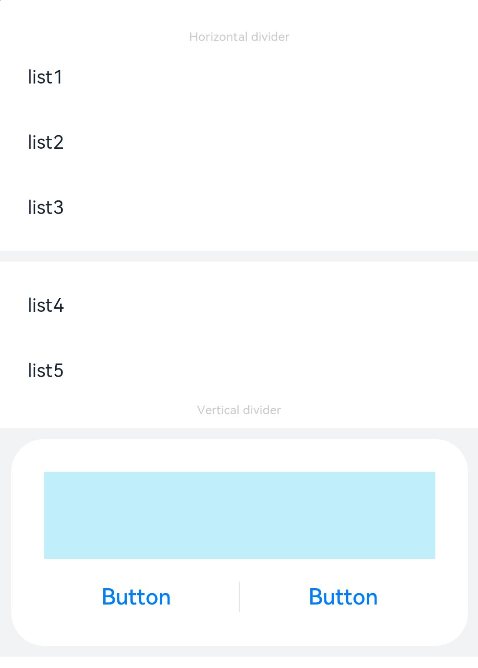
定义了Divider的样式,如方向、颜色及宽度。
- // xxx.ets
- @Entry
- @Component
- struct DividerExample {
- build() {
- Column() {
- // 使用横向分割线场景
- Text('Horizontal divider').fontSize(9).fontColor(0xCCCCCC)
- List() {
- ForEach([1, 2, 3], (item: number) => {
- ListItem() {
- Text('list' + item).width('100%').fontSize(14).fontColor('#182431').textAlign(TextAlign.Start)
- }.width(244).height(48)
- }, (item: number) => item.toString())
- }.padding({ left: 24, bottom: 8 })
-
- Divider().strokeWidth(8).color('#F1F3F5')
- List() {
- ForEach([4, 5], (item: number) => {
- ListItem() {
- Text('list' + item).width('100%').fontSize(14).fontColor('#182431').textAlign(TextAlign.Start)
- }.width(244).height(48)
- }, (item: number) => item.toString())
- }.padding({ left: 24, top: 8 })
-
- // 使用纵向分割线场景
- Text('Vertical divider').fontSize(9).fontColor(0xCCCCCC)
- Column() {
- Column() {
- Row().width(288).height(64).backgroundColor('#30C9F0').opacity(0.3)
- Row() {
- Button('Button')
- .width(136)
- .height(22)
- .fontSize(16)
- .fontColor('#007DFF')
- .fontWeight(500)
- .backgroundColor(Color.Transparent)
- Divider().vertical(true).height(22).color('#182431').opacity(0.6).margin({ left: 8, right: 8 })
- Button('Button')
- .width(136)
- .height(22)
- .fontSize(16)
- .fontColor('#007DFF')
- .fontWeight(500)
- .backgroundColor(Color.Transparent)
- }.margin({ top: 17 })
- }
- .width(336)
- .height(152)
- .backgroundColor('#FFFFFF')
- .borderRadius(24)
- .padding(24)
- }
- .width('100%')
- .height(168)
- .backgroundColor('#F1F3F5')
- .justifyContent(FlexAlign.Center)
- .margin({ top: 8 })
- }.width('100%').padding({ top: 24 })
- }
- }
智能客服
你问我答,随时在线为你解决问题
合作咨询
我们的专家服务团队将竭诚为您提供专业的合作咨询服务
解决方案
精准高效的一站式服务支持,助力开发者商业成功