















合作咨询
我们的专家服务团队将竭诚为您提供专业的合作咨询服务
提供用于图形绘制和媒体数据写入的Surface,XComponent负责将其嵌入到视图中,支持应用自定义Surface位置和大小。具体指南请参考自定义渲染 (XComponent)文档。
该组件从API Version 8 开始支持。后续版本如有新增内容,则采用上角标单独标记该内容的起始版本。
无
XComponent(options: XComponentOptions)
元服务API: 从API version 12开始,该接口支持在元服务中使用。
系统能力: SystemCapability.ArkUI.ArkUI.Full
参数:
| 参数名 | 类型 | 必填 | 说明 |
|---|---|---|---|
| options | XComponentOptions | 是 | 定义XComponent的具体配置参数。 |
XComponent(value: {id: string, type: XComponentType, libraryname?: string, controller?: XComponentController})
该接口从API version 12开始不再演进,推荐使用XComponent(options: XComponentOptions)。
元服务API: 从API version 12开始,该接口支持在元服务中使用。
系统能力: SystemCapability.ArkUI.ArkUI.Full
参数:
| 参数名 | 类型 | 必填 | 说明 |
|---|---|---|---|
| id | string | 是 | 组件的唯一标识,支持最大的字符串长度128。 |
| type | XComponentType | 是 | 用于指定XComponent组件类型。 |
| libraryname | string | 否 | 用Native层编译输出动态库名称(对应的动态库不支持跨模块加载),仅类型为SURFACE或TEXTURE时有效。 |
| controller | XComponentController | 否 | 给组件绑定一个控制器,通过控制器调用组件方法,仅类型为SURFACE或TEXTURE时有效。 |
XComponent(value: {id: string, type: string, libraryname?: string, controller?: XComponentController})
说明:
从API version 12开始废弃,建议使用XComponent(options: XComponentOptions)替代。
系统能力: SystemCapability.ArkUI.ArkUI.Full
参数:
| 参数名 | 类型 | 必填 | 说明 |
|---|---|---|---|
| id | string | 是 | 组件的唯一标识,支持最大的字符串长度128。 |
| type | string | 是 | 用于指定XComponent组件类型,可选值仅有两个为: -"surface":用于EGL/OpenGLES和媒体数据写入,开发者定制的绘制内容单独展示到屏幕上。 -"component"9+ :XComponent将变成一个容器组件,并可在其中执行非UI逻辑以动态加载显示内容。 其他值均会被视为"surface"类型 |
| libraryname | string | 否 | 应用Native层编译输出动态库名称(对应的动态库不支持跨模块加载),仅XComponent类型为"surface"时有效。 |
| controller | XComponentcontroller | 否 | 给组件绑定一个控制器,通过控制器调用组件方法,仅XComponent类型为"surface"时有效。 |
定义XComponent的具体配置参数。
元服务API: 从API version 12开始,该接口支持在元服务中使用。
系统能力: SystemCapability.ArkUI.ArkUI.Full
| 名称 | 类型 | 必填 | 说明 |
|---|---|---|---|
| type | XComponentType | 是 | 用于指定XComponent组件类型。 |
| controller | XComponentController | 是 | 给组件绑定一个控制器,通过控制器调用组件方法,仅类型为SURFACE或TEXTURE时有效。 |
| imageAIOptions | ImageAIOptions | 否 | 给组件设置一个AI分析选项,通过此项可配置分析类型或绑定一个分析控制器。 |
除支持通用属性外,还支持以下属性:
不支持foregroundColor、obscured和pixelStretchEffect属性,并且type为SURFACE类型时也不支持动态属性设置、自定义绘制、背景设置(backgroundColor除外)、图像效果(shadow除外)、maskShape和foregroundEffect属性。
对于TEXTURE和SURFACE类型的XComponent,当不设置renderFit属性时,取默认值为RenderFit.RESIZE_FILL。
enableAnalyzer(enable: boolean)
设置组件支持AI分析,当前支持主体识别、文字识别和对象查找等功能。
本功能需要搭配XComponentController的StartImageAnalyzer和StopImageAnalyzer一起使用。
不能和overlay属性同时使用,两者同时设置时overlay中CustomBuilder属性将失效。该特性依赖设备能力。
元服务API: 从API version 12开始,该接口支持在元服务中使用。
系统能力: SystemCapability.ArkUI.ArkUI.Full
参数:
| 参数名 | 类型 | 必填 | 说明 |
|---|---|---|---|
| enable | boolean | 是 | 是否启用图像分析功能 |
仅type为SURFACE和TEXTURE时该功能有效。
从API version 12开始,type为SURFACE或TEXTURE时,支持通用事件。
元服务API: 从API version 12开始,该接口支持在元服务中使用。
仅type为SURFACE或TEXTURE时以下事件有效:
onLoad(callback: (event?: object) => void )
插件加载完成时回调事件。
元服务API: 从API version 12开始,该接口支持在元服务中使用。
系统能力: SystemCapability.ArkUI.ArkUI.Full
参数:
| 参数名 | 类型 | 必填 | 说明 |
|---|---|---|---|
| event | object | 否 | 获取XComponent实例对象的context,context上挂载的方法由开发者在c++层定义。 |
onDestroy(event: () => void )
插件卸载完成时回调事件。
元服务API: 从API version 12开始,该接口支持在元服务中使用。
系统能力: SystemCapability.ArkUI.ArkUI.Full
XComponent组件的控制器,可以将此对象绑定至XComponent组件,然后通过控制器来调用组件方法。
元服务API: 从API version 12开始,该接口支持在元服务中使用。
系统能力: SystemCapability.ArkUI.ArkUI.Full
- xcomponentController: XComponentController = new XComponentController()
元服务API: 从API version 12开始,该接口支持在元服务中使用。
constructor()
XComponentController的构造函数。
元服务API: 从API version 12开始,该接口支持在元服务中使用。
系统能力: SystemCapability.ArkUI.ArkUI.Full
getXComponentSurfaceId(): string
获取XComponent对应Surface的ID,供@ohos接口使用,使用方式可参考相机管理,仅XComponent类型为SURFACE("surface")或TEXTURE时有效。
元服务API: 从API version 12开始,该接口支持在元服务中使用。
系统能力: SystemCapability.ArkUI.ArkUI.Full
返回值:
| 类型 | 描述 |
|---|---|
| string | XComponent持有Surface的ID。 |
setXComponentSurfaceSize(value: {surfaceWidth: number, surfaceHeight: number}): void
设置XComponent持有Surface的宽度和高度,仅XComponent类型为SURFACE("surface")或TEXTURE时有效。
该接口从API Version 12开始废弃,建议使用setXComponentSurfaceRect替代。
系统能力: SystemCapability.ArkUI.ArkUI.Full
参数:
| 参数名 | 类型 | 必填 | 说明 |
|---|---|---|---|
| surfaceWidth | number | 是 | XComponent持有Surface的宽度。 |
| surfaceHeight | number | 是 | XComponent持有Surface的高度。 |
getXComponentContext(): Object
获取XComponent实例对象的context,仅XComponent类型为SURFACE("surface")或TEXTURE时有效。
元服务API: 从API version 12开始,该接口支持在元服务中使用。
系统能力: SystemCapability.ArkUI.ArkUI.Full
返回值:
| 类型 | 描述 |
|---|---|
| Object | 获取XComponent实例对象的context,context包含的具体接口方法由开发者自定义,context内容与onLoad回调中的第一个参数一致。 |
setXComponentSurfaceRect(rect: SurfaceRect): void
设置XComponent持有Surface的显示区域,仅XComponent类型为SURFACE("surface")或TEXTURE时有效。
元服务API: 从API version 12开始,该接口支持在元服务中使用。
系统能力: SystemCapability.ArkUI.ArkUI.Full
参数:
| 参数名 | 类型 | 必填 | 说明 |
|---|---|---|---|
| rect | SurfaceRect | 是 | XComponent持有Surface的显示区域。 |
getXComponentSurfaceRect(): SurfaceRect
获取XComponent持有Surface的显示区域,仅XComponent类型为SURFACE("surface")或TEXTURE时有效。
元服务API: 从API version 12开始,该接口支持在元服务中使用。
系统能力: SystemCapability.ArkUI.ArkUI.Full
返回值:
| 类型 | 描述 |
|---|---|
| SurfaceRect | 获取XComponent持有Surface的显示区域。 |
onSurfaceCreated(surfaceId: string): void
当XComponent持有的Surface创建后进行该回调,仅XComponent类型为SURFACE("surface")或TEXTURE时有效。
元服务API: 从API version 12开始,该接口支持在元服务中使用。
系统能力: SystemCapability.ArkUI.ArkUI.Full
参数:
| 参数名 | 类型 | 必填 | 说明 |
|---|---|---|---|
| surfaceId | string | 是 | 回调该方法的时候,绑定XComponent持有Surface的ID。 |
仅当XComponent组件未设置libraryname参数时,会进行该回调。
onSurfaceChanged(surfaceId: string, rect: SurfaceRect): void
当XComponent持有的Surface大小改变后(包括首次创建时的大小改变)进行该回调,仅XComponent类型为SURFACE("surface")或TEXTURE时有效。
元服务API: 从API version 12开始,该接口支持在元服务中使用。
系统能力: SystemCapability.ArkUI.ArkUI.Full
参数:
| 参数名 | 类型 | 必填 | 说明 |
|---|---|---|---|
| surfaceId | string | 是 | 回调该方法的时候,绑定XComponent持有Surface的ID。 |
| rect | SurfaceRect | 是 | 回调该方法的时候,绑定XComponent持有Surface的显示区域。 |
仅当XComponent组件未设置libraryname参数时,会进行该回调。
onSurfaceDestroyed(surfaceId: string): void
当XComponent持有的Surface销毁后进行该回调,仅XComponent类型为SURFACE("surface")或TEXTURE时有效。
元服务API: 从API version 12开始,该接口支持在元服务中使用。
系统能力: SystemCapability.ArkUI.ArkUI.Full
参数:
| 参数名 | 类型 | 必填 | 说明 |
|---|---|---|---|
| surfaceId | string | 是 | 回调该方法的时候,绑定XComponent持有Surface的ID。 |
仅当XComponent组件未设置libraryname参数时,会进行该回调。
startImageAnalyzer(config: ImageAnalyzerConfig): Promise<void>
配置AI分析并启动AI分析功能,使用前需先启用图像AI分析能力。
该方法调用时,将截取调用时刻的画面帧进行分析,使用时需注意启动分析的时机,避免出现画面和分析内容不一致的情况。
若该方法尚未执行完毕,此时重复调用,则会触发错误回调。
分析类型不支持动态修改。
该特性依赖设备能力,不支持该能力的情况下,将返回错误码。
元服务API: 从API version 12开始,该接口支持在元服务中使用。
系统能力: SystemCapability.ArkUI.ArkUI.Full
参数:
| 参数名 | 类型 | 必填 | 说明 |
|---|---|---|---|
| config | ImageAnalyzerConfig | 是 | 执行AI分析所需要的入参,用于配置AI分析功能。 |
返回值:
| 类型 | 说明 |
|---|---|
| Promise<void> | Promise对象,用于获取AI分析是否成功执行。 |
错误码:
以下错误码的详细介绍请参见AI分析类库错误码。
| 错误码ID | 错误信息 |
|---|---|
| 110001 | Image analysis feature is unsupported. |
| 110002 | Image analysis is currently being executed. |
| 110003 | Image analysis is stopped. |
stopImageAnalyzer(): void
停止AI分析功能,AI分析展示的内容将被销毁。
在startImageAnalyzer方法未返回结果时调用本方法,会触发其错误回调。
该特性依赖设备能力。
元服务API: 从API version 12开始,该接口支持在元服务中使用。
系统能力: SystemCapability.ArkUI.ArkUI.Full
setXComponentSurfaceRotation(rotationOptions: SurfaceRotationOptions): void
设置XComponent持有Surface在屏幕旋转时是否锁定方向,仅XComponent类型为SURFACE("surface")时有效。
元服务API: 从API version 12开始,该接口支持在元服务中使用。
系统能力: SystemCapability.ArkUI.ArkUI.Full
参数:
| 参数名 | 类型 | 必填 | 说明 |
|---|---|---|---|
| rotationOptions | SurfaceRotationOptions | 是 | 设置XComponent持有Surface在屏幕旋转时是否锁定方向。 |
rotationOptions未配置时,默认XComponent持有Surface在屏幕旋转时不锁定方向,跟随屏幕进行旋转。
仅在屏幕旋转过程中生效,旋转完成后不再锁定Surface。
仅在屏幕旋转90°,即发生横竖屏切换时生效。
锁定旋转后的Buffer宽高需要保持不变,否则会有拉伸问题。
getXComponentSurfaceRotation(): Required<SurfaceRotationOptions>
获取XComponent持有Surface在屏幕旋转时是否锁定方向的设置,仅XComponent类型为SURFACE("surface")时有效。
元服务API: 从API version 12开始,该接口支持在元服务中使用。
系统能力: SystemCapability.ArkUI.ArkUI.Full
返回值:
| 类型 | 描述 |
|---|---|
| SurfaceRotationOptions | 获取XComponent持有Surface在屏幕旋转时是否锁定方向的设置。 |
用于描述XComponent持有Surface在屏幕旋转时是否锁定方向的设置。
元服务API: 从API version 12开始,该接口支持在元服务中使用。
系统能力: SystemCapability.ArkUI.ArkUI.Full
| 名称 | 类型 | 必填 | 说明 |
|---|---|---|---|
| lock | boolean | 否 | Surface在屏幕旋转时是否锁定方向,未设置时默认取值为false,即不锁定方向。 |
用于描述XComponent持有Surface的显示区域。
元服务API: 从API version 12开始,该接口支持在元服务中使用。
系统能力: SystemCapability.ArkUI.ArkUI.Full
| 名称 | 类型 | 必填 | 说明 |
|---|---|---|---|
| offsetX | number | 否 | Surface显示区域相对于XComponent组件左上角的x轴坐标,单位:px。 |
| offsetY | number | 否 | Surface显示区域相对于XComponent组件左上角的y轴坐标,单位:px。 |
| surfaceWidth | number | 是 | Surface显示区域的宽度,单位:px。 |
| surfaceHeight | number | 是 | Surface显示区域的高度,单位:px。 |
surfaceWidth和surfaceHeight属性在未调用setXComponentSurfaceRect也未设置border和padding等属性时,其取值大小为XComponent组件的大小。
surfaceWidth和surfaceHeight属性的取值都不可超过8192px,否则会导致渲染异常。
示例效果请以真机运行为准,当前DevEco Studio预览器不支持。
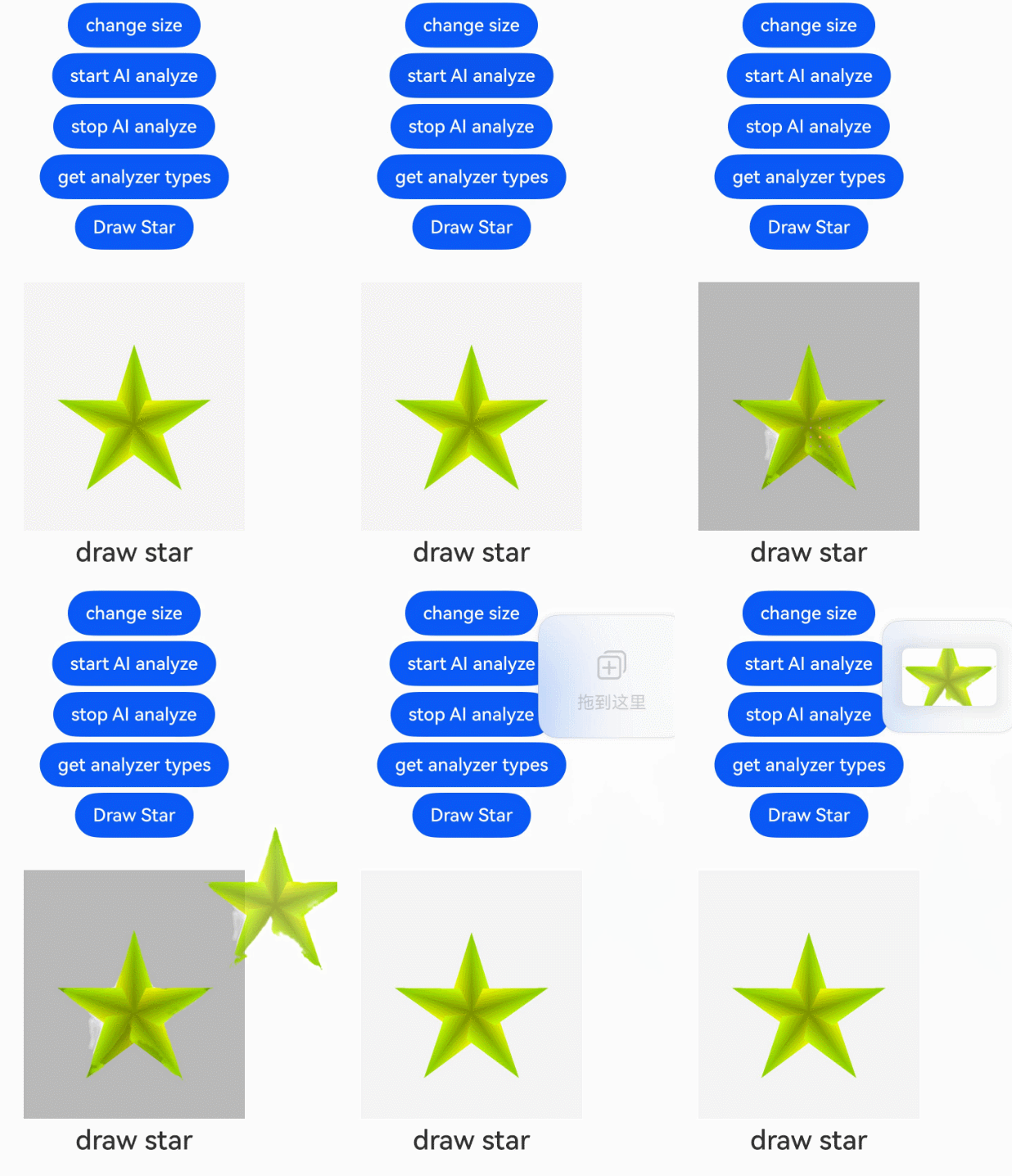
使用enableAnalyzer属性开启图像AI分析功能。可通过XComponentController控制开始、停止图形AI分析。
- // xxx.ets
- import { BusinessError } from '@kit.BasicServicesKit';
- import nativeRender from 'libnativerender.so';
-
- class CustomXComponentController extends XComponentController {
- onSurfaceCreated(surfaceId: string): void {
- console.log(`onSurfaceCreated surfaceId: ${surfaceId}`);
- nativeRender.SetSurfaceId(BigInt(surfaceId));
- }
-
- onSurfaceChanged(surfaceId: string, rect: SurfaceRect): void {
- console.log(`onSurfaceChanged surfaceId: ${surfaceId}, rect: ${JSON.stringify(rect)}}`);
- nativeRender.ChangeSurface(BigInt(surfaceId), rect.surfaceWidth, rect.surfaceHeight);
- }
-
- onSurfaceDestroyed(surfaceId: string): void {
- console.log(`onSurfaceDestroyed surfaceId: ${surfaceId}`);
- nativeRender.DestroySurface(BigInt(surfaceId));
- }
- }
-
- @Entry
- @Component
- struct XComponentExample {
- xComponentController: XComponentController = new CustomXComponentController();
- private config: ImageAnalyzerConfig = {
- types: [ImageAnalyzerType.SUBJECT, ImageAnalyzerType.TEXT]
- };
- private aiController: ImageAnalyzerController = new ImageAnalyzerController();
- private options: ImageAIOptions = {
- types: [ImageAnalyzerType.SUBJECT, ImageAnalyzerType.TEXT],
- aiController: this.aiController
- };
- @State xcWidth: string = "320px";
- @State xcHeight: string = "480px";
- @State currentStatus: string = "index";
-
- build() {
- Column({ space: 5 }) {
- Button("change size")
- .onClick(() => {
- this.xcWidth = "640px";
- this.xcHeight = "720px";
- })
- Button('start AI analyze')
- .onClick(() => {
- this.xComponentController.startImageAnalyzer(this.config)
- .then(() => {
- console.log("analysis complete");
- })
- .catch((error: BusinessError) => {
- console.log("error code: " + error.code);
- })
- })
- Button('stop AI analyze')
- .onClick(() => {
- this.xComponentController.stopImageAnalyzer();
- })
- Button('get analyzer types')
- .onClick(() => {
- this.aiController.getImageAnalyzerSupportTypes();
- })
- Button('Draw Star')
- .fontSize('16fp')
- .fontWeight(500)
- .margin({ bottom: 24 })
- .onClick(() => {
- let surfaceId = this.xComponentController.getXComponentSurfaceId();
- this.xComponentController.getXComponentSurfaceRect();
- nativeRender.DrawPattern(BigInt(surfaceId));
- let hasDraw: boolean = false;
- if (nativeRender.GetXComponentStatus(BigInt(surfaceId))) {
- hasDraw = nativeRender.GetXComponentStatus(BigInt(surfaceId)).hasDraw;
- }
- if (hasDraw) {
- this.currentStatus = "draw star";
- }
- })
- XComponent({
- type: XComponentType.SURFACE,
- controller: this.xComponentController,
- imageAIOptions: this.options
- })
- .width(this.xcWidth)
- .height(this.xcHeight)
- .enableAnalyzer(true)
- Text(this.currentStatus)
- .fontSize('24fp')
- .fontWeight(500)
- }
- .width("100%")
- }
- }
通过setXComponentSurfaceRotation设置surface在屏幕旋转过程中锁定方向,不跟随屏幕进行旋转。
- // xxx.ets
- @Entry
- @Component
- struct Index {
- @State isLock: boolean = true;
- @State xc_width: number = 500;
- @State xc_height: number = 700;
- myXComponentController: XComponentController = new XComponentController();
-
- build() {
- Flex({ direction: FlexDirection.Column, alignItems: ItemAlign.Center, justifyContent: FlexAlign.Start }) {
- XComponent({
- id: 'xComponentId',
- type: XComponentType.SURFACE,
- libraryname: 'nativerender',
- controller: this.myXComponentController
- })
- .width(this.xc_width)
- .height(this.xc_height)
- .onLoad(() => {
- let surfaceRotation: SurfaceRotationOptions = { lock: this.isLock };
- this.myXComponentController.setXComponentSurfaceRotation(surfaceRotation);
- console.log("Surface getXComponentSurfaceRotation lock = " +
- this.myXComponentController.getXComponentSurfaceRotation().lock);
- })
- }
- .width('100%')
- .height('100%')
- }
- }