本模块提供应用数据的安全证明服务,支持创建证明密钥、销毁证明密钥、初始化证明会话、结束证明会话和获取安全地理位置,能够为安全摄像头和安全地理位置功能提供安全证明能力,确保图像或位置数据未被篡改。
起始版本: 5.0.0(12)
createAttestKey
createAttestKey(options: AttestOptions): Promise<void>
创建证明密钥,在证明密钥不存在或者不可用的条件下调用,使用Promise异步回调。
元服务API: 从版本5.0.2(14)开始,该接口支持在元服务中使用。
模型约束: 此接口仅可在Stage模型下使用。
系统能力: SystemCapability.Security.TrustedAppService.Core
起始版本: 5.0.0(12)
参数:
| 参数名 | 类型 | 必填 | 说明 |
|---|---|---|---|
| options | AttestOptions | 是 | 生成证明密钥的参数,需要指定密钥类型和密钥大小。 |
返回值:
| 类型 | 说明 |
|---|---|
| Promise<void> | Promise对象,无返回结果。 |
错误码:
以下错误码的详细介绍请参见ArkTS API错误码 。
| 错误码ID | 错误信息 |
|---|---|
| 201 | Permission verification failed. The application does not have the permission required to call the API. |
| 401 | Parameter error. Possible causes: 1. Mandatory parameters are left unspecified; 2. Incorrect parameter types; 3. Parameter verification failed. |
| 1011500001 | algorithm param is invalid. |
| 1011500002 | algorithm param is missing. |
| 1011500003 | create attestation key failed. |
| 1011500004 | create anonymous certificate failed. |
| 1011500005 | operating file failed. |
| 1011500006 | IPC communication failed. |
示例:
import { trustedAppService } from '@kit.DeviceSecurityKit';
import { BusinessError } from '@kit.BasicServicesKit';
import { hilog } from '@kit.PerformanceAnalysisKit';

let properties: Array<trustedAppService.AttestParam> = [
  {
    tag: trustedAppService.AttestTag.ATTEST_TAG_ALGORITHM,
    value: trustedAppService.AttestKeyAlg.ATTEST_ALG_ECC
  },
  {
    tag: trustedAppService.AttestTag.ATTEST_TAG_KEY_SIZE,
    value: trustedAppService.AttestKeySize.ATTEST_ECC_KEY_SIZE_256
  }
];
let options: trustedAppService.AttestOptions = {
  properties: properties,
};
await trustedAppService.createAttestKey(options)
  .then(
    (): void => {
      hilog.info(0x0000, 'testTag', 'Succeeded in creating attest key');
    }
  ).catch(
    (error: BusinessError): void => {
      let err = error as BusinessError;
      hilog.error(0x0000, 'testTag', `Failed to create attest key, code:${err.code}, message:${err.message}`);
    });
AttestOptions
createAttestKey接口的请求参数。
元服务API: 从版本5.0.2(14)开始,该接口支持在元服务中使用。
模型约束: 此接口仅可在Stage模型下使用。
系统能力: SystemCapability.Security.TrustedAppService.Core
起始版本: 5.0.0(12)
| 名称 | 类型 | 只读 | 可选 | 说明 |
|---|---|---|---|---|
| properties | Array<AttestParam> | 否 | 否 | 开发者应用传入的用于生成证明密钥的配置信息。 |
AttestParam
AttestOptions配置信息的内容条目。
元服务API: 从版本5.0.2(14)开始,该接口支持在元服务中使用。
模型约束: 此接口仅可在Stage模型下使用。
系统能力: SystemCapability.Security.TrustedAppService.Core
起始版本: 5.0.0(12)
| 名称 | 类型 | 只读 | 可选 | 说明 |
|---|---|---|---|---|
| tag | AttestTag | 否 | 否 | 应用传入的标签,用于生成证明密钥的配置信息。 |
| value | boolean | number | bigint | Uint8Array | 否 | 否 | 应用传入的标签对应的值,用于生成证明密钥的配置信息。 boolean: 预留参数,暂未使用。 number: 1. tag为ATTEST_TAG_ALGORITHM,其值为AttestKeyAlg类型。 2. tag为ATTEST_TAG_KEY_SIZE,其值为AttestKeySize类型。 3. tag为ATTEST_TAG_DEVICE_TYPE,其值为AttestType类型。 bigint: tag为ATTEST_TAG_DEVICE_ID,其值为设备ID,取值范围为int64类型的随机值。 Uint8Array: 预留参数,暂未使用。 |
AttestTag
配置信息标签类型,使用AttestTagType扩展定义。
元服务API: 从版本5.0.2(14)开始,该接口支持在元服务中使用。
模型约束: 此接口仅可在Stage模型下使用。
系统能力: SystemCapability.Security.TrustedAppService.Core
起始版本: 5.0.0(12)
| 名称 | 值 | 说明 |
|---|---|---|
| ATTEST_TAG_INVALID | AttestTagType.ATTEST_TAG_TYPE_INVALID | 0 | 不合法标签。 |
| ATTEST_TAG_ALGORITHM | AttestTagType.ATTEST_TAG_TYPE_UINT | 1 | 算法标签。 |
| ATTEST_TAG_KEY_SIZE | AttestTagType.ATTEST_TAG_TYPE_UINT | 2 | 密钥大小标签。 |
| ATTEST_TAG_DEVICE_TYPE | AttestTagType.ATTEST_TAG_TYPE_UINT | 3 | 设备类型标签。 |
| ATTEST_TAG_DEVICE_ID | AttestTagType.ATTEST_TAG_TYPE_UINT | 4 | 设备序列号标签。 |
AttestTagType
标签类型定义,用于区分数据类型。
元服务API: 从版本5.0.2(14)开始,该接口支持在元服务中使用。
模型约束: 此接口仅可在Stage模型下使用。
系统能力: SystemCapability.Security.TrustedAppService.Core
起始版本: 5.0.0(12)
| 名称 | 值 | 说明 |
|---|---|---|
| ATTEST_TAG_TYPE_INVALID | 0<<28 | 不合法标签类型。 |
| ATTEST_TAG_TYPE_INT | 1<<28 | INT类型。 |
| ATTEST_TAG_TYPE_UINT | 2<<28 | UINT类型。 |
| ATTEST_TAG_TYPE_ULONG | 3<<28 | ULONG类型。 |
| ATTEST_TAG_TYPE_BOOL | 4<<28 | BOOL类型。 |
| ATTEST_TAG_TYPE_BYTES | 5<<28 | BYTES类型。 |
AttestKeyAlg
证明密钥算法类型。
元服务API: 从版本5.0.2(14)开始,该接口支持在元服务中使用。
模型约束: 此接口仅可在Stage模型下使用。
系统能力: SystemCapability.Security.TrustedAppService.Core
起始版本: 5.0.0(12)
| 名称 | 值 | 说明 |
|---|---|---|
| ATTEST_ALG_ECC | 1 | ECC算法类型。 |
AttestKeySize
证明密钥长度。
元服务API: 从版本5.0.2(14)开始,该接口支持在元服务中使用。
模型约束: 此接口仅可在Stage模型下使用。
系统能力: SystemCapability.Security.TrustedAppService.Core
起始版本: 5.0.0(12)
| 名称 | 值 | 说明 |
|---|---|---|
| ATTEST_ECC_KEY_SIZE_256 | 256 | 证明密钥长度,256位。 |
| ATTEST_ECC_KEY_SIZE_384 | 384 | 证明密钥长度,384位。 |
destroyAttestKey
destroyAttestKey(): Promise<void>
销毁证明密钥,使用Promise异步回调。
元服务API: 从版本5.0.2(14)开始,该接口支持在元服务中使用。
模型约束: 此接口仅可在Stage模型下使用。
系统能力: SystemCapability.Security.TrustedAppService.Core
起始版本: 5.0.0(12)
错误码:
以下错误码的详细介绍请参见ArkTS API错误码 。
| 错误码ID | 错误信息 |
|---|---|
| 201 | Permission verification failed. The application does not have the permission required to call the API. |
| 1011500005 | operating file failed. |
| 1011500006 | IPC communication failed. |
| 1011500007 | item not found. |
返回值:
| 类型 | 说明 |
|---|---|
| Promise<void> | Promise对象,无返回结果。 |
示例:
import { trustedAppService } from '@kit.DeviceSecurityKit';
import { BusinessError } from '@kit.BasicServicesKit';
import { hilog } from '@kit.PerformanceAnalysisKit';

await trustedAppService.destroyAttestKey().then(
  (): void => {
    hilog.info(0x0000, 'testTag', 'Succeeded in destroying attest key');
  }
).catch(
  (error: BusinessError): void => {
    let err = error as BusinessError;
    hilog.error(0x0000, 'testTag', `Failed to destroy attest key, code:${err.code}, message:${err.message}`);
  }
);
initializeAttestContext
initializeAttestContext(userData: string, options: AttestOptions): Promise<AttestReturnResult>
初始化证明会话,在创建证明密钥成功后使用,使用Promise异步回调。
元服务API: 从版本5.0.2(14)开始,该接口支持在元服务中使用。
模型约束: 此接口仅可在Stage模型下使用。
系统能力: SystemCapability.Security.TrustedAppService.Core
起始版本: 5.0.0(12)
参数:
| 参数名 | 类型 | 必填 | 说明 |
|---|---|---|---|
| userData | string | 是 | 打开证明会话的参数,传入的用户数据,长度在16到127字节之间。 |
| options | AttestOptions | 是 | 打开证明会话的参数,需要指定设备类型和设备ID。 |
返回值:
| 类型 | 说明 |
|---|---|
| Promise<AttestReturnResult> | Promise对象,返回生成的匿名证书链。 |
错误码:
以下错误码的详细介绍请参见ArkTS API错误码 。
| 错误码ID | 错误信息 |
|---|---|
| 201 | Permission verification failed. The application does not have the permission required to call the API. |
| 401 | Parameter error. Possible causes: 1. Mandatory parameters are left unspecified; 2. Incorrect parameter types; 3. Parameter verification failed. |
| 1011500002 | param is missing. |
| 1011500005 | operating file failed. |
| 1011500006 | IPC communication failed. |
| 1011500007 | item not found. |
| 1011500008 | anonymous certificate verify failed. |
| 1011500009 | anonymous certificate has expired. |
| 1011500010 | get attestation key failed. |
| 1011500011 | initialize secure camera failed. |
示例:
import { trustedAppService } from '@kit.DeviceSecurityKit';
import { BusinessError } from '@kit.BasicServicesKit';
import { hilog } from '@kit.PerformanceAnalysisKit';

// 以安全地理位置场景为例
const deviceId = 0;
const initProperties: Array<trustedAppService.AttestParam> = [
  {
    tag: trustedAppService.AttestTag.ATTEST_TAG_DEVICE_TYPE,
    value: trustedAppService.AttestType.ATTEST_TYPE_LOCATION
  },
  {
    tag: trustedAppService.AttestTag.ATTEST_TAG_DEVICE_ID,
    value: BigInt(deviceId) // 此参数在安全地理位置场景下不生效
  }
];
const initOptions: trustedAppService.AttestOptions = {
  properties: initProperties
};
let userData = 'trusted_app_service_default_userdata'; // 示例值,实际值请自行生成,长度在16到127 Bytes之间
// 初始化证明会话
try {
  const certChainResult = await trustedAppService.initializeAttestContext(userData, initOptions);
} catch (err) {
  const error = err as BusinessError;
  console.error(`Failed to initialize attest context, code:${error.code}, message:${error.message}`);
}
AttestType
证明会话类型。
模型约束: 此接口仅可在Stage模型下使用。
系统能力: SystemCapability.Security.TrustedAppService.Core
起始版本: 5.0.0(12)
| 名称 | 值 | 说明 |
|---|---|---|
| ATTEST_TYPE_LOCATION | 1 | 安全地理位置类型。 元服务API: 从版本5.0.2(14)开始,该接口支持在元服务中使用。 |
| ATTEST_TYPE_CAMERA | 2 | 安全摄像头类型。 |
| ATTEST_TYPE_SECIMAGE_PROCESS | 3 | 安全图像处理类型。起始版本:5.1.0(18)。 |
AttestReturnResult
initializeAttestContext接口的返回值。
元服务API: 从版本5.0.2(14)开始,该接口支持在元服务中使用。
模型约束: 此接口仅可在Stage模型下使用。
系统能力: SystemCapability.Security.TrustedAppService.Core
起始版本: 5.0.0(12)
| 名称 | 类型 | 只读 | 可选 | 说明 |
|---|---|---|---|---|
| certChains | Array<string> | 否 | 否 | 打开证明会话成功之后返回的匿名证书链 |
示例:
import { trustedAppService } from '@kit.DeviceSecurityKit';
import { BusinessError } from '@kit.BasicServicesKit';
import { hilog } from '@kit.PerformanceAnalysisKit';

// device_id 需要指定为 Bigint类型
let device_id_tt = 12581;
// userdata的长度需要超过16个Bytes,最大长度为127 Bytes
let user_data = "test_user_data_0000"
let properties2: Array<trustedAppService.AttestParam> = [
  {
    tag: trustedAppService.AttestTag.ATTEST_TAG_DEVICE_TYPE,
    value: trustedAppService.AttestType.ATTEST_TYPE_LOCATION
  },
  {
    tag: trustedAppService.AttestTag.ATTEST_TAG_DEVICE_ID,
    value: BigInt(device_id_tt)
  },
];
let options2: trustedAppService.AttestOptions = {
  properties: properties2,
};
await trustedAppService.initializeAttestContext(user_data, options2).then(
  (returnResult: trustedAppService.AttestReturnResult): void => {
    let chains = returnResult.certChains as Array<string>;
    for (const item of chains) {
      hilog.info(0x0000, 'testTag', 'item: ' + item);
    };
  }
).catch(
  (error: BusinessError): void => {
    let err = error as BusinessError;
    hilog.error(0x0000, 'testTag', `Failed to initialize attest context, code:${err.code}, message:${err.message}`);
  }
);
AttestExceptionErrCode
可信应用服务中创建证明密钥、销毁证明密钥、初始化证明会话、结束证明会话、获取当前安全位置等接口的错误码。
模型约束: 此接口仅可在Stage模型下使用。
系统能力: SystemCapability.Security.TrustedAppService.Core
起始版本: 5.0.0(12)
| 名称 | 值 | 说明 |
|---|---|---|
| ATTEST_ERROR_NO_PERMISSION | 201 | 权限校验失败。 元服务API: 从版本5.0.2(14)开始,该接口支持在元服务中使用。 |
| ATTEST_ERROR_ILLEGAL_ARGUMENT | 401 | 参数检查失败。 元服务API: 从版本5.0.2(14)开始,该接口支持在元服务中使用。 |
| ATTEST_ERROR_INVALID_ALG_ARGUMENT | 1011500001 | 无效的算法参数。 元服务API: 从版本5.0.2(14)开始,该接口支持在元服务中使用。 |
| ATTEST_ERROR_MISSING_ARGUMENT | 1011500002 | 参数传入不足。 元服务API: 从版本5.0.2(14)开始,该接口支持在元服务中使用。 |
| ATTEST_ERROR_KEY_GENERATOR_FAILED | 1011500003 | 密钥生成失败。 元服务API: 从版本5.0.2(14)开始,该接口支持在元服务中使用。 |
| ATTEST_ERROR_CERTS_CREATION_FAILED | 1011500004 | 证书创建失败。 元服务API: 从版本5.0.2(14)开始,该接口支持在元服务中使用。 |
| ATTEST_ERROR_FILE_OPERATION_FAILED | 1011500005 | 文件操作失败。 元服务API: 从版本5.0.2(14)开始,该接口支持在元服务中使用。 |
| ATTEST_ERROR_COMMUNICATION_FAILED | 1011500006 | IPC通信失败。 元服务API: 从版本5.0.2(14)开始,该接口支持在元服务中使用。 |
| ATTEST_ERROR_ITEM_NOT_FOUND | 1011500007 | 密钥不存在。 元服务API: 从版本5.0.2(14)开始,该接口支持在元服务中使用。 |
| ATTEST_ERROR_CERTS_VERIFICATION_FAILED | 1011500008 | 证书校验失败。 元服务API: 从版本5.0.2(14)开始,该接口支持在元服务中使用。 |
| ATTEST_ERROR_CERTS_EXPIRED | 1011500009 | 证书已过期。 元服务API: 从版本5.0.2(14)开始,该接口支持在元服务中使用。 |
| ATTEST_ERROR_KEY_NOT_MATCHED | 1011500010 | 密钥不匹配。 元服务API: 从版本5.0.2(14)开始,该接口支持在元服务中使用。 |
| ATTEST_ERROR_SECURE_CAMERA_INITIALIZATION_FAILED | 1011500011 | 安全相机初始化失败。 元服务API: 从版本5.0.2(14)开始,该接口支持在元服务中使用。 |
| ATTEST_ERROR_CONTEXT_BAD_STATE | 1011500012 | 证明会话上下文异常。 元服务API: 从版本5.0.2(14)开始,该接口支持在元服务中使用。 |
| ATTEST_ERROR_KEY_EXPIRED | 1011500013 | 密钥已过期。 元服务API: 从版本5.0.2(14)开始,该接口支持在元服务中使用。 |
| ATTEST_ERROR_LOCATION_SERVICE_UNAVAILABLE | 1011500014 | 位置服务不可用。 元服务API: 从版本5.0.2(14)开始,该接口支持在元服务中使用。 |
| ATTEST_ERROR_LOCATION_SWITCH_OFF | 1011500015 | 位置信息开关关闭。 元服务API: 从版本5.0.2(14)开始,该接口支持在元服务中使用。 |
| ATTEST_ERROR_LOCATION_FAILED | 1011500016 | 位置信息获取失败。 元服务API: 从版本5.0.2(14)开始,该接口支持在元服务中使用。 |
| ATTEST_ERROR_SIGNATURE_VERIFICATION_FAILED | 1011500017 | 签名验证失败。 起始版本: 5.1.0(18) |
| ATTEST_ERROR_SECIMAGE_PROCESS_FAILED | 1011500018 | 安全图像处理失败。 起始版本: 5.1.0(18) |
finalizeAttestContext
finalizeAttestContext(options: AttestOptions): Promise<void>
结束证明会话,在结束安全证明服务后调用,使用Promise异步回调。
元服务API: 从版本5.0.2(14)开始,该接口支持在元服务中使用。
模型约束: 此接口仅可在Stage模型下使用。
系统能力: SystemCapability.Security.TrustedAppService.Core
起始版本: 5.0.0(12)
参数:
| 参数名 | 类型 | 必填 | 说明 |
|---|---|---|---|
| options | AttestOptions | 是 | 关闭证明会话的参数,需要指定设备类型。 |
返回值:
| 类型 | 说明 |
|---|---|
| Promise<void> | Promise对象,无返回结果。 |
错误码:
以下错误码的详细介绍请参见ArkTS API错误码 。
| 错误码ID | 错误信息 |
|---|---|
| 201 | Permission verification failed. The application does not have the permission required to call the API. |
| 401 | Parameter error. Possible causes: 1. Mandatory parameters are left unspecified; 2. Incorrect parameter types; 3. Parameter verification failed. |
| 1011500002 | param is missing. |
| 1011500006 | IPC communication failed. |
| 1011500007 | item not found. |
示例:
import { trustedAppService } from '@kit.DeviceSecurityKit';
import { BusinessError } from '@kit.BasicServicesKit';
import { hilog } from '@kit.PerformanceAnalysisKit';

let properties: Array<trustedAppService.AttestParam> = [
  {
    tag: trustedAppService.AttestTag.ATTEST_TAG_DEVICE_TYPE,
    value: trustedAppService.AttestType.ATTEST_TYPE_CAMERA
  }
];
let options: trustedAppService.AttestOptions = {
  properties: properties,
};
await trustedAppService.finalizeAttestContext(options).then(
  (): void => {
    hilog.info(0x0000, 'testTag', 'Succeeded in finalizing attest context');
  }
).catch(
  (error: BusinessError): void => {
    let err = error as BusinessError;
    hilog.error(0x0000, 'testTag', `Failed to finalize attest context, code:${err.code}, message:${err.message}`);
  }
);
getCurrentSecureLocation
getCurrentSecureLocation(timeout : number, priority: LocatingPriority): Promise<SecureLocation>
获取当前安全位置,使用Promise异步回调。
元服务API: 从版本5.0.2(14)开始,该接口支持在元服务中使用。
模型约束: 此接口仅可在Stage模型下使用。
系统能力: SystemCapability.Security.TrustedAppService.Location
需要权限:ohos.permission.LOCATION 和 ohos.permission.APPROXIMATELY_LOCATION
起始版本: 5.0.0(12)
参数:
| 参数名 | 类型 | 必填 | 说明 |
|---|---|---|---|
| timeout | number | 是 | 单次位置请求的超时时间,单位:毫秒(milliseconds),最小为1000毫秒。取值范围为大于等于1000。 |
| priority | LocatingPriority | 是 | 获取安全地理位置的优先级策略。 |
返回值:
| 类型 | 说明 |
|---|---|
| Promise<SecureLocation> | Promise对象,返回获取的安全位置。 |
错误码:
以下错误码的详细介绍请参见ArkTS API错误码 。
| 错误码ID | 错误信息 |
|---|---|
| 201 | Permission verification failed. The application does not have the permission required to call the API. |
| 401 | Parameter error. Possible causes: 1. Mandatory parameters are left unspecified; 2. Incorrect parameter types; 3. Parameter verification failed. |
| 1011500012 | attestation context not initialized. |
| 1011500013 | attestation key has expired. |
| 1011500014 | location service is unavailable. |
| 1011500015 | The location switch is off. |
| 1011500016 | Failed to obtain the secure geographical location. |
示例:
import { trustedAppService } from '@kit.DeviceSecurityKit';
import { BusinessError } from '@kit.BasicServicesKit';
import { hilog } from '@kit.PerformanceAnalysisKit';

// 以精度优先模式为例
const timeout = 5000; // 获取安全地理位置的超时时间,单位为毫秒
const priority = trustedAppService.LocatingPriority.PRIORITY_ACCURACY;
let secureLocation: trustedAppService.SecureLocation;
try {
  secureLocation = await trustedAppService.getCurrentSecureLocation(timeout, priority);
} catch (err) {
  const error = err as BusinessError;
  console.error(`Failed to get current secure location, code:${error.code},  message:${error.message}`);
}
LocatingPriority
获取安全地理位置的优先级策略。
元服务API: 从版本5.0.2(14)开始,该接口支持在元服务中使用。
模型约束: 此接口仅可在Stage模型下使用。
系统能力: SystemCapability.Security.TrustedAppService.Location
起始版本: 5.0.0(12)
| 名称 | 值 | 说明 |
|---|---|---|
| PRIORITY_ACCURACY | 0 | 精度优先,保证获取最高精度。 |
| PRIORITY_LOCATING_SPEED | 1 | 速度优先,保证位置获取速度。 |
SecureLocation
获取的安全地理位置。
元服务API: 从版本5.0.2(14)开始,该接口支持在元服务中使用。
模型约束: 此接口仅可在Stage模型下使用。
系统能力: SystemCapability.Security.TrustedAppService.Location
起始版本: 5.0.0(12)
| 名称 | 类型 | 只读 | 可选 | 说明 |
|---|---|---|---|---|
| originalLocation | Location | 否 | 否 | 地理位置信息。 |
| userData | String | 否 | 否 | 用户数据,长度在16到127字节之间。 |
| signature | String | 否 | 否 | 签名结果。 当证明密钥长度为256位时,signature长度为96字节; 当证明密钥长度为384位时,signature长度为136或者140字节。 |
Location
获取的安全地理位置信息。
元服务API: 从版本5.0.2(14)开始,该接口支持在元服务中使用。
模型约束: 此接口仅可在Stage模型下使用。
系统能力: SystemCapability.Security.TrustedAppService.Location
起始版本: 5.0.0(12)
| 名称 | 类型 | 只读 | 可选 | 说明 |
|---|---|---|---|---|
| latitude | number | 否 | 否 | 纬度,正值表示北纬,负值表示南纬。取值范围为-90到90。仅支持WGS84坐标系。 |
| longitude | number | 否 | 否 | 经度,正值表示东经,负值表示西经。取值范围为-180到180。仅支持WGS84坐标系。 |
| altitude | number | 否 | 否 | 高度,单位:米。 |
| accuracy | number | 否 | 否 | 精度,单位:米,取值大于等于0。 |
| timestamp | number | 否 | 否 | 时间戳,单位:毫秒,取值大于等于0。 |
示例:
import { trustedAppService } from '@kit.DeviceSecurityKit';
import { BusinessError } from '@kit.BasicServicesKit';
import { hilog } from '@kit.PerformanceAnalysisKit';

try {
  const secureLocation = await trustedAppService.getCurrentSecureLocation(3000, trustedAppService.LocatingPriority.PRIORITY_LOCATING_SPEED);
  hilog.info(0x0000, 'testTag', `Succeeded in getting secure location, result = ${JSON.stringify(secureLocation)}`);
} catch (error) {
  let err = error as BusinessError;
  hilog.error(0x0000, 'testTag', `Failed to get secure location, code:${err.code}, message:${err.message}`);
}
procSecImageTransform
procSecImageTransform(srcSecImage: ArrayBuffer, procParams: SecImageProcParamsArray): Promise<SecImageBuffer>
处理安全图像压缩、裁剪操作,使用Promise异步回调。
模型约束: 此接口仅可在Stage模型下使用。
系统能力: SystemCapability.Security.TrustedAppService.Core
设备行为差异: 该接口在支持安全摄像头能力的Phone、Tablet、PC/2in1均可正常调用,在不支持安全摄像头能力的Phone、Tablet、PC/2in1设备及其他设备类型中统一返回业务错误码1011500011。
起始版本: 5.1.0(18)
参数:
| 参数名 | 类型 | 必填 | 说明 |
|---|---|---|---|
| srcSecImage | ArrayBuffer | 是 | 安全相机返回签名后的安全图像。 |
| procParams | SecImageProcParamsArray | 是 | 安全图像压缩、裁剪处理的参数。 |
返回值:
| 类型 | 说明 |
|---|---|
| Promise<SecImageBuffer> | Promise对象,返回压缩、裁剪处理后签名的安全图像。 |
错误码:
以下错误码的详细介绍请参见ArkTS API错误码 。
| 错误码ID | 错误信息 |
|---|---|
| 201 | Permission verification failed. The application does not have the permission required to call the API. |
| 401 | Parameter error. Possible causes: 1. Mandatory parameters are left unspecified; 2. Incorrect parameter types; 3. Parameter verification failed. |
| 1011500011 | secure image processing is not supported. |
| 1011500012 | attestation context not initialized. |
| 1011500013 | attestation key has expired. |
| 1011500017 | signature verification failed. |
| 1011500018 | secure image process failed. |
安全图像压缩示例:
import { trustedAppService } from '@kit.DeviceSecurityKit';
import { BusinessError } from '@kit.BasicServicesKit';
import { hilog } from '@kit.PerformanceAnalysisKit';

const srcSecImageBuffer = new ArrayBuffer(461844);// 实际使用请替换为Camera Kit获取到的安全图像buffer

let properties: Array<trustedAppService.SecImageProcParams> = [
  {
    tag: trustedAppService.SecImageProcTag.SECIMAGE_TAG_PROC_OPERATION,
    value: trustedAppService.SecImageProcOperation.SECIMAGE_COMPRESSION,
  },
  {
    tag: trustedAppService.SecImageProcTag.SECIMAGE_TAG_SRC_IMAGE_FORMAT,
    value: trustedAppService.SecImageProcFormat.SECIMAGE_FORMAT_YUV_NV21, // 安全图像压缩、裁剪命令输入的原始图像格式都为:YUV420 NV21 格式
  },
  {
    tag: trustedAppService.SecImageProcTag.SECIMAGE_TAG_DEST_IMAGE_FORMAT,
    value: trustedAppService.SecImageProcFormat.SECIMAGE_FORMAT_JPEG, // 安全图像压缩命令返回的图像格式为:JPEG 格式
  },
  {
    tag: trustedAppService.SecImageProcTag.SECIMAGE_TAG_COMPRESSION_QUALITY,
    value: 90, // 实际使用请替换为业务场景需要的压缩质量
  },
];
let procParams: trustedAppService.SecImageProcParamsArray = {
  properties: properties,
};
await trustedAppService.procSecImageTransform(srcSecImageBuffer, procParams).then(
  (returnResult: trustedAppService.SecImageBuffer): void => {
    let returnSecImageBuffer = returnResult.secImage;
  }
).catch(
  (error: BusinessError): void => {
    let err = error as BusinessError;
    hilog.error(0x0000, 'testTag', `Failed to process secureImage compression, code:${err.code}, message:${err.message}`);
  }
);
安全图像裁剪示例:
import { trustedAppService } from '@kit.DeviceSecurityKit';
import { BusinessError } from '@kit.BasicServicesKit';
import { hilog } from '@kit.PerformanceAnalysisKit';

const srcSecImageBuffer = new ArrayBuffer(461844);// 实际使用请替换为Camera Kit获取到的安全图像buffer

let properties: Array<trustedAppService.SecImageProcParams> = [
  {
    tag: trustedAppService.SecImageProcTag.SECIMAGE_TAG_PROC_OPERATION,
    value: trustedAppService.SecImageProcOperation.SECIMAGE_CROPPING,
  },
  {
    tag: trustedAppService.SecImageProcTag.SECIMAGE_TAG_SRC_IMAGE_FORMAT,
    value: trustedAppService.SecImageProcFormat.SECIMAGE_FORMAT_YUV_NV21, // 安全图像压缩、裁剪命令输入的原始图像格式都为:YUV420 NV21 格式
  },
  {
    tag: trustedAppService.SecImageProcTag.SECIMAGE_TAG_DEST_IMAGE_FORMAT,
    value: trustedAppService.SecImageProcFormat.SECIMAGE_FORMAT_YUV_NV21, // 安全图像裁剪命令返回的图像格式为:YUV420 NV21 格式
  },
  {
    tag: trustedAppService.SecImageProcTag.SECIMAGE_TAG_CROP_REGION,
    value: { x : 0, y : 0, width : 320, height : 240 }, // 实际使用请替换为业务场景需要的裁剪区域范围
  },
];
let procParams: trustedAppService.SecImageProcParamsArray = {
  properties: properties,
};
await trustedAppService.procSecImageTransform(srcSecImageBuffer, procParams).then(
  (returnResult: trustedAppService.SecImageBuffer): void => {
    let returnSecImageBuffer = returnResult.secImage;
  }
).catch(
  (error: BusinessError): void => {
    let err = error as BusinessError;
    hilog.error(0x0000, 'testTag', `Failed to process secureImage cropping, code:${err.code}, message:${err.message}`);
  }
);
安全图像压缩并裁剪示例:
import { trustedAppService } from '@kit.DeviceSecurityKit';
import { BusinessError } from '@kit.BasicServicesKit';
import { hilog } from '@kit.PerformanceAnalysisKit';

const srcSecImageBuffer = new ArrayBuffer(461844);// 实际使用请替换为Camera Kit获取到的安全图像buffer

let properties: Array<trustedAppService.SecImageProcParams> = [
  {
    tag: trustedAppService.SecImageProcTag.SECIMAGE_TAG_PROC_OPERATION,
    value: trustedAppService.SecImageProcOperation.SECIMAGE_COMPRESSION_AND_CROPPING,
  },
  {
    tag: trustedAppService.SecImageProcTag.SECIMAGE_TAG_SRC_IMAGE_FORMAT,
    value: trustedAppService.SecImageProcFormat.SECIMAGE_FORMAT_YUV_NV21, // 安全图像压缩、裁剪命令输入的原始图像格式都为:YUV420 NV21 格式
  },
  {
    tag: trustedAppService.SecImageProcTag.SECIMAGE_TAG_DEST_IMAGE_FORMAT,
    value: trustedAppService.SecImageProcFormat.SECIMAGE_FORMAT_JPEG, // 安全图像压缩并裁剪命令返回的图像格式为:JPEG 格式
  },
  {
    tag: trustedAppService.SecImageProcTag.SECIMAGE_TAG_COMPRESSION_QUALITY,
    value: 90, // 实际使用请替换为业务场景需要的压缩质量
  },
  {
    tag: trustedAppService.SecImageProcTag.SECIMAGE_TAG_CROP_REGION,
    value: { x : 0, y : 0, width : 320, height : 240 }, // 实际使用请替换为业务场景需要的裁剪区域范围
  },
];
let procParams: trustedAppService.SecImageProcParamsArray = {
  properties: properties,
};
await trustedAppService.procSecImageTransform(srcSecImageBuffer, procParams).then(
  (returnResult: trustedAppService.SecImageBuffer): void => {
    let returnSecImageBuffer = returnResult.secImage;
  }
).catch(
  (error: BusinessError): void => {
    let err = error as BusinessError;
    hilog.error(0x0000, 'testTag', `Failed to process secureImage compression and cropping, code:${err.code}, message:${err.message}`);
  }
);
SecImageProcParamsArray
procSecImageTransform接口的请求参数。
模型约束: 此接口仅可在Stage模型下使用。
系统能力: SystemCapability.Security.TrustedAppService.Core
起始版本: 5.1.0(18)
| 名称 | 类型 | 只读 | 可选 | 说明 |
|---|---|---|---|---|
| properties | Array<SecImageProcParams> | 否 | 否 | 开发者应用传入的用于安全图像压缩、裁剪处理的配置信息。 |
SecImageProcParams
SecImageProcParamsArray配置信息的内容条目。
模型约束: 此接口仅可在Stage模型下使用。
系统能力: SystemCapability.Security.TrustedAppService.Core
起始版本: 5.1.0(18)
| 名称 | 类型 | 只读 | 可选 | 说明 |
|---|---|---|---|---|
| tag | SecImageProcTag | 否 | 否 | 应用传入的标签,用于安全图像压缩、裁剪处理的配置信息。 |
| value | number | CropRegion | 否 | 否 | 应用传入的标签对应的值,用于安全图像压缩、裁剪处理的配置信息。 number: 1)tag为SECIMAGE_TAG_SRC_IMAGE_FORMAT或者 SECIMAGE_TAG_DEST_IMAGE_FORMAT ,其值为SecImageProcFormat类型; 2)tag为SECIMAGE_TAG_PROC_OPERATION,其值为SecImageProcOperation类型; 3)tag为SECIMAGE_TAG_COMPRESSION_QUALITY,其值为1到100之间; CropRegion: tag为SECIMAGE_TAG_CROP_REGION,其值为CropRegion类型。 |
SecImageProcTag
安全图像压缩、裁剪处理的配置信息标签类型,使用AttestTagType扩展定义。
模型约束: 此接口仅可在Stage模型下使用。
系统能力: SystemCapability.Security.TrustedAppService.Core
起始版本: 5.1.0(18)
| 名称 | 值 | 说明 |
|---|---|---|
| SECIMAGE_TAG_INVALID | AttestTagType.ATTEST_TAG_TYPE_INVALID | 0 | 不合法标签。 |
| SECIMAGE_TAG_SRC_IMAGE_FORMAT | AttestTagType.ATTEST_TAG_TYPE_UINT | 1 | 原始安全图像的格式。 |
| SECIMAGE_TAG_DEST_IMAGE_FORMAT | AttestTagType.ATTEST_TAG_TYPE_UINT | 2 | 压缩、裁剪处理后的安全图像的格式。 |
| SECIMAGE_TAG_PROC_OPERATION | AttestTagType.ATTEST_TAG_TYPE_UINT | 3 | 安全图像的处理命令,支持压缩命令、裁剪命令、压缩并裁剪命令。 |
| SECIMAGE_TAG_COMPRESSION_QUALITY | AttestTagType.ATTEST_TAG_TYPE_UINT | 4 | 安全图像压缩处理的压缩质量。 |
| SECIMAGE_TAG_CROP_REGION | AttestTagType.ATTEST_TAG_TYPE_UINT | 5 | 安全图像裁剪处理的裁剪区域。 |
SecImageProcOperation
安全图像的处理命令。
模型约束: 此接口仅可在Stage模型下使用。
系统能力: SystemCapability.Security.TrustedAppService.Core
起始版本: 5.1.0(18)
| 名称 | 值 | 说明 |
|---|---|---|
| SECIMAGE_COMPRESSION | 0 | 安全图像压缩命令。 |
| SECIMAGE_CROPPING | 1 | 安全图像裁剪命令。 |
| SECIMAGE_COMPRESSION_AND_CROPPING | 2 | 安全图像压缩并裁剪命令。 |
SecImageProcFormat
安全图像的格式。
模型约束: 此接口仅可在Stage模型下使用。
系统能力: SystemCapability.Security.TrustedAppService.Core
起始版本: 5.1.0(18)
| 名称 | 值 | 说明 |
|---|---|---|
| SECIMAGE_FORMAT_INVALID | 0 | 无效的安全图像格式。 |
| SECIMAGE_FORMAT_YUV_NV21 | 1 | YUV420 NV21格式的安全图像。输入原始安全图像格式,以及裁剪命令返回的安全图像格式均为SECIMAGE_FORMAT_YUV_NV21。 |
| SECIMAGE_FORMAT_JPEG | 2 | JPEG格式的安全图像。压缩命令、压缩并裁剪命令返回的安全图像格式均为SECIMAGE_FORMAT_JPEG。 |
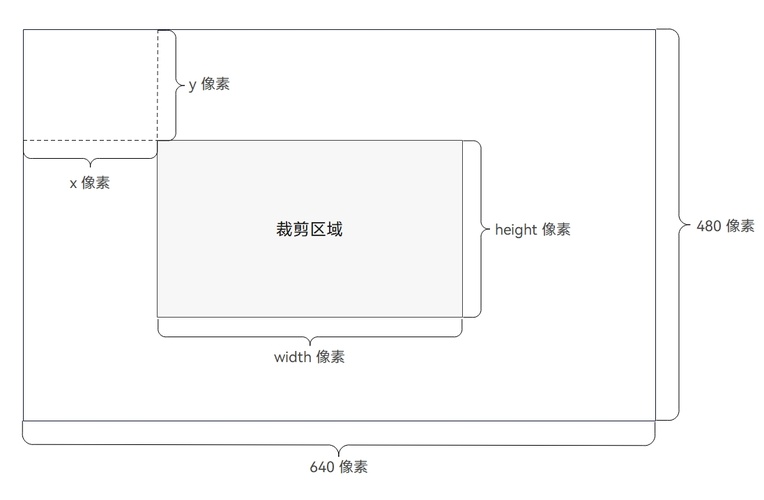
CropRegion
安全图像裁剪处理的裁剪区域。裁剪区域参数作用如下图所示。
模型约束: 此接口仅可在Stage模型下使用。
系统能力: SystemCapability.Security.TrustedAppService.Core
起始版本: 5.1.0(18)
| 名称 | 类型 | 只读 | 可选 | 说明 |
|---|---|---|---|---|
| x | number | 否 | 否 | 裁剪区域左上角点在水平方向(横向)上相对于整个图像左边界的偏移量,取值范围在 0 到 640 之间的偶数。单位:像素(pixel)。 |
| y | number | 否 | 否 | 裁剪区域左上角点在垂直方向(纵向)上相对于整个图像上边界的偏移量,取值范围在 0 到 480 之间的偶数。单位:像素(pixel)。 |
| width | number | 否 | 否 | 裁剪区域的宽度,即横向的长度,取值范围在 0 到 640 之间的偶数,且需满足 x 与 width 的和不大于 640。单位:像素(pixel)。 |
| height | number | 否 | 否 | 裁剪区域的高度,即纵向的长度,取值范围在 0 到 480 之间的偶数,且需满足 y 与 height 的和不大于 480。单位:像素(pixel)。 |
SecImageBuffer
获得压缩、裁剪处理后签名的安全图像。
模型约束: 此接口仅可在Stage模型下使用。
系统能力: SystemCapability.Security.TrustedAppService.Core
起始版本: 5.1.0(18)
| 名称 | 类型 | 只读 | 可选 | 说明 |
|---|---|---|---|---|
| secImage | ArrayBuffer | 否 | 否 | 返回压缩、裁剪处理后签名的安全图像。 |
ImageAuthData
待验证的图像数据。
模型约束: 此接口仅可在Stage模型下使用。
系统能力: SystemCapability.Security.TrustedAppService.ContentTrustCredentials
起始版本: 26.0.0
| 名称 | 类型 | 只读 | 可选 | 说明 |
|---|---|---|---|---|
| buffer | Uint8Array | 否 | 否 | 图片数据数组或图片URL。 |
| imageSize | number | 否 | 否 | 图片数据大小。 |
| bufferType | BufferType | 是 | 否 | 图片数据形式。 |
| imageFormat | ImageFormat | 是 | 否 | 图片格式类型。 |
ImageBufferFormat
图片数组类型。
模型约束: 此接口仅可在Stage模型下使用。
系统能力: SystemCapability.Security.TrustedAppService.ContentTrustCredentials
起始版本: 26.0.0
| 名称 | 值 | 说明 |
|---|---|---|
| IMAGE_DATA_TYPE_DATAFLOW | 0 | 图片类型为数据流。 |
| IMAGE_DATA_TYPE_URL | 1 | 图片类型为URL。 |
BufferType
图片数据形式,ImageAuthData结构体参数之一。
模型约束: 此接口仅可在Stage模型下使用。
系统能力: SystemCapability.Security.TrustedAppService.ContentTrustCredentials
起始版本: 26.0.0
| 名称 | 值 | 说明 |
|---|---|---|
| BUFFER_TYPE_DATA | 0 | 数组形式图片。 |
| BUFFER_TYPE_URL | 1 | URL字符串形式图片。 |
ImageFormat
图片格式类型,ImageAuthData结构体参数之一。
模型约束: 此接口仅可在Stage模型下使用。
系统能力: SystemCapability.Security.TrustedAppService.ContentTrustCredentials
起始版本: 26.0.0
| 名称 | 值 | 说明 |
|---|---|---|
| IMAGE_TYPE_JPEG | 0 | 图片格式:JPEG。 |
| IMAGE_TYPE_DNG | 1 | 图片格式:DNG。 |
| IMAGE_TYPE_HEIF | 2 | 图片格式:HEIF。 |
ContentTrustCredentialsErrorCode
内容证真能力对应错误码。
模型约束: 此接口仅可在Stage模型下使用。
系统能力: SystemCapability.Security.TrustedAppService.ContentTrustCredentials
起始版本: 26.0.0
| 名称 | 值 | 说明 |
|---|---|---|
| CONTENT_TRUST_CREDENTIAL_ERROR_BAD_IMAGE_TYPE | 1027200001 | 错误的图片类型。 |
| CONTENT_TRUST_CREDENTIAL_ERROR_OUT_OF_STORE | 1027200002 | 存储空间不足。 |
| CONTENT_TRUST_CREDENTIAL_ERROR_WRONG_SIGN_CERT_PARAM | 1027200003 | 错误的签名证书信息。 |
| CONTENT_TRUST_CREDENTIAL_ERROR_CHECK_IMAGE_HASH_FAILED | 1027200004 | 图片哈希检测失败。 |
| CONTENT_TRUST_CREDENTIAL_ERROR_SIGN_FAILED | 1027200005 | 图片签名计算失败。 |
| CONTENT_TRUST_CREDENTIAL_ERROR_VERIFY_FAILED | 1027200006 | 验证签名计算失败。 |
| CONTENT_TRUST_CREDENTIAL_ERROR_NO_SIGN_ASSERTION | 1027200007 | 图片签名中没有签名assertion。 |
| CONTENT_TRUST_CREDENTIAL_ERROR_NO_SIGN_MANIFEST | 1027200008 | 图片签名中没有签名manifest。 |
| CONTENT_TRUST_CREDENTIAL_ERROR_WRONG_CERT_CHAINS | 1027200009 | 签名信息中证书链验证失败或证书链根证书无效。 |
| CONTENT_TRUST_CREDENTIAL_ERROR_PLATFORM_NOT_SUPPORTED | 1027200010 | 该平台不支持此接口。 |
| CONTENT_TRUST_CREDENTIAL_ERROR_BAD_METADATA | 1027200011 | 签名的metadata信息错误。 |
| CONTENT_TRUST_CREDENTIAL_ERROR_CLAIM_INVALID | 1027200012 | 签名claim信息无效。 |
| CONTENT_TRUST_CREDENTIAL_ERROR_FILE_OPERATION_FAILED | 1027200013 | 文件操作失败。 |
| CONTENT_TRUST_CREDENTIAL_ERROR_ILLEGAL_ARGUMENT | 1027200014 | 函数入参无效。 |
hasImageSignature
hasImageSignature(data: ImageAuthData): Promise<boolean>
检测图片中是否存在内容证真签名。使用Promise异步回调。
模型约束: 此接口仅可在Stage模型下使用。
系统能力: SystemCapability.Security.TrustedAppService.ContentTrustCredentials
起始版本: 26.0.0
参数:
| 参数名 | 类型 | 必填 | 说明 |
|---|---|---|---|
| data | ImageAuthData | 是 | 图片数据结构体。 |
返回值:
| 类型 | 说明 |
|---|---|
| Promise<boolean> | Promise对象,返回true表示存在证真签名,返回false表示不存在证真签名。 |
错误码:
| 错误码ID | 错误信息 |
|---|---|
| 401 | Parameter error. Possible causes: 1. Mandatory parameters are left unspecified; 2. Incorrect parameter types; 3. Parameter verification failed. |
| 1027200001 | Incorrect image format. |
| 1027200007 | No signature assertion found in the image. |
| 1027200008 | No signature manifest found in the image signature. |
| 1027200010 | APIs not supported on the platform. |
| 1027200013 | File operation failed. |
| 1027200014 | argument is invalid. |
示例:
import { mediaAuthVerify } from '@kit.DeviceSecurityKit';
import { BusinessError } from '@kit.BasicServicesKit';
import { hilog } from '@kit.PerformanceAnalysisKit';

const imageBuffer = new Uint8Array([0xFF, 0xD8, 0xFF, 0xE0, 0x00, 0x10, 0x4A, 0x46, 0x49, 0x46, 0x00, 0x01, 0x01, 0x01, 0x00, 0x60, 0x00, 0x60, 0x00, 0x00, 0xFF, 0xDB, 0x00, 0x43, 0x00, 0x08, 0x06, 0x06, 0x07, 0x06, 0x05, 0x08, 0x07, 0x07, 0x07, 0x09, 0x09, 0x08, 0x0A, 0x0C, 0x14, 0x0D, 0x0C, 0x0B, 0x0B, 0x0C, 0x19, 0x12, 0x13, 0x0F, 0x14, 0x1D, 0x1A, 0x1F, 0x1E, 0x1D, 0x1A, 0x1C, 0x1C, 0x20, 0x24, 0x2E, 0x27, 0x20, 0x22, 0x2C, 0x23, 0x1C, 0x1C, 0x28, 0x37, 0x29, 0x2C, 0x30, 0x31, 0x34, 0x34, 0x34, 0x1F, 0x27, 0x39, 0x3D, 0x38, 0x32, 0x3C, 0x2E, 0x33, 0x34, 0x32, 0xFF, 0xC0, 0x00, 0x0B, 0x08, 0x00, 0x01, 0x00, 0x01, 0x01, 0x01, 0x11, 0x00, 0xFF, 0xC4, 0x00, 0x14, 0x00, 0x01, 0x00, 0x00, 0x00, 0x00, 0x00, 0x00, 0x00, 0x00, 0x00, 0x00, 0x00, 0x00, 0x00, 0x00, 0x00, 0x00, 0xFF, 0xC4, 0x00, 0x14, 0x10, 0x01, 0x00, 0x00, 0x00, 0x00, 0x00, 0x00, 0x00, 0x00, 0x00, 0x00, 0x00, 0x00, 0x00, 0x00, 0x00, 0x00, 0xFF, 0xDA, 0x00, 0x08, 0x01, 0x01, 0x00, 0x00, 0x3F, 0x00, 0x37, 0xFF, 0xD9]); // 数据均为示例值,仅用于展示如何检查是否有签名,实际请使用经过相机签名后的图片。
const data:mediaAuthVerify.ImageAuthData = {
  buffer: imageBuffer,
  imageSize: imageBuffer.length,
  bufferType: mediaAuthVerify.BufferType.BUFFER_TYPE_DATA,
  imageFormat: mediaAuthVerify.ImageFormat.IMAGE_TYPE_JPEG,
};
try {
  const result = await mediaAuthVerify.hasImageSignature(data);
} catch (error) {
  let err = error as BusinessError;
  hilog.error(0x0000, 'testTag', `Failed to check image signature, code:${err.code}, message:${err.message}`);
}
verifyImageSignature
verifyImageSignature(data: ImageAuthData): Promise<Uint8Array>
对图片中内容证真内容进行验证签名操作,调用成功时返回内容证真内容的manifest数据,使用Promise异步回调。
模型约束: 此接口仅可在Stage模型下使用。
系统能力: SystemCapability.Security.TrustedAppService.ContentTrustCredentials
起始版本: 26.0.0
参数:
| 参数名 | 类型 | 必填 | 说明 |
|---|---|---|---|
| data | ImageAuthData | 是 | 图片数据。 |
返回值:
| 类型 | 说明 |
|---|---|
| Promise<Uint8Array> | Promise对象,返回验证签名后manifest数据对象。 |
错误码:
| 错误码ID | 错误信息 |
|---|---|
| 401 | Parameter error. Possible causes: 1. Mandatory parameters are left unspecified; 2. Incorrect parameter types; 3. Parameter verification failed. |
| 1027200001 | Incorrect image format. |
| 1027200004 | Image data hash check failed. |
| 1027200006 | Signature verification failed. |
| 1027200007 | No signature assertion found in the image signature. |
| 1027200008 | No signature manifest found in the image signature. |
| 1027200009 | Certificate chain verification failed or the root certificate is invalid in the signature information. |
| 1027200010 | APIs not supported on the platform. |
| 1027200012 | Invalid claim information during signature verification. |
| 1027200013 | File operation failed. |
| 1027200014 | argument is invalid. |
示例:
import { mediaAuthVerify } from '@kit.DeviceSecurityKit';
import { BusinessError } from '@kit.BasicServicesKit';
import { hilog } from '@kit.PerformanceAnalysisKit';

const imageBuffer = new Uint8Array([0xFF, 0xD8, 0xFF, 0xE0, 0x00, 0x10, 0x4A, 0x46, 0x49, 0x46, 0x00, 0x01, 0x01, 0x01, 0x00, 0x60, 0x00, 0x60, 0x00, 0x00, 0xFF, 0xDB, 0x00, 0x43, 0x00, 0x08, 0x06, 0x06, 0x07, 0x06, 0x05, 0x08, 0x07, 0x07, 0x07, 0x09, 0x09, 0x08, 0x0A, 0x0C, 0x14, 0x0D, 0x0C, 0x0B, 0x0B, 0x0C, 0x19, 0x12, 0x13, 0x0F, 0x14, 0x1D, 0x1A, 0x1F, 0x1E, 0x1D, 0x1A, 0x1C, 0x1C, 0x20, 0x24, 0x2E, 0x27, 0x20, 0x22, 0x2C, 0x23, 0x1C, 0x1C, 0x28, 0x37, 0x29, 0x2C, 0x30, 0x31, 0x34, 0x34, 0x34, 0x1F, 0x27, 0x39, 0x3D, 0x38, 0x32, 0x3C, 0x2E, 0x33, 0x34, 0x32, 0xFF, 0xC0, 0x00, 0x0B, 0x08, 0x00, 0x01, 0x00, 0x01, 0x01, 0x01, 0x11, 0x00, 0xFF, 0xC4, 0x00, 0x14, 0x00, 0x01, 0x00, 0x00, 0x00, 0x00, 0x00, 0x00, 0x00, 0x00, 0x00, 0x00, 0x00, 0x00, 0x00, 0x00, 0x00, 0x00, 0xFF, 0xC4, 0x00, 0x14, 0x10, 0x01, 0x00, 0x00, 0x00, 0x00, 0x00, 0x00, 0x00, 0x00, 0x00, 0x00, 0x00, 0x00, 0x00, 0x00, 0x00, 0x00, 0xFF, 0xDA, 0x00, 0x08, 0x01, 0x01, 0x00, 0x00, 0x3F, 0x00, 0x37, 0xFF, 0xD9]); // 数据均为示例值,仅用于展示如何检查是否有签名,实际请使用经过相机签名后的图片。
const data:mediaAuthVerify.ImageAuthData = {
  buffer: imageBuffer,
  imageSize: imageBuffer.length,
  bufferType: mediaAuthVerify.BufferType.BUFFER_TYPE_DATA,
  imageFormat: mediaAuthVerify.ImageFormat.IMAGE_TYPE_JPEG,
};
try {
  const result = await mediaAuthVerify.verifyImageSignature(data);
} catch (error) {
  let err = error as BusinessError;
  hilog.error(0x0000, 'testTag', `Failed to verify image signature, code:${err.code}, message:${err.message}`);
}
parseImageMetadata
parseImageMetadata(manifests: Uint8Array): Promise<string>
从验证签名获得的manifest数据中解析获得其json格式结果。此接口需要在调用verifyImageSignature接口成功后调用。使用Promise异步回调。
模型约束: 此接口仅可在Stage模型下使用。
系统能力: SystemCapability.Security.TrustedAppService.ContentTrustCredentials
起始版本: 26.0.0
参数:
| 参数名 | 类型 | 必填 | 说明 |
|---|---|---|---|
| manifests | Uint8Array | 是 | 图片验证签名后manifest信息。 |
返回值:
| 类型 | 说明 |
|---|---|
| Promise<string> | Promise对象,返回验证签名后manifest的json格式字符串。 |
错误码:
| 错误码ID | 错误信息 |
|---|---|
| 401 | Parameter error. Possible causes: 1. Mandatory parameters are left unspecified; 2. Incorrect parameter types; 3. Parameter verification failed. |
| 1027200002 | Insufficient storage space for the service. |
| 1027200010 | APIs not supported on the platform. |
| 1027200014 | argument is invalid. |
示例:
import { mediaAuthVerify } from '@kit.DeviceSecurityKit';
import { BusinessError } from '@kit.BasicServicesKit';
import { hilog } from '@kit.PerformanceAnalysisKit';
import { util } from '@kit.ArkTS';

const file = "/data/local/testpic/pics/jpgpic.jpg";// 此路径为示例值,仅用于展示如何传递URL内容,实际请使用正确图片URL。
let encoder = new util.TextEncoder();
let imageBuffer = encoder.encodeInto(file);
const data:mediaAuthVerify.ImageAuthData = {
  buffer: imageBuffer,
  imageSize: imageBuffer.length,
  bufferType: mediaAuthVerify.BufferType.BUFFER_TYPE_DATA,
  imageFormat: mediaAuthVerify.ImageFormat.IMAGE_TYPE_JPEG,
};
try {
  let manifest = await mediaAuthVerify.verifyImageSignature(data);
  let stringResult = await mediaAuthVerify.parseImageMetadata(manifest);
} catch (error) {
  let err = error as BusinessError;
  hilog.error(0x0000, 'testTag', `Failed to verify image signature, code:${err.code}, message:${err.message}`);
}