从API version 4开始支持。后续版本如有新增内容,则采用上角标单独标记该内容的起始版本。
开关选择器,通过开关,开启或关闭某个功能。
属性
除支持通用属性外,还支持如下属性:
| 名称 | 类型 | 默认值 | 必填 | 描述 |
|---|---|---|---|---|
| checked | boolean | false | 否 | 是否选中。 true表示选中,false表示未选中。 |
| showtext | boolean | false | 否 | 是否显示文本。true表示显示文本,false表示不显示文本。 |
| texton | string | "On" | 否 | 选中时显示的文本。 |
| textoff | string | "Off" | 否 | 未选中时显示的文本。 |
样式
除支持通用样式外,还支持如下样式:
| 名称 | 类型 | 默认值 | 必填 | 描述 |
|---|---|---|---|---|
| texton-color | <color> | #000000 | 否 | 选中时显示的文本颜色,仅设置texton和textoff生效。 |
| textoff-color | <color> | #000000 | 否 | 未选中时显示的文本颜色,仅设置texton和textoff生效。 |
| text-padding | number | 0px | 否 | texton/textoff中最长文本两侧距离滑块边界的距离。 |
| font-size | <length> | - | 否 | 文本尺寸,仅设置texton和textoff生效。 |
| allow-scale | boolean | true | 否 | 文本尺寸是否跟随系统设置字体缩放尺寸进行放大缩小。true表示跟随系统放大缩小,false表示不跟随系统放大缩小。 如果在config描述文件中针对ability配置了fontSize的config-changes标签,则应用不会重启而直接生效。 |
| font-style | string | normal | 否 | 字体样式,仅设置texton和textoff生效。见text组件font-style的样式属性。 |
| font-weight | number | string | normal | 否 | 字体粗细,仅设置texton和textoff生效。见text组件的font-weight的样式属性。 |
| font-family | string | sans-serif | 否 | 字体列表,用逗号分隔,每个字体用字体名或者字体族名设置。列表中第一个系统中存在的或者通过自定义字体指定的字体,会被选中作为文本的字体。仅设置texton和textoff生效。 |
示例
<!-- xxx.hml -->
<div class="container">
    <switch @change="normalSwitchChange">
    </switch>
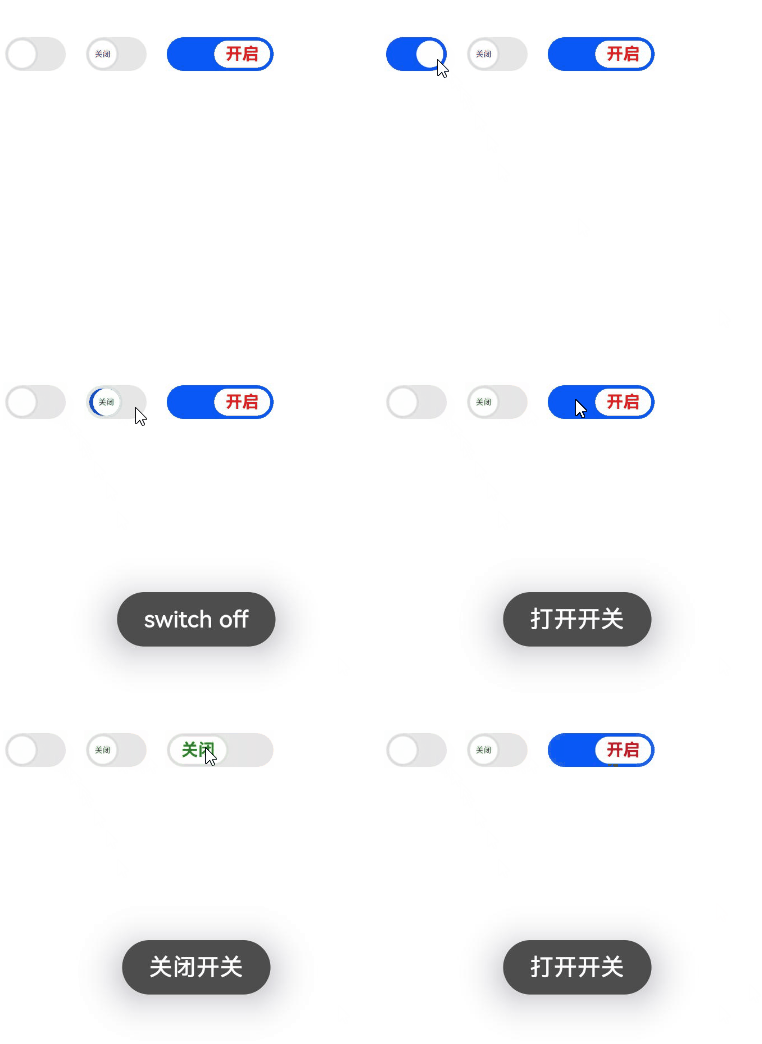
    <switch class="switch" showtext="true" texton="开启" textoff="关闭" @change="switchChange">
    </switch>
    <switch class="switch text" showtext="true" texton="开启" textoff="关闭" checked="true" @change="switchChange">
    </switch>
</div>
/* xxx.css */
.container {
display: flex;
justify-content: center;
align-items: center;
}
.switch {
texton-color: red;
textoff-color: forestgreen;
}
.text {
text-padding: 20px;
font-size: 30px;
font-weight: 700;
} // xxx.js
import promptAction from '@ohos.promptAction';
export default {
data: {
title: 'World'
},
switchChange(e) {
if (e.checked) {
promptAction.showToast({
message: "打开开关"
});
} else {
promptAction.showToast({
message: "关闭开关"
});
}
},
normalSwitchChange(e) {
if (e.checked) {
promptAction.showToast({
message: "switch on"
});
} else {
promptAction.showToast({
message: "switch off"
});
}
}
}