


智能客服
你问我答,随时在线为你解决问题















章节标题(title)组件通常用于记录页面标题,例如商品标题、新闻标题等。章节标题一般具有如下特点:
效果图如下:
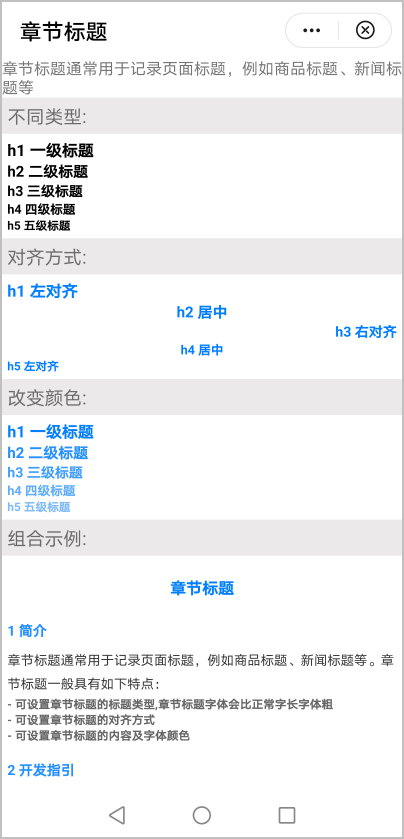
基本布局代码如下:
- <import name="title" src="./Title/title1.ux"></import>
- <template>
- <!-- Only one root node is allowed in template. -->
- <div class="container">
- <text>章节标题通常用于记录页面标题,例如商品标题、新闻标题等</text>
- <div class="item-content">
- <text class="section">基本用法</text>
- <div class="example-body">
- <title type="h1" title="h1 一级标题 设置左对齐" color="black" align="left"> </title>
- <title type="h2" title="h2 二级标题 设置标题类型" color="black" align="left"> </title>
- <title type="h3" title="h3 三级标题 设置居中" color="black" align="center"> </title>
- <title type="h4" title="h4 四级标题 设置右对齐" color="black" align="right"> </title>
- <title type="h5" title="h5 五级标题 改变颜色" color="#7db9f7" align="left"> </title>
- </div>
- </div>
- </div>
- </template>
章节标题组件由div和text组件构成。
- <template>
- <div class="box" style="align-items:{{textAlign}}">
- <text class="{{type}}" style="color: {{color}}">{{title}}</text>
- </div>
- </template>
支持的属性:
属性 |
类型 |
默认值 |
描述 |
|---|---|---|---|
type |
String |
- |
标题类型,可选值:h1、h2、h3、h4、h5,章节标题字体会比正常字长字体粗。 |
title |
String |
- |
章节标题内容。 |
align |
String |
left |
对齐方式,可选值:
|
color |
String |
#333333 |
字体颜色。 |
子组件的props中定义相关属性值,父组件引用时传入属性值,子组件通过 this.xxx 获取值并进行处理。
- props: {
- type: {
- type: String,
- default: ''
- },
- title: {
- type: String,
- default: ''
- },
- align: {
- type: String,
- default: 'left'
- },
- color: {
- type: String,
- default: '#333333'
- },
- },
使用计算属性computed方法,通过props属性动态计算样式,返回给组件使用。
- computed: {
- textAlign() {
- let align = 'center';
- switch (this.align) {
- case 'left':
- align = 'flex-start'
- break;
- case 'center':
- align = 'center'
- break;
- case 'right':
- align = 'flex-end'
- break;
- }
- return align
- }
- },
章节标题title.ux代码:
- <template>
- <div class="box" style="align-items:{{textAlign}}">
- <text class="{{type}}" style="color: {{color}}">{{title}}</text>
- </div>
- </template>
- <style lang="less" >
- .box {
- flex-direction: column;
- justify-content: center;
- }
- .h1 {
- font-size: 30px;
- color: #333;
- font-weight: bold;
- }
- .h2 {
- font-size: 28px;
- color: #333;
- font-weight: bold;
- }
- .h3 {
- font-size: 26px;
- color: #333;
- font-weight: bold;
- /* font-weight: 400; */
- }
- .h4 {
- font-size: 24px;
- color: #333;
- font-weight: bold;
- /* font-weight: 300; */
- }
- .h5 {
- font-size: 22px;
- color: #333;
- font-weight: bold;
- /* font-weight: 200; */
- }
- </style>
- <script>
- export default {
- props: {
- type: {
- type: String,
- default: ''
- },
- title: {
- type: String,
- default: ''
- },
- align: {
- type: String,
- default: 'left'
- },
- color: {
- type: String,
- default: '#333333'
- },
- },
- computed: {
- textAlign() {
- let align = 'center';
- switch (this.align) {
- case 'left':
- align = 'flex-start'
- break;
- case 'center':
- align = 'center'
- break;
- case 'right':
- align = 'flex-end'
- break;
- }
- return align
- }
- },
- }
- </script>
页面hello.ux代码:
- <import name="title" src="./Title/title1.ux"></import>
- <template>
- <!-- Only one root node is allowed in template. -->
- <div class="container">
- <text>章节标题通常用于记录页面标题,例如商品标题、新闻标题等</text>
- <div class="item-content">
- <text class="section">不同类型:</text>
- <div class="example-body">
- <title type="h1" title="h1 一级标题" color="black" align="left"> </title>
- <title type="h2" title="h2 二级标题" color="black" align="left"> </title>
- <title type="h3" title="h3 三级标题" color="black" align="left"> </title>
- <title type="h4" title="h4 四级标题" color="black" align="left"> </title>
- <title type="h5" title="h5 五级标题" color="black" align="left"> </title>
- </div>
- </div>
- <div class="item-content">
- <text class="section">对齐方式:</text>
- <div class="example-body">
- <title type="h1" title="h1 左对齐" color="#027fff" align="left"> </title>
- <title type="h2" title="h2 居中" color="#027fff" align="center"> </title>
- <title type="h3" title="h3 右对齐" color="#027fff" align="right"> </title>
- <title type="h4" title="h4 居中" color="#027fff" align="center"> </title>
- <title type="h5" title="h5 左对齐" color="#027fff" align="left"> </title>
- </div>
- </div>
- <div class="item-content">
- <text class="section">改变颜色:</text>
- <div class="example-body">
- <title type="h1" title="h1 一级标题" color="#027fff" align="left"> </title>
- <title type="h2" title="h2 二级标题" color="#2490ff" align="left"> </title>
- <title type="h3" title="h3 三级标题" color="#439ffc" align="left"> </title>
- <title type="h4" title="h4 四级标题" color="#60adfb" align="left"> </title>
- <title type="h5" title="h5 五级标题" color="#7db9f7" align="left"> </title>
- </div>
- </div>
- <div class="item-content">
- <text class="section">组合示例:</text>
- <div class="example-body">
- <title class="box-head" type="h1" title="章节标题" color="#027fff" align="center"> </title>
- <title class="box" type="h3" title="1 简介" color="#2490ff" align="left"> </title>
- <div>
- <text class="text">章节标题通常用于记录页面标题,例如商品标题、新闻标题等。章节标题一般具有如下特点:</text>
- </div>
- <title type="h5" color="#666" title="- 可设置章节标题的标题类型,章节标题字体会比正常字长字体粗"></title>
- <title type="h5" color="#666" title="- 可设置章节标题的对齐方式"></title>
- <title type="h5" color="#666" title="- 可设置章节标题的内容及字体颜色"></title>
- </div>
- <div class="example-body">
- <title class="box" type="h3" title="2 开发指引" color="#2490ff" align="left"> </title>
- <title class="box" type="h4" title="2.1 自定义子组件" align="left"></title>
- <div>
- <text class="text">1.定义布局样式。 </text>
- </div>
- <div>
- <text class="text">2.规划属性和支持的事件。</text>
- </div>
- <title class="box" type="h4" title="2.2 父子组件通信" align="left"></title>
- <div>
- <text class="text">子组件的props中定义参数。</text>
- </div>
- <title class="box" type="h4" title="2.3 计算style样式" align="left"></title>
- <div>
- <text class="text">使用计算属性computed方法,通过props属性动态计算数据和样式,返回给组件使用。</text>
- </div>
- </div>
- <div class="example-body">
- <title type="h2" title="示例代码" align="left"></title>
- </div>
- </div>
- </div>
- </template>
- <style>
- .container {
- flex-direction: column;
- }
- .section {
- font-size: 35px;
- padding: 10px;
- background-color: rgb(235, 233, 233);
- }
- .item-content {
- width: 100%;
- flex-direction: column;
- align-content: center;
- }
- .example-body {
- padding: 10px;
- flex-direction: column;
- }
- .text {
- font-size: 25px;
- line-height: 22px;
- color: #333;
- line-height: 45px
- }
- .box-head {
- height: 100px;
- }
- .box {
- height: 60px;
- }
- </style>
-
- <script>
- module.exports = {
- data() {
- },
- onInit() {
- this.$page.setTitleBar({text: '章节标题'})
- },
- }
- </script>